Page 317 of 792

3174-5. Using the driving support systems
4
Driving
RX450h_RX450hL _U_OM48F85U■
Automatic cancelation of co nstant speed control mode
Constant speed control mode is automatica lly canceled in the following situations:●
Actual vehicle speed is more than approxim ately 10 mph (16 km/h) below the set vehi-
cle speed. ●
Actual vehicle speed falls below approximately 25 mph (40 km/h).●
VSC is activated. ●
TRAC is activated for a period of time. ●
When the VSC or TRAC system is turned off. ●
Pre-collision braking is activated.
If constant speed control mode is automati cally canceled for any other reason, there may
be a malfunction in the system . Contact your Lexus dealer.■
Warning messages and buzzers for dynamic ra dar cruise control with full-speed range
Warning messages and buzzers are used to indicate a system malfunction or to inform
the driver of the need for ca ution while driving. If a warn ing message is shown on the
multi-information display, read the message and follow the instructions.■
When the sensor may not be correctly detecting the vehicle ahead
In the case of the following and depending on the conditions, operate the brake pedal
when deceleration of the system is insuff icient or operate the accelerator pedal when
acceleration is required.
As the sensor may not be able to correctly detect these types of vehicles, the approach
warning ( → P. 314) may not be activated.●
Vehicles that cut in suddenly ●
Vehicles traveling at low speeds ●
Vehicles that are not moving in the same lane ●
Vehicles with small rear ends (traile rs with no load on board, etc.)
Page 320 of 792
320 4-5. Using the driving support systems
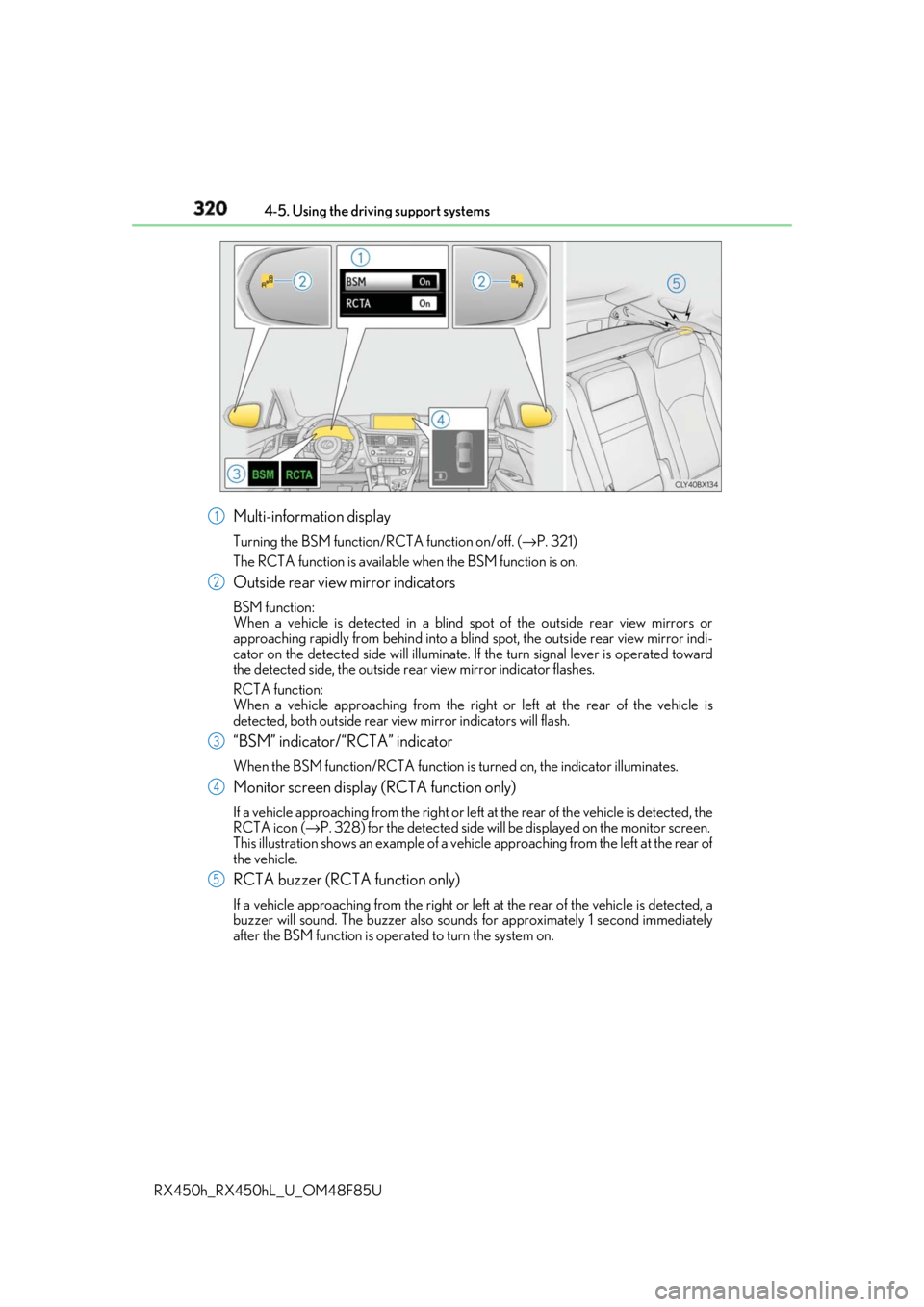
RX450h_RX450hL _U_OM48F85UMulti-information display Turning the BSM function/RCTA function on/off. ( → P. 321)
The RCTA function is available when the BSM function is on.
Outside rear view mirror indicators BSM function:
When a vehicle is detected in a blind spot of the outside rear view mirrors or
approaching rapidly from behind into a blin d spot, the outside rear view mirror indi-
cator on the detected side will illuminate. If the turn signal lever is operated toward
the detected side, the outside rear view mirror indicator flashes.
RCTA function:
When a vehicle approaching from the right or left at the rear of the vehicle is
detected, both outsid e rear view mirror indicators will flash.
“BSM” indicator/“RCTA” indicator When the BSM function/RCTA function is turned on, the indicator illuminates.
Monitor screen display (RCTA function only) If a vehicle approaching from the right or left at the rear of the vehicle is detected, the
RCTA icon ( → P. 328) for the detected side will be displayed on the monitor screen.
This illustration shows an example of a vehi cle approaching from the left at the rear of
the vehicle.
RCTA buzzer (RCTA function only) If a vehicle approaching from the right or left at the rear of the vehicle is detected, a
buzzer will sound. The buzzer also sounds for approximately 1 second immediately
after the BSM function is operated to turn the system on. 1
2
3
4
5
Page 321 of 792

3214-5. Using the driving support systems
4
Driving
RX450h_RX450hL _U_OM48F85UPress “ < ” or “ > ” of the meter control switches, select .
Press “ ∧ ” or “ ∨ ” of the meter control switches, select “BSM”.
Press “ ∧ ” or “ ∨ ” of the meter control switch es, select “BSM” or “RCTA”.■
Outside rear view mirro r indicator visibility
In strong sunlight, the outside rear view mirror indicator may be difficult to see.■
Hearing the RCTA buzzer
The RCTA buzzer may be difficult to hear over loud noises, such as if the audio system
volume is high. ■
When there is a malfunction in the Blind Spot Monitor
If a system malfunction is detected due to any of the following, a warning message will be
displayed: ( → P. 667)●
A sensor is malfunctioning ●
A sensor is dirty or covere d with snow or a sticker●
The outside temperature is extremely high or low ●
Sensor voltage is abnormal ●
A sensor is misaligned ■
Certification for the Blind Spot Monitor
For vehicles sold in the U.S.A.
For vehicles sold in CanadaTurning the BSM function/RCTA function on/off 1
2
3
Page 328 of 792
328 4-5. Using the driving support systems
RX450h_RX450hL _U_OM48F85U■
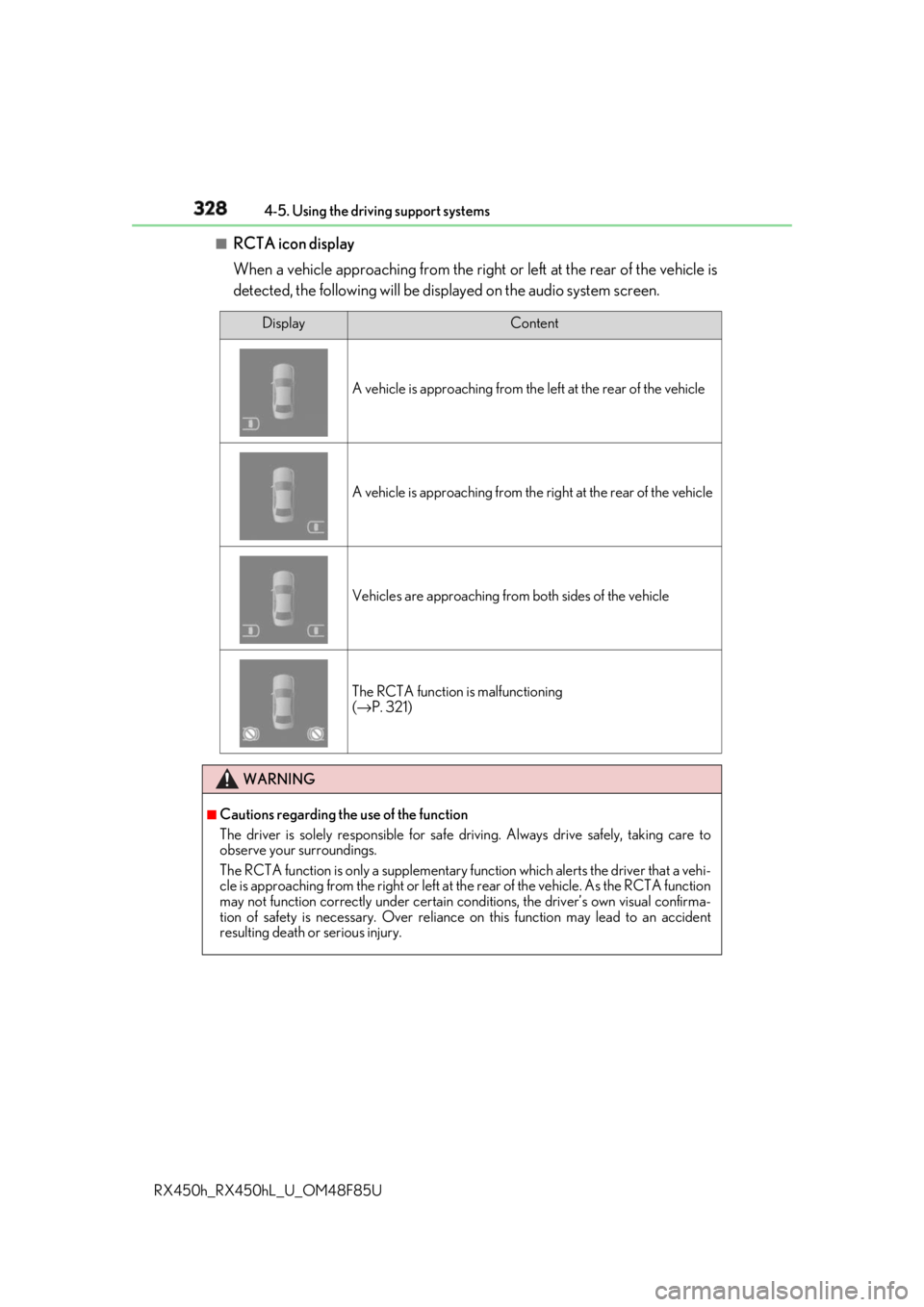
RCTA icon display
When a vehicle approaching from the right or left at the rear of the vehicle is
detected, the following will be displayed on the audio system screen. Display Content
A vehicle is approaching from the left at the rear of the vehicle
A vehicle is approaching from the right at the rear of the vehicle
Vehicles are approaching from both sides of the vehicle
The RCTA function is malfunctioning
( → P. 321)
WARNING ■
Cautions regarding the use of the function
The driver is solely responsible for safe driving. Always drive safely, taking care to
observe your surroundings.
The RCTA function is only a supplementary function which alerts the driver that a vehi-
cle is approaching from the right or left at the rear of the vehicle. As the RCTA function
may not function correctly under certain cond itions, the driver’s own visual confirma-
tion of safety is necessary. Over reliance on this function may lead to an accident
resulting death or serious injury.
Page 332 of 792
332 4-5. Using the driving support systems
RX450h_RX450hL _U_OM48F85UPress “ < ” or “ > ” of the meter control
switches, select .
Press “ ∧ ” or “ ∨ ” of the meter control
switches, select “Parking Assist”.
When on, the indicator light comes on
to inform the driver that the system is
operational.Intuitive parking assist ∗
∗ : If equippedThe distance from your vehicle to a ne arby wall or othe r stationary object
when parallel parking or maneuvering into a garage is measured by the sen-
sors and communicated via the displays and a buzzer. Always check the sur-
rounding area when using this system.
Types of sensors
Except F SPORT models
F SPORT models
Front corner sensors
Front center sensors
Rear corner sensors
Rear center sensors
Turning the intuitive parking assist on/off 1
2
3
4
1
2
Page 333 of 792
3334-5. Using the driving support systems
4
Driving
RX450h_RX450hL _U_OM48F85UWhen the sensors detect an obstacle, the following displays inform the driver of
the position and distance to the obstacle. ■
Multi-information display
Front corner sensor operation
Front center sensor operation
Rear corner sensor operation
Rear center sensor operation■
Lexus Display Audio or navigation system (8-inch display) screen
Intuitive parking assist When the vehicle is moving forward.
A graphic is automatically displayed
when an obstacle is detected. The
screen can be set so that the graphic
is not displayed. ( → P. 338)
: Select to mute the buzzer
sounds.
Intuitive parking assist
Rear Cross Traffic Alert (if
equipped)
When the vehicle is moving back-
ward. A simplified image is displayed
on the upper part of the screen
when an obstacle is detected.Display 1
2
3
4
1
2
3
Page 334 of 792
334 4-5. Using the driving support systems
RX450h_RX450hL _U_OM48F85U■
Navigation system (12.3 -inch display) screen
Intuitive parking assist
Rear Cross Traffic Alert (if
equipped) A graphic is automatically displayed
on the side display when an obstacle
is detected. The screen can be set so
that the graphic is not displayed.
( → P. 338)
: Select to mute the buzzer
sounds. This function is available
when the vehicle is moving forward. 1
2
Page 335 of 792
3354-5. Using the driving support systems
4
Driving
RX450h_RX450hL _U_OM48F85U■
Distance display
Sensors that detect an obstacle will illuminate continuously or blink.
Sensor detection display, obstacle distance Display
* 1
Insert display Approximate distance to object
Lexus parking
assist moni-
tor
* 4
Panoramic
view monitor Front and rear
center sensor Front and rear
corner sensor
(continuous) (blinking
slowly) (blinking
slowly) Front center sen-
sor:
3.3 ft. (100 cm)
to
2.0 ft. (60 cm)
Rear center sen-
sor:
4.9 ft. (150 cm)
to
2.0 ft. (60 cm) ⎯
(continuous) (blinking) (blinking) 2.0 ft. (60 cm) to
1.5 ft. (45 cm)
RX450h Front corner
sensor:
2.0 ft. (60 cm) to
1.5 ft. (45 cm)
Rear corner sen-
sor:
2.0 ft. (60 cm) to
1.5 ft. (45 cm)
RX450hL Front corner
sensor:
2.0 ft. (60 cm) to
1.5 ft. (45 cm)
2.1 ft. (66 cm) to
1.5 ft. (45 cm)
(continuous) (blinking
rapidly) (blinking
rapidly) 1.5 ft. (45 cm) to
1.2 ft. (35 cm) 1.5 ft. (45 cm) to
1.2 ft. (35 cm)


