Page 417 of 792

4175-2. Setup
5
Lexus Display Audio system
RX450h_RX450hL _U_OM48F85UGo to “Display”: “MENU” button → “Display”
Turn off screen.
Adjust screen quality.
Adjust screen quality of the rear
view monitor camera.
Change to day mode.
This setting turns the screen off. To tu rn it on, press any button such as the
“AUDIO” button or “MENU” button. If a screen off image has been se t, the set image will be displayed.
When the headlights are turned on, the screen dims.
However, the screen can be switched to day mode by selecting “Day Mode”.The screen will stay in day mode when the headlights are turned on until “Day Mode”
is selected again.
Select “General” or “Camera” on the “D isplay” screen or select “Display” on
audio menu screen. ( → P. 423)
Adjust the display as desired by turning the controller clockwise (+) or coun-
terclockwise (-). To select “Contrast”, “Brightness”, “Color” or “Tone”, move the controller to the left.
(“Color” and “Tone” are available when “Display” on the audio settings screen for
each audio source is selected.) ■
Changing the sample image (when “General” is selected)
Move the controller to the right and select the desired sample image.Display settings Settings are available for adjusting the contrast and brightness of the screen.
The display can also be turned off.
Screen for display settings 1
2
3
4
Screen off
Day mode
Adjusting the screen quality 1
2
Page 499 of 792

499
6Interior features
RX450h_RX450hL _U_OM48F85U6-1. Basic operation of the
Remote Touch screen
Remote Touch ............................ 500
12.3-inch display........................ 504
6-2. Using the air conditioning
system and defogger
Lexus Climate
Concierge ................................. 506
Front automatic air
conditioning system ...............507
Rear automatic air
conditioning system ...............522
Heated steering wheel/
seat heaters/
seat ventilators .........................525
6-3. Using the interior lights
Interior lights list......................... 528
• Interior lights ..........................529
• Personal lights ...................... 530
6-4. Using the storage features
List of storage features.............532
• Glove box ...............................534
• Console box ...........................534
• Cup holders........................... 535
• Door pockets .........................537 • Bottle holders ........................ 537
• Coin box ..................................538
• Auxiliary boxes .....................539
Luggage compartment
features .......................................540
6-5. Using the other interior
features
Other interior features ............ 547
• Sun visors ................................ 547
• Vanity mirrors ....................... 547
• Clock ........................................548
• Wireless charger .................548
• Power outlets.........................555
• Front passenger
footwell hooks ....................... 557
• Rear door sunshades ......... 557
• Armrest ................................... 558
• Assist grips..............................559
• Coat hooks .............................559
Garage door opener ...............560
Compass ....................................... 567
LEXUS Enform Safety
Connect ........................................571
LEXUS Enform Remote ......... 576
LEXUS Enform Service
Connect ...................................... 577
Page 518 of 792

518 6-2. Using the air conditio ning system and defogger
RX450h_RX450hL _U_OM48F85U■
Registering air conditioning settings to electronic keys●
Unlocking the vehicle using an electronic key and turning the power switch to ON
mode will recall that ke y’s registered air co nditioning settings.●
When the power switch is turned off, the cu rrent air conditioning settings will automati-
cally be registered to the electronic key that was used to unlock the vehicle. ●
The system may not operate correctly if more th an one electronic key is in the vicinity or
if the smart access system with push-button start is used to unlock a passenger door.●
The doors that can recall the air conditioni ng setting when unlocked using the smart
access system with push-b utton start can be changed.
* For details, contact your Lexus
dealer.
* : The doors that can recall the driving positi on memory are changed at the same time.■
Using automatic mode
Fan speed is adjusted automatically according to the temperature setting and the ambi-
ent conditions.
Therefore, the fan may stop for a while until wa rm or cool air is ready to flow immediately
after the “AUTO” button is pressed or “AUTO” is selected. ■
How the system judges if a passenger is in the vehicle when in S-FLOW mode
In S-FLOW mode, the system judges if a passenger is in the vehicle as follows:
• Front passenger seat: A passeng er is judged to be in the front passenger seat when the
system detects an object on the front passe nger seat, fastening of the front passenger
seat belt, changing of the set temperature for the front passenger seat or the opening
and closing of the front passenger door. (However, when only opening and closing of
the front passenger door is detected, the sy stem will judge that a passenger is not in
the front passenger seat after the vehicl e speed reaches approximately 12 mph (20
km/h) or more.)
• Rear seats (automatic S-FLOW mode only): A passenger is judged to be in a rear seat
when the system detects the opening and closin g of a rear door or the operation of the
rear air conditioning system (RX450hL).
If a passenger is judged to be in the vehicl e, the system will retain the judgement for a
certain amount of time after th e power switch is turned off.■
Operation of automatic S-FLOW mode
When the system is operating in automati c S-FLOW mode, if the system detects the
opening and closing of a rear door or the op eration of the rear air conditioning system
(RX450hL), S-FLOW mode will be disabled. To enable S-FLOW mode, select
on the option control screen. (In this case , the system will operate in manual S-FLOW
mode.) ■
Changing from manual S-FLOW mode to automatic S-FLOW mode
Select on the option control screen to disable S-FLOW mode.
Turn the power switch off.
Wait for 60 minutes or more and change the power switch to ON mode. ■
Using the voice command system
Air conditioning system can be operated using voic e commands. For details, refer to the
“NAVIGATION SYSTEM OWNER’S MANUAL”. 1
2
3
Page 520 of 792
520 6-2. Using the air conditio ning system and defogger
RX450h_RX450hL _U_OM48F85U■
Ventilation and air conditioning odors ●
To let fresh air in, set the air conditioning system to the outside air mode. ●
During use, various odors from inside and outside the vehicle may enter into and accu-
mulate in the air conditioning system. This may then cause odor to be emitted from the
vents. ●
To reduce potential odors from occurring:
• It is recommended that the air conditioning system be set to outside air mode prior
to turning the vehicle off.
• The start timing of the blower may be dela yed for a short period of time immediately
after the air conditioning system is started in automatic mode.■
Air conditioning filter
→ P. 625 ■
Customization
Some functions can be customized ( → P. 736)
WARNING ■
To prevent the windshield from fogging up ●
Do not use during cool air operation in extremely humid weather. The differ-
ence between the temperature of the outside air and that of the windshield can cause
the outer surface of the windshield to fog up, blocking your vision.
■
To prevent burns ●
Do not touch the rear view mirror surfaces when the outside rear view mirror defog-
gers are on. ●
Do not touch the glass at lower part of the windshield or to the side of the front pillars
when the windshield wiper de-icer is on. (if equipped) ●
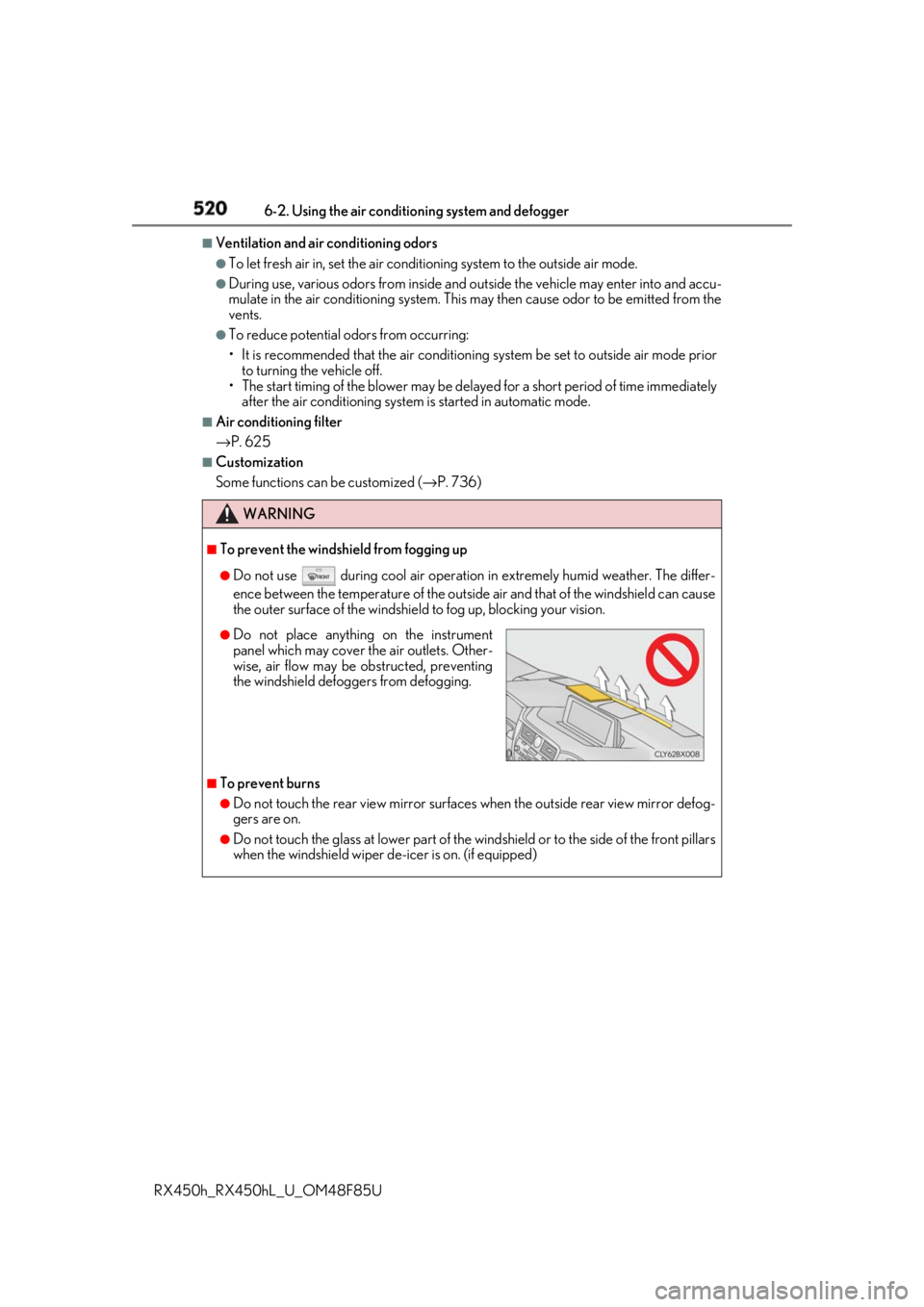
Do not place anything on the instrument
panel which may cover th e air outlets. Other-
wise, air flow may be obstructed, preventing
the windshield defoggers from defogging.
Page 531 of 792
5316-3. Using the interior lights
6
Interior features
RX450h_RX450hL _U_OM48F85U●
Illuminated entry system: The lights automatically turn on/off according to power switch
mode, the presence of the electronic key, whether the doors are locked/unlocked, and
whether the doors are opened/closed. ●
If the interior lights remain on when the power switch is turned off, the lights will go off
automatically after 20 minutes. ●
In the following cases, the interior lights and front personal lights may not respond as
normal.
• When water, dirt, etc., have adhered to the lens surface
• When operated with a wet hand
• When wearing gloves, etc. ●
Some functions can be customized ( → P. 736)
NOTICE ●
Never remove the lens for the front interior light and fron t personal lights. Otherwise,
the lights will be damaged. If the lens need to remove, contact your Lexus dealer.●
To prevent 12-volt battery discharge, do not leave the lights on longer than necessary
when the hybrid system is off.
Page 534 of 792
534 6-4. Using the storage features
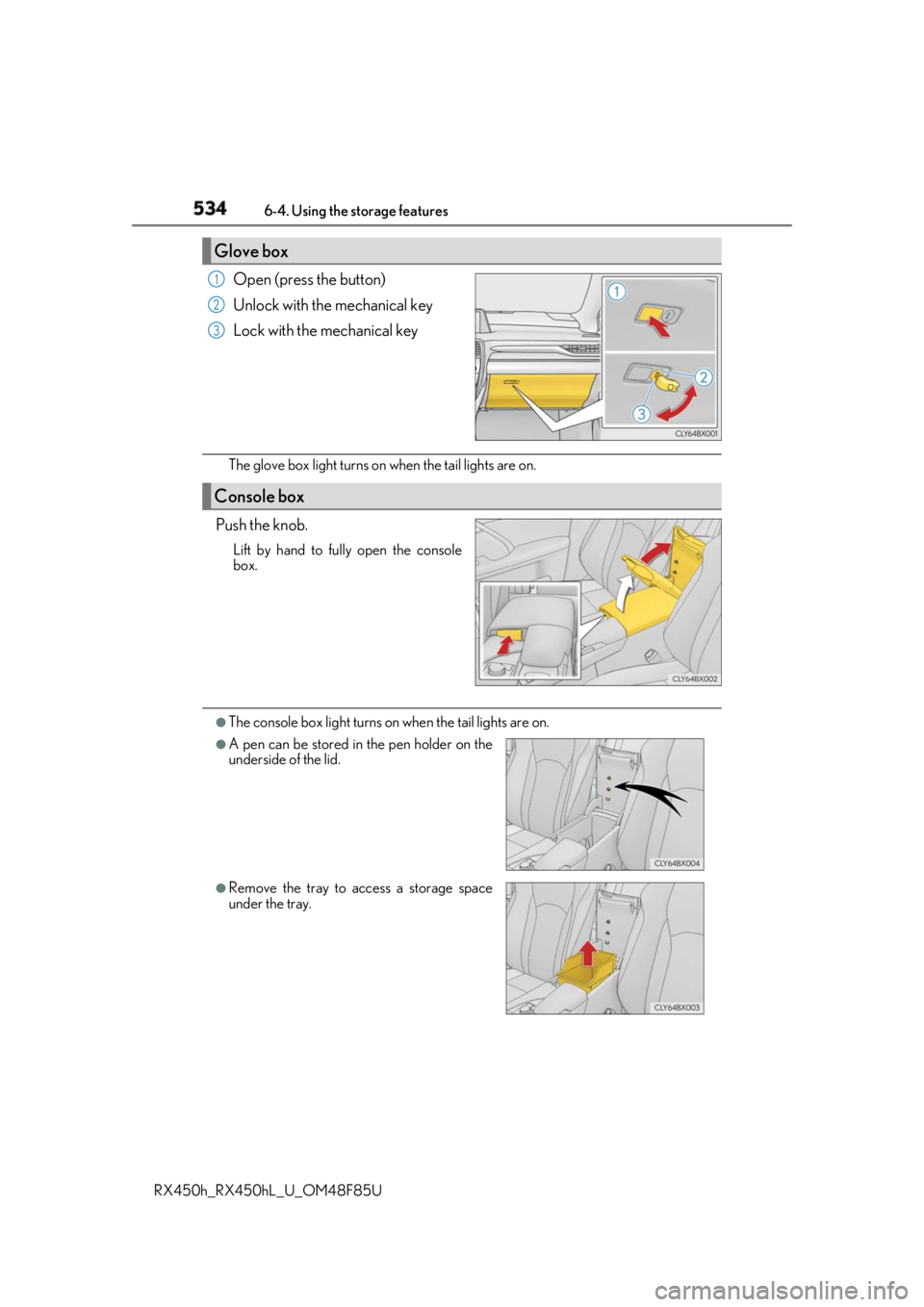
RX450h_RX450hL _U_OM48F85UOpen (press the button)
Unlock with the mechanical key
Lock with the mechanical key
The glove box light turns on when the tail lights are on.
Push the knob. Lift by hand to fully open the console
box.
●
The console box light turns on when the tail lights are on.Glove box 1
2
3
Console box
●
A pen can be stored in the pen holder on the
underside of the lid.
●
Remove the tray to access a storage space
under the tray.
Page 539 of 792
5396-4. Using the storage features
6
Interior features
RX450h_RX450hL _U_OM48F85UAuxiliary boxes
Type A
Type B
Press in the lid. Lift the lid.
Type C (if equipped)
Pull up the lever to release the lock, and
lift the lid. WARNING
Type A: Do not store items he avier than 0.44 lb. (200 g).
Doing so may cause the auxiliary box to open and the items inside may fall out, result-
ing in an accident.
Page 548 of 792

548 6-5. Using the other interior features
RX450h_RX450hL _U_OM48F85U
Vehicles with a Lexus Display Audio system
The clock can be adjusted by pressing
the buttons.
Pressing and holding will move the
clock hands backward.
Pressing and holding will move the
clock hands forward.
Vehicles with a navigation system
The GPS clock's time is automatically
adjusted by utilizing GPS time informa-
tion. For details, refer to “NAVIGATION
SYSTEM OWNER’S MANUAL”.
A portable device, such as a smartphone or mobile battery, can be charged by
just placing it on the charging area, prov ided the device is compatible with the Qi
wireless charging standard created by the Wireless Power Consortium.
The wireless charger cannot be used with a portable device that is larger than
the charging area. Additionally, dependin g on the portable device, the wireless
charger may not operate properly. Refer to the operation manual of the portable
device. ■
The “Qi” symbol
The “Qi” symbol is a trademark of the Wireless Power Consortium.Clock 1
2
Wireless charger (if equipped)