2018 LEXUS NX300h brake
[x] Cancel search: brakePage 223 of 460
2234-5. Using the driving support systems
LEXUS NX300h Owners Manu-
al_USA_OM78212U 4
Driving
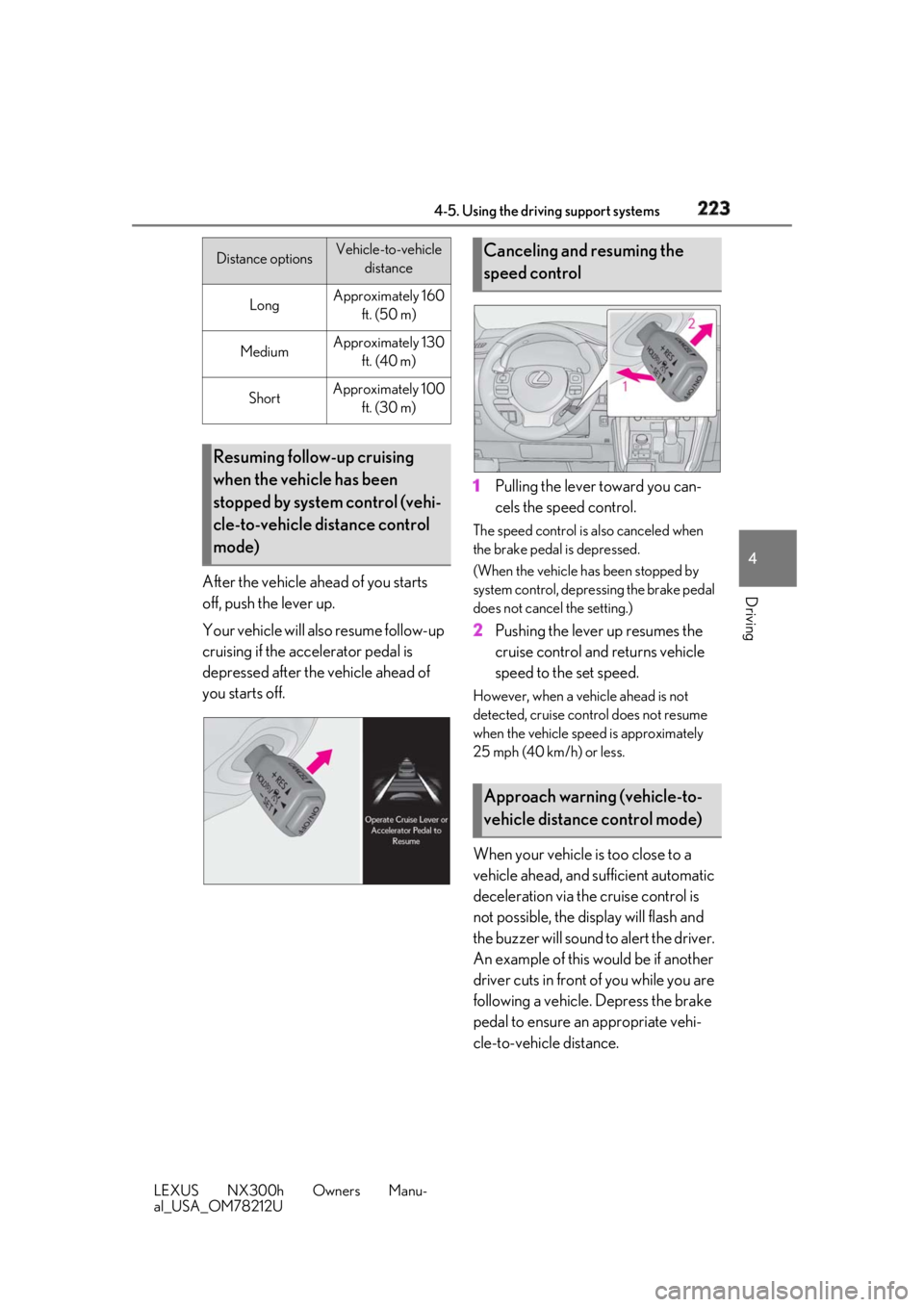
After the vehicle ahead of you starts
off, push the lever up.
Your vehicle will also resume follow-up
cruising if the accelerator pedal is
depressed after the vehicle ahead of
you starts off. 1 Pulling the lever toward you can-
cels the speed control. The speed control is also canceled when
the brake pedal is depressed.
(When the vehicle has been stopped by
system control, depressing the brake pedal
does not cancel the setting.)
2 Pushing the lever up resumes the
cruise control and returns vehicle
speed to the set speed. However, when a vehicle ahead is not
detected, cruise control does not resume
when the vehicle speed is approximately
25 mph (40 km/h) or less.
When your vehicle is too close to a
vehicle ahead, and sufficient automatic
deceleration via the cruise control is
not possible, the display will flash and
the buzzer will sound to alert the driver.
An example of this would be if another
driver cuts in front of you while you are
following a vehicle. Depress the brake
pedal to ensure an appropriate vehi-
cle-to-vehicle distance.Distance options Vehicle-to-vehicle
distance
Long Approximately 160
ft. (50 m)
Medium Approximately 130
ft. (40 m)
Short Approximately 100
ft. (30 m)
Resuming follow-up cruising
when the vehicle has been
stopped by system control (vehi-
cle-to-vehicle distance control
mode) Canceling and resuming the
speed control
Approach warning (vehicle-to-
vehicle distance control mode)
Page 225 of 460

2254-5. Using the driving support systems
LEXUS NX300h Owners Manu-
al_USA_OM78212U 4
Driving ●
Vehicle speed is at or above approxi-
mately 30 mph (50 km/h).
However, when a preceding vehicle is
detected, the dynamic radar cruise con-
trol with full-speed range can be set even
if the vehicle speed is below approxi-
mately 30 mph (50 km/h).■
Accelerating after setting the vehicle
speed
The vehicle can accelerate by operating the
accelerator pedal. After accelerating, the
set speed resumes. However, during vehi-
cle-to-vehicle distance control mode, the
vehicle speed may decrease below the set
speed in order to maintain the distance to
the preceding vehicle. ■
When the vehicle stops while follow-up
cruising●
Pushing the lever up while the vehicle
ahead stops will resume follow-up cruis-
ing if the vehicle ahead starts off within
approximately 3 seconds after pushing
the lever up.●
If the vehicle ahead starts off within 3 sec-
onds after your vehicle stops, follow-up
cruising will be resumed.■
Automatic cancelation of vehicle-to-
vehicle distance control mode
Vehicle-to-vehicle dist ance control mode is
automatically canceled in the following situ-
ations. ●
Actual vehicle speed falls below approxi-
mately 25 mph (40 km/h) when there
are no vehicles ahead.●
The preceding vehicle leaves the lane
when your vehicle is following at a vehicle
speed at or below approximately 25 mph
(40 km/h). Otherwise, the sensor can
not properly detect the vehicle.
(“CRUISE NOT AVAILABLE No pre-
ceding vehicle” is displayed on the multi-
information display.)
●
VSC is activated.
●
TRAC is activated for a period of time.
●
When the VSC or TRAC system is
turned off.
●
The sensor cannot detect correctly
because it is covered in some way. ●
Pre-collision braking is activated. ●
The parking brake is operated. ●
The vehicle is stopped by system control
on a steep incline. ●
The following are detected when the
vehicle has been stopped by system con-
trol:
• The driver is not wearing a seat belt.
• The driver’s door is opened.
• The vehicle has been stopped for about 3
minutes
If vehicle-to-vehicle distance control mode
is automatically canceled for any other rea-
son, there may be a malfunction in the sys-
tem. Contact your Lexus dealer. ■
Automatic cancelation of constant
speed control mode
Constant speed control mode is automati-
cally canceled in the following situations: ●
Actual vehicle speed is more than
approximately 10 mph (16 km/h) below
the set vehicle speed. ●
Actual vehicle speed falls below approxi-
mately 25 mph (40 km/h). ●
VSC is activated. ●
TRAC is activated for a period of time. ●
When the VSC or TRAC system is
turned off. ●
Pre-collision braking is activated.
If constant speed control mode is automati-
cally canceled for any other reason, there
may be a malfunction in the system. Con-
tact your Lexus dealer.
■
Warning messages and buzzers for
dynamic radar cruise control with full-
speed range
Warning messages and buzzers are used to
indicate a system malfunction or to inform
the driver of the need for caution while driv-
ing. If a warning messa ge is shown on the
multi-information displa y, read the message
and follow the instructions.
■
When the sensor may not be correctly
detecting the vehicle ahead
In the case of the fo llowing and depending
on the conditions, operate the brake pedal
when deceleration of the system is insuffi-
Page 226 of 460

226 4-5. Using the driving support systems
LEXUS NX300h Owners Manu-
al_USA_OM78212U cient or operate the accelerator pedal
when acceleration is required.
As the sensor may not be able to correctly
detect these types of vehicles, the approach
warning ( → P.223) may not be activated.●
Vehicles that cut in suddenly●
Vehicles traveling at low speeds●
Vehicles that are not moving in the same
lane●
Vehicles with small rear ends (trailers
with no load on board, etc.)
●
Motorcycles travelin g in the same lane●
When water or snow thrown up by the
surrounding vehicles hinders the detect-
ing of the sensor●
When your vehicle is pointing upwards
(caused by a heavy load in the luggage
compartment, etc.)
●
Preceding vehicle has an extremely high
ground clearance ■
Conditions under which the vehicle-to-
vehicle distance control mode may not
function correctly
In the case of the following conditions,
operate the brake pedal (or accelerator
pedal, depending on the situation) as nec-
essary.
As the sensor may not be able to correctly
detect vehicles ahead, the system may not
operate properly. ●
When the road curves or when the lanes
are narrow
●
When steering wheel operation or your
position in the lane is unstable
●
When the vehicle ahead of you deceler-
ates suddenly
Page 227 of 460

2274-5. Using the driving support systems
LEXUS NX300h Owners Manu-
al_USA_OM78212U 4
Driving *
:If equipped
■
Types of sensors
Front corner sensors
Front center sensors
Rear corner sensors
Rear center sensors ■
Turning intuitive parking assist on/
off
Intuitive parking assist can be enabled/
disabled on the multi-information dis-
play as following:
1 Press “ ” or “ ” of meter con-
trol switches and select .
2 Press “ ” or “ ” of meter con-
trol switches and select .
3 Press to select the desired set-
ting (on/off).Intuitive parking assist *
The distance from your vehicle to
nearby obstacles when parallel
parking or maneuvering into a
garage is measured by the sensors
and communicated via the displays
and a buzzer. Always check the sur-
rounding area when using this sys-
tem. WARNING■
When using the intuitive parking
assist
Observe the following precautions.
Failing to do so may result in the vehicle
being unable to be driven safely and pos-
sibly cause an accident. ●
Do not use the sensor at speeds in
excess of 6 mph (10 km/h).●
The sensors’ detection areas and reac-
tion times are limited. When moving
forward or reversing, check the areas
surrounding the vehicle (especially the
sides of the vehicle) for safety, and
drive slowly, using the brake to control
the vehicle’s speed.
●
Do not install accessories within the
sensors’ detection areas.
NOTICE
■
When using intuitive parking assist
In the following situations, the system
may not function correctly due to a sen-
sor malfunction, etc. Have the vehicle
checked by your Lexus dealer.
●
The intuitive parking assist operation
display flashes, and a buzzer sounds
when no obstacles are detected.
●
If the area around a sensor collides
with something, or is subjected to
strong impact. ●
If the bumper collides with something. ●
If the display shows continuously with-
out beeping, except when the buzzer
mute switch has been turned on. ●
If a display error oc curs, first check the
sensor.
If the error occurs even if there is no
ice, snow or mud on the sensor, it is
likely that the sensor is malfunctioning.
System components
A
B
C
D
Page 229 of 460

2294-5. Using the driving support systems
LEXUS NX300h Owners Manu-
al_USA_OM78212U 4
Driving ■
Muting the buzzer sound●
To mute the buzzer sound
The buzzer can be temporarily muted by
pressing of the meter control
switches while an obstacle detection dis-
play is shown on the multi-information
display.●
To cancel the mute
Mute will be automatically cancelled in
the following situations.
• When the shift position is changed
• When the vehicle speed has reached or
exceeded approximately 6 mph (10 km/
h) with the shift lever in D
• When the intuitive par king assist is turned
off once and turned on again
• When the power switch is turned off once
and turned to ON mode again
• When a sensor is malfunctioning ■
Certification
For vehicles sold in the U.S.A.
This device complies with Part 15 of the
FCC Rules. Operation is subject to the fol-
lowing two conditions; (1) this device may
not cause harmful interference, and (2) this
device must accept any interference
received, including interference that may
cause undesired operation.
For vehicles sold in Canada
This ISM device complies with Canadian
ICES-001.
Cet appareil ISM est conforme a la norme
NMB-001 du Canada. ■
Intuitive parking assist display
When an obstacle is detected while the
Lexus parking assist monitor is in use, the
warning indicator will appear in the upper
corner of the screen even if the display set-
ting has been set to off.
■
If “Clean Parking Assist Sensor” is dis-
played on the multi-information display
A sensor may be dirty or covered with snow
or ice. In such cases, if it is removed from
the sensor, the system should return to nor-
mal.
Also, due to the sensor being frozen at low
temperatures, a malfunction display may
appear or an obstacle may not be detected. If the sensor thaws out, the system should
return to normal. ■
If “Parking Assist Malfunction” is dis-
played on the multi-information display
Depending on the malf unction of the sen-
sor, the device may not be working nor-
mally. Have the vehicle inspected by your
Lexus dealer. ■
Sensor detection information ●
The sensor’s detectio n areas are limited
to the areas around the vehicle’s bumper. ●
Certain vehicle conditions and the sur-
rounding environment may affect the
ability of a sensor to correctly detect an
obstacle. Particular instances where this
may occur are listed below.
• There is dirt, snow or ice on the sensor.
(Wiping the sensors will resolve this
problem.)
• The sensor is frozen. (Thawing the area
will resolve this problem.)
In especially cold weather, if a sensor is
frozen the screen may show an abnormal
display, or obstacles may not be
detected.
• The sensor is covered in any way.
• The vehicle is leaning considerably to one
side.
• On an extremely bumpy road, on an
incline, on gravel, or on grass.
• The vicinity of the vehicle is noisy due to
vehicle horns, motorcycle engines, air
brakes of large vehicles, or other loud
noises producing ultrasonic waves.
• There is another vehicle equipped with
parking assist sensors in the vicinity.
• The sensor is coated with a sheet of spray
or heavy rain.
• The vehicle is equipped with a fender
pole or wireless antenna.
• Towing eyelets are installed.
• The bumper or sensor receives a strong
impact.
• A backlit license plate, license plate
holder, etc., are installed.
• The vehicle is approaching a tall or
curved curb.
• In harsh sunlight or intense cold weather.
• The area directly under the bumpers is
not detected.
• If obstacles draw too close to the sensor.
• A non-genuine Lexus suspension (low-
Page 232 of 460

232 4-5. Using the driving support systems
LEXUS NX300h Owners Manu-
al_USA_OM78212U ■
Buzzer operation and distance to
an obstacle
A buzzer sounds when the sensors are
operating.
The buzzer sounds faster as the
vehicle approaches an obstacle.
When the vehicle comes within the
following distance of the obstacle,
the buzzer sounds continuously. • Front corner sensors: Approximately 1.0
ft. (30 cm)
• Front center sensors: Approximately 1.0
ft. (30 cm)
• Rear corner sensors: Approximately 1.0
ft. (30 cm)
• Rear center sensors: Approximately 1.2
ft. (35 cm)
When 2 or more obstacles are
detected simultaneously, the buzzer
system responds to the nearest
obstacle. If one or both come within
the above distances, the beep will
repeat a long tone, followed by fast
beeps. ■
Customization
Settings (e.g. buzzer sounds volume) can
be changed. ( → P.425) *
: If equipped
The system operates in the following
situations when an obstacle is detected
in the traveling direction of the vehicle. ■
The vehicle is driven at low speeds
and the brake pedal is not
depressed, or is depressed too lateParking Support Brake func-
tion (for static objects) *
When a collision may occur with an
obstacle while parking or traveling
at low speeds, when the vehicle
suddenly moves forward due to
mistaken accelera tor pedal opera-
tion, or when the vehicle moves due
to the shift lever being in the wrong
position, the sensors detect obsta-
cles to the front or rear in the travel-
ing direction of the vehicle, and the
system operates to lessen impact
with obstacles such as walls, and
reduce resulting damage.
Examples of system operation
Page 233 of 460
2334-5. Using the driving support systems
LEXUS NX300h Owners Manu-
al_USA_OM78212U 4
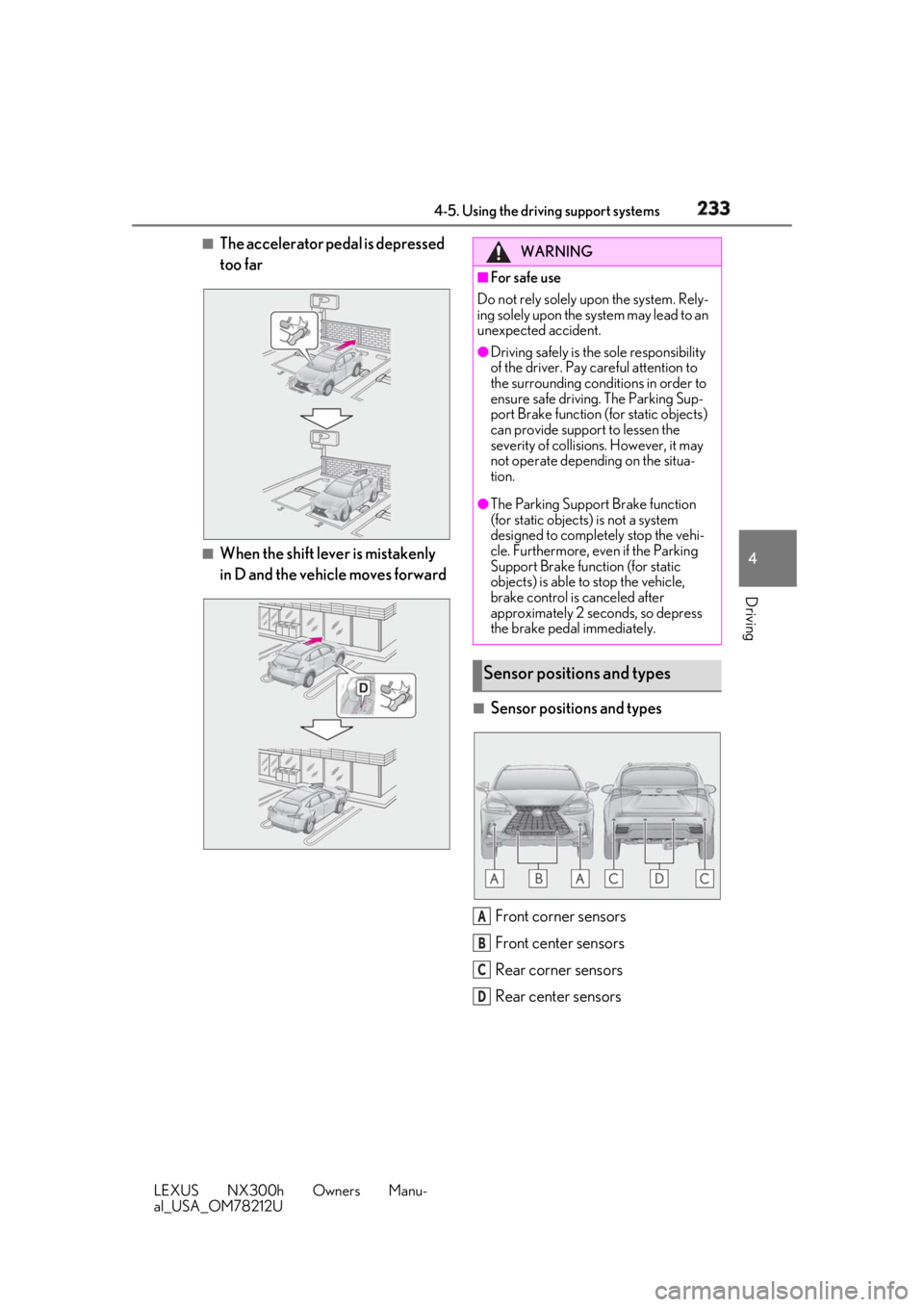
Driving ■
The accelerator pedal is depressed
too far
■
When the shift lever is mistakenly
in D and the vehicle moves forward
■
Sensor positions and types
Front corner sensors
Front center sensors
Rear corner sensors
Rear center sensors WARNING■
For safe use
Do not rely solely upon the system. Rely-
ing solely upon the sy stem may lead to an
unexpected accident. ●
Driving safely is th e sole responsibility
of the driver. Pay careful attention to
the surrounding conditions in order to
ensure safe driving. The Parking Sup-
port Brake function (for static objects)
can provide support to lessen the
severity of collisions. However, it may
not operate depending on the situa-
tion. ●
The Parking Support Brake function
(for static objects) is not a system
designed to completely stop the vehi-
cle. Furthermore, even if the Parking
Support Brake function (for static
objects) is able to stop the vehicle,
brake control is canceled after
approximately 2 seconds, so depress
the brake pedal immediately.
Sensor positions and types
A
B
C
D
Page 234 of 460

234 4-5. Using the driving support systems
LEXUS NX300h Owners Manu-
al_USA_OM78212U This system can be enabled/disabled
on the multi-information display.
1 Press “ ” or “ ” of the meter
control switches and select .
2 Press “ ” or “ ” of the meter
control switches and select .
3 Press on the meter control
switches to enable/disable the sys- tem.
The PKSB OFF indicator comes on
when the Parking Support Brake
function is OFF (not operating).
When the Parking Support Brake func-
tion is switched OFF, system operation
does not resume until the function is
switched back ON through the set-
tings screen on the multi-information
display. (System operation does not
resume by operating the power
switch.)
■
When removing and installing the 12-
volt battery
The system needs to be initialized.
The system can be init ialized by driving the
vehicle straight ahead for 5 seconds or
more at a speed of approximately 22 mph
(35 km/h) or higher.
■
Hybrid system output restraint control
When there is an obstacle, where a potent ial collision may occur, is detected, the
increase of the vehicle speed is restrained due to hybrid system output being con-
trolled. NOTICE■
Preventing sensor malfunctions●
If the area around a sensor is subjected
to an impact, equi pment may not oper-
ate properly due to a sensor malfunc-
tion. Have the vehicle inspected by
your Lexus dealer.●
When using a high-pressure washer to
wash the vehicle, do not spray water
directly on the sensors. The sensors
may not function properly if subjected
to an impact from strong water pres-
sure.●
When using steam to wash the vehicle,
do not direct steam too close to the
sensors. The sensors may not function
properly if subjected to steam.
Changing settings of the Park-
ing Support Brake function (for
static objects)
Operation