Page 326 of 628

326
LX570_OM_OM60Q78U_(U) 4-5. Using the driving support systems●
Screen description
Under vehicle terrain view selection
switch Switches between front view and under
vehicle terrain view display each time
the switch is selected.
Automatic display mode selection
switch → P. 321
Tilt meter/slip display Displays the vehicle’s estimated degree
of incline or indicates a tire slippage.
( → P. 327)
Vehicle width lines (blue) Indicate the width of the vehicle includ-
ing the outside rear view mirror.
1.5 ft. (0.5 m) distance guide line
(red)
3 ft. (1 m) distance guide line (blue) 6 ft. (2 m) distance guide line
(blue) Items to indicate the estimated
distance from the front end of the vehi-
cle.
Front tire course line (yellow) Indicates the estimated course of the
front tires according to steering wheel
position.
Forward movement guide line
(blue) Indicates the estimated tire course of
the tightest possible turn.
Front tire contact line (blue)
Rear tire contact line (blue) Items and indicate estimated tire
positions on the image.
Rear tire course line (yellow) Indicates the estimated course of the
rear tires.1
2
3
4
5
6 7 5 7
8
9
10
11 10 11
12
Page 330 of 628

330
LX570_OM_OM60Q78U_(U) 4-5. Using the driving support systems■
Under vehicle terrain view & dual side view ●
The screen can be displayed when the shift lever is in D or N.●
While the under vehicle terrain view is di splayed, if the vehicle speed reaches or
exceeds approximately 3 mph (5 km/h), the screen automatically returns to the front
view display. ●
In the following situations, the under vehi cle terrain view selection switch cannot be
operated.
• The vehicle is not completely stopped
• After the engine starts, a fixed distance or more has not been driven
• After the four-wheel drive control switch is shifted to L4, a fixed distance or more
has not been driven ●
In the following situations, the system may no t operate normally, or it may not be possi-
ble to switch to the under vehicle terrain view.
• The road is covered with snow
• It is nighttime and the road has no illumination
• Dirt or foreign matter is adhering to the camera lens
• There is water in front of the vehicle (a river, puddle , sea water, etc.)
WARNING ■
Guide lines
The tire position indicator lines and vehicl e position indicator lines may differ from
actual vehicle positions depending on the number of passengers, cargo weight, road
grade, road surface conditions, brightness of the surrounding environment, etc. Always
drive the vehicle while confirming the safety of your surroundings. ■
Under vehicle terrain view display
The image displayed is one that was previous ly taken at a point approximately 10 ft.
(3 m) behind the current vehicle position. In cases such as when objects move after the
image is taken, the image displayed on the screen may differ from the actual state.
Page 333 of 628

LX570_OM_OM60Q78U_(U) 3334-5. Using the driving support systems
4
Driving ■
Panoramic view & wide front view
The image looking down at the vehicl e from above and the image from the
front camera are displayed si multaneously and assist the driver to check con-
ditions in front, and to the right and le ft, of the vehicle at intersections or T-
junctions with poor visibility. ●
Screen description
The following 2 types of display mode can be selected according to condi-
tions.
Panoramic view Displays an image looking down at the vehicle from above.
Wide front view Displays an image of the area to the front of the vehicle.
Display area
Guide line display selection switch → P. 334
Automatic display mode selection switch → P. 321
Front distance guide line (blue) Indicates a distance approximately 3 ft. (1 m) from the front end of the vehicle.
Forward projected course lines Automatically displayed when the steering wheel is turned 90 ° or more from the cen-
ter position.
Indicates the estimated course of the vehicle according to steering wheel operations.
Distance guide line display mode
Projected course line display mode
1
2
3
4
5
6
7
Page 336 of 628
336
LX570_OM_OM60Q78U_(U) 4-5. Using the driving support systems●
Using the vehicle width lines
The relative distance of obstacles from the vehicle width lines can be con-
firmed.
Example 1: When there is an obstacle in front of the vehicle
Operate the steering wheel so that the vehicle width line and
the obstacle do not overlap.
Example 2: When parking on the shoulder
Approach the shoulder, but do not allow the vehicle width
line to overlap the curb or other obstacles.
After confirming the distance to the shoulder of the road,
maneuvering the vehicle so that the vehicle width line and
the curb or other obstacle are parallel allows the vehicle to
be parked evenly.
Page 339 of 628
LX570_OM_OM60Q78U_(U) 3394-5. Using the driving support systems
4
Driving ●
Switching modes
The display mode switches and the icon display changes each time the
guide line display selection switch is selected.
• Projected course line display mode:
Projected course lines that change according to steering wheel opera-
tions are displayed.
• Parking assist guide line display mode:
Inverted steering wheel operations (p arking assist guide line) are dis-
played. Use this mode if you are used to how the vehicle handles (if you
can park without needing the course line display).
• Distance guide line display mode:
Only distance guide lines are displayed. ●
Guide lines
The panoramic view & rear view screen is explained here as an example. Selected mode Projected course
line display mode Parking assist guide
line display mode Distance guide line
display mode
Icon display
Projected course line display mode
Parking assist guide line display
mode
Page 340 of 628

340
LX570_OM_OM60Q78U_(U) 4-5. Using the driving support systems
Front distance guide line (blue) Indicates a distance approximately 3 ft. (1 m) from the front end of the vehicle.
Rear vehicle width extension guide lines Indicate the estimated course of the vehicle when backing up straight.
• The displayed width is wider than the actual vehicle width.
• In projected course line disp lay mode, this item overlaps the projected course lines
when going straight.
Side projected course line (yellow) Indicates the projected reverse course calcu lated by the angle of the steering wheel.
The projected reverse course line on the outside of the turn is displayed according to
the direction of the steering wheel.
Rear distance guide line Indicates the estimated distance from the end of the rear bumper (at the center). (Red
line: approximately 1.5 ft. [0.5 m] away. Ye llow line: approximately 3 ft. [1 m] away.)
In projected course line display mode, the re ar distance guide line changes according
to steering wheel operations.
Projected reverse course (yellow) Changes according to steering wheel operations and indicates the estimated course
of the vehicle.
Rear distance guide line (blue) Indicates a distance approximately 1.5 ft. (0.5 m) from the end of the rear bumper (at
the center).
Parking assist guide line (blue) Indicates the estimated tire course of the tightest possible turn in reverse.
Intuitive parking assist When the intuitive parking assist is on, an icon will be displaye d when an obstacle is
detected. (Refer to P. 287 for informat ion about the intuitive parking assist.)
Vehicle center line (blue) Indicates the estimated vehicle center on the ground.
Distance guide line display mode
1
2
3
4
5
6
7
8
9
Page 341 of 628
LX570_OM_OM60Q78U_(U) 3414-5. Using the driving support systems
4
Driving ●
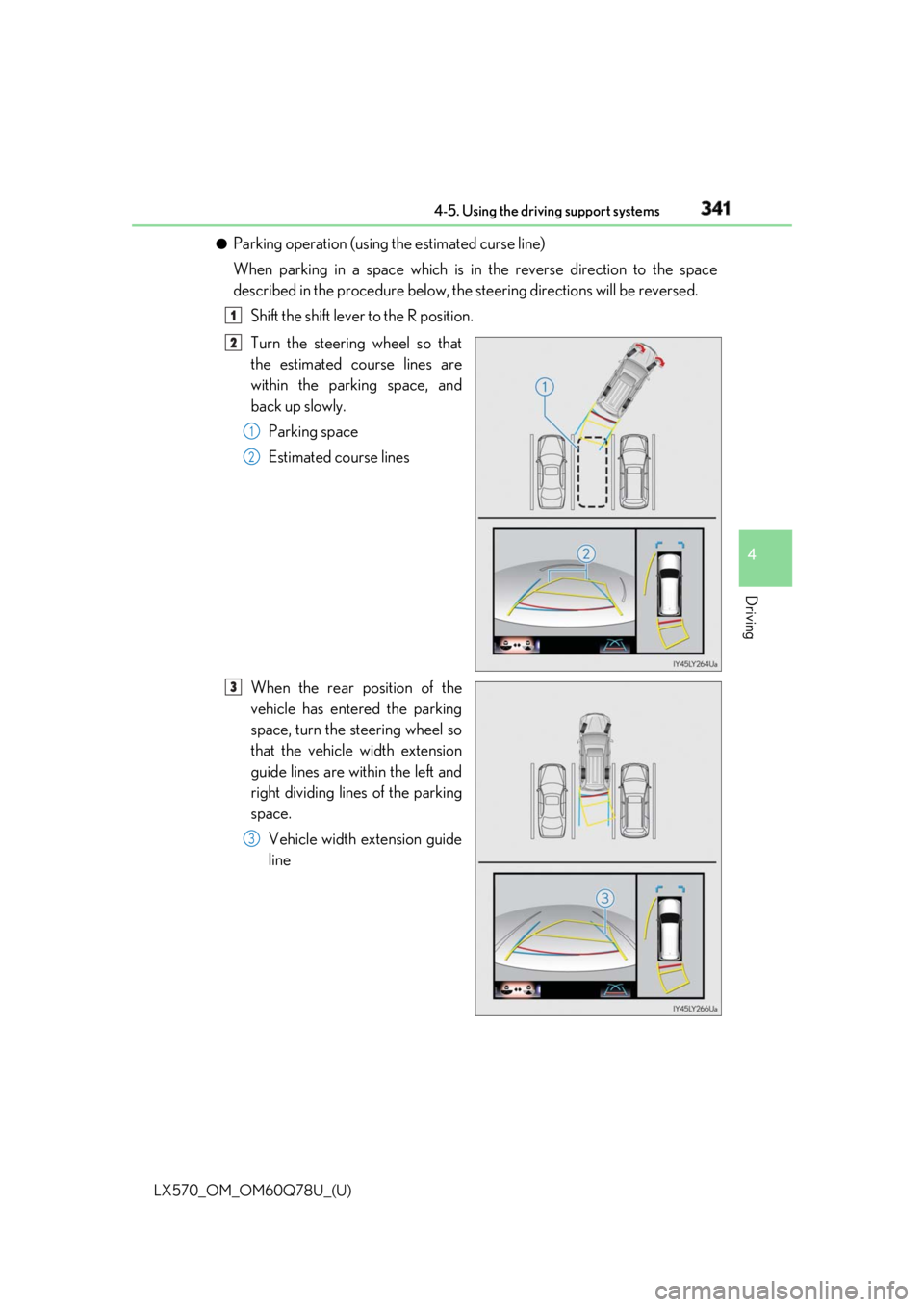
Parking operation (using the estimated curse line)
When parking in a space which is in the reverse direction to the space
described in the procedure below, the steering directions will be reversed.
Shift the shift lever to the R position.
Turn the steering wheel so that
the estimated course lines are
within the parking space, and
back up slowly.
Parking space
Estimated course lines
When the rear position of the
vehicle has entered the parking
space, turn the steering wheel so
that the vehicle width extension
guide lines are within the left and
right dividing lines of the parking
space.
Vehicle width extension guide
line 1
2
1
2
3
3
Page 342 of 628

342
LX570_OM_OM60Q78U_(U) 4-5. Using the driving support systems
Once the vehicle width extension gu ide lines and the parking space lines
are parallel, straighten the steering wh eel and back up slowly until the vehi-
cle has completely entered the parking space.
Stop the vehicle in an approp riate place, and finish parking.●
Parking operation (using the parking assist guide line)
When parking in a space which is in the reverse direction to the space
described in the procedure below, the steering directions will be reversed.
Shift the shift lever to the R position.
Back up until the parking assist
guide line meets the edge of the
left-hand dividing line of the park-
ing space.
Parking assist guide line
Parking space dividing line
Turn the steering wheel all the way to the right, and back up slowly.
Once the vehicle is parallel with the parking space, straighten the steering
wheel and back up slowly until the vehicle has completely entered the
parking space.
Stop the vehicle in an approp riate place, and finish parking.4
5
1
2
1
2
3
4
5