2018 LEXUS LS500 ESP
[x] Cancel search: ESPPage 309 of 514
3095-1. Remote Touch/Display
LS500_OM_OM50F54U_(U) 5
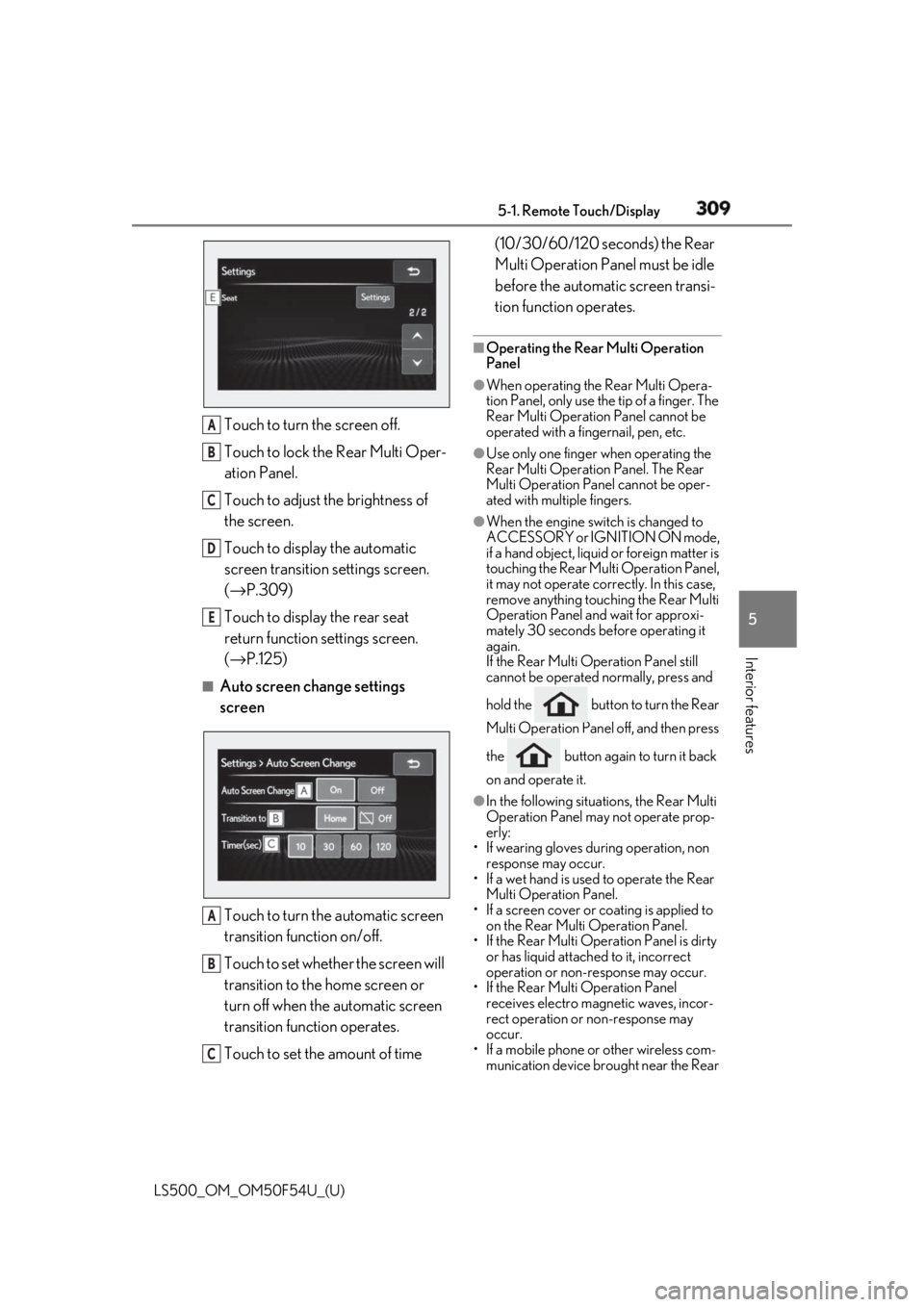
Interior features Touch to turn the screen off.
Touch to lock the Rear Multi Oper-
ation Panel.
Touch to adjust the brightness of
the screen.
Touch to display the automatic
screen transition settings screen.
( → P.309)
Touch to display the rear seat
return function settings screen.
( → P.125)■
Auto screen change settings
screen
Touch to turn the automatic screen
transition function on/off.
Touch to set whether the screen will
transition to the home screen or
turn off when the automatic screen
transition function operates.
Touch to set the amount of time (10/30/60/120 seconds) the Rear
Multi Operation Panel must be idle
before the automatic screen transi-
tion function operates. ■
Operating the Rear Multi Operation
Panel ●
When operating the Rear Multi Opera-
tion Panel, only use the tip of a finger. The
Rear Multi Operation Panel cannot be
operated with a fingernail, pen, etc. ●
Use only one finger when operating the
Rear Multi Operation Panel. The Rear
Multi Operation Panel cannot be oper-
ated with multiple fingers. ●
When the engine swit ch is changed to
ACCESSORY or IGNITION ON mode,
if a hand object, liquid or foreign matter is
touching the Rear Multi Operation Panel,
it may not operate correctly. In this case,
remove anything touching the Rear Multi
Operation Panel and wait for approxi-
mately 30 seconds be fore operating it
again.
If the Rear Multi Operation Panel still
cannot be operated normally, press and
hold the button to turn the Rear
Multi Operation Panel off, and then press
the button again to turn it back
on and operate it. ●
In the following situations, the Rear Multi
Operation Panel may not operate prop-
erly:
• If wearing gloves during operation, non
response may occur.
• If a wet hand is used to operate the Rear
Multi Operation Panel.
• If a screen cover or coating is applied to
on the Rear Multi Operation Panel.
• If the Rear Multi Operation Panel is dirty
or has liquid attached to it, incorrect
operation or non-response may occur.
• If the Rear Multi Operation Panel
receives electro magnetic waves, incor-
rect operation or non-response may
occur.
• If a mobile phone or other wireless com-
munication device br ought near the Rear A
B
C
D
E
A
B
C
Page 321 of 514
3215-3. Using the air conditio ning system and defogger
LS500_OM_OM50F54U_(U) 5
Interior features To enable/disable S-FLOW mode and
enter manual S-FLOW mode, select the
S-FLOW mode switch.
Manual S-FLOW mode
When the S-FLOW mode switch is
selected, S-FLOW mode will be manu-
ally enabled/ disabled. The indicator will illuminate on the air con-
ditioning control screen when S-FLOW
mode is enabled. ■
Operation of the air conditioning sys-
tem in S-FLOW mode
If the front passenger’s door or a rear door
is opened then closed, the air conditioning
system determines that a passenger is in the
vehicle. In this case, priority for the airflow
will be changed from th e driver’s seat only
to the front seats only or all seats, respec-
tively.
(Depending on the set temperature or
ambient temperature, priority for the air-
flow may not be given to the driver’s seat
only.)
If a passenger is judged to be in the vehicle,
the system will retain the judgement for a
certain amount of time after the engine
switch is turned off. ■
Operation of automatic S-FLOW mode
When the system is operating in automatic
S-FLOW mode, if a rear door is opened
and then closed, S-FLOW mode will be dis-
abled. To enable S-FL OW mode, select the
S-FLOW mode switch.
■
Changing from manual S-FLOW mode
to automatic S-FLOW mode
1 Select the S-FLOW mode switch to dis-
able S-FLOW mode.
2 Turn the engine switch off.
3 After 60 minutes have elapsed, change
the engine switch to ON mode.
Vehicles with DUAL-ZONE climate
control
To turn on the “DUAL” mode, perform
any of the following procedures:
Select “DUAL” on the sub function
menu. ( → P.316)
Select “DUAL” on the option con-
trol screen.
Adjust the passenger’s side tem-
perature setting. The indicator on the main control screen
comes on when the “DUAL” mode is on.
Vehicles with 4-ZONE climate con-
trol
To turn on the “4-ZONE” mode, per-
form any of the following procedures:
Select “4-ZONE” on the sub func-
tion menu. ( → P.316)
Select “4-ZONE” on the option
control screen.
Adjust a passenger seat tempera-
ture setting. The indicator on the main control screen
comes on when the “4-ZONE” mode is on.
■
Location of air outlets
The air outlets and air volume changes
according to the selected air flow
mode.Adjusting the temperature for
the driver and passenger seats
separately
Air outlet layout and operations
Page 332 of 514

332 5-4. Using the interior lights
LS500_OM_OM50F54U_(U) 2 To turn on/off the rear interior
lights, touch the respective button.
■
Turning the lights on/off
Front
Turns the lights on/off (touch the light) When a door is opened while the door
position is on, the lights turn on.
Rear (vehicles without a panoramic
moon roof)
On/dimmed/off When a door is opened while the door
position is on, the lights turn on.
Rear (vehicles with a panoramic
moon roof)
On/dimmed/off When a door is opened while the door
position is on, the lights turn on.
■
Using the Rear Multi Operation
Panel (if equipped)
1 Display the home screen and then
touch “Rear Shade/Lamp”.
( → P.308)
2 To turn on/dimmed/off the rear per-
sonal lights, touch the respective
button.Operating the personal lights
Page 333 of 514
3335-4. Using the interior lights
LS500_OM_OM50F54U_(U) 5
Interior features ■
Illuminated entry system
The lights automatically turn on/off accord-
ing to the engine switch mode, the pres-
ence of the electronic key, whether the
doors are locked/unlocked, and whether
the doors are opened/closed. ■
To prevent the battery from being dis-
charged
If the interior lights remain on when the
engine switch is turned off, the lights will go
off automatically after 20 minutes. ■
When front interior light or front per-
sonal lights do not respond as normal●
When water, dirt, et c., have adhered to
the lens surface●
When operated with a wet hand●
When wearing gloves, etc.■
Customization
Some functions can be customized.
( → P.468)
NOTICE■
To prevent battery discharge
Do not leave the lights on longer than
necessary when the engine is not run-
ning.
■
Removing light lenses
Never remove the lens for the front inte-
rior light and front personal lights. Other-
wise, the lights will be damaged. If a lens
needs to be removed, contact your Lexus
dealer.
Page 347 of 514
3475-6. Using the other interior features
LS500_OM_OM50F54U_(U) 5
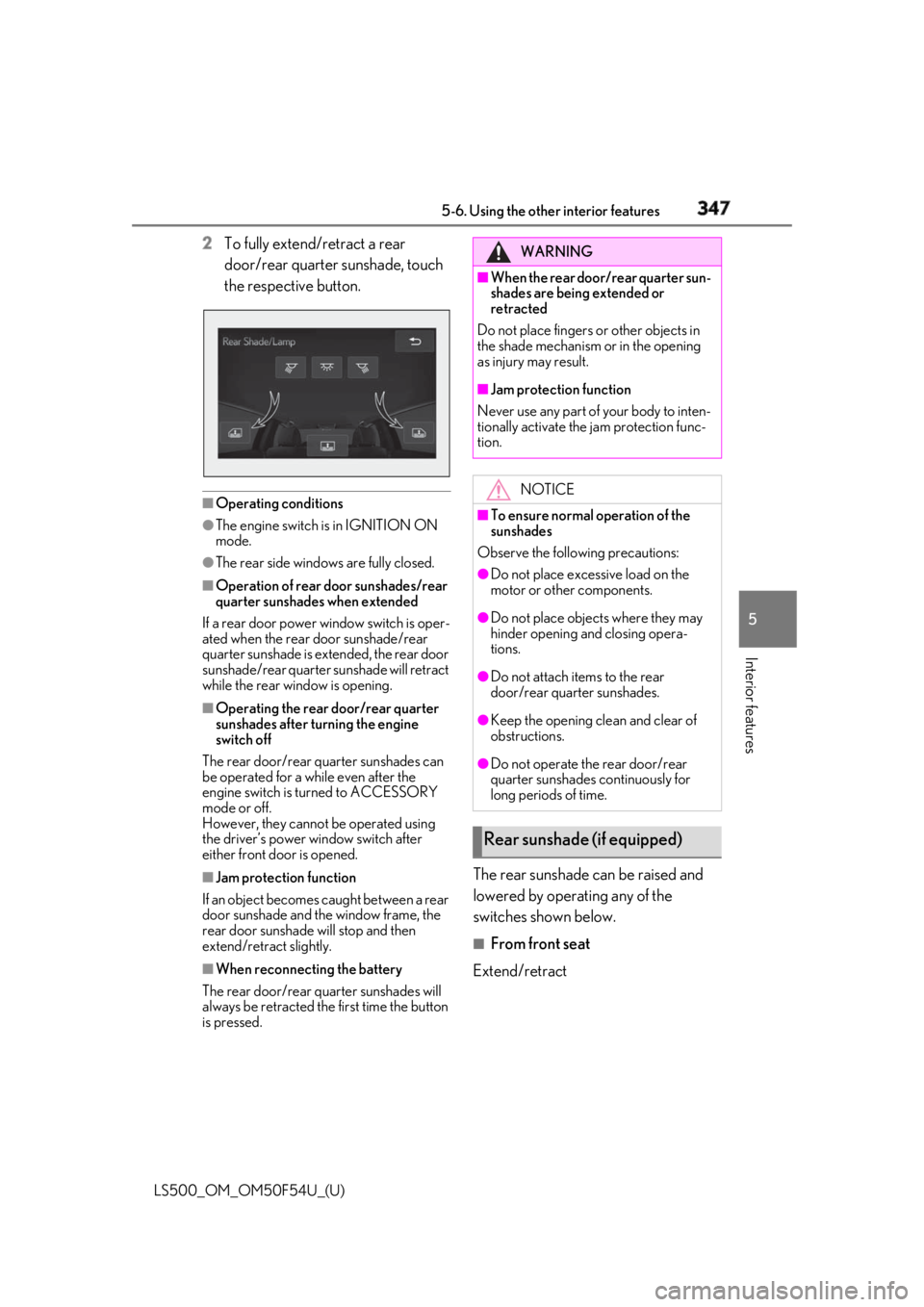
Interior features 2 To fully extend/retract a rear
door/rear quarter sunshade, touch
the respective button.
■
Operating conditions●
The engine switch is in IGNITION ON
mode.●
The rear side windows are fully closed.■
Operation of rear door sunshades/rear
quarter sunshades when extended
If a rear door power window switch is oper-
ated when the rear door sunshade/rear
quarter sunshade is extended, the rear door
sunshade/rear quarter sunshade will retract
while the rear window is opening. ■
Operating the rear door/rear quarter
sunshades after turning the engine
switch off
The rear door/rear quarter sunshades can
be operated for a while even after the
engine switch is turned to ACCESSORY
mode or off.
However, they cannot be operated using
the driver’s power window switch after
either front door is opened.
■
Jam protection function
If an object becomes caught between a rear
door sunshade and the window frame, the
rear door sunshade will stop and then
extend/retract slightly.
■
When reconnecting the battery
The rear door/rear quarter sunshades will
always be retracted the first time the button
is pressed. The rear sunshade can be raised and
lowered by operating any of the
switches shown below. ■
From front seat
Extend/retract WARNING■
When the rear door/rear quarter sun-
shades are being extended or
retracted
Do not place fingers or other objects in
the shade mechanism or in the opening
as injury may result. ■
Jam protection function
Never use any part of your body to inten-
tionally activate the jam protection func-
tion.
NOTICE■
To ensure normal operation of the
sunshades
Observe the following precautions: ●
Do not place excessive load on the
motor or other components. ●
Do not place objects where they may
hinder opening and closing opera-
tions. ●
Do not attach items to the rear
door/rear quarter sunshades. ●
Keep the opening clean and clear of
obstructions.
●
Do not operate the rear door/rear
quarter sunshades continuously for
long periods of time.
Rear sunshade (if equipped)
Page 348 of 514

348 5-6. Using the other interior features
LS500_OM_OM50F54U_(U) ■
From rear seat
Vehicles without power rear seat
Extend/retract
Vehicles with power rear seat
1 Display the home screen and then
touch “Rear Shade/Lamp”.
( → P.308)
2 To fully extend/retract a rear door
sunshade, touch the respective but-
ton.
■
The rear sunshade can be used when
The engine switch is in IGNITION ON
mode. ■
Operating the rear sunshade after turn-
ing the engine switch off
The rear sunshade ca n be operated for a
while even after the engine switch is
switched to ACCESSORY mode or turned
off. ■
Reverse operation feature
To ensure adequate rear visibility, the rear
sunshade automatically lowers when the
shift position is shifted to R.
However, the rear suns hade is raised again
if any of the following occurs: ●
The switch is pressed again.●
The shift position is shifted to P. ●
The shift position is sh ifted out of P and R,
and the vehicle reaches a speed of 9 mph
(15 km/h).
If the engine is turned off when the rear sun-
shade has been lowered due to the reverse
operation feature, it will not be raised even
when the engine is turned on again and the
vehicle reaches a speed of 9 mph (15
km/h). To raise the sunshade again, press
the switch.
WARNING■
When the rear sunshade is being
raised or lowered
Do not place fingers or other objects in
the shade mechanism or in the opening
as injury may result.
NOTICE
■
To ensure normal operation of the
sunshade
Observe the following precautions:
●
Do not place excessive load on the
motor or other components.
●
Do not place objects where they may
hinder opening and closing opera-
tions.
●
Do not attach items to the rear sun-
shade.
Page 355 of 514

3555-6. Using the other interior features
LS500_OM_OM50F54U_(U) 5
Interior features *
:If equipped
“SOS” button
LED light indicators
MicrophoneLexus Enform Safety Con-
nect *
Safety Connect is a subscrip-
tion-based telematics service that
uses Global Positioning System
(GPS) data and embedded cellular
technology to provide safety and
security features to subscribers.
Safety Connect is supported by
Lexus’ designated response center,
which operates 24 hours per day, 7
days per week.
Safety Connect service is available
by subscription on select, telemat-
ics hardware-equipped vehicles.
By using the Safety Connect ser-
vice, you are agreeing to be bound
by the Telematics Subscription Ser-
vice Agreement and its Terms and
Conditions, as in effect and
amended from time to time, a cur-
rent copy of which is available at
Lexus.com. All use of the Safety
Connect service is subject to such
then-applicable Terms and Condi-
tions. System components
A
B
C
Page 356 of 514
356 5-6. Using the other interior features
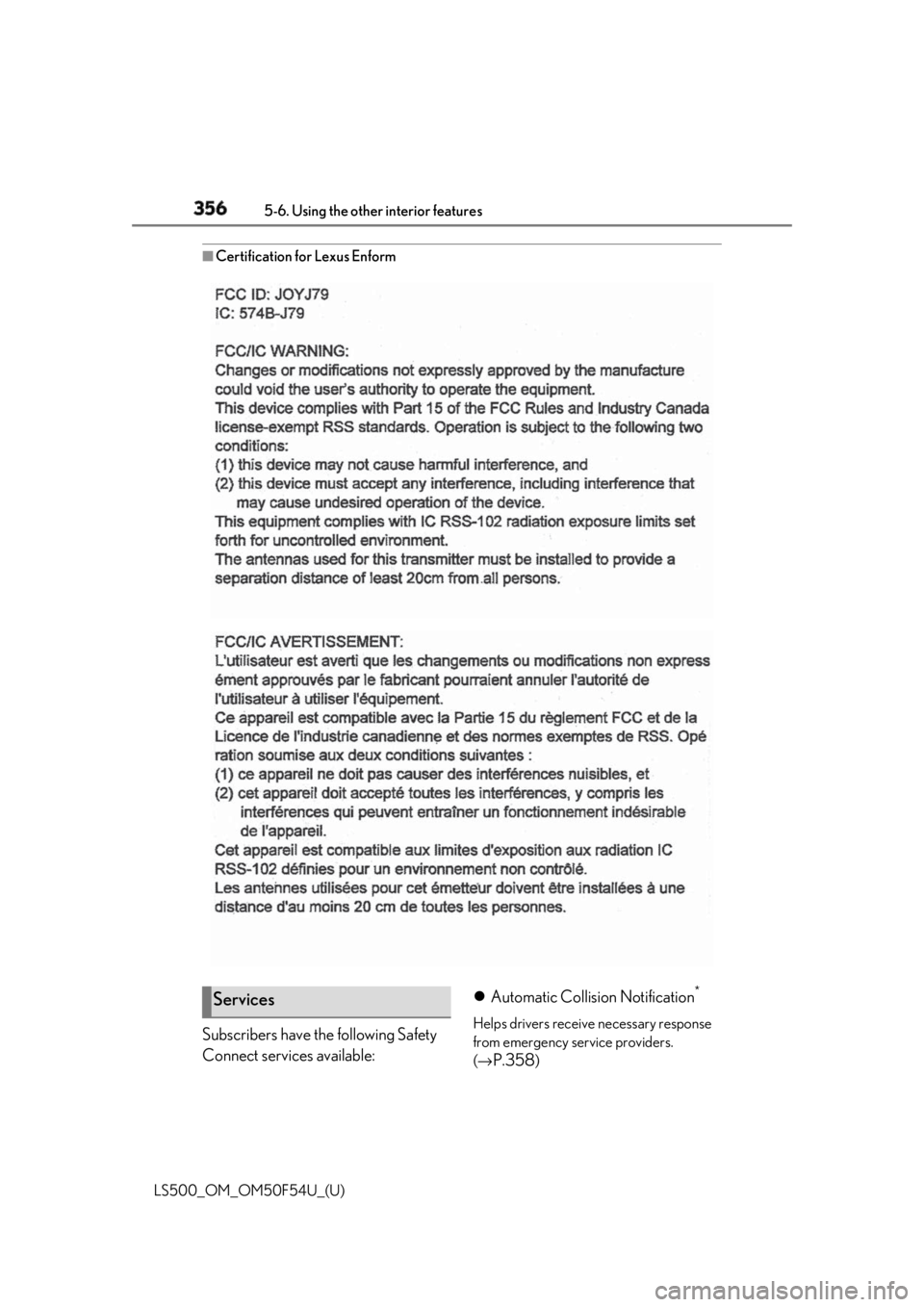
LS500_OM_OM50F54U_(U) ■
Certification for Lexus Enform
Subscribers have the following Safety
Connect services available: Automatic Collision Notification *
Helps drivers receive necessary response
from emergency service providers.
( →
P.358 )Services