2018 LEXUS LS500 door lock
[x] Cancel search: door lockPage 160 of 514

160 4-2. Driving procedures
LS500_OM_OM50F54U_(U) 4-2.Driving procedures
1 Press the parking brake switch to
check that the parking brake is set.
( → P.170)The parking brake indicator will come on.
2 Firmly depress the brake pedal. and a message will be displayed on
the multi-information display.
If it is not displayed, the engine cannot be
started.
3 Press the engine switch shortly and
firmly.When operating the engine switch, one
short, firm press is enough. It is not neces-
sary to press and hold the switch.
The engine will crank until it starts or for up
to 30 seconds, whichever is less.
Continue depressing the brake pedal until
the engine is completely started.
The engine can be started from any engine
switch mode. ■
Engine switch illumination
According to the situation, the engine
switch illumination operates as follows. ●
When a door is opened, or the engine
switch mode is changed from ACCES-
SORY or IGNITION ON mode to off,
the engine switch illumination slowly
blinks. ●
When depressing the brake pedal with
carrying the electronic key on your per-
son, the engine switch illumination rapidly
blinks. ●
When the engine sw itch is in ACCES-
SORY or IGNITION ON mode, the
engine switch illumination illuminates. ■
If the engine does not start ●
The engine immobilizer system may not
have been deactivated. ( → P.58)
Contact your Lexus dealer. ●
If a message related to start-up is shown
on the multi-information display, read the
message and follow the instructions. ■
If the battery is discharged
The engine cannot be started using the
smart access system with push-button start.
Refer to P.438 to restart the engine. ■
Electronic key battery depletion
→ P.92 ■
Conditions affecting operation
→ P.108 ■
Notes for the entry function
→ P.109
■
Steering lock function
●
After turning the engine switch off and
opening and closing the doors, the steer-
ing wheel will be lock ed due to the steer-
ing lock function. Operating the engine
switch again automatically cancels the
steering lock.
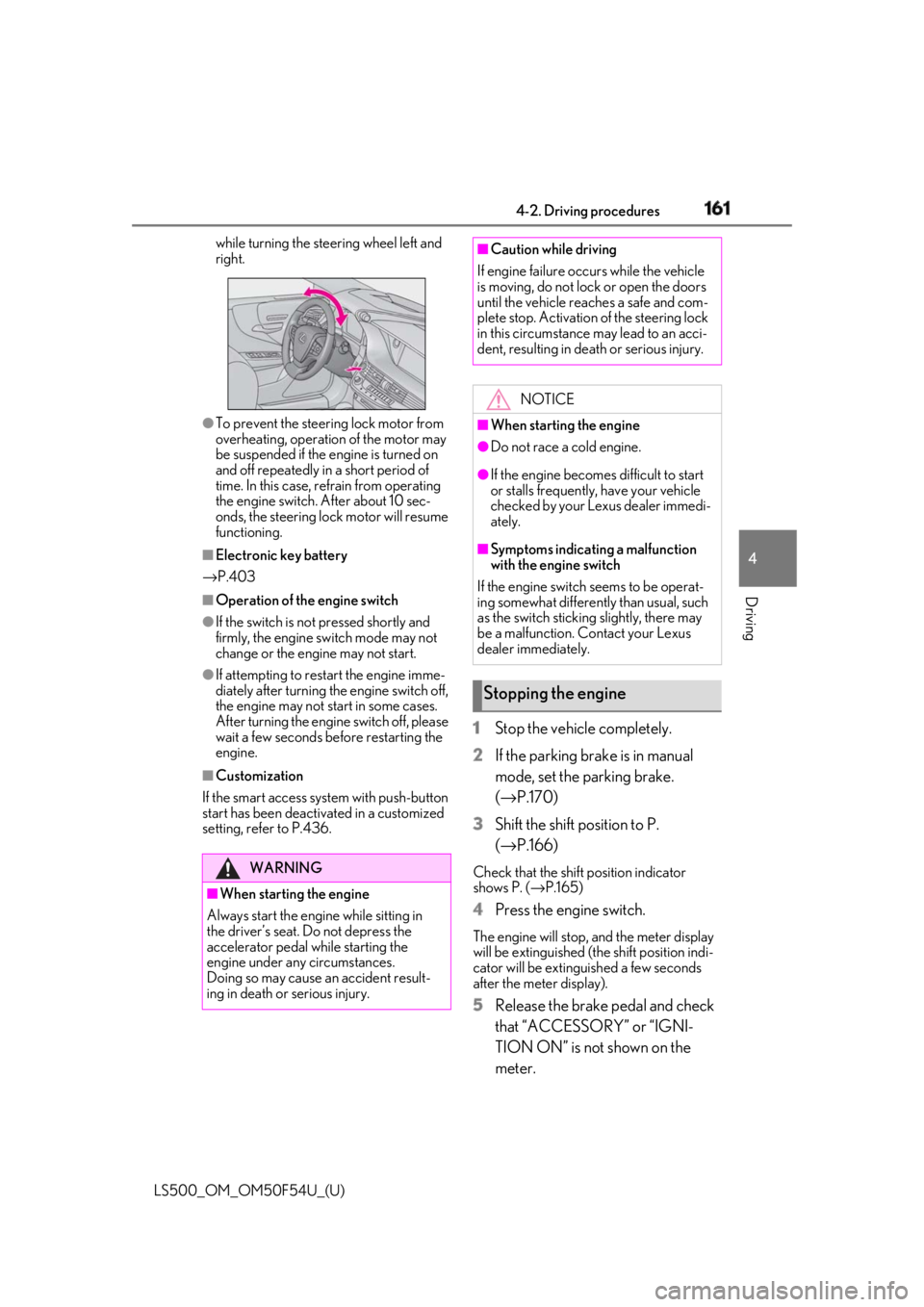
●
When the steering lock cannot be
released, “Push Engine Switch While
Turning Steering Whee l in Either Direc-
tion” will be displayed on the multi-infor-
mation display.
Press the engine switch shortly and firmly Engine (ignition) switch Performing the following opera-
tions when carryin g the electronic
key on your person starts the
engine or changes engine switch
modes.
Starting the engine
Page 161 of 514
1614-2. Driving procedures
LS500_OM_OM50F54U_(U) 4
Driving while turning the steering wheel left and
right.
●
To prevent the steering lock motor from
overheating, operation of the motor may
be suspended if the engine is turned on
and off repeatedly in a short period of
time. In this case, refrain from operating
the engine switch. After about 10 sec-
onds, the steering lock motor will resume
functioning.■
Electronic key battery
→ P.403■
Operation of the engine switch●
If the switch is not pressed shortly and
firmly, the engine switch mode may not
change or the engine may not start.●
If attempting to restart the engine imme-
diately after turning the engine switch off,
the engine may not start in some cases.
After turning the engine switch off, please
wait a few seconds before restarting the
engine.■
Customization
If the smart access sy stem with push-button
start has been deactivated in a customized
setting, refer to P.436. 1 Stop the vehicle completely.
2 If the parking brake is in manual
mode, set the parking brake.
( → P.170)
3 Shift the shift position to P.
( → P.166) Check that the shift position indicator
shows P. ( → P.165)
4 Press the engine switch. The engine will stop, and the meter display
will be extinguished (the shift position indi-
cator will be extinguished a few seconds
after the meter display).
5 Release the brake pedal and check
that “ACCESSORY” or “IGNI-
TION ON” is not shown on the
meter.WARNING
■
When starting the engine
Always start the engine while sitting in
the driver’s seat. Do not depress the
accelerator pedal while starting the
engine under any circumstances.
Doing so may cause an accident result-
ing in death or serious injury. ■
Caution while driving
If engine failure occurs while the vehicle
is moving, do not lock or open the doors
until the vehicle reaches a safe and com-
plete stop. Activation of the steering lock
in this circumstance may lead to an acci-
dent, resulting in death or serious injury.
NOTICE■
When starting the engine ●
Do not race a cold engine. ●
If the engine becomes difficult to start
or stalls frequently, have your vehicle
checked by your Lexus dealer immedi-
ately. ■
Symptoms indicating a malfunction
with the engine switch
If the engine switch seems to be operat-
ing somewhat differently than usual, such
as the switch sticking slightly, there may
be a malfunction. Contact your Lexus
dealer immediately.
Stopping the engine
Page 176 of 514

176 4-3. Operating the lights and wipers
LS500_OM_OM50F54U_(U) The sensor may not function properly if an
object is placed on th e sensor, or anything
that blocks the sensor is affixed to the wind-
shield.
Doing so interferes with the sensor detect-
ing the level of ambient light and may cause
the automatic headlight system to malfunc-
tion. ■
Automatic light off system●
When the headlights are on: The head-
lights and tail lights tu rn off 30 seconds
after the driver’s door is opened and
closed if the engine switch is turned to
ACCESSORY mode or turned off. (The
lights turn off immediately if on the
key is pressed after all the doors are
closed.)●
When only the tail lights are on: The tail
lights turn off automatically if the engine
switch is turned to ACCESSORY mode
or turned off and the driver’s door is
opened.
To turn the lights on again, turn the engine
switch to IGNITION ON mode, or turn the
light switch off once and then back to
or . ■
Light reminder buzzer
A buzzer sounds when the engine switch is
turned off or turned to ACCESSORY
mode and the driver’s door is opened while
the lights are turned on. ■
Automatic headlight leveling system
The level of the headlights is automatically
adjusted according to the number of pas-
sengers and the loading condition of the
vehicle to ensure that the headlights do not
interfere with other road users.
■
Windshield wiper linked headlight illu-
mination
When driving during daytime with the
headlight switch turned to , if the wind-
shield wipers are used, the headlights will
turn on automatically after several seconds
to help enhance the visibility of your vehicle.
■
Battery-saving function
In order to prevent the battery of the vehicle from discharging, if the headlights and/or
tail lights are on when the engine switch is
turned off the battery saving function will
operate and automatically turn off all the
lights after approximately 20 minutes.
When the engine switch is turned to IGNI-
TION ON mode, the battery-saving func-
tion will be disabled.
When any of the following are performed,
the battery-saving function is canceled
once and then reactivated. All the lights will
turn off automatically 20 minutes after the
Battery- saving function has been reacti-
vated: ●
When the headlight switch is operated●
When a door is opened or closed ■
Welcome light illumination control
The front position and tail lights automati-
cally turn on at night when the doors are
unlocked using the entr y function or wire-
less remote control if the light switch is in
the position. ■
Customization
Some functions can be customized.
( → P.468)
1 With the headlights on, push the NOTICE■
To prevent battery discharge
Do not leave the lights on longer than
necessary when the engine is not run-
ning.
Turning on the high beam head-
lights
Page 182 of 514

182 4-3. Operating the lights and wipers
LS500_OM_OM50F54U_(U) ●
If the wiper is turned to AUTO mode
while the engine switch is in IGNITION
ON mode, the wipers will operate once
to show that AUTO mode is activated.●
If the temperature of the raindrop sensor
is 185°F (85°C) or higher, or 5°F
(-15°C) or lower, automatic operation
may not occur. In this case, operate the
wipers in any mode other than AUTO
mode.■
If no windshield washer fluid sprays
Check that the washer nozzles are not
blocked if there is wash er fluid in the wind-
shield washer fluid reservoir.
■
Front door opening linked windshield
wiper stop function
When is selected and the windshield
wipers are operating, if a front door is
opened while the vehicle is stopped and the
P shift position is sele cted, operation of the
windshield wipers w ill be stopped to pre-
vent anyone near the vehicle from being
sprayed by water from the wipers. When
the front door is closed, wiper operation will
resume.
■
When stopping the engine in an emer-
gency while driving
If the windshield wipers are operating when
the engine is stopped, the windshield wipers
will operate in high speed operation. After
the vehicle is stopped, operation will return
to normal when the engi ne switch is turned to IGNITION ON mode, or operation will
stop when the driver’s door is opened. ■
Outside rear view mirror defogger acti-
vation linked to windshield wiper opera-
tion
The outside rear view mirror defoggers
automatically turn on when you operate the
windshield wipers.
The outside rear view mirror defoggers
automatically turn off approximately 15
minutes after the wipers stop.
For details about the outside rear view mir-
ror defoggers: → P.314
WARNING■
Caution regarding the use of wind-
shield wipers in AUTO mode
The windshield wipers may operate
unexpectedly if the sensor is touched or
the windshield is subj ect to vibration in
AUTO mode. Take care that your fingers
or anything else do not become caught
in the windshield wipers. ■
Caution regarding the use of washer
fluid
When it is cold, do not use the washer
fluid until the windshield becomes warm.
The fluid may freeze on the windshield
and cause low visibility. This may lead to
an accident, resulting in death or serious
injury.
NOTICE
■
When there is no washer fluid spray
from the nozzle
Damage to the washer fluid pump may
be caused if the lever is pulled toward
you and held continually.
■
When a nozzle becomes blocked
In this case, contact your Lexus dealer.
Do not try to clear it with a pin or other
object. The nozzle will be damaged.
Page 291 of 514

2914-5. Using the driving support systems
LS500_OM_OM50F54U_(U) 4
Driving *
:If equipped
■
Situations in which the vehicle height
control may not operate properly●
In the following situations, the vehicle
height may change slowly or may not
change to the correct height:
• When the vehicle comes into contact
with snow, ice, stone, etc.
• When the ambient temperature is low
• When the accumulator tank pressure is
low●
In the following situations, the vehicle
height may not change:
• If the hood or trunk is not fully closed
• If the brake pedal depressed and the
vehicle is stopped
• When the vehicle is on a significantly
uneven or undulating road
• When the vehicle is on a slanted road or a
slope
■
Operating sound of the air suspension
compressor and valves
When the vehicle height is changed, such
as due to passengers entering the vehicle or
cargo being loaded, or when the vehicle
height is changed using the vehicle height
adjustment switch, the air suspension com-
pressor and valves may operate and a
sound may be heard. This does not indicate a malfunction. ■
When the accumulator tank pressure is
low
When the accumulator tank pressure is low,
the air suspension compressor and valves
may operate repeatedly even though the
vehicle height is not being changed. This
does not indicate a malfunction.
Electronically modulated air
suspension *
The height of the vehicle when driv-
ing can be selected using the vehi-
cle height adjustment switch. The
selected height level will be main-
tained regardless of the number of
passengers or weight of cargo.
Additionally, setti ngs of the follow-
ing functions can be changed:
Access mode control
Parking height control
Vehicle height control WARNING■
Situations in whic h the operation of
the electronically modulated air sus-
pension should be canceled
In the following situations, make sure to
disable all functions of the vehicle height
control of the electronically modulated
air suspension and then stopping the
engine. Otherwise, the vehicle height
may change and part of your body may
be caught under the vehicle, possibly
causing injury. ●
When the vehicle is parked on a curb ●
If any of the wheels is not touching the
ground ●
If the vehicle needs to be jacked up ●
If the vehicle is to be tied down ●
If the vehicle is to be towed
■
Vehicle height control precautions
In the following situations, make sure to
check the safety of the area around the
vehicle, as the vehicle height may change
and part of someone’s body may be
caught in the vehicle, possibly causing
injury or the vehicle may be damaged.
●
When opening a door
●
When unlocking the doors using the
smart access system with push-button
start
●
When changing the vehicle height
using the vehicle height adjustment
switch
Page 292 of 514
292 4-5. Using the driving support systems
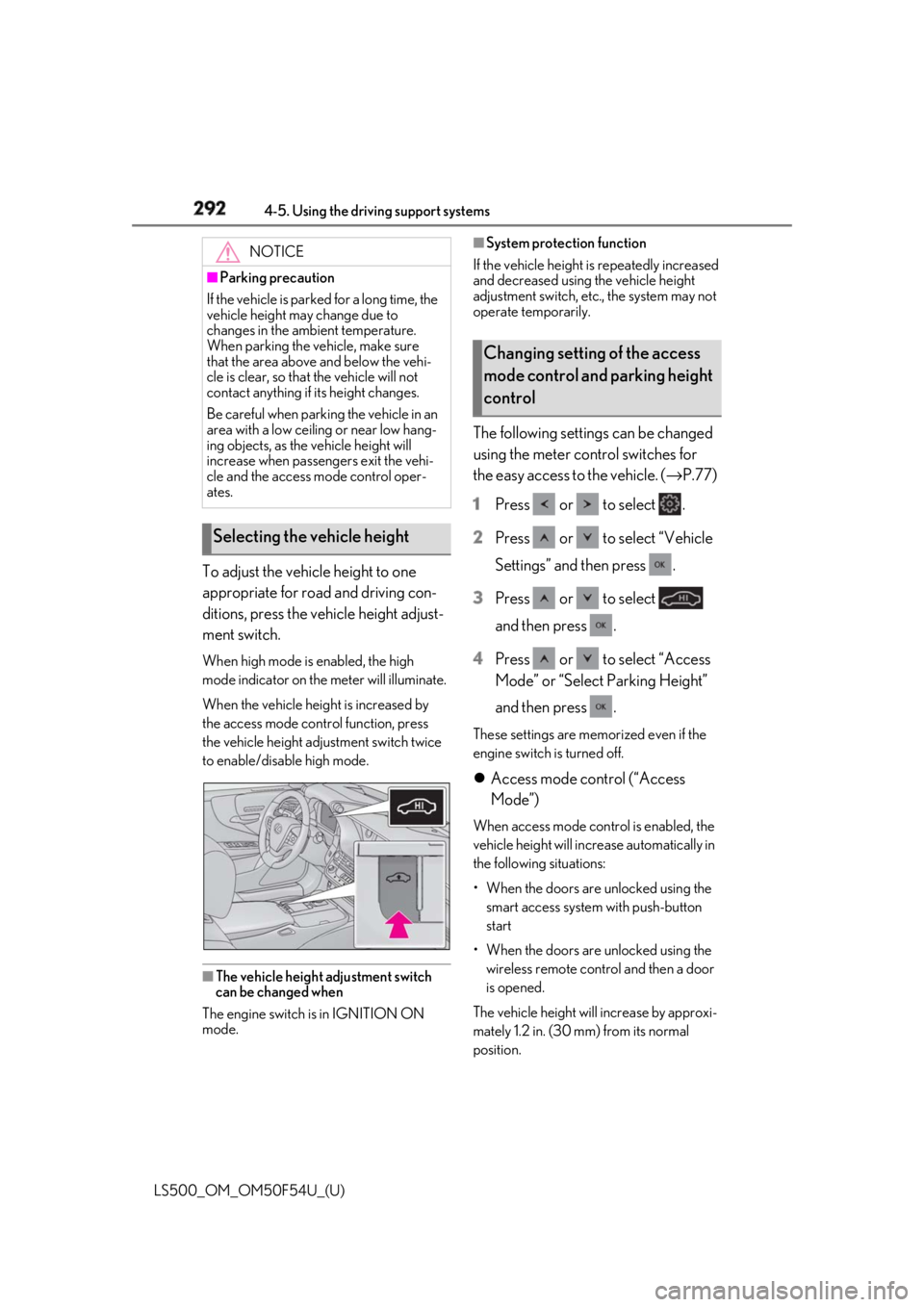
LS500_OM_OM50F54U_(U) To adjust the vehicle height to one
appropriate for road and driving con-
ditions, press the vehicle height adjust-
ment switch. When high mode is enabled, the high
mode indicator on the meter will illuminate.
When the vehicle height is increased by
the access mode control function, press
the vehicle height adjustment switch twice
to enable/disable high mode.
■
The vehicle height adjustment switch
can be changed when
The engine switch is in IGNITION ON
mode. ■
System protection function
If the vehicle height is repeatedly increased
and decreased using the vehicle height
adjustment switch, etc ., the system may not
operate temporarily.
The following settings can be changed
using the meter control switches for
the easy access to the vehicle. ( → P.77)
1 Press or to select .
2 Press or to select “Vehicle
Settings” and then press .
3 Press or to select
and then press .
4 Press or to select “Access
Mode” or “Select Parking Height”
and then press . These settings are memorized even if the
engine switch is turned off.
Access mode control (“Access
Mode”) When access mode cont rol is enabled, the
vehicle height will incr ease automatically in
the following situations:
• When the doors are unlocked using the
smart access system with push-button
start
• When the doors are unlocked using the
wireless remote control and then a door
is opened.
The vehicle height will increase by approxi-
mately 1.2 in. (30 mm) from its normal
position.NOTICE■
Parking precaution
If the vehicle is parked for a long time, the
vehicle height may change due to
changes in the ambient temperature.
When parking the vehicle, make sure
that the area above and below the vehi-
cle is clear, so that the vehicle will not
contact anything if its height changes.
Be careful when parking the vehicle in an
area with a low ceiling or near low hang-
ing objects, as the vehicle height will
increase when passengers exit the vehi-
cle and the access mode control oper-
ates.
Selecting the vehicle height Changing setting of the access
mode control and parking height
control
Page 315 of 514

3155-3. Using the air conditio ning system and defogger
LS500_OM_OM50F54U_(U) 5
Interior features ●
When the engine switch is turned off, the
current air conditioning settings will auto-
matically be registered to the electronic
key that was used to unlock the vehicle.●
The system may not operate correctly if
more than one electr onic key is in the
vicinity or if the smart access system with
push-button start is used to unlock a pas-
senger door.●
The doors that can recall the air condi-
tioning setting *
when unlocked using the
smart access system with push-button
start can be changed. For details, contact
your Lexus dealer. *
: The doors that can recall the driving
position memory are changed at the
same time.■
Operation of the air conditioning sys-
tem in Eco drive mode
In Eco drive mode, the air conditioning sys-
tem is controlled as follows to prioritize fuel
efficiency: ●
Engine speed and compressor operation
controlled to restri ct heating/cooling
capacity●
Fan speed restricted when automatic
mode is selected
To improve air condit ioning performance,
perform the following operations: ●
Turn off eco air conditioning mode
( → P.316) ●
Adjust the fan speed●
Turn off Eco drive mode ( → P.289)
■
When the outside temperature falls to
nearly 32°F (0°C)
The dehumidification function may not
operate even when “A/C” is selected.
■
Ventilation and air conditioning odors
●
To let fresh air in, set the air conditioning
system to the outside air mode.
●
During use, various odors from inside and
outside the vehicle may enter into and
accumulate in the air conditioning sys-
tem. This may then cause odor to be
emitted from the vents.
●
To reduce potential odors from occur- ring:
• It is recommended that the air condition-
ing system be set to outside air mode
prior to turning the vehicle off.
• The start timing of the blower may be
delayed for a short pe riod of time imme-
diately after the air conditioning system is
started in automatic mode or with the
micro dust and pollen filter on. ●
When parking, the system automatically
switches to outside air mode to encour-
age better air circulation throughout the
vehicle, helping to reduce odors that
occur when starting the vehicle. ■
Using the voice command system
Air conditioning system can be operated
using voice commands. For details, refer to
the “NAVIGATION AND MULTIMEDIA
SYSTEM OWNER’S MANUAL”. ■
Air conditioning filter
→ P.402 ■
Customization
Some functions can be customized.
( → P.468)
WARNING■
To prevent the windshield from fog-
ging up
Do not use the windshield defogger
switch during cool air operation in
extremely humid weather. The difference
between the temperature of the outside
air and that of the windshield can cause
the outer surface of the windshield to fog
up, blocking your vision.
■
When the outside rear view mirror
defoggers are operating
Do not touch the outside rear view mir-
ror surfaces, as they can become very
hot and burn you.
Page 330 of 514
330 5-4. Using the interior lights
LS500_OM_OM50F54U_(U) 5-4.Using the interior lights
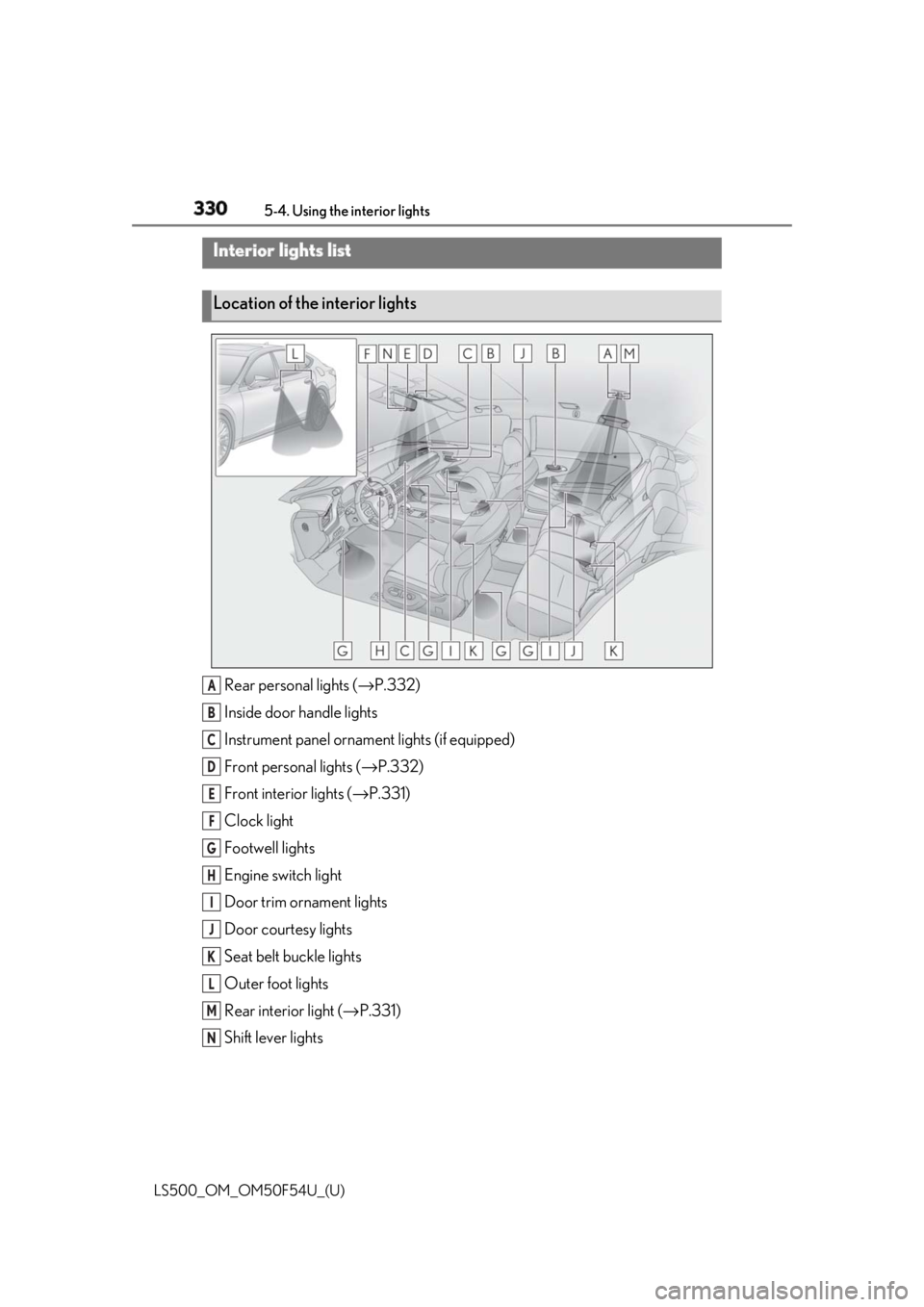
Rear personal lights ( → P.332)
Inside door handle lights
Instrument panel orname nt lights (if equipped)
Front personal lights ( → P.332)
Front interi or lights ( → P.331)
Clock light
Footwell lights
Engine switch light
Door trim ornament lights
Door courtesy lights
Seat belt buckle lights
Outer foot lights
Rear interior light ( → P.331)
Shift lever lightsInterior lights list
Location of the interior lights
A
B
C
D
E
F
G
H
I
J
K
L
M
N