2018 LEXUS LS500 belt
[x] Cancel search: beltPage 124 of 514
124 3-3. Adjusting the seats
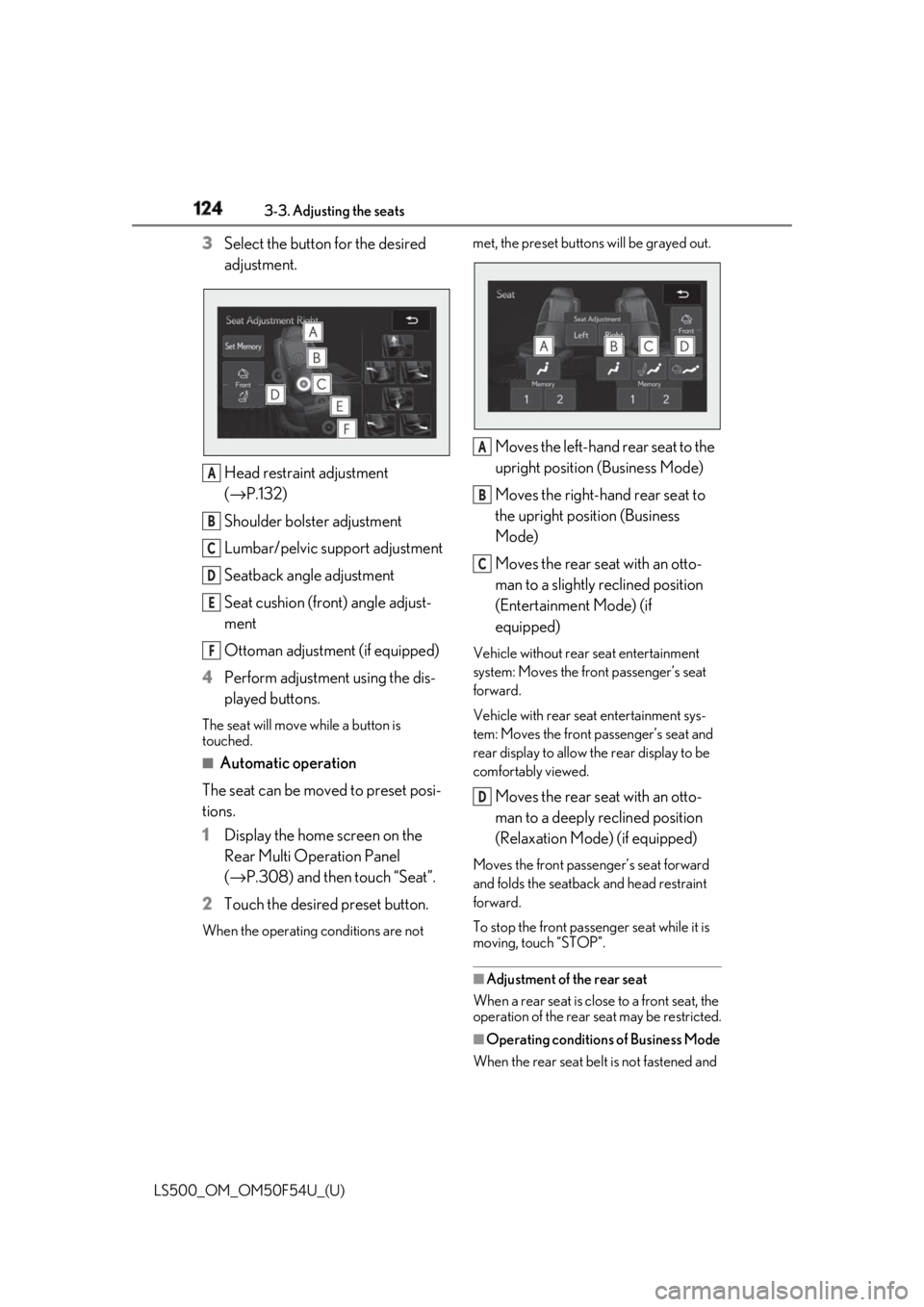
LS500_OM_OM50F54U_(U) 3 Select the button for the desired
adjustment.
Head restraint adjustment
( → P.132)
Shoulder bolster adjustment
Lumbar/pelvic support adjustment
Seatback angle adjustment
Seat cushion (front) angle adjust-
ment
Ottoman adjustment (if equipped)
4 Perform adjustment using the dis-
played buttons.The seat will move while a button is
touched. ■
Automatic operation
The seat can be moved to preset posi-
tions.
1 Display the home screen on the
Rear Multi Operation Panel
( → P.308) and then touch “Seat”.
2 Touch the desired preset button.When the operating conditions are not met, the preset buttons will be grayed out.
Moves the left-hand rear seat to the
upright position (Business Mode)
Moves the right-hand rear seat to
the upright position (Business
Mode)
Moves the rear seat with an otto-
man to a slightly reclined position
(Entertainment Mode) (if
equipped) Vehicle without rear seat entertainment
system: Moves the fron t passenger’s seat
forward.
Vehicle with rear seat entertainment sys-
tem: Moves the front passenger’s seat and
rear display to allow th e rear display to be
comfortably viewed.
Moves the rear seat with an otto-
man to a deeply reclined position
(Relaxation Mode) (if equipped) Moves the front passenger’s seat forward
and folds the seatback and head restraint
forward.
To stop the front passen ger seat while it is
moving, touch “STOP”.
■
Adjustment of the rear seat
When a rear seat is close to a front seat, the
operation of the rear se at may be restricted.
■
Operating conditions of Business Mode
When the rear seat belt is not fastened and A
B
C
D
E
F A
B
C
D
Page 125 of 514

1253-3. Adjusting the seats
LS500_OM_OM50F54U_(U) 3
Before driving weight is not detected on the rear seat,
Business Mode cannot be selected.
Once weight is detect ed on the seat, the
seat will be judged as occupied until the
rear door is opened then closed or the
engine switch is turned off. ■
The rear seat with an ottoman cannot be
moved to Entertainment Mode/Relax-
ation Mode when (if equipped)
In the following situations, Entertainment
Mode or Relaxation Mode cannot be
selected: ●
The engine switch is in ACCESSORY
mode or off.●
The rear seat belt is not fastened and
weight is not detected on the rear seat.
Once weight is detect ed on the seat, the
seat will be judged as occupied until the
rear door is opened then closed or the
engine switch is turned off. ●
The weight of an occupant or heavy
object, etc. is detected on the front pas-
senger’s seat.
Once weight is detect ed on the seat, the
seat will be judged as occupied until the
front passenger’s door is opened then
closed or the engine switch is turned off. ●
The front passenger’s seat belt is fas-
tened.●
The front passenger’s door is open.■
When the front passenger’s seat is
folded forward
→ P.120
■
Automatic angle adjustment of the rear
displays (if equipped)
When a seat is adjusted, the angle of the
rear display will be adjusted automatically
to maintain an optima l viewing angle for the
rear display from the rear seat.
■
Operation after the engine switch is
turned off
After a certain time el apses after the engine
switch is turned off, the following parts of
the rear seats will move to their neutral
positions. ●
Shoulder bolster ●
Lumbar/pelvic support ■
Seat return function linked to the door
opening operation
The rear seat will return to the upright posi-
tion automatically when the rear door is
opened for easier entry and exit of the vehi-
cle.
For the rear seat with an ottoman (if
equipped): When the rear door on the side
with the rear seat with an ottoman is
opened, the seatback of the rear seat with
an ottoman will move to a more upright
position. The seatback will move to the
upright position after the door is closed and
the system determines that the rear passen-
ger has exited.
However, if the armres t is stowed, the rear
seat will not move. ■
Shift-linked rear seat reclining function
When the shift position is shifted from P, to
enhance rear visibility for the driver, the rear
seats will recl ine slightly.
However, the shift-linke d rear seat reclining
function will not operate in the following sit-
uations: ●
The weight of an occupant or heavy
object, etc. is detected on a rear seat.
Once weight is detected on the seat, the
seat will be judged as occupied until the
rear door is opened then closed or the
engine switch is turned off.
●
A rear seat belt is fastened. ●
A rear door is open. ●
The armrest is stowed.
When a front seat is close to a rear seat, the
rear seats may not operate or the range of
movement may be restricted.
■
Pre-collision seatback s for the passen-
ger seats
→ P.201, 211
■
Customization
Some functions can be customized.
( → P.468)
Page 126 of 514

126 3-3. Adjusting the seats
LS500_OM_OM50F54U_(U) 1 Press the seat switch.
2 Press the sub function button of the
Remote Touch. ( → P.304)
3 Select .The rear seat will move to the upright posi-
tion.
■
Operation of the rear seats from the
front seats
In the following situations, the rear seats
cannot be operated from the front seats.
●
When the armrest is stowed and weight
of an occupant, heavy object, etc. is
detected on a rear seat
Once weight is detect ed on the seat, the
seat will be judged as occupied until the
rear door is opened then closed or the
engine switch is turned off.
●
When the armrest is stowed and a rear
seat belt is fastened. The rear seat relaxation system utilizes
pneumatic chambers and dedicated
heaters, and applies pressure to the
occupant’s body at different modes
and intensities.
To display the rear seat relaxation sys-
tem screen, display the home screen
on the Rear Multi Operation Panel
( → P.308) and then touch “Relax-
ation”.
Touch to select the desired rear
seat.
Touch to select the desired mode. When a button is touched, operation will
begin.
Touch to adjust the intensity. The intensity can be adjusted in 5 steps.
Touch to turn the spot heaters
on/off.
Touch to stop the operation.Returning the rear seat from the
front seats
A WARNING■
When returning the rear seats to the
neutral position
To avoid injuring th e rear passengers,
wait until they have gotten out of the
vehicle before operating the switch.
Rear seat relaxation system (if
equipped)
A
B
C
D
E
Page 127 of 514

1273-3. Adjusting the seats
LS500_OM_OM50F54U_(U) 3
Before driving If a seat is not occupi ed, do not operate the
rear seat relaxation system for that seat. ■
Relaxation system●
Operating conditions
• The engine switch is in IGNITION ON
mode.
• The temperature in the cabin is not
extremely high.
• The weight of an occupant is detected on
the rear seat or the rear seat belt is fas-
tened.
Once weight is detect ed on the seat, the
seat will be judged as occupied until the
rear door is opened then closed or the
engine switch is turned off. ●
Automatic stop function
• The operation will be canceled automati-
cally after approximately 15 minutes.
• If the door for a seat that the relaxation
system is currently being used is opened,
the relaxation system will stop operating.
The seat and steering wheel are auto-
matically adjusted to allow the driver to
enter and exit the vehicle easily.
Driver’s seat
When all of the following have been
performed, the seat and steering
wheel are automatically adjusted to a
position that allows driver to enter and
exit the vehicle easily.
• The shift position has been shifted to
P.
• The engine switch has been turned
off.
• The driver’s seat belt has been
unfastened. When the driver’s seat adjustment
switches are in front passenger mode
( → P.118), the seat and steering wheel will
not move.WARNING■
Using the relaxation system●
Those who are pregnant, have recently
given birth, or suffer from ailments
requiring rest (heart disease etc.)
should consult a doctor before use.
●
Do not allow children to use the relax-
ation function.
●
Do not use immediately after consum-
ing a meal or alcohol, or for an
extended period of time.
●
If you feel sick while using the relax-
ation function, immediately discon-
tinue use. Driving position memory This feature automatically adjusts
the positions of the front seats,
steering wheel, outside rear view
mirrors and head-up display (if
equipped) to make entering and
exiting the vehicle easier or to suit
your preferences.
Up to 3 different driving positions
can be recorded.
Each electronic key (including a
card key) can be registered to
recall your preferred driving posi-
tion.
Power easy access system
Page 128 of 514

128 3-3. Adjusting the seats
LS500_OM_OM50F54U_(U) On vehicles with adjustable seat cush-
ion side bolsters, when the driver’s
door is opened with the engine switch
off, the seat cushio n side bolsters will
lower if they are in the default position.
When any of the following has been
performed, the seat and steering
wheel automatically return to their
original positions.
• The engine switch has been turned
to ACCESSORY mode or IGNI-
TION ON mode.
• The driver’s seat belt has been fas-
tened.
Front passenger’s seat
If all of the following have been per-
formed while the vehicle is stopped,
the lumbar support, pelvic support,
shoulder bolster (if equipped), seat-
back side bolster (if equipped), and hip
support (if equipped) will be moved to
their default position. On vehicles with
adjustable seat cushion side bolsters,
the seat cushion side bolsters will
lower.
• The passenger’s seat belt has been
unfastened.
• The front passenger’s door is
opened. ■
Operation of the power easy access sys-
tem ●
When exiting the vehicle, the power easy
access system may not operate if the seat
is already in the rearmost or uppermost
position or close to the rear seat. ●
If the seat position is adjusted during
power easy access syst em operation, the
automatic operation will stop. (The seat
will change to manual operation.) ●
If the seat position is adjusted during or
after the power easy access system oper-
ation when the driver is exiting the vehi-
cle, the power easy access system will not
operate when entering the vehicle. ■
Seat cushion side bolster adjustment (if
equipped)
If the seat cushion side bolsters have been
lowered, when the front door is closed, the
seat cushion side bolsters will move to their
default position.
If the seat is adjusted while the seat cushion
side bolsters are moving to the default posi-
tion, their movement will be temporarily
suspended. (The seat cushion side bolsters
will move to the default position after a cer-
tain amount of time.) ■
Customization
Some functions can be customized.
( → P.468)
1 Turn the engine switch to IGNI-
TION ON mode.
2 Check that the shift position is in P.
3 Adjust the driver’s seat, steering
wheel, outside rear view mirrors
and head-up display (if equipped)
to the desired positions.
4 While pressing the “SET” button, or
within 3 seconds after the “SET” Recording a driving position into
memory
Page 131 of 514

1313-3. Adjusting the seats
LS500_OM_OM50F54U_(U) 3
Before driving cle easier.
If the driving position is in a position that
has already been recorded, the seat and
outside rear view mirrors will not move.
2 Turn the engine switch to ACCES-
SORY mode or IGNITION ON
mode, or fasten a seat belt.The seat, steering wheel and head-up dis-
play (if equipped) will move to the
recorded position. ■
Recalling the driving position using the
memory recall function●
Different driving positions can be regis-
tered for each electronic key. Therefore,
the driving position that is recalled may
be different depending on the key being
carried.●
If a door other than the driver’s door is
unlocked with the smart access system
with push-button start, the driving posi-
tion cannot be recalled. In this case, press
the driving position button which has
been set.■
Customization
Some functions can be customized.
( → P.468) *
: If equipped
1 Turn the engine switch to IGNI-
TION ON mode.
2 Display the home screen on the
Rear Multi Operation Panel
( → P.308) and then touch “Seat”.
3 Touch “Left” or “Right”.
4 Adjust the rear seat to the desired
position and then touch “Set Mem-
ory”.
5 Touch “1” or “2”. If the preset is being used, the previously
recorded seat position will be overwritten.
■
In order to correctly use the position
memory function
If a seat position is already in the furthest
possible position and the seat is operated in
the same direction, the recorded position
may be slightly differen t when it is recalled.Rear seat position memory *
The rear seat position can be mem-
orized and recalled with the touch
of a button.
Recording a position into mem-
ory
WARNING
■
Seat adjustme nt caution
Take care during seat adjustment so that
the rear passengers do not strike the
front seats.
Page 132 of 514

132 3-3. Adjusting the seats
LS500_OM_OM50F54U_(U) 1 Turn the engine switch to IGNI-
TION ON mode.
2 Display the home screen on the
Rear Multi Operation Panel
( → P.308) and then touch “Seat”.
3 Touch “1” or “2”.When the operating conditions are not
met, the buttons will be grayed out.
To stop the operation touch “STOP”.
If the seat is adjust ed while a memorized
position is being recalled, the automatic
operation will stop. (The seat will change to
manual operation.)
■
Operating condition
The weight of an occupant is detected on
the rear seat or the rear seat belt is fas-
tened.
Once weight is detect ed on the seat, the
seat will be judged as occupied until the
rear door is opened then closed or the
engine switch is turned off. ■
Recalling a rear seat position
If a memorized rear seat position is recalled,
the seat may stop part-way to ensure suffi-
cient space for the rear passenger. ■
Recalling the ottoman position (if
equipped)
When a seat position is recalled, the otto-
man will not raise or extend. The ottoman
position can only be recalled if the memo-
rized position is lower and shorter than the
current position.
Front seats
1 Press the seat switch.Recalling the memorized posi-
tion Head restraints Head restraints are provided for all
seats.
Vehicles with power rear seat: The
head restraint for the rear center
seat is integrated into the seatback
and cannot be adjusted. WARNING■
Head restraint precautions
Observe the following precautions
regarding the head re straints. Failure to
do so may result in death or serious
injury. ●
Use the head restraints designed for
each respective seat. ●
Adjust the head restraints to the cor-
rect position at all times. ●
Manual type: After adjusting the head
restraints, push down on them and
make sure they are locked in position. ●
Do not drive with the head restraints
removed.
Adjusting a head restraint verti-
cally and horizontally (power
head restraints)
Page 135 of 514
1353-4. Adjusting the steering wheel and mirrors
LS500_OM_OM50F54U_(U) 3
Before driving 3-4.Adjusting the steering wheel and mirrors
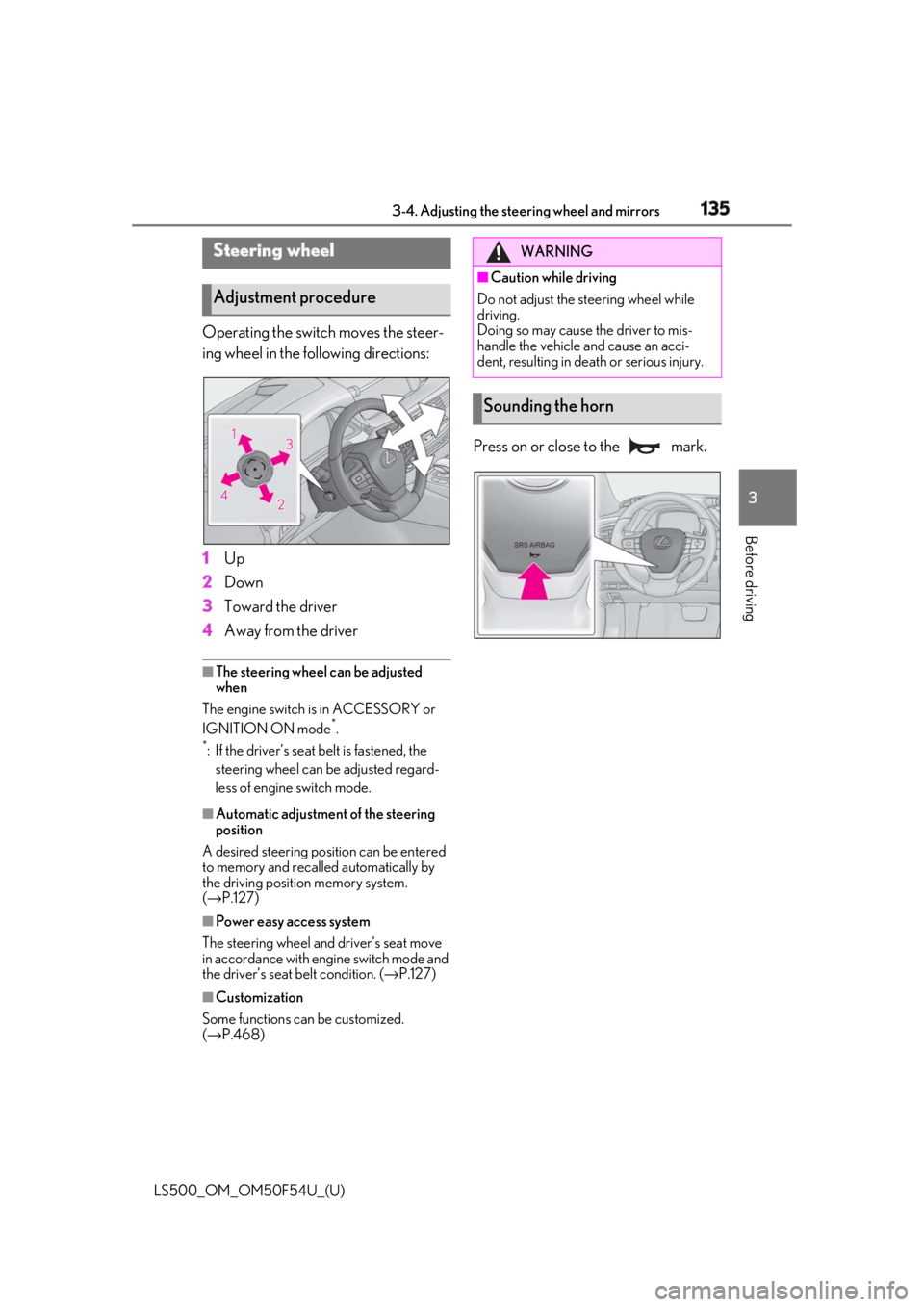
Operating the switch moves the steer-
ing wheel in the following directions:
1 Up
2 Down
3 Toward the driver
4 Away from the driver ■
The steering wheel can be adjusted
when
The engine switch is in ACCESSORY or
IGNITION ON mode *
.*
: If the driver’s seat belt is fastened, the
steering wheel can be adjusted regard-
less of engine switch mode.
■
Automatic adjustment of the steering
position
A desired steering position can be entered
to memory and recalled automatically by
the driving position memory system.
( → P.127)
■
Power easy access system
The steering wheel and driver’s seat move
in accordance with engine switch mode and
the driver’s seat belt condition. ( → P.127)
■
Customization
Some functions can be customized.
( → P.468) Press on or close to the mark.Steering wheel
Adjustment procedure WARNING■
Caution while driving
Do not adjust the steering wheel while
driving.
Doing so may cause the driver to mis-
handle the vehicle and cause an acci-
dent, resulting in death or serious injury.
Sounding the horn