2018 LEXUS LS500 mirror
[x] Cancel search: mirrorPage 345 of 514
3455-6. Using the other interior features
LS500_OM_OM50F54U_(U) 5
Interior features ■
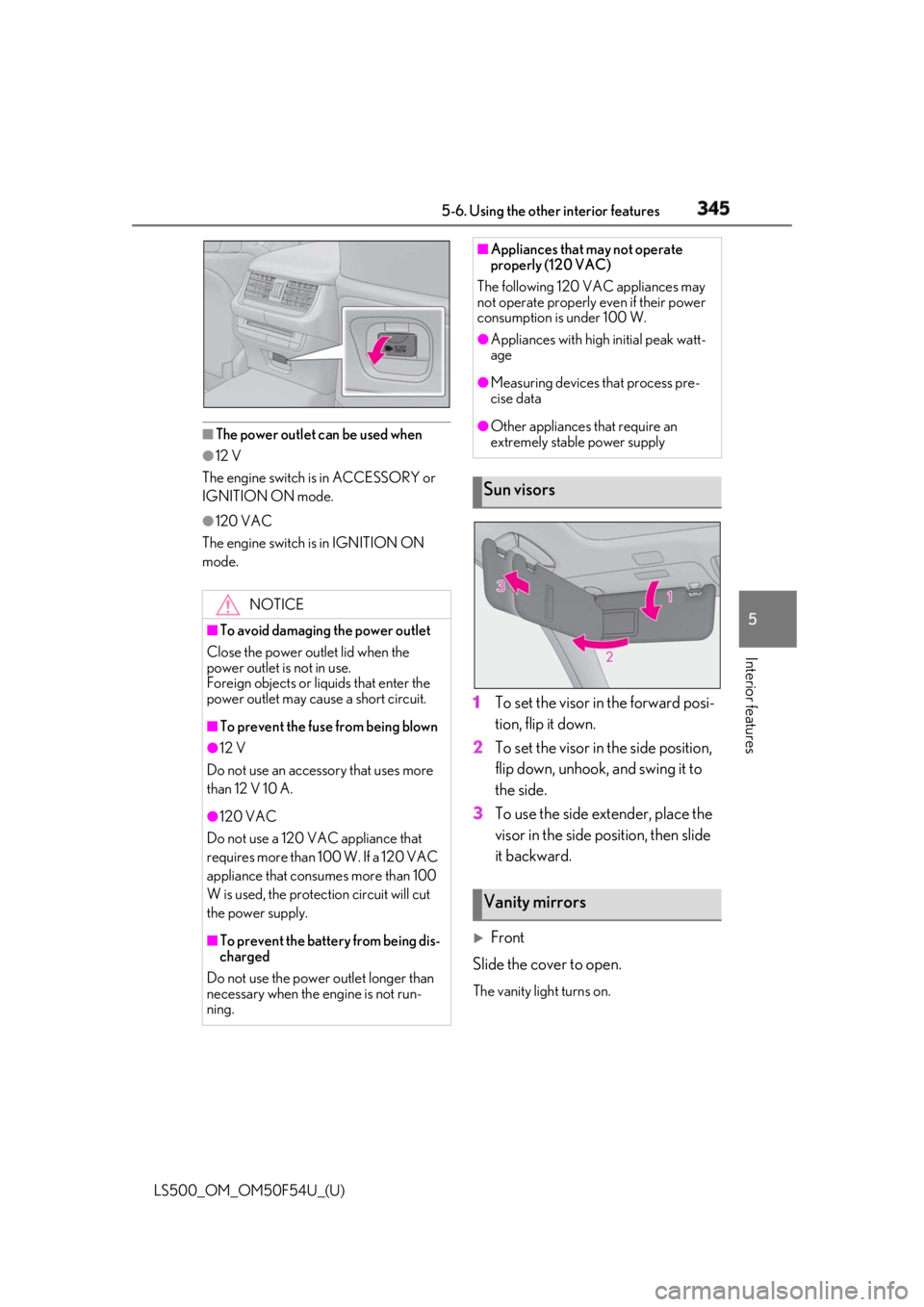
The power outlet can be used when●
12 V
The engine switch is in ACCESSORY or
IGNITION ON mode. ●
120 VAC
The engine switch is in IGNITION ON
mode.
1 To set the visor in the forward posi-
tion, flip it down.
2 To set the visor in the side position,
flip down, unhook, and swing it to
the side.
3 To use the side extender, place the
visor in the side position, then slide
it backward.
Front
Slide the cover to open. The vanity light turns on.NOTICE■
To avoid damaging the power outlet
Close the power outlet lid when the
power outlet is not in use.
Foreign objects or liquids that enter the
power outlet may cause a short circuit. ■
To prevent the fuse from being blown●
12 V
Do not use an accessory that uses more
than 12 V 10 A.
●
120 VAC
Do not use a 120 VAC appliance that
requires more than 100 W. If a 120 VAC
appliance that consumes more than 100
W is used, the protection circuit will cut
the power supply.
■
To prevent the battery from being dis-
charged
Do not use the power outlet longer than
necessary when the engine is not run-
ning. ■
Appliances that may not operate
properly (120 VAC)
The following 120 VAC appliances may
not operate properly even if their power
consumption is under 100 W. ●
Appliances with high initial peak watt-
age ●
Measuring devices that process pre-
cise data ●
Other appliances that require an
extremely stable power supply
Sun visors
Vanity mirrors
Page 346 of 514
346 5-6. Using the other interior features
LS500_OM_OM50F54U_(U)
Rear
Press the button to open. The vanity light turns on.
■
To prevent battery discharge
If the vanity lights remain on when the
engine switch is turned off, the lights will go
off automatically after 20 minutes.
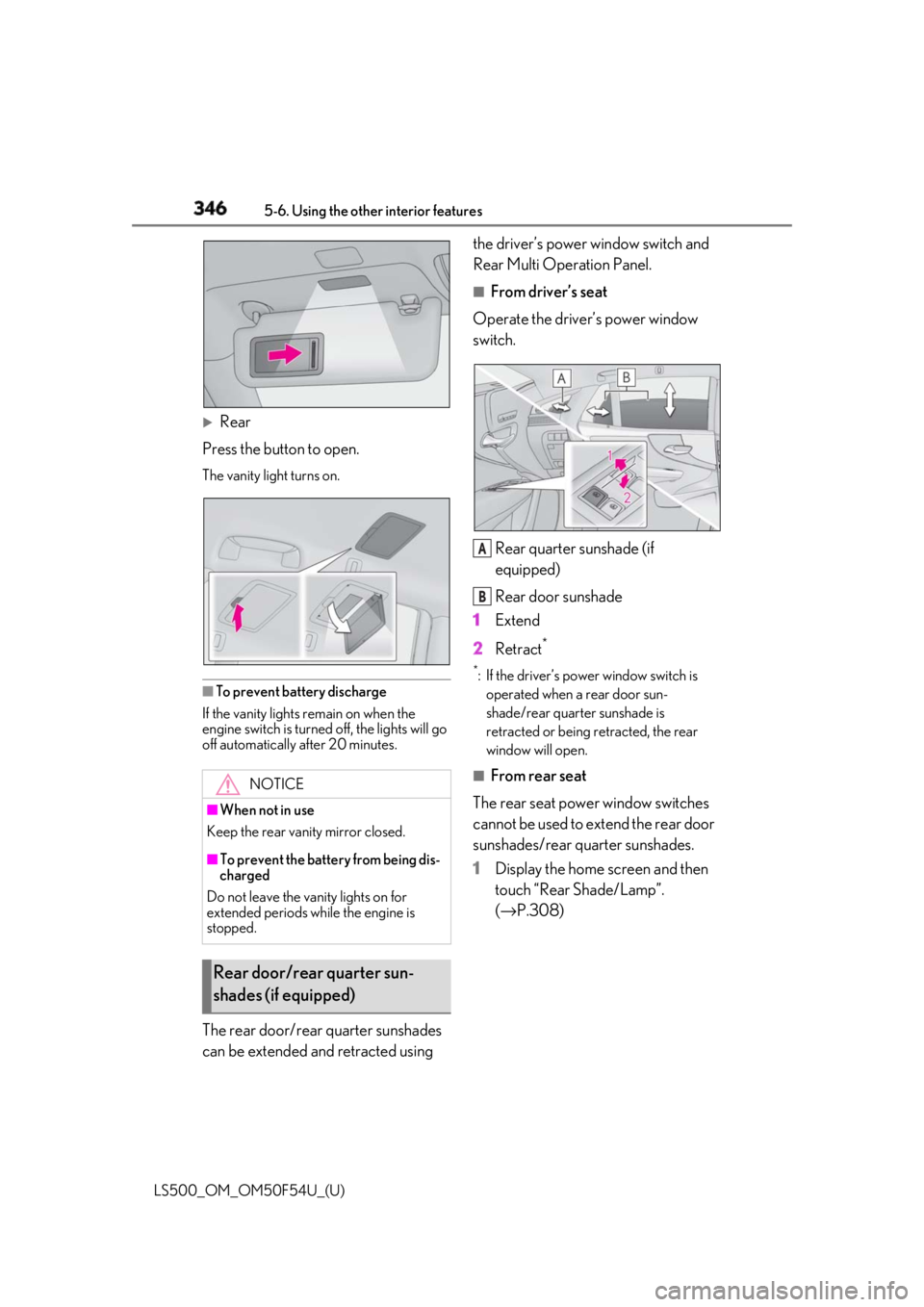
The rear door/rear quarter sunshades
can be extended and retracted using the driver’s power window switch and
Rear Multi Operation Panel. ■
From driver’s seat
Operate the driver’s power window
switch.
Rear quarter sunshade (if
equipped)
Rear door sunshade
1 Extend
2 Retract **
: If the driver’s power window switch is
operated when a rear door sun-
shade/rear quarter sunshade is
retracted or being retracted, the rear
window will open. ■
From rear seat
The rear seat power window switches
cannot be used to extend the rear door
sunshades/rear quarter sunshades.
1 Display the home screen and then
touch “Rear Shade/Lamp”.
( → P.308)NOTICE
■
When not in use
Keep the rear vani ty mirror closed.
■
To prevent the battery from being dis-
charged
Do not leave the vanity lights on for
extended periods while the engine is
stopped.
Rear door/rear quarter sun-
shades (if equipped) A
B
Page 351 of 514
3515-6. Using the other interior features
LS500_OM_OM50F54U_(U) 5
Interior features
■
Before programming HomeLink ®
During programming, it is possible
that garage doors, gates, or other
devices may operate. For this rea-
son, make sure that people and
objects are clear of the garage door
or other devices to prevent injury or
other potential harm.
It is recommended that a new bat-
tery be placed in the remote control
transmitter for more accurate pro-
gramming.
Garage door opener motors manu-
factured after 1995 may be
equipped with rolling code protec-
tion. If this is the case, you may need
a stepladder or other sturdy, safe
device to reach the “Learn” or
“Smart” button on the garage door
opener motor. ■
Programming HomeLink ®
Steps 1 through 3 must be performed
within 60 seconds, otherwise the indi-
cator light will stop flashing and pro-
gramming will not be able to be
completed.
1 Press and release the HomeLink ®
button you want to program and
check that the HomeLink ®
indica-
tor light flashes (orange).
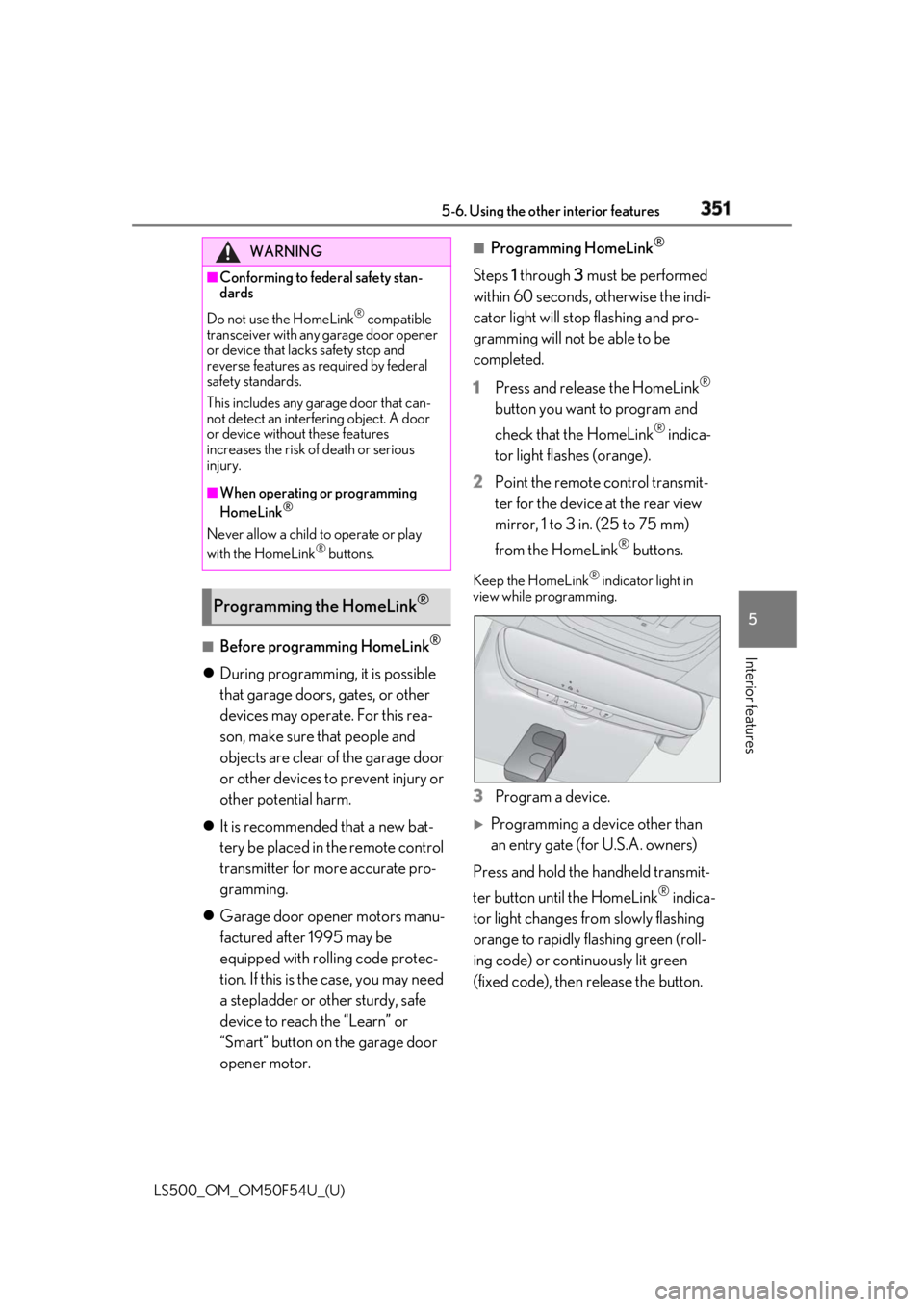
2 Point the remote control transmit-
ter for the device at the rear view
mirror, 1 to 3 in. (25 to 75 mm)
from the HomeLink ®
buttons.Keep the HomeLink ®
indicator light in
view while programming.
3 Program a device.
Programming a device other than
an entry gate (for U.S.A. owners)
Press and hold the handheld transmit-
ter button until the HomeLink ®
indica-
tor light changes from slowly flashing
orange to rapidly flashing green (roll-
ing code) or continuously lit green
(fixed code), then release the button.WARNING■
Conforming to federal safety stan-
dards
Do not use the HomeLink ®
compatible
transceiver with any garage door opener
or device that lacks safety stop and
reverse features as required by federal
safety standards.
This includes any garage door that can-
not detect an interfering object. A door
or device without these features
increases the risk of death or serious
injury. ■
When operating or programming
HomeLink ®
Never allow a child to operate or play
with the HomeLink ®
buttons.
Programming the HomeLink ®
Page 362 of 514

362 6-1. Maintenance and care
LS500_OM_OM50F54U_(U) 6-1.Maintenance and care
Working from top to bottom, liber-
ally apply water to the vehicle body,
wheel wells and underside of the
vehicle to remove any dirt and dust.
Wash the vehicle body using a
sponge or soft cloth, such as a
chamois.
For hard-to-remove marks, use car
wash soap and rinse thoroughly with
water.
Wipe away any water.
Wax the vehicle when the water-
proof coating deteriorates. If water does not bead on a clean surface,
apply wax when the vehicle body is cool.
■
Self-restoring coat
The vehicle body has a self-restoring coat-
ing that is resistant to small surface
scratches caused in a car wash etc.
●
The coating lasts for 5 to 8 years from
when the vehicle is delivered from the
plant.
●
The restoration time differs depending on
the depth of the scratch and outside tem-
perature.
The restoration time may become
shorter when the coating is warmed by
applying warm water.
●
Deep scratches caused by keys, coins,
etc. cannot be restored.
●
Do not use wax that contains abrasives. ■
Automatic car washes ●
Before washing the vehicle:
• Fold the mirrors
• Turn off the power trunk opener and
closer (if equipped)
Start washing from the front of the vehicle.
Extend the mirrors before driving.●
Brushes used in automatic car washes
may scratch the vehicl e surface and harm
your vehicle’s paint. ■
High pressure car washes ●
Do not allow the nozzles of the car wash
to come within close proximity of the win-
dows and the air suspension unit (if
equipped). ●
Before using the car wash, check that the
fuel filler door on your vehicle is closed
properly. ■
When using a car wash
If the door handle becomes wet while the
electronic key is within the effective range,
the door may lock and unlock repeatedly. In
that case, follow the following correction
procedures to wash the vehicle: ●
Place the key in a position 6 ft. (2 m) or
more separate from the vehicle while the
vehicle is being wash ed. (Take care to
ensure that the key is not stolen.) ●
Set the electronic key to battery-saving
mode to disable the smart access system
with push-button start. ( → P.108)■
Aluminum wheels ●
Remove any dirt immediately by using a
neutral detergent. ●
Wash detergent off with water immedi-
ately after use.
●
To protect the paint from damage, make
sure to observe the following precau-
tions.
• Do not use acidic, alkaline or abrasive
detergent
• Do not use hard brushes
• Do not use detergent on the wheels when
they are hot, such as after driving or park-
ing in hot weatherCleaning and protecting the
vehicle exterior Perform cleaning in a manner
appropriate to each component
and its material.
Cleaning instructions
Page 476 of 514
474 8-2. Customization
LS500_OM_OM50F54U_(U) *
:If equipped ■
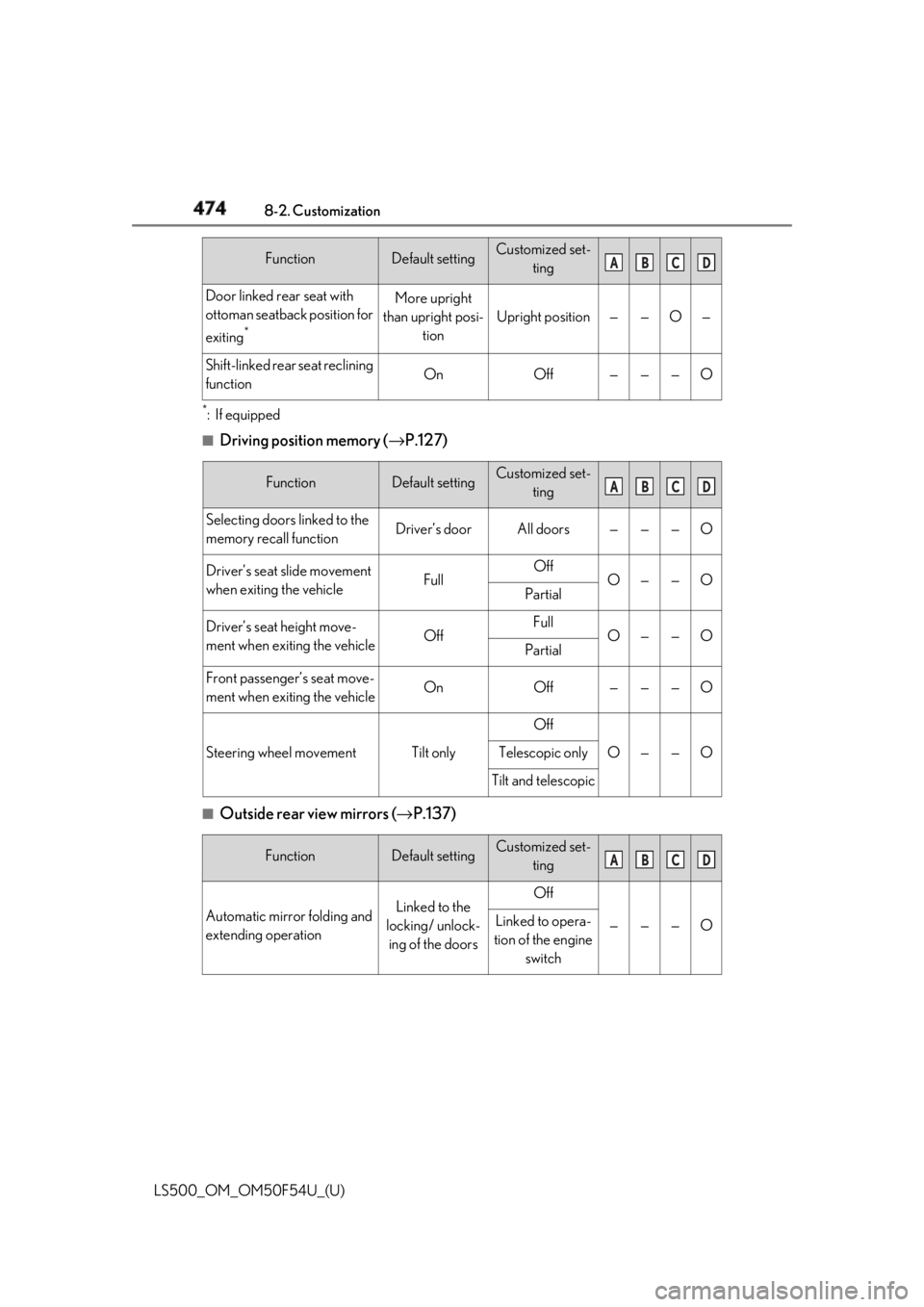
Driving position memory ( → P.127)
■
Outside rear view mirrors ( → P.137)Door linked rear seat with
ottoman seatback position for
exiting *
More upright
than upright posi-
tion Upright position — — O —
Shift-linked rear seat reclining
function On Off — — — O
Function Default setting Customized set-
ting
Selecting doors linked to the
memory recall function Driver’s door All doors — — — O
Driver’s seat slide movement
when exiting the vehicle Full Off
O — — O
Partial
Driver’s seat height move-
ment when exiting the vehicle Off Full
O — — O
Partial
Front passenger’s seat move-
ment when exiting the vehicle On Off — — — O
Steering wheel movement Tilt only Off
O — — OTelescopic only
Tilt and telescopic
Function Default setting Customized set-
ting
Automatic mirror folding and
extending operation Linked to the
locking/ unlock-
ing of the doors Off
— — — OLinked to opera-
tion of the engine
switchFunction Default setting Customized set-
ting A B C D
A B C D
A B C D
Page 479 of 514

4778-2. Customization
LS500_OM_OM50F54U_(U) 8
Vehicle specifications *
:If equipped ■
RSA (Road Sign Assist) *
( → P.238)
*
:If equipped
■
BSM (Blind Spot Monitor) *
( → P.251)
*
:If equippedVehicle sway warning func-
tion On Off — O — —
Vehicle sway warning sensi-
tivity Standard High
— O — —
Low
Function Default setting Customized set-
ting
RSA (Road Sign Assist) On Off — O — —
Excess speed notification
method Display only No notification
— O — —
Display and
buzzer
Excess speed notification
level 1 mph (2 km/h) 3 mph (5 km/h)
— O — —
5 mph (10 km/h)
Other notifications method
(No-entry notification) Display only No notification
— O — —
Display and
buzzer
Function Default setting Customized set-
ting
BSM (Blind Spot Monitor) On Off — O — —
Outside rear view mirror indi-
cator brightness Bright Dim — O — —
Alert timing for presence of
approaching vehicle (sensitiv-
ity) Intermediate Early
— O — —Late
Only when vehi-
cle detected in
blind spotFunction Default setting Customized set-
ting A B C D
A B C D
A B C D
Page 500 of 514

498 Alphabetical Index
LS500_OM_OM50F54U_(U) Brightness control
Instrument panel light control ..........71, 75
BSM (Blind Spot Monitor).........................251 C
Card key ............................................................ 92
Care
Aluminum wheels ...................................... 362
Exterior ........................................................... 362
Interior .............................................................365
Seat belts........................................................365
Cargo capacity.............................................. 158
Cargo net ....................................................... 339
Center Display ............................................. 306
Chains ..............................................................300
Child restraint system
Fixed with a LATCH system .................. 53
Fixed with a seat belt................................... 49
Front passenger occupa nt classification
system ............................................................. 40
Points to remember .................................... 45
Riding with children ..................................... 45
Types of child restraint system installation
method ........................................................... 46
Using an anchor bracket .......................... 55
Child safety
Airbag precautions...................................... 34
Battery precautions ......................385, 442
Child restraint system................................. 46
Heated steering wheel and seat heater
precautions................................................ 326
How your child should wear the seat belt
............................................................................ 25
Moon roof precautions ............................143
Panoramic moon roof precautions .... 147
Power window lock switch.......................141
Power window precautions .................. 140
Rear door child-protectors ..................... 99
Removed electronic key battery precau-
tions ...............................................................404
Seat belt extender precautions ............. 25
Seat belt precautions .................................. 45 Trunk precautions.......................................100
Child-protectors............................................. 99
Cleaning
Aluminum wheels ......................................362
Exterior............................................................362
Interior ............................................................ 365
Radar sensor .............................. 190, 191, 197
Seat belts ....................................................... 365
Clock ................................................ 69, 72, 344
Clock light ...................................................... 330
Coat hooks..................................................... 343
Coin holder .................................................... 336
Condenser ..................................................... 382
Console box .................................................. 337
Consumption screen .................................... 87
Cooling system.............................................. 381
Engine overheating................................... 443
Cornering lights ............................................. 177
Cruise control
Dynamic radar cruise control with
full-speed range ........................... 238, 241
Cup holders ................................................... 336
Current fuel consumption .......................... 78
Curtain shield airbags .................................. 29
Customizable features .............................. 468
D
Daytime running light system ................... 175
Defogger
Outside rear view mirrors.......................314
Rear window ..................................................314
Windshield ......................................................314
Differential
Front differential oi l............. .............. .........452
Rear differential oil......... .......... ........... .......453
Dimension ...................................................... 448
Dinghy towing.................................................159
Display
Center Display ........................................... 306
Dynamic radar cruise control with
full-speed range ........................................241
Head-up display............................................83
Page 501 of 514

4991-1. What to do if... (Troubleshooting)
LS500_OM_OM50F54U_(U) 499Alphabetical Index
Intuitive parking assist.............................. 257
LKA (Lane-Keeping Assist)................. 234
LTA (Lane-Tracing Assist) ................... 225
Multi-information display .......................... 76
Parking Support Brake function (rear
pedestrians) ..............................................286
RCD (Rear Camera Detection) ........268
RCTA .............................................................. 264
Warning message..................................... 428
Distance until next engine oil
change ..................................................... 70, 75
Do-it-yourself maintenance .................... 369
Door courtesy lights ................................... 330
Door lock
Doors.................................................................. 96
Smart access system with push-button
start ..................................................................107
Wireless remote control........................... 94
Doors
Automatic door lock ing and unlocking
system ........................................................... 100
Door closer ..................................................... 99
Door glasses ..................................................139
Door lock.......................................................... 96
Open door warning bu zzer .......... 97, 99
Outside rear view mirrors ...................... 137
Rear door child-protectors ..................... 99
Drive distance .................................................. 78
Drive info 1/Drive info 2 .............................. 78
Driver’s seat position memory
Driving position memory......................... 127
Memory recall function ........................... 130
Power easy access system ..................... 127
Drive-start control ......................................... 151
Driving
Break-in tips .................................................... 151
Correct driving posture .............................23
Driving mode select switch ..................289
Procedures .................................................... 150
Winter drive tips......................................... 299
Driving information display ........................ 78 Driving position memory............................ 127
Memory recall function............................ 130
Power easy access system ..................... 127
Driving range ................................................... 78
Driving support system information display
...............................................................................81
DRS (Dynamic Rear Steering) .............. 294
Dynamic radar cruise control with
full-speed range .............................. 238, 241
Warning message .................................... 250
Dynamic Rear Steering (DRS) .............. 294 E
ECB (Electronically Controlled Brake Sys-
tem) ................................................................ 294
Eco Driving Indicator............................ 79, 87
Eco Driving Indicator Light .........................79
EDR (Event data recorder) ............................7
Elapsed time ..................................................... 78
Electric Power Steering (EPS) .............. 294
Warning light .................................................421
Electronic key .................................................. 92
Battery-saving function............................108
If the electronic key does not operate
properly .......................................................436
Replacing the battery .............................. 403
Electronic roof sunshade
Jam protection function ........................... 146
Operation ........................................................144
Electronically Controlled Brake System
(ECB) ............................................................ 294
Electronically modulated air suspension
............................................................................291
Emergency flashers ..................................... 410
Emergency, in case of
If a warning buzzer sounds.................... 418
If a warning light turns on........................ 418
If a warning message is displayed .....428
If the battery is discharged ................... 438
If the electronic key does not operate
properly .......................................................436