Page 314 of 514
314 5-3. Using the air conditioning system and defogger
LS500_OM_OM50F54U_(U) ■
Changing the air flow mode
→ P.316 ■
Switching between outside air and
recirculated air modes
Press the outside/recirculated air
mode switch. The mode changes as follows each time
the switch is pressed.
automatic mode → (outside air
mode) → (recirculated air mode)
→ automatic mode
When the system is switched to automatic
mode, the air conditioning system operates
automatically. ■
Defogging the windshield
Defoggers are used to defog the wind-
shield and front side windows.
Press the windshield defogger switch. Set the outside/reci rculated air mode
switch to outside air mode if the recircu-
lated air mode is used. (It may switch auto-
matically.)
To defog the windshield and the side win-
dows quickly, turn the air flow and tem-
perature up.
To return to the previous mode, press the
windshield defogger switch again when the
windshield is defogged.
■
Defogging the rear window and
outside rear view mirrors
Defoggers are used to defog the rear
window, and to remove raindrops, dew
and frost from the outside rear view
mirrors.
Press the rear window and outside rear
view mirror defoggers switch.
The defoggers will automatically turn off after a while. The operation time changes
according to the ambient temperature and
vehicle speed. ■
Windshield wiper de-icer (if
equipped)
→ P.319 ■
When the outside temperature exceeds
75°F (24°C) and the air conditioning
system is on ●
In order to reduce the air conditioning
power consumption, the air conditioning
system may switch to recirculated air
mode automatically. This may also
reduce fuel consumption. ●
It is possible to switch to outside air mode
at any time by pressing the outside/recir-
culated air mode switch. ■
Fogging up of the windows
The windows will easily fog up when the
humidity in the vehicle is high. Turning “A/C”
on will dehumidify the air from the outlets
and defog the windshield effectively. ●
If you turn “A/C” off, the windows may fog
up more easily. ●
The windows may fog up if the recircu-
lated air mode is used. ■
Outside/recirculated air mode ●
When driving on dusty roads such as tun-
nels or in heavy traffic, set the out-
side/recirculated air mode switch to the
recirculated air mode. This is effective in
preventing outside air from entering the
vehicle interior. During cooling opera-
tion, setting the recirc ulated air mode will
also cool the vehicle interior effectively.
●
Outside/recirculated air mode may auto-
matically switch depending on the tem-
perature setting or the inside
temperature.
■
Registering air conditioning settings to
electronic keys
●
Unlocking the vehicle using an electronic
key and turning the engine switch to
IGNITION ON mode will recall that
key’s registered air conditioning settings.
Page 315 of 514

3155-3. Using the air conditio ning system and defogger
LS500_OM_OM50F54U_(U) 5
Interior features ●
When the engine switch is turned off, the
current air conditioning settings will auto-
matically be registered to the electronic
key that was used to unlock the vehicle.●
The system may not operate correctly if
more than one electr onic key is in the
vicinity or if the smart access system with
push-button start is used to unlock a pas-
senger door.●
The doors that can recall the air condi-
tioning setting *
when unlocked using the
smart access system with push-button
start can be changed. For details, contact
your Lexus dealer. *
: The doors that can recall the driving
position memory are changed at the
same time.■
Operation of the air conditioning sys-
tem in Eco drive mode
In Eco drive mode, the air conditioning sys-
tem is controlled as follows to prioritize fuel
efficiency: ●
Engine speed and compressor operation
controlled to restri ct heating/cooling
capacity●
Fan speed restricted when automatic
mode is selected
To improve air condit ioning performance,
perform the following operations: ●
Turn off eco air conditioning mode
( → P.316) ●
Adjust the fan speed●
Turn off Eco drive mode ( → P.289)
■
When the outside temperature falls to
nearly 32°F (0°C)
The dehumidification function may not
operate even when “A/C” is selected.
■
Ventilation and air conditioning odors
●
To let fresh air in, set the air conditioning
system to the outside air mode.
●
During use, various odors from inside and
outside the vehicle may enter into and
accumulate in the air conditioning sys-
tem. This may then cause odor to be
emitted from the vents.
●
To reduce potential odors from occur- ring:
• It is recommended that the air condition-
ing system be set to outside air mode
prior to turning the vehicle off.
• The start timing of the blower may be
delayed for a short pe riod of time imme-
diately after the air conditioning system is
started in automatic mode or with the
micro dust and pollen filter on. ●
When parking, the system automatically
switches to outside air mode to encour-
age better air circulation throughout the
vehicle, helping to reduce odors that
occur when starting the vehicle. ■
Using the voice command system
Air conditioning system can be operated
using voice commands. For details, refer to
the “NAVIGATION AND MULTIMEDIA
SYSTEM OWNER’S MANUAL”. ■
Air conditioning filter
→ P.402 ■
Customization
Some functions can be customized.
( → P.468)
WARNING■
To prevent the windshield from fog-
ging up
Do not use the windshield defogger
switch during cool air operation in
extremely humid weather. The difference
between the temperature of the outside
air and that of the windshield can cause
the outer surface of the windshield to fog
up, blocking your vision.
■
When the outside rear view mirror
defoggers are operating
Do not touch the outside rear view mir-
ror surfaces, as they can become very
hot and burn you.
Page 330 of 514
330 5-4. Using the interior lights
LS500_OM_OM50F54U_(U) 5-4.Using the interior lights
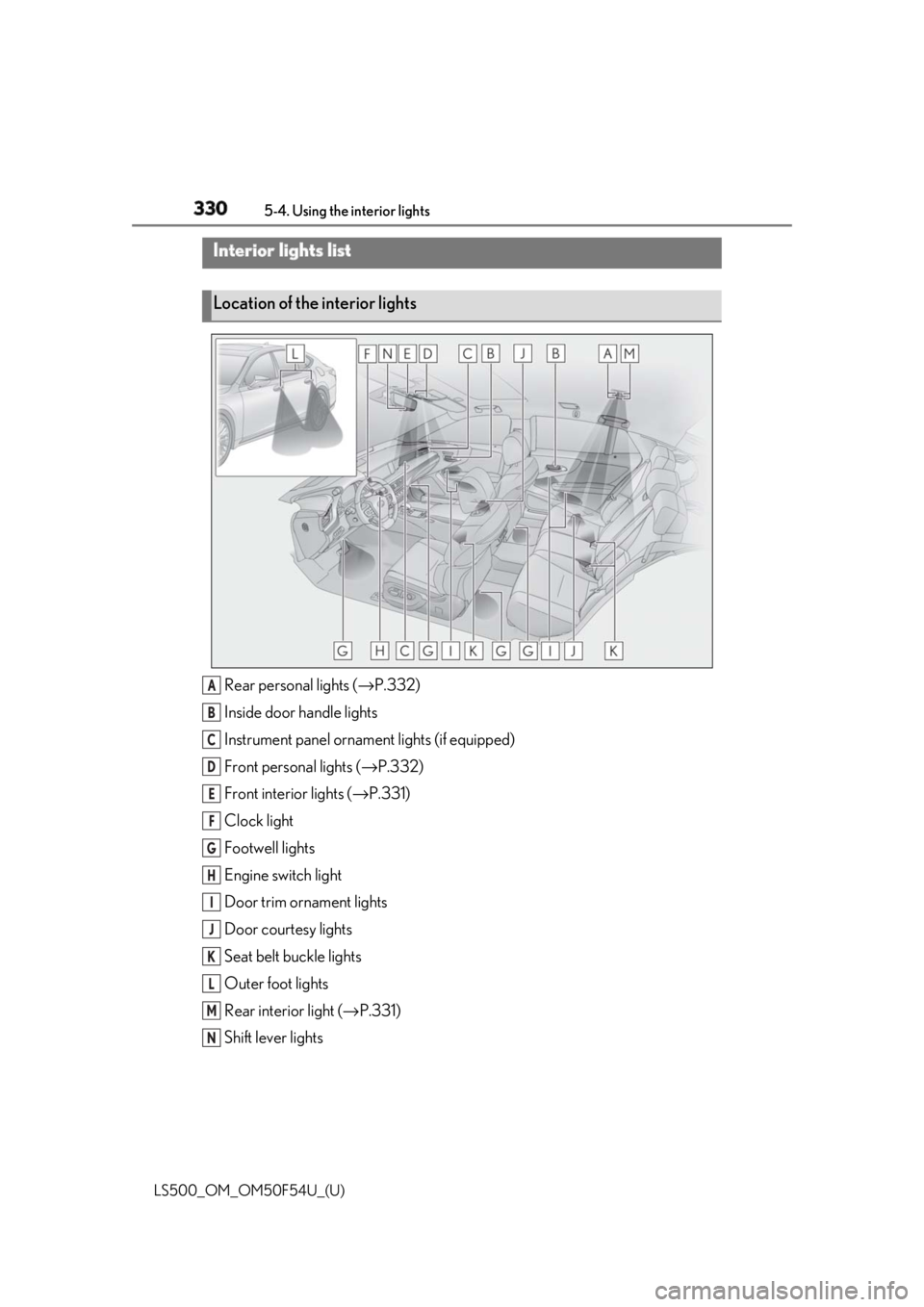
Rear personal lights ( → P.332)
Inside door handle lights
Instrument panel orname nt lights (if equipped)
Front personal lights ( → P.332)
Front interi or lights ( → P.331)
Clock light
Footwell lights
Engine switch light
Door trim ornament lights
Door courtesy lights
Seat belt buckle lights
Outer foot lights
Rear interior light ( → P.331)
Shift lever lightsInterior lights list
Location of the interior lights
A
B
C
D
E
F
G
H
I
J
K
L
M
N
Page 333 of 514
3335-4. Using the interior lights
LS500_OM_OM50F54U_(U) 5
Interior features ■
Illuminated entry system
The lights automatically turn on/off accord-
ing to the engine switch mode, the pres-
ence of the electronic key, whether the
doors are locked/unlocked, and whether
the doors are opened/closed. ■
To prevent the battery from being dis-
charged
If the interior lights remain on when the
engine switch is turned off, the lights will go
off automatically after 20 minutes. ■
When front interior light or front per-
sonal lights do not respond as normal●
When water, dirt, et c., have adhered to
the lens surface●
When operated with a wet hand●
When wearing gloves, etc.■
Customization
Some functions can be customized.
( → P.468)
NOTICE■
To prevent battery discharge
Do not leave the lights on longer than
necessary when the engine is not run-
ning.
■
Removing light lenses
Never remove the lens for the front inte-
rior light and front personal lights. Other-
wise, the lights will be damaged. If a lens
needs to be removed, contact your Lexus
dealer.
Page 335 of 514
3355-5. Using the storage features
LS500_OM_OM50F54U_(U) 5
Interior features
Vehicles with power rear seat
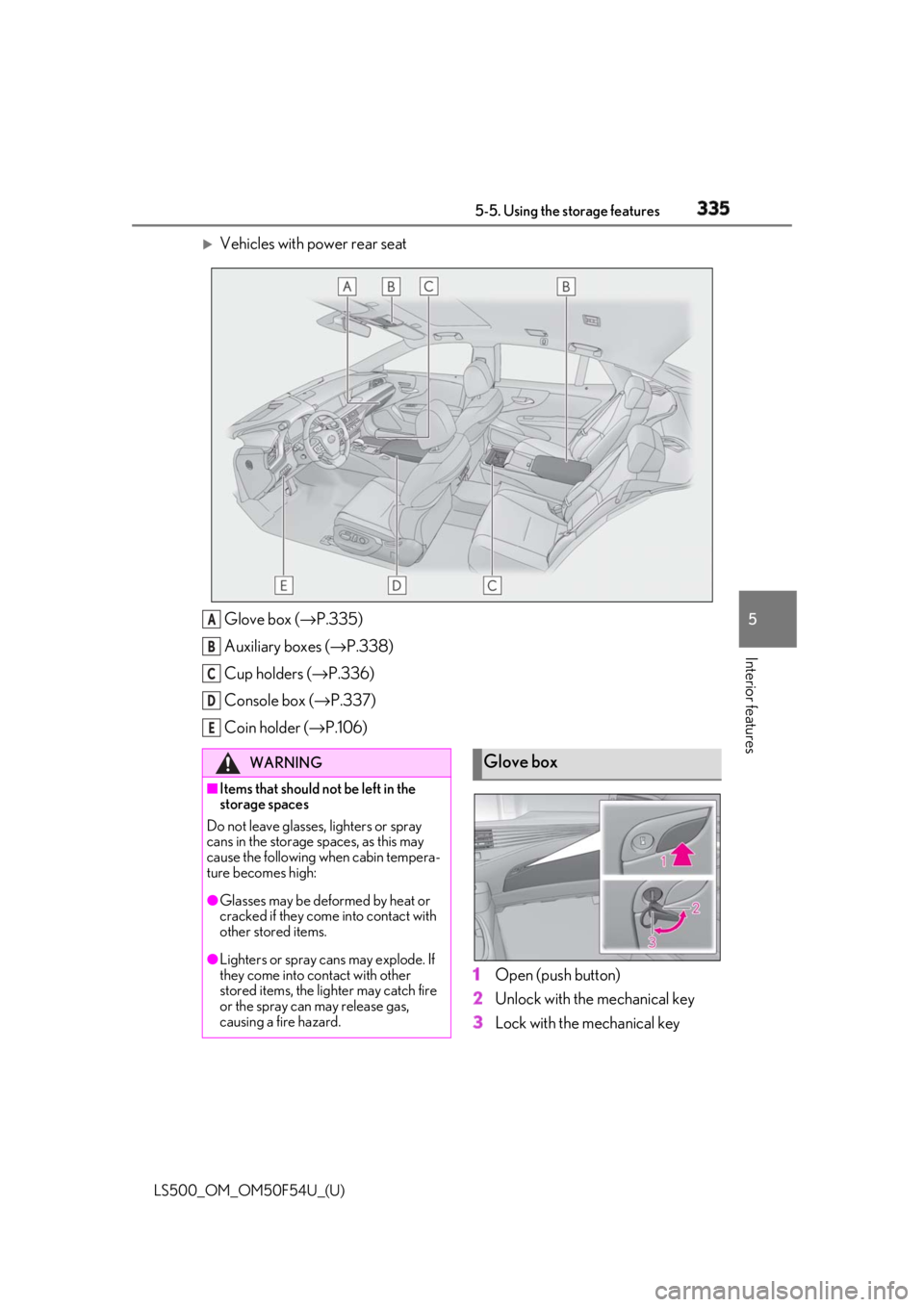
Glove box ( → P.335)
Auxiliary boxes ( → P.338)
Cup holders ( → P.336)
Console box ( → P.337)
Coin holder ( → P.106)
1 Open (push button)
2 Unlock with the mechanical key
3 Lock with the mechanical keyA
B
C
D
E
WARNING■
Items that should not be left in the
storage spaces
Do not leave glasses, lighters or spray
cans in the storage spaces, as this may
cause the following when cabin tempera-
ture becomes high:
●
Glasses may be deformed by heat or
cracked if they come into contact with
other stored items.
●
Lighters or spray cans may explode. If
they come into contact with other
stored items, the lighter may catch fire
or the spray can may release gas,
causing a fire hazard. Glove box
Page 343 of 514
3435-6. Using the other interior features
LS500_OM_OM50F54U_(U) 5
Interior features
Vehicle without power rear seat
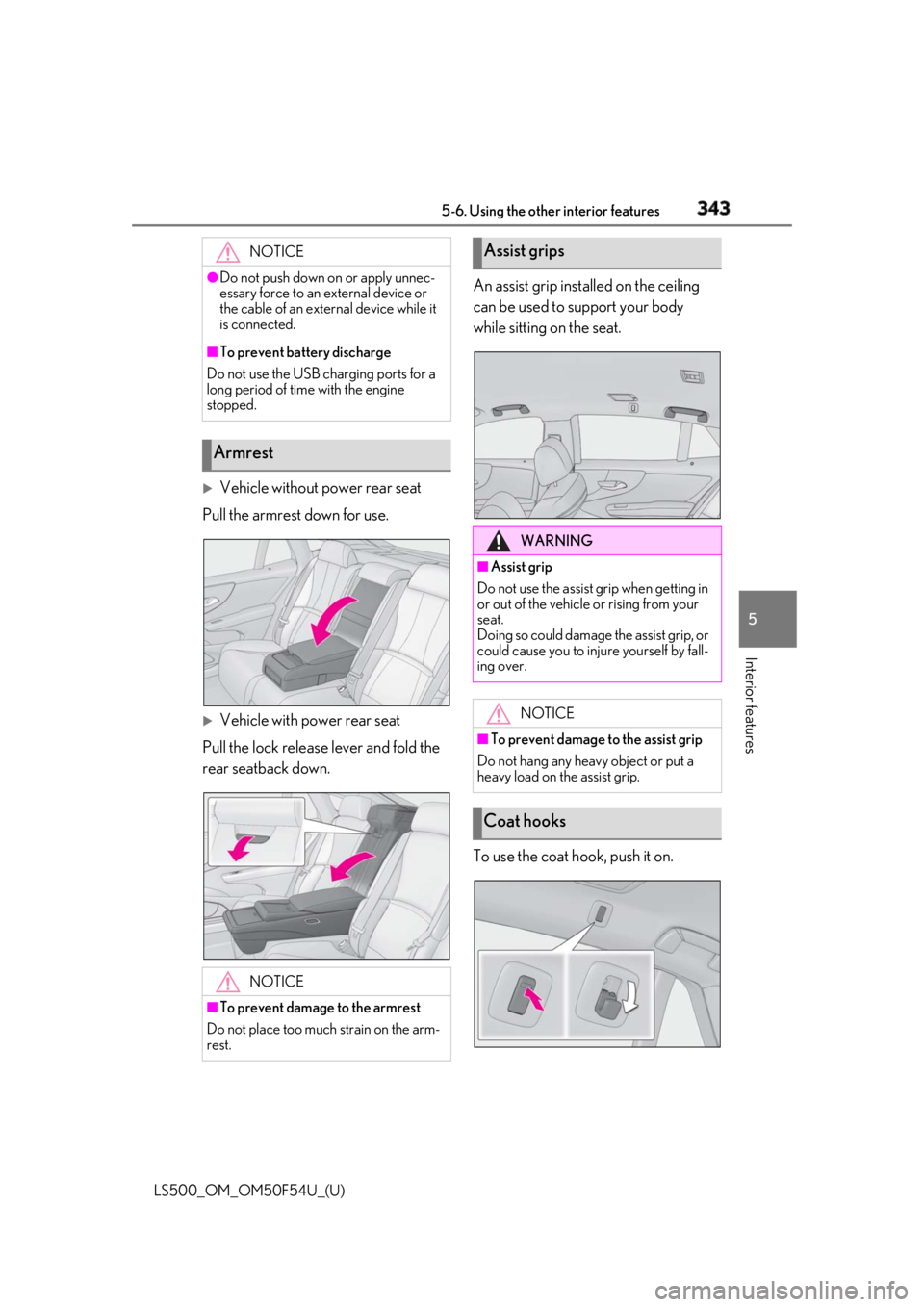
Pull the armrest down for use.
Vehicle with power rear seat
Pull the lock release lever and fold the
rear seatback down. An assist grip installed on the ceiling
can be used to support your body
while sitting on the seat.
To use the coat hook, push it on.NOTICE●
Do not push down on or apply unnec-
essary force to an external device or
the cable of an external device while it
is connected.■
To prevent battery discharge
Do not use the USB charging ports for a
long period of time with the engine
stopped.
Armrest
NOTICE
■
To prevent damage to the armrest
Do not place too much strain on the arm-
rest. Assist grips
WARNING■
Assist grip
Do not use the assist grip when getting in
or out of the vehicle or rising from your
seat.
Doing so could damage the assist grip, or
could cause you to injure yourself by fall-
ing over.
NOTICE■
To prevent damage to the assist grip
Do not hang any heavy object or put a
heavy load on the assist grip.
Coat hooks
Page 344 of 514
344 5-6. Using the other interior features
LS500_OM_OM50F54U_(U) The GPS clock’s time is automatically
adjusted by utilizing GPS time infor-
mation. For details, refer to “NAVIGA-
TION AND MULTIMEDIA SYSTEM
OWNER’S MANUAL”.
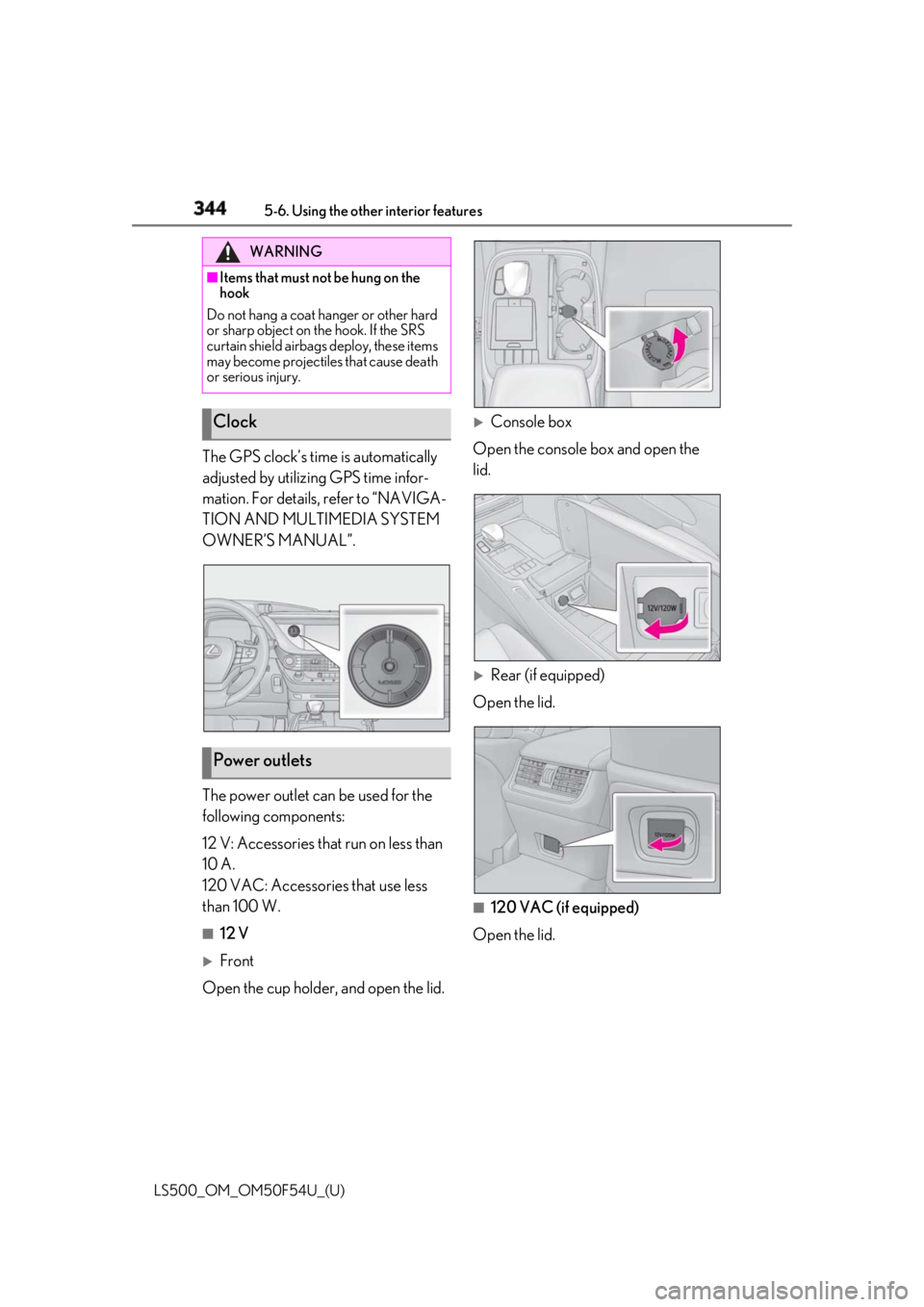
The power outlet can be used for the
following components:
12 V: Accessories that run on less than
10 A.
120 VAC: Accessories that use less
than 100 W. ■
12 V
Front
Open the cup holder , and open the lid.
Console box
Open the console box and open the
lid.
Rear (if equipped)
Open the lid.
■
120 VAC (if equipped)
Open the lid.WARNING■
Items that must not be hung on the
hook
Do not hang a coat ha nger or other hard
or sharp object on the hook. If the SRS
curtain shield airbags deploy, these items
may become projectiles that cause death
or serious injury.
Clock
Power outlets
Page 349 of 514
3495-6. Using the other interior features
LS500_OM_OM50F54U_(U) 5
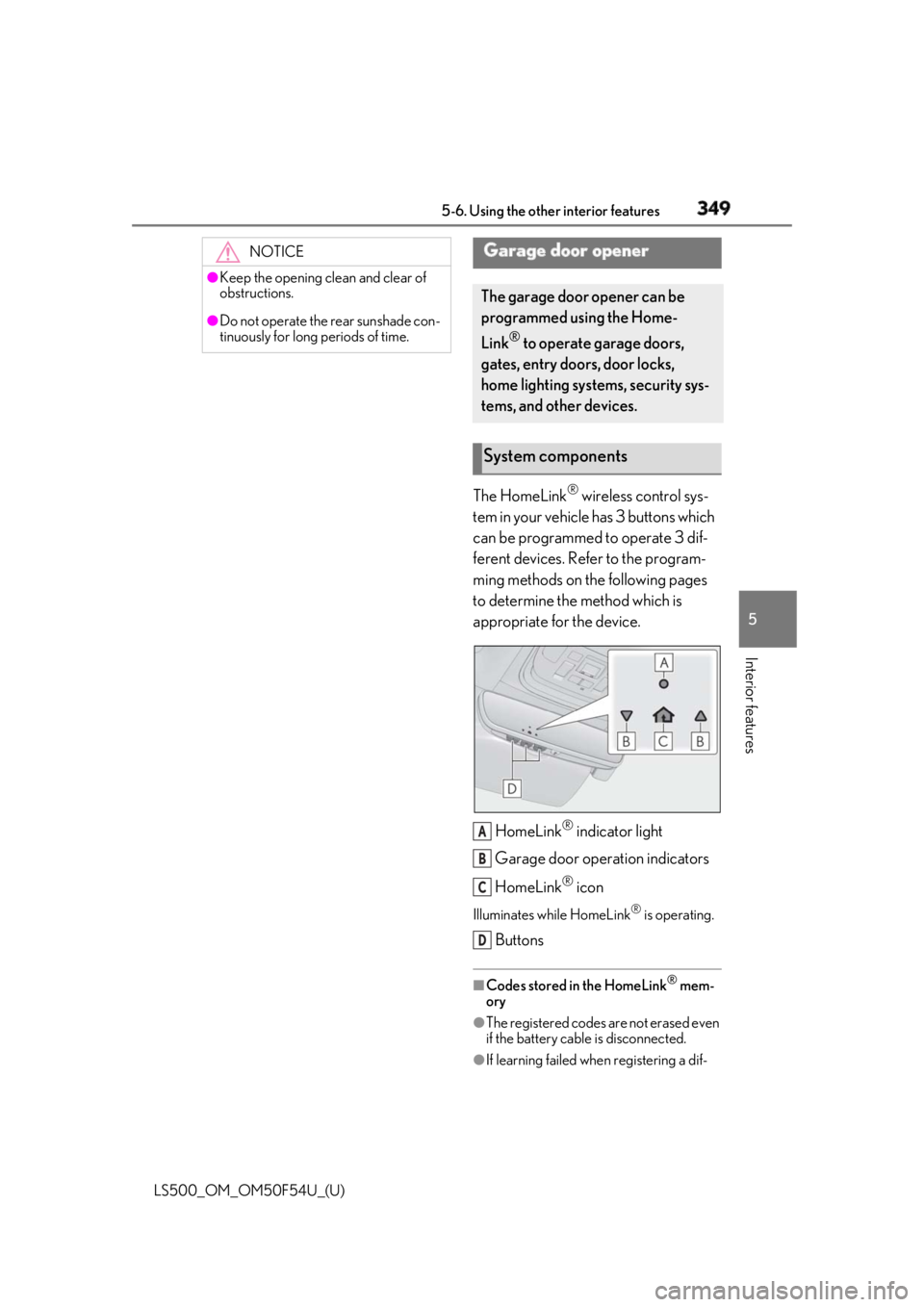
Interior features The HomeLink ®
wireless control sys-
tem in your vehicle has 3 buttons which
can be programmed to operate 3 dif-
ferent devices. Refer to the program-
ming methods on the following pages
to determine the method which is
appropriate for the device.
HomeLink ®
indicator light
Garage door operation indicators
HomeLink ®
iconIlluminates while HomeLink ®
is operating.
Buttons ■
Codes stored in the HomeLink ®
mem-
ory
●
The registered codes are not erased even
if the battery cable is disconnected.
●
If learning failed when registering a dif-NOTICE●
Keep the opening clean and clear of
obstructions.●
Do not operate the rear sunshade con-
tinuously for long periods of time.
Garage door opener The garage door opener can be
programmed using the Home-
Link ®
to operate garage doors,
gates, entry doors, door locks,
home lighting systems, security sys-
tems, and other devices.
System components
A
B
C
D