2018 KIA STINGER phone
[x] Cancel search: phonePage 131 of 551

Features of your vehicle
44
4
Make sure to refuel your vehicle
according to the “Fuel requirements”
suggested in chapter 1.
If the fuel filler cap requires replace-
ment, use only a genuine Kia cap or the
equivalent specified for your vehicle. An
incorrect fuel filler cap can result in a
serious malfunction of the fuel system
or emission control system.
WARNING- Cell phone
fires
Do not use cellular phones
while refueling. Electric current
and/or electronic interference
from cellular phones can poten-
tially ignite fuel vapors causing
a fire.
WARNING- Smoking
DO NOT use matches or a lighter
and DO NOT SMOKE or leave a lit
cigarette in your vehicle while at
a gas station especially during
refueling. Automotive fuel is
highly flammable and can, when
ignited, result in fire.
WARNING- Refueling & Vehicle fires
When refueling, always shut the
engine off. Sparks produced by
electrical components related
to the engine can ignite fuel
vapors causing a fire. Once
refueling is complete, check to
make sure the filler cap and
filler door are securely closed,
before starting the engine.
CAUTION- Exterior paint
Do not spill fuel on the exterior surfaces of the vehicle. Anytype of fuel spilled on paintedsurfaces may damage the paint.
Page 178 of 551

491
Features of your vehicle
Check headlights (if equipped)
This warning message illuminates if
there is a malfunction (burned-out
bulb or circuit malfunction) with the
head lights (high and low beam). In
this case, have the vehicle inspected
by an authorized Kia dealer.
✽ ✽NOTICE
• When replacing the bulb, use the
same wattage bulb.
For more information, refer to
“BULB WATTAGE” in chapter 8.
• If the different wattage bulb is equipped with the vehicle, this
warning message is not displayed.
Low Fuel
This warning message illuminates
if the fuel tank is nearly empty.
- When the low fuel level warninglight is illuminates.
Add fuel as soon as possible.
Check Smart Phone Wireless Charger (if equipped)
If a smart phone is still left on the
wireless charging pad unattended,
even when the the Engine Start/Stop
Button is in the ACC or OFF position
and the instrument panel's one time
driving information mode has fin-
ished, a warning message will lit up
on the instrument panel.
❈ For more details, refer to “Smart
Phone Wireless Charger” in this
chapter.
Page 196 of 551

4109
Features of your vehicle
✽ ✽NOTICE
• This system can only sense objects
within the range and location of
the sensors; It can not detect
objects in other areas where sen-
sors are not installed. Also, small
or slim objects, such as poles or
objects located between sensors
may not be detected by the sen-
sors. Always visually check behind
the vehicle when backing up.
• Be sure to inform any drivers of the vehicle that may be unfamiliar
with the system regarding the sys-
tems capabilities and limitations.
Non-operational conditions of
parking assist system
Parking assist system may not
operate normally when:
1. Moisture is frozen to the sensor. (It will operate normally when mois-
ture melts.)
2. Sensor is covered with foreign matter, such as snow or water, or
the sensor cover is blocked. (It will
operate normally when the materi-
al is removed or the sensor is no
longer blocked.)
3. Sensor is stained with foreign mat- ter such as snow or water.
(Sensing range will return to nor-
mal when removed.)
4.The parking assist button is off.
There is a possibility of parking assist system malfunction when:
1. Driving on uneven road surfaces such as unpaved roads, gravel,
bumps, or gradient.
2. Objects generating excessive noise such as vehicle horns, loud
motorcycle engines, or truck air
brakes can interfere with the sen-
sor.
3. Heavy rain or water spray.
4. Wireless transmitters or mobile phones present near the sensor.
5. Sensor is covered with snow.
Page 244 of 551

4157
Features of your vehicle
USB charger (if equipped)
The USB charger is designed to
recharge devices using a USB cable.
The electrical devices can be
recharged when the Engine Start/Stop
button is in ACC/ON/START position.
The battery charging state may be
monitored on the electrical device.
Disconnect the USB cable from the
USB port after use. Some devices are not supported
for fast charging but will be
charged with normal speed.
Use the USB charger when the engine is running to prevent bat-
tery discharge.
Only devices that fits the USB port can be used.
The USB charger can be used only for battery charging purposes.
Battery chargers cannot be charged.
Wireless smart phone charg-
ing system (if equipped)
A wireless smart phone charging
system located in front of the center
console
Firmly close all doors, and turn the
ignition to ACC or IGN ON. To start
wireless charging, place the smart
phone equipped with wireless charg-
ing function on the wireless charging
pad.
For best wireless charging results,
place the smart phone on the center
of the charging pad.
OCK047461
OCK047440N
Page 245 of 551
Features of your vehicle
158
4
The wireless charging system is
designed for one smart phone
equipped with QI per single usage
only. Please refer to the smart phone
accessory cover or the smart phone
manufacturer homepage to check
whether your smart phone supports
QI function.Wireless smart phone charging
1. Remove any object on the smart
phone charging pad including the
smart key. If there is any foreign
object on the pad other than a
smart phone, the wireless charging
function may not operate properly.
2. Place the smart phone on the cen- ter of the wireless charging pad.
3. The indicator light will change to orange once the wireless charging
begins. After the charging is com-
plete, the orange light will change
to green.
4. You can choose to turn the wireless charging function to either ON or
OFF by selecting the USM on the
instrument cluster. (Please refer to
“Instrument Cluster” for details).
If the wireless charging does not
work, gently move your smart phone
around the pad until the charging indi-
cator light turns yellow. Depending on
the smart phone, the charging indica-
tor light may not turn green even after
the charging is complete. If the wireless charging is not func-
tioning properly, the orange light will
blink and flash for ten seconds then
turn off. In such cases, remove the
smart phone from the pad and
replace it on the pad again, or double
check the charging status.
If you leave the smart phone on the
charging pad when the vehicle igni-
tion is in OFF, the vehicle will alert
you through warning messages and
sound (applicable for vehicles with
voice guidance function) after the
‘Good bye’ function on the instru-
ment cluster ends.
Page 246 of 551
4159
Features of your vehicle
WARNING - Distracted
driving
Driving while distracted can
result in a loss of vehicle con-
trol that may lead to an acci-
dent, severe personal injury,
and death. The driver’s primary
responsibility is in the safe and
legal operation of a vehicle, and
use of any handheld devices,
other equipment, or vehicle sys-
tems which take the driver’s
eyes, attention and focus away
from the safe operation of a
vehicle or which are not permis-
sible by law should never be
used during operation of the
vehicle.CAUTION - Liquid in
Wireless Smart Phone
Charger
To prevent liquid from damaging the wireless smart phone charg-ing system in your vehicle,securely close the tray coverwhen charging your phone.
CAUTION
If it is not possible to close the tray cover due to the size ofyour smart phone or becausethe tray cover has been bro-ken, do not use the wirelesssmart phone charging func-tion.
Even if you're not charging your smart phone, keep thetray cover closed at all timeswhen it is left in the tray.Driving with the tray coveropened will increase thechance of accidents andresult in injury as you're high-ly likely to get distracted bythe smart phone.
When the interior temperature of the wireless charging sys-tem rises above a set temper-ature, the wireless chargingwill cease to function. Afterthe interior temperature dropsbelow the threshold, the wire-less charging function willresume.
(Continued)
WARNING - Metal in
Wireless Charging System
If any metallic object such as
coins is located between the
wireless charging system and
the smart phone, the charging
may be disrupted. Also, the
metallic object may heat up and
potentially damage the charg-
ing system. If there is any metal-
lic object between the smart
phone and the charging pad,
immediately remove the smart
phone. Remove the metallic
object after it has cooled down.
Page 247 of 551
Features of your vehicle
160
4
(Continued)
The wireless charging may not function properly whenthere is a heavy accessorycover on the smart phone.
The wireless charging will stop when the smart key ismoved out of the vehicle withthe ignition in ON.
Charging may be temporarily interrupted when smart keydetection is activated. (whenturning on ignition, opening orclosing the doors)
The wireless charging will stop when the vehicle isturned OFF.
The wireless charging will stop when the smart phone isnot in complete contact withthe wireless charging pad.
Items equipped with magnetic components such as creditcard, telephone card, bank-book, any transportation ticketand such may become dam-aged during wireless charging.
(Continued)(Continued) Place the smart phone on the center of the charge pad forbest results. The smart phonemay not charge when placednear the rim of the chargingpad. When the smart phonedoes get charged, it may heatup excessively.
For smart phones without built-in wireless charging sys-tem, an appropriate accessoryhas to be equipped.
Cellphones that are not certi- fied for wireless smart phonecharging standards (QI) maynot be able to charge.
Self-protection features in some smart phones couldslow down or stop charging.
In some cases, the wireless charging indicator could notturn green even when thephone is fully charged.
(Continued)(Continued) Smart phones of some manu- facturers may display mes-sages on weak current. This isdue to the particular charac-teristic of the smart phoneand does not imply a malfunc-tion on wireless chargingfunction.
The indicator light of some manufacturers’ smart phonesmay still be yellow after thesmart phone is fully charged.This is due to the particularcharacteristic of the smartphone and not a malfunctionof the wireless charging.
When any smart phone with- out a wireless charging func-tion or a metallic object isplaced on the charging pad, asmall noise may sound. Thissmall sound is due to the vehi-cle discerning compatibility ofthe object placed on thecharging pad. It does notaffect your vehicle or thesmart phone in any way.
Page 484 of 551
Maintenance
56
7
✽ ✽
NOTICE- Remodeling
Prohibited
Do not rewire your vehicle in any
way as doing so may affect the per-
formance of several safety features
in your vehicle. Rewiring your vehi-
cle may also void your warranty and
cause you to be responsible for any
subsequent vehicle damage which
may result.
✽ ✽ NOTICE- Window tinting
precaution
Window tint(especially metallic
film) might cause communication
disorder or poor radio reception,
and malfunction of the automatic
lighting system due to excessive
change of illumination inside the
vehicle. The solution used might also
flow into electric, electronic devices
causing disorder and failure.
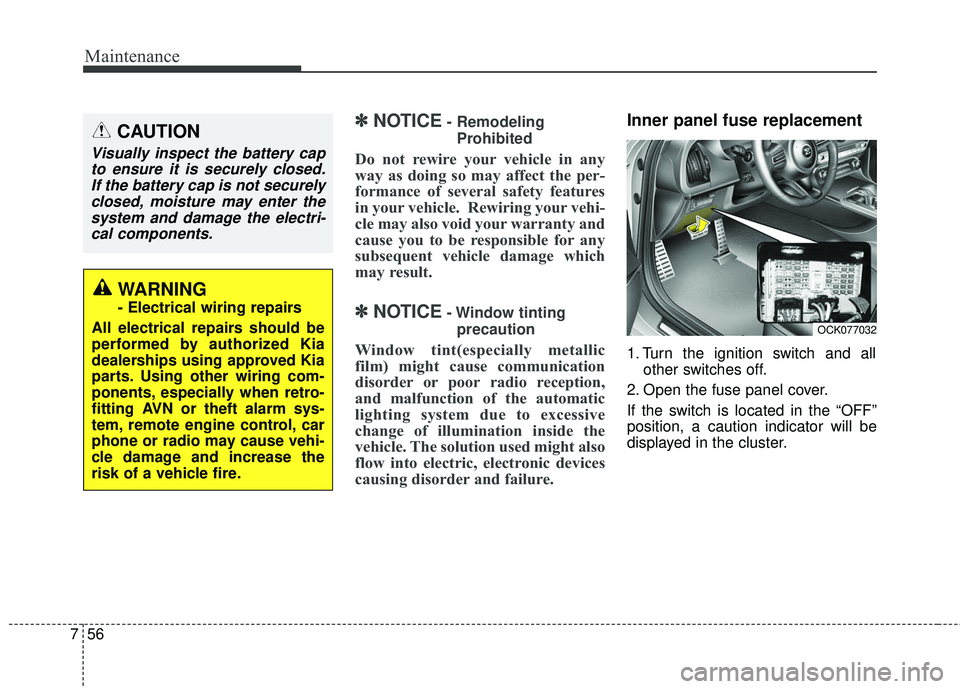
Inner panel fuse replacement
1. Turn the ignition switch and all other switches off.
2. Open the fuse panel cover.
If the switch is located in the “OFF”
position, a caution indicator will be
displayed in the cluster.
CAUTION
Visually inspect the battery cap to ensure it is securely closed.If the battery cap is not securelyclosed, moisture may enter thesystem and damage the electri-cal components.
WARNING
- Electrical wiring repairs
All electrical repairs should be
performed by authorized Kia
dealerships using approved Kia
parts. Using other wiring com-
ponents, especially when retro-
fitting AVN or theft alarm sys-
tem, remote engine control, car
phone or radio may cause vehi-
cle damage and increase the
risk of a vehicle fire.
OCK077032