Page 311 of 605
Audio system
549
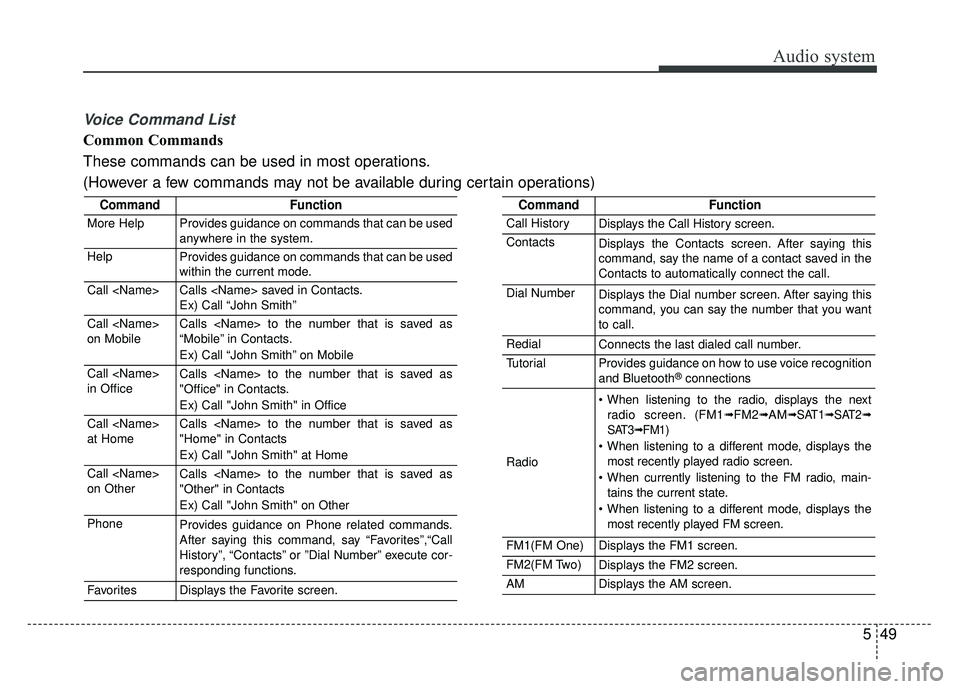
Voice Command List
Common Commands
These commands can be used in most operations.
(However a few commands may not be available during certain operations)
CommandFunction
More HelpProvides guidance on commands that can be used
anywhere in the system.
HelpProvides guidance on commands that can be used
within the current mode.
Call Calls saved in Contacts.
Ex) Call “John Smith”
Call
on MobileCalls to the number that is saved as
“Mobile” in Contacts.
Ex) Call “John Smith” on Mobile
Call
in OfficeCalls to the number that is saved as
"Office" in Contacts.
Ex) Call "John Smith" in Office
Call
at HomeCalls to the number that is saved as
"Home" in Contacts
Ex) Call "John Smith" at Home
Call
on OtherCalls to the number that is saved as
"Other" in Contacts
Ex) Call "John Smith" on Other
PhoneProvides guidance on Phone related commands.
After saying this command, say “Favorites”,“Call
History”, “Contacts” or ”Dial Number” execute cor-
responding functions.
FavoritesDisplays the Favorite screen.
CommandFunction
Call HistoryDisplays the Call History screen.
ContactsDisplays the Contacts screen. After saying this
command, say the name of a contact saved in the
Contacts to automatically connect the call.
Dial NumberDisplays the Dial number screen. After saying this
command, you can say the number that you want
to call.
RedialConnects the last dialed call number.
TutorialProvides guidance on how to use voice recognition
and Bluetooth®connections
Radio
When listening to the radio, displays the nextradio screen. (FM1➟FM2➟AM➟ SAT1➟ SAT2➟
SAT3➟ FM1)
When listening to a different mode, displays the most recently played radio screen.
When currently listening to the FM radio, main- tains the current state.
When listening to a different mode, displays the most recently played FM screen.
FM1(FM One)Displays the FM1 screen.
FM2(FM Two)Displays the FM2 screen.
AMDisplays the AM screen.
Page 312 of 605
Audio system
50
5
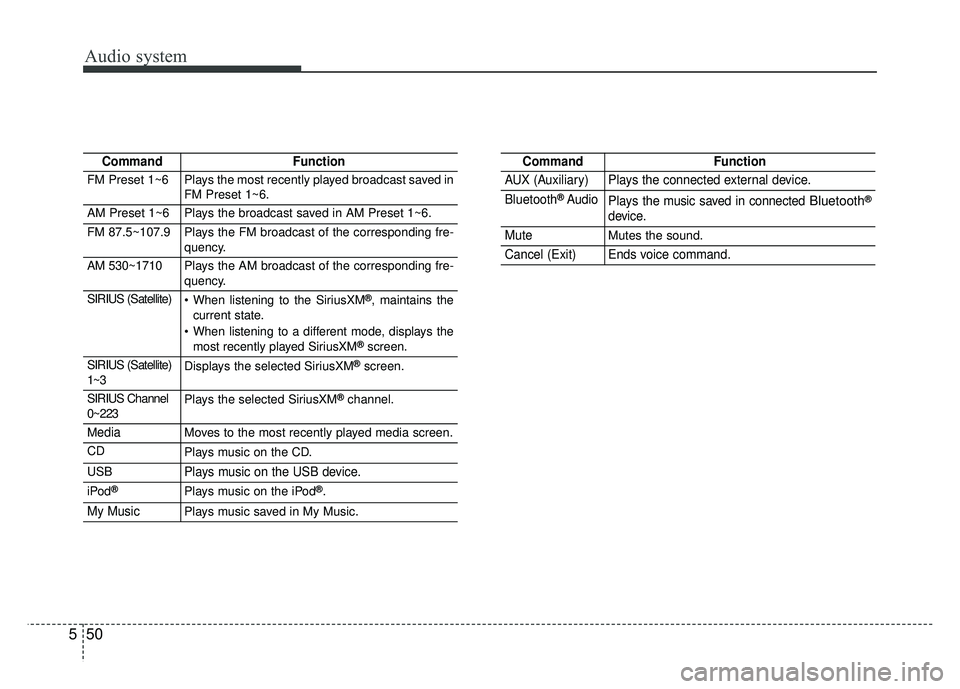
CommandFunction
FM Preset 1~6Plays the most recently played broadcast saved in
FM Preset 1~6.
AM Preset 1~6Plays the broadcast saved in AM Preset 1~6.
FM 87.5~107.9Plays the FM broadcast of the corresponding fre-
quency.
AM 530~1710Plays the AM broadcast of the corresponding fre-
quency.
SIRIUS (Satellite) When listening to the SiriusXM®, maintains the
current state.
When listening to a different mode, displays the most recently played SiriusXM
®screen.
SIRIUS (Satellite)
1~3Displays the selected SiriusXM®screen.
SIRIUS Channel
0~223Plays the selected SiriusXM®channel.
MediaMoves to the most recently played media screen.
CDPlays music on the CD.
USBPlays music on the USB device.
iPod®Plays music on the iPod®.
My MusicPlays music saved in My Music.
CommandFunction
AUX (Auxiliary)Plays the connected external device.
Bluetooth®AudioPlays the music saved in connected Bluetooth®
device.
MuteMutes the sound.
Cancel (Exit)Ends voice command.
Page 318 of 605
Audio system
56
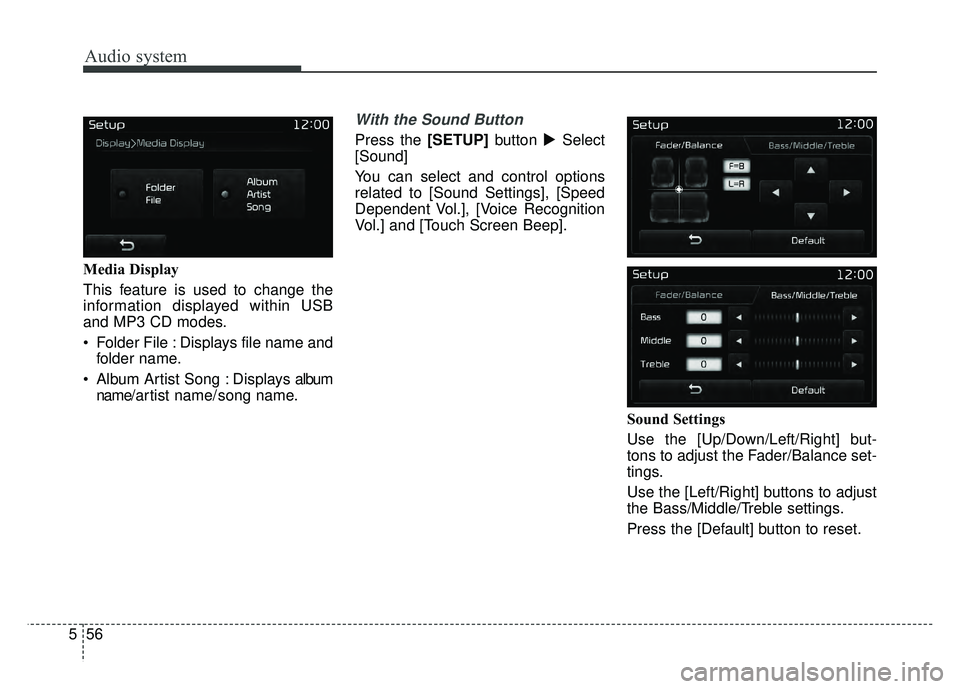
5 Media Display
This feature is used to change the
information displayed within USB
and MP3 CD modes.
Folder File : Displays file name and
folder name.
Album Artist Song : Displays album name/ a r tist name/ song name.
With the Sound Button
Press the [SETUP] button �Select
[Sound]
You can select and control options
related to [Sound Settings], [Speed
Dependent Vol.], [Voice Recognition
Vol.] and [Touch Screen Beep].
Sound Settings
Use the [Up/Down/Left/Right] but-
tons to adjust the Fader/Balance set-
tings.
Use the [Left/Right] buttons to adjust
the Bass/Middle/Treble settings.
Press the [Default] button to reset.
Page 319 of 605
Audio system
557
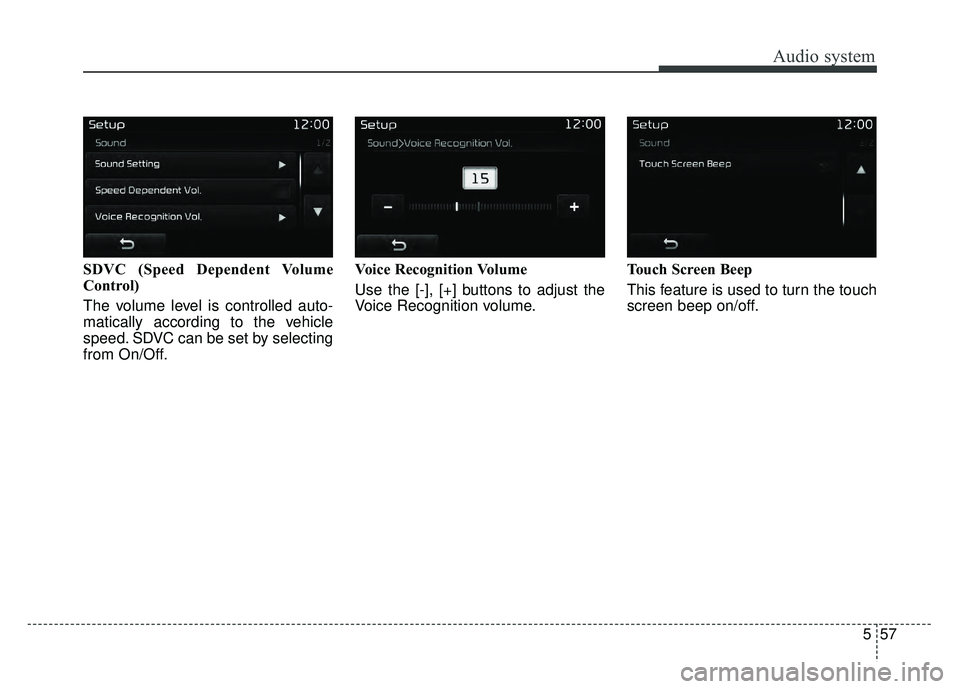
SDVC (Speed Dependent Volume
Control)
The volume level is controlled auto-
matically according to the vehicle
speed. SDVC can be set by selecting
from On/Off.Voice Recognition Volume
Use the [-], [+] buttons to adjust the
Voice Recognition volume.
Touch Screen Beep
This feature is used to turn the touch
screen beep on/off.
Page 322 of 605
Audio system
60
5
✽
✽
NOTICE - Before
Downloading Contacts
• Only contacts within connected phones can be downloaded. Also
check to see that your mobile
phone supports the download fea-
ture.
• To learn more about whether your mobile phone supports contact
downloads, refer to your mobile
phone user’s manual.
• The contacts for only the connect- ed phone can be downloaded.
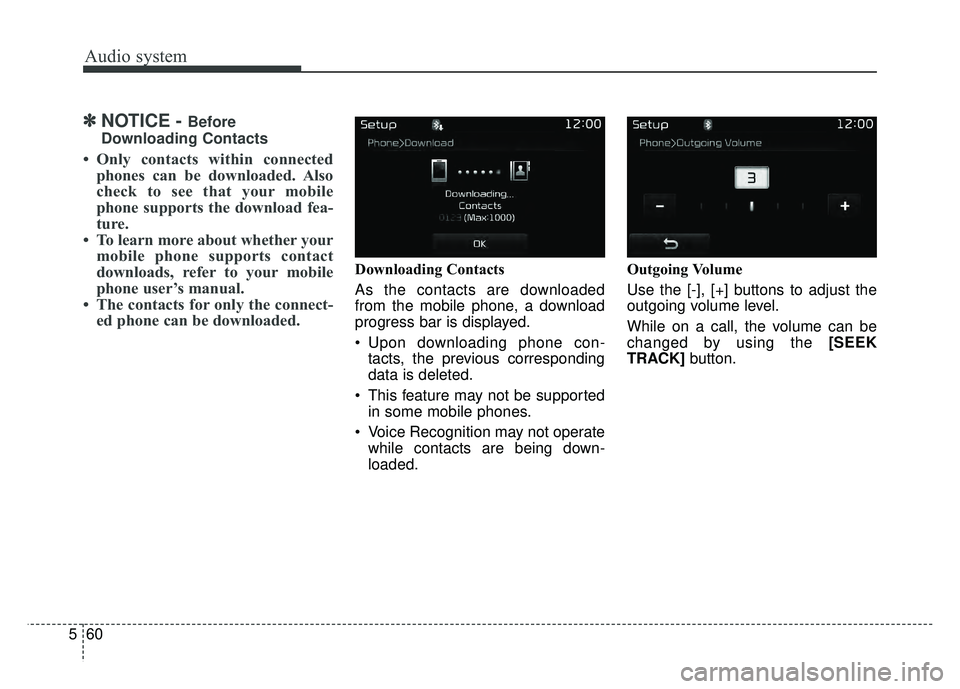
Downloading Contacts
As the contacts are downloaded
from the mobile phone, a download
progress bar is displayed.
Upon downloading phone con-
tacts, the previous corresponding
data is deleted.
This feature may not be supported in some mobile phones.
Voice Recognition may not operate while contacts are being down-
loaded. Outgoing Volume
Use the [-], [+] buttons to adjust the
outgoing volume level.
While on a call, the volume can be
changed by using the [SEEK
TRACK]
button.
Page 324 of 605
Audio system
62
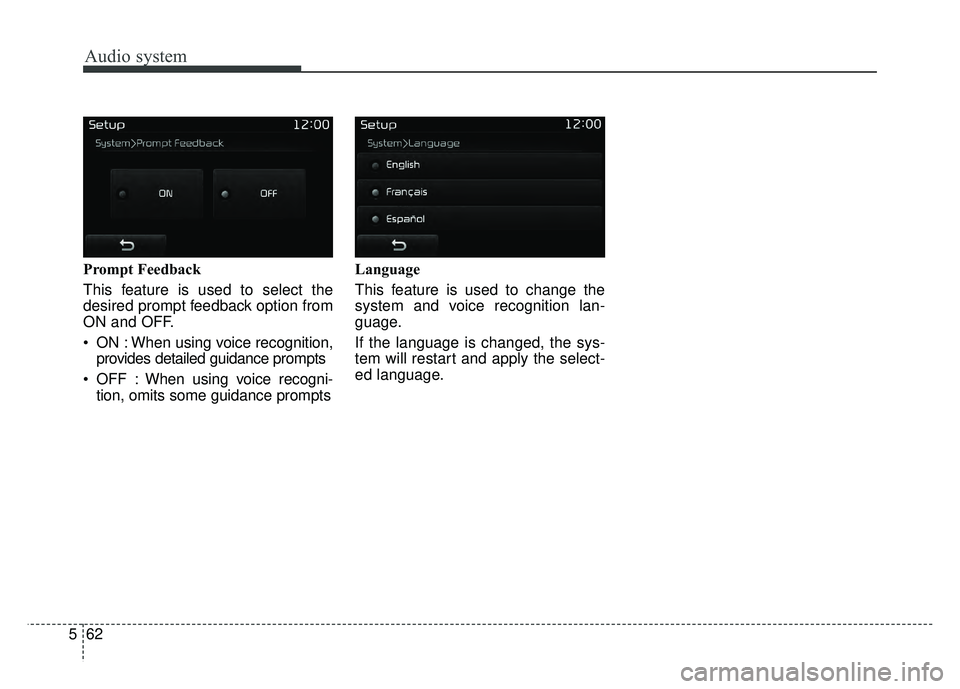
5 Prompt Feedback
This feature is used to select the
desired prompt feedback option from
ON and OFF.
ON : When using voice recognition,
provides detailed guidance prompts
OFF : When using voice recogni- tion, omits some guidance prompts Language
This feature is used to change the
system and voice recognition lan-
guage.
If the language is changed, the sys-
tem will restart and apply the select-
ed language.
Page 592 of 605

Index
2I
A/V Mode ......................................................................4-\
87
Air bag warning label ....................................................3-69
Air bag warning light ....................................................3-46
Air bags........................................................................\
..3-43Operation ....................................................................3-44\
Air bag warning light ..................................................3-46
SRS components and functions ..................................3-47
Occupant Detection System (ODS) ............................3-50
Driver's and passenger's front air bag ........................3-58
Side air bag ................................................................3-60
Curtain air bag ............................................................3-62
Inflation conditions ....................................................3-65
Non-inflation conditions ............................................3-67
SRS Care ....................................................................3-69\
Air bag warning label ................................................3-70
Air cleaner ....................................................................8-35\
Filter replacement ......................................................8-35
Air conditioning system ..................................................9-6
Air ventilation seat ......................................................4-166
All Wheel Drive (AWD) ................................................6-20 All Wheel Drive (AWD) transfer mode selection ......6-22
For safe all wheel drive operation ..............................6-23
Reducing the risk of a rollover ..................................6-26
Anti-lock brake system (ABS) ......................................6-42
Appearance care ............................................................8-93 Exterior care ................................................................8-93 Interior care ................................................................8-98
Armed stage ..................................................................4-19
Armrest (rear) ................................................................3-16
AUDIO (With Touch Screen) ..........................................5-7 Feature of Your Audio ..................................................5-8
Radio Mode ................................................................5-19
SiriusXM Radio Mode ................................................5-22
Media Mode ................................................................5-24
Phone Mode ................................................................5-39
Bluetooth
®Wireless Technology ................................5-40
Voice Recognition Mode ............................................5-47
Setup Mode ................................................................5-55
Audio system ..................................................................5-2 Antenna ........................................................................\
5-2
Steering wheel audio controls ......................................5-2
AUX, USB port ............................................................5-4
How vehicle audio works ............................................5-4
Auto light ....................................................................4-11\
9
Automatic transaxle ......................................................6-13 Manual mode ..............................................................6-15
Shift-lock override ......................................................6-18
Paddle shifter ..............................................................6-17
Autonomous Emergency Braking (AEB) ......................6-51 System setting and activation ....................................6-51
AEB warning message and system control ................6-54
Brake operation ..........................................................6-55
A