2018 KIA SOUL EV display
[x] Cancel search: displayPage 306 of 496
![KIA SOUL EV 2018 Owners Manual 4175
Features of your vehicle
Dial
Select the [PHONE]button on the
audio ➟Select [Dial].
(1) Phone number entry window: The phone number entered using the
keypad is displayed.
(2) Clear - Press to](/manual-img/2/55107/w960_55107-305.png "KIA SOUL EV 2018 Owners Manual 4175
Features of your vehicle
Dial
Select the [PHONE]button on the
audio ➟Select [Dial].
(1) Phone number entry window: The phone number entered using the
keypad is displayed.
(2) Clear - Press to")
4175
Features of your vehicle
Dial
Select the [PHONE]button on the
audio ➟Select [Dial].
(1) Phone number entry window: The phone number entered using the
keypad is displayed.
(2) Clear - Press to delete individual digits.
- Press and hold to delete theentire phone number.
(3) Keypad: Enter phone number.
(4)
Bluetooth®Wireless Technology
phone name
- The name of the connected
Bluetooth®Wireless Technology
device is displayed.
- Contacts matching the keypad number/letter input are displayed.(5) Call
- Enter and select a phone num-ber to call.
- Select without entering a phone number to see the most recent
dialed call.
Connections
Select the [PHONE] button on the
audio ➟Select [Connections].
- For connections setting, refer to Setup ➟Select [Bluetooth] ➟
Select [Connections] page.
Setup
Select the [PHONE] button on the
audio ➟Select [Settings].
- For phone Setup, refer to Setup page ➟Select [Bluetooth].
Page 308 of 496
![KIA SOUL EV 2018 Owners Manual 4177
Features of your vehicle
Setup
Access Display, Sound, Date/Time,
Bluetooth, System, Screen Saver
and Display Off settings.
Select the [SETUP]button on the
audio system.
Display
Select the [SETUP](/manual-img/2/55107/w960_55107-307.png "KIA SOUL EV 2018 Owners Manual 4177
Features of your vehicle
Setup
Access Display, Sound, Date/Time,
Bluetooth, System, Screen Saver
and Display Off settings.
Select the [SETUP]button on the
audio system.
Display
Select the [SETUP")
4177
Features of your vehicle
Setup
Access Display, Sound, Date/Time,
Bluetooth, System, Screen Saver
and Display Off settings.
Select the [SETUP]button on the
audio system.
Display
Select the [SETUP] button on the
audio system ➟ Select [Display].
Mode: Audio screen brightness can be adjusted to the time of day.
Illumination: The brightness of the audio screen can be changed.
Sound
Select the [SETUP] button on the
audio system ➟ Select [Sound].
Position: Sound balance and pan- ning can be adjusted.
Tone: Sound tone color can be adjusted.
Speed Dependent Volume: Automatically adjust volume based
on vehicle speed.
Beep: Select whether to play a sound when the screen is touched.
Date/Time
Select the [SETUP] button on the
audio system ➟ Select [Date/Time].
Set Time: Set the time displayed on the audio screen.
Time Format: Choose between 12- hour and 24-hour time formats.
Set Date: Set the date displayed on the audio screen.
Bluetooth
Select the [SETUP] button on the
audio system ➟ Select [Bluetooth].
Connections: Control pairing, dele- tion, connection and disconnection
of
Bluetooth®Wireless Technology
devices.
Auto Connection Priority: Set the connection priority of
Bluetooth®
Wireless Technology devices when
the vehicle is started.
Download Contacts: Contacts can be downloaded from connected
Bluetooth®Wireless Technology
devices.
Bluetooth Voice Prompts: Play or mute voice prompts for
Bluetooth®
Wireless Technology device pair-
ing, connection and errors.
WARNING- Date/Time
Setting Distraction
Adjusting the date/time setting
while driving can result in a loss
of vehicle control that may lead
to an accident, severe personal
injury, and death.
Page 310 of 496
![KIA SOUL EV 2018 Owners Manual 4179
Features of your vehicle
Screen Saver
Set the information displayed when
the audio system is switched off or
the screen is turned off.
Select the [SETUP]button on the
audio system ➟ Select [Scr](/manual-img/2/55107/w960_55107-309.png "KIA SOUL EV 2018 Owners Manual 4179
Features of your vehicle
Screen Saver
Set the information displayed when
the audio system is switched off or
the screen is turned off.
Select the [SETUP]button on the
audio system ➟ Select [Scr")
4179
Features of your vehicle
Screen Saver
Set the information displayed when
the audio system is switched off or
the screen is turned off.
Select the [SETUP]button on the
audio system ➟ Select [Screen
Saver].
Analog: An analog clock is dis- played.
Digital: A digital clock is displayed.
None: No information is displayed.
Display Off
To prevent glare, the screen can be
turned off with the audio system in
operation.
Select the [SETUP] button on the
audio system ➟ Select [Display Off].
Page 319 of 496
57
Driving your vehicle
Starting the vehicle
1. Carry the smart key or leave itinside the vehicle.
2. Make sure the parking brake is firmly applied
3. Place the transaxle shift lever in P (Park). Depress the brake pedal
fully.
4. Press the POWER button until the ready " " indicator light in the
cluster is turned on. Even if the smart key is in the vehi-
cle, if it is far away from you, the
vehicle may not start.
When the POWER button is in the ACC position or above, if any door
is opened, the system checks for
the smart key. If the smart key is
not in the vehicle, a message "key
is not in the vehicle" will appear on
the LCD display. And if all doors
are closed, the chime will sound for
5 seconds. The indicator or warn-
ing will turn off while the vehicle is
moving. Always have the smart key
with you.CAUTION
If the vehicle stalls while thevehicle is in motion, do notattempt to move the shift leverto the P (Park) position. If thetraffic and road conditions per-mit, you may put the shift leverin the N (Neutral) position whilethe vehicle is still moving andpress the POWER button in anattempt to restart the vehicle.
WARNING- Proper
footwear
Always wear appropriate shoes
when operating your vehicle.
Unsuitable shoes (high heels, ski
boots, sandals, etc.) may inter-
fere with your ability to use the
brake and accelerator pedals.
Page 324 of 496
Driving your vehicle
12
5
Reduction gear operation
When stopped on an incline, do not
hold the vehicle with the motor
power. Use the service brake or the
parking brake.
Transaxle ranges
The indicator in the instrument clus-
ter displays the shift lever position
when the POWER button is in the
ON position.
P (Park)
Always come to a complete stop
before shifting into P (Park). This
position locks the gear and prevents
the drive wheels from rotating.
Shifting into P (Park) while the vehi-
cle is in motion will cause the drive
wheels to lock which will cause you
to lose control of the vehicle.
WARNING- Leaving the
vehicle
Before leaving the driver’s seat,
always make sure the shift lever
is in the P (Park) position; then
set the parking brake fully and
shut the vehicle off. Do not use
the P position in place of the
parking brake. Always make
sure the shift lever is latched in
the P position and set the park-
ing brake fully. Unexpected and
sudden vehicle movement can
occur if these precautions are
not followed.
CAUTION- Reduction gear
To avoid damage to your reduc-tion gear, do not accelerate thevehicle in R (Reverse) or anyforward gear position with thebrakes on. The reduction gearmay be damaged if you shiftinto P (Park) while the vehicle isin motion.
Page 382 of 496
What to do in an emergency
16
6
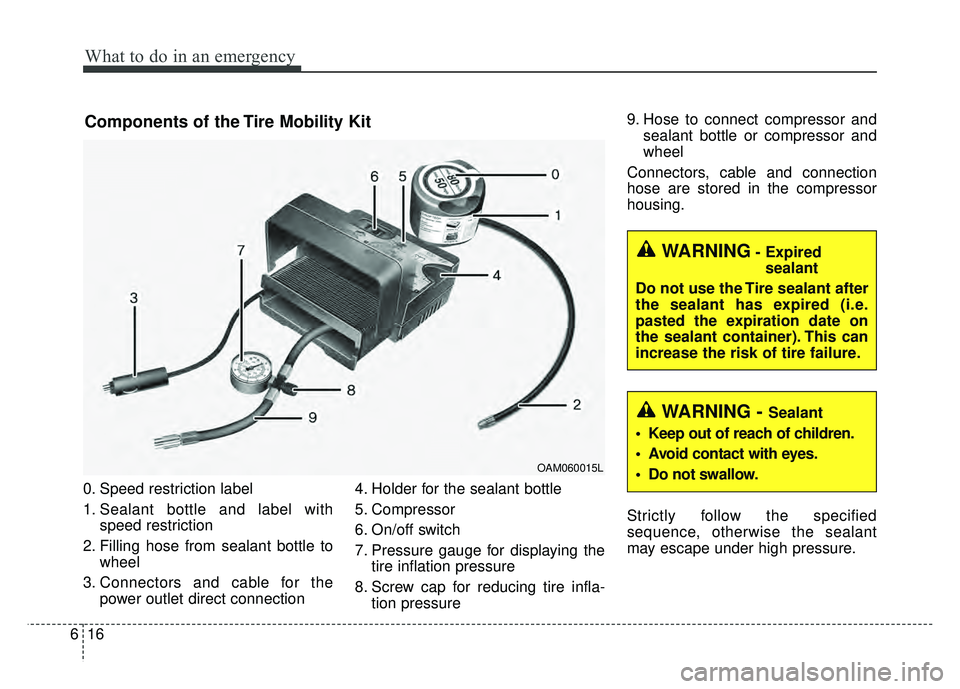
0. Speed restriction label
1. Sealant bottle and label with
speed restriction
2. Filling hose from sealant bottle to wheel
3. Connectors and cable for the power outlet direct connection 4. Holder for the sealant bottle
5. Compressor
6. On/off switch
7. Pressure gauge for displaying the
tire inflation pressure
8. Screw cap for reducing tire infla- tion pressure 9. Hose to connect compressor and
sealant bottle or compressor and
wheel
Connectors, cable and connection
hose are stored in the compressor
housing.
Strictly follow the specified
sequence, otherwise the sealant
may escape under high pressure.
Components of the Tire Mobility Kit
OAM060015L
WARNING- Expired sealant
Do not use the Tire sealant after
the sealant has expired (i.e.
pasted the expiration date on
the sealant container). This can
increase the risk of tire failure.
WARNING - Sealant
• Keep out of reach of children.
Avoid contact with eyes.
Do not swallow.
Page 433 of 496
743
Maintenance
3. Checking tire life (TIN : TireIdentification Number)
Any tires that are over 6 years old,
based on the manufacturing date,
should be replaced by new ones. You
can find the manufacturing date on
the tire sidewall (possibly on the
inside of the wheel), displaying the
DOT Code. The DOT Code is a
series of numbers on a tire consist-
ing of numbers and English letters.
The manufacturing date is designat-
ed by the last four digits (characters)
of the DOT code.
DOT : XXXX XXXX OOOO
The front part of the DOT means a
plant code number, tire size and
tread pattern and the last four num-
bers indicate week and year manu-
factured.
For example:
DOT XXXX XXXX 1617 represents
that the tire was produced in the 16th
week of 2017.
4. Tire ply composition and mate-rial
The number of layers or plies of rub-
ber-coated fabric in the tire. Tire
manufacturers also must indicate the
materials in the tire, which include
steel, nylon, polyester, and others.
The letter "R" means radial ply con-
struction; the letter "D" means diago-
nal or bias ply construction; and the
letter "B" means belted-bias ply con-
struction.
5. Maximum permissible inflationpressure
This number is the greatest amount
of air pressure that should be put in
the tire. Do not exceed the maximum
permissible inflation pressure. Refer
to the Tire and Loading Information
label for recommended inflation
pressure.
WARNING- Tire age
Replace tires within the recom-
mended time frame. Failure to
replace tires as recommended
can result in sudden tire failure,
which could lead to a loss of
control and an accident.
Page 487 of 496
I3
Index
Brake system. . . . . . . . . . . . . . . . . . . . . . . . . . . . . . . . . 5-17Anti-lock brake system (ABS) . . . . . . . . . . . . . . . . . 5-23
Electronic parking brake (EPB) . . . . . . . . . . . . . . . . 5-19
Electronic stability control (ESC) . . . . . . . . . . . . . . 5-25
Hill-start assist control (HAC) . . . . . . . . . . . . . . . . . 5-30
Power brakes . . . . . . . . . . . . . . . . . . . . . . . . . . . . . . 5-17
Vehicle stability management (VSM) . . . . . . . . . . . 5-29
Brakes fluid. . . . . . . . . . . . . . . . . . . . . . . . . . . . . . . . . . 7-24\
Bulb replacement . . . . . . . . . . . . . . . . . . . . . . . . . . . . . 7-63
Bulb wattage . . . . . . . . . . . . . . . . . . . . . . . . . . . . . . . . . . 8-4
Camera see the Rear camera display . . . . . . . . . . . . . . 4-80
Capacities (Lubricants) . . . . . . . . . . . . . . . . . . . . . . . . . . 8-6
Care Care of seat belts . . . . . . . . . . . . . . . . . . . . . . . . . . . 3-25
Exterior care . . . . . . . . . . . . . . . . . . . . . . . . . . . . . . . 7-73
Interior care . . . . . . . . . . . . . . . . . . . . . . . . . . . . . . . 7-78
Tire care . . . . . . . . . . . . . . . . . . . . . . . . . . . . . . . . . . 7-36\
Care of seat belts . . . . . . . . . . . . . . . . . . . . . . . . . . . . . 3-25
Cargo area cover . . . . . . . . . . . . . . . . . . . . . . . . . . . . . 4-126
Center console storage . . . . . . . . . . . . . . . . . . . . . . . . 4-116
Central door lock switch. . . . . . . . . . . . . . . . . . . . . . . . 4-13
Chains - Tire . . . . . . . . . . . . . . . . . . . . . . . . . . . . . . . . . 5-46
Checking tire inflation pressure . . . . . . . . . . . . . . . . . . 7-37 Child restraint system . . . . . . . . . . . . . . . . . . . . . . . . . . 3-26
Lower anchor system . . . . . . . . . . . . . . . . . . . . . . . . 3-32
Seat belt . . . . . . . . . . . . . . . . . . . . . . . . . . . . . . . . . . 3-27\
Tether anchor system . . . . . . . . . . . . . . . . . . . . . . . . 3-31
Child-protector rear door lock . . . . . . . . . . . . . . . . . . . 4-13
Clean air . . . . . . . . . . . . . . . . . . . . . . . . . . . . . . . . . . . 4-\
114
Climate control air filter . . . . . . . . . . . . . . . . . . . . . . . . 7-27
Clothes hanger . . . . . . . . . . . . . . . . . . . . . . . . . . . . . . 4-124
Combined instrument, see instrument cluster . . . . . . . 4-40
Coolant . . . . . . . . . . . . . . . . . . . . . . . . . . . . . . . . . . . . \
. 7-21
Cooling fluid, see engine coolant . . . . . . . . . . . . . . . . . 7-21
Cruise control system . . . . . . . . . . . . . . . . . . . . . . . . . . 5-33 To set cruise control speed . . . . . . . . . . . . . . . . . . . . 5-34
Cup holder . . . . . . . . . . . . . . . . . . . . . . . . . . . . . . . . . 4-118
Curtain air bag . . . . . . . . . . . . . . . . . . . . . . . . . . . . . . . 3-50
Dashboard illumination, see instrument panel illumination. . . . . . . . . . . . . . . . . . . . . . . . . . . 4-41
Dashboard, see instrument cluster . . . . . . . . . . . . . . . . 4-40
Day/night rearview mirror . . . . . . . . . . . . . . . . . . . . . . 4-35
Daytime running light . . . . . . . . . . . . . . . . . . . . . . . . . 4-81
Defogging (Windscreen). . . . . . . . . . . . . . . . . . . . . . . 4-111
Defogging (Windshield) . . . . . . . . . . . . . . . . . . . . . . . 4-111
Defogging logic . . . . . . . . . . . . . . . . . . . . . . . . . . . . . 4-114
C
D