Page 67 of 496
Introduction
21
This vehicle is equipped with an
event data recorder (EDR). The
main purpose of an EDR is to
record, in certain crash or near
crash-like situations, such as an
air bag deployment or hitting a
road obstacle, data that will assist
in understanding how a vehicle's
systems performed. The EDR is
designed to record data related to
vehicle dynamics and safety sys-
tems for a short period of time,
typically 30 seconds or less. The
EDR in this vehicle is designed to
record such data as:
* How various systems in yourvehicle were operating;
* Whether or not the driver and passenger safety belts were
buckled/ fastened;
* How far (if at all) the driver was depressing the accelerator
and/or brake pedal; and,
* How fast the vehicle was travel- ing. These data can help provide a bet-
ter understanding of the circum-
stances in which crashes and
injuries occur. NOTE: EDR data
are recorded by your vehicle only
if a non-trivial crash situation
occurs; no data are recorded by
the EDR under normal driving con-
ditions and no personal data (e.g.,
name, gender, age, and crash loca-
tion) are recorded. However, other
parties, such as law enforcement,
could combine the EDR data with
the type of personally identifying
data routinely acquired during a
crash investigation.
To read data recorded by an EDR,
special equipment is required, and
access to the vehicle or the EDR is
needed. In addition to the vehicle
manufacturer, other parties, such
as law enforcement, that have the
special equipment, can read the
information if they have access to
the vehicle or the EDR.
Your rights with respect to the
information discussed above may
vary from state to state. In some
states, such information is consid-
ered private, is exclusively owned
by the owner of the motor vehicle,
and is not retrievable or usable by
another person or entity.
VEHICLE DATA COLLECTION AND EVENT DATA RECORDERS
Page 72 of 496
25
Your vehicle at a glance
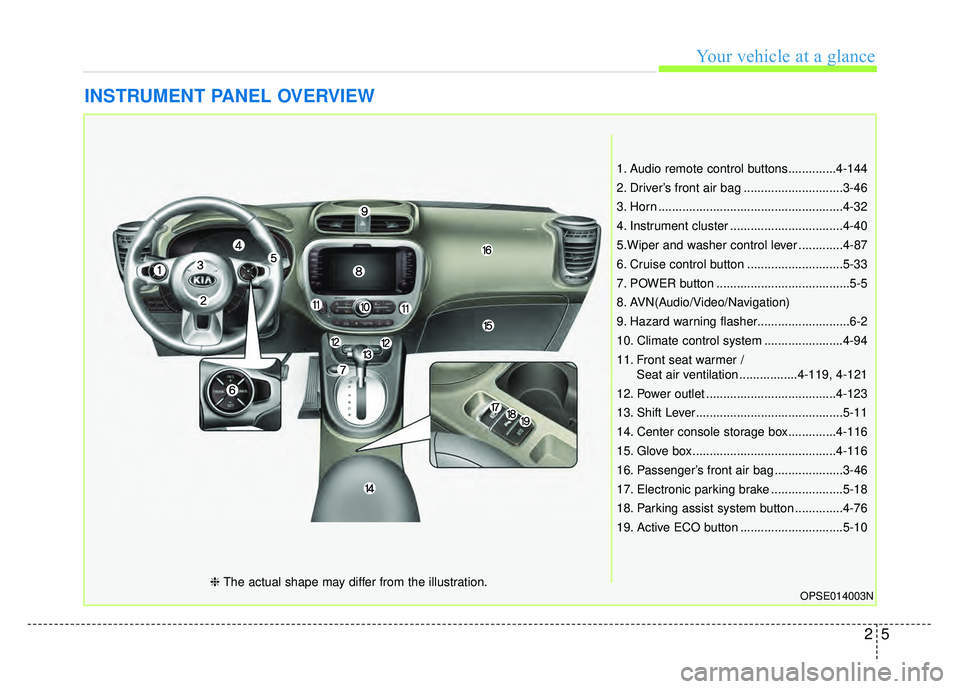
INSTRUMENT PANEL OVERVIEW
1. Audio remote control buttons..............4-144
2. Driver’s front air bag .............................3-46
3. Horn ......................................................4-32
4. Instrument cluster .................................4-40
5.Wiper and washer control lever .............4-87
6. Cruise control button ............................5-33
7. POWER button .......................................5-5
8. AVN(Audio/Video/Navigation)
9. Hazard warning flasher...........................6-2
10. Climate control system .......................4-94
11. Front seat warmer /Seat air ventilation .................4-119, 4-121
12. Power outlet ......................................4-123
13. Shift Lever...........................................5-11
14. Center console storage box..............4-116
15. Glove box ..........................................4-116
16. Passenger’s front air bag ....................3-46
17. Electronic parking brake .....................5-18
18. Parking assist system button ..............4-76
19. Active ECO button ..............................5-10
OPSE014003N❈ The actual shape may differ from the illustration.
Page 73 of 496
Your vehicle at a glance
62
MOTOR ROOM COMPARTMENT
OPSE015005
1. Coolant reservoir ..................................7-21
2. Brake fluid reservoir ..............................7-24
3. Fuse box................................................7-51
4. Positive battery terminal ........................7-33
5. Negative battery terminal ......................7-33
6. Radiator cap ..........................................7-23
7. Windshield washer fluid reservoir ........7-26
❈The actual motor compartment in the vehicle may differ from the illustration.
Page 83 of 496
Safety features of your vehicle
10
3
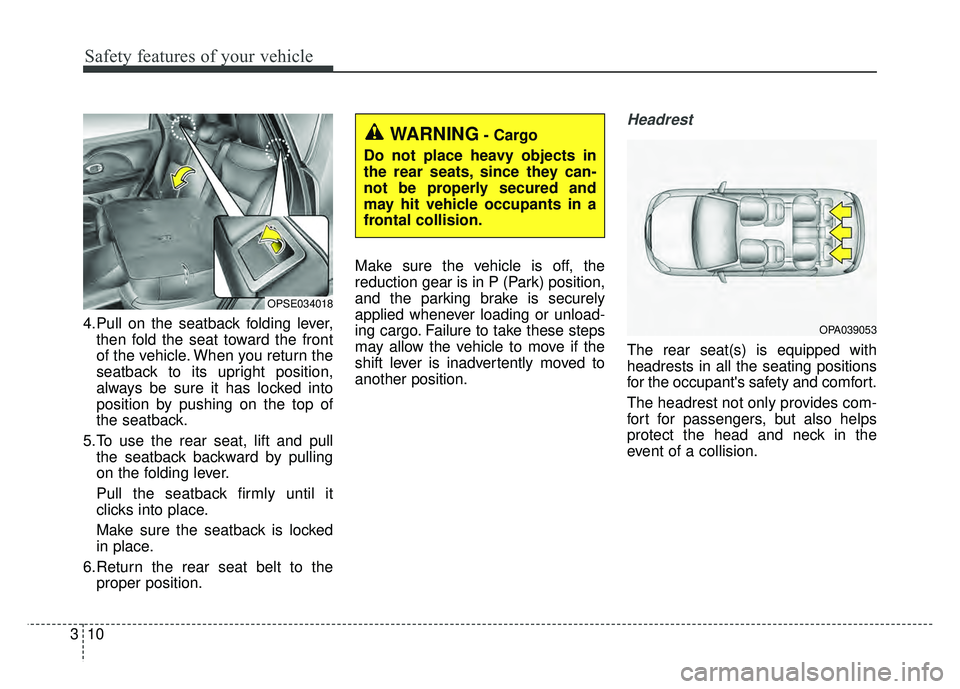
4.Pull on the seatback folding lever,
then fold the seat toward the front
of the vehicle. When you return the
seatback to its upright position,
always be sure it has locked into
position by pushing on the top of
the seatback.
5.To use the rear seat, lift and pull the seatback backward by pulling
on the folding lever.
Pull the seatback firmly until it
clicks into place.
Make sure the seatback is locked
in place.
6.Return the rear seat belt to the proper position. Make sure the vehicle is off, the
reduction gear is in P (Park) position,
and the parking brake is securely
applied whenever loading or unload-
ing cargo. Failure to take these steps
may allow the vehicle to move if the
shift lever is inadvertently moved to
another position.
Headrest
The rear seat(s) is equipped with
headrests in all the seating positions
for the occupant's safety and comfort.
The headrest not only provides com-
fort for passengers, but also helps
protect the head and neck in the
event of a collision.
OPSE034018
WARNING- Cargo
Do not place heavy objects in
the rear seats, since they can-
not be properly secured and
may hit vehicle occupants in a
frontal collision.
OPA039053
Page 129 of 496
Safety features of your vehicle
56
3
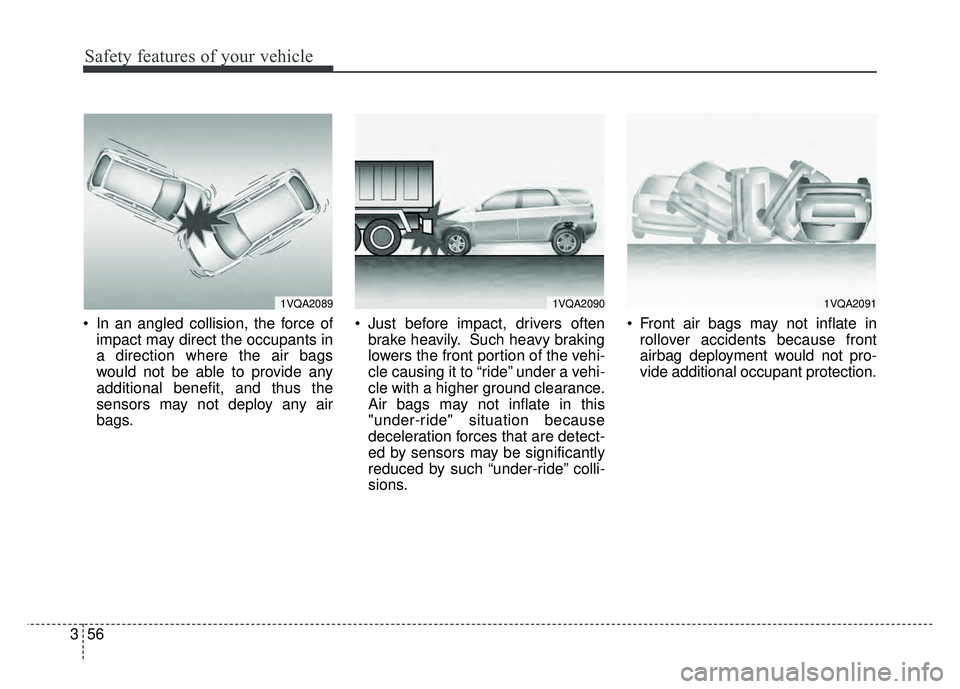
In an angled collision, the force of
impact may direct the occupants in
a direction where the air bags
would not be able to provide any
additional benefit, and thus the
sensors may not deploy any air
bags. Just before impact, drivers often
brake heavily. Such heavy braking
lowers the front portion of the vehi-
cle causing it to “ride” under a vehi-
cle with a higher ground clearance.
Air bags may not inflate in this
"under-ride" situation because
deceleration forces that are detect-
ed by sensors may be significantly
reduced by such “under-ride” colli-
sions. Front air bags may not inflate in
rollover accidents because front
airbag deployment would not pro-
vide additional occupant protection.
1VQA20901VQA20911VQA2089
Page 141 of 496
Features of your vehicle
10
4
DOOR LOCKS
.Operating door locks from
outside the vehicle
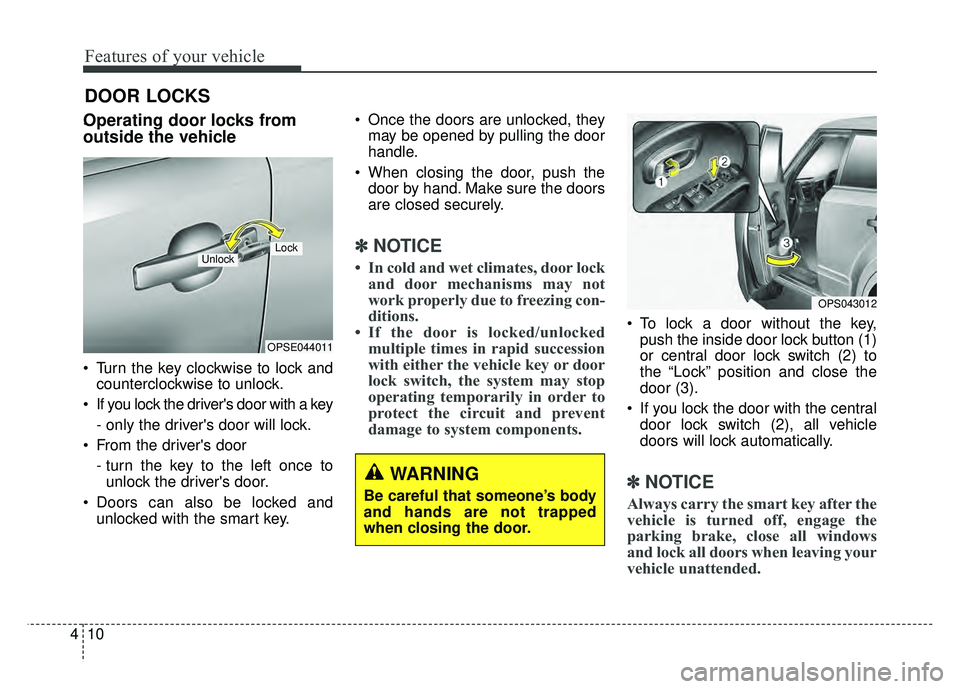
Turn the key clockwise to lock and
counterclockwise to unlock.
If you lock the driver's door with a key
- only the driver's door will lock.
From the driver's door
- turn the key to the left once tounlock the driver's door.
Doors can also be locked and unlocked with the smart key. Once the doors are unlocked, they
may be opened by pulling the door
handle.
When closing the door, push the door by hand. Make sure the doors
are closed securely.
✽ ✽ NOTICE
• In cold and wet climates, door lock
and door mechanisms may not
work properly due to freezing con-
ditions.
• If the door is locked/unlocked multiple times in rapid succession
with either the vehicle key or door
lock switch, the system may stop
operating temporarily in order to
protect the circuit and prevent
damage to system components.
To lock a door without the key,
push the inside door lock button (1)
or central door lock switch (2) to
the “Lock” position and close the
door (3).
If you lock the door with the central door lock switch (2), all vehicle
doors will lock automatically.
✽ ✽ NOTICE
Always carry the smart key after the
vehicle is turned off, engage the
parking brake, close all windows
and lock all doors when leaving your
vehicle unattended.
OPSE044011
LockUnlock
OPS043012
WARNING
Be careful that someone’s body
and hands are not trapped
when closing the door.
Page 143 of 496
Features of your vehicle
12
4
With central door lock switch
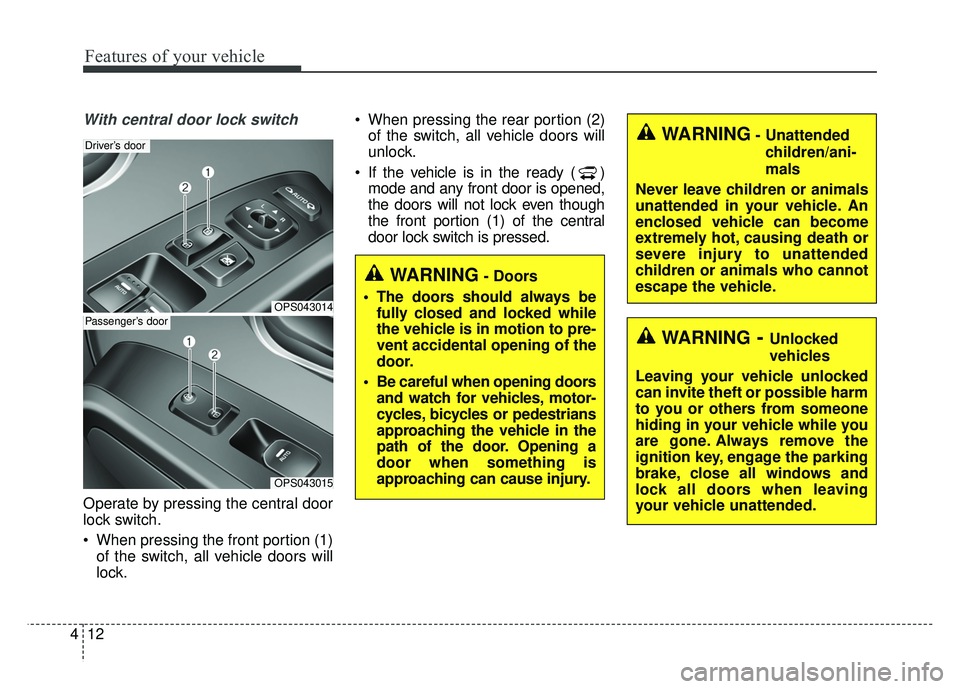
Operate by pressing the central door
lock switch.
When pressing the front portion (1)
of the switch, all vehicle doors will
lock. When pressing the rear portion (2)
of the switch, all vehicle doors will
unlock.
If the vehicle is in the ready ( ) mode and any front door is opened,
the doors will not lock even though
the front portion (1) of the central
door lock switch is pressed.
OPS043014
Driver’s door
OPS043015
Passenger’s door
WARNING- Unattended
children/ani-
mals
Never leave children or animals
unattended in your vehicle. An
enclosed vehicle can become
extremely hot, causing death or
severe injury to unattended
children or animals who cannot
escape the vehicle.
WARNING- Doors
The doors should always be fully closed and locked while
the vehicle is in motion to pre-
vent accidental opening of the
door.
Be careful when opening doors and watch for vehicles, motor-
cycles, bicycles or pedestrians
approaching the vehicle in the
path of the door. Opening a
door when something is
approaching can cause injury.
WARNING- Unlocked
vehicles
Leaving your vehicle unlocked
can invite theft or possible harm
to you or others from someone
hiding in your vehicle while you
are gone. Always remove the
ignition key, engage the parking
brake, close all windows and
lock all doors when leaving
your vehicle unattended.
Page 153 of 496
Features of your vehicle
22
4
Opening the hood
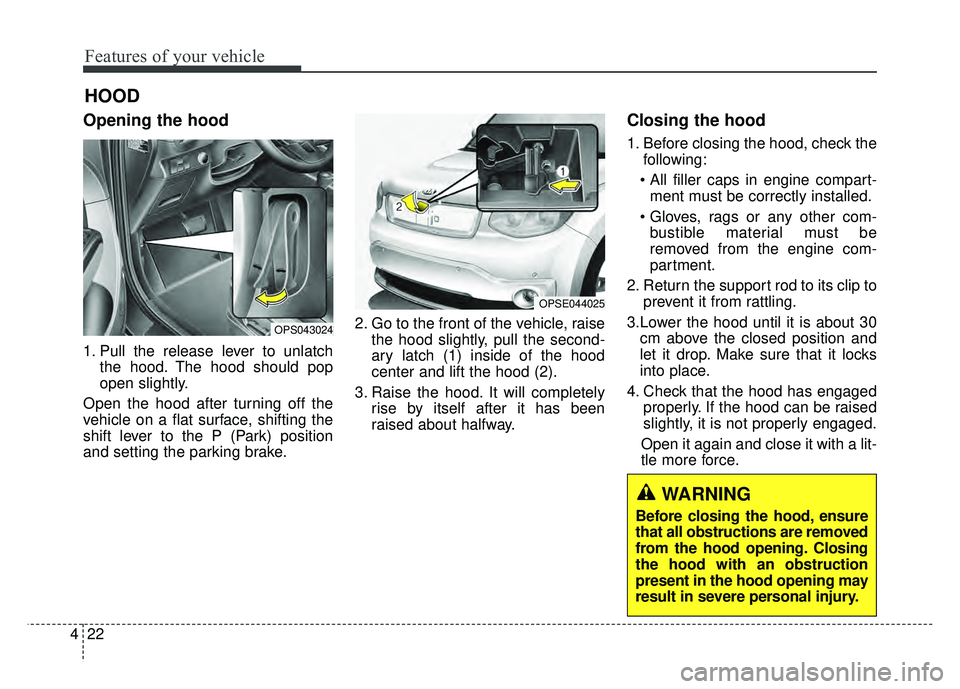
1. Pull the release lever to unlatch
the hood. The hood should pop
open slightly.
Open the hood after turning off the
vehicle on a flat surface, shifting the
shift lever to the P (Park) position
and setting the parking brake. 2. Go to the front of the vehicle, raise
the hood slightly, pull the second-
ary latch (1) inside of the hood
center and lift the hood (2).
3. Raise the hood. It will completely rise by itself after it has been
raised about halfway.
Closing the hood
1. Before closing the hood, check thefollowing:
ment must be correctly installed.
bustible material must be
removed from the engine com-
partment.
2. Return the support rod to its clip to prevent it from rattling.
3.Lower the hood until it is about 30 cm above the closed position and
let it drop. Make sure that it locks
into place.
4. Check that the hood has engaged properly. If the hood can be raised
slightly, it is not properly engaged.
Open it again and close it with a lit-
tle more force.
HOOD
OPS043024
OPSE044025
WARNING
Before closing the hood, ensure
that all obstructions are removed
from the hood opening. Closing
the hood with an obstruction
present in the hood opening may
result in severe personal injury.