2018 KIA SORENTO reset
[x] Cancel search: resetPage 260 of 536

4175
Features of your vehicle
Steering wheel remote
controller
(1) VOLUME
Used to control volume.
(2) SEEK
When pressed shortly (under 0.8
seconds).
- FM, AM mode : Searches broad-cast frequencies saved to presets.
- CD, USB, iPod
®, My Music,
Bluetooth®Wireless Technology
Audio mode : Changes the track, file. When pressed and held (over 0.8
seconds).
- FM, AM mode : Automatically
searches broadcast frequencies
and channels.
- CD, USB, iPod
®, My Music mode :
Rewinds or fast forwards the track
or file.
(3) MUTE
Mutes audio volume.
(4) MODE
Each time this key is pressed, the
mode is changed in order of FM1,
FM2, AM, CD, USB (iPod), AUX, My
Music, BT Audio.
If the media is not connected or a
disc is not inserted, corresponding
modes will be disabled.
Press and hold the key (over 0.8 sec-
onds) to turn the audio system on/off.
When power is off, press the key to
turn power back on. (5) (if equipped)
When pressed shortly.
- When pressed in the phone screen,
displays call history screen.
- When pressed in the dial screen, makes a call.
- When pressed in the incoming call screen, answers the call.
- When pressed while another incoming call is waiting, switches to
waiting call (Call Waiting).
When pressed and held (over 0.8 sec-
onds).
- When pressed in the
Bluetooth®
Wireless Technology Handsfree
wait mode, redials the last call.
- When pressed during a
Bluetooth®
Wireless Technology Handsfree
call, switches call back to mobile
phone (Private).
- When pressed while calling on the mobile phone, switches call back to
Bluetooth®Wireless Technology
Handsfree (Operates only when
Bluetooth®Wireless Technology
Handsfree is connected).
OUMA046409
Page 267 of 536
Features of your vehicle
182
4
(Continued)
If you use devices such as a USB
hub purchased separately, the
vehicle’s audio system may not
recognize the USB device. In that
case, connect the USB device
directly to the multimedia terminal
of the vehicle.
If the USB device is divided by log- ical drives, only the music files on
the highest-priority drive are recog-
nized by car audio.
Devices such as MP3 Player/ Cellular phone/Digital camera can
be unrecognizable by standard
USB I/F can be unrecognizable.
Charging through the USB may not be supported in some mobile
devices.
USB HDD or USB types liable to connection failures due to vehicle
vibrations are not supported. (i-stick
type)
Some non-standard USB devices (METAL COVER TYPE USB) can
be unrecognizable.
(Continued)(Continued)
Some USB flash memory readers
(such as CF, SD, micro SD, etc.) or
external-HDD type devices can be
unrecognizable.
Music files protected by DRM (DIGI- TAL RIGHTS MANAGEMENT) are
not recognizable.
The data in the USB memory may be lost while using this audio.
Always back up important data on
a personal storage device.
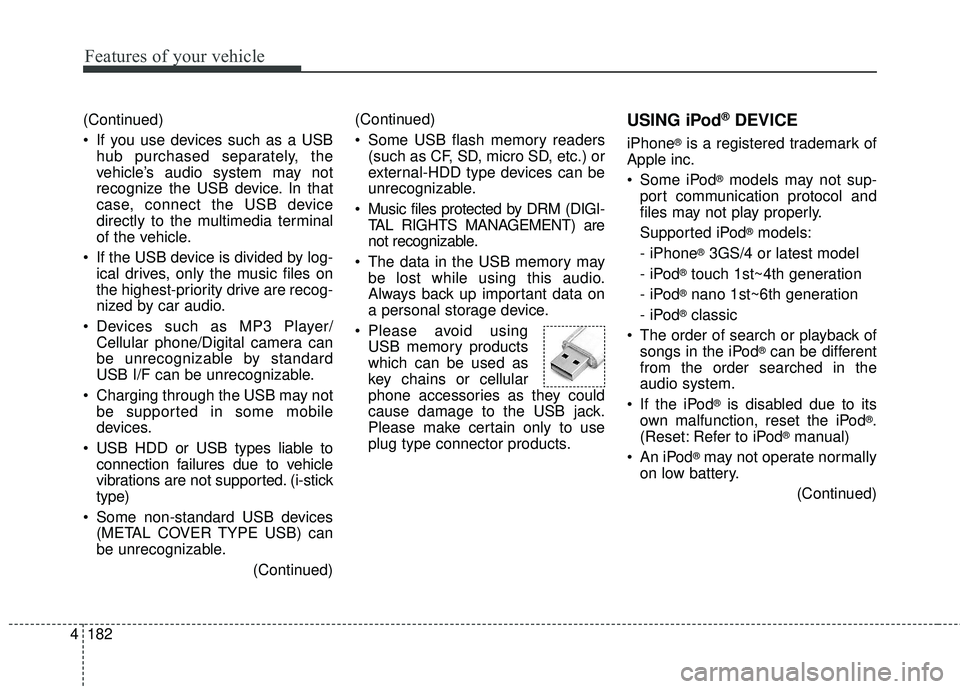
Please avoid using USB memory products
which can be used as
key chains or cellular
phone accessories as they could
cause damage to the USB jack.
Please make certain only to use
plug type connector products.USING iPod®DEVICE
iPhone®is a registered trademark of
Apple inc.
Some iPod
®models may not sup-
port communication protocol and
files may not play properly.
Supported iPod
®models:
- iPhone
®3GS/4 or latest model
- iPod
®touch 1st~4th generation
- iPod
®nano 1st~6th generation
- iPod
®classic
The order of search or playback of songs in the iPod
®can be different
from the order searched in the
audio system.
If the iPod
®is disabled due to its
own malfunction, reset the iPod®.
(Reset: Refer to iPod®manual)
An iPod
®may not operate normally
on low battery.
(Continued)
Page 334 of 536
Driving your vehicle
64
5
Each of these actions will cancel
cruise control operation (the SETindicator light in the instrument clus-ter will go off), but it will not turn thesystem off. If you wish to resumecruise control operation, move thelever up (to RES+). You will return toyour previously preset speed.To resume cruising speed at
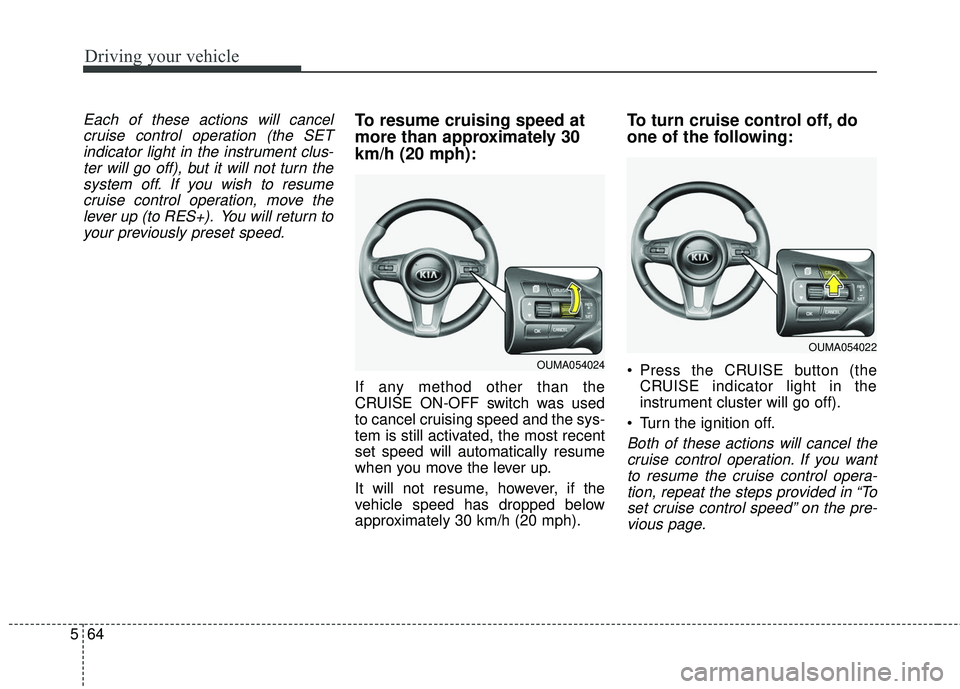
more than approximately 30
km/h (20 mph):
If any method other than the
CRUISE ON-OFF switch was used
to cancel cruising speed and the sys-
tem is still activated, the most recent
set speed will automatically resume
when you move the lever up.
It will not resume, however, if the
vehicle speed has dropped below
approximately 30 km/h (20 mph).
To turn cruise control off, do
one of the following:
Press the CRUISE button (the CRUISE indicator light in the
instrument cluster will go off).
Turn the ignition off.
Both of these actions will cancel the cruise control operation. If you wantto resume the cruise control opera-tion, repeat the steps provided in “Toset cruise control speed” on the pre-vious page.
OUMA054024
OUMA054022
Page 395 of 536

63
What to do in an emergency
If the engine stalls at a cross-
road or crossing
If the engine stalls at a crossroad or
crossing, set the shift lever in the N
(Neutral) position and then push the
vehicle to a safe place.
If you have a flat tire while
driving
If a tire goes flat while you are driv-
ing:
1.Take your foot off the acceleratorpedal and let the vehicle slow
down while driving straight ahead.
Do not apply the brakes immedi-
ately or attempt to pull off the road
as this may cause a loss of control.
When the vehicle has slowed to
such a speed that it is safe to do
so, brake carefully and pull off the
road. Drive off the road as far as
possible and park on a firm level
ground. If you are on a divided
highway, do not park in the median
area between the two traffic lanes. 2.When the vehicle is stopped, turn
on your emergency hazard flash-
ers, set the parking brake and put
the transaxle in P (Park, automatic
transaxle).
3.Have all passengers get out of the vehicle. Be sure they all get out on
the side of the vehicle that is away
from traffic.
4.When changing a flat tire, follow the instruction provided later in this
section.
If the engine stalls while driv-
ing
1.Reduce your speed gradually,keeping a straight line. Move cau-
tiously off the road to a safe place.
2.Turn on your emergency flashers.
3.Try to start the engine again. If your vehicle will not start, contact an
authorized Kia dealer or seek other
qualified assistance.
✽ ✽ NOTICE
If there was a check engine light and
loss of power or stall and if safe to do
so, wait at least 10 seconds to restart
the vehicle after it stalls. This may
reset the car so it will no longer run
at low power condition.
IN CASE OF AN EMERGENCY WHILE DRIVING
Page 412 of 536

Maintenance
Engine compartment . . . . . . . . . . . . . . . . . . . . . . . . 7-3
Maintenance services . . . . . . . . . . . . . . . . . . . . . . . . 7-6
• Owner’s responsibility . . . . . . . . . . . . . . . . . . . . . . . . . 7-6
• Owner maintenance precautions . . . . . . . . . . . . . . . . . 7-7
Owner maintenance . . . . . . . . . . . . . . . . . . . . . . . . . 7-8
• Owner maintenance schedule. . . . . . . . . . . . . . . . . . . . 7-8
Scheduled maintenance service. . . . . . . . . . . . . . . 7-10
Explanation of scheduled maintenance items . . . 7-29
Engine oil. . . . . . . . . . . . . . . . . . . . . . . . . . . . . . . . . 7-33
• Checking the engine oil level . . . . . . . . . . . . . . . . . . . 7-34
• Changing the engine oil and filter . . . . . . . . . . . . . . . 7-35
Engine coolant . . . . . . . . . . . . . . . . . . . . . . . . . . . . 7-36
• Checking the coolant level . . . . . . . . . . . . . . . . . . . . . 7-36
• Changing the coolant . . . . . . . . . . . . . . . . . . . . . . . . . 7-38
Brake fluid . . . . . . . . . . . . . . . . . . . . . . . . . . . . . . . 7-39
• Checking the brake fluid level . . . . . . . . . . . . . . . . . . 7-39
Washer fluid . . . . . . . . . . . . . . . . . . . . . . . . . . . . . . 7-40
• Checking the washer fluid level . . . . . . . . . . . . . . . . . 7-40
Parking brake . . . . . . . . . . . . . . . . . . . . . . . . . . . . . 7-41
• Checking the parking brake. . . . . . . . . . . . . . . . . . . . 7-41
Air cleaner. . . . . . . . . . . . . . . . . . . . . . . . . . . . . . . . 7-42
• Filter replacement . . . . . . . . . . . . . . . . . . . . . . . . . . . . 7-42
Climate control air filter . . . . . . . . . . . . . . . . . . . . 7-44
• Filter inspection . . . . . . . . . . . . . . . . . . . . . . . . . . . . . . 7-44
Wiper blades . . . . . . . . . . . . . . . . . . . . . . . . . . . . . . 7-46
• Blade inspection . . . . . . . . . . . . . . . . . . . . . . . . . . . . . . 7-46
• Blade replacement . . . . . . . . . . . . . . . . . . . . . . . . . . . . 7-46
Battery . . . . . . . . . . . . . . . . . . . . . . . . . . . . . . . . . . . 7-\
49
• For best battery service . . . . . . . . . . . . . . . . . . . . . . . 7-49
• Battery recharging . . . . . . . . . . . . . . . . . . . . . . . . . . . 7-50
• Recharging battery . . . . . . . . . . . . . . . . . . . . . . . . . . . 7-51
• Reset items . . . . . . . . . . . . . . . . . . . . . . . . . . . . . . . . . . 7-51\
Tires and wheels . . . . . . . . . . . . . . . . . . . . . . . . . . . 7-52
• Tire care . . . . . . . . . . . . . . . . . . . . . . . . . . . . . . . . . . . . \
7-52
• Recommended cold tire inflation pressures . . . . . . . 7-52
• Tire pressure . . . . . . . . . . . . . . . . . . . . . . . . . . . . . . . . 7-53
• Checking tire inflation pressure. . . . . . . . . . . . . . . . . 7-53
• Tire rotation . . . . . . . . . . . . . . . . . . . . . . . . . . . . . . . . . 7-54
• Wheel alignment and tire balance . . . . . . . . . . . . . . . 7-55
• Tire replacement . . . . . . . . . . . . . . . . . . . . . . . . . . . . . 7-56
• Wheel replacement . . . . . . . . . . . . . . . . . . . . . . . . . . . 7-57
• Tire traction . . . . . . . . . . . . . . . . . . . . . . . . . . . . . . . . . 7-57
• Tire maintenance . . . . . . . . . . . . . . . . . . . . . . . . . . . . . 7-57
• Tire sidewall labeling . . . . . . . . . . . . . . . . . . . . . . . . . 7-57
• All season tires . . . . . . . . . . . . . . . . . . . . . . . . . . . . . . . 7-64
• Summer tires . . . . . . . . . . . . . . . . . . . . . . . . . . . . . . . . 7-64
• Snow tires . . . . . . . . . . . . . . . . . . . . . . . . . . . . . . . . . . . 7-\
64
• Radial-ply tires . . . . . . . . . . . . . . . . . . . . . . . . . . . . . . 7-64
• Low aspect ratio tire . . . . . . . . . . . . . . . . . . . . . . . . . . 7-65
7
Page 462 of 536

751
Maintenance
Recharging battery
When recharging the battery,
observe the following precautions:
The battery must be removed fromthe vehicle and placed in an area
with good ventilation.
Do not allow cigarettes, sparks, or flame near the battery.
Watch the battery during charging, and stop or reduce the charging
rate if the battery cells begin
gassing (boiling) violently or if the
temperature of the electrolyte of
any cell exceeds 49°C (120°F).
Wear eye protection when check- ing the battery during charging.
Disconnect the battery charger in the following order.
1. Turn off the battery charger main switch.
2. Unhook the negative clamp from the negative battery terminal.
3. Unhook the positive clamp from the positive battery terminal. Before performing maintenance or
recharging the battery, turn off all
accessories and stop the engine.
The negative battery cable must be removed first and installed last
when the battery is disconnected.
Reset items
Items should be reset after the bat-
tery has been discharged or the bat-
tery has been disconnected.
Auto up/down window (See chapter 4)
Sunroof (See chapter 4)
Trip computer (See chapter 4)
Climate control system (See chapter 4)
Integrated Memory System (See chapter 3)
Audio (See chapter 4)
Page 466 of 536
755
Maintenance
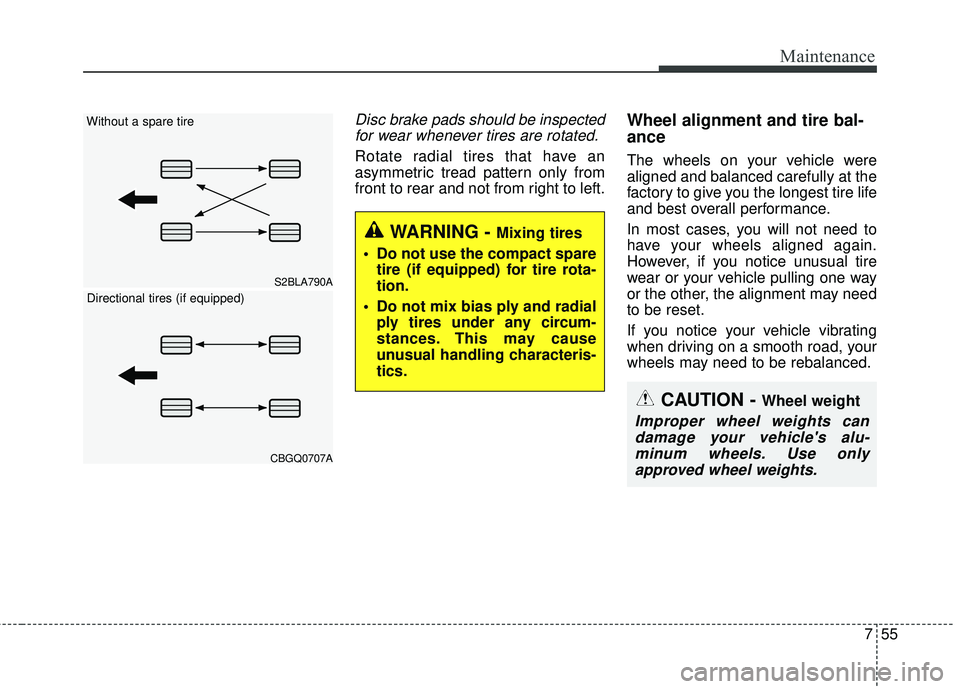
Disc brake pads should be inspectedfor wear whenever tires are rotated.
Rotate radial tires that have an
asymmetric tread pattern only from
front to rear and not from right to left.
Wheel alignment and tire bal-
ance
The wheels on your vehicle were
aligned and balanced carefully at the
factory to give you the longest tire life
and best overall performance.
In most cases, you will not need to
have your wheels aligned again.
However, if you notice unusual tire
wear or your vehicle pulling one way
or the other, the alignment may need
to be reset.
If you notice your vehicle vibrating
when driving on a smooth road, your
wheels may need to be rebalanced.
WARNING - Mixing tires
Do not use the compact spare tire (if equipped) for tire rota-
tion.
Do not mix bias ply and radial ply tires under any circum-
stances. This may cause
unusual handling characteris-
tics.
CAUTION - Wheel weight
Improper wheel weights candamage your vehicle's alu-minum wheels. Use onlyapproved wheel weights.
CBGQ0707A
S2BLA790A
Without a spare tire
Directional tires (if equipped)
Page 479 of 536

Maintenance
68
7
If you do not have a spare, use a
fuse of the same rating from a circuityou may not need for operating thevehicle, such as the power outletfuse.
If the head lamp, turn signal lamp,
stop signal lamp, fog lamp, DRL, tail
lamp, HMSL do not work and the
fuses are OK, check the fuse panel
in the engine compartment. If a fuse
is blown, it must be replaced.
✽ ✽ NOTICE
If the headlamp, fog lamp, turn sig-
nal lamp, or tail lamp malfunction
even without any problem to the
lamps, have the vehicle checked by
an authorized Kia dealer for assis-
tance.
✽ ✽NOTICE - Fuse Panel Covers
• Put all switches in ON when driv-
ing.
• If the vehicle remains idle for over 1 month, put all switches in OFF
to prevent the batteries from being
discharged.
• Excluding long-term parking for over 1 month, the contact points of
switches may wear out upon
extensive use. Please refrain from
excessive use of switches.
Fuse switch
Always, put the fuse switch at the ON
position.
If you move the switch to the OFF
position, some items such as audio
and digital clock must be reset and
transmitter (or smart key) may not
work properly. When the switch is
Off, the caution indicator will be dis-
played on the instrument cluster.
Always place the fuse switch in the
ON position while driving the vehicle.
OUMA074017