Page 171 of 536
Features of your vehicle
86
4
✽ ✽
NOTICE
If any of the following conditions
occur, the km and days may be
incorrect.
- The battery cable is disconnected.
- The fuse switch is turned off.
- The battery is discharged.
Master Warning Mode
This warning light informs the driv-
er of the following situations
- Low washer fluid
- Blind Spot Detection (BSD) mal-function (if equipped)
- Lane Departure warning system (LDWS) malfunction (if equipped)
- Autonomous Emergency Braking (AEB) malfunction (if equipped)
- Advanced smart cruise control system (ASCC) malfunction (if
equipped)
- Service reminder (if equipped)
- Lamp malfunction and so on.
The Master Warning Light illumi-
nates when more than one of the
above warning situations occur. At
this time, the LCD Modes Icon will
change from ( ) to ( ).
If the warning situation is solved, the
master warning light will be turned off
and the LCD Modes Icon will be
changed back to its previous icon ( ).
(ex : refill the washer fluid)
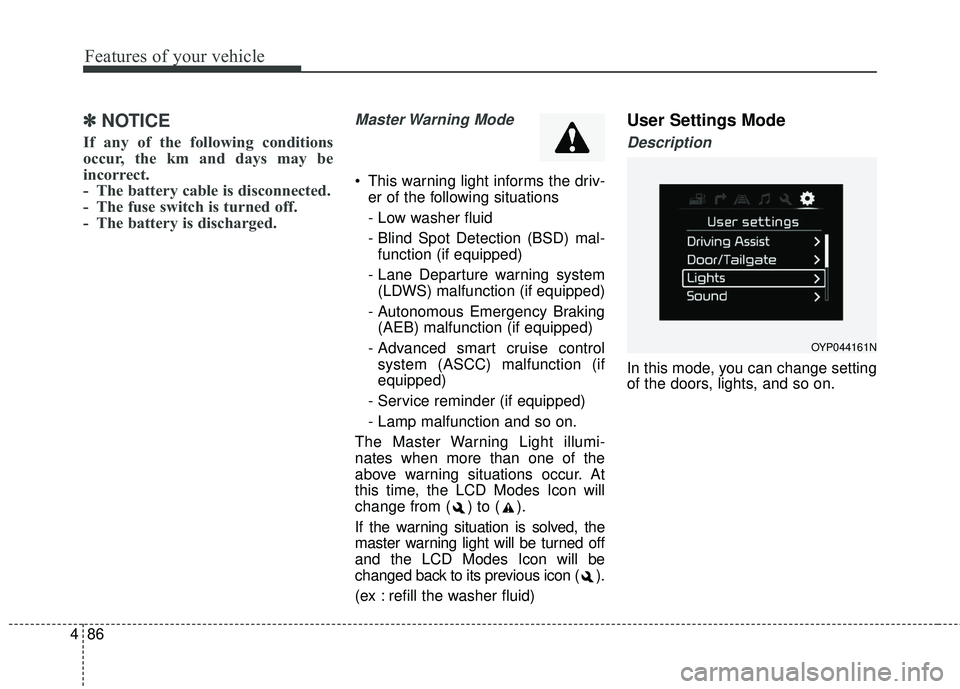
User Settings Mode
Description
In this mode, you can change setting
of the doors, lights, and so on.
OYP044161N
Page 174 of 536
489
Features of your vehicle
Sound
Park assist system vol. (if equipped)
Adjust the Park Assist System vol-
ume. (Level 1~3).
Blind spot detection Sound (if equipped)
If this item is checked, the blind spot
detection sound function will be acti-
vated.
Welcome sound(if equipped)
If this item is checked, the welcome
sound function will be activated.
Seat / Steering
Seat easy access (if equipped)
If this item is checked, the driver’s
seat will automatically move forward
or rearward for the driver to enter or
exit the vehicle comfortably.
Steering Position
If this item is checked, the warning
function regarding the steering wheel
alignment will be activated.
Service interval
On this mode, you can activate the
service interval function with mileage
(mi. or km) and period (months).
The service interval functionwill be deactivated.
You can set the service inter- val (km and months).
Page 180 of 536
495
Features of your vehicle
Low Washer Fluid
• This warning message illuminateson the service reminder mode if
the washer fluid level in the reser-
voir is nearly empty.
It means that you should refill the washer fluid.
Turn on FUSE SWITCH
This warning message illuminatesif the fuse switch on the fuse box is
OFF.
It means that you should turn the fuse switch on.
For more details, refer to “Fuses” in
chapter 7.
Low Fuel
This warning message illuminates if
the fuel tank is nearly empty.
- When the low fuel level warning light is illuminated.
- When the trip computer displays "--- km (or mile)" as range.
Add fuel as soon as possible.
OYP044139NOYP044135NOYP044276N
Page 188 of 536

4103
Features of your vehicle
Low Fuel Level WarningLight
This warning light illuminates:
When the fuel tank is nearly empty.
If the fuel tank is nearly empty:
Add fuel as soon as possible.
Electronic Parking Brake(EPB) Warning Light(if equipped)
This warning light illuminates:
Once you set the ignition switch or Engine Start/Stop Button to the ON
position.
- It illuminates for approximately 3seconds and then goes off.
When there is a malfunction with the EPB.
In this case, have your vehicle
inspected by an authorized Kia
dealer.
✽ ✽ NOTICE- Electronic Parking
Brake (EPB)
Warning Light
The Electronic Parking Brake
(EPB) Warning Light may illumi-
nate when the Electronic Stability
control (ESC) Indicator Light comes
on to indicate that the ESC is not
working properly (This does not
indicate malfunction of the EPB).
Master Warning light (if equipped)
This warning light informs the driv- er of the following situations
- Low washer fluid (if equipped)
- Blind Spot Detection (BSD) mal-function (if equipped)
- Lane Departure warning system (LDWS) malfunction (if equipped)
- Autonomous Emergency Braking (AEB) malfunction (if equipped)
- Advanced smart cruise control system (ASCC) malfunction
(if equipped)
- High beam assist system (HBA) malfunction (if equipped)
- Service required
- Lamp malfunction and so on.
CAUTION - Low Fuel
Level
Driving with the Low Fuel Level warning light on or with the fuellevel below “0 or E” can causethe engine to misfire and dam-age the catalytic converter (ifequipped).
EPB
Page 222 of 536
4137
Features of your vehicle
System operation
Ventilation
1. Set the mode to the position.
2. Set the air intake control to theoutside (fresh) air position.
3. Set the temperature control to the desired position.
4. Set the fan speed control to the desired speed.
Heating
1. Set the mode to the position.
2. Set the air intake control to theoutside (fresh) air position.
3. Set the temperature control to the desired position.
4. Set the fan speed control to the desired speed.
5. If dehumidified heating is desired, turn the air conditioning system (if
equipped) on.
If the windshield fogs up, set the mode to the or position. Operation Tips
To keep dust or unpleasant fumes
from entering the vehicle through
the ventilation system, temporarily
set the air intake control to the
recirculated air position. Be sure to
return the control to the fresh air
position when the irritation has
passed to keep fresh air in the
vehicle. This will help keep the driv-
er alert and comfortable.
Air for the heating/cooling system is drawn in through the grilles just
ahead of the windshield. Care
should be taken that these are not
blocked by leaves, snow, ice or
other obstructions.
To prevent interior fog on the wind- shield, set the air intake control to
the fresh air position and fan speed
to the desired position, turn on the
air conditioning system, and adjust
the temperature control to desired
temperature.
Air conditioning
Kia Air Conditioning Systems are
filled with refrigerant*.
1. Start the engine. Push the air con- ditioning button.
2. Set the mode to the position.
3. Set the air intake control to the outside air or recirculated air posi-
tion.
4. Adjust the fan speed control and temperature control to maintain
maximum comfort.
The refrigerant system should only be serviced by trained and certified
technicians to insure proper and
safe operation.
The refrigerant system should be serviced in a well-ventilated place.
The air conditioning evaporator (cooling coil) shall never be repaired
or replaced with one removed from
a used or salvaged vehicle and new
replacement MAC evaporators shall
be certified (and labeled) as meet-
ing SAE Standard J2842.
Page 225 of 536
Features of your vehicle
140
4
WARNING
The oil and refrigerant in your
vehicle's air conditioning sys-
tem is under very high pres-
sure. If proper service proce-
dures are not followed an explo-
sion may result. To reduce the
risk of serious injury or death,
the air conditioning system in
your vehicle should only be
serviced by trained and certi-
fied technicians.
CAUTION- AC Repair
It is important that the correct
type and amount of oil and refrig-erant is used, otherwise damageto the vehicle may occur. To pre-vent damage, the air conditioningsystem in your vehicle shouldonly be serviced by trained andcertified technicians.
Page 239 of 536
Features of your vehicle
154
4
Checking the amount of air
conditioner refrigerant and
compressor lubricant
When the amount of refrigerant is
low, the performance of the air con-
ditioning is reduced. Overfilling also
has a negative impact on the air con-
ditioning system.
Therefore, if abnormal operation is
found, have the system inspected by
an authorized Kia dealer.
WARNING
The oil and refrigerant in your
vehicle's air conditioning sys-
tem is under very high pres-
sure. If proper service proce-
dures are not followed an explo-
sion may result. To reduce the
risk of serious injury or death,
the air conditioning system in
your vehicle should only be
serviced by trained and certi-
fied technicians.
CAUTION
It is important that the correct
type and amount of oil and refrig-erant is used, otherwise damageto the vehicle may occur. To pre-vent damage, the air conditioningsystem in your vehicle shouldonly be serviced by trained andcertified technicians.
Page 265 of 536

Features of your vehicle
180
4
Adjust the volume to levels that
allow the driver to hear sounds
from outside of the vehicle. Driving
in a state where external sounds
cannot be heard may lead to acci-
dents.
Pay attention to the volume setting when turning the device on. A sud-
den output of extreme volume
upon turning the device on could
lead to hearing impairment. (Adjust
the volume to a suitable levels
before turning off the device.) Turn on the car ignition before
using the audio system. Do not
operate the audio system for long
periods of time with the ignition
turned off; such operations may lead
to battery discharge.
In case of product malfunction, please contact your place of pur-
chase or After Service center.
Placing the audio system within an electromagnetic environment may
result in noise interference.CAUTION
Do not subject the device tosevere shock or impact. Directpressure onto the front side ofthe monitor may cause damageto the LCD or touch screen.
When cleaning the device, make sure to turn off theaudio system and use a dryand smooth cloth. Never usetough materials, chemicalcloths, or solvents (alcohol,benzene, thinners, etc.) assuch materials may damagethe device panel or causecolor/quality deterioration
Do not place beverages close to the audio system. Spillingbeverages may lead to systemmalfunction.
Prevent caustic solutions such as perfume and cosmetic oilfrom contacting the dashboardbecause they may cause dam-age or discoloration.