2018 KIA SORENTO light
[x] Cancel search: lightPage 358 of 536

Driving your vehicle
88
5
If the system does not work properly,
a warning message will appear and
the light on the switch will turn off.
The system will turn off automatical-
ly.
Have your vehicle inspected by an
authorized Kia dealer.
RCTA (Rear Cross Traffic Alert)
When your vehicle moves backwards
from a parking position, the sensor
detects approaching vehicles to the
left or right side direction and gives
information to the driver.
Operating conditions
Select RCTA (Rear Cross Traffic
Alert) in "User Settings" under
"Driving Assist" on the instrument
cluster. The system will turn on and
standby to activate.
Select RCTA again, to turn the sys- tem off.
If the vehicle is turned off and on again, the RCTA system will return
to the state right before the vehicle
was turned off. Always turn the
RCTA system off when not in use.
OUM054178L
OYP054026KOUM054124L
Page 359 of 536

589
Driving your vehicle
The system operates when thevehicle speed is below 10 km/h
(6.2 mph) with the shift lever in R
(Reverse).
The RCTA (Rear Cross Traffic Alert) detecting range is 0.5m ~
20m based on the side direction. If
the approaching vehicle speed is
4 km/h (2.5 mph) ~ 36 km/h (22
mph) within sensing range, it is
detected. However, the system
sensing range is different based on
conditions. Always pay attention to
your surroundings.Warning type
If the vehicle detected by sensorsapproaches your vehicle, the warn-
ing chime will sound and the warn-
ing light will blink on the outside
rearview mirror.
If the detected vehicle is out of the sensing range of your vehicle,
move the vehicle away from the
detected object slowly; the warning
will be cancelled.
The system may not operate prop- erly due to other factors or circum-
stances. Always pay attention to
your surroundings. \b
If your vehicle's left or right side
bumper is blinded by barrier or
vehicles, the system sensing abili-
ty may be deteriorated.
OYP054027K
WARNING
The Blind Spot Detection
System with Lane Change
Assist and Rear Cross Traffic
Alert is not a substitute for
proper and safe lane changing
procedures. Always drive safely
and use caution when changing
lanes. The Blind Spot Detection
System may not detect every
object alongside the vehicle.
Page 363 of 536

593
Driving your vehicle
LDWS operation
To activate/deactivate the LDWS:
With the ignition switch in the ON
position, press the LDWS button
located on the instrument panel on
the lower left hand side of the driver.The indicator in the cluster display
will initially illuminate white. If the
indicator(white) activated in the pre-
vious ignition cycle, the system turns
on without any control. If you press
the LDWS button again, the indicator
on the cluster display will go off. The
color of indicator will change depend
on the condition of LDWS.
- White : Sensor does not detect the
lane marker or vehicle
speed is less than 40mph
(64kph).
- Green : S ensor detects the lane
marker.
(Continued)
Do not put objects that reflect light on the crash pad.
You may not hear warning sound of LDWS because of
the excessive audio sound.
OUMA054031
OUM054133L
Page 365 of 536
595
Driving your vehicle
Warning light and message
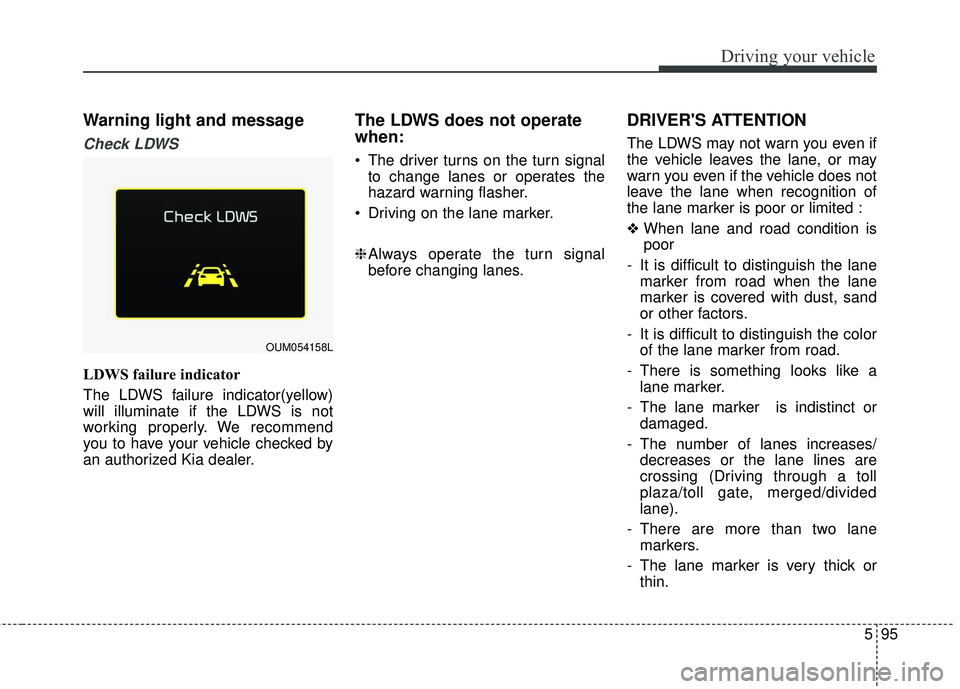
Check LDWS
LDWS failure indicator
The LDWS failure indicator(yellow)
will illuminate if the LDWS is not
working properly. We recommend
you to have your vehicle checked by
an authorized Kia dealer.
The LDWS does not operate
when:
The driver turns on the turn signalto change lanes or operates the
hazard warning flasher.
Driving on the lane marker.
\b Always operate the turn signal
before changing lanes.
DRIVER'S ATTENTION
The LDWS may not warn you even if
the vehicle leaves the lane, or may
warn you even if the vehicle does not
leave the lane when recognition of
the lane marker is poor or limited :
❖ When lane and road condition is
poor
- It is difficult to distinguish the lane marker from road when the lane
marker is covered with dust, sand
or other factors.
- It is difficult to distinguish the color of the lane marker from road.
- There is something looks like a lane marker.
- The lane marker is indistinct or damaged.
- The number of lanes increases/ decreases or the lane lines are
crossing (Driving through a toll
plaza/toll gate, merged/divided
lane).
- There are more than two lane markers.
- The lane marker is very thick or thin.
OUM054158L
Page 366 of 536

Driving your vehicle
96
5
- The lane marker is not visible due
to snow, rain, stain, a puddle or
other factors.
- A shadow is on the lane marker because of a median strip,
guardrail, noise barriers and oth-
ers.
- When the lane markers are compli- cated or a structure substitutes for
the lines such as a construction
area.
- There are crosswalk signs or other symbols on the road.
- The lane suddenly disappears such as at the intersection.
- The lane marker in a tunnel is cov- ered with dirt or oil and etc. ❖
When external condition is inter-
vened
- The brightness of outside changes suddenly when entering/existing a
tunnel or passing under a bridge.
- The headlamps are not on at night or in a tunnel, or light level is low.
- There is a boundary structure in the roadway.
- Because the light of street, sun, oncoming vehicle and so on
reflects from the water on the road.
- When light shines brightly in the reverse direction you drive.
- The distance from the vehicle ahead is very short or the vehicle
ahead drives hiding the lane line.
- You drive on a steep grade or a sharp curve.
- The vehicle vibrates heavily.
- The temperature near inside mirror is very high due to direct sun light
and etc. ❖
When front visibility is poor
- The lens or windshield is covered by strange materials.
- The sensor cannot detect the lane because of fog, heavy rain or snow.
- The windshield is fogged by humid air in the vehicle.
- Putting something on the crash pad and etc.
Page 367 of 536

597
Driving your vehicle
Your vehicle's fuel economy depends
mainly on your style of driving, where
you drive and when you drive.
Each of these factors affects how
many miles (kilometers) you can get
from a gallon (liter) of fuel. To operate
your vehicle as economically as pos-
sible, use the following driving sug-
gestions to help save money in both
fuel and repairs:
Drive smoothly. Accelerate at amoderate rate. Don't make "jack-
rabbit" starts or full-throttle shifts
and maintain a steady cruising
speed. Don't race between stop-
lights. Try to adjust your speed to
the traffic so you don't have to
change speeds unnecessarily.
Avoid heavy traffic whenever pos-
sible. Always maintain a safe dis-
tance from other vehicles so you
can avoid unnecessary braking.
This also reduces brake wear.
Drive at a moderate speed. The faster you drive, the more fuel your
vehicle uses. Driving at a moderate
speed, especially on the highway,
is one of the most effective ways to
reduce fuel consumption. Don't "ride" the brake pedal. This
can increase fuel consumption and
also increase wear on these com-
ponents. In addition, driving with
your foot resting on the brake pedal
may cause the brakes to overheat,
which reduces their effectiveness
and may lead to more serious con-
sequences.
Take care of your tires. Keep them inflated to the recommended pres-
sure. Incorrect inflation, either too
much or too little, results in unnec-
essary tire wear. Check the tire
pressures at least once a month.
Be sure that the wheels are aligned correctly. Improper align-
ment can result from hitting curbs
or driving too fast over irregular
surfaces. Poor alignment causes
faster tire wear and may also result
in other problems as well as
greater fuel consumption. Keep your vehicle in good condi-
tion. For better fuel economy and
reduced maintenance costs, main-
tain your vehicle in accordance
with the maintenance schedule in
section 7. If you drive your vehicle
in severe conditions, more frequent
maintenance is required (see sec-
tion 7 for details).
Keep your vehicle clean. For maxi- mum service, your vehicle should
be kept clean and free of corrosive
materials. It is especially important
that mud, dirt, ice, etc. not be
allowed to accumulate on the
underside of the vehicle. This extra
weight can result in increased fuel
consumption and also contribute to
corrosion.
Travel lightly. Don't carry unneces- sary weight in your vehicle. Weight
reduces fuel economy.
Don't let the engine idle longer than necessary. If you are waiting
(and not in traffic), turn off your
engine and restart only when
you're ready to go.
ECONOMICAL OPERATION
Page 368 of 536
Driving your vehicle
98
5
Remember, your vehicle does not
require extended warm-up. After
the engine has started, allow the
engine to run for 10 to 20 seconds
prior to placing the vehicle in gear.
In very cold weather, however, give
your engine a slightly longer warm-
up period.
Don't "lug" or "over-rev" the engine. Lugging is driving too slowly in a
very high gear resulting in engine
bucking. If this happens, shift to a
lower gear. Over-revving is racing
the engine beyond its safe limit.
This can be avoided by shifting at
the recommended speed. Use your air conditioning sparingly.
The air conditioning system is
operated by engine power so your
fuel economy is reduced when you
use it.
Open windows at high speeds can reduce fuel economy.
Fuel economy is less in crosswinds and headwinds. To help offset
some of this loss, slow down when
driving in these conditions.
Keeping a vehicle in good operating
condition is important both for econ-
omy and safety. Therefore, have an
authorized Kia dealer perform
scheduled inspections and mainte-
nance.
WARNING - Engine off
during motion
Never turn the engine off to
coast down hills or anytime the
vehicle is in motion. The power
steering and power brakes will
not function properly without
the engine running. In addition,
turning off the ignition while
driving could engage the steer-
ing wheel lock resulting in loss
of vehicle steering. Keep the
engine on and downshift to an
appropriate gear for engine
braking effect.
Page 369 of 536
599
Driving your vehicle
Hazardous driving conditions
When hazardous driving conditions
are encountered such as water,
snow, ice, mud, sand, or similar haz-
ards, follow these suggestions:
• Drive cautiously and allow extradistance for braking.
Avoid sudden braking or steering.
When braking with non-ABS brakes pump the brake pedal with
a light up-and-down motion until
the vehicle is stopped.
Do not pump the brake pedal on a
vehicle equipped with ABS. If stalled in snow, mud, or sand,
use second gear. Accelerate slow-
ly to avoid spinning the drive
wheels.
Use sand, rock salt, or other non- slip material under the drive
wheels to provide traction when
stalled in ice, snow, or mud.
Reducing the risk of a rollover
This multi-purpose passenger vehi-
cle is defined as a Sports Utility
Vehicle (SUV). Utility vehicles have a
significantly higher rollover rate than
other types of vehicles. SUV's have
higher ground clearance and a nar-
rower track to make them capable of
performing in a wide variety of off-
road applications. Specific design
characteristics give them a higher
center of gravity than ordinary vehi-
cles. An advantage of the higher
ground clearance is a better view of
the road, which allows you to antici-
pate problems. They are not
designed for cornering at the same
speeds as conventional passenger
vehicles, any more than low-slung
sports vehicles are designed to per-
form satisfactorily in off-road condi-
tions. Due to this risk, driver and pas-
sengers are strongly recommended
to buckle their seat belts. In a rollover
crash, an unbelted person is signifi-
cantly more likely to die than a per-
son wearing a seat belt. There are
steps that a driver can make to
reduce the risk of a rollover.
SPECIAL DRIVING CONDITIONS
WARNING- Downshifting
Do not downshift with an auto-
matic transaxle while driving on
slippery surfaces. The sudden
change in tire speed could
cause the tires to skid and
result in an accident.