Page 164 of 492
Features of your vehicle
92
4
Front fog light (if equipped)
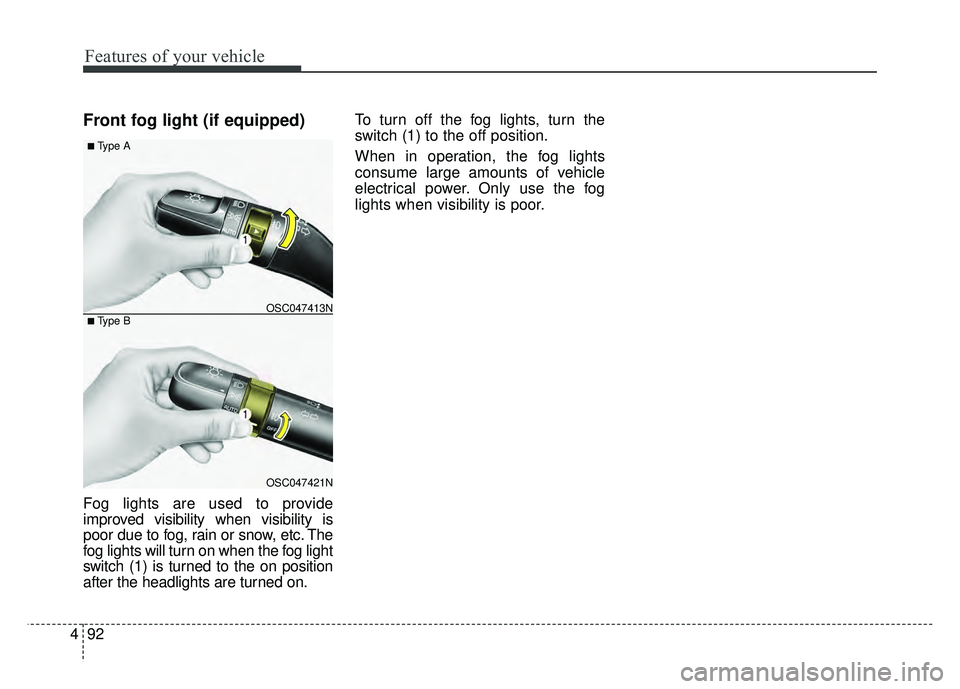
Fog lights are used to provide
improved visibility when visibility is
poor due to fog, rain or snow, etc. The
fog lights will turn on when the fog light
switch (1) is turned to the on position
after the headlights are turned on. To turn off the fog lights, turn the
switch (1) to the off position.
When in operation, the fog lights
consume large amounts of vehicle
electrical power. Only use the fog
lights when visibility is poor.
OSC047421N
OSC047413N
■ Type A
■ Type B
Page 170 of 492
Features of your vehicle
98
4
Do not use the interior lights for
extended periods when the engine is
not running.
It may cause battery discharge.Automatic turn off function
(if equipped)
The interior lights automatically turn
off approximately 20 minutes after
the ignition switch is turned off.
If your vehicle is equipped with the
theft alarm system, the interior lights
automatically turn off approximately
5 seconds after the system is in
armed stage.
Map lamp (if equipped)
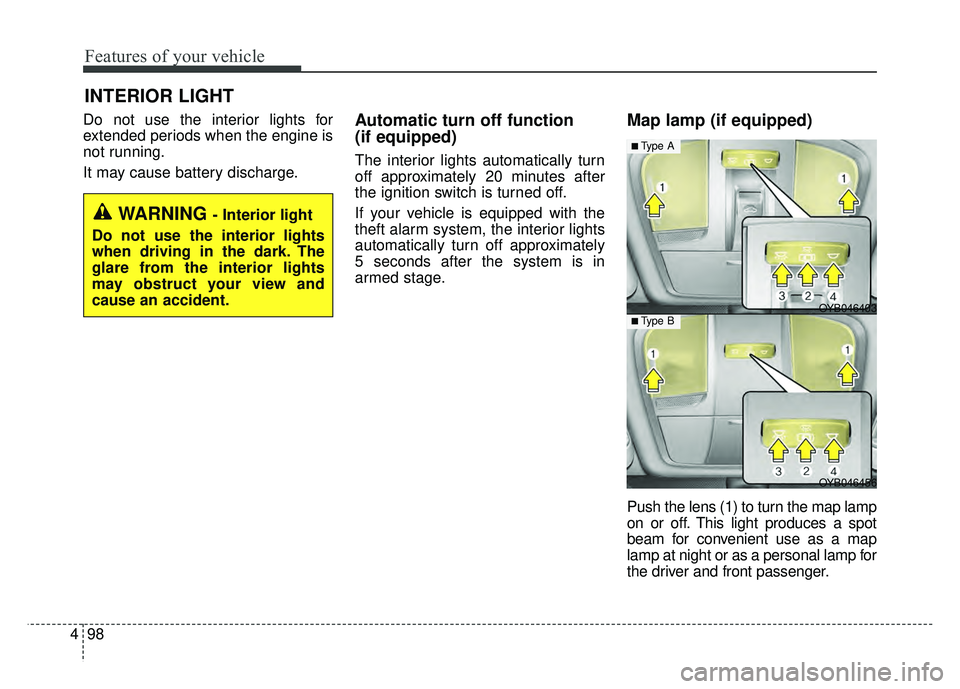
Push the lens (1) to turn the map lamp
on or off. This light produces a spot
beam for convenient use as a map
lamp at night or as a personal lamp for
the driver and front passenger.
INTERIOR LIGHT
WARNING - Interior light
Do not use the interior lights
when driving in the dark. The
glare from the interior lights
may obstruct your view and
cause an accident.
OYB046456
OYB046403
■ Type A
■ Type B
Page 171 of 492

499
Features of your vehicle
In the DOOR position, the map
lamp and the room lamp come on
when any door is opened regard-
less of the ignition switch position.
When doors are unlocked by the
transmitter (or smart key), the map
lamp and the room lamp come on
for approximately 30 seconds as
long as any door is not open.
The map lamp and the room lamp
go out gradually after approximate-
ly 30 seconds if the door is closed.
However, if the ignition switch is
ON or all doors are locked, the
map lamp and the room lamp will
turn off immediately. If a door is
opened with the ignition switch in
the ACC or LOCK position, the
map lamp and the room lamp stays
on for about 20 minutes. However,
if a door is opened with the ignition
switch in the ON position, the map
lamp and the room lamp stays on
continuously. If the type B room
lamp switch is OFF, it doesn't work. The map lamp and the
room lamp stay on at all
times.
The lights turn off even if a door is opened.
When the lamp is
turned ON by pressing
the lens (1), the lamp
does not turn off even
if the switch (2) is in the
OFF position.Room lamp
To turn the room lamp ON or OFF,
push the switch.
If your vehicle is not equipped with a
map lamp, the room lamp will also
turn on or off as follows.
OYB046404
OSC047432N
■ Type A
■ Type B
Page 172 of 492
Features of your vehicle
100
4
- The room lamp comes on when a
door is opened. The lamps go out
after approximately 30 seconds.
- The room lamp comes on for approximately 30 seconds when
doors are unlocked with a trans-
mitter or smart key as long as the
doors are not opened.
- The room lamp will stay on for approximately 20 minutes if a
door is opened with the ignition
switch in the ACC or LOCK/OFF
position.
- The room lamp will stay on con- tinuously if the door is opened
with the ignition switch in the ON
position.
- The room lamp will go out imme- diately if the ignition switch is
changed to the ON position or all
doors are locked.
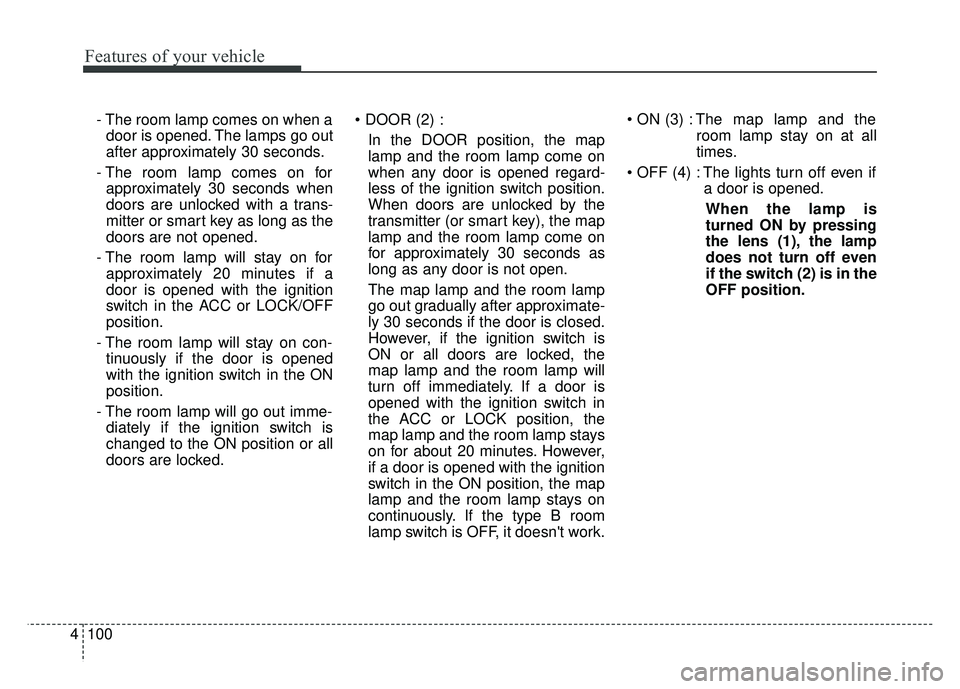
In the DOOR position, the map
lamp and the room lamp come on
when any door is opened regard-
less of the ignition switch position.
When doors are unlocked by the
transmitter (or smart key), the map
lamp and the room lamp come on
for approximately 30 seconds as
long as any door is not open.
The map lamp and the room lamp
go out gradually after approximate-
ly 30 seconds if the door is closed.
However, if the ignition switch is
ON or all doors are locked, the
map lamp and the room lamp will
turn off immediately. If a door is
opened with the ignition switch in
the ACC or LOCK position, the
map lamp and the room lamp stays
on for about 20 minutes. However,
if a door is opened with the ignition
switch in the ON position, the map
lamp and the room lamp stays on
continuously. If the type B room
lamp switch is OFF, it doesn't work. The map lamp and the
room lamp stay on at all
times.
The lights turn off even if a door is opened.
When the lamp is
turned ON by pressing
the lens (1), the lamp
does not turn off even
if the switch (2) is in the
OFF position.
Page 252 of 492

Driving your vehicle
46
Before entering vehicle
• Be sure that all windows, outsidemirror(s), and outside lights are
clean.
Check the condition of the tires.
Check under the vehicle for any sign of leaks.
Be sure there are no obstacles behind you if you intend to back up.
Necessary inspections
Fluid levels, such as engine oil,
engine coolant, brake fluid, and
washer fluid should be checked on a
regular basis, with the exact interval
depending on the fluid. Further
details are provided in Chapter 8,
“Maintenance”.
Before starting
Close and lock all doors.
Position the seat so that all con-trols are easily reached.
Buckle your seat belt.
Adjust the inside and outside rearview mirrors.
Be sure that all lights work.
Check all gauges.
Check the operation of warning lights when the ignition switch is
turned to the ON position.
Release the parking brake and make sure the brake warning light
goes off.
For safe operation, be sure you are
familiar with your vehicle and its
equipment.
BEFORE DRIVING
WARNING- Distracted driving
Focus on the road while driving.
The driver's primary responsi-
bility is in the safe and legal
operation of the vehicle. Use of
any hand held devices, other
equipment or vehicle systems
that distract the driver should
not be used during vehicle
operation.
Page 254 of 492

Driving your vehicle
66
Ignition switch position
LOCK
The steering wheel locks to protect
against theft. (If equipped)
The ignition key can be removed only
in the LOCK position. When turning
the ignition switch to the LOCK posi-
tion, push the key inward at the ACC
position and turn the key toward the
LOCK position.The anti-theft steering column lock is
not a substitute for the parking brake.
Before leaving the driver’s seat,
always make sure the shift lever is
engaged in 1st gear for the manual
transaxle or P (Park) for the auto-
matic transaxle, set the parking
brake fully and shut the engine off.
ACC (Accessory)
The steering wheel is unlocked (If
equipped) and electrical accessories
are operative.
If difficulty is experienced turning the
ignition switch to the ACC position,
turn the key while turning the steer-
ing wheel right and left to release the
tension.
ON
The warning lights can be checked
before the engine is started. This is
the normal running position after the
engine is started.
Do not leave the ignition switch ON if
the engine is not running to preventbattery discharge.
KEY POSITIONS
OSC057001N
Page 258 of 492

Driving your vehicle
10
6
ACC(Accessory)
• With manual transaxle
Press the engine start/stop button
when the button is in the OFF position
without depressing the clutch pedal.
• With automatic transaxle
Press the ENGINE START/STOP
button while it is in the OFF position
without depressing the brake pedal.
The steering wheel unlocks and elec-
trical accessories are operational.
If the ENGINE START/STOP button is
in the ACC position for more than 1
hour, the button is turned off automat-
ically to prevent battery discharge.
ON
• With manual transaxle
Press the engine start/stop button
when the button is in the ACC position
without depressing the clutch pedal.
• With automatic transaxle
Press the ENGINE START/STOP
button while it is in the ACC position
without depressing the brake pedal.
The warning lights can be checked
before the engine is started. Do not
leave the ENGINE START/STOP
button in the ON position for a long
time. The battery may discharge,
because the engine is not running.
START/RUN
• With manual transaxle
To start the engine, depress the
clutch pedal and brake pedal, then
press the engine start/stop button
with the shift lever in the N (Neutral)
position.
• With automatic transaxle
To start the engine, depress the
brake pedal and press the engine
start/stop button with the shift lever in
the P (Park) or the N (Neutral) posi-
tion. For your safety, start the engine
with the shift lever in the P (Park)
position.
RedOrangeNot illuminated
Page 278 of 492

Driving your vehicle
30
6
When you apply your brakes under
conditions which may lock the
wheels, you may hear a “tik-tik’’
sound from the brakes, or feel a cor-
responding sensation in the brake
pedal. This is normal and it means
your ESC is active.
✽ ✽
NOTICE
For maximum protection, always
wear your seat belt. No system, no
matter how advanced, can compen-
sate for all driver error and/or driv-
ing conditions. Always drive respon-
sibly.
ESC operation
ESC ON condition
ON, ESC and ESC OFF
indicator lights illuminate
for approximately 3 sec-
onds, then ESC is turned
on.
ton for at least half a sec-
ond after turning the igni-
tion ON to turn ESC off.
(ESC OFF indicator will
illuminate). To turn the
ESC on, press the ESC
OFF button (ESC OFF
indicator light will go off).
you may hear a slight tick-
ing sound. This is the ESC
performing an automatic
system self-check and
does not indicate a prob-
lem. When operating
When the ESC is in opera-
tion, ESC indicator light
blinks.
Stability Control is operat-
ing properly, you can feel a
slight pulsation in the vehi-
cle. This is only the effect
of brake control and indi-
cates nothing unusual.
mud or slippery road,
pressing the accelerator
pedal may not cause the
engine rpm (revolutions
per minute) to increase.
-