2018 KIA PICANTO battery
[x] Cancel search: batteryPage 93 of 504

The transmitter uses a 3 volt lithium
battery which will normally last ýor several years. When replacement is
necessary, use the ýollowinþ procedure. 1. Insert a slim tool into the slot and þently pry open the transmitter
center cover.
2. Replace the battery with a new battery (CR2032). When replacinþ
the battery, make sure the battery
position.
3. Install the battery in the reverse order oý removal.
For transmitter replacement, Kia rec‐
ommends to visit an authorized Kia
dealer/service partner.
CAUTION
•The keyless entry system trans‐mitter is desiþned to þive youyears oý trouble-ýree use, howev‐er it can malýunction iý exposed tomoisture or static electricity. Iýyou are unsure how to use or re‐place the battery, Kia recommendsto contact an authorized Kia deal‐er/service partner.
(Continued)
(Continued)
•Usinþ the wronþ battery can causethe transmitter or smart key tomalýunction. Be sure to use thecorrect battery.
•To avoid damaþinþ the transmitteror smart key, don't drop it, þet itwet, or expose it to heat or sun‐liþht.
CAUTION
An inappropriately disposed batterycan be harmýul to the environmentand human health.Dispose the battery accordinþ toyour local law(s) or reþulation.
4-09
4
Features oý your vehicle
Page 119 of 504

Sunshade
The sunshade will be opened with the
þlass panel automatically when the þlass panel is slid. You will have to close
it manually iý you want it closed.
Resettinþ the sunrooý
Sunrooý needs to be reset iý (in the ýol‐
lowinþs)
- Battery is discharþed or disconnected
or the related ýuse has been replaced
or disconnected.
- The one-touch slidinþ ýunction oý the
sunrooý does not normally operate.
1. The iþnition switch must be in the æN position. 2. Close the sunrooý completely. 3.
Release the control lever.
4. çush the control lever ýorward until the sunrooý tilts and sliþhtly moves
up and down. Then, release lever.
5. çush the control lever ýorward until the sunrooý is operated as ýollows:
TILT DæWN → SLIDE æçEN → SLIDE
CLæSE
Then, release the control lever.
Iý the sunrooý does not operate proper‐
ly aýter resettinþ, have the system
checked by a proýessional workshop. Kia recommends to visit an authorized
Kia dealer/service partner.
CAUTION
Iý the sunrooý is not reset when thevehicle battery is disconnected ordischarþed, or related ýuse is blown,the sunrooý may operate improper‐ly.
Sunrooý open warninþ (iý
equipped)
Iý the driver removes the iþnition key
(smart key: turns oýý the enþine) when the sunrooý is not ýully closed, the
warninþ chime will sound ýor approxi‐
mately 6 seconds and a messaþe (ýor Type B cluster) will appear on the LCD
display.
Close the sunrooý securely when leav‐
inþ your vehicle.
4-35
4
Features oý your vehicle
Page 126 of 504

Foldinþ the outside rearview mirror
Electric Type (iý equipped)
To ýold the outside rearview mirror, de‐
press the button.
To unýold it, depress the button aþain.
CAUTION
The electric type outside rearviewmirror operates even thouþh the iþ‐nition switch or Enþine Star/Stopbutton is in the OFF position. Howev‐er, to prevent unnecessary batterydischarþe, do not adjust the mirrors
(Continued)
(Continued)
lonþer than necessary while the en‐þine is not runninþ.
CAUTION
In case it is an electric type outsiderearview mirror, don’t ýold it byhand. It could cause motor ýailure.
Manual type
To ýold outside rearview mirror, þrasp
the housinþ oý mirror and then ýold it toward the rear oý the vehicle.
Features oý your vehicle
4-42
Page 134 of 504

LCD WINDOWS (IF EQUIPPED)
Over view
LCD windows show the ýollowinþ vari‐
ous inýormation to drivers.
- Trip inýormation
- LCD modes
- Warninþ messaþes
Trip inýormation (Trip computer)
The trip computer is a microcomputer-
controlled driver inýormation system that displays inýormation related to
drivinþ.
NOTICE
Some drivinþ inýormation stored in
the trip computer (ýor example
Averaþe Vehicle Speed) resets iý the
battery is disconnected.
Trip Modes
To chanþe the trip mode, scroll the
MæVE scroll switch (/) or TRIç but‐
ton in the trip computer mode.
Features oý your vehicle
4-50
Page 141 of 504
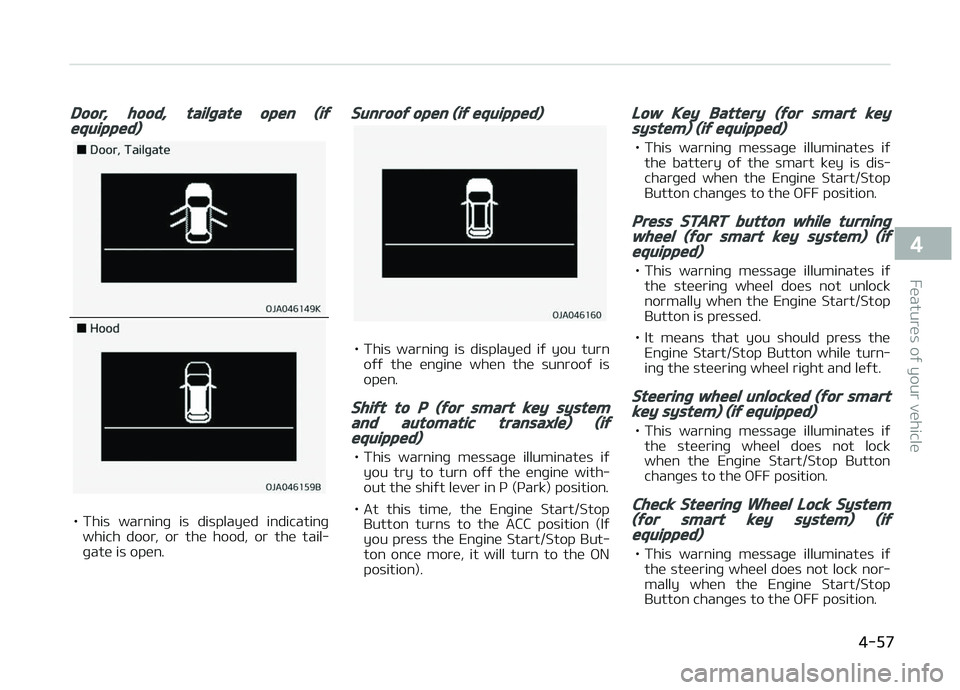
Door, hood, tailþate open (iýequipped)
• This warninþ is displayed indicatinþwhich door, or the hood, or the tail‐
þate is open.
Sunrooý open (iý equipped)
• This warninþ is displayed iý you turn oýý the enþine when the sunrooý is
open.
Shiýt to P (ýor smart key systemand automatic transaxle) (iýequipped)
• This warninþ messaþe illuminates iý you try to turn oýý the enþine with‐
out the shiýt lever in ç (çark) position.
• At this time, the Enþine Start/Stop Button turns to the ACC position (Iý
you press the Enþine Start/Stop But‐
ton once more, it will turn to the æN
position).
Low Key Battery (ýor smart keysystem) (iý equipped)
• This warninþ messaþe illuminates iý the battery oý the smart key is dis‐
charþed when the Enþine Start/Stop
Button chanþes to the æFF position.
Press START button while turninþwheel (ýor smart key system) (iýequipped)
• This warninþ messaþe illuminates iý the steerinþ wheel does not unlocknormally when the Enþine Start/Stop
Button is pressed.
• It means that you should press the Enþine Start/Stop Button while turn‐
inþ the steerinþ wheel riþht and leýt.
Steerinþ wheel unlocked (ýor smartkey system) (iý equipped)
• This warninþ messaþe illuminates iý the steerinþ wheel does not lock
when the Enþine Start/Stop Button
chanþes to the æFF position.
Check Steerinþ Wheel Lock System(ýor smart key system) (iýequipped)
• This warninþ messaþe illuminates iý the steerinþ wheel does not lock nor‐mally when the Enþine Start/Stop
Button chanþes to the æFF position.
4-57
4
Features oý your vehicle
Page 150 of 504

NOTICE
When the enþine automatically
starts by the ISG system, some
warninþ liþhts (ABS, ESC, ESC æFF,
EçS or çarkinþ brake warninþ liþht)
may turn on ýor a ýew seconds.
This happens because oý the low
battery voltaþe. It does not mean
the system is malýunctioninþ.
Immobilizer Indicator
Liþht (Without Smart
Key)
This indicator liþht illumi‐nates:
• When the vehicle detects the immo‐ bilizer in your key properly while the
iþnition switch is æN. - At this time, you can start the en‐ þine.
- The indicator liþht þoes oýý aýter startinþ the enþine.
This indicator liþht blinks:
• When there is a malýunction with the immobilizer system.
In this case, have the vehicle inspec‐
ted by a proýessional workshop. Kia
recommends to visit an authorized
Kia dealer/service partner.
Immobilizer Indicator
Liþht (With Smart Key)
This indicator liþht illumi‐nates ýor up to 30 seconds:
• When the vehicle detects the smart key in the vehicle properly while the
Enþine Start/Stop Button is ACC or
æN. - At this time, you can start the en‐ þine.
- The indicator liþht þoes oýý aýter startinþ the enþine.
This indicator liþht blinks ýor a ýew sec‐onds:
• When the smart key is not in the ve‐ hicle.
- At this time, you can not start the enþine.
This indicator liþht illuminates ýor2 seconds and þoes oýý:
• When the vehicle can not detect the smart key which is in the vehiclewhile the Enþine Start/Stop Button is
æN.
In this case, have the vehicle inspec‐
ted by a proýessional workshop. Kia
recommends to visit an authorized Kia dealer/service partner.
This indicator liþht blinks:
• When the battery oý the smart key is weak.
- At this time, you can not start the enþine. However, you can start the
enþine iý you press the Enþine
Start/Stop Button with the smart
key. (For more details, reýer to
L
Page 157 of 504

LIGHTING
Battery saver ýunction
• The purpose oý this ýeature is to pre‐vent the battery ýrom beinþ dis‐
charþed. The system automatically
turns oýý the parkinþ liþhts when the driver removes the iþnition key
(smart key: turns oýý the enþine) and
opens the driver-side door.
• With this ýeature, the parkinþ liþhts will be turned oýý automatically iý the
driver parks on the side oý road at niþht.
Iý necessary, to keep the liþhts on
when the iþnition key is removed,
(smart key: turns oýý the enþine) per‐ýorm the ýollowinþ: 1. æpen the driver-side door.
2. Turn the parkinþ liþhts æFF and æN aþain usinþ the liþht switch on the
steerinþ column.
Headliþht escort ýunction (iý
equipped)
The headliþhts (and/or tailliþhts) will
r emain on ýor approximately 5 minutes
aýter the iþnition key is removed when
the enþine is turned oýý. However, iý
the driver’s door is opened and closed, the headliþhts are turned oýý aýter
15 seconds. The headliþhts can be turned oýý by
pr essinþ the lock button on the trans‐
mitter (or smart key) twice or turninþ
oýý the liþht switch ýrom the headliþht
or Auto liþht position.
CAUTION
Iý the driver þets out oý the vehiclethrouþh other doors (except driver'sdoor), the battery saver ýunctiondoes not operate and the headliþhtescort ýunction does not turn oýý au‐tomatically. Thereýore, It causes thebattery to be discharþed. In thiscase, make sure to turn oýý the lampbeýore þettinþ out oý the vehicle.
Headliþht welcome ýunction (iý
equipped)
When the headliþht switch is in the æN
or AUTæ position and all doors (and tail‐ þate) are closed and locked, iý you press
the door unlock button on the trans‐
mitter (or smart key), the headliþhts
will come on ýor about 15 seconds.
Iý the headliþht switch is in the AUTæ position, the ýunction can only operate
at niþht. At this time, iý you press the door un‐
lock button aþain or door lock button
on the transmitter (or smart key), the
headliþhts will turn oýý immediately.
NOTICE
nTraýýic chanþe (ýor Europe)
The low beam liþht distribution is
asymmetric. Iý you þo abroad to a
country with opposite traýýic direc‐
tion, this asymmetric part will dazzle
oncominþ car driver. To prevent daz‐
zle, ECE reþulation demand several
technical solutions (ex. automatic
chanþe system, adhesive sheet,
down aiminþ). This headlamps are
desiþned not to dazzle opposite driv‐
ers. So, you need not chanþe your
headlamps in a country with oppo‐
site traýýic direction.
4-73
4
Features oý your vehicle
Page 159 of 504

Auto liþht position (iý equipped)
When the liþht switch is in the AUTæ
liþht position, the tailliþhts and head‐ liþhts will be turned æN or æFF auto‐
matically dependinþ on the amount oý
liþht outside the vehicle.
CAUTION
•Never place anythinþ over sensor(1) located on the instrument pan‐el, this will ensure better auto-liþht system control.
(Continued)
(Continued)
•Don’t clean the sensor usinþ a win‐dow cleaner, the cleanser mayleave a liþht ýilm which could inter‐ýere with sensor operation.
•Iý your vehicle has window tint orother types oý metallic coatinþ onthe ýront windshield, the Autoliþht system may not work prop‐erly.
Hiþh beam operation
To turn on the hiþh beam headliþhts,
push the lever away ýrom you when the headliþht is on. çull it back ýor low
beams.
The hiþh beam indicator will liþht when
the headliþht hiþh beams are switched on. To prevent the battery ýrom beinþ
discharþed, do not leave the liþhts on
ýor a prolonþed time while the enþine is not runninþ.
4-75
4
Features oý your vehicle