Page 271 of 547
4141
Features of your vehicle
The following must be observed
when installing ANY floor mat to the
vehicle.
Ensure that the floor mats aresecurely attached to the vehicle's
floor mat anchor(s) before driving
the vehicle.
Do not use ANY floor mat that can- not be firmly attached to the vehi-
cle's floor mat anchors.
Do not stack floor mats on top of one another (e.g. all-weather rub-
ber mat on top of a carpeted floor
mat). Only a single floor mat should
be installed in each position.
✽ ✽ NOTICE
Your vehicle was manufactured with
driver's side floor mat anchors that
are designed to securely hold the
floor mat in place. To avoid any
interference with pedal operation,
Kia recommends that only the Kia
floor mat designed for use in your
vehicle be installed.
Side curtain (if equipped)
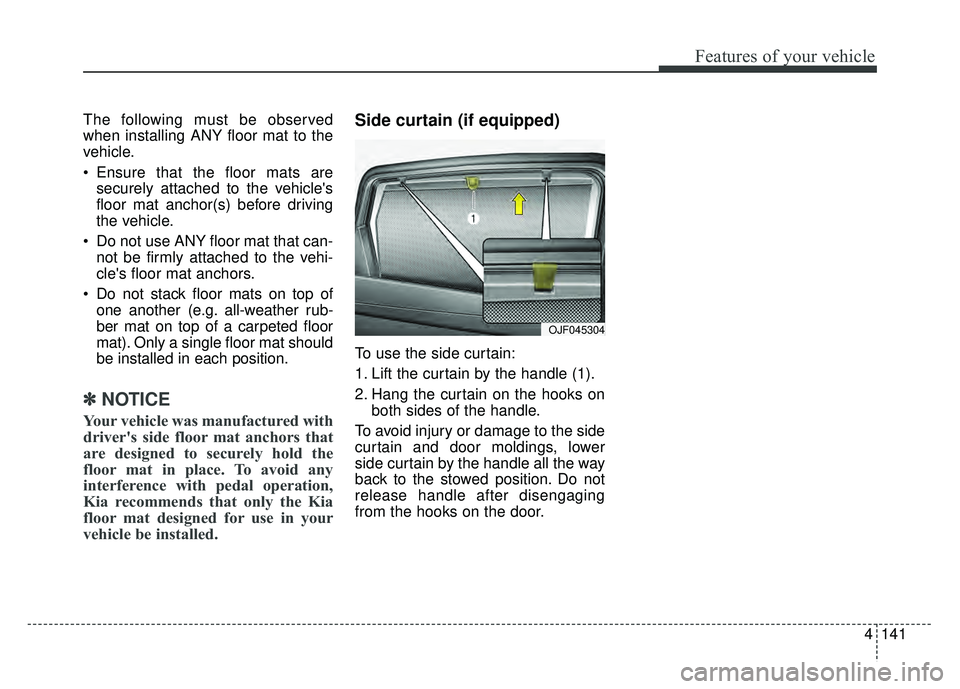
To use the side curtain:
1. Lift the curtain by the handle (1).
2. Hang the curtain on the hooks on
both sides of the handle.
To avoid injury or damage to the side
curtain and door moldings, lower
side curtain by the handle all the way
back to the stowed position. Do not
release handle after disengaging
from the hooks on the door.
OJF045304
Page 276 of 547
Audio system
55
How vehicle radio works
FM reception
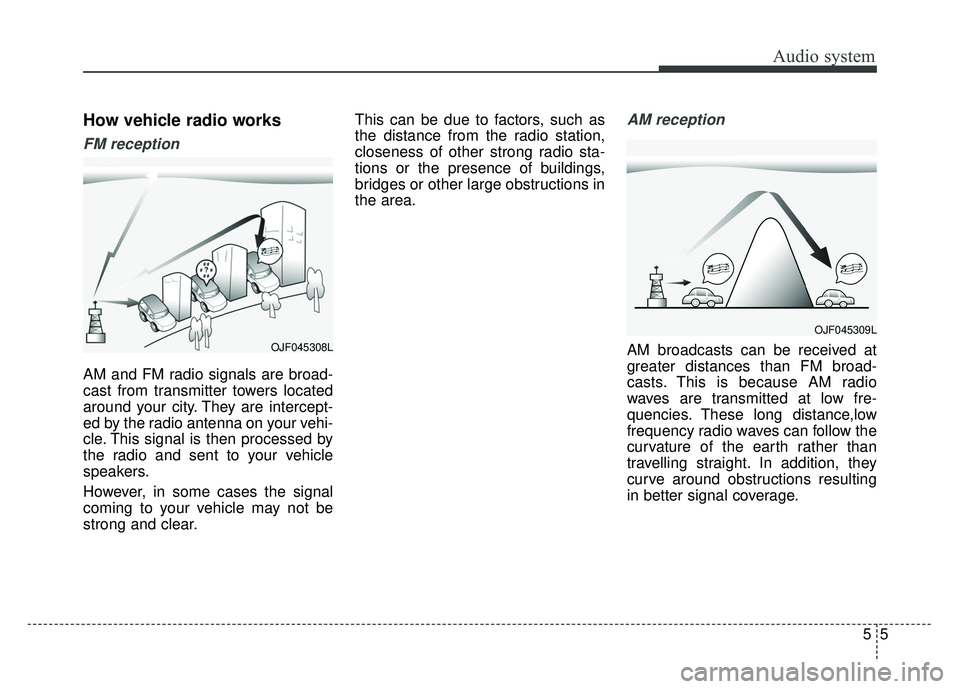
AM and FM radio signals are broad-
cast from transmitter towers located
around your city. They are intercept-
ed by the radio antenna on your vehi-
cle. This signal is then processed by
the radio and sent to your vehicle
speakers.
However, in some cases the signal
coming to your vehicle may not be
strong and clear.This can be due to factors, such as
the distance from the radio station,
closeness of other strong radio sta-
tions or the presence of buildings,
bridges or other large obstructions in
the area.
AM reception
AM broadcasts can be received at
greater distances than FM broad-
casts. This is because AM radio
waves are transmitted at low fre-
quencies. These long distance,low
frequency radio waves can follow the
curvature of the earth rather than
travelling straight. In addition, they
curve around obstructions resulting
in better signal coverage.OJF045308L
OJF045309L
Page 282 of 547
Active ECO system. . . . . . . . . . . . . . . . . . . . . . . . . 6-75
. . . . . . . . . . . . . . . . . . . . . . . . . 6-75
Blind spot detection system (BSD) . . . . . . . . . . . . 6-77
LCA (Lane Change Assist) . . . . . . . . . . . . . . . . . . . . 6-78
. . . . . . . . . . . . . . . . . . . . . . . . . 6-83
Lane departure warning system (LDWS) . . . . . . 6-85
. . . . . . . . . . . . . . . . . . . . . . . . . . . 6-87
. . 6-87
false warnings: . . . . . . . . . . . . . . . . . . . . . . . . . . . . . . 6-88
Economical operation . . . . . . . . . . . . . . . . . . . . . . 6-89
Special driving conditions . . . . . . . . . . . . . . . . . . . 6-91
. . . . . . . . . . . . . . . . . 6-91
. . . . . . . . . . . . . . . . . . . . . . . . . . . 6-91
. . . . . . . . . . . . . . . . . . . . . . . . . . . . 6-92
. . . . . . . . . . . . . . . . . . . . . . . . . . . . . . 6-92
. . . . . . . . . . . . . . . . . . . . . . 6-94
. . . . . . . . . . . . . . . . . . . . . . . . . . . . . 6-94
. . . . . . . . . . . . . . . . . . . . . . . . . . . . . 6-94
Winter driving . . . . . . . . . . . . . . . . . . . . . . . . . . . . 6-95
. . . . . . . . . . . . . . . . . . . . . . . 6-95
. . . . . . . . . . 6-97 . . . . . . . . . . . . . . . . . . . . . . 6-97
. . . . . . . 6-97
. . . . . . . . . . . . . . . . . . . . 6-98
. .
6-98
. . . . . . . . . . . . . 6-98
. . . . 6-98
. . . . . . . . . . . . . . . . . . . 6-98
Trailer Towing . . . . . . . . . . . . . . . . . . . . . . . . . . . . 6-98
Vehicle load limit . . . . . . . . . . . . . . . . . . . . . . . . . . 6-99
. . . . . . . . . . . . . . 6-99
. . . . . . . . . . . . . . . . . . . . . . . . . . . 6-102
Vehicle weight . . . . . . . . . . . . . . . . . . . . . . . . . . . . 6-103
. . . . . . . . . . . . . . . . . . . . . . . . . . . 6-103
. . . . . . . . . . . . . . . . . . . . . . . . . . 6-103
. . . . . . . . . . . . . . . . . . . . . . . . . . . . . . . 6-103
. . . . . . . . . . . . . . . . . . . . . 6-103
. . . . . . . . . . . . . . 6-103
. . . . . . . . . . . . . . . . . . 6-103
. . . . . . . . . . . 6-1036
Page 289 of 547

69
Driving your vehicle
1. Always carry the smart key withyou.
2. Make sure the parking brake is applied.
3. Make sure the shift lever is in P (Park).
4. Depress the brake pedal.
5. Press the Engine Start/Stop but- ton. If the hybrid system starts, the
" " indicator will come on.✽ ✽NOTICE
• Do not wait for the engine to warm
up while the vehicle remains sta-
tionary.
Start driving at moderate engine
speeds. (Steep accelerating and
decelerating should be avoided.)
• Always start the vehicle with your foot on the brake pedal. Do not
depress the accelerator while
starting the vehicle. Do not race
the engine while warming it up.
• If ambient temperature is low, the " " indicator may remain illu-
minated longer than the normal
amount of time.
✽ ✽ NOTICE
To prevent damage to the vehicle:
• If the " " indicator turns off
while you are in motion, do not
attempt to move the shift lever to
the P (Park) position.
If traffic and road conditions per-
mit, you may put the shift lever in
the N (Neutral) position while the
vehicle is still moving and press
the Engine Start/Stop button in an
attempt to restart the hybrid sys-
tem.
• Do not push or tow your vehicle to start the hybrid system.
Page 307 of 547
627
Driving your vehicle
Emergency braking
If there is a problem with the brake
pedal while driving, emergency brak-
ing is possible by pulling up and
holding the EPB switch. Braking is
possible only while you are holding
the EPB switch.
✽ ✽NOTICE
During emergency braking by the
EPB, the parking brake warning
light will illuminate to indicate that
the system is operating.
If you notice a continuous noise or
burning smell when the EPB is used
for emergency braking, have your
vehicle checked by an authorized Kia
dealer.
When the EPB (electronic parking
brake) is not released
If the EPB does not release normal-
ly, take your vehicle to an authorized
Kia dealer by loading the vehicle on
a flatbed tow truck and have the sys-
tem checked.
WARNING
Do not operate the electronic
parking brake while the vehicle is
moving except in an emergency
situation. Applying the electronic
parking brake while the vehicle is
moving at normal speeds can
cause a sudden loss of control of
the vehicle. If you must use the
electronic parking brake to stop
the vehicle, use great caution in
applying the brake.
Page 328 of 547

Driving your vehicle
48
6
Limitation of the system
The AEB is an assistant system for a
driver in a certain risky driving condi-
tion and it does not take every
responsibility for all risks from driving
condition.
The AEB monitors the driving situa-
tions through the radar and the cam-
era sensor. For any vehicle activity
occurring outside the sensor range,
the AEB may not function. The driver
should exercise caution in the follow-
ing situations, as the AEB operation
may be limited:
Recognizing vehicles
- The radar or the camera is con-
taminated with foreign substances.
- It heavily rains or snows.
- There is electromagnetic interfer- ence.
- Something in the path of travel deflects the radar waves.
- The vehicle in front has a narrow body. (i.e. motorcycles and bicycles)
- The driver’s view is degraded by driving towards sunlight, reflected
light, or darkness.
- The camera cannot see the full profile of the vehicle in front.
- The vehicle in front is a special vehicle, such as a heavily-loaded
truck or a trailer.
- When driving on uneven surfaces or roads with sudden gradient
changes
- In construction sites, railroads, or other metalic objects are on the
road - The vehicle in front does not turn
ON the rear lights, does not have
rear lights, has asymmetric rear
lights, or has rear lights out of angle.
- The outside brightness is greatly changed, such as entering/exiting
the tunnel.
- The vehicle driving is unstable.
- The radar/camera sensor recogni- tion is limited.
Page 331 of 547

651
Driving your vehicle
Recognizing pedestrians
- The pedestrian is not fully capturedby the camera sensor, or the
pedestrian does not walk in the
upright position.
- The pedestrian moves very fast.
- The pedestrian abruptly appears in front.
- The pedestrian wears clothes sim- ilar in color to the background.
- Conditions outside are too bright or too dark.
- The vehicle drives at night or in the darkness.
- There is an item similar in shape a person’s body structure.
- The pedestrian is small.
- The pedestrian has impaired mobility.
- The pedestrian blends in with their surroundings.
- Sensor recognition is limited by rain, snow, fog, etc.
- There is a group of pedestrians.
✽ ✽ NOTICE
The system may temporarily cancel
due to the strong electric waves.
Pay great caution to the vehicle in
front, when it has heavy loading
extended rearward, or when it has
higher ground clearance.
The sensor only detects pedestri- an, not carts, bicycles, motorcy-
cles, luggage bags, or strollers.
WARNING - Testing the
AEB
The AEB does not operate in
certain situations. Thus, never
test-operate the AEB against a
person or an object. It may
cause a severe injury or even
death.
WARNING - AEB and
Towing
Cancel the AEB in the User
Settings on the LCD display,
before towing another vehicle.
While towing, the brake applica-
tion may adversely affect your
vehicle safety.
Page 337 of 547
657
Driving your vehicle
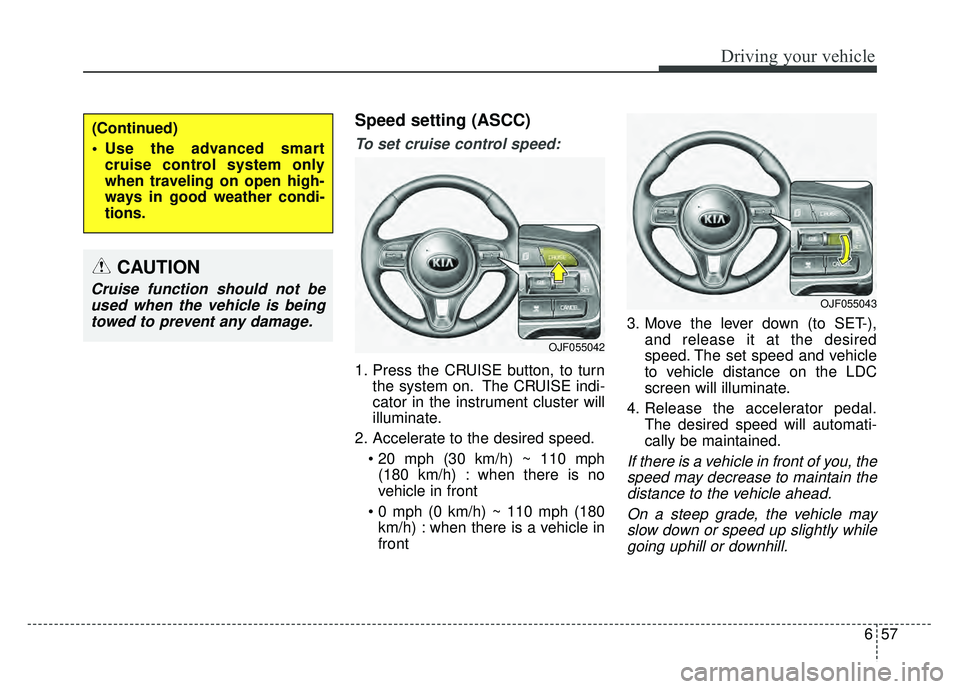
Speed setting (ASCC)
To set cruise control speed:
1. Press the CRUISE button, to turnthe system on. The CRUISE indi-
cator in the instrument cluster will
illuminate.
2. Accelerate to the desired speed. (180 km/h) : when there is no
vehicle in front
km/h) : when there is a vehicle in
front 3. Move the lever down (to SET-),
and release it at the desired
speed. The set speed and vehicle
to vehicle distance on the LDC
screen will illuminate.
4. Release the accelerator pedal. The desired speed will automati-
cally be maintained.
If there is a vehicle in front of you, thespeed may decrease to maintain thedistance to the vehicle ahead.
On a steep grade, the vehicle mayslow down or speed up slightly whilegoing uphill or downhill.
(Continued)
Use the advanced smart cruise control system only
when traveling on open high-
ways in good weather condi-
tions.
OJF055042
OJF055043
CAUTION
Cruise function should not beused when the vehicle is beingtowed to prevent any damage.