Page 45 of 616
H39
COMPONENTS OF THE HYBRID/PLUG-IN HYBRID VEHICLE
1. Engine : 1.6 L
2. Motor : 32 kw (hybrid)/44.5 kw (plug-in hybrid)
3. Transmission : 6 DCT
4. Hybrid starter generator (HSG)5. HPCU (Hybrid Power Control Unit)
6. High voltage battery system
7. Generative brake system
8. Virtual Engine Sound System (VESS)
ODEP017006N❈
The actual shape may differ from the illustration.
Page 47 of 616

H41
WARNING - Battery elec-trolyte
As with all batteries, avoid fluid
contact with the Hybrid battery.
If the battery is damaged and if
electrolyte comes in contact
with your body, clothes or eyes,
immediately flush with a large
quantity of fresh water.
WARNING - After market
battery charger
Do not use an after-market bat-
tery charger to charge the
Hybrid battery. Doing so may
result in death or serious injury.
WARNING - High Waters
Avoid high waters as this may result in your vehicle becom-
ing saturated with water and
could compromise the high
voltage components.
Do not touch the any of the high voltage components
within your vehicle if your
vehicle has been submerged
in water equal to half of the
vehicle height. Touching high
voltage components once
submerged in water could
result in severe burns or elec-
tric shock that could result in
death or serious injury.
ODEQ016004
MotorCAUTION - High Voltage
Battery Damage
When loading your vehicle, be careful of transporting items ina manner that could damage thehigh voltage battery. Do notstore items on top of the highvoltage battery or overload thetrunk area. Such actions mayultimately damage the high volt-age battery unit.
CAUTION - Carrying
Liquids in Trunk
Do not load large amounts of liquid in open containers in thevehicle. If spilled onto the HEVbattery, the liquid may cause ashort or further damage to thebattery.
Page 68 of 616

Safety features of your vehicle
23
You will find many safety precautions
and recommendations throughout
this section, and throughout this man-
ual. The safety precautions in this sec-
tion are among the most important.
Always wear your seat belt
A seat belt is your best protection in
all types of accidents. Air bags are
designed to supplement seat belts,
not replace them. So even though
your vehicle is equipped with air
bags, ALWAYS make sure you and
your passengers wear your seat
belts, and wear them properly.
Restrain all children
All children under age 13 should ride
in your vehicle properly restrained in
a rear seat, not the front seat. Infants
and small children should be
restrained in an appropriate child
restraint. Larger children should use
a booster seat with the lap/shoulder
belt until they can use the seat belt
properly without a booster seat.
Air bag hazards
While air bags can save lives, they
can also cause serious or fatal
injuries to occupants who sit too
close to them, or who are not prop-
erly restrained. Infants, young chil-
dren, and shorter adults are at the
greatest risk of being injured by an
inflating air bag. Follow all instruc-
tions and warnings in this manual.
Driver distraction
Driver distraction presents a serious
and potentially deadly danger, espe-
cially for inexperienced drivers.
Safety should be the first concern
when behind the wheel and drivers
need to be aware of the wide array of
potential distractions, such as drowsi-
ness, reaching for objects, eating,
personal grooming, other passen-
gers, and using cellular phones.
Drivers can become distracted when
they take their eyes and attention off
the road or their hands off the wheel
to focus on activities other than driv-
ing. To reduce your risk of distraction
or getting into an accident:
• ALWAYS set up your mobiledevices (i.e., MP3 players, phones,
navigation units, etc.) when your
vehicle is parked or safely stopped.
IMPORTANT SAFETY PRECAUTIONS
Page 177 of 616

Features of your vehicle
44
4
Electronic power steering
(EPS)
The power steering uses a motor to
assist you in steering the vehicle. If
the engine is off or if the power steer-
ing system becomes inoperative, the
vehicle may still be steered, but it will
require increased steering effort.
The EPS is controlled by a power
steering control unit which senses
the steering wheel torque and vehi-
cle speed to command the motor.
The steering becomes heavier as the
vehicle’s speed increases and
becomes lighter as the vehicle’s
speed decreases for optimum steer-
ing control.
Should you notice any change in the
effort required to steer during normal
vehicle operation, have the power
steering checked by an authorized
Kia dealer. If the Electronic Power Steering
System does not operate normally,
the warning light will illuminate on
the instrument cluster. The steering
wheel may require increased
steering effort. Take your vehicle to
an authorized Kia dealer and have
the vehicle checked as soon as
possible.
When you operate the steering wheel in low temperature, noise
may occur. If temperature rises, the
noise will likely disappear. This is a
normal condition.
When the vehicle is stationary, and the steering wheel is turned all the
way to the left or right continuous-
ly, the steering wheel becomes
harder to turn. The power assist is
limited to protect the motor from
overheating.
As time passes, the steering wheel
will return to its normal condition.
✽ ✽ NOTICE
The following symptoms may occur
during normal vehicle operation:
• The EPS warning light does not
illuminate.
• The steering gets heavy immedi- ately after turning the Engine
Start/Stop button is ON position.
This happens as the system per-
forms the EPS system diagnostics.
When the diagnostics are complet-
ed, the steering wheel will return
to its normal condition.
• A click noise may be heard from the EPS relay after turning the
Engine Start/Stop button is ON or
OFF position.
• A motor noise may be heard when the vehicle is at a stop or at a low
driving speed.
• If the Electronic Power Steering System does not operate normally,
the warning light will illuminate on
the instrument cluster. The steer-
ing wheel may become difficult to
control or operate abnormally.
Take your vehicle to an authorized
Kia dealer and have the vehicle
checked as soon as possible. (Continued)
STEERING WHEEL
Page 196 of 616
463
Features of your vehicle
The outside temperature on the dis-
play may not change immediately
like a general thermometer to pre-
vent the driver from being distracted.
To change the temperature unit (from
°C to °F or from °F to °C)
The temperature unit can be
changed by using the “User Settings”
mode of the LCD window.
❈For more details, refer to “LCD
window” in this chapter.
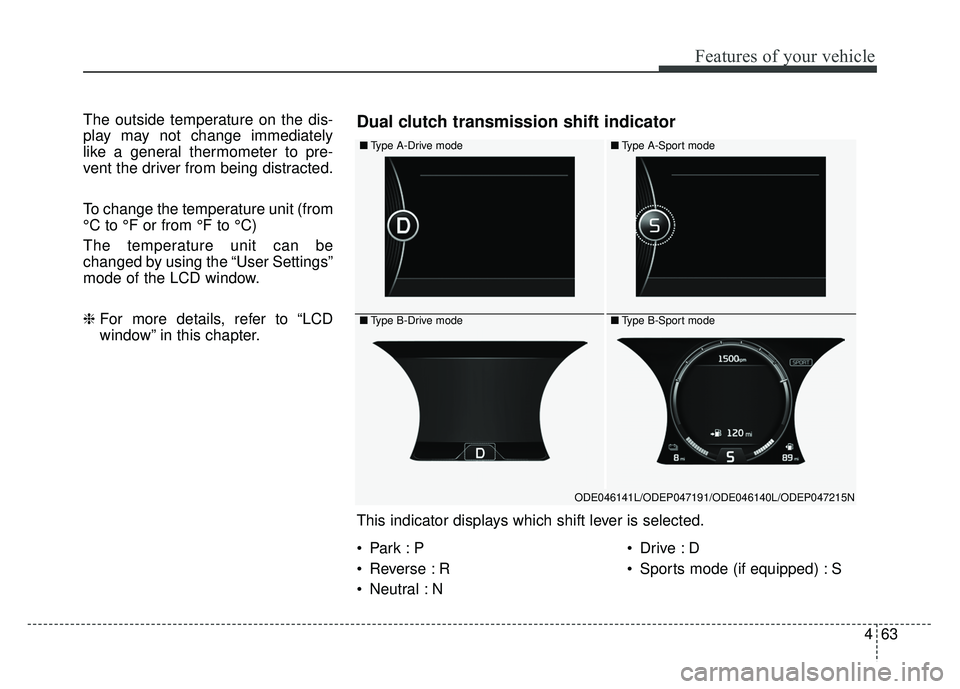
■Type A-Drive mode
■Type B-Drive mode
■Type A-Sport mode
■Type B-Sport mode
ODE046141L/ODEP047191/ODE046140L/ODEP047215N
This indicator displays which shift lever is selected.
Dual clutch transmission shift indicator
Reverse : R
Neutral : N
Sports mode (if equipped) : S
Page 212 of 616
479
Features of your vehicle
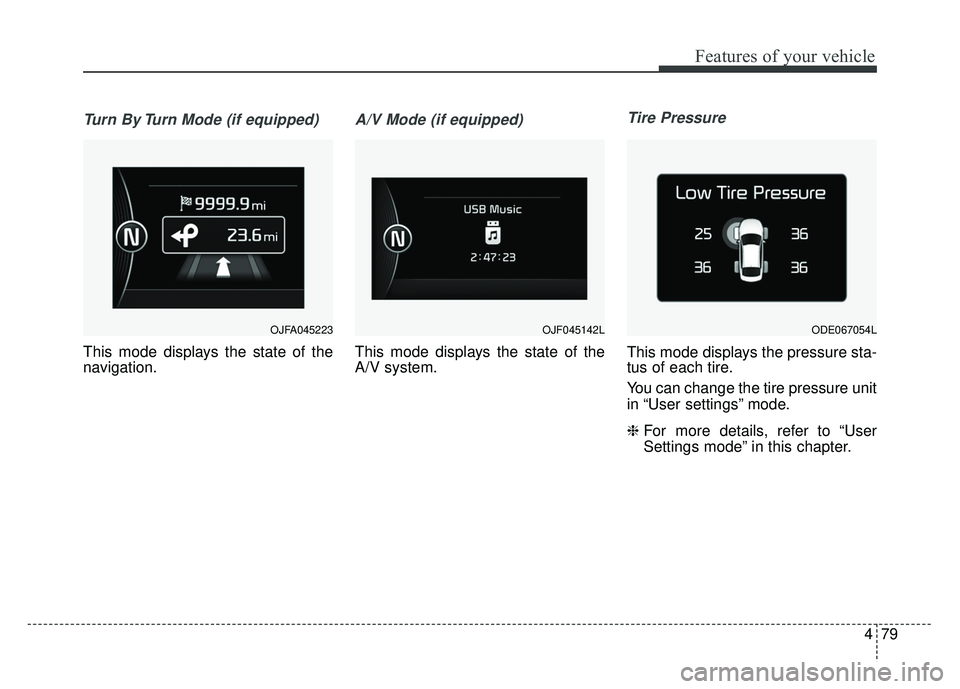
Turn By Turn Mode (if equipped)
This mode displays the state of the
navigation.
A/V Mode (if equipped)
This mode displays the state of the
A/V system.
Tire Pressure
This mode displays the pressure sta-
tus of each tire.
You can change the tire pressure unit
in “User settings” mode.
❈For more details, refer to “User
Settings mode” in this chapter.
OJF045142LOJFA045223 ODE067054L
Page 217 of 616

Features of your vehicle
84
4
✽
✽
NOTICE
If any of the following conditions
occur, the mileage and number of
days to service may be incorrect.
- The battery cable is disconnected.
- The fuse switch is turned off.
- The battery is discharged.
Other Features
Instrument Cluster layout (if
equipped)
Selecting the mode
Simple/Normal/Detailed changes
the LCD screen of the instrument
cluster. (For Type B cluster of Plug-
in Hybrid)
Aux. Battery Saver + (if equipped) : If this item is checked, the Aux.
Battery Saver + function will be
activated.
❈ For more details, refer to “Aux.
Battery Saver +” in chapter Intro.
Fuel Economy Auto Reset - Off : The average fuel economywill not reset automatically when-
ever refueling.
- After Ignition : The average fuel economy will reset automatically
whenever it has passed 4 hours
after turning OFF the engine.
- After Refueling : The average fuel economy will reset automatically
when refueling.
❈ For more details, refer to “Trip
Computer” in this chapter. Fuel Economy Unit : Choose the
fuel economy unit. (US gallon, UK
gallon)
Temperature Unit : Choose the temperature unit. (°C, °F)
Tire Pressure Unit (if equipped) : Choose the tire pressure unit. (psi,
kPa, bar)
Reset
You can reset the menus in the User
Settings Mode. All menus in the User
Settings Mode are initialized, except
service interval.
Page 305 of 616
Audio system
56
Feature of Your Audio
Head unit
❈The actual image in the vehicle
may differ from the illustration. (1)
LCD screen
Tap the screen to select a button.
(2) POWER/VOL knob
Turn to adjust the volume.
Press to turn the device on or off.
(3) RADIO
Start FM, AM.
(4) MEDIA
Select USB(iPod
®), Bluetooth®
Wireless Technology(BT) Audio,
AUX or My Music.
Display the media menu when two or more media are connected or when
the [MEDIA] button is pressed in
media mode.
(5) SEEK/TRACK
Search for next station in radio mode.
Change the current song in media mode. (6)
PHONE
Start
Bluetooth®Wireless Technology
Phone mode.
(7) SETUP
Access Display, Sound, Date/Time,
Bluetooth, System, Screen Saver
and Display Off settings.
(8) TUNE knob
Turn to navigate through the sta- tions/songs list.
Press to select an item.