Page 99 of 502
Features of your vehicle
18
4
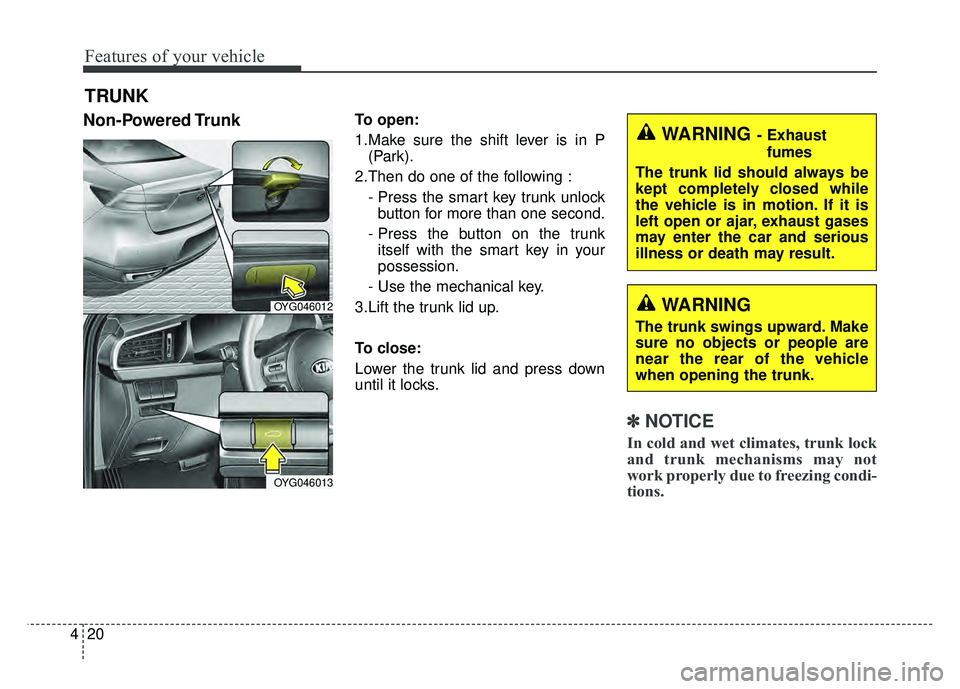
With central door lock switch
Operate by pressing the central door
lock switch.
For Driver’s door:
When pushing down on the right
portion (1) of the switch, all vehicle
doors will lock. When pushing down on left portion
(2) of the switch, all vehicle doors
will unlock.
For Passenger’s door:
When pushing down on the front portion (1) of the switch, all vehicle
doors will lock.
When pushing down on the rear portion (2) of the switch, all vehicle
doors will unlock.
If the smart key is in the vehicle and any front door is opened, the
doors will not lock even though the
right portion(1, driver`s door) of the
central door lock switch is pressed.
WARNING - Doors
The doors should always be
fully closed and locked while the
vehicle is in motion to prevent
accidental opening of the door.
WARNING - Unattended
children/animals
Never leave children or animals
unattended in your vehicle. An
enclosed vehicle can become
extremely hot, causing death or
severe injury to unattended
children or animals who cannot
escape the vehicle.
OYG046009
OYG046010
■ Driver side
■Passenger side
Page 100 of 502
419
Features of your vehicle
Impact sensing door unlock
system
In the event of air bag deployment
resulting from a vehicle impact, all
doors will automatically unlock.
Auto door lock/unlock feature
All doors will automatically lockwhen the transaxle shift lever is
shifted out of P(Park).
All doors will automatically unlock when the transaxle shift lever is
shifted into P (Park).
✽ ✽ NOTICE
You can select some auto door
lock/unlock features in “User Settings”
For more information, refer to
“User Settings” in this chapter.
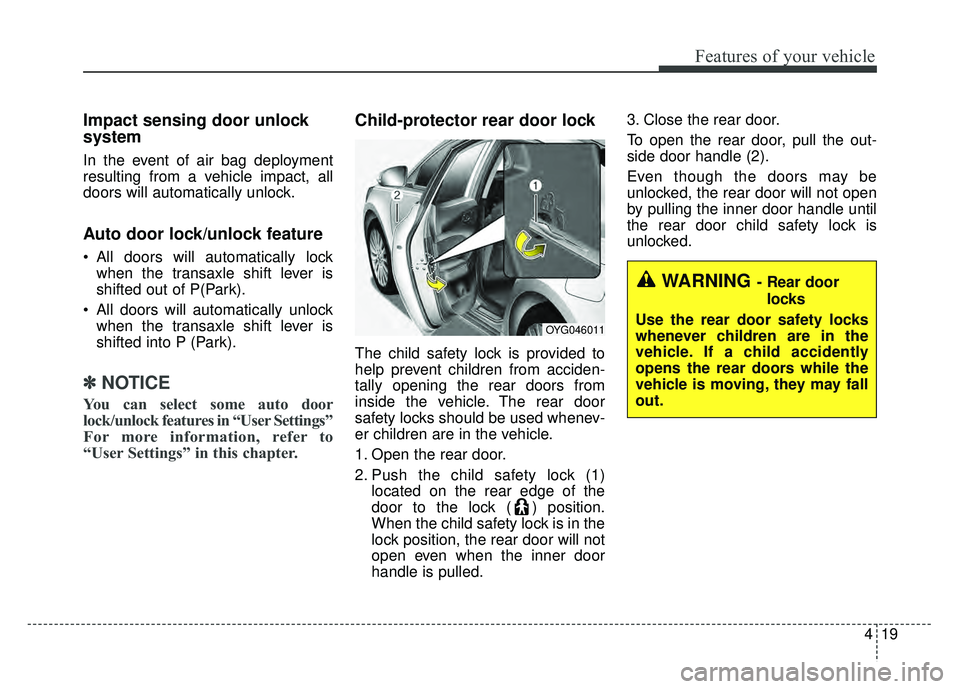
Child-protector rear door lock
The child safety lock is provided to
help prevent children from acciden-
tally opening the rear doors from
inside the vehicle. The rear door
safety locks should be used whenev-
er children are in the vehicle.
1. Open the rear door.
2. Push the child safety lock (1)
located on the rear edge of the
door to the lock ( ) position.
When the child safety lock is in the
lock position, the rear door will not
open even when the inner door
handle is pulled. 3. Close the rear door.
To open the rear door, pull the out-
side door handle (2).
Even though the doors may be
unlocked, the rear door will not open
by pulling the inner door handle until
the rear door child safety lock is
unlocked.
OYG046011
WARNING- Rear door
locks
Use the rear door safety locks
whenever children are in the
vehicle. If a child accidently
opens the rear doors while the
vehicle is moving, they may fall
out.
Page 101 of 502
Features of your vehicle
20
4
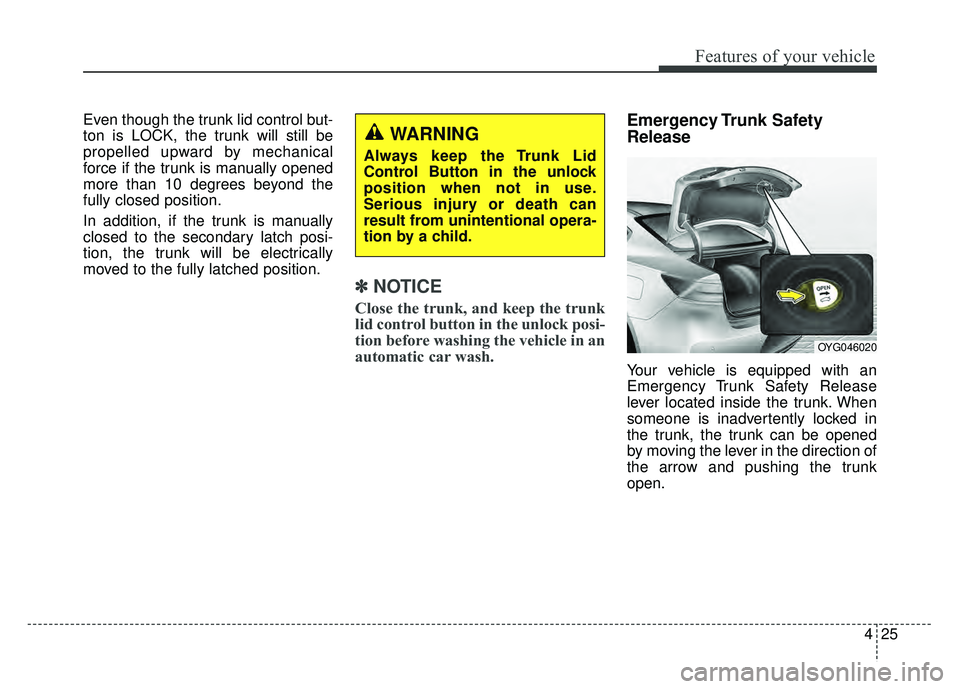
Non-Powered TrunkTo open:
1.Make sure the shift lever is in P
(Park).
2.Then do one of the following : - Press the smart key trunk unlockbutton for more than one second.
- Press the button on the trunk itself with the smart key in your
possession.
- Use the mechanical key.
3.Lift the trunk lid up.
To close:
Lower the trunk lid and press down
until it locks.
✽ ✽ NOTICE
In cold and wet climates, trunk lock
and trunk mechanisms may not
work properly due to freezing condi-
tions.
TRUNK
OYG046012
OYG046013
WARNING- Exhaust
fumes
The trunk lid should always be
kept completely closed while
the vehicle is in motion. If it is
left open or ajar, exhaust gases
may enter the car and serious
illness or death may result.
WARNING
The trunk swings upward. Make
sure no objects or people are
near the rear of the vehicle
when opening the trunk.
Page 103 of 502

Features of your vehicle
22
4
Closing the trunk
To close the power trunk, do one of
the following:
Push the close button of the power
trunk main button, until the power
trunk is closed securely. The chime
will sound twice.
Push the power trunk close button.
Push the power trunk lock button when all doors and engine hood
are closed with the smart key in
your possession. After closing, all
doors and trunk lock automatically.
✽ ✽ NOTICE
The power trunk lock button will
not work if you press the button
when:
- Any door is open.
- The engine start/stop button is not
in the OFF position.
- The smart key is in the vehicle.
Do not leave the power trunk open
for a long period of time. This may
drain the battery.
✽ ✽ NOTICE
In cold and wet climates, trunk lock
and trunk mechanisms may not
work properly due to freezing condi-
tions.
WARNING
Make sure there are no people
or objects around the trunk
before opening or closing the
power trunk. Wait until the trunk
is open fully and stopped
before loading or unloading
cargo from the vehicle.
CAUTION
Do not close or open the
power trunk manually. Thismay cause damage to thepower trunk. If it is necessaryto close or open the powertrunk manually when the bat-tery is drained or disconnect-ed, do not apply excessiveforce.
To prevent damage to the trunk lift cylinders and theattached hardware, alwaysclose the trunk before driving.
Page 105 of 502
Features of your vehicle
24
4
If the automatic stop and reverse fea-
ture operates more than twice during
one opening or closing operation, the
power trunk may stop at that posi-
tion.
If this occurs, close the trunk manu-
ally and operate the trunk automati-
cally again.To Reset the Power Trunk
If the battery has been discharged or
disconnected, or if the related fuse
has been replaced or disconnected,
reset the power trunk as follows:
1. Move the shift lever to the P (Park)
position.
2. Close the trunk manually.
If the power trunk doesn't work prop-
erly after performing the above pro-
cedure, have the system checked by
an authorized Kia dealer.
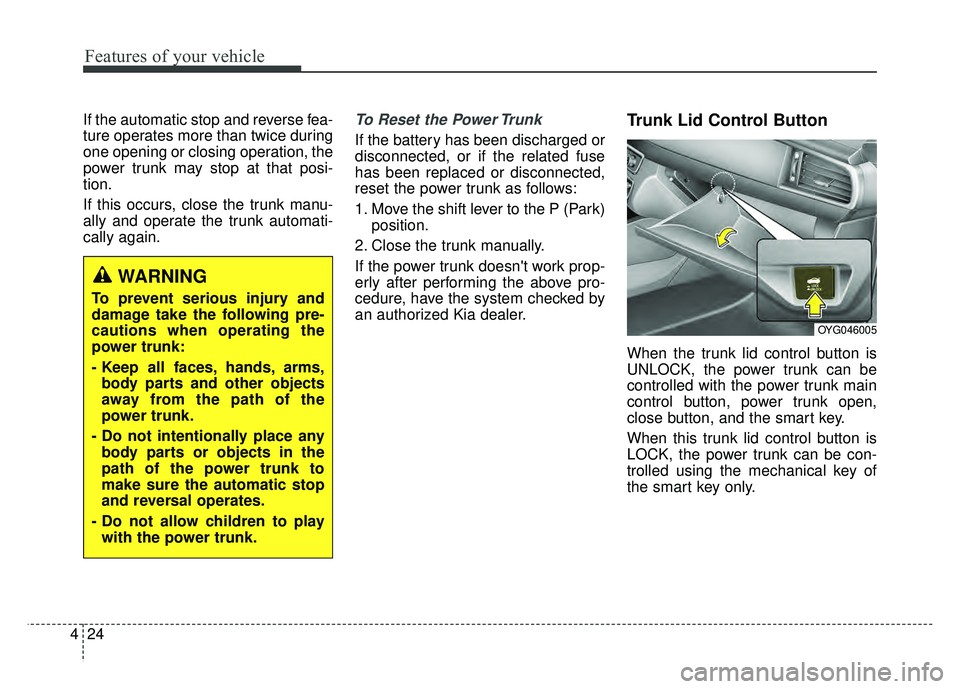
Trunk Lid Control Button
When the trunk lid control button is
UNLOCK, the power trunk can be
controlled with the power trunk main
control button, power trunk open,
close button, and the smart key.
When this trunk lid control button is
LOCK, the power trunk can be con-
trolled using the mechanical key of
the smart key only.
WARNING
To prevent serious injury and
damage take the following pre-
cautions when operating the
power trunk:
- Keep all faces, hands, arms, body parts and other objects
away from the path of the
power trunk.
- Do not intentionally place any body parts or objects in the
path of the power trunk to
make sure the automatic stop
and reversal operates.
- Do not allow children to play with the power trunk.
OYG046005
Page 106 of 502
425
Features of your vehicle
Even though the trunk lid control but-
ton is LOCK, the trunk will still be
propelled upward by mechanical
force if the trunk is manually opened
more than 10 degrees beyond the
fully closed position.
In addition, if the trunk is manually
closed to the secondary latch posi-
tion, the trunk will be electrically
moved to the fully latched position.
✽ ✽NOTICE
Close the trunk, and keep the trunk
lid control button in the unlock posi-
tion before washing the vehicle in an
automatic car wash.
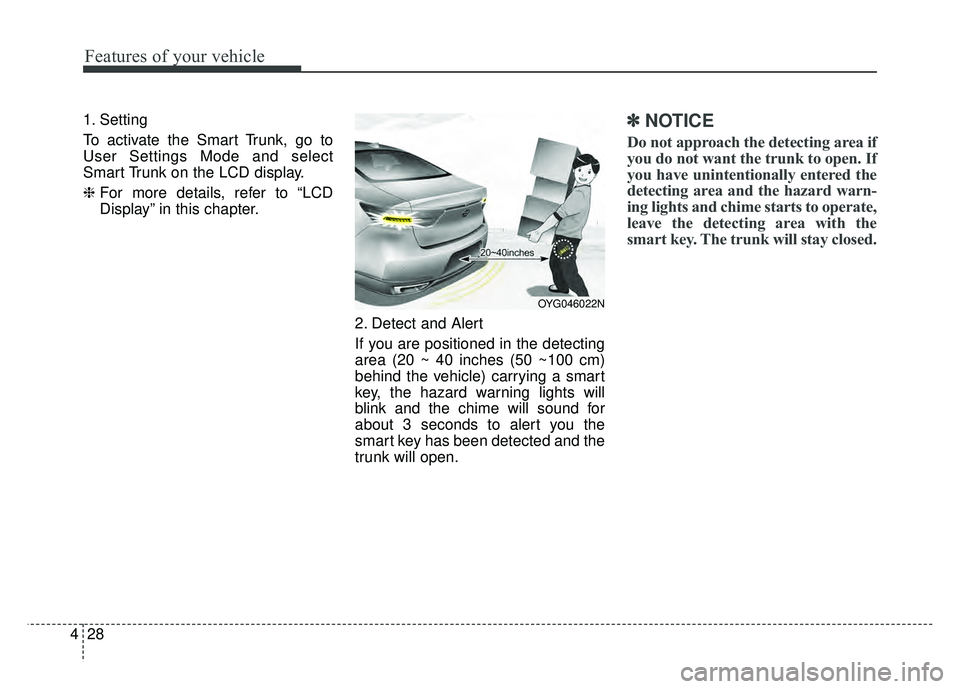
Emergency Trunk Safety
Release
Your vehicle is equipped with an
Emergency Trunk Safety Release
lever located inside the trunk. When
someone is inadvertently locked in
the trunk, the trunk can be opened
by moving the lever in the direction of
the arrow and pushing the trunk
open.
WARNING
Always keep the Trunk Lid
Control Button in the unlock
position when not in use.
Serious injury or death can
result from unintentional opera-
tion by a child.
OYG046020
Page 107 of 502
Features of your vehicle
26
4
You and your passengers must be
aware of the location of the
Emergency Trunk Safety Release
lever in this vehicle and how to
open the trunk in case you are
accidentally locked in the trunk.
Your vehicle should be kept locked and the Smart Key should be kept
out of the reach of children.
Parents should teach their children
about the dangers of playing in
trunks.
Use the release lever for emergen- cies only.
WARNING
NEVER allow anyone to occupy
the trunk of the vehicle at any
time. If the trunk is partially or
totally latched and the person is
unable to get out, serious injury
or death could occur due to lack
of ventilation, exhaust fumes
and rapid heat build-up, or
because of exposure to cold
weather conditions. The trunk is
also a highly dangerous loca-
tion in the event of a crash
because it is not a protected
occupant space but is a part of
the vehicle’s crush zone.
WARNING
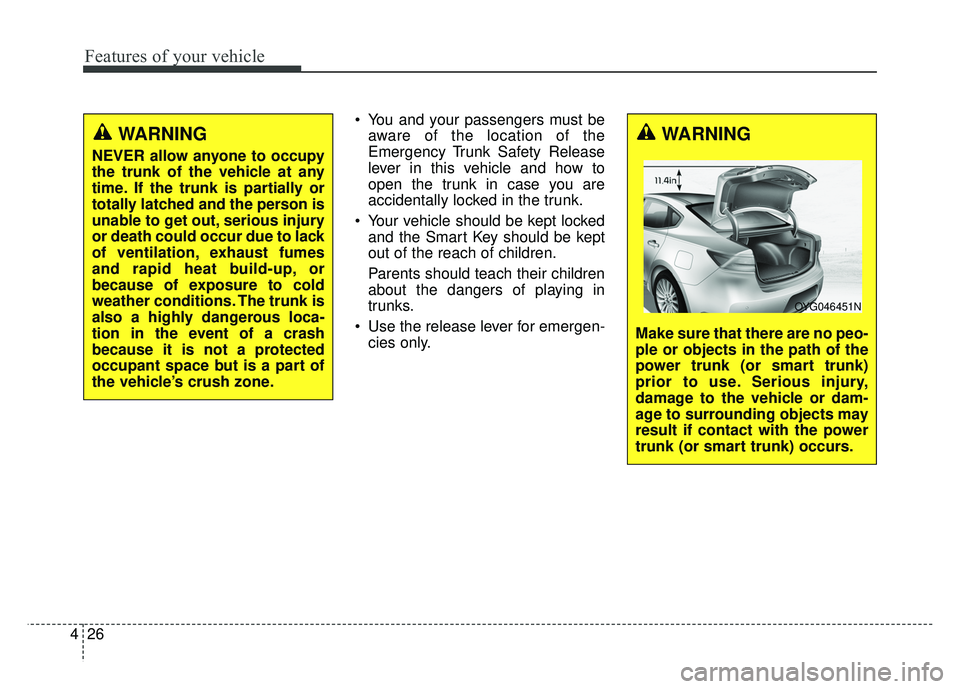
Make sure that there are no peo-
ple or objects in the path of the
power trunk (or smart trunk)
prior to use. Serious injury,
damage to the vehicle or dam-
age to surrounding objects may
result if contact with the power
trunk (or smart trunk) occurs.
OYG046451N
Page 109 of 502
Features of your vehicle
28
4
1. Setting
To activate the Smart Trunk, go to
User Settings Mode and select
Smart Trunk on the LCD display.
❈ For more details, refer to “LCD
Display” in this chapter.
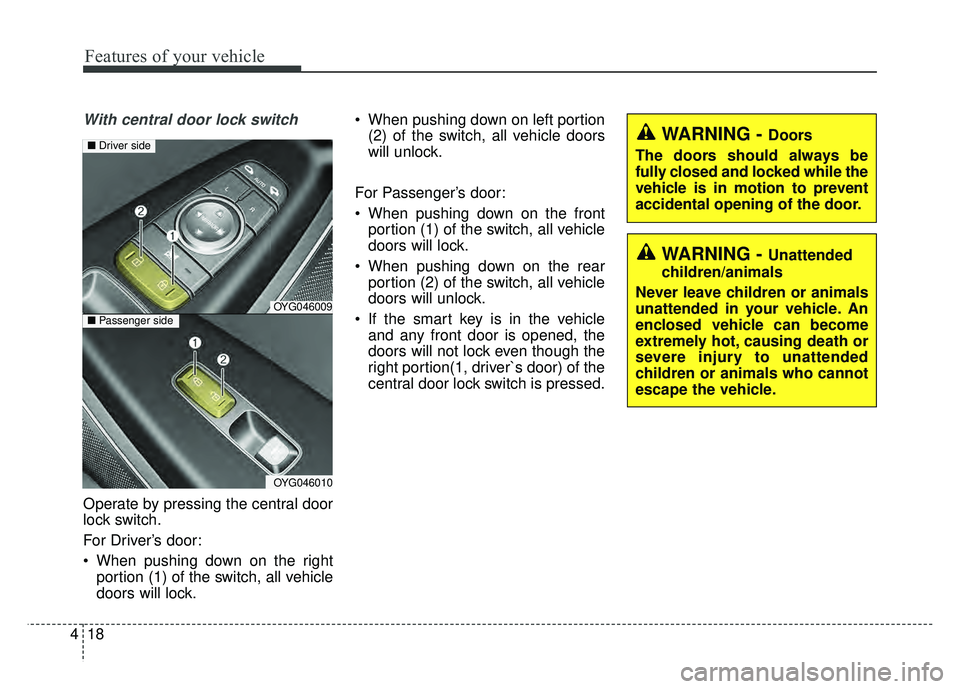
2. Detect and Alert
If you are positioned in the detecting
area (20 ~ 40 inches (50 ~100 cm)
behind the vehicle) carrying a smart
key, the hazard warning lights will
blink and the chime will sound for
about 3 seconds to alert you the
smart key has been detected and the
trunk will open.✽ ✽NOTICE
Do not approach the detecting area if
you do not want the trunk to open. If
you have unintentionally entered the
detecting area and the hazard warn-
ing lights and chime starts to operate,
leave the detecting area with the
smart key. The trunk will stay closed.
OYG046022N