2018 INFINITI Q50-HYBRID lane
[x] Cancel search: lanePage 99 of 442

2-14Instruments and controls
.SHIFT “P” warning
. Shift to Park - Li-ion battery low warning
. Shift to Park - Press brake and start
warning
. PUSH warning
. Key ID Incorrect warning
. Parking brake release warning
. Low washer fluid warning
. Door/trunk open warning
. Loose Fuel Cap warning
. Tire Pressure Low - Add Air warning
. Flat Tire - Visit dealer warning
. All-Wheel Drive (AWD) warning (if so
equipped)
. Headlight warning
. Hybrid system overheat warning
. Low oil pressure warning
. High temperature warning
. Adaptive Front lighting System (AFS)
warning (if so equipped)
. Intelligent Key system warning
. Chassis control warning
See “Vehicle information display” (P.2-18).
If the driver assist system warnings appear
in the vehicle information display, the master
warning light also illuminates. See “Lane
Departure Warning (LDW)/Lane Departure
Prevention (LDP)” (P.5-32), “Blind Spot
Warning (BSW)” (P.5-39), “Blind Spot Inter- vention®(BSI)” (P.5-47), “Back-up Collision
Intervention (BCI)” (P.5-59), “Distance Con-
trol Assist (DCA)” (P.5-93), “Forward Emer-
gency Braking (FEB)” (P.5-104) and
“Predictive Forward Collision Warning
(PFCW)” (P.5-112).
Power steering warning light
When the ignition switch is in the ON
position, the power steering warning light
illuminates. After starting the hybrid system,
the power steering warning light stays on for
a few seconds and turns off. This indicates
that Direct Adaptive Steering is operational.
Drive the vehicle after the power steering
warning light turns off.
If the power steering warning light illumi-
nates while driving, pull off the road to a
safe location and stop the vehicle. If the
power steering warning light turns off, you
can drive again. If the power steering
warning light continues to illuminate, it is
recommended you have Direct Adaptive
Steering checked by an INFINITI retailer.
(See “Power steering” (P.5-126).)
Seat belt warning light and
chime
The light and chime remind you to fasten
seat belts. The light illuminates whenever the ignition switch is pushed to the ON
position, and will remain illuminated until the
driver’s seat belt is fastened. At the same
time, the chime will sound for about 6
seconds unless the driver’s seat belt is
securely fastened.
The seat belt warning light for the front
passenger will illuminate if the seat belt is
not fastened when the front passenger’s
seat is occupied.
See “Seat belts” (P.1-9) for precautions on
seat belt usage.
Supplemental air bag warning
light
After pushing the ignition switch to the ON
position, the supplemental air bag warning
light will illuminate. The supplemental air bag
warning light will turn off after about 7
seconds if the supplemental front air bag
and supplemental side air bag, curtain side-
impact air bag systems and/or pretensioner
seat belt are operational.
If any of the following conditions occur, the
supplemental front air bag, supplemental
side air bag, supplemental curtain side-
impact air bag and pretensioner seat belt
needs servicing.
. The supplemental air bag warning light
remains on after approximately 7 sec-
Page 103 of 442

2-18Instruments and controls
the brake pad, the sound will always be
heard even if the brake pedal is not
depressed. Have the brakes checked as soon
as possible if the warning sound is heard.
JVI0641X
The vehicle information displayis located
between the tachometer and the speed-
ometer, and it displays the warnings and
information. The following items are also
displayed if the vehicle is equipped with
them:
. Automatic Transmission (AT)
— “Driving the vehicle” (P.5-15)
. All-Wheel Drive (AWD)
— “Intelligent All-Wheel Drive (AWD)” (P.5-123)
. Cruise control
— “Cruise control” (P.5-70)
. Intelligent Cruise Control (ICC)
— “Intelligent Cruise Control (ICC)” (P.5- 72) .
Active Lane Control
— “Active Lane Control” (P.5-24)
. Lane Departure Warning (LDW)/Lane
Departure Prevention (LDP)
— “Lane Departure Warning (LDW)/ Lane Departure Prevention (LDP)”
(P.5-32)
. Blind Spot Warning (BSW)
— “Blind Spot Warning (BSW)” (P.5-39)
. Blind Spot Intervention
®(BSI)
— “Blind Spot Intervention®(BSI)” (P.5-
47)
. Back-up Collision Intervention (BCI)
— “Back-up Collision Intervention (BCI)” (P.5-59)
. Distance Control Assist (DCA)
— “Distance Control Assist (DCA)” (P.5- 93)
. Forward Emergency Braking (FEB)
— “Forward Emergency Braking (FEB)” (P.5-104)
. Predictive Forward Collision Warning
(PFCW)
— “Predictive Forward Collision Warning
(PFCW)” (P.5-112)
. Active trace control
— “Active trace control” (P.5-132)
. Intelligent Key system
— “Intelligent Key system” (P.3-6)
VEHICLE INFORMATION DISPLAY
Page 108 of 442

22. All-Wheel Drive (AWD) warning
(if so equipped)
This warning appears when the Intelligent
All-Wheel Drive (AWD) system is not func-
tioning properly while the hybrid system is
running. The displayed message will vary
depending on the condition of the AWD
system malfunction. (See “Intelligent All-
Wheel Drive (AWD)” (P.5-123).)
23. Extended storage fuse warning
This warning may appear if the extended
storage fuse switch is not pushed in
(switched on). When this warning appears,
push in (switch on) the extended storage
fuse switch to turn off the warning. For
more information, see “Extended storage
fuse switch” (P.8-21).
24. Headlight warning
This warning appears if the LED headlights
are malfunctioning. It is recommended you
have the system checked by an INFINITI
retailer.
25. Adaptive Front lighting System
(AFS) warning (if so equipped)
This warning appears when the Adaptive
Front lighting System (AFS) is not function-
ing properly. It is recommended you have the
system checked by an INFINITI retailer.(See “Adaptive Front lighting System (AFS)”
(P.2-41).)
26. Power will turn off to save the
battery warning
This warning appears after a period of time
if the shift lever has not moved from the “P”
(Park) position with the ignition switch in the
ACC or ON position.
27. Power turned off to save the
battery warning
This warning appears after the ignition
switch is automatically turned OFF to save
the 12-volt battery.
28. Light reminder warning
This warning appears when the driver side
door is opened with the headlight switch left
ON and the ignition switch in the ACC, OFF
or LOCK position. Place the headlight switch
to “OFF” or “AUTO” position. For additional
information, see “Headlight and turn signal
switch” (P.2-36).
29. “TIMER” indicator
This indicator appears when the set “TIMER”
indicator activates. You can set the time for
up to 6 hours. (See the Infiniti InTouch
Owner’s Manual.)
30. Low outside temperature
warning
This warning appears if the outside tem-
perature is below 37°F (3°C). The warning
can be set not to be displayed. (See the
Infiniti InTouch Owner’s Manual.)
31. Chassis control warning
This warning appears if Active Lane Control
(if so equipped), the active trace control
system and/or chassis control are not
functioning properly. It is recommended
you have the system checked by an INFINITI
retailer. (See “Active Lane Control” (P.5-24),
“Active trace control” (P.5-132) and “Chassis
control” (P.5-134).)
32. Cruise indicator
Models without Intelligent Cruise Control
(ICC) system:
This indicator shows the cruise control
system status. The status is shown by the
color.
See “Cruise control” (P.5-70) for details.
Models with Intelligent Cruise Control (ICC)
system:
This indicator shows the conventional (fixed
speed) cruise control mode status. The
status is shown by the color.
Instruments and controls2-23
Page 109 of 442

2-24Instruments and controls
See “Conventional (fixed speed) cruise con-
trol mode” (P.5-89) for details.
33. Intelligent Cruise Control (ICC)
system ON indicator (if so
equipped)
This indicator shows the Intelligent Cruise
Control (ICC) system status. The status is
shown by the color. (See “Intelligent Cruise
Control (ICC)” (P.5-72).)
34. Driver assist system indicator
This indicator shows the status of the
following systems.
.Lane Departure Warning (LDW) (if so
equipped)
. Lane Departure Prevention (LDP) (if so
equipped)
. Blind Spot Warning (BSW)
. Blind Spot Intervention
®(BSI) (if so
equipped)
. Distance Control Assist (DCA) (if so
equipped)
. Forward Emergency Braking (FEB)
. Predictive Forward Collision Warning
(PFCW)
For more details, see “Lane Departure
Warning (LDW)/Lane Departure Prevention
(LDP)” (P.5-32), “Blind Spot Warning
(BSW)” (P.5-39), “Blind Spot Intervention
®
(BSI)” (P.5-47), “Distance Control Assist
(DCA)” (P.5-93), “Forward Emergency Brak-
ing (FEB)” (P.5-104) and “Predictive For-
ward Collision Warning (PFCW)” (P.5-112).
The figure and color of this indicator will
change depending on the conditions of the
above systems. (In each section, the name of
this indicator is referred to as, “driver assist
system lane indicator”, “driver assist system
blind spot indicator” or “driver assist system
forward indicator” depending on the sys-
tems.)
35. INFINITI Drive Mode Selector
indicator
When a driving mode is selected using the
INFINITI Drive Mode Selector, the selected
mode indicator is displayed.
. PERSONAL
. SPORT
. STANDARD
. ECO
. SNOW
(See “INFINITI Drive Mode Selector” (P.5-
21).)
36. Automatic Transmission (AT)
position indicator
This indicator shows the automatic shift
position. In the manual shift mode, when the trans-
mission does not shift to the selected gear
due to a transmission protection mode, the
AT position indicator will blink and a chime
will sound.
See “Automatic transmission” (P.5-15) for
further details.
Page 114 of 442

6. Elapsed time and trip odometer
(mile or km)
Elapsed time:
The elapsed time mode shows the time since
the last reset. Resetting is done by pushing
the
orswitch for longer than 1
second. (The trip odometer is also reset at
the same time.)
Trip odometer:
The trip odometer mode shows the total
distance the vehicle has been driven since
the last reset. Resetting is done by pushing
the
orswitch for longer than 1
second. (The elapsed time is also reset at the
same time.)
7. Distance to empty (dte — mile or
km)
The distance to empty (dte) mode provides
you with an estimation of the distance that
can be driven before refueling. The dte is
constantly being calculated, based on the
amount of fuel in the fuel tank and the actual
fuel consumption.
The display is updated every 30 seconds.
The dte mode includes a low range warning
feature. If the fuel level is low, the warning is
displayed on the screen. When the fuel level drops even lower, the
dte display will change to “——”.
.
If the amount of fuel added is small, the
display just before the ignition switch is
pushed to the OFF position may con-
tinue to be displayed.
. When driving uphill or rounding curves,
the fuel in the tank shifts, which may
momentarily change the display.
8. Engine coolant temperature
gauge
This gauge indicates the temperature of the
engine coolant. If the engine is overheated,
the high temperature warning will appear.
The engine coolant temperature varies with
the outside air temperature and driving
conditions.
CAUTION
If the engine is overheated, continued
operation of the vehicle may seriously
damage the engine. See “If your vehicle
overheats” (P.6-8) for immediate action
required.
9. Navigation (if so equipped)
When the route guidance is set in the
navigation system, this item shows the
navigation route information.
For more details, see the Infiniti InTouch
Owner’s Manual.
10. Audio
The audio mode shows the status of audio
information.
For more details, see the Infiniti InTouch
Owner’s Manual.
11. Driving aids
The driving aids mode shows the operating
condition for the following systems.
. Lane Departure Warning (LDW)
. Lane Departure Prevention (LDP)
. Blind Spot Warning (BSW)
. Blind Spot Intervention
®(BSI)
. Distance Control Assist (DCA)
. Forward Emergency Braking (FEB)
. Predictive Forward Collision Warning
(PFCW)
For more details, see “Lane Departure
Warning (LDW)/Lane Departure Prevention
(LDP)” (P.5-32), “Blind Spot Warning
(BSW)” (P.5-39), “Blind Spot Intervention
®
(BSI)” (P.5-47), “Distance Control Assist
(DCA)” (P.5-93), “Forward Emergency Brak-
Instruments and controls2-29
Page 115 of 442

2-30Instruments and controls
ing (FEB)” (P.5-104) and “Predictive For-
ward Collision Warning (PFCW)” (P.5-112).
12. Tire pressure
The tire pressure mode shows the pressure
of all four tires while the vehicle is driven.
When the “Tire Pressure Low - Add Air” or
“Flat Tire - Visit dealer” warning appears,
the display can be switched to the tire
pressure mode by pushing the
orswitch.
The tire pressure unit can be changed in the
[TPMS setting] under the [Settings] menu
on the lower display. (See the Infiniti InTouch
Owner’s Manual.)
NOTE:
After the ignition switch is placed in the ON
position, it may take a period of time for the
tire pressure to be displayed while the
vehicle is driven. Depending on the radio
wave circumstance, tire pressure may not
correctly be displayed.
13. Chassis control
When Active Lane Control (if so equipped) or
the active trace control system is operated, it
shows the operating condition. See “Active
Lane Control” (P.5-24) and “Active trace
control” (P.5-132) for more details.
Warning check
The present warnings are displayed. If no
warning is present, “No Warning” is dis-
played.
JVI0679M
CLOCK AND OUTSIDE AIR TEM-
PERATURE
The clockand outside air temperatureare displayed on the upper side of the vehicle
information display.
Clock
The clock can be adjusted on the lower
display. See the Infiniti InTouch Owner’s
Manual.
Outside air temperature (°F or °C)
The outside air temperature is displayed in °F
or °C in the range of −22 to 131°F (−30 to
55°C).
Page 127 of 442

2-42Instruments and controls
Instrument brightness control
The instrument brightness control switch
can be operated when the ignition switch is
in the ON position. When the switch is
operated, the vehicle information display
switches to the brightness adjustment
mode.
Push the + side of the switch
to brighten
the instrument panel lights. The barmoves
to the + side.
Push the - side of the switch
to dim the
instrument panel lights. The barmoves to
the − side. When the brightness level reaches
the minimum, the instrument panel lights will
turn off during the nighttime.
When the brightness level reaches the max-
imum or minimum, a beep will sound.
The vehicle information display returns to
the normal display when the instrument
brightness control switch is not operated
for more than 5 seconds.
SIC3271
TURN SIGNAL SWITCH
Turn signal
Move the lever up or down to signal the
turning direction. When the turn is com-
pleted, the turn signals cancel automatically.
Lane change signal
. Move the lever up or down until the turn
signal begins to flash, but the lever does
not latch, to signal a lane change. Hold
the lever until the lane change is com-
pleted.
. Move the lever up or down until the turn
signal begins to flash, but the lever does
not latch, and release the lever. The turn signal will automatically flash three
times.
Choose the appropriate method to signal a
lane change based on road and traffic
conditions.
Page 155 of 442
3-6Pre-driving checks and adjustments
3. Within 20 seconds of performing Step 2,push and hold the power door lock
switch to the
position (UNLOCK)
for more than 5 seconds.
4. When activated, the hazard indicator will flash twice. When deactivated, the ha-
zard indicator will flash once.
5. The ignition switch must be placed in the OFF and ON position again between
each setting change.
When the automatic door unlock system is
deactivated, the doors do not unlock when
the ignition switch is placed in the OFF
position. To unlock the door manually, use
the inside lock knob or the power door lock
switch (driver’s or front passenger’s side).
The automatic door unlock function can be
changed on the lower display. (See the
Infiniti InTouch Owner’s Manual.)
SPA2536
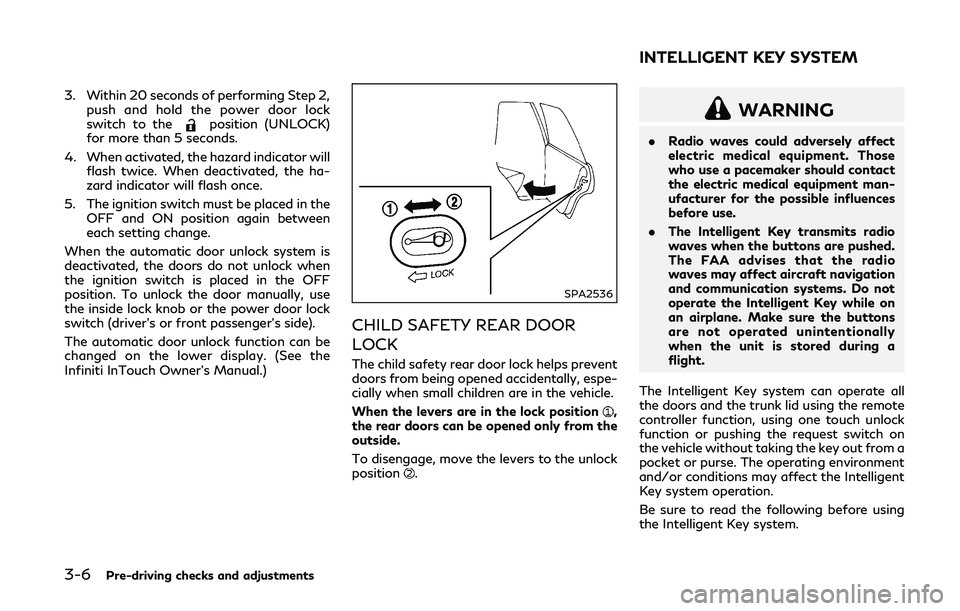
CHILD SAFETY REAR DOOR
LOCK
The child safety rear door lock helps prevent
doors from being opened accidentally, espe-
cially when small children are in the vehicle.
When the levers are in the lock position
,
the rear doors can be opened only from the
outside.
To disengage, move the levers to the unlock
position
.
WARNING
. Radio waves could adversely affect
electric medical equipment. Those
who use a pacemaker should contact
the electric medical equipment man-
ufacturer for the possible influences
before use.
. The Intelligent Key transmits radio
waves when the buttons are pushed.
The FAA advises that the radio
waves may affect aircraft navigation
and communication systems. Do not
operate the Intelligent Key while on
an airplane. Make sure the buttons
are not operated unintentionally
when the unit is stored during a
flight.
The Intelligent Key system can operate all
the doors and the trunk lid using the remote
controller function, using one touch unlock
function or pushing the request switch on
the vehicle without taking the key out from a
pocket or purse. The operating environment
and/or conditions may affect the Intelligent
Key system operation.
Be sure to read the following before using
the Intelligent Key system.
INTELLIGENT KEY SYSTEM