2018 INFINITI Q50 HYBRID lights
[x] Cancel search: lightsPage 124 of 440

2-38Instruments and controls
SIC3269
Headlight beam select
To select the low beam, put the lever in
the neutral position as shown.
To select the high beam, push the lever
forward while the switch is in the
position. Pull it back to select the low
beam.
Pulling the lever toward you will flash
the headlight high beam even when the
headlight switch is in the OFF position.
High beam assist (if so equipped)
The high beam assist system will operate
when the vehicle is driven at speeds of
approximately 22 MPH (35 km/h) andabove. If an oncoming vehicle or leading
vehicle appears in front of your vehicle when
the headlight high beam is on, the headlight
will be switched to the low beam automa-
tically.
Precautions on high beam assist:
WARNING
.
The high beam assist system is a
convenience but it is not a substitute
for safe driving operation. The driver
should remain alert at all times,
ensure safe driving practices and
switch the high beams and low beam
manually when necessary.
. The high beam or low beam may not
switch automatically under the fol-
lowing conditions. Switch the high
beam and low beam manually.
— During bad weather (rain, fog, snow, wind, etc.).
— When a light source similar to a headlight or tail light is in the
vicinity of the vehicle.
— When the headlights of the on- coming vehicle or the leading
vehicle are turned off, when the
color of the light is affected due to
foreign materials on the lights, or when the light beam is out of
position.
— When there is a sudden, contin- uous change in brightness.
— When driving on a road that passes over rolling hills, or a road
that has level differences.
— When driving on a road with many curves.
— When a sign or mirror-like sur- face is reflecting intense light
towards the front of the vehicle.
— When the container, etc. being towed by a leading vehicle is
reflecting intense light.
— When a headlight on your vehicle is damaged or dirty.
— When the vehicle is leaning at an angle due to a punctured tire,
being towed, etc.
. The timing of switching the low beam
and high beam may change under the
following situations.
— The brightness of the headlights of the oncoming vehicle or leading
vehicle.
— The movement and direction of the oncoming vehicle and the
Page 125 of 440

leading vehicle.
— When only one light on the on- coming vehicle or the leading
vehicle is illuminated.
— When the oncoming vehicle or the leading vehicle is a two-wheeled
vehicle.
— Road conditions (incline, curve, the road surface, etc.).
— The number of passengers and the amount of luggage.
JVI0686X
High beam assist operations:
To activate the high beam assist system,
turn the headlight switch to the AUTO
position
and push the lever forward(high beam position). The high beam assist
indicator light in the meter will illuminate
while the headlights are turned on.
If the high beam assist indicator light does
not illuminate in the above condition, it may
indicate that the system is not functioning
properly. It is recommended you have the
system checked by an INFINITI retailer.
When the vehicle speed lowers to less than
approximately 17 MPH (27 km/h), the head-
light remains the low beam. To turn off the high beam assist system, turn
the headlight switch to the
position or
select the low beam position by placing the
lever in the neutral position.
Instruments and controls2-39
Page 126 of 440

2-40Instruments and controls
JVI0670X
Ambient image sensor maintenance:
The ambient image sensor
for the high
beam assist system is located in front of the
inside mirror. To keep the proper operation
of the high beam assist system and prevent a
system malfunction, be sure to observe the
following:
. Always keep the windshield clean.
. Do not attach a sticker (including trans-
parent material) or install an accessory
near the ambient image sensor.
. Do not strike or damage the areas around
the ambient image sensor. Do not touch
the sensor lens that is located on the
ambient image sensor. If the ambient image sensor is damaged due
to an accident, it is recommended you
contact an INFINITI retailer.
Battery saver system
A chime will sound and the light reminder
warning will appear in the vehicle informa-
tion display when the driver side door is
opened with the light switch in the
orposition and the ignition switch in the
ACC, OFF or LOCK position.
When the headlight switch is in the
orposition while the ignition switch is in
the ON position, the lights will automatically
turn off after a period of time when the
ignition switch has been pushed to the OFF
position.
When the headlight switch remains in the
orposition after the lights auto-
matically turn off, the lights will turn on
when the ignition switch is pushed to the ON
position.
CAUTION
. When you turn on the headlight
switch again after the lights auto-
matically turn off, the lights will not
turn off automatically. Be sure to
turn the light switch to the OFF
position when you leave the vehicle for extended periods of time, other-
wise the 12-volt battery will be
discharged.
. Never leave the light switch on when
the INFINITI Direct Response Hy-
brid
®System is not running for a
period of time even if the headlights
turn off automatically.
Daytime running light system
The daytime running lights automatically
illuminate when the hybrid system is started
with the parking brake released. The day-
time running lights operate with the head-
light switch in the OFF, AUTO or
position. Turn the headlight switch to theposition for full illumination when driv-
ing at night.
If the parking brake is applied before the
hybrid system is started, the daytime run-
ning lights do not illuminate. The daytime
running lights illuminate once the parking
brake is released. The daytime running lights
will remain on until the ignition switch is
pushed to the OFF position.
Page 127 of 440

WARNING
When the daytime running light system
is active, tail lights on your vehicle are
not on. It is necessary at dusk to turn on
your headlights. Failure to do so could
cause an accident injuring yourself and
others.
Adaptive Front lighting System
(AFS) (if so equipped)
The Adaptive Front lighting System (AFS)
will automatically adjust the headlights (low
beam) toward the turning direction to
improve the driver’s view. When the head-
light switch is ON and the driver operates
the steering wheel in a turn, the AFS system
will be activated.
The AFS will operate:
.when the headlight switch is ON.
. when the shift lever is in any position
other than P (Park) or R (Reverse).
. when the vehicle is driven at above 3
MPH (5 km/h) for the left-side head-
light. Note that the right-side low beam
headlight will swivel but the left-side
headlight will not swivel when the vehicle
is below 3 MPH (5 km/h) and the
steering wheel is turned. AFS will also adjust the headlight to a proper
axis automatically, depending on the number
of occupants in the vehicle, the load the
vehicle is carrying and the road conditions.
If the AFS warning appears in the vehicle
information display after the ignition switch
has been placed in the ON position, this may
indicate that the AFS is not functioning
properly. Have the system checked. It is
recommended you visit an INFINITI retailer
for this service. When the hybrid system is
started, the headlights will vibrate to check
the system condition. This is not a malfunc-
tion.JVI0644X
JVI0937X
Instruments and controls2-41
Page 128 of 440

2-42Instruments and controls
Instrument brightness control
The instrument brightness control switch
can be operated when the ignition switch is
in the ON position. When the switch is
operated, the vehicle information display
switches to the brightness adjustment
mode.
Push the + side of the switch
to brighten
the instrument panel lights. The barmoves
to the + side.
Push the - side of the switch
to dim the
instrument panel lights. The barmoves to
the − side. When the brightness level reaches
the minimum, the instrument panel lights will
turn off during the nighttime.
When the brightness level reaches the max-
imum or minimum, a beep will sound.
The vehicle information display returns to
the normal display when the instrument
brightness control switch is not operated
for more than 5 seconds.
SIC3271
TURN SIGNAL SWITCH
Turn signal
Move the lever up or down to signal the
turning direction. When the turn is com-
pleted, the turn signals cancel automatically.
Lane change signal
. Move the lever up or down until the turn
signal begins to flash, but the lever does
not latch, to signal a lane change. Hold
the lever until the lane change is com-
pleted.
. Move the lever up or down until the turn
signal begins to flash, but the lever does
not latch, and release the lever. The turn signal will automatically flash three
times.
Choose the appropriate method to signal a
lane change based on road and traffic
conditions.
Page 129 of 440

SIC3272
FOG LIGHT SWITCH
To turn the fog lights on, turn the headlight
switch to theposition, then turn the
switch to theposition. To turn them off,
turn the switch to the OFF position.
The headlights must be on with the low
beams selected for the fog lights to operate.
The fog lights automatically turn off when
the high beam headlights are selected.
JVI1491X
To sound the horn, push the center pad area
of the steering wheel.
WARNING
Do not disassemble the horn. Doing so
could affect proper operation of the
supplemental front air bag system. Tam-
pering with the supplemental front air
bag system may result in serious perso-
nal injury.
SIC4336
The vehicle should be driven with the Vehicle
Dynamic Control (VDC) system on for most
driving conditions.
If the vehicle is stuck in mud or snow, the
VDC system reduces the output of the
INFINITI Direct Response Hybrid
®System
to reduce wheel spin. The speed of hybrid
system will be reduced even if the accel-
erator is depressed to the floor. If maximum
power of the hybrid system is needed to free
a stuck vehicle, turn the VDC system off.
To turn off the VDC system, push the VDC
OFF switch. The
indicator light will
illuminate.
Push the VDC OFF switch again or restart
the hybrid system to turn on the system. (See
Instruments and controls2-43
HORN VEHICLE DYNAMIC CONTROL
(VDC) OFF SWITCH
Page 132 of 440

2-46Instruments and controls
ate, turn the heater off and have the
system checked. It is recommended
that you visit an INFINITI retailer for
this service.
Push the CLIMATE button and touch
[Steering Heater] on the lower display to
turn on or off the steering wheel heating
manually. The steering wheel heating will
turn off automatically 30 minutes after it
has been turned on. When the steering
wheel heating is turned on, the indicator
above [Steering Heater] will turn on.
If the surface temperature of the steering
wheel is above the temperature within which
the system is designed to operate, the
system will not heat the steering wheel. This
is not a malfunction.
Automatic steering wheel heating can be
turned on or off from the climate control
settings screen. For details, see the Infiniti
InTouch Owner’s Manual.
SIC4316
In the storage box
JVI1298X
In the console box The power outlets are located in the storage
box and console box.
CAUTION
.
The outlet and plug may be hot
during or immediately after use.
. Do not use with accessories that
exceed a 12 volt, 120W (10A) power
draw. Do not use double adapters or
more than one electrical accessory.
. Use power outlet with the INFINITI
Direct Response Hybrid
®System run-
ning to avoid discharging the vehicle
12-volt battery.
. Avoid using power outlet when the
air conditioner, headlights or rear
window defroster is on.
. This power outlet is not designed for
use with a cigarette lighter unit.
. Push the plug in as far as it will go. If
good contact is not made, the plug
may overheat or the internal tem-
perature fuse may blow.
. Before inserting or disconnecting a
plug, be sure the electrical accessory
being used is turned OFF.
. When not in use, be sure to close the
cap. Do not allow water or any liquid
POWER OUTLET
Page 137 of 440
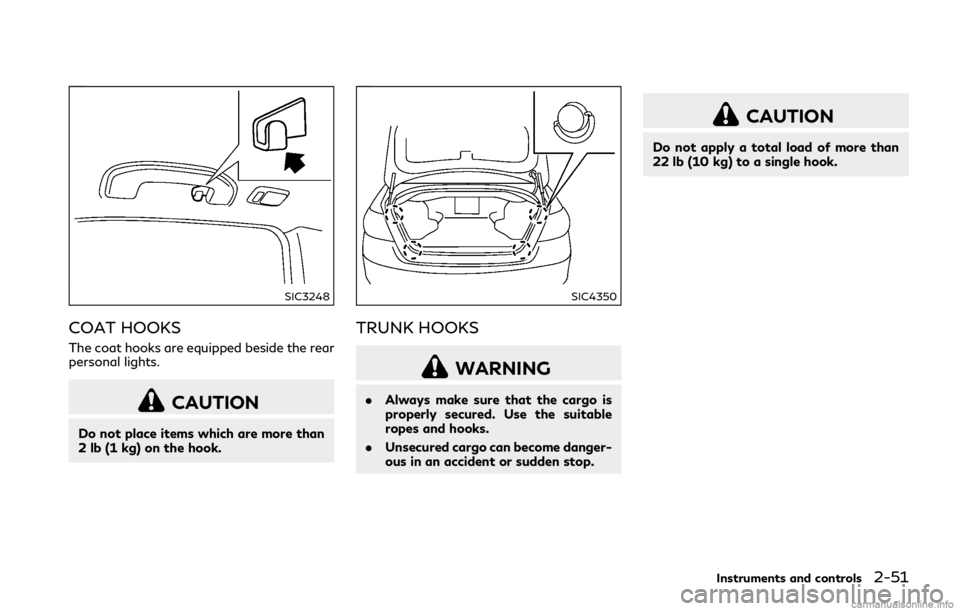
SIC3248
COAT HOOKS
The coat hooks are equipped beside the rear
personal lights.
CAUTION
Do not place items which are more than
2 lb (1 kg) on the hook.
SIC4350
TRUNK HOOKS
WARNING
.Always make sure that the cargo is
properly secured. Use the suitable
ropes and hooks.
. Unsecured cargo can become danger-
ous in an accident or sudden stop.
CAUTION
Do not apply a total load of more than
22 lb (10 kg) to a single hook.
Instruments and controls2-51