Page 105 of 552
3-18
Convenient features of your vehicle
Heated Steering Wheel
(if equipped)
When the engine Start/Stop button is
in the ON/OFF position or when the
engine is running, press the heated
steering wheel button to warm the
steering wheel. The indicator on the
button will illuminate.
To turn the heated steering wheel off,
press the button again. The indicator
on the button will turn off.
The heated steering wheel will auto-
matically turn off after approximately
30 minutes.Do not install any cover or acces-
sory on the steering wheel. The
cover or accessory could cause
damage to the heated steering
wheel system.
Horn
To sound the horn, press the area
indicated by the horn symbol on your
steering wheel (see illustration). The
horn will operate only when this area
is pressed.
Do not strike the horn severely to
operate it, or hit it with your fist.
Do not press on the horn with a
sharp-pointed object.
NOTICE
NOTICE
OLF047018
OLF047016
Page 156 of 552

3-69
Convenient features of your vehicle
3
Parking Brake & BrakeFluid Warning Light
This warning light illuminates:
When the Engine Start/Stop button
is in the ON position
- It illuminates for approximately 3seconds and then goes off.
- It remains on if the parking brake is applied.
When the parking brake is applied.
When the brake fluid level in the reservoir is low.
- If the warning light illuminateswith the parking brake released, it
indicates the brake fluid level in
reservoir is low.
When the regenerative brake does not operate.
When only one of the dual system is working, the stopping distance
will be increased
If the brake fluid level in the reser-
voir is low:
1. Drive carefully to the nearest safe location and stop your vehicle.
2. Stop the vehicle, immediately check the brake fluid level and add
fluid, if necessary (For more infor-
mation, refer to "Brake Fluid" in
the chapter 7). Then check all
brake components for fluid leaks.
When any leak in the brake system
is still detected, when the warning
light remains ON, or when the
brakes do not properly operate, do
not drive the vehicle.
Have the vehicle towed to an
authorized HYUNDAI dealer and
inspected.
Dual-diagonal braking system
Your vehicle is equipped with dual-
diagonal braking systems. This means
you still have braking on two wheels
even if one of the dual systems fails.
With only one of the dual systems
working, longer pedal travel and
greater pedal pressure should be
required. Also, the vehicle will not stop in a
short distance only with one of the
brake systems.
If the brakes fail, while driving, shift
to a lower gear for additional engine
braking and stop the vehicle as soon
as it is safe to do so.
(red color)
Driving the vehicle with a warn-
ing light ON is dangerous. If the
Parking Brake & Brake Fluid
Warning Light illuminates with
the parking brake released, it
indicates that the brake fluid
level is low.
In this case, have the vehicle
inspected by an authorized
HYUNDAI dealer.
WARNING
Page 170 of 552

3-83
Convenient features of your vehicle
3
Sunroof Open (if equipped)
This warning is displayed when the
sunroof is opened, after turning OFF
the vehicle.
Low Tire Pressure
This warning message is displayed if
the tire pressure is low. The corre-
sponding tire on the vehicle will be
illuminated.
For more information, refer to
"Tire Pressure Monitoring System
(TPMS)" in chapter 6.
Turn on FUSE SWITCH
This warning message is displayed
if the fuse switch in the instrument
panel fuse, under the steering wheel
is OFF.
If this message is displayed, turn the
fuse switch on.
For more information, refer to
"Fuses" in chapter 7.
Align steering wheel (if equipped)
This warning message is displayed
when the steering wheel is turned by
90 degrees or wider, either to the left
or to the right, while running the
engine.
In order to align the steering wheel,
turn the wheel in the direction shown
while the engine is running to
straighten the steering wheel.
Steering wheel aligning is com-pleted (if equipped)
If the steering wheel aligning is com-
pleted after "Align steering wheel"
warning message is displayed, this
message is displayed for 2 seconds.
OLF047696
Page 178 of 552

3-91
Convenient features of your vehicle
L
LC
C D
D
D
D I
IS
S P
P L
LA
A Y
Y
3
LCD display control
The LCD display modes can be
changed by pressing the control
switches on the steering wheel.
(1) : Changing LCD modes or
returning to previous position
(2) , : Changing items
(3) OK : Selecting or resetting
LCD modes
OLF047201
Modes SymbolDescription
Trip Computer
This mode displays information related to driving such as tripmeter, fuel economy, etc.
For more information, refer to "Trip Computer" in
this chapter.
Turn By Turn (TBT)
(if equipped)This mode displays the state of the navigation.
Assist
(If equipped)
This mode displays the state of the Smart Cruise Control (SCC) and Lane Keeping Assist System (LKAS).
For more information, refer to "Smart Cruise Control
(SCC)" and Lane Keeping Assist System (LKAS) in
chapter 5.
This mode displays information related to Driver Attention Alert and Tire Pressure Monitoring System (TPMS).
For more information, refer to "Driver Attention Alert
(DAA)" in chapter 5 and "Tire Pressure Monitoring
System (TPMS)" in chapter 6.
User SettingsOn this mode, you can change settings of the doors,
lamps, etc.
Warning
This mode displays information such as tire pressure,service intervals, warning messages related to the
Smart Cruise Control, etc.
Page 186 of 552
3-99
Convenient features of your vehicle
The trip computer is a microcomput-
er-controlled driver information sys-
tem that displays information related
to driving.
Information
Some driving information stored in the
trip computer (for example Average
Vehicle Speed) resets if the battery is
disconnected.
Trip modes
To change the trip mode, toggle the
" , " switch on the steering wheel.
i
T
TR
R I
IP
P
C
C O
O M
M P
PU
U T
TE
ER
R
3
Fuel Economy
Drive Info
Fuel Economy
Accumulated Info
Fuel Economy
Digital Speedometer
Driving style
OLF047201N
■
■
■
■
T
T
T
T
y
y
y
y
p
p
p
p
e
e
e
e
A
A
A
A
■
■
■
■
T
T
T
T
y
y
y
y
p
p
p
p
e
e
e
e
B
B
B
B
↔↔ ↔↔
Energy flow
↔
Page 187 of 552

3-100
Convenient features of your vehicle
Fuel economy
Distance To Empty (1)
The distance to empty is the esti-mated distance the vehicle can be
driven with the remaining fuel.
- Distance range: 1 ~ 9999 mi. or 1 ~ 9999 km
If the estimated distance is below 1 mi. (1 km), the trip computer will
display "---" as distance to empty.
Information
• If the vehicle is not on level groundor the battery power has been inter-
rupted, the distance to empty func-
tion may not operate correctly.
• The distance to empty may differ from the actual driving distance as
it is an estimate of the available
driving distance.
• The trip computer may not register additional fuel if less than 1.6 gal-
lons (6 liters) of fuel are added to the
vehicle.
• The fuel economy and distance to empty may vary significantly based
on driving conditions, driving habits,
and condition of the vehicle.
Average Fuel Economy (2)
The average fuel economy is calcu-lated by the total driving distance
and fuel consumption since the last
average fuel economy reset.
The average fuel economy can be reset both manually and automati-
cally.
Manual reset
To clear the average fuel economy
manually, press the [OK] button on
the steering wheel for more than 1
second when the average fuel econo-
my is displayed.
Automatic reset
To automatically reset the average fuel
economy after refueling, select the
"Auto Reset" mode in User Settings
menu on the LCD display.
- After Ignition: The average fuel econ- omy will reset automatically whenev-
er it has passed 4 hours after turning
OFF the engine.
- After Refueling: The average fuel economy will reset automatically
when driving speed exceeds 1 km/h,
after adding 6 liters (1.6 gallons) of
fuel or more.
Information
The average fuel economy may be
inaccurate, when the vehicle drives
shorter than 0.19 miles (300 meters)
after turning ON the Engine Start/Stop
button.
i
i
OLF047699N
Page 216 of 552
3-129
Convenient features of your vehicle
3
Face-Level (B, D, F)
Air flow is directed toward the upper
body and face. Additionally, each
outlet can be controlled to direct the
air discharged from the outlet.
Bi-Level (B, C, D, E, F)
Air flow is directed towards the face
and the floor.
Floor & Defrost (A, C, D, E)
Most of the air flow is directed to the
floor and the windshield with a small
amount directed to the side window
defrosters.
Floor-Level (A, C, D, E)
Most of the air flow is directed to the
floor, with a small amount of the air
being directed to the windshield and
side window defrosters.
Defrost-Level (A, D)
Most of the air flow is directed to the
windshield with a small amount of air
directed to the side window defrosters.
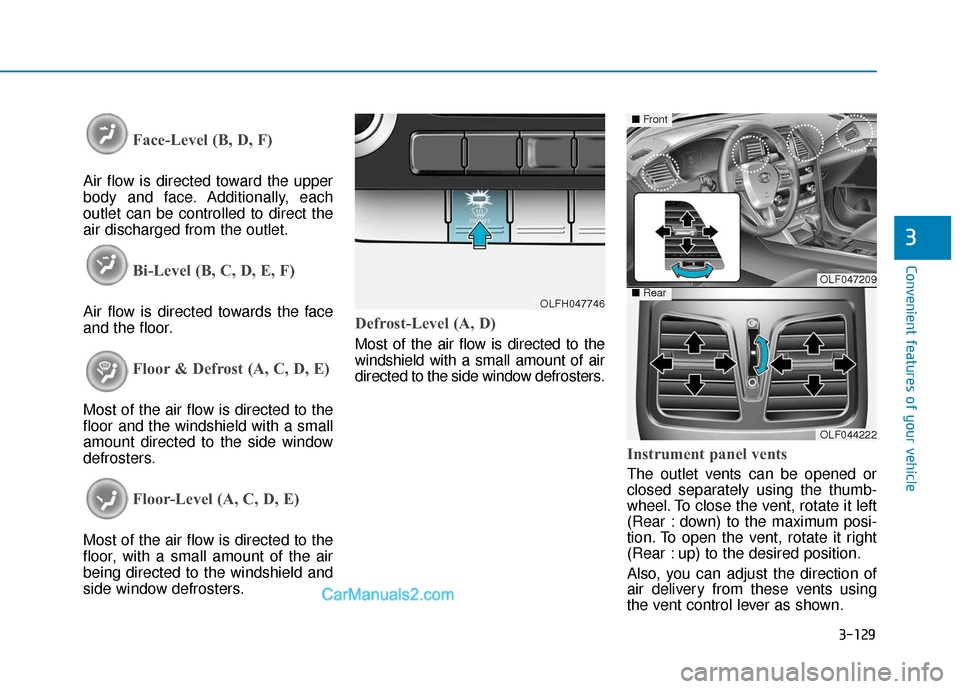
Instrument panel vents
The outlet vents can be opened or
closed separately using the thumb-
wheel. To close the vent, rotate it left
(Rear : down) to the maximum posi-
tion. To open the vent, rotate it right
(Rear : up) to the desired position.
Also, you can adjust the direction of
air delivery from these vents using
the vent control lever as shown.
OLFH047746
OLF047209
OLF044222
■Front
■Rear
Page 240 of 552
Multimedia System
Multimedia system .................................................4-2
AUX, USB and iPod®Port ...............................................4-2
Antenna ........................................................................\
.......4-2
Steering Wheel Audio Control........................................4-3
Audio (Display Audio) / Video /
Navigation System (AVN).................................................4-4
Bluetooth®Wireless Technology Hands-Free ...........4-4
How vehicle audio works ................................................4-5
Features of your vehicle .................................................4-7
4


