Page 342 of 522

5-92
Driving your vehicle
Detecting radar
The radars are located inside of the
rear bumper.
Always keep the rear bumper clean
for the system to work properly.
Warning message
This warning message may appearwhen :
- One or both of the sensors on therear bumper is blocked by dirt or
snow or a foreign object
- Driving in rural areas where the BSD sensor does not detect
another vehicle for an extended
period of time
- When there is inclement weather such as heavy snow or rain
If any of these conditions occur, the
light on the BSD switch and the sys-
tem will turn off automatically. When the BSD cancelled warning
message is displayed in the cluster,
check to make sure that the rear
bumper is free from any dirt or snow
in the areas where the sensor is
located. Remove any dirt, snow, or
foreign material that could interfere
with the radar sensors.
After any dirt or debris is removed,
the BSD system should operate nor-
mally after about 10 minutes of driv-
ing the vehicle.
If the system still does not operate
normally have your vehicle inspected
by an authorized HYUNDAI dealer.
OLF057054OLF057581N
Page 343 of 522
5-93
Driving your vehicle
5
If the system does not work properly,
a warning message will appear and
the light on the switch will turn off.
The system will turn off automatical-
ly. Have your vehicle checked by an
authorized HYUNDAI dealer.
RCTA (Rear Cross Traffic Alert)
Operating conditions
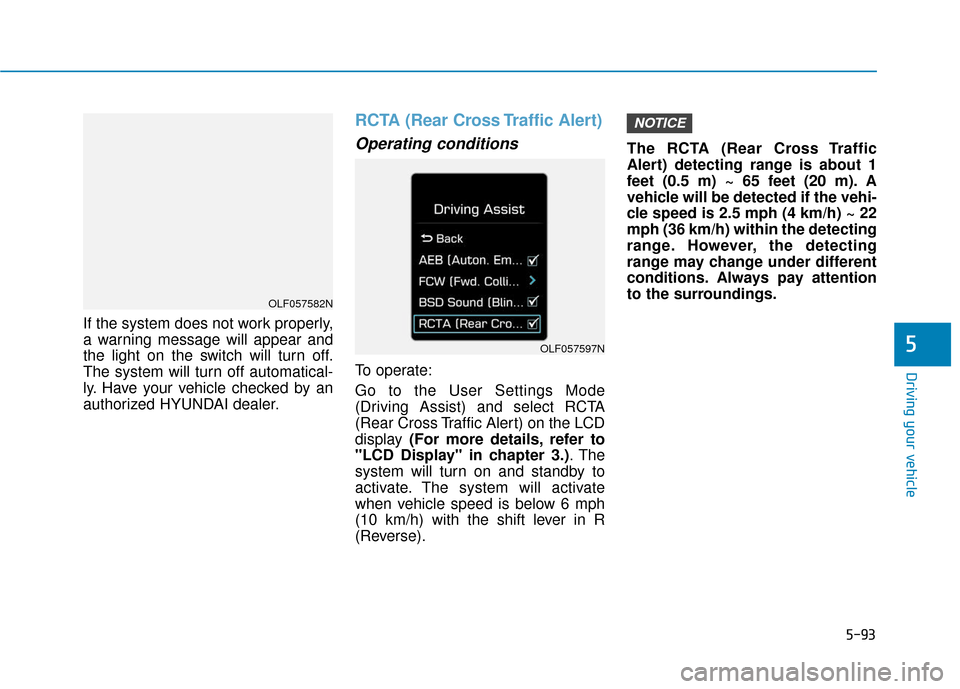
To operate:
Go to the User Settings Mode
(Driving Assist) and select RCTA
(Rear Cross Traffic Alert) on the LCD
display (For more details, refer to
"LCD Display" in chapter 3.) . The
system will turn on and standby to
activate. The system will activate
when vehicle speed is below 6 mph
(10 km/h) with the shift lever in R
(Reverse). The RCTA (Rear Cross Traffic
Alert) detecting range is about 1
feet (0.5 m) ~ 65 feet (20 m). A
vehicle will be detected if the vehi-
cle speed is 2.5 mph (4 km/h) ~ 22
mph (36 km/h) within the detecting
range. However, the detecting
range may change under different
conditions. Always pay attention
to the surroundings.
NOTICE
OLF057597N
OLF057582N
Page 344 of 522
5-94
Driving your vehicle
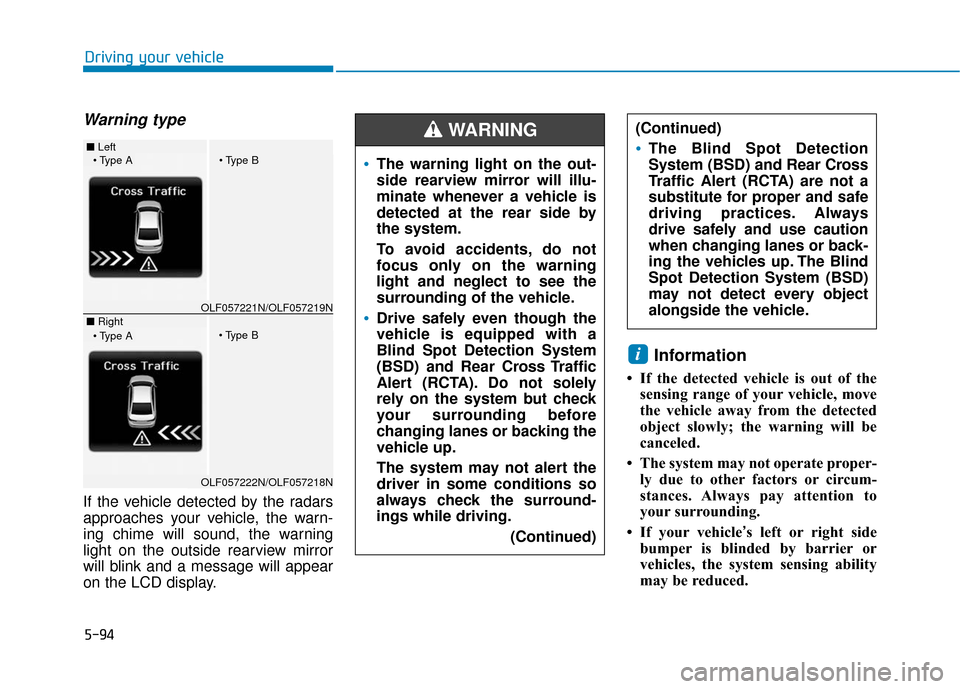
Warning type
If the vehicle detected by the radars
approaches your vehicle, the warn-
ing chime will sound, the warning
light on the outside rearview mirror
will blink and a message will appear
on the LCD display.
Information
• If the detected vehicle is out of thesensing range of your vehicle, move
the vehicle away from the detected
object slowly; the warning will be
canceled.
• The system may not operate proper- ly due to other factors or circum-
stances. Always pay attention to
your surrounding.
• If your vehicle’s left or right side bumper is blinded by barrier or
vehicles, the system sensing ability
may be reduced.
i
The warning light on the out-
side rearview mirror will illu-
minate whenever a vehicle is
detected at the rear side by
the system.
To avoid accidents, do not
focus only on the warning
light and neglect to see the
surrounding of the vehicle.
Drive safely even though the
vehicle is equipped with a
Blind Spot Detection System
(BSD) and Rear Cross Traffic
Alert (RCTA). Do not solely
rely on the system but check
your surrounding before
changing lanes or backing the
vehicle up.
The system may not alert the
driver in some conditions so
always check the surround-
ings while driving.
(Continued)
(Continued)
The Blind Spot Detection
System (BSD) and Rear Cross
Traffic Alert (RCTA) are not a
substitute for proper and safe
driving practices. Always
drive safely and use caution
when changing lanes or back-
ing the vehicles up. The Blind
Spot Detection System (BSD)
may not detect every object
alongside the vehicle.
WARNING ■ Left
■ RightOLF057221N/OLF057219N
OLF057222N/OLF057218N
Page 347 of 522

5-97
Driving your vehicle
5
The Automatic Emergency Braking
(AEB) system is designed to help
detect and monitor the vehicle ahead
or help detect a pedestrian in the
roadway through radar signals and
camera recognition to warn the driv-
er that a collision is imminent, and if
necessary, apply emergency brak-
ing.System setting and activation
System setting
The driver can activate the AEB by
placing the ignition switch to the ON
position and by selecting 'User
Settings', 'Driving Assist', and 'AEB
(Automatic Braking System)'. The
AEB deactivates, when the driver
cancels the system setting.
A AU
U T
TO
O M
M A
AT
TI
IC
C
E
E M
M E
ER
R G
G E
EN
N C
CY
Y
B
B R
RA
A K
KI
IN
N G
G
(
( A
A E
EB
B )
)
(
( I
IF
F
E
E Q
Q U
UI
IP
P P
PE
ED
D )
)
OLF057454N
Take the following precautions
when using the Automatic
Emergency Braking (AEB):
This system is only a supple-
mental system and it is not
intended to, nor does it replace
the need for extreme care and
attention of the driver. The
sensing range and objects
detectable by the sensors are
limited. Pay attention to the
road conditions at all times.
NEVER drive too fast in accor-
dance with the road condi-
tions or while cornering.
Always drive cautiously to
prevent unexpected and sud-
den situations from occur-
ring. AEB does not stop the
vehicle completely and is not
a collision avoidance system.
WARNING
Page 348 of 522
5-98
Driving your vehicleThe warning light illumi-
nates on the LCD display,
when you cancel the AEB
system. The driver can
monitor the AEB ON/OFF status on
the LCD display. If the warning light
remains ON when the AEB is acti-
vated, have the system checked by
an authorized HYUNDAI dealer.
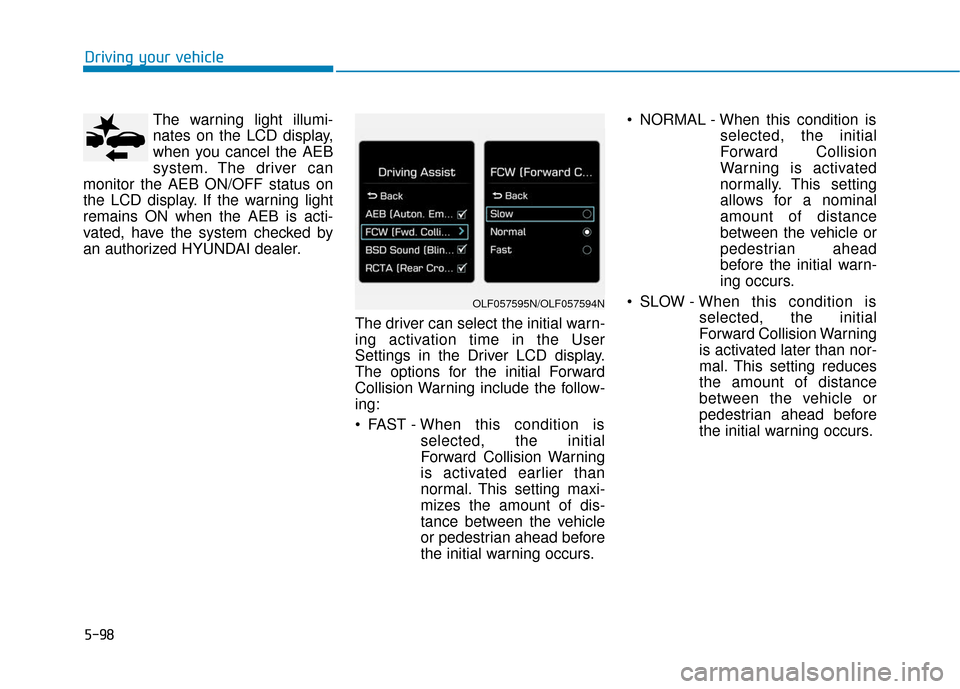
The driver can select the initial warn-
ing activation time in the User
Settings in the Driver LCD display.
The options for the initial Forward
Collision Warning include the follow-
ing:
FAST - When this condition is
selected, the initial
Forward Collision Warning
is activated earlier than
normal. This setting maxi-
mizes the amount of dis-
tance between the vehicle
or pedestrian ahead before
the initial warning occurs. NORMAL - When this condition is
selected, the initial
Forward Collision
Warning is activated
normally. This setting
allows for a nominal
amount of distance
between the vehicle or
pedestrian ahead
before the initial warn-
ing occurs.
SLOW - When this condition is selected, the initial
Forward Collision Warning
is activated later than nor-
mal. This setting reduces
the amount of distance
between the vehicle or
pedestrian ahead before
the initial warning occurs.
OLF057595N/OLF057594N
Page 349 of 522
5-99
Driving your vehicle
5
Prerequisite for activation
The AEB gets ready to be activated,
when the AEB is selected on the
LCD display, and when the following
prerequisites are satisfied.
- The ESC is activated.
- To enable the system to detectpedestrians ahead, the vehicle
driving speed must be between 5 -
40 mph (8 - 65 km/h).
- To enable the system to detect a vehicle ahead, the vehicle driving
speed must be between 5 - 110
mph (8 - 180 km/h).
When traveling above 50 mph (80
km/h), the AEB system only initiates
partial braking. This is to prevent
unintended full braking to stop in the
middle of the highway.
AEB warning message and
system control
The AEB produces warning mes-
sages and warning alarms in accor-
dance with the collision risk levels.
Also, it controls the brakes in accor-
dance with the collision risk levels.The AEB automatically acti-
vates upon placing the igni-
tion switch to the ON position.
The driver can deactivate the
AEB by canceling the system
setting on the LCD display.
The AEB automatically deacti-
vates upon canceling the
ESC. When the ESC is can-
celed, the AEB cannot be acti-
vated on the LCD display.
WARNING
Page 350 of 522
5-100
Driving your vehicle
Forward Warning (1stwarning)
This initial warning message appears
on the LCD display with a warning
chime.
The driver can select the initial warn-
ing activation time in the User
Settings in the Driver LCD display.
The options for the initial Forward
Collision Warning include FAST,
NORMAL, or SLOW initial warning
time.
Collision Warning (2ndwarning)
This warning message appears onthe LCD display with a warning
chime.
Additionally, some vehicle system intervention occurs by the engine
management system to help decel-
erate the vehicle.
- If the detected vehicle in front isdriving slower than 50 mph (80
km/h), your vehicle speed may
decelerate sharply to avoid a col-
lision. If the detected vehicle in
front is driving faster than 50 mph
(80 km/h), your vehicle speed
may decelerate moderately. - If your vehicle is traveling less
than 40 mph (65 km/h) and a
pedestrian is detected within the
Collision Warning (2
ndwarning)
stage, your vehicle speed may
decelerate sharply to avoid a col-
lision.
OLF057452NOLF057583N
Page 351 of 522
5-101
Driving your vehicle
5
Emergency braking (3rdwarning)
This warning message appears on
the LCD display with a warning
alarm.
Additionally, automatic emergency braking of the vehicle is applied in
order to avoid a collision.
- If your vehicle is traveling lessthan 40 mph (65 km/h) and a
pedestrian is detected within the
Emergency Braking stage, auto-
matic emergency braking of the
vehicle is applied. In this condi-
tion, your vehicle speed will
decelerate sharply to avoid a col-
lision. - When your vehicle drives slower
than 40 mph (65 km/h) with a
passer-by in front, the driving
speed may abruptly decrease.
When your vehicle drives faster
than 40 mph (65 km/h) with a
pedestrian in front, the AEB does
not operate.
Brake operation
In an urgent situation, the braking system enters into the ready status
for prompt reaction against the dri-
ver’s depressing the brake pedal.
The AEB provides additional brak- ing power for optimum braking per-
formance, when the driver depress-
es the brake pedal.
The braking control is automatical- ly deactivated, when the driver
sharply depresses the brake pedal,
or when the driver abruptly oper-
ates the steering wheel.
The braking control is automatical- ly canceled, when risk factors dis-
appear.
OLF057584N
The driver should always use
extreme caution while operating
the vehicle, whether or not there
is a warning message or alarm
from the AEB system.
CAUTION