2018 Hyundai Santa Fe Button
[x] Cancel search: ButtonPage 69 of 570
Safety features of your vehicle
48
3
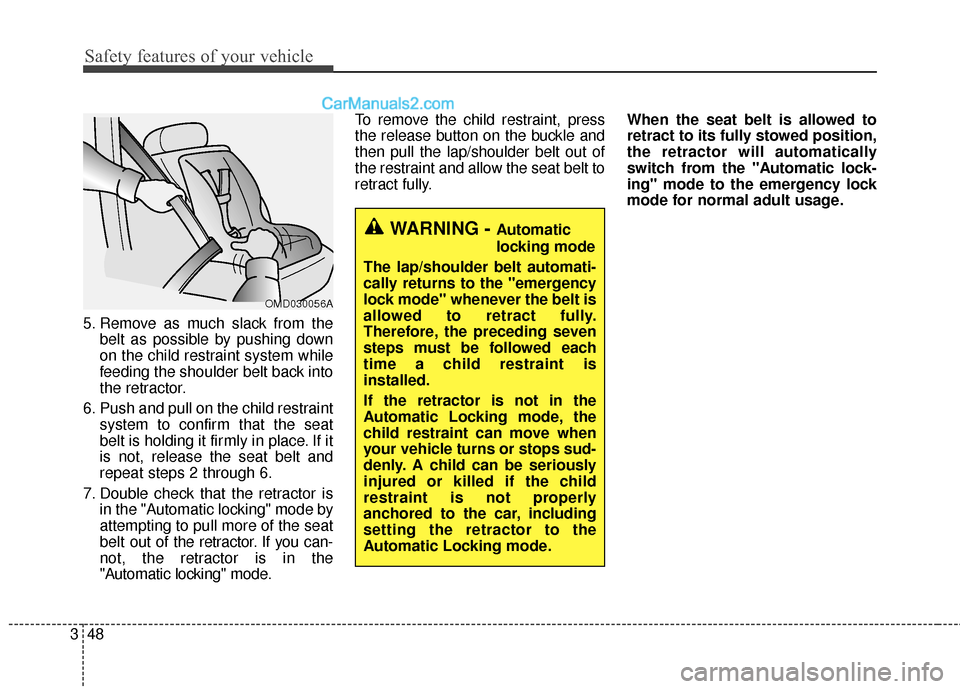
5. Remove as much slack from the
belt as possible by pushing down
on the child restraint system while
feeding the shoulder belt back into
the retractor.
6. Push and pull on the child restraint system to confirm that the seat
belt is holding it firmly in place. If it
is not, release the seat belt and
repeat steps 2 through 6.
7. Double check that the retractor is in the "Automatic locking" mode by
attempting to pull more of the seat
belt out of the retractor. If you can-
not, the retractor is in the
"Automatic locking" mode. To remove the child restraint, press
the release button on the buckle and
then pull the lap/shoulder belt out of
the restraint and allow the seat belt to
retract fully.
When the seat belt is allowed to
retract to its fully stowed position,
the retractor will automatically
switch from the "Automatic lock-
ing" mode to the emergency lock
mode for normal adult usage.
WARNING - Automatic
locking mode
The lap/shoulder belt automati-
cally returns to the "emergency
lock mode" whenever the belt is
allowed to retract fully.
Therefore, the preceding seven
steps must be followed each
time a child restraint is
installed.
If the retractor is not in the
Automatic Locking mode, the
child restraint can move when
your vehicle turns or stops sud-
denly. A child can be seriously
injured or killed if the child
restraint is not properly
anchored to the car, including
setting the retractor to the
Automatic Locking mode.
OMD030056A
Page 81 of 570

Safety features of your vehicle
60
3
Occupant classification system(Continued)
If the SRS air bag warning light
" " does not illuminate, or
continuously remains on after
illuminating for about 6 sec-
onds or blinks when the igni-
tion switch is turned to the ON
position, or after the engine is
started, comes on while driv-
ing, the SRS is not working
properly. If this occurs, have
your vehicle immediately
inspected by an authorized
HYUNDAI dealer.
Before you replace a fuse or disconnect a battery terminal,
turn the ignition switch to the
LOCK position and remove
the ignition key for ignition
key, and turn the engine
start/stop button to the OFF
position for smart key. Never
remove or replace the air bag
related fuse(s) when the igni-
tion switch is in the ON posi-
tion. Failure to heed this warn-
ing will cause the SRS air bag
warning light to illuminate.
OANNSA2003/OANNSA2002/OANNSA2004
■ Type B
■Type A
■ Type C
WARNING
If an air bag deploys, theremay be a loud noise followed
by a fine dust released in the
vehicle. These conditions are
normal and are not hazardous
- the air bags are packed in
this fine powder. The dust
generated during air bag
deployment may cause skin
or eye irritation as well as
aggravate asthma for some
persons. Always wash all
exposed skin areas thorough-
ly with cold water and a mild
soap after an accident in
which the air bags were
deployed.
The SRS can function only when the ignition switch is in
the ON position.
(Continued)
Page 107 of 570
Features of your vehicle
44
Record your key number
The key code num-
ber is stamped or
printed on the key
code tag attached to
the key set. Should
you lose your keys,
this number will enable an author-
ized HYUNDAI dealer to duplicate
the keys easily. Remove the key
code tag and store it in a safe place.
Also, record the key code number
and keep it in a safe and handy
place, but not in the vehicle.
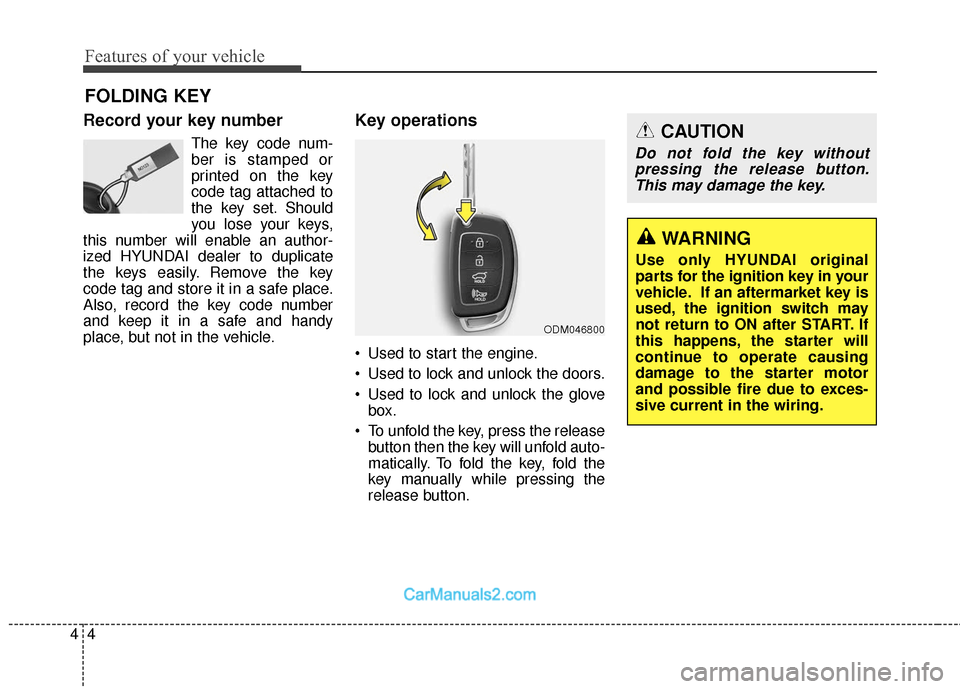
Key operations
• Used to start the engine.
Used to lock and unlock the doors.
Used to lock and unlock the glove box.
To unfold the key, press the release button then the key will unfold auto-
matically. To fold the key, fold the
key manually while pressing the
release button.
FOLDING KEY
ODM046800
CAUTION
Do not fold the key withoutpressing the release button.This may damage the key.
WARNING
Use only HYUNDAI original
parts for the ignition key in your
vehicle. If an aftermarket key is
used, the ignition switch may
not return to ON after START. If
this happens, the starter will
continue to operate causing
damage to the starter motor
and possible fire due to exces-
sive current in the wiring.
Page 108 of 570
45
Features of your vehicle
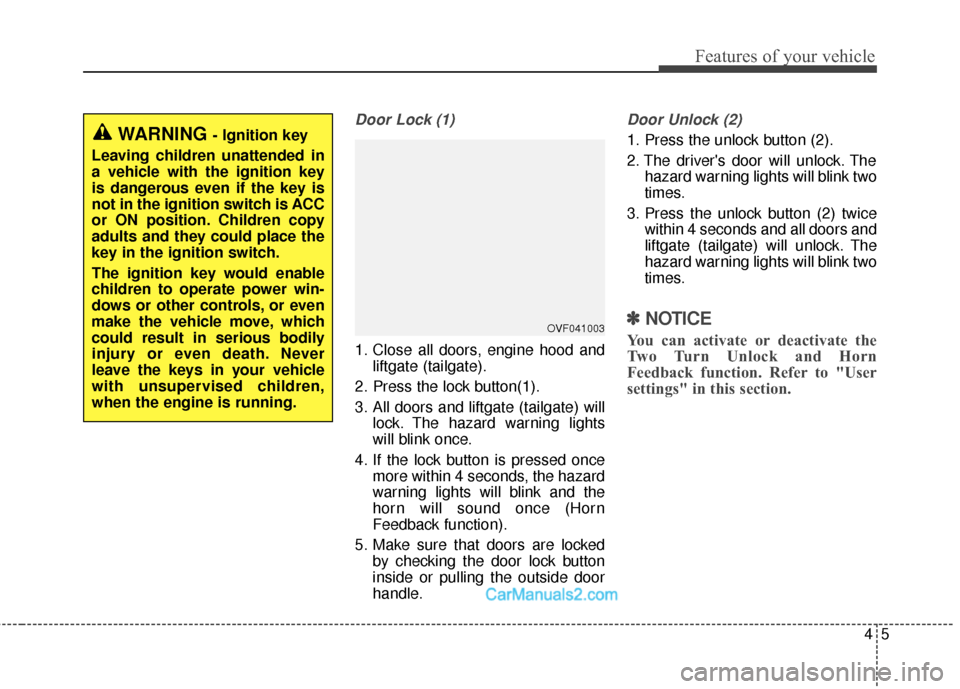
Door Lock (1)
1. Close all doors, engine hood andliftgate (tailgate).
2. Press the lock button(1).
3. All doors and liftgate (tailgate) will lock. The hazard warning lights
will blink once.
4. If the lock button is pressed once more within 4 seconds, the hazard
warning lights will blink and the
horn will sound once (Horn
Feedback function).
5. Make sure that doors are locked by checking the door lock button
inside or pulling the outside door
handle.
Door Unlock (2)
1. Press the unlock button (2).
2. The driver's door will unlock. Thehazard warning lights will blink two
times.
3. Press the unlock button (2) twice within 4 seconds and all doors and
liftgate (tailgate) will unlock. The
hazard warning lights will blink two
times.
✽ ✽NOTICE
You can activate or deactivate the
Two Turn Unlock and Horn
Feedback function. Refer to "User
settings" in this section.
WARNING - Ignition key
Leaving children unattended in
a vehicle with the ignition key
is dangerous even if the key is
not in the ignition switch is ACC
or ON position. Children copy
adults and they could place the
key in the ignition switch.
The ignition key would enable
children to operate power win-
dows or other controls, or even
make the vehicle move, which
could result in serious bodily
injury or even death. Never
leave the keys in your vehicle
with unsupervised children,
when the engine is running.
OVF041003
Page 109 of 570
Features of your vehicle
64
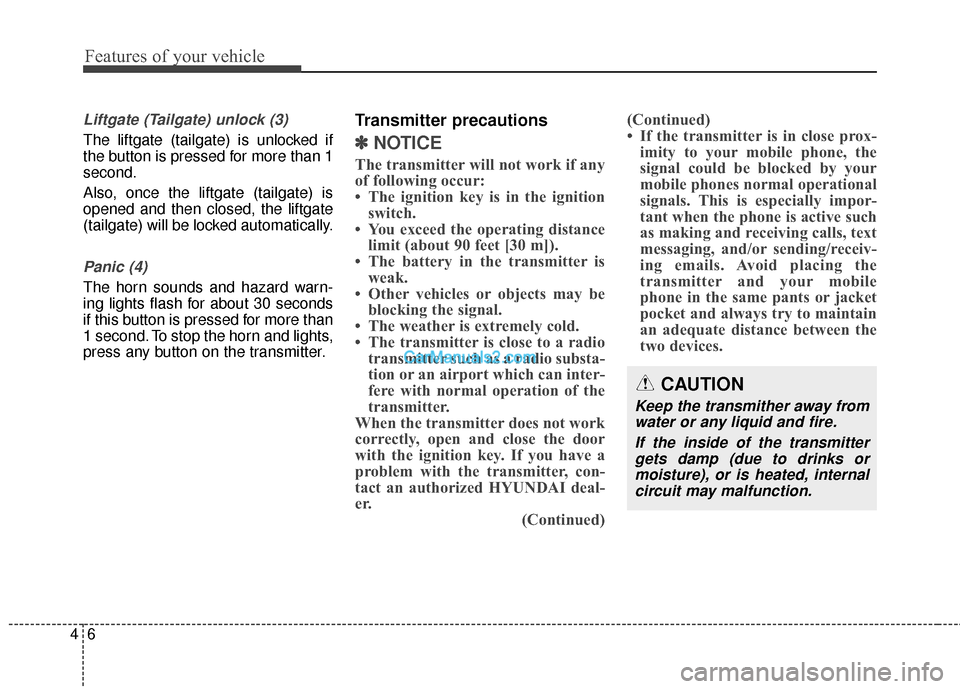
Liftgate (Tailgate) unlock (3)
The liftgate (tailgate) is unlocked if
the button is pressed for more than 1
second.
Also, once the liftgate (tailgate) is
opened and then closed, the liftgate
(tailgate) will be locked automatically.
Panic (4)
The horn sounds and hazard warn-
ing lights flash for about 30 seconds
if this button is pressed for more than
1 second. To stop the horn and lights,
press any button on the transmitter.
Transmitter precautions
✽ ✽NOTICE
The transmitter will not work if any
of following occur:
• The ignition key is in the ignition
switch.
• You exceed the operating distance limit (about 90 feet [30 m]).
• The battery in the transmitter is weak.
• Other vehicles or objects may be blocking the signal.
• The weather is extremely cold.
• The transmitter is close to a radio transmitter such as a radio substa-
tion or an airport which can inter-
fere with normal operation of the
transmitter.
When the transmitter does not work
correctly, open and close the door
with the ignition key. If you have a
problem with the transmitter, con-
tact an authorized HYUNDAI deal-
er. (Continued)(Continued)
• If the transmitter is in close prox-
imity to your mobile phone, the
signal could be blocked by your
mobile phones normal operational
signals. This is especially impor-
tant when the phone is active such
as making and receiving calls, text
messaging, and/or sending/receiv-
ing emails. Avoid placing the
transmitter and your mobile
phone in the same pants or jacket
pocket and always try to maintain
an adequate distance between the
two devices.
CAUTION
Keep the transmither away from
water or any liquid and fire.
If the inside of the transmittergets damp (due to drinks ormoisture), or is heated, internalcircuit may malfunction.
Page 113 of 570

Features of your vehicle
10
4
Record your key number
The key code num-
ber is stamped or
printed on the key
code tag attached to
the key set. Should
you lose your keys,
this number will enable an author-
ized HYUNDAI dealer to duplicate
the keys easily. Remove the key
code tag and store it in a safe place.
Also, record the key code number
and keep it in a safe and handy
place, but not in the vehicle.
Smart key function
To remove the mechanical key, press
and hold the release button (1) and
remove the mechanical key (2).
To reinstall the mechanical key, put
the key into the hole and push it until
a click sound is heard. With a smart key, you can lock or
unlock a door (and Liftgate (Tailgate))
and start the engine.
Refer to the following for more details.
SMART KEY
ODM042002
WARNING - Smart key
Leaving children unattended in
a vehicle with the smart key is
dangerous even if the Engine
Start/Stop Button is in the ACC
or ON position. Children copy
adults and they could press the
Engine Start/Stop Button.
The smart key would enable
children to operate power win-
dows or other controls, or even
make the vehicle move, which
could result in serious bodily
injury or even death. Never
leave the keys in your vehicle
with unsupervised children,
when the Engine is running.
Page 114 of 570
411
Features of your vehicle
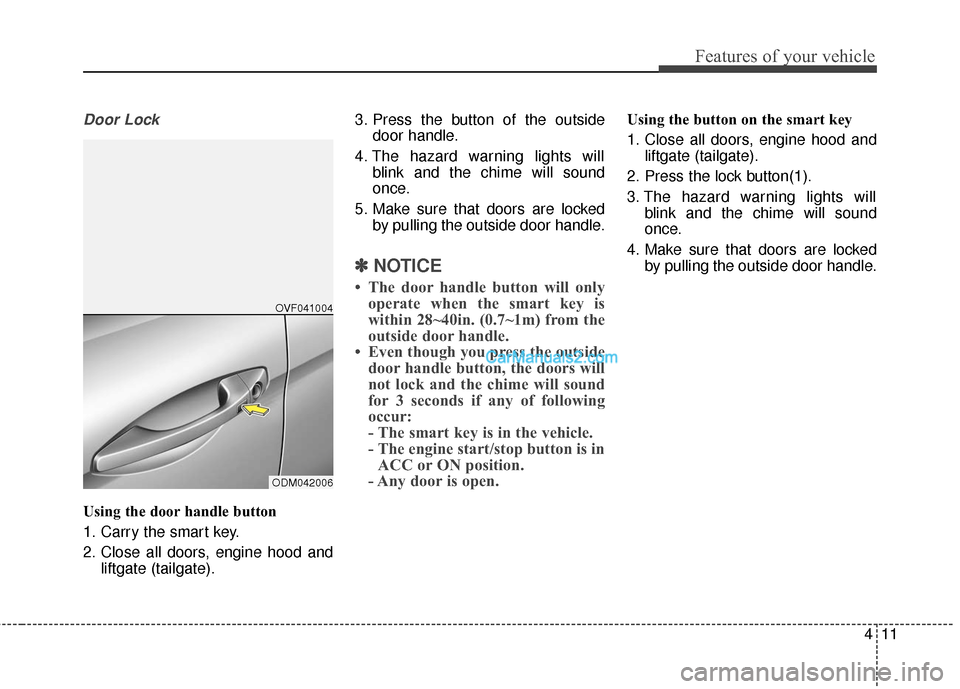
Door Lock
Using the door handle button
1. Carry the smart key.
2. Close all doors, engine hood andliftgate (tailgate). 3. Press the button of the outside
door handle.
4. The hazard warning lights will blink and the chime will sound
once.
5. Make sure that doors are locked by pulling the outside door handle.
✽ ✽NOTICE
• The door handle button will only
operate when the smart key is
within 28~40in. (0.7~1m) from the
outside door handle.
• Even though you press the outside door handle button, the doors will
not lock and the chime will sound
for 3 seconds if any of following
occur:
- The smart key is in the vehicle.
- The engine start/stop button is inACC or ON position.
- Any door is open.
Using the button on the smart key
1. Close all doors, engine hood and
liftgate (tailgate).
2. Press the lock button(1).
3. The hazard warning lights will blink and the chime will sound
once.
4. Make sure that doors are locked by pulling the outside door handle.
ODM042006OVF041004
Page 115 of 570
Features of your vehicle
12
4
Unlocking
Using the door handle button
1. Carry the smart key.
2. Press the button of the driver's
outside door handle.
3. The driver’s door will unlock. The hazard warning lights will blink
and the chime will sound two
times.
4. Press the button twice within 4 seconds and all doors and the lift-
gate (tailgate) will unlock and the
hazard warning lights will blink
and the chime will sound two
times.
❈ If you press the button of the front
passenger’s outside door handle
while carrying the smart key, all
doors will unlock.
✽ ✽
NOTICE
• The door handle button will only
operate when the smart key is
within 28~40in. (0.7~1m) from the
outside door handle.
• When the smart key is recognized in the area of 28~40in. (0.7~1m)
from the front outside door han-
dle, other people can also unlock
the doors by pressing the button of
the front outside door handle.
• After unlocking the driver's door or all doors, the door(s) will lock
automatically unless the door is
opened.
Using the button on the smart key
1. Press the unlock button (2) of the
smart key.
2. The driver’s door will unlock. The hazard warning lights will blink
and the chime will sound two
times.
3. Press the unlock button (2) twice within 4 seconds and all doors and
the liftgate (tailgate) will unlock.
The hazard warning lights will
blink and the chime will sound two
times.
✽ ✽NOTICE
After pressing the button, the doors
will lock automatically unless any
door is opened within 30 seconds.
✽ ✽NOTICE
You can activate or deactivate the
Two Turn Unlock function. Refer to
"User settings" in this section.