2018 Hyundai Kona light controls
[x] Cancel search: light controlsPage 17 of 523

1-6
Your vehicle at a glanceI
I NN SSTT RR UU MM EENN TT PP AA NN EELL OO VVEERR VV IIEE WW (( II))
1. Instrument cluster ........................................3-37
2. Horn ..............................................................3-19
3. Driver’s front air bag......................................2-48
4. Key ignition switch/ ........................................5-6
Engine Start/Stop button ................................5-9
5. Light control/Turn signals ..............................3-83
6. Wiper/Washer................................................3-95
7. Audio system/ ................................................4-7 Navigation system ..........................................4-4
8. Hazard warning flasher switch ........................6-3
9. Manual climate control system/ ..................3-108 Automatic climate control system ..............3-116
10. Passenger’s front air bag ............................2-48
11. Glove box ..................................................3-128
12. Power outlet ..............................................3-132
13. Manual transmission shift lever/ Dual clutch transmission shift lever ..5-16, 5-19
14. Drive mode button ......................................5-53
15. Heated steering wheel ................................3-18
16. Idle stop and go (ISG) OFF button ............5-47
17. Seat warmer................................................2-19
18. Seat warmer/Air ventilation seat ................2-21
19. 4WD lock button..........................................5-41
20. DBC button ................................................5-38
21. Parking Distance Warning (Reverse/Forward) button ........................3-104
22. Cup holder ................................................3-131
23. Steering wheel audio controls/ ....................4-3 Bluetooth ®
wireless technology
hands-free controls ......................................4-4
24. Speed limiter controls/ ................................5-88 Cruise controls/ ..........................................5-90
[A-F] : Type A ~ Type F
The actual shape may differ from the illustration. OOS017004
■
Left-Hand drive type
Page 18 of 523

1-7
Your vehicle at a glance
IINN SSTT RR UU MM EENN TT PP AA NN EELL OO VVEERR VV IIEE WW (( IIII))
11. Instrument cluster ........................................3-37
2. Horn ..............................................................3-19
3. Driver’s front air bag......................................2-48
4. Engine Start/Stop button ................................5-9
5. Light control/Turn signals ..............................3-83
6. Wiper/Washer................................................3-95
7. Audio system/ ................................................4-7
Navigation system ..........................................4-4
8. Hazard warning flasher switch ........................6-3
9. Manual climate control system/ ..................3-108 Automatic climate control system ..............3-116
10. Passenger’s front air bag ............................2-48
11. Glove box ..................................................3-128
12. Power outlet ..............................................3-132
13. Manual transmission shift lever/ Dual clutch transmission shift lever ..5-16, 5-19
14. 4WD lock button..........................................5-41
15. DBC button .................................5-38
16. Parking Distance Warning (Reverse/Forward) button ........................................................3-104
17. Seat warmer................................................2-19
18. Seat warmer/Air ventilation seat ................2-21
19. Drive mode button ......................................5-53
20. Heated steering wheel ...............................3-18
21. Idle stop and go (ISG) OFF button ............5-47
22. Cup holder ................................................3-131
23. Steering wheel audio controls/ ....................4-3 Bluetooth ®
wireless technology
hands-free controls ......................................4-4
24. Speed limiter controls/ ................................5-88
Cruise controls ..........................................5-90
[A-F] : Type A ~ Type F
The actual shape may differ from the illustration. OOS017004E
■
Right-Hand drive type
Page 26 of 523
2-7
Safety system of your vehicle
2
Front seats
The front seat can be adjusted by
using the control lever (or knob) or
switches located on the outside of the
seat cushion. Before driving, adjustthe seat to the proper position so that
you can easily control the steering
wheel, foot pedals and controls on the
instrument panel.
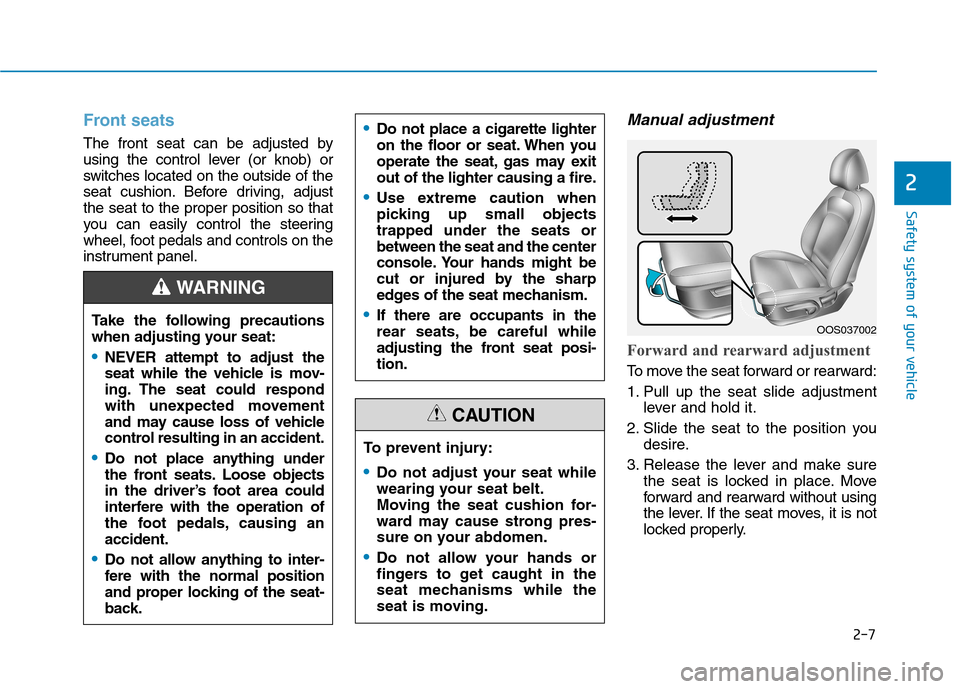
Manual adjustment
Forward and rearward adjustment
To move the seat forward or rearward:
1. Pull up the seat slide adjustmentlever and hold it.
2. Slide the seat to the position you desire.
3. Release the lever and make sure the seat is locked in place. Move
forward and rearward without using
the lever. If the seat moves, it is not
locked properly.
To prevent injury:
Do not adjust your seat while
wearing your seat belt.
Moving the seat cushion for-
ward may cause strong pres-
sure on your abdomen.
Do not allow your hands or
fingers to get caught in the
seat mechanisms while the
seat is moving.
CAUTION
Take the following precautions
when adjusting your seat:
NEVER attempt to adjust the
seat while the vehicle is mov-
ing. The seat could respond
with unexpected movement
and may cause loss of vehicle
control resulting in an accident.
Do not place anything under
the front seats. Loose objects
in the driver’s foot area could
interfere with the operation of
the foot pedals, causing anaccident.
Do not allow anything to inter-
fere with the normal position
and proper locking of the seat-
back.
WARNING
Do not place a cigarette lighter
on the floor or seat. When you
operate the seat, gas may exit
out of the lighter causing a fire.
Use extreme caution when
picking up small objectstrapped under the seats orbetween the seat and the center
console. Your hands might be
cut or injured by the sharp
edges of the seat mechanism.
If there are occupants in the
rear seats, be careful while
adjusting the front seat posi-tion.OOS037002
Page 103 of 523

3-20
Convenient features of your vehicle
Pull the day/night lever towards you to reduce glare from the headlamps
of the vehicles behind you during
night driving.
Remember that you lose somerearview clarity in the night position.
Electric Chromic Mirror (ECM)
(if equipped)
The electric rearview mirror automati-cally controls the glare from the head-
lamp of the vehicle behind you in
nighttime or low light driving condi-
tions.
When the engine is running, the
glare is automatically controlled by
the sensor mounted in the rearview
mirror. The sensor detects the light
level around the vehicle, and auto-matically adjusts to control the head-
lamp glare from vehicles behind you.
Whenever the shift lever is placed in
R (Reverse), the mirror will automat-
ically go to the brightest setting in
order to improve the driver’s view
behind the vehicle. [A] : Indicator
The electric rearview mirror automat- ically controls the glare from the
headlamp of the car behind you in
nighttime or low light driving condi-
tions. When the engine is running,the glare is automatically controlled
by the sensor mounted in the
rearview mirror. The sensor detects
the light level around the vehicle, andautomatically adjusts to control the
headlamp glare from vehicles behind
you. Whenever the shift lever is
placed in R (Reverse), the mirror will
automatically go to the brightest set-
ting in order to improve the drivers
view behind the vehicle.When cleaning the mirror, use a
paper towel or similar material
dampened with glass cleaner. Do
not spray glass cleaner directly on
the mirror as that may cause the
liquid cleaner to enter the mirrorhousing.Outside rearview mirror
Be sure to adjust mirror angles
before driving.
Your vehicle is equipped with both
left-hand and right-hand outside
rearview mirrors.
NOTICE
OOS047010L
OOS047012
Page 179 of 523

3-96
Convenient features of your vehicle
Windshield wipers
Operates as follows when the igni-
tion switch is turned ON./MIST : For a single wiping cycle,
move the lever down ( ) or up (MIST) and release
it. The wipers will operate
continuously if the lever isheld in this position.
O/OFF : Wiper is not in operation
---/INT : Wiper operates intermittently
at the same wiping intervals.
Use this mode in light rain or
mist. To vary the speed set-
ting, turn the speed control
knob.
1/LO : Normal wiper speed
2/HI : Fast wiper speed
Information
If there is heavy accumulation of snow
or ice on the windshield, defrost the
windshield for about 10 minutes, or until
the snow and/or ice is removed before
using the windshield wipers to ensure
proper operation.
If you do not remove the snow and/or ice
before using the wiper and washer, it may
damage the wiper and washer system.
AUTO (Automatic) control (if equipped)
The rain sensor located on the upperend of the windshield glass senses
the amount of rainfall and controls
the wiping cycle for the proper inter-
val. The more it rains, the faster the
wiper operates.
When the rain stops, the wiper stops.
To vary the speed setting, turn thespeed control knob (1).
If the wiper switch is set in AUTO
mode when the ignition switch is inthe ON position, the wiper will oper-
ate once to perform a self-check of
the system. Set the wiper to OFF
position when the wiper is not in use.
When washing the vehicle, set the wiper switch in the O (OFF) positionto stop the auto wiper operation.
The wiper may operate and be dam-
aged if the switch is set in the AUTO
mode while washing the vehicle.
Do not remove the sensor cover located on the upper end of the
passenger side windshield glass.
Damage to system parts could
occur and may not be covered by
your vehicle warranty.
NOTICE
i
OOS047322L
Sensor To avoid personal injury from the
windshield wipers, when theengine is running and the wind-
shield wiper switch is placed in
the AUTO mode:
Do not touch the upper end of the windshield glass facing the
rain sensor.
Do not wipe the upper end of the windshield glass with a
damp or wet cloth.
Do not put pressure on the windshield glass.
WARNING
Page 319 of 523
5-65
Driving your vehicle
5
FCA warning message and
system control
The FCA produces warning mes-
sages and warning alarms in accor-
dance with the collision risk levels,
such as abrupt stopping of the vehi-
cle in front, insufficient braking dis-
tance, or pedestrian detection. Also,
it controls the brakes in accordance
with the collision risk levels.
The driver can select the initial warn-
ing activation time in the User
Settings in the LCD display. The
options for the initial Forward
Collision Warning include Early,
Normal or Late initial warning time.
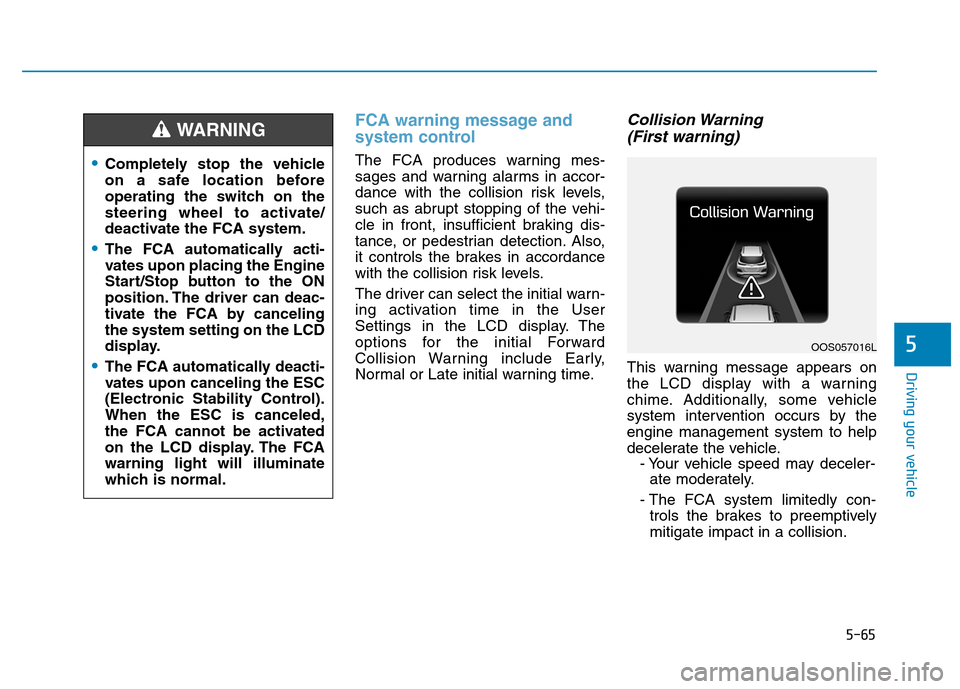
Collision Warning (First warning)
This warning message appears on
the LCD display with a warning
chime. Additionally, some vehicle
system intervention occurs by theengine management system to help
decelerate the vehicle. - Your vehicle speed may deceler-ate moderately.
- The FCA system limitedly con- trols the brakes to preemptivelymitigate impact in a collision.
Completely stop the vehicle
on a safe location before
operating the switch on the
steering wheel to activate/
deactivate the FCA system.
The FCA automatically acti-
vates upon placing the Engine
Start/Stop button to the ON
position. The driver can deac-
tivate the FCA by cancelingthe system setting on the LCD
display.
The FCA automatically deacti-
vates upon canceling the ESC
(Electronic Stability Control).When the ESC is canceled,
the FCA cannot be activated
on the LCD display. The FCAwarning light will illuminate
which is normal.
WARNING
OOS057016L
Page 331 of 523

5-77
Driving your vehicle
5
LKA operation
To activate/deactivate the LKA sys- tem:
With the ignition switch in the ON
position, press the LKA system but-
ton located on the instrument panel
on the left hand side of the steering
wheel. (Right hand side of the steer-
ing wheel for RHD vehicles.)
The indicator in the cluster display
will initially illuminate white. This indi-cates the LKA system is in the
READY but NOT ENABLED state.
The system detects lane
markers and controls the
steering wheel by a camera,
therefore, if the lane markers
are hard to detect, the system
may not work properly.
Please refer to "Limitations of the system".
Do not remove or damage the
related parts of LKA system.
You may not hear a warning sound of LKA system
because of excessive audiosound.
Do not place objects on the
dashboard that reflects light
such as mirrors, white paper,
etc. The system may malfunc-tion if the sunlight is reflected.
Always have your hands on the steering wheel while the
LKA system is activated. If
you continue to drive with
your hands off the steering
wheel after the "Keep handson steering wheel" warning
message appears, the system
will turn off automatically.
The steering wheel is not con-
tinuously controlled so if the
vehicle speed is at a higher
rate when leaving a lane the
vehicle may not be controlled
by the system. The driver
must always follow the speedlimit when using the system.
If you attach objects to the
steering wheel, the system
may not assist steering or the
hands off alarm may not work
properly.
When you tow a trailer, make
sure that you turn off the LKAsystem.
OOS057034
Page 337 of 523

5-83
Driving your vehicle
5
Driving on a steep grade, over ahill, or when driving on a curved road.
The adverse road conditions cause excessive vehicle vibrations while
driving.
The surrounding of the inside rear view mirror temperature is highdue to direct sunlight, etc.
When front visibility is poor
The windshield or the LKAS cam- era lens is blocked with dirt or
debris.
The windshield glass is fogged up; a clear view of the road is obstruct-ed.
Placing objects on the dashboard, etc.
The sensor cannot detect the lane because of fog, heavy rain or snow.LKA system function change
The driver can change LKA to Lane
Departure Warning (LDW) system orchange the LKA system mode
between Standard LKA and Active
LKA from the LCD display. Go to the"User Settings Driver Assistance
Lane Keeping Assist Lane
Departure Warning/Standard
LKA/Active LKA". The system is automatically set to Standard LKA if a function is notselected.
Lane Departure Warning
LDW system alerts the driver with a
visual warning and a warning alarm
when the system detects the vehicle
departing the lane. The steeringwheel will not be controlled.
Standard LKA
The Standard LKA mode guides the
driver to help keep the vehicle within
the lanes. It rarely controls the steer-
ing wheel, when the vehicle drives
well inside the lanes. However, it
starts to control the steering wheel,
when the vehicle is about to deviate
out of the lanes.
Active LKA
The Active LKA mode provides more
frequent steering wheel control in
comparison with the Standard LKA
mode. Active LKA can reduce the dri-
ver’s fatigue to assist the steering for
maintaining the vehicle in the middle
of the lane.