Page 302 of 523
5-48
Driving your vehicle
Auto stop
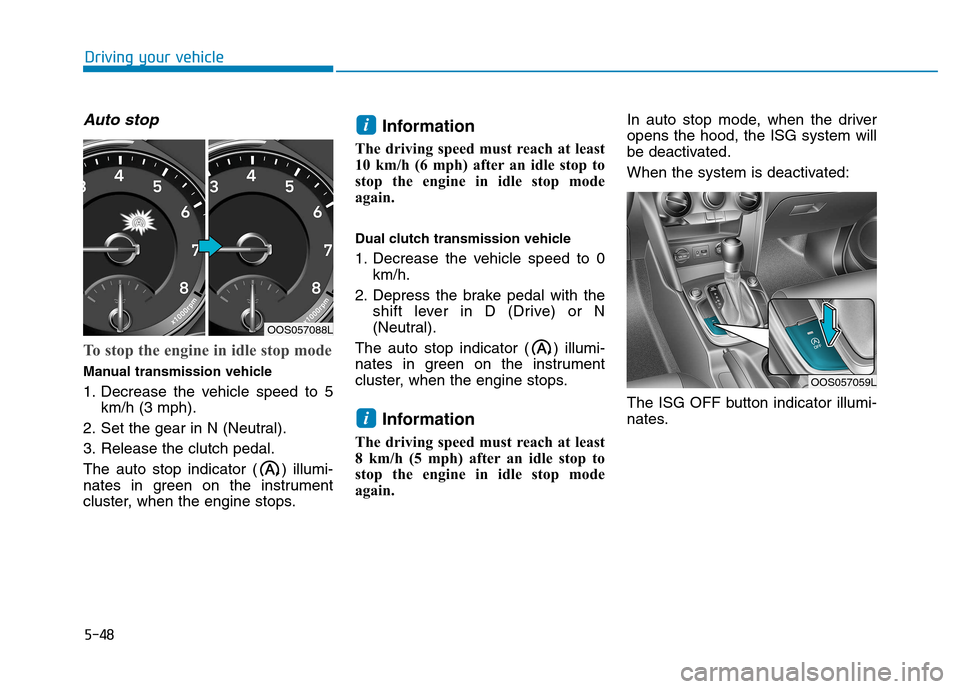
To stop the engine in idle stop mode
Manual transmission vehicle
1. Decrease the vehicle speed to 5km/h (3 mph).
2. Set the gear in N (Neutral).
3. Release the clutch pedal.
The auto stop indicator ( ) illumi-
nates in green on the instrument
cluster, when the engine stops. Information
The driving speed must reach at least
10 km/h (6 mph) after an idle stop to
stop the engine in idle stop mode
again.
Dual clutch transmission vehicle
1. Decrease the vehicle speed to 0 km/h.
2. Depress the brake pedal with the shift lever in D (Drive) or N
(Neutral).
The auto stop indicator ( ) illumi-
nates in green on the instrument
cluster, when the engine stops.
Information
The driving speed must reach at least
8 km/h (5 mph) after an idle stop to
stop the engine in idle stop mode
again. In auto stop mode, when the driveropens the hood, the ISG system will
be deactivated.
When the system is deactivated:
The ISG OFF button indicator illumi-
nates.
i
i
OOS057059L
OOS057088L
Page 303 of 523
5-49
Driving your vehicle
5
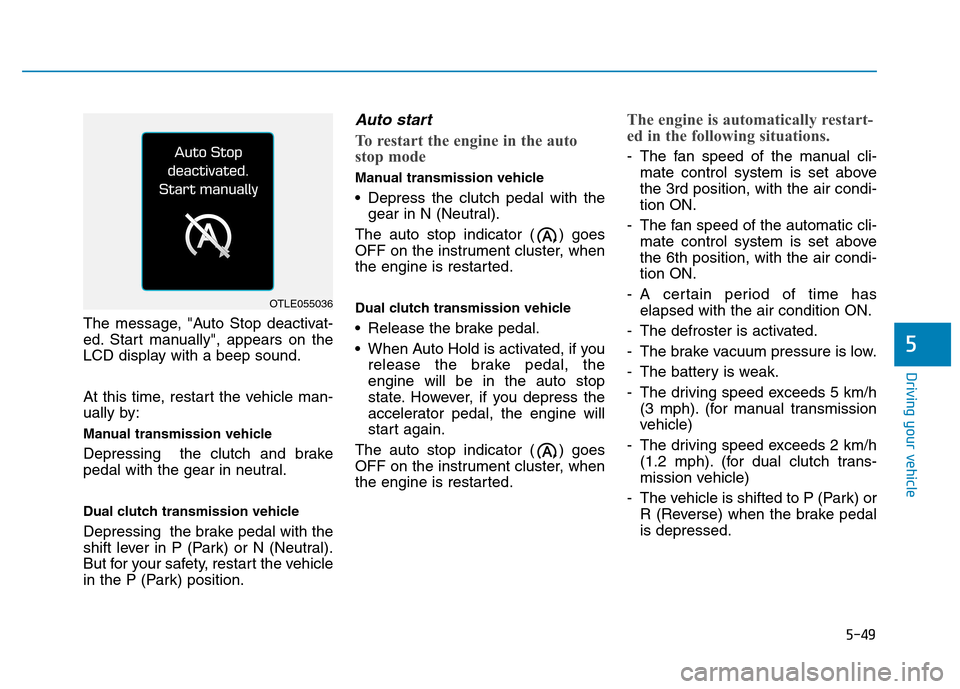
The message, "Auto Stop deactivat-
ed. Start manually", appears on the
LCD display with a beep sound.
At this time, restart the vehicle man-
ually by:
Manual transmission vehicle
Depressing the clutch and brake
pedal with the gear in neutral.
Dual clutch transmission vehicle
Depressing the brake pedal with the
shift lever in P (Park) or N (Neutral).
But for your safety, restart the vehicle
in the P (Park) position.
Auto start
To restart the engine in the auto
stop mode
Manual transmission vehicle
Depress the clutch pedal with thegear in N (Neutral).
The auto stop indicator ( ) goes
OFF on the instrument cluster, when
the engine is restarted.
Dual clutch transmission vehicle
Release the brake pedal.
When Auto Hold is activated, if you release the brake pedal, the engine will be in the auto stop
state. However, if you depress the
accelerator pedal, the engine will
start again.
The auto stop indicator ( ) goes
OFF on the instrument cluster, when
the engine is restarted.
The engine is automatically restart-
ed in the following situations.
- The fan speed of the manual cli- mate control system is set above the 3rd position, with the air condi-tion ON.
- The fan speed of the automatic cli- mate control system is set abovethe 6th position, with the air condi-tion ON.
- A certain period of time has elapsed with the air condition ON.
- The defroster is activated.
- The brake vacuum pressure is low.
- The battery is weak.
- The driving speed exceeds 5 km/h (3 mph). (for manual transmission
vehicle)
- The driving speed exceeds 2 km/h (1.2 mph). (for dual clutch trans-
mission vehicle)
- The vehicle is shifted to P (Park) or R (Reverse) when the brake pedalis depressed.
OTLE055036
Page 305 of 523

5-51
Driving your vehicle
5
To deactivate the ISG system
Press the ISG OFF button to deac-tivate the ISG system. Then, the
ISG OFF button indicator illumi-
nates, and the message "AutoStop System Off" appears on the
LCD display.
Press the ISG OFF button again to reactivate the ISG system. Then,
the ISG OFF button indicator turns
OFF.
ISG system malfunction
The ISG system may not operate:
When there is a malfunction with the ISG sensors or the ISG system.
The followings occur, when there is
a malfunction with the ISG system:
The auto stop indicator ( ) willblink in yellow on the instrument
cluster.
The light on the ISG OFF button will illuminate. Information
When you cannot turn OFF the ISG OFF button indicator by pressing the
ISG OFF button, or when the mal-
function with the ISG system per-
sists, we recommend that you contact
an authorized HYUNDAI dealer.
You can turn off the ISG OFF but- ton indicator by driving over 80
km/h (50 mph) for up to 2 hours
with the fan speed below the 2nd
position. If the ISG OFF button
indicator remains ON, we recom-
mend that you contact an author-
ized HYUNDAI dealer.
i
When the engine is in auto stop
mode, the engine may restart.
Before leaving the vehicle or
checking the engine compart-
ment, stop the engine by plac-
ing the ignition switch to the
LOCK/OFF position or remov-
ing the ignition key.
WARNING
Page 307 of 523
5-53
Driving your vehicle
5
DDRRIIVV EE MM OODDEE IINN TTEEGG RRAA TTEEDD CC OO NNTTRR OO LL SS YY SSTT EEMM (( IIFF EE QQ UUIIPP PPEEDD ))
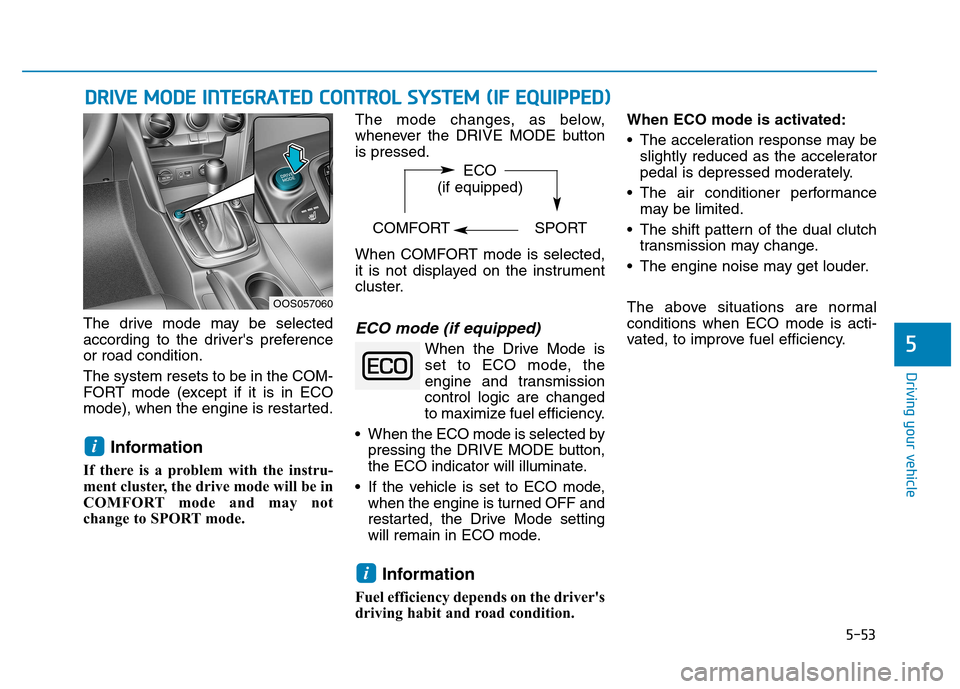
The drive mode may be selected
according to the driver's preferenceor road condition. The system resets to be in the COM-
FORT mode (except if it is in ECO
mode), when the engine is restarted.
Information
If there is a problem with the instru-
ment cluster, the drive mode will be in
COMFORT mode and may not
change to SPORT mode. The mode changes, as below,
whenever the DRIVE MODE buttonis pressed.
When COMFORT mode is selected,
it is not displayed on the instrument
cluster.ECO mode (if equipped)
When the Drive Mode is
set to ECO mode, the
engine and transmission
control logic are changed
to maximize fuel efficiency.
When the ECO mode is selected by pressing the DRIVE MODE button,
the ECO indicator will illuminate.
If the vehicle is set to ECO mode, when the engine is turned OFF and
restarted, the Drive Mode setting
will remain in ECO mode.
Information
Fuel efficiency depends on the driver's
driving habit and road condition. When ECO mode is activated:
The acceleration response may be
slightly reduced as the accelerator
pedal is depressed moderately.
The air conditioner performance may be limited.
The shift pattern of the dual clutch transmission may change.
The engine noise may get louder.
The above situations are normal conditions when ECO mode is acti-
vated, to improve fuel efficiency.
i
i
OOS057060 ECO
(if equipped)
COMFORT SPORT
Page 331 of 523

5-77
Driving your vehicle
5
LKA operation
To activate/deactivate the LKA sys- tem:
With the ignition switch in the ON
position, press the LKA system but-
ton located on the instrument panel
on the left hand side of the steering
wheel. (Right hand side of the steer-
ing wheel for RHD vehicles.)
The indicator in the cluster display
will initially illuminate white. This indi-cates the LKA system is in the
READY but NOT ENABLED state.
The system detects lane
markers and controls the
steering wheel by a camera,
therefore, if the lane markers
are hard to detect, the system
may not work properly.
Please refer to "Limitations of the system".
Do not remove or damage the
related parts of LKA system.
You may not hear a warning sound of LKA system
because of excessive audiosound.
Do not place objects on the
dashboard that reflects light
such as mirrors, white paper,
etc. The system may malfunc-tion if the sunlight is reflected.
Always have your hands on the steering wheel while the
LKA system is activated. If
you continue to drive with
your hands off the steering
wheel after the "Keep handson steering wheel" warning
message appears, the system
will turn off automatically.
The steering wheel is not con-
tinuously controlled so if the
vehicle speed is at a higher
rate when leaving a lane the
vehicle may not be controlled
by the system. The driver
must always follow the speedlimit when using the system.
If you attach objects to the
steering wheel, the system
may not assist steering or the
hands off alarm may not work
properly.
When you tow a trailer, make
sure that you turn off the LKAsystem.
OOS057034
Page 342 of 523
5-88
Driving your vehicle
Speed Limit Control operation
You can set the speed limit when you
do not want to drive over a specificspeed.
If you drive over the preset speed
limit, the warning system operates
(set speed limit will blink and chime
will sound) until the vehicle speed
returns within the speed limit.Information
While speed limit control is in opera-
tion, the cruise control system cannot
be activated.
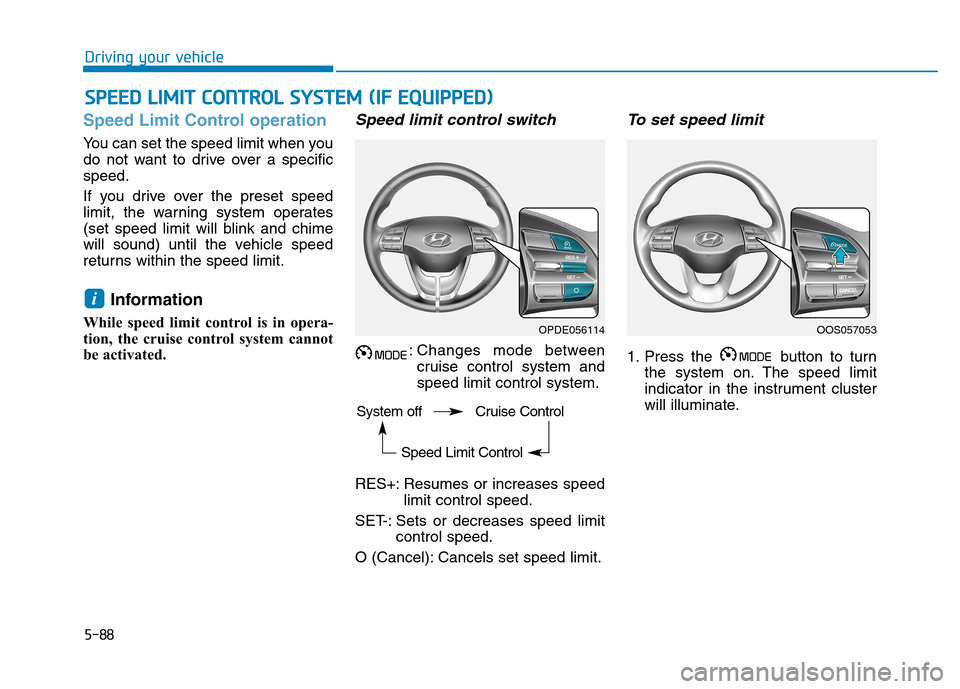
Speed limit control switch
: Changes mode between cruise control system andspeed limit control system.
RES+: Resumes or increases speed limit control speed.
SET-: Sets or decreases speed limit control speed.
O (Cancel): Cancels set speed limit.
To set speed limit
1. Press the button to turn the system on. The speed limit
indicator in the instrument cluster
will illuminate.
i
SSPP EEEEDD LL IIMM IITT CC OO NNTTRR OO LL SS YY SSTT EEMM (( IIFF EE QQ UUIIPP PPEEDD ))
OPDE056114OOS057053
System off Cruise Control Speed Limit Control
Page 343 of 523
5-89
Driving your vehicle
5
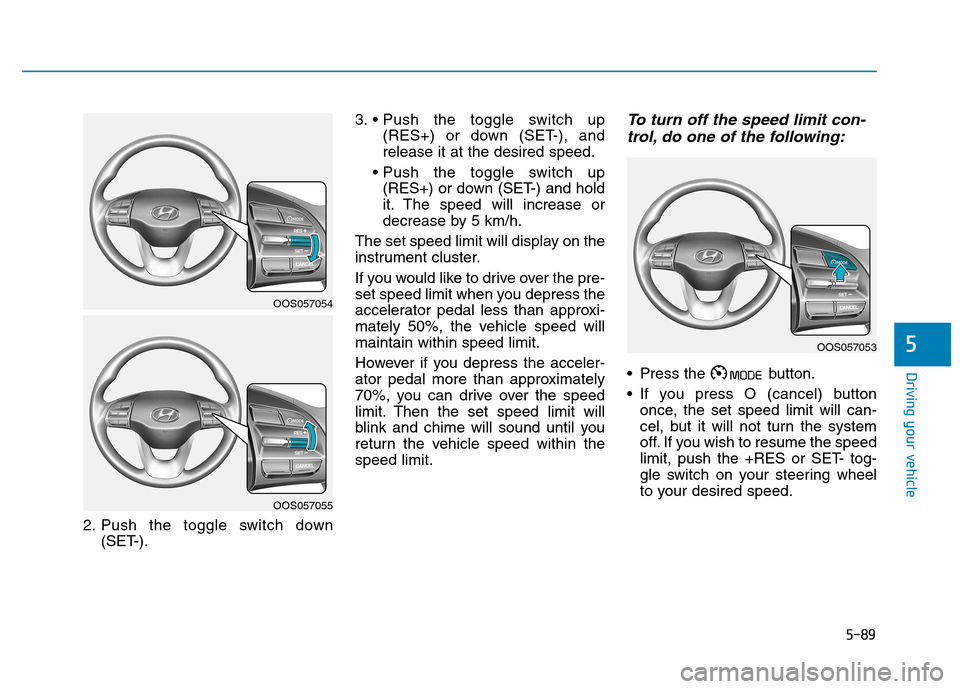
2. Push the toggle switch down(SET-). 3.
(RES+) or down (SET-), and release it at the desired speed.
(RES+) or down (SET-) and hold
it. The speed will increase or
decrease by 5 km/h.
The set speed limit will display on the
instrument cluster.
If you would like to drive over the pre-
set speed limit when you depress the
accelerator pedal less than approxi-
mately 50%, the vehicle speed willmaintain within speed limit.
However if you depress the acceler-
ator pedal more than approximately
70%, you can drive over the speed
limit. Then the set speed limit will
blink and chime will sound until you
return the vehicle speed within thespeed limit.
To turn off the speed limit con- trol, do one of the following:
Press the button.
If you press O (cancel) button once, the set speed limit will can-
cel, but it will not turn the system
off. If you wish to resume the speed
limit, push the +RES or SET- tog-
gle switch on your steering wheel
to your desired speed.
OOS057054
OOS057055
OOS057053
Page 344 of 523
5-90
Driving your vehicle
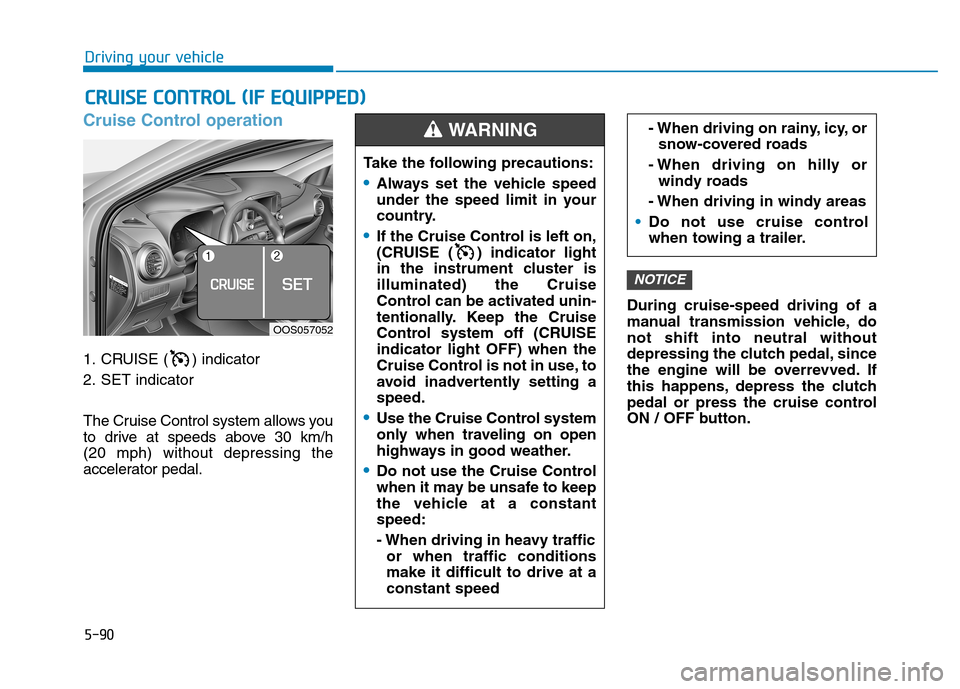
Cruise Control operation
1. CRUISE ( ) indicator
2. SET indicator
The Cruise Control system allows you
to drive at speeds above 30 km/h (20 mph) without depressing the
accelerator pedal.During cruise-speed driving of a
manual transmission vehicle, donot shift into neutral without
depressing the clutch pedal, since
the engine will be overrevved. If
this happens, depress the clutch
pedal or press the cruise control
ON / OFF button.
NOTICE
CC
RR UU IISS EE CC OO NNTTRR OO LL (( IIFF EE QQ UUIIPP PP EEDD ))
Take the following precautions:
Always set the vehicle speed
under the speed limit in your
country.
If the Cruise Control is left on,
(CRUISE ( ) indicator light
in the instrument cluster isilluminated) the Cruise
Control can be activated unin-
tentionally. Keep the Cruise
Control system off (CRUISEindicator light OFF) when the
Cruise Control is not in use, to
avoid inadvertently setting aspeed.
Use the Cruise Control system
only when traveling on open
highways in good weather.
Do not use the Cruise Control
when it may be unsafe to keep
the vehicle at a constantspeed:
- When driving in heavy traffic
or when traffic conditions make it difficult to drive at aconstant speed
- When driving on rainy, icy, orsnow-covered roads
- When driving on hilly or windy roads
- When driving in windy areas
Do not use cruise control
when towing a trailer.
WARNING
OOS057052