Page 252 of 523
![Hyundai Kona 2018 Owners Manual 4-31
Multimedia System
4
Setup
Access Display, Sound, Date/Time,
Bluetooth, System and Display Off
settings. Press the [SETUP/CLOCK] button
on the audio system.
Display
Press the [SETUP/CLOCK] butt](/manual-img/35/16231/w960_16231-251.png "Hyundai Kona 2018 Owners Manual 4-31
Multimedia System
4
Setup
Access Display, Sound, Date/Time,
Bluetooth, System and Display Off
settings. Press the [SETUP/CLOCK] button
on the audio system.
Display
Press the [SETUP/CLOCK] butt")
4-31
Multimedia System
4
Setup
Access Display, Sound, Date/Time,
Bluetooth, System and Display Off
settings. Press the [SETUP/CLOCK] button
on the audio system.
Display
Press the [SETUP/CLOCK] button
on the audio system ➟Select
[Display].
Dimming mode: Brightness is auto- matically adjusted according to the
headlight use.
Brightness: The brightness of the audio screen can be changed.
Screensaver: Set the information displayed when the audio system
is switched off or the screen is
turned off.
Sound
Press the [SETUP/CLOCK] button
on the audio system ➟Select
[Sound].
Position: Sound balance and fader can be adjusted.
Equaliser: Sound tone color can be adjusted.
Speed dependent volume control: Automatically adjust volume based
on vehicle speed.
Rear parking sensors prioritised: Automatically lower audio volume
while reversing.
Date/Time
Press the [SETUP/CLOCK] button
on the audio system ➟Select
[Date/Time].
Set time: Set the time displayed on the audio screen.
Time format: Choose betw een 12-
hour and 24-hour time formats.
Set date: Set the date displayed on the audio screen.
Page 253 of 523
![Hyundai Kona 2018 Owners Manual 4-32
Multimedia System
Bluetooth
Press the [SETUP/CLOCK] button
➟ Select [Bluetooth].
Connections: Control pairing, dele- tion, connection and disconnection of Bluetooth ®
devices.
Auto connectio](/manual-img/35/16231/w960_16231-252.png "Hyundai Kona 2018 Owners Manual 4-32
Multimedia System
Bluetooth
Press the [SETUP/CLOCK] button
➟ Select [Bluetooth].
Connections: Control pairing, dele- tion, connection and disconnection of Bluetooth ®
devices.
Auto connectio")
4-32
Multimedia System
Bluetooth
Press the [SETUP/CLOCK] button
➟ Select [Bluetooth].
Connections: Control pairing, dele- tion, connection and disconnection of Bluetooth ®
devices.
Auto connection priority: Set the connection priority of Bluetooth ®
devices when the vehicle is started.
Update contacts: Contacts can be
downloaded from connectedBluetooth ®
devices.
Bluetooth voice guidance: Play or mute voice prompts for Bluetooth ®
device pairing, connection and
errors. Information
When paired devices are deleted, the call history and contacts of the
device saved to the audio system are
deleted.
For Bluetooth ®
connections with
low connection priority, some time
may be required for the connection
to be established.
Contacts can be downloaded only from the currently connected
Bluetooth ®
device.
If no Bluetooth ®
device is connected,
the Download Contacts button is
disabled.
If the language setting is Slovakian or Hungarian, Bluetooth voice guid-
ance is not supported.
System
Press the [SETUP/CLOCK] button
on the audio system ➟Select
[System].
Language: Change the user lan- guage.
Default: Reset the audio system.
Information
The system resets to the default val-
ues, and all saved data and settings
are lost.
Display Off
To prevent glare, the screen can be
turned off with the audio system in
operation. Press the [SETUP/CLOCK] button
on the audio system ➟Select
[Display Off].
Information
Use ‘Screensaver’ to set the informa-
tion to be displayed when the screen is
turned off.
i
i
i
Page 375 of 523
6-8
What to do in an emergency
If your temperature gauge indicates
overheating, you experience a loss
of power, or hear loud pinging or
knocking, the engine may be over-
heating. If this happens, you should:
1. Pull off the road and stop as soonas it is safe to do so.
2. Place the shift lever in P (Park, for dual clutch transmission vehicle)
or neutral (for manual transmis-
sion/dual clutch transmission vehi-
cle) and set the parking brake. If
the air conditioning is ON, turn it
OFF.
3. If engine coolant is running out under the vehicle or steam is com-ing out from the hood, stop the
engine. Do not open the hood until
the coolant has stopped running
or the steaming has stopped. If
there is no visible loss of engine
coolant and no steam, leave the
engine running and check to be
sure the engine cooling fan is
operating. If the fan is not running,
turn the engine off. 4. Check for coolant leaking from the
radiator, hoses or under the vehi-
cle. (If the air conditioning had been
in use, it is normal for cold water to
be draining from it when you stop.)
5. If engine coolant is leaking out, stop the engine immediately and we rec-
ommend that you call an authorized
HYUNDAI dealer for assistance.
IIFF TT HH EE EE NN GGIINN EE OO VVEERR HH EEAA TTSS
While the engine is
running, keep hands,
clothing and tools
away from the mov-
ing parts such as thecooling fan and drive
belt to prevent seri-
ous injury.
WARNING
NEVER remove the radiator cap or thedrain plug while theengine and radiator
are hot. Hot coolant
and steam may blow out under
pressure, causing serious injury.
Turn the engine off and wait
until the engine cools down.
Use extreme care when remov-
ing the radiator cap. Wrap a
thick towel around it, and turn it
counterclockwise slowly to the
first stop. Step back while the
pressure is released from the
cooling system. When you aresure all the pressure has been
released, press down on the
cap, using a thick towel, and
continue turning counterclock-
wise to remove it.
WARNING
Page 387 of 523
6-20
What to do in an emergency
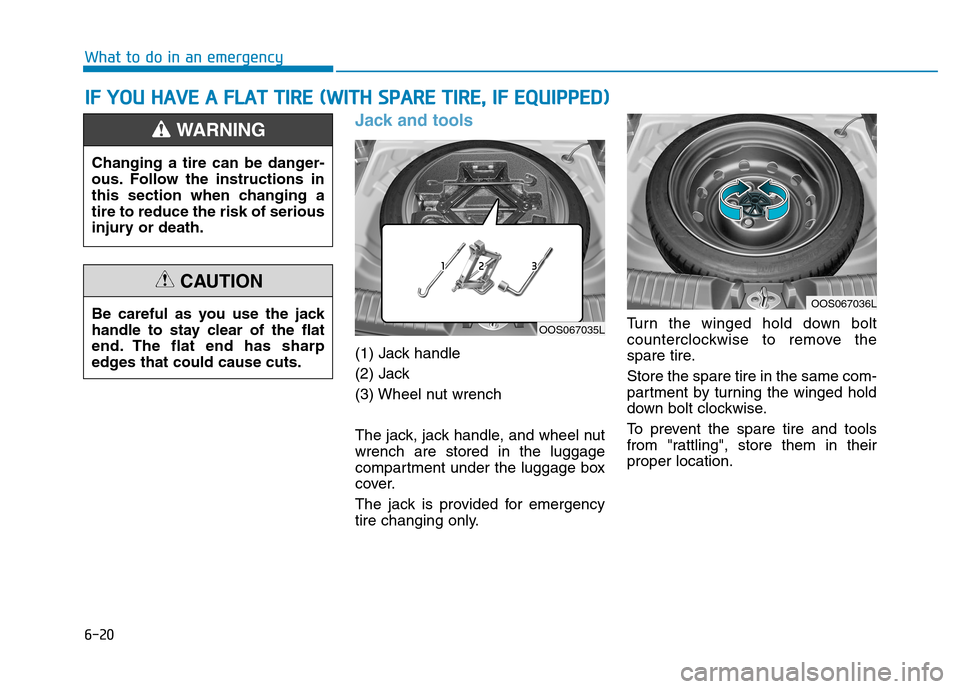
Jack and tools
(1) Jack handle
(2) Jack
(3) Wheel nut wrench
The jack, jack handle, and wheel nut wrench are stored in the luggage
compartment under the luggage box
cover.
The jack is provided for emergency
tire changing only.Turn the winged hold down bolt
counterclockwise to remove the
spare tire. Store the spare tire in the same com-
partment by turning the winged hold
down bolt clockwise.
To prevent the spare tire and tools
from "rattling", store them in theirproper location.
II
FF YY OO UU HH AAVVEE AA FF LLAA TT TT IIRR EE (( WW IITT HH SS PP AA RREE TT IIRR EE,, IIFF EE QQ UUIIPP PPEEDD ))
OOS067035L
OOS067036L
Changing a tire can be danger-
ous. Follow the instructions in
this section when changing atire to reduce the risk of serious
injury or death.
WARNING
Be careful as you use the jack
handle to stay clear of the flat
end. The flat end has sharp
edges that could cause cuts.
CAUTION
Page 388 of 523
6-21
What to do in an emergency
6
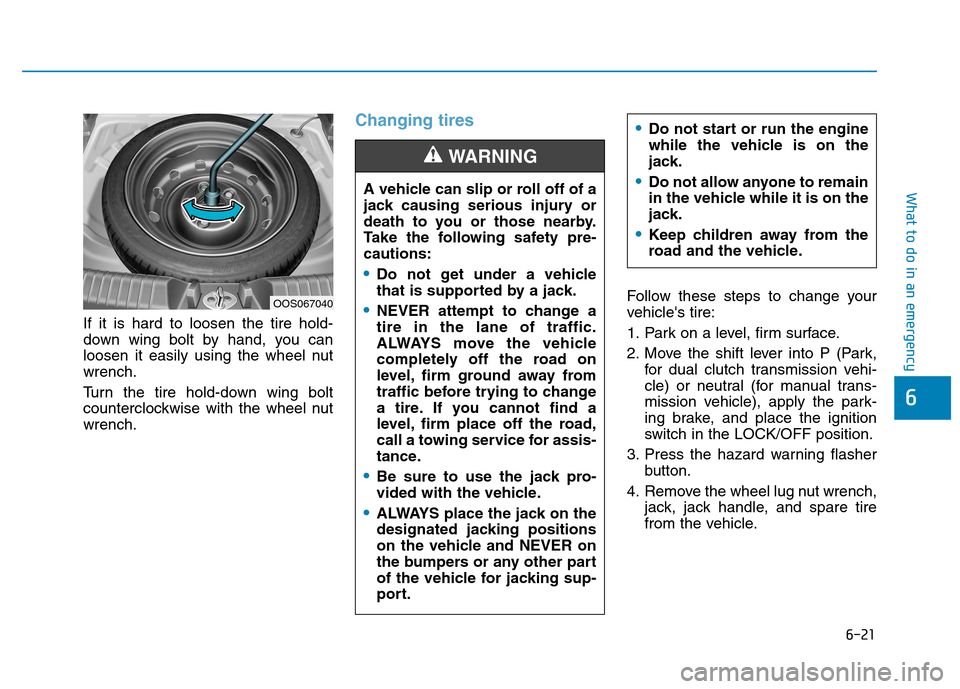
If it is hard to loosen the tire hold-
down wing bolt by hand, you can
loosen it easily using the wheel nutwrench.
Turn the tire hold-down wing bolt
counterclockwise with the wheel nutwrench.
Changing tires
Follow these steps to change your
vehicle's tire:
1. Park on a level, firm surface.
2. Move the shift lever into P (Park,for dual clutch transmission vehi-
cle) or neutral (for manual trans-
mission vehicle), apply the park-
ing brake, and place the ignition
switch in the LOCK/OFF position.
3. Press the hazard warning flasher button.
4. Remove the wheel lug nut wrench, jack, jack handle, and spare tire
from the vehicle.
A vehicle can slip or roll off of a
jack causing serious injury or
death to you or those nearby.
Take the following safety pre-cautions:
Do not get under a vehicle
that is supported by a jack.
NEVER attempt to change a tire in the lane of traffic.
ALWAYS move the vehicle
completely off the road on
level, firm ground away from
traffic before trying to change
a tire. If you cannot find a
level, firm place off the road,
call a towing service for assis-
tance.
Be sure to use the jack pro-
vided with the vehicle.
ALWAYS place the jack on the
designated jacking positions
on the vehicle and NEVER on
the bumpers or any other part
of the vehicle for jacking sup-
port.
WARNING
Do not start or run the engine
while the vehicle is on the
jack.
Do not allow anyone to remain
in the vehicle while it is on the
jack.
Keep children away from the
road and the vehicle.
OOS067040
Page 389 of 523
6-22
What to do in an emergency
[A] : Block
5. Block both the front and rear of thetire diagonally opposite of the tire
you are changing. 6. Loosen the wheel lug nuts coun-
terclockwise one turn each in the
order shown above, but do not
remove any lug nuts until the tire
has been raised off of the ground. 7. Place the jack at the designated
jacking position under the frame
closest to the tire you are chang-
ing. The jacking positions are
plates welded to the frame with
two notches. Never jack at any
other position or part of the vehi-
cle. It may damage the side sealmolding.
OOS067016LOOS067017OOS067018
■Front■Rear
Page 390 of 523
6-23
What to do in an emergency
6
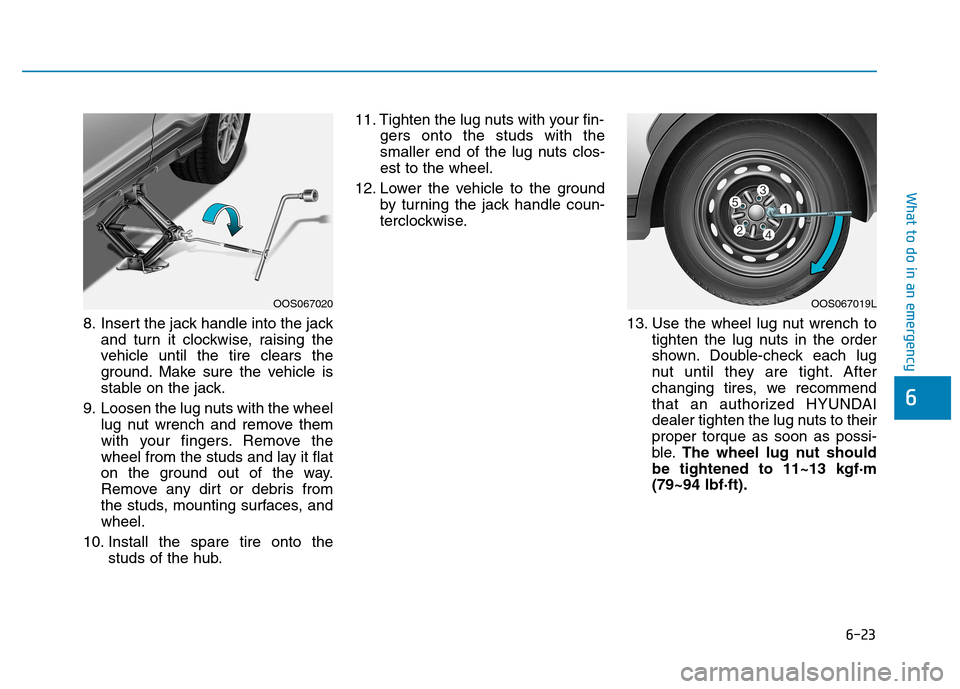
8. Insert the jack handle into the jackand turn it clockwise, raising the
vehicle until the tire clears the
ground. Make sure the vehicle is
stable on the jack.
9. Loosen the lug nuts with the wheel lug nut wrench and remove them
with your fingers. Remove the
wheel from the studs and lay it flat
on the ground out of the way.
Remove any dirt or debris from
the studs, mounting surfaces, andwheel.
10. Install the spare tire onto the studs of the hub. 11. Tighten the lug nuts with your fin-
gers onto the studs with the
smaller end of the lug nuts clos-est to the wheel.
12. Lower the vehicle to the ground by turning the jack handle coun-
terclockwise.
13. Use the wheel lug nut wrench totighten the lug nuts in the order
shown. Double-check each lug
nut until they are tight. After
changing tires, we recommend
that an authorized HYUNDAI
dealer tighten the lug nuts to theirproper torque as soon as possi-
ble. The wheel lug nut should
be tightened to 11~13 kgf·m(79~94 lbf·ft).
OOS067020OOS067019L
Page 410 of 523
6-43
What to do in an emergency
6
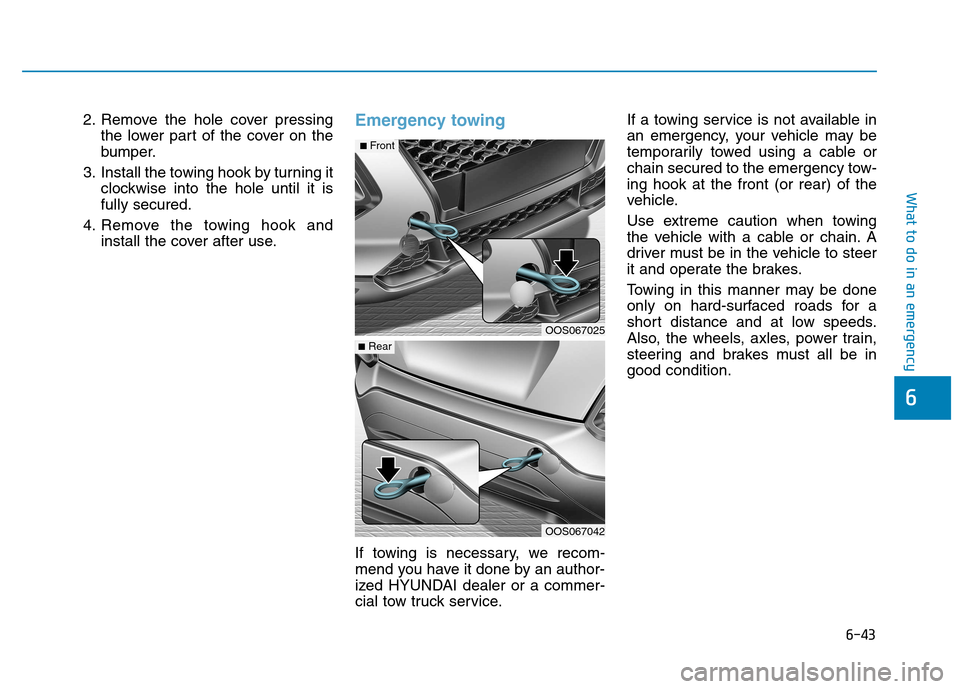
2. Remove the hole cover pressingthe lower part of the cover on the
bumper.
3. Install the towing hook by turning it clockwise into the hole until it isfully secured.
4. Remove the towing hook and install the cover after use.Emergency towing
If towing is necessary, we recom-
mend you have it done by an author-
ized HYUNDAI dealer or a commer-
cial tow truck service. If a towing service is not available in
an emergency, your vehicle may be
temporarily towed using a cable or
chain secured to the emergency tow-ing hook at the front (or rear) of the
vehicle.
Use extreme caution when towing
the vehicle with a cable or chain. A
driver must be in the vehicle to steer
it and operate the brakes.
Towing in this manner may be done
only on hard-surfaced roads for a
short distance and at low speeds.
Also, the wheels, axles, power train,
steering and brakes must all be ingood condition.
OOS067042
OOS067025
■
Rear
■Front
![Hyundai Kona 2018 Owners Manual 6-22
What to do in an emergency
[A] : Block
5. Block both the front and rear of thetire diagonally opposite of the tire
you are changing. 6. Loosen the wheel lug nuts coun-
terclockwise one turn eac](/manual-img/35/16231/w960_16231-388.png "Hyundai Kona 2018 Owners Manual 6-22
What to do in an emergency
[A] : Block
5. Block both the front and rear of thetire diagonally opposite of the tire
you are changing. 6. Loosen the wheel lug nuts coun-
terclockwise one turn eac")