Page 15 of 497
1-5
Your vehicle at a glance
1
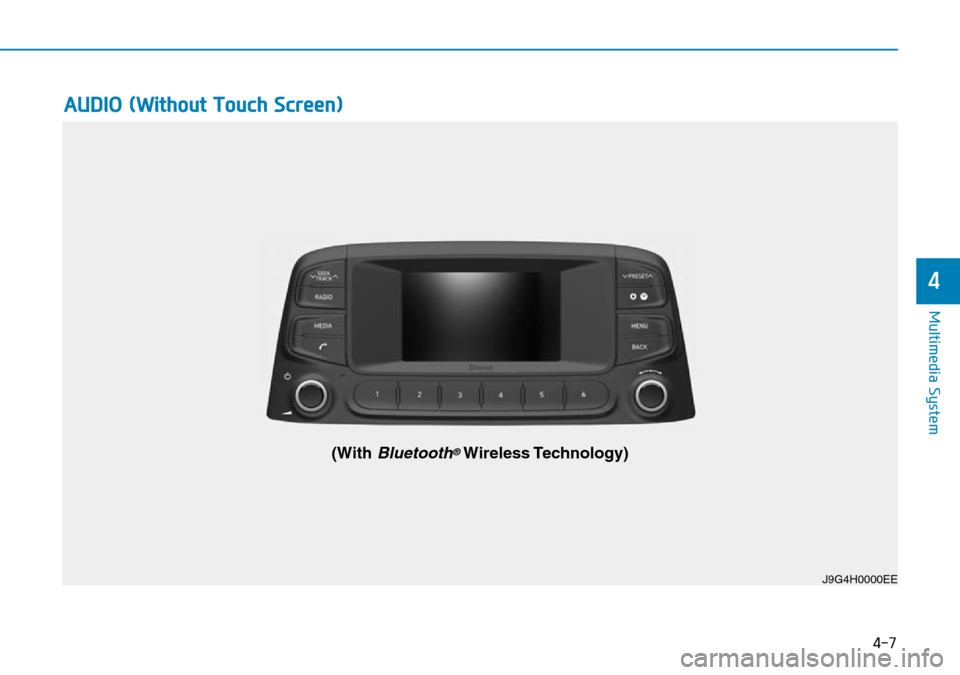
INSTRUMENT PANEL OVERVIEW
1. Instrument cluster ........................................3-38
2. Horn ..............................................................3-19
3. Driver’s front air bag......................................2-46
4. Engine Start/Stop button ................................5-9
5. Light control/Turn signals ..............................3-83
6. Wiper/Washer................................................3-95
7. Audio system/ ................................................4-7Navigation system ..........................................4-4
8. Hazard warning flasher switch ........................6-3
9. Manual climate control system ..................3-108 Automatic climate control system ..............3-116
10. Passenger’s front air bag ............................2-46
11. Glove box ..................................................3-128
12. Power outlet ..............................................3-132
13. Manual transmission shift lever ..................5-16 Dual clutch transmission shift lever ............5-19
14. 4WD lock button..........................................5-42
15. DBC button ................................................5-39
16. Parking Distance Warning (Reverse/Forward) button ........................3-104
17. Seat warmer................................................2-18
18. Seat warmer/Air ventilation seat ................2-20
19. Drive mode button ......................................5-54
20. Heated steering wheel ................................3-18
21. Idle stop and go (ISG) OFF button ............5-49
22. Cup holder ................................................3-131
23. Steering wheel audio controls ......................4-3 Bluetooth
®wireless technology
hands-free controls ......................................4-4
24. Speed limiter controls ................................5-88 Cruise controls ............................................5-91
[A-F] : Type A ~ Type FThe actual shape may differ from the illustration.
OOS017004E
Page 217 of 497
Multimedia System
Multimedia system .................................................4-2
AUX, USB and iPod®port ..............................................4-2
Antenna ........................................................................\
.......4-2
Steering wheel audio controls .......................................4-3
Bluetooth
®Wireless Technology hands-free ..........4-4
Audio / Video / Navigation system (AVN) ..................4-4
How vehicle radio works .................................................4-4
Audio (Without Touch Screen) ............................4-7
Feature of Your Audio .....................................................4-8
Radio........................................................................\
...........4-13
Media........................................................................\
..........4-14
Phone ........................................................................\
.........4-23
Setup ........................................................................\
..........4-31
Declaration of Conformity ..................................4-33
CE for EU ........................................................................\
..4-33
4
Page 220 of 497
Bluetooth®Wireless Technology
hands-free
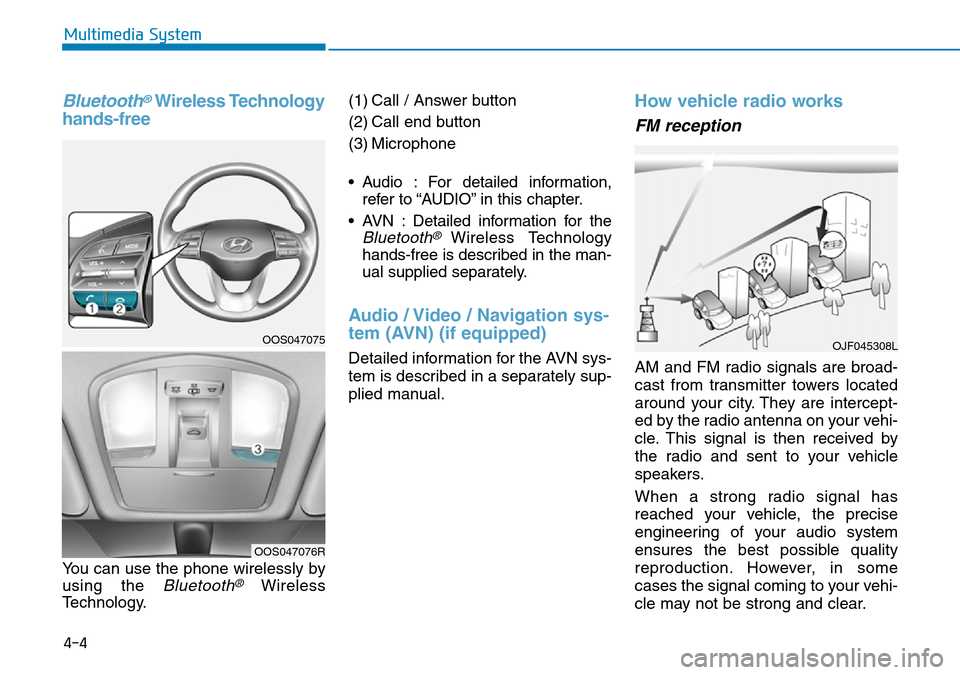
You can use the phone wirelessly by
using the
Bluetooth®Wireless
Technology. (1) Call / Answer button
(2) Call end button
(3) Microphone
• Audio : For detailed information,
refer to “AUDIO” in this chapter.
• AVN : Detailed information for the
Bluetooth® Wireless Technology
hands-free is described in the man-
ual supplied separately.
Audio / Video / Navigation sys-
tem (AVN) (if equipped)
Detailed information for the AVN sys-
tem is described in a separately sup-
plied manual.
How vehicle radio works
FM reception
AM and FM radio signals are broad-
cast from transmitter towers located
around your city. They are intercept-
ed by the radio antenna on your vehi-
cle. This signal is then received by
the radio and sent to your vehicle
speakers.
When a strong radio signal has
reached your vehicle, the precise
engineering of your audio system
ensures the best possible quality
reproduction. However, in some
cases the signal coming to your vehi-
cle may not be strong and clear.
OJF045308L
4-4
Multimedia System
OOS047075
OOS047076R
Page 222 of 497
4-6
Multimedia System
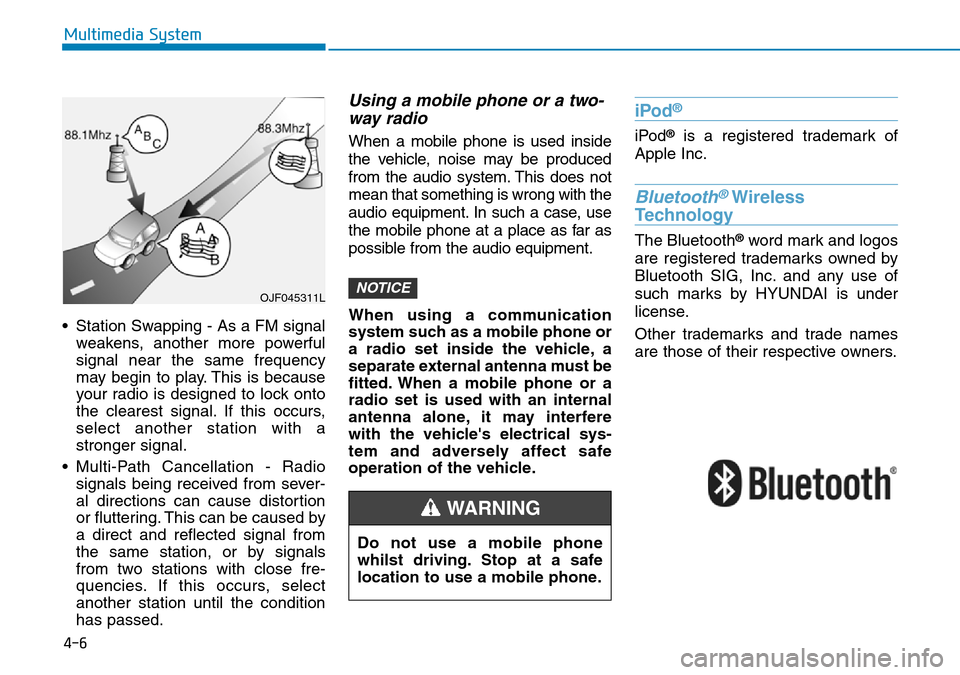
• Station Swapping - As a FM signal weakens, another more powerful
signal near the same frequency
may begin to play. This is because
your radio is designed to lock onto
the clearest signal. If this occurs,
select another station with a
stronger signal.
• Multi-Path Cancellation - Radio signals being received from sever-
al directions can cause distortion
or fluttering. This can be caused by
a direct and reflected signal from
the same station, or by signals
from two stations with close fre-
quencies. If this occurs, select
another station until the condition
has passed.
Using a mobile phone or a two-way radio
When a mobile phone is used inside
the vehicle, noise may be produced
from the audio system. This does not
mean that something is wrong with the
audio equipment. In such a case, use
the mobile phone at a place as far as
possible from the audio equipment.
When using a communication
system such as a mobile phone or
a radio set inside the vehicle, a
separate external antenna must be
fitted. When a mobile phone or a
radio set is used with an internal
antenna alone, it may interfere
with the vehicle's electrical sys-
tem and adversely affect safe
operation of the vehicle.
iPod®
iPod®is a registered trademark of
Apple Inc.
Bluetooth®Wireless
Technology
The Bluetooth®word mark and logos
are registered trademarks owned by
Bluetooth SIG, Inc. and any use of
such marks by HYUNDAI is under
license.
Other trademarks and trade names
are those of their respective owners.
NOTICEOJF045311L
Do not use a mobile phone
whilst driving. Stop at a safe
location to use a mobile phone.
WARNING
Page 223 of 497
4-7
Multimedia System
4
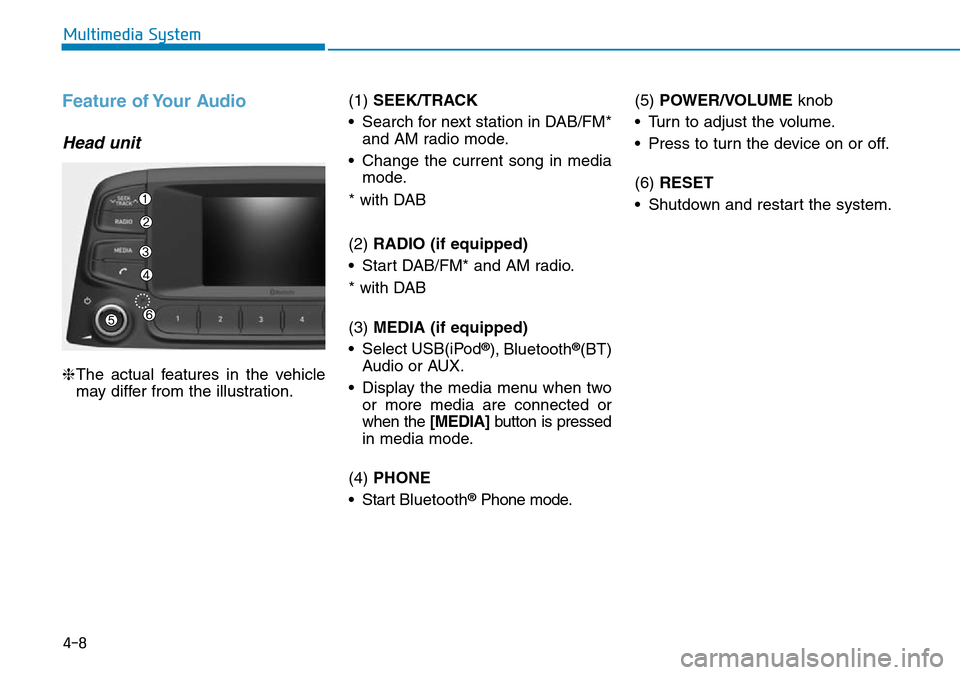
AUDIO (Without Touch Screen)
J9G4H0000EE
(With Bluetooth®Wireless Technology)
Page 224 of 497
4-8
Multimedia System
Feature of Your Audio
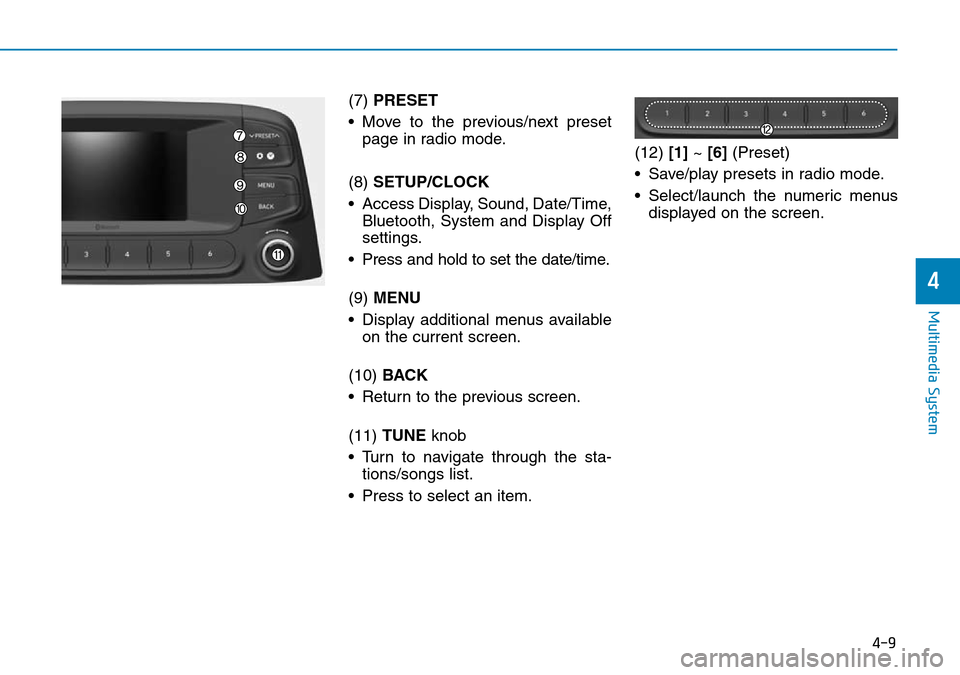
Head unit
❈The actual features in the vehicle
may differ from the illustration. (1)
SEEK/TRACK
• Search for next station in DAB/FM* and AM radio mode.
• Change the current song in media mode.
* with DAB
(2) RADIO (if equipped)
• Start DAB/FM* and AM radio.
* with DAB
(3) MEDIA (if equipped)
• Select USB(iPod
®), Bluetooth®(BT)
Audio or AUX.
• Display the media menu when two or more media are connected or
when the [MEDIA] button is pressed
in media mode.
(4) PHONE
• Start Bluetooth
®Phone mode. (5)
POWER/VOLUME knob
• Turn to adjust the volume.
• Press to turn the device on or off.
(6) RESET
• Shutdown and restart the system.
Page 225 of 497
4-9
Multimedia System
4
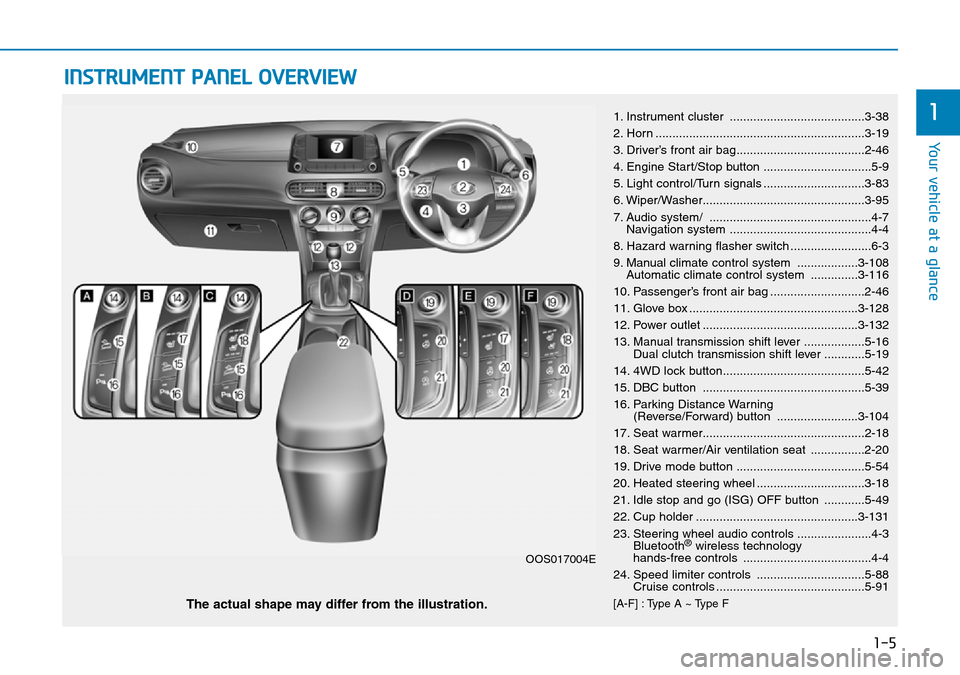
(7) PRESET
• Move to the previous/next preset page in radio mode.
(8) SETUP/CLOCK
• Access Display, Sound, Date/Time, Bluetooth, System and Display Off
settings.
• Press and hold to set the date/time.
(9) MENU
• Display additional menus available on the current screen.
(10) BACK
• Return to the previous screen.
(11) TUNE knob
• Turn to navigate through the sta- tions/songs list.
• Press to select an item. (12)
[1]~ [6] (Preset)
• Save/play presets in radio mode.
• Select/launch the numeric menus displayed on the screen.
Page 226 of 497
4-10
Multimedia System
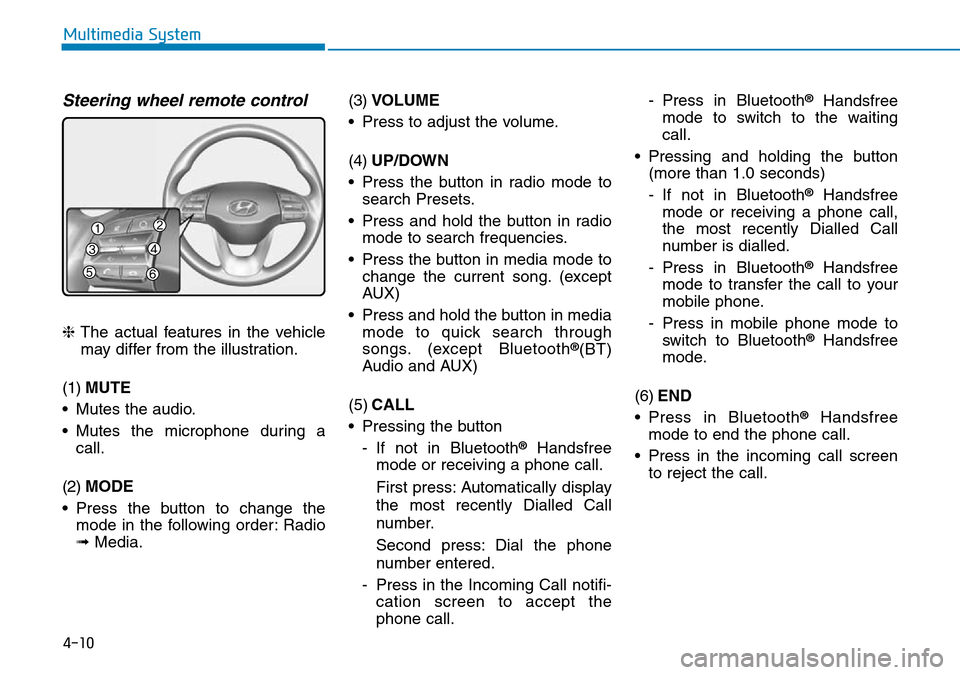
Steering wheel remote control
❈The actual features in the vehicle
may differ from the illustration.
(1) MUTE
• Mutes the audio.
• Mutes the microphone during a call.
(2) MODE
• Press the button to change the mode in the following order: Radio
➟ Media. (3)
VOLUME
• Press to adjust the volume.
(4) UP/DOWN
• Press the button in radio mode to search Presets.
• Press and hold the button in radio mode to search frequencies.
• Press the button in media mode to change the current song. (except
AUX)
• Press and hold the button in media mode to quick search through
songs. (except Bluetooth®(BT)
Audio and AUX)
(5) CALL
• Pressing the button - If not in Bluetooth
®Handsfree
mode or receiving a phone call.
First press: Automatically display
the most recently Dialled Call
number.
Second press: Dial the phone
number entered.
- Press in the Incoming Call notifi- cation screen to accept the
phone call. - Press in Bluetooth
®Handsfree
mode to switch to the waiting
call.
• Pressing and holding the button (more than 1.0 seconds)
- If not in Bluetooth
®Handsfree
mode or receiving a phone call,
the most recently Dialled Call
number is dialled.
- Press in Bluetooth
®Handsfree
mode to transfer the call to your
mobile phone.
- Press in mobile phone mode to switch to Bluetooth
®Handsfree
mode.
(6) END
• Press in Bluetooth
®Handsfree
mode to end the phone call.
• Press in the incoming call screen to reject the call.