2018 Hyundai Kona ad blue
[x] Cancel search: ad bluePage 228 of 497
4-12
Multimedia System
• Operating the device whilst driv- ing could lead to accidents due
to a lack of attention to external
surroundings. First park the
vehicle before operating the
device.
• Adjust the volume to levels that allow the driver to hear sounds
from outside of the vehicle.
Driving in a state where external
sounds cannot be heard may
lead to accidents.
• Pay attention to the volume set- ting when turning the device on.
A sudden output of extreme vol-
ume upon turning the device on
could lead to hearing impair-
ment. (Adjust the volume to a
suitable levels before turning off
the device.)
• Turn on the car engine before using this device. Do not oper-
ate the audio system for long
periods of time only with the
ignition turned on as such oper-
ations may lead to battery dis-
charge. • Do not subject the device to
severe shock or impact. Direct
pressure onto the front side of
the monitor may cause damage
to the LCD.
• When cleaning the device, make sure to turn off the device and
use a dry and smooth cloth.
Never use tough materials, chem-
ical cloths, or solvents (alcohol,
benzene, thinners, etc.). As such
materials may damage the device
panel or cause colour/quality
deterioration.
• Do not place beverages close to the audio system. Spilling bever-
ages may lead to system mal-
function.
• In case of product malfunction, please contact your place of pur-
chase or After Service centre.
• Placing the audio system within an electromagnetic environment
may result in noise interference.
• Prevent caustic solutions such as perfume and cosmetic oil
from contacting the dashboard
because they may cause dam-
age or discolouration.
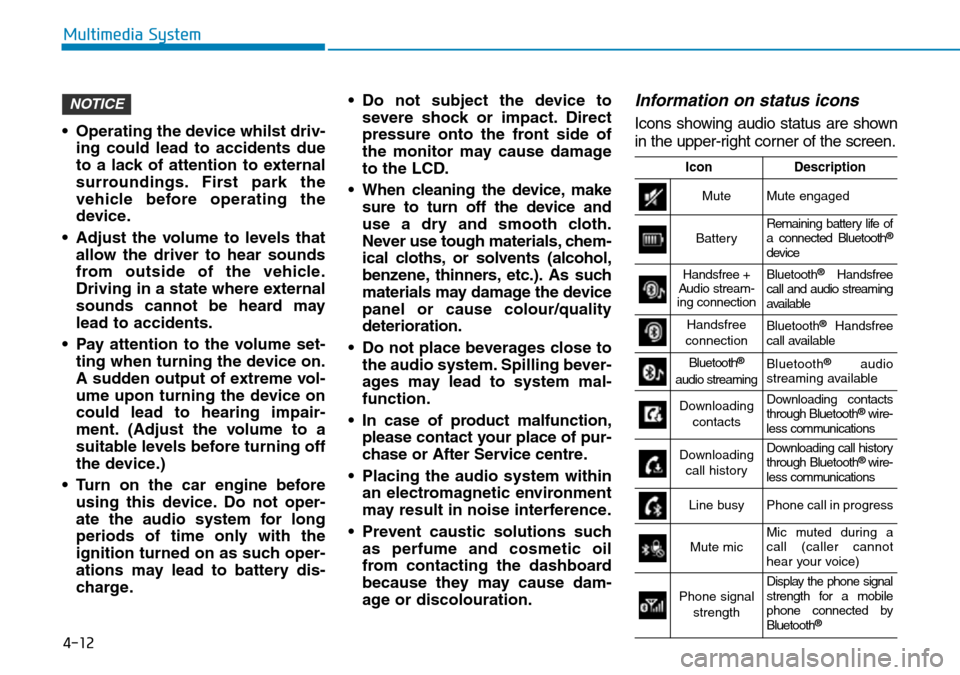
Information on status icons
Icons showing audio status are shown
in the upper-right corner of the screen.
NOTICE
IconDescription
MuteMute engaged
BatteryRemaining battery life of
a connected Bluetooth®
device
Handsfree +
Audio stream-
ing connectionBluetooth®Handsfree
call and audio streaming
available
Handsfree
connectionBluetooth®Handsfree
call available
Bluetooth®
audio streamingBluetooth®audio
streaming available
Downloading
contactsDownloading contacts
through Bluetooth®wire-
less communications
Downloading
call historyDownloading call history
through Bluetooth® wire-
less communications
Line busyPhone call in progress
Mute micMic muted during a
call (caller cannot
hear your voice)
Phone signal
strengthDisplay the phone signal
strength for a mobile
phone connected by
Bluetooth
®
Page 235 of 497
4-19
Multimedia System
4
• There may be noise if the audio sys-tem is used with an iPod®or AUX
external device connected to the
power jack. In these cases, discon-
nect the iPod
®or external device
from the power jack.
• Play may be interrupted, or device malfunctions may occur depending
on the characteristics of your
iPod
®/iPhone®.
• Play may fail if your iPhone
®is con-
nected through both Bluetooth®and
USB. In this case, select Dock con-
nector or Bluetooth
®on your
iPhone®to change the sound output
settings.
• If your software version does not support the communication proto-
col or your iPod
®is not recognised
due to device failure, anomalies or
defects, iPod
®mode cannot be used.
• iPod
®nano (5th generation) devices
may not be recognised if the battery
is low. Charge sufficiently before
use.
• The search and song play order in the iPod
®device may be different
from the search order in the audio
system. • If the iPod
®has failed due to an
internal defect, please reset the
iPod
®(consult your iPod®manual).
• Depending on the software version, the iPod
®may fail to sync with the
system. If the media is removed or
disconnected before recognition, the
previous mode may not be restored
(iPad
®cannot be charged).
• Cables other than the 1-meter cable provided with iPod
®/iPhone®prod-
ucts may not be recognised.
• When other music apps are used on your iPod
®, the system sync func-
tion may fail due to malfunction of
the iPod
®application.
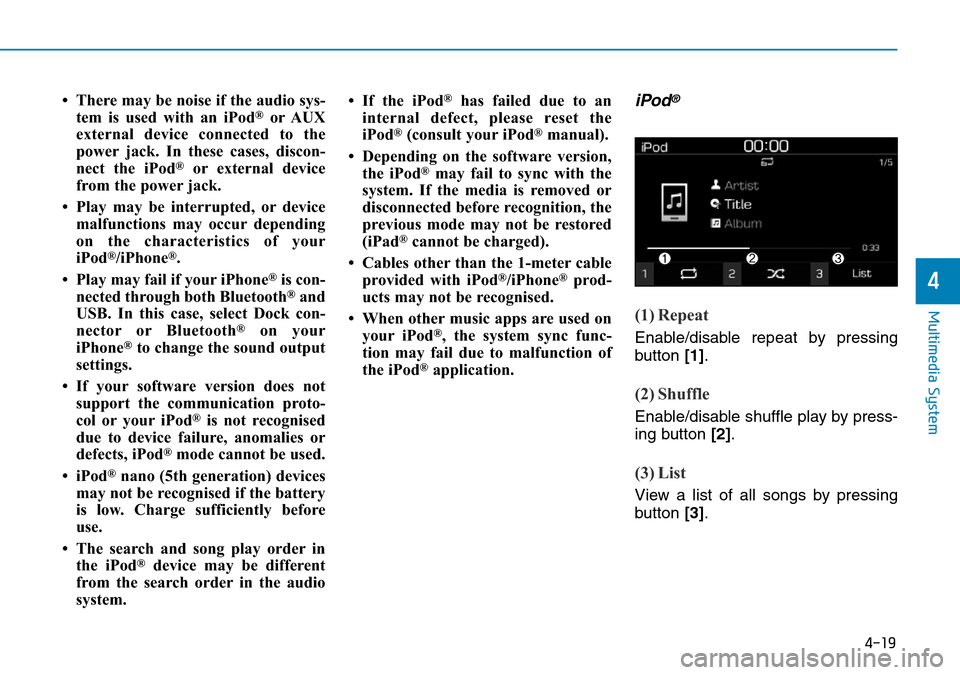
iPod®
(1) Repeat
Enable/disable repeat by pressing
button [1].
(2) Shuffle
Enable/disable shuffle play by press-
ing button [2].
(3) List
View a list of all songs by pressing
button [3].
Page 237 of 497
![Hyundai Kona 2018 Owners Manual - RHD (UK, Australia) 4-21
Multimedia System
4
Playing iPod files
Select [iPod files] to play songs
saved on your iPod®.
If there are no songs saved on your
iPod
®, the [iPod files] is disabled.
Information
Operation can](/manual-img/35/16232/w960_16232-236.png "Hyundai Kona 2018 Owners Manual - RHD (UK, Australia) 4-21
Multimedia System
4
Playing iPod files
Select [iPod files] to play songs
saved on your iPod®.
If there are no songs saved on your
iPod
®, the [iPod files] is disabled.
Information
Operation can")
4-21
Multimedia System
4
Playing iPod files
Select [iPod files] to play songs
saved on your iPod®.
If there are no songs saved on your
iPod
®, the [iPod files] is disabled.
Information
Operation cannot be carried out cor-
rectly due to iPod®application mal-
function.
Information
- Using Bluetooth®(BT) Audio
• Bluetooth
®Audio mode can only be
used if a Bluetooth®-enabled phone
is connected. Only devices that sup-
port Bluetooth
®audio can be used.
• If the Bluetooth
®-enabled phone is
disconnected during play, the music
stops.
• When the TRACK UP/DOWN but- tons are used during Bluetooth
®
audio streaming, a popping noise or
sound interruptions may occur,
depending on the mobile phone
device.
• Depending on the mobile phone model, the audio streaming function
may not be supported.
• If a phone call is made or received when music is playing in Bluetooth
®
Audio mode, the call may mix with
the music.
• When returning to Bluetooth
®
Audio mode after ending a call, play
might not resume automatically for
some mobile phone models. • Bluetooth
®Handsfree is a fea-
ture that enables drivers to prac-
tice safe driving. Connecting the
car audio system with a
Bluetooth
®phone allows the
user to conveniently make calls,
receive calls, and manage the
phone book. Before using the
Bluetooth®Wireless Technology,
carefully read the contents of
this user’s manual.
• Excessive use or operations whilst driving may lead to negli-
gent driving practices and be
the cause of accidents.
• Do not operate the device exces- sively whilst driving.
• Viewing the screen for pro- longed periods of time is dan-
gerous and may lead to acci-
dents.
• When driving, view the screen only for short periods of time.
NOTICEi
i
Page 238 of 497
![Hyundai Kona 2018 Owners Manual - RHD (UK, Australia) 4-22
Multimedia System
Bluetooth®(BT) Audio
(1) Repeat
Enable/disable repeat by pressing
button [1].
(2) Shuffle
Enable/disable shuffle play by press-
ing button [2].
(3) Play/Pause
Pause or play mu](/manual-img/35/16232/w960_16232-237.png "Hyundai Kona 2018 Owners Manual - RHD (UK, Australia) 4-22
Multimedia System
Bluetooth®(BT) Audio
(1) Repeat
Enable/disable repeat by pressing
button [1].
(2) Shuffle
Enable/disable shuffle play by press-
ing button [2].
(3) Play/Pause
Pause or play mu")
4-22
Multimedia System
Bluetooth®(BT) Audio
(1) Repeat
Enable/disable repeat by pressing
button [1].
(2) Shuffle
Enable/disable shuffle play by press-
ing button [2].
(3) Play/Pause
Pause or play music by pressing but-
ton [3].
Information
Some mobile phones may not support
this function.
Playback
Press the [MEDIA] button, and
select [BT Audio].
Changing songs
Press the [SEEK/TRACK] button to
play the previous or next song.
Information
Some mobile phones may not support
this function.
Repeat play
Select [Repeat] to enable or disable
‘Repeat all’, ‘Repeat current song’ or
‘Repeat category’ play.
• Repeat all: Repeat all songs.
• Repeat current song: The cur- rently playing song is repeated.
• Repeat category: Repeat all songs in the current category.
Information
The repeat play function is engaged,
depending on the operation of the con-
nected Bluetooth
®device.
Shuffle play
Select [Shuffle] to enable or disable
‘Shuffle’, ‘Shuffle category’ play.
• Shuffle: Songs are played inrandom order.
• Shuffle category: Songs within the current category are played in
random order.
Information
The shuffle function is engaged,
depending on the operation of the con-
nected Bluetooth
®device.
Menu
Press the [MENU] button, and select
the desired function.
• Connections: The currently con- nected Bluetooth
®device can be
changed.
• Sound Settings: Audio sound set- tings can be changed.
i
i
i
i
Page 239 of 497
![Hyundai Kona 2018 Owners Manual - RHD (UK, Australia) 4-23
Multimedia System
4
AUX
Running AUX
Press the [MEDIA]button, and
select [AUX].
• Connect the external device con- nection jack to the AUX terminal to
run AUX.
Menu
Press the [MENU] button and s](/manual-img/35/16232/w960_16232-238.png "Hyundai Kona 2018 Owners Manual - RHD (UK, Australia) 4-23
Multimedia System
4
AUX
Running AUX
Press the [MEDIA]button, and
select [AUX].
• Connect the external device con- nection jack to the AUX terminal to
run AUX.
Menu
Press the [MENU] button and s")
4-23
Multimedia System
4
AUX
Running AUX
Press the [MEDIA]button, and
select [AUX].
• Connect the external device con- nection jack to the AUX terminal to
run AUX.
Menu
Press the [MENU] button and select
the desired function.
• Sound Settings: Audio sound set- tings can be changed.
Phone
Information
- Using Bluetooth®(BT) Phone
• Bluetooth
®is a near-field wireless
networking technology that uses the
2.4 GHz frequency to connect vari-
ous devices within a certain distance
wirelessly.
• The technology is used in PCs, peripherals, Bluetooth
®phones,
tablet PCs, household appliances
and automobiles. Devices support-
ing Bluetooth
®can exchange data at
high speeds without physical cable
connections.
• Bluetooth
®Handsfree devices
enable convenient access to phone
functions through mobile phones
equipped with Bluetooth
®.
• Some Bluetooth
®devices may not be
supported by the Bluetooth®
Handsfree function.
• When Bluetooth
®is connected and
calls are attempted through a con-
nected mobile phone from outside
the vehicle, the call is connected
through the Bluetooth
®Handsfree
function of the vehicle. • Please be sure to disconnect the
Bluetooth
®Handsfree function
through your Bluetooth®device or
the audio screen.
• The Bluetooth
®Handsfree function
helps drivers to drive safely. By con-
necting a Bluetooth
®-enabled phone
to the vehicle’s audio system, phone
calls can be made and received
through the audio system and con-
tacts can be managed. Consult the
user manual before use.
• Excessive manipulation of controls whilst driving, making it difficult to
pay attention to the road ahead, can
lead to accidents. Do not operate the
device excessively whilst driving.
• Looking at the screen for a pro- longed time increases the risk of
accidents. Keep time spent looking
at the screen to a minimum.
i
Page 240 of 497
4-24
Multimedia System
Precautions when connecting
Bluetooth®devices
• The vehicle supports the followingBluetooth®functions. Some
Bluetooth®devices may not sup-
port some functions.
1) Bluetooth
®Handsfree phone
calls
2) Operations during a call (Private, Switch, Mic Vol. con-
trols)
3) Download call history saved to the Bluetooth
®device
4) Download contacts saved to the Bluetooth
®device
5) Automatic contacts/call history download when Bluetooth
®is
connected
6) Automatic Bluetooth
®device
connection when the vehicle is
started
7) Bluetooth
®audio streaming
playback
• Before connecting the audio sys- tem to your device, make sure your
device supports Bluetooth
®. • Even if your device supports
Bluetooth
®, a Bluetooth®connec-
tion cannot be established if the
device’s Bluetooth
®function is
switched off. Search and connect
with the Bluetooth
®function
enabled.
• Pair or connect Bluetooth
®devices
to the audio system with the vehi-
cle at a standstill.
• If a Bluetooth
®connection is lost
due to abnormal conditions whilst
a Bluetooth
®device is connected
(communication range exceeded,
device power OFF, communication
errors, etc.), the disconnected
Bluetooth
®device is searched for
and automatically reconnected.
• If you want to disable the Bluetooth
®device auto-connect
function, turn the Bluetooth®func-
tion OFF on your device. Consult
the user manuals for individual
devices to see whether Bluetooth
®
is supported.
• Handsfree call quality and volume may vary depending on the type of
Bluetooth
®device. • Some Bluetooth
®devices are sub-
ject to intermittent Bluetooth®con-
nection failures. In this case, use
the following method.
1) Turn the Bluetooth
®function off
on your Bluetooth®device ➟
Turn it on and try again.
2) Delete the paired device from both the audio system and
Bluetooth
®device, then pair
again.
3) Power down your Bluetooth
®
device ➟Turn it on and try
again.
4) Completely remove the battery from your Bluetooth
®device;
reinsert it, reboot, and attempt
connection.
5) Restart the vehicle and reat- tempt connection.
Page 241 of 497
4-25
Multimedia System
4
Pairing a Bluetooth®device
Information on pairing Bluetooth®
devices
• Pairing refers to the process ofpairing Bluetooth®mobile phones
or devices with the system prior to
connection. This is a necessary
procedure for Bluetooth
®connec-
tion and usage.
• Up to five devices can be paired.
• Pairing Bluetooth
®device is not
allowed whilst vehicle is moving.
Pairing the first Bluetooth®device
Press the [PHONE] button on the
audio system or the [CALL] button
on the steering wheel remote control
➟ Search for the vehicle from the
Bluetooth
®device, and pair ➟ Enter
the passkey on the Bluetooth®
device or approve passkey ➟
Bluetooth®pairing completed.
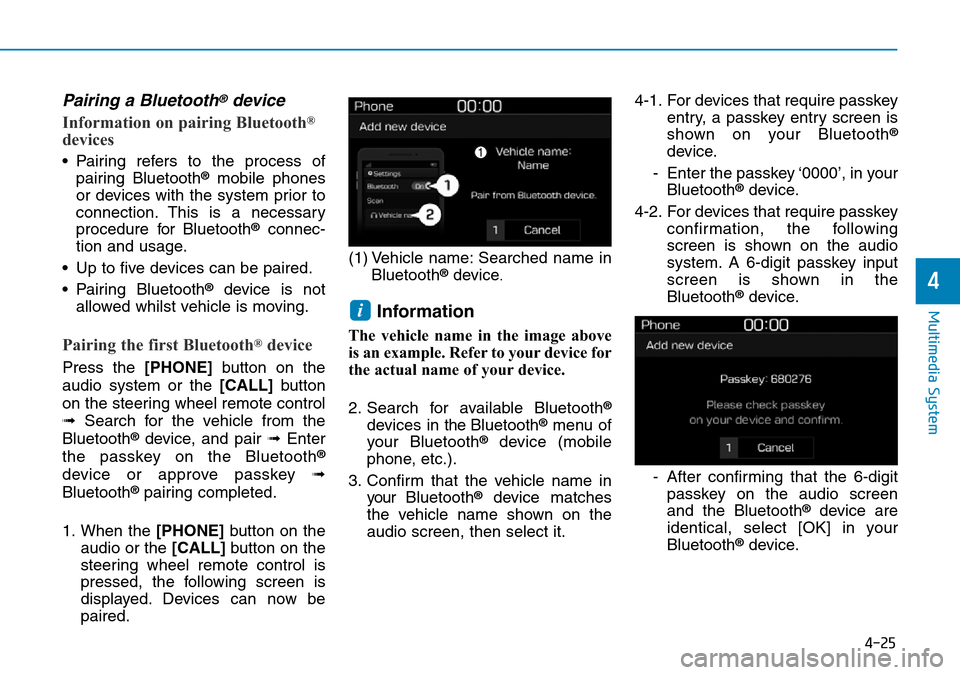
1. When the [PHONE] button on the
audio or the [CALL] button on the
steering wheel remote control is
pressed, the following screen is
displayed. Devices can now be
paired. (1) Vehicle name: Searched name in
Bluetooth
®device.
Information
The vehicle name in the image above
is an example. Refer to your device for
the actual name of your device.
2. Search for available Bluetooth
®
devices in the Bluetooth®menu of
your Bluetooth®device (mobile
phone, etc.).
3. Confirm that the vehicle name in your Bluetooth
®device matches
the vehicle name shown on the
audio screen, then select it. 4-1. For devices that require passkey
entry, a passkey entry screen is
shown on your Bluetooth
®
device.
- Enter the passkey ‘0000’, in your Bluetooth
®device.
4-2. For devices that require passkey confirmation, the following
screen is shown on the audio
system. A 6-digit passkey input
screen is shown in the
Bluetooth
®device.
- After confirming that the 6-digit passkey on the audio screen
and the Bluetooth
®device are
identical, select [OK] in your
Bluetooth
®device.
i
Page 242 of 497
![Hyundai Kona 2018 Owners Manual - RHD (UK, Australia) 4-26
Multimedia System
Information
The 6-digit passkey in the image
above is an example. Refer to your
vehicle for the actual passkey.
Pairing a second Bluetooth®device
Press the [SETUP/CLOCK]button](/manual-img/35/16232/w960_16232-241.png "Hyundai Kona 2018 Owners Manual - RHD (UK, Australia) 4-26
Multimedia System
Information
The 6-digit passkey in the image
above is an example. Refer to your
vehicle for the actual passkey.
Pairing a second Bluetooth®device
Press the [SETUP/CLOCK]button")
4-26
Multimedia System
Information
The 6-digit passkey in the image
above is an example. Refer to your
vehicle for the actual passkey.
Pairing a second Bluetooth®device
Press the [SETUP/CLOCK]button
on the audio system ➟Select
[Bluetooth] ➟Select [Connections]
➟ Select [Add new device].
- The pairing procedure from this point is identical to [Pairing the first
Bluetooth device].
Information
• Bluetooth®standby mode lasts for
three minutes. If a device is not
paired within three minutes, pairing
is cancelled. Start over from the
beginning.
• For most Bluetooth
®devices, a con-
nection is established automatically
after pairing. Some devices, howev-
er, require separate confirmation
when connecting after pairing. Be
sure to check your Bluetooth
®
device after pairing to confirm that
it has connected.
Connecting Bluetooth®devices
If there are no connected devices
Press the [PHONE] button on the
audio system or the [CALL] button in
the steering wheel remote control ➟
List of paired Bluetooth
®devices ➟
Select the desired Bluetooth®device
from the list ➟ Connect Bluetooth®.
ii