Page 248 of 642

3-98
Convenient features of your vehicle
Tripmeter/Average vehicle speed/
Elapsed time
Tripmeter (1)
• The tripmeter is the total driving
distance since the last tripmeter
reset.
• To reset the tripmeter, press the
OK button on the steering wheel
for more than 1 second when the
tripmeter is displayed.
Average Vehicle Speed (2)
• The average vehicle speed is cal-
culated by the total driving dis-
tance and driving time since the
last average vehicle speed reset.
• To reset the average vehicle speed,
press the OK button on the steering
wheel for more than 1 second when
the average vehicle speed is dis-
played.
Information
• The average vehicle speed is not dis-
played if the driving distance is less
than 300 meters (0.19 miles) or the
driving time is less than 10 seconds,
after resetting the vehicle speed.
• The average vehicle speed will con-
tinue to be calculated and will start
to decrease if the vehicle is stopped
while the engine is still running (for
example, when the vehicle is in traf-
fic or stopped at a stop light.)
Elapsed Time (3)
• The elapsed time is the total driv-
ing time since the last elapsed time
reset.
• To reset the elapsed time, press the
OK button on the steering wheel for
more than 1 second when the
elapsed time is displayed.
Information
The elapsed time will continue to be
counted while the engine is still run-
ning (for example, when the vehicle is
in traffic or stopped at a stop light.)
i
i
OAE046463L/OAE046121L
■Type A■Type B
Page 252 of 642

3-102
To change the trip mode, toggle the
“ , ” switch on the steering wheel.
Range
The range is the estimated distance
the vehicle can be driven with the
remaining fuel in the fuel tank
(Gasoline/Petrol) and high-voltage
(hybrid) battery (Electric).
If the estimated distance is below
1km (1 mile), the trip computer will
display “---” as the range.
Information
• If the vehicle is not on level ground
or the battery power has been inter-
rupted, the range function may not
operate correctly.
• The range may differ from the actu-
al driving distance as it is an esti-
mate of the available driving dis-
tance.
• The trip computer may not register
additional fuel if less than 6 liters (2
gallon) of fuel are added to the vehicle.
• The range may vary significantly
based on driving conditions, driving
habits, and condition of the vehicle.
i
Convenient features of your vehicle
OAE046402
■ ■
T T
y y
p p
e e
A A
■ ■
T T
y y
p p
e e
B B
■ ■
T T
y y
p p
e e
C C
OAEPH047534L/OAEPH047153L
■Type A■Type B
Page 253 of 642

3-103
Convenient features of your vehicle
Distance to empty/
Average fuel economy/
Instant fuel economy
Distance to Empty (1)
• The distance to empty is the esti-
mated distance the vehicle can be
driven with the remaining fuel.
• If the estimated distance is below
1 km (1 mi.), the trip computer will
display "----" as distance to empty.
Information
• If the vehicle is not on level ground
or the battery power has been inter-
rupted, the distance to empty func-
tion may not operate correctly.
• The distance to empty may differ
from the actual driving distance as
it is an estimate of the available
driving distance.
• The trip computer may not register
additional fuel if less than 6 liters (2
gallon) of fuel are added to the vehicle.
• The fuel economy and distance to
empty may vary significantly based
on driving conditions, driving habits,
and condition of the vehicle.
Average Fuel Economy (2)
• The average fuel economy is calcu-
lated by the total driving distance
and fuel consumption since the last
average fuel economy reset.
• The average fuel economy can be
reset both manually and automati-
cally.
Manual reset
To clear the average fuel economy
manually, press the OK button on the
steering wheel for more than 1 sec-
ond when the average fuel economy
is displayed.
Automatic reset
To automatically reset the average
fuel economy, select between "After
Ignition" or "After Refueling" in the
User Settings mode on the LCD dis-
play.
- After Ignition: When the engine has
been OFF for 4 hours or longer the
average fuel economy will reset
automatically.
- After Refueling: The average fuel
economy will reset automatically
after adding 1.6 gallons (6 liters) of
fuel or more and after driving speed
exceeds 1 mph (1 km/h).
Information
The vehicle must be driven for a min-
imum of 300 meters (0.19 miles) since
the last ignition key cycle before the
average fuel economy will be recalcu-
lated.
i
i
3
OAE046465L/OAE046464L
■Type A■Type B
Page 254 of 642

3-104
Instant Fuel Economy (3)
• This mode displays the instanta-
neous fuel economy while driving.
Tripmeter/Average vehicle speed/
Elapsed time
Tripmeter (1)
• The tripmeter is the total driving
distance since the last tripmeter
reset.
• To reset the tripmeter, press the
OK button on the steering wheel
for more than 1 second when the
tripmeter is displayed.
Average Vehicle Speed (2)
• The average vehicle speed is cal-
culated by the total driving dis-
tance and driving time since the
last average vehicle speed reset.
• To reset the average vehicle speed,
press the OK button on the steering
wheel for more than 1 second when
the average vehicle speed is dis-
played.
Information
• The average vehicle speed is not dis-
played if the driving distance is less
than 300 meters (0.19 miles) or the
driving time is less than 10 seconds,
after resetting the vehicle speed.
• The average vehicle speed will con-
tinue to be calculated and will start
to decrease if the vehicle is stopped
while the engine is still running (for
example, when the vehicle is in traf-
fic or stopped at a stop light.)
i
Convenient features of your vehicle
OAE046463L/OAE046121L
■Type A■Type B
Page 255 of 642

3-105
Convenient features of your vehicle
Elapsed Time (3)
• The elapsed time is the total driv-
ing time since the last elapsed time
reset.
• To reset the elapsed time, press the
OK button on the steering wheel for
more than 1 second when the
elapsed time is displayed.
Information
The elapsed time will continue to be
counted while the engine is still run-
ning (for example, when the vehicle is
in traffic or stopped at a stop light.)
Digital speedometer
This message shows the speed of
the vehicle (km/h, MPH).
Drive Info display
At the end of each driving cycle, the
Driving Info message is displayed.
This display shows the trip distance
(1), average fuel economy (2), remain-
ing vehicle range (3), and charging
status (4).
This information is displayed for a few
seconds when you turn off the vehicle,
and then goes off automatically. The
information is calculated for each time
the vehicle is turned on
Information
If sunroof open warning is displayed
in the cluster, the Drive Info message
will not be displayed.
i
i
3
OAE046146/OAE046147
■Type A■Type B
OAEPH047537L/OAEPH047538L
■Type A■Type B
Page 305 of 642
Multimedia System
Multimedia system .................................................4-2
AUX, USB and iPod®port ...............................................4-2
Antenna ...............................................................................4-2
Steering wheel audio controls .......................................4-3
Bluetooth®Wireless Technology hands-free ..........4-4
Audio / Video / Navigation system (AVN) ..................4-5
How vehicle radio works .................................................4-5
AUDIO (With Touch Screen) .................................4-8
Feature of your audio......................................................4-9
Radio .................................................................................4-16
Media..................................................................................4-18
Phone .................................................................................4-32
Setup ..................................................................................4-40
Declaration of conformity ..................................4-42
CE for EU ..........................................................................4-42
NCC for Taiwan ................................................................4-43
4
Page 307 of 642
4-3
Multimedia System
4
• Before entering a place with a low
height clearance or a car wash,
remove the antenna by rotating it
counterclockwise. If not, the
antenna may be damaged.
• When reinstalling your antenna,
it is important that it is fully
tightened and adjusted to the
upright position to ensure prop-
er reception.
Shark fin antenna (Type B)
The shark fin antenna receives
transmitted data. (for example:
AM/FM, DAB, GPS/GNSS)
Avoid adding metallic coatings
such as Ni, Cd, and so on. These
can degrade the received AM and
FM broadcast signals.
Steering wheel audio controls
(if equipped)
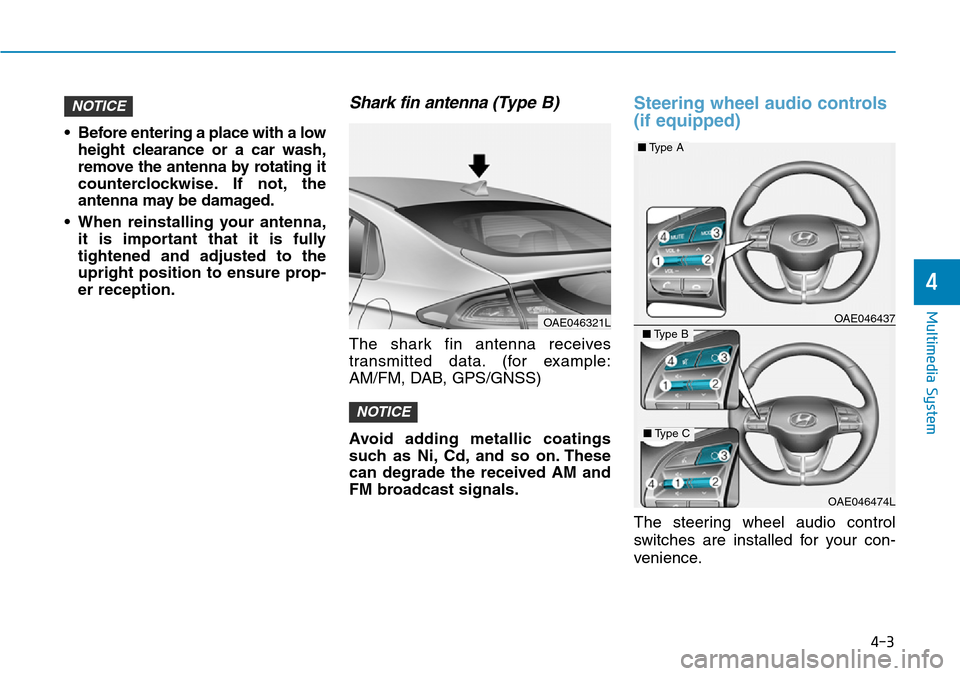
The steering wheel audio control
switches are installed for your con-
venience.
OAE046437
OAE046474L
NOTICE
NOTICE
■Type A
■Type B
■Type C
OAE046321L
Page 317 of 642

4-13
Multimedia System
4
Multimedia System
Steering wheel remote control
❈The actual features in the may dif-
fer from the illustration.
(1)MUTE
• Press to mute audio output.
(2)MODE
• Press the button to change the
mode in the following order: Radio
➟Media.
• Press and hold the button to turn off.
(with Type B, Type C)
(3)VOLUME
• Press to adjust the volume.(4)UP/DOWN
• Press the button in radio mode to
search Presets.
• Press and hold the button in radio
mode to search frequencies.
• Press the button in media mode to
change the current song.
• Press and hold the button in media
mode to quick search through
songs.
(5)CALL
• Pressing the button
- If not in Bluetooth
®Handsfree
mode or receiving a phone call.
First press: Display Dial Number
screen.
Second press: Automatically dis-
play the most recently Dialed
Call number.
Third press: Dial the phone num-
ber entered.
- Press in the Incoming Call notifi-
cation screen to accept the
phone call.
- Press in Bluetooth
®Handsfree
mode to switch to the waiting call.• Pressing and holding the button
- If not in Bluetooth
®Handsfree
mode or receiving a phone call,
the most recently Dialed Call
number is dialed.
- Press in Bluetooth
®Handsfree
mode to transfer the call to your
cell phone.
- Press in cell phone mode to
switch to Bluetooth
®Handsfree
mode.
(6)END
• Press in Bluetooth
®Handsfree
mode to end the phone call.
• Press in the incoming call screen
to reject the call.