Page 422 of 642

5-75
Driving your vehicle
5
To set Cruise Control speed
1. Press the CRUISE / button on
the steering wheel to turn the sys-
tem on. The cruise indicator will
illuminate.
2. Accelerate to the desired speed,
which must be more than 30 km/h
(20 mph).3. Push the toggle switch (1) down
(SET-), and release it. The SET
indicator light will illuminate.
4. Release the accelerator pedal.
Information
On a steep slope, the vehicle may
slightly slow down or speed up, while
driving uphill or downhill.
To increase Cruise Control
speed
• Push the toggle switch (1) up
(RES+) and hold it, while monitor-
ing the SET speed on the instru-
ment cluster.
Release the toggle switch when
the desired speed is shown and
the vehicle will accelerate to that
speed.
• Push the toggle switch (1) up
(RES+) and release it immediately.
The cruising speed will increase
2.0 km/h (1.2 mph) each time the
toggle switch is operated in this
manner.
i
OAE056154L
■Type A
■Type B
OAE056155L
■Type A
■Type B
OAE056156L
■Type A
■Type B
Page 423 of 642
5-76
Driving your vehicle
• Depress the accelerator pedal.
When the vehicle attains the
desired speed, push the toggle
switch (1) down (SET-).
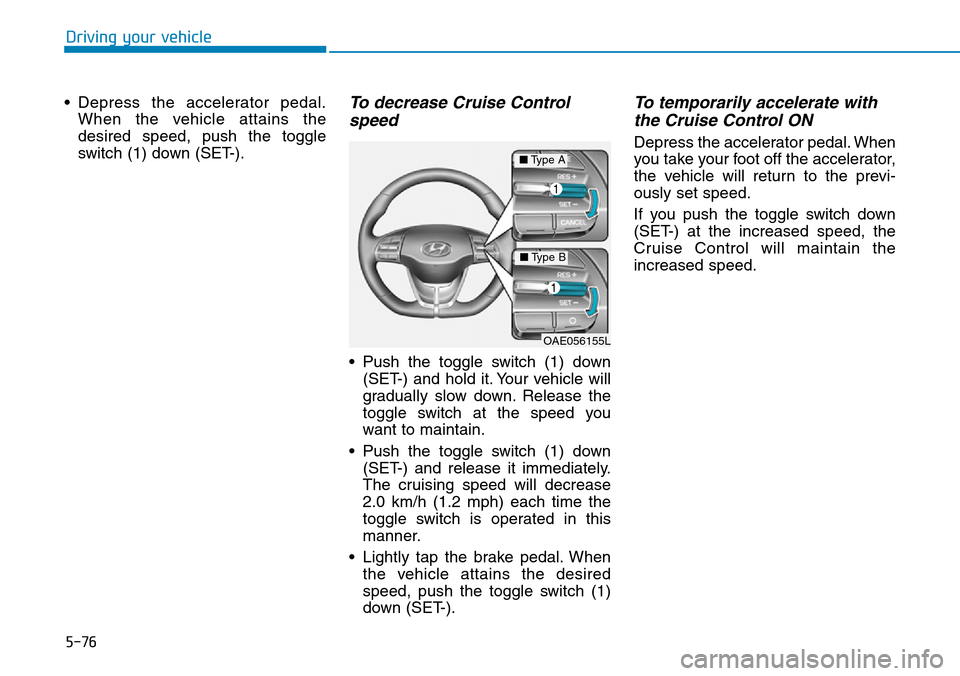
To decrease Cruise Control
speed
• Push the toggle switch (1) down
(SET-) and hold it. Your vehicle will
gradually slow down. Release the
toggle switch at the speed you
want to maintain.
• Push the toggle switch (1) down
(SET-) and release it immediately.
The cruising speed will decrease
2.0 km/h (1.2 mph) each time the
toggle switch is operated in this
manner.
• Lightly tap the brake pedal. When
the vehicle attains the desired
speed, push the toggle switch (1)
down (SET-).
To temporarily accelerate with
the Cruise Control ON
Depress the accelerator pedal. When
you take your foot off the accelerator,
the vehicle will return to the previ-
ously set speed.
If you push the toggle switch down
(SET-) at the increased speed, the
Cruise Control will maintain the
increased speed.
OAE056155L
■Type A
■Type B
Page 424 of 642

5-77
Driving your vehicle
5
Cruise Control will be cancelled
when:
• Depressing the brake pedal.
• Pressing the CANCEL / O button
located on the steering wheel.
• Pressing the CRUISE / button.
Both the indicator and the SET
indicator will turn OFF.
• Moving the shift lever into N
(Neutral).
• Decreasing the vehicle speed to
less than the memory speed by
approximately 20 km/h (12 mph).
• Decreasing the vehicle speed to
less than approximately 30 km/h
(20 mph).• The ESC (Electronic Stability
Control) is operating.
• Downshifting to 2
ndgear when in
Manual Shift mode.
Information
Each of the above actions will cancel
Cruise Control operation (the SET
indicator light in the instrument clus-
ter will go off), but only pressing the
CRUISE / button will turn the sys-
tem off. If you wish to resume Cruise
Control operation, push the toggle
switch up (RES+) located on your
steering wheel. You will return to your
previously preset speed, unless the
system was turned off using the
CRUISE / button.
To resume preset Cruising
speed
Push the toggle switch (1) up
(RES+). If the vehicle speed is over
30 km/h (20 mph), the vehicle will
resume the preset speed.
i
OAE056157L
■Type A
■Type B
OAE056156L
■Type A
■Type B
Page 425 of 642
5-78
Driving your vehicle
To turn Cruise Control off
• Press the CRUISE / button (the
cruise ( ) indicator light
will go off).
• Press the button (The
( ) indicator light will go
off.).
- With the Cruise Control on,
pressing the button once will turn
Off the Cruise Control and turn
on the Speed Limit Control.
- With the Cruise Control off and
Speed Limit Control on, pressing
the button will turn off both sys-
tem.
Information
The mode changes, as below, whenev-
er the button is pressed.
i
OAE056154L
■Type A
■Type B
System off Cruise Control
Speed Limit Control
Page 426 of 642

5-79
Driving your vehicle
5
➀Cruise indicator
➁Set speed
➂Vehicle-to-vehicle distance
To see the SCC screen on the LCD
display in the cluster, select SCC/
LKAS mode ( ) for cluster type A or
ASSIST mode ( ) for cluster type
B. For more information, refer to
"LCD Display Modes" in chapter 3.
The Smart Cruise Control System
allows you to program the vehicle to
maintain constant speed and mini-
mum distance between the vehicle
ahead.The Smart Cruise Control System
will automatically adjust your vehicle
speed to maintain your programmed
speed and following distance without
requiring you to depress the acceler-
ator or brake pedals.
SMART CRUISE CONTROL SYSTEM (IF EQUIPPED)
For your safety, please read the
owner's manual before using the
Smart Cruise Control system.
WARNING
The Smart Cruise Control
System is not a substitute for
safe driving practices, but a
convenience function only. It is
the responsibility of the driver
to always check the speed and
distance to the vehicle ahead.
WARNING
Take the following precautions :
•Always set the vehicle speed
under the speed limit in your
country.
(Continued)
WARNING
OAE056097
(Continued)
•If the Smart Cruise Control is
left on, (cruise ( )
indicator light in the instru-
ment cluster is illuminated)
the Smart Cruise Control can
be activated unintentionally.
Keep the Smart Cruise
Control System off (cruise
( ) indicator light
OFF) when the Smart Cruise
Control is not in use, to avoid
inadvertently setting a speed.
•Use the Smart Cruise Control
System only when traveling
on open highways in good
weather.
•Do not use the Smart Cruise
Control when it may not be
safe to keep the vehicle at a
constant speed:
- When driving in heavy traffic
or when traffic conditions
make it difficult to drive at a
constant speed
- When driving on rainy, icy, or
snow-covered roads
(Continued)
Page 428 of 642

5-81
Driving your vehicle
5
Smart Cruise Control speed
To set Smart Cruise Control
speed
1. Push the button on the steer-
ing wheel to turn the system on.
The cruise ( ) indicator
will illuminate.
2. Accelerate to the desired speed.
The Smart Cruise Control speed
can be set as follows:
• 30 ~ 180 km/h (20 ~ 110 mph) :
when there is no vehicle in front
• 10 ~ 180 km/h (5 ~ 110 mph) :
when there is a vehicle in front3. Push the toggle switch down
(SET-). The Set Speed and
Vehicle-to-Vehicle Distance on the
LCD display will illuminate.
4. Release the accelerator pedal.
The desired speed will automati-
cally be maintained.
If there is a vehicle in front of you, the
speed may decrease to maintain the
distance to the vehicle ahead.
On a steep grade, the vehicle may
slow down or speed up slightly while
going uphill or downhill.
Information
Vehicle speed may decrease on an
upward slope and increase on a down-
ward slope.
i
OAE056154L
■Type A
■Type B
OAE056155L
■Type A
■Type B
When vehicle speed is under 10
km/h (6 mph), the Smart Cruise
Control is cancelled. The driver
must adjust the vehicle speed
by depressing the accelerator
or brake pedal according to the
road condition ahead and driv-
ing condition.
CAUTION
Page 432 of 642
5-85
Driving your vehicle
5
To turn Cruise Control off
• Press the CRUISE/ button (the
cruise ( ) indicator light
will go off).
• Press the button (The
( ) indicator light will go
off.). (if equipped with Speed Limit
Control)
- With the Smart Cruise Control
on, pressing the button once will
turn Off the Smart Cruise Control
and turn on the Speed Limit
Control.
- With the Smart Cruise Control off
and Speed Limit Control on,
pressing the button will turn off
both system.
Information
The mode changes, as below, whenev-
er the button is pressed.
Smart Cruise Control Vehicle-
to-Vehicle Distance
To set Vehicle-to-Vehicle
Distance
When the Smart Cruise Control
System is ON, you can set and main-
tain the distance from the vehicle
ahead of you without pressing the
accelerator or brake pedal.
i
System off Smart Cruise Control
Speed Limit Control
OAE056154L
■Type A
■Type B
OAE056158L
■Type A
■Type B
Page 437 of 642

5-90
Driving your vehicle
Check Smart Cruise Control System
The message will appear when the
vehicle to vehicle distance control
system is not functioning normally.
We recommend that you take your
vehicle to an authorized HYUNDAI
dealer and have the system checked.
To adjust the sensitivity of
Smart Cruise Control
The sensitivity of vehicle speed
when following the front vehicle to
maintain the set distance can be
adjusted. Go to the 'User Settings →
Driving Assist →Smart Cruise
Control Speed →Slow/Normal/Fast'
on the LCD display. You may select
one of the three stages you prefer.
- Slow:
Vehicle speed following the front
vehicle to maintain the set distance
is slower than normal speed.
- Normal:
Vehicle speed following the front
vehicle to maintain the set distance
is normal.
- Fast:
Vehicle speed following the front
vehicle to maintain the set distance
is faster than normal speed.
Information
The last selected speed sensitivity of
the smart cruise control is remained in
the system.
To convert to Cruise Control
mode
The driver may choose to only use
the conventional Cruise Control
mode (speed control function) by
doing as follows:
1. Turn the Smart Cruise Control
System on (the cruise indicator
light will be on but the system will
not be activated).
2. Push and hold the Vehicle-to-
Vehicle Distance button for more
than 2 seconds.
3. Choose between "Smart Cruise
Control" and "Cruise Control".
When the system is cancelled using
theCRUISE/ button or the
CRUISE/ button is used after the
vehicle is in the ready ( ) mode,
the Smart Cruise Control mode will
turn on.
i
OAE056167L