2018 HYUNDAI ELANTRA SPORT mirror
[x] Cancel search: mirrorPage 113 of 534
3-28
Convenient features of your vehicle
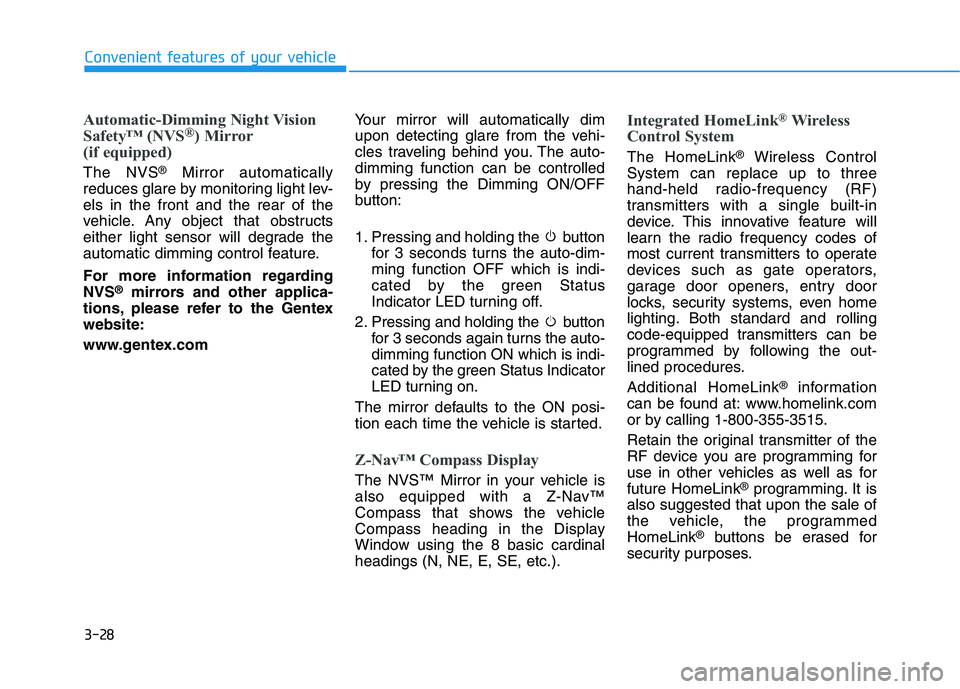
Automatic-Dimming Night Vision
Safety™ (NVS®
) Mirror
(if equipped)
The NVS ®
Mirror automatically
reduces glare by monitoring light lev- els in the front and the rear of the
vehicle. Any object that obstructs
either light sensor will degrade the
automatic dimming control feature.
For more information regarding NVS ®
mirrors and other applica-
tions, please refer to the Gentexwebsite:
www.gentex.com Your mirror will automatically dim
upon detecting glare from the vehi-
cles traveling behind you. The auto-dimming function can be controlled
by pressing the Dimming ON/OFF
button:
1. Pressing and holding the button
for 3 seconds turns the auto-dim- ming function OFF which is indi-
cated by the green Status
Indicator LED turning off.
2. Pressing and holding the button for 3 seconds again turns the auto-dimming function ON which is indi-
cated by the green Status Indicator
LED turning on.
The mirror defaults to the ON posi-
tion each time the vehicle is started.
Z-Nav™ Compass Display
The NVS™ Mirror in your vehicle is
also equipped with a Z-Nav™
Compass that shows the vehicle
Compass heading in the Display
Window using the 8 basic cardinalheadings (N, NE, E, SE, etc.).
Integrated HomeLink ®
Wireless
Control System
The HomeLink ®
Wireless Control
System can replace up to three
hand-held radio-frequency (RF)
transmitters with a single built-in
device. This innovative feature will
learn the radio frequency codes of
most current transmitters to operate
devices such as gate operators,
garage door openers, entry door
locks, security systems, even home
lighting. Both standard and rolling
code-equipped transmitters can be
programmed by following the out-
lined procedures. Additional HomeLink ®
information
can be found at: www.homelink.com
or by calling 1-800-355-3515.
Retain the original transmitter of the
RF device you are programming for
use in other vehicles as well as forfuture HomeLink ®
programming. It is
also suggested that upon the sale of
the vehicle, the programmedHomeLink ®
buttons be erased for
security purposes.
Page 115 of 534
3-30
Convenient features of your vehicle
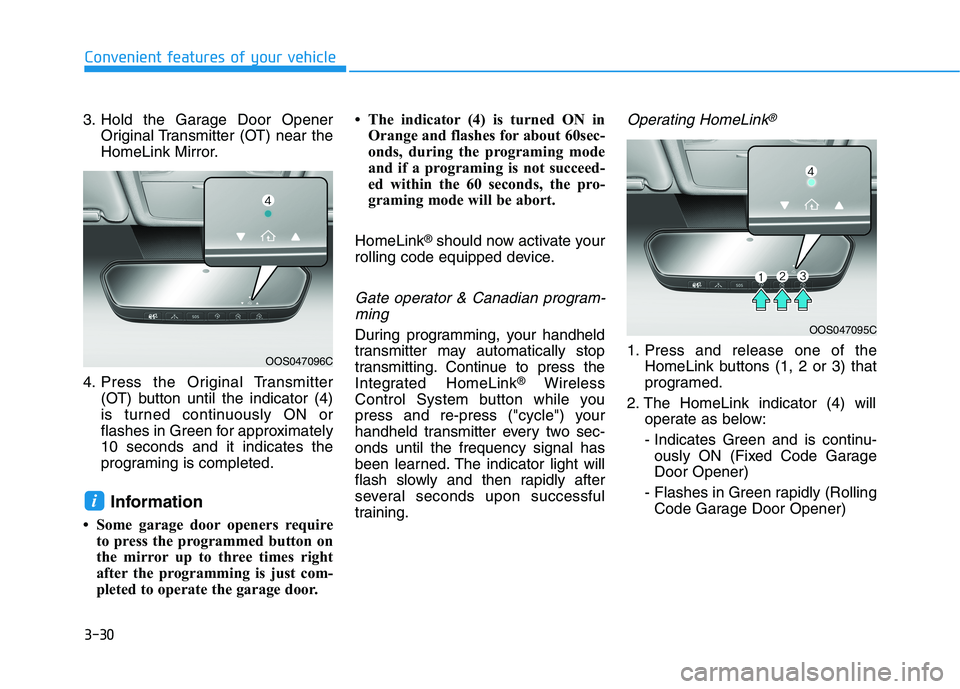
3. Hold the Garage Door OpenerOriginal Transmitter (OT) near the
HomeLink Mirror.
4. Press the Original Transmitter (OT) button until the indicator (4)
is turned continuously ON or
flashes in Green for approximately10 seconds and it indicates the
programing is completed.
Information
Some garage door openers require to press the programmed button on
the mirror up to three times right
after the programming is just com-
pleted to operate the garage door. The indicator (4) is turned ON in
Orange and flashes for about 60sec-
onds, during the programing mode
and if a programing is not succeed-
ed within the 60 seconds, the pro-
graming mode will be abort.
HomeLink ®
should now activate your
rolling code equipped device.
Gate operator & Canadian program-
ming
During programming, your handheld
transmitter may automatically stop
transmitting. Continue to press the
Integrated HomeLink ®
Wireless
Control System button while you
press and re-press ("cycle") your
handheld transmitter every two sec-onds until the frequency signal has
been learned. The indicator light will
flash slowly and then rapidly after
several seconds upon successful
training.
Operating HomeLink®
1. Press and release one of the HomeLink buttons (1, 2 or 3) that
programed.
2. The HomeLink indicator (4) will operate as below:
- Indicates Green and is continu- ously ON (Fixed Code GarageDoor Opener)
- Flashes in Green rapidly (Rolling Code Garage Door Opener)
i
OOS047095C
OOS047096C
Page 117 of 534
3-32
Convenient features of your vehicle
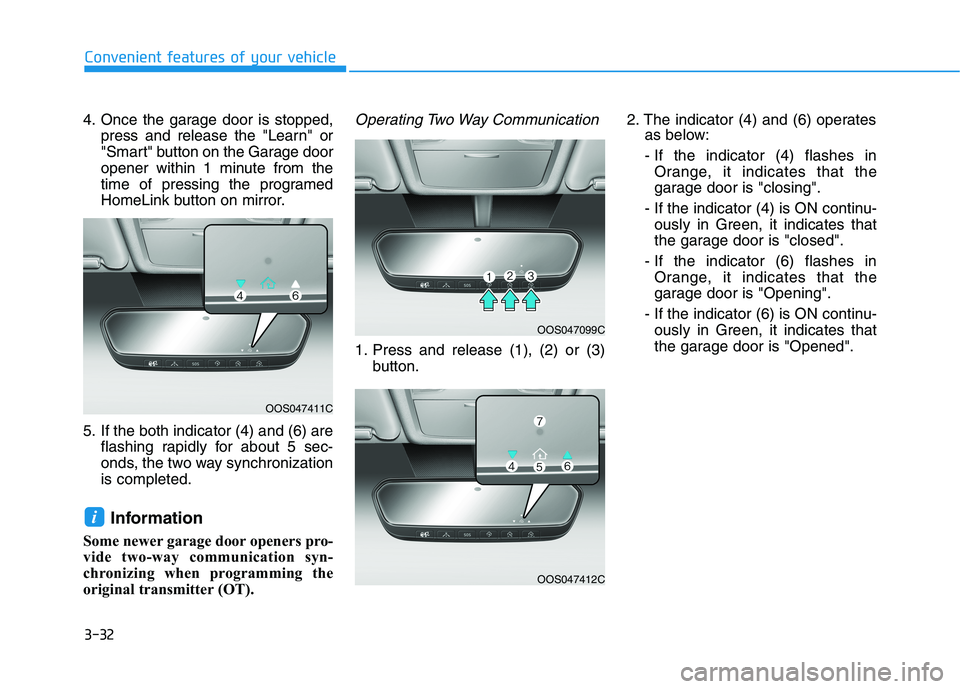
4. Once the garage door is stopped,press and release the "Learn" or
"Smart" button on the Garage door
opener within 1 minute from the
time of pressing the programed
HomeLink button on mirror.
5. If the both indicator (4) and (6) are flashing rapidly for about 5 sec-
onds, the two way synchronizationis completed.
Information
Some newer garage door openers pro-
vide two-way communication syn-
chronizing when programming the
original transmitter (OT).Operating Two Way Communication
1. Press and release (1), (2) or (3) button. 2. The indicator (4) and (6) operates
as below:
- If the indicator (4) flashes in Orange, it indicates that the
garage door is "closing".
- If the indicator (4) is ON continu- ously in Green, it indicates that
the garage door is "closed".
- If the indicator (6) flashes in Orange, it indicates that the
garage door is "Opening".
- If the indicator (6) is ON continu- ously in Green, it indicates that
the garage door is "Opened".
i
OOS047411C
OOS047099C
OOS047412C
Page 118 of 534
3-33
Convenient features of your vehicle
3
- If the indicator (4) or (6) does notturn to Green, it indicates that the
last status of garage door was
not received properly. The
HomeLink mirror tries to receive
the last known status of the
garage door for a few seconds.Recalling Garage Door Status
Homelink mirror with two way com-
munication provides a way to viewthe last stored message from the
garage door opener. In order to recall
the last known status of the last acti-
vated device, press the buttons "1
and 2" OR "2 and 3" simultaneously.
If the indicator (4) is ON continu- ously in Green, it indicates that the
last activated device was "closed"
properly.
If the indicator (6) is ON continu- ously in Green, it indicates that the
last activated device was "open"
properly.
Information
Two way communication range dis-
tance between "vehicle" and "garage
door opener" is 100m.
The range may be reduced or
increased a little due to obstacle con-
ditions around the garage door open-
er, such as houses or trees.
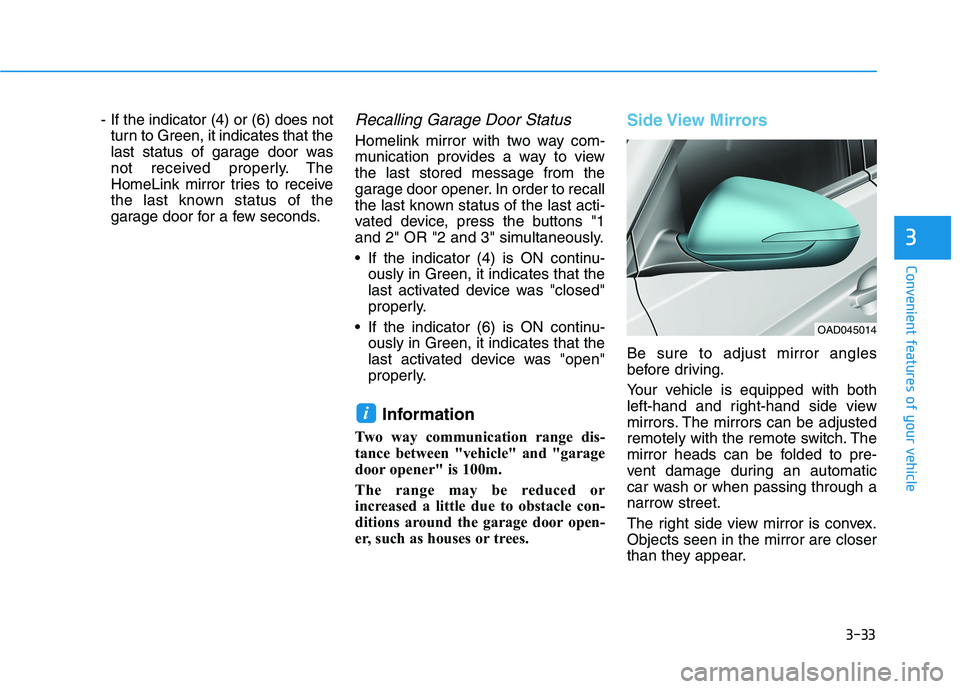
Side View Mirrors
Be sure to adjust mirror angles
before driving.
Your vehicle is equipped with both
left-hand and right-hand side view
mirrors. The mirrors can be adjusted
remotely with the remote switch. The
mirror heads can be folded to pre-
vent damage during an automatic
car wash or when passing through a
narrow street.
The right side view mirror is convex. Objects seen in the mirror are closer
than they appear.
i
OAD045014
Page 119 of 534
3-34
Convenient features of your vehicle
Use your interior side view mirror or
direct observation to determine the
actual distance of following vehicles
when changing lanes.
Do not scrape ice off the mirrorface; this may damage the sur- face of the glass.
If the mirror is jammed with ice, do not adjust the mirror by
force. Use an approved spray
de-icer (not radiator antifreeze)
spray, or a sponge or soft cloth
with very warm water, or move
the vehicle to a warm place and
allow the ice to melt.Adjusting the side view mirrors
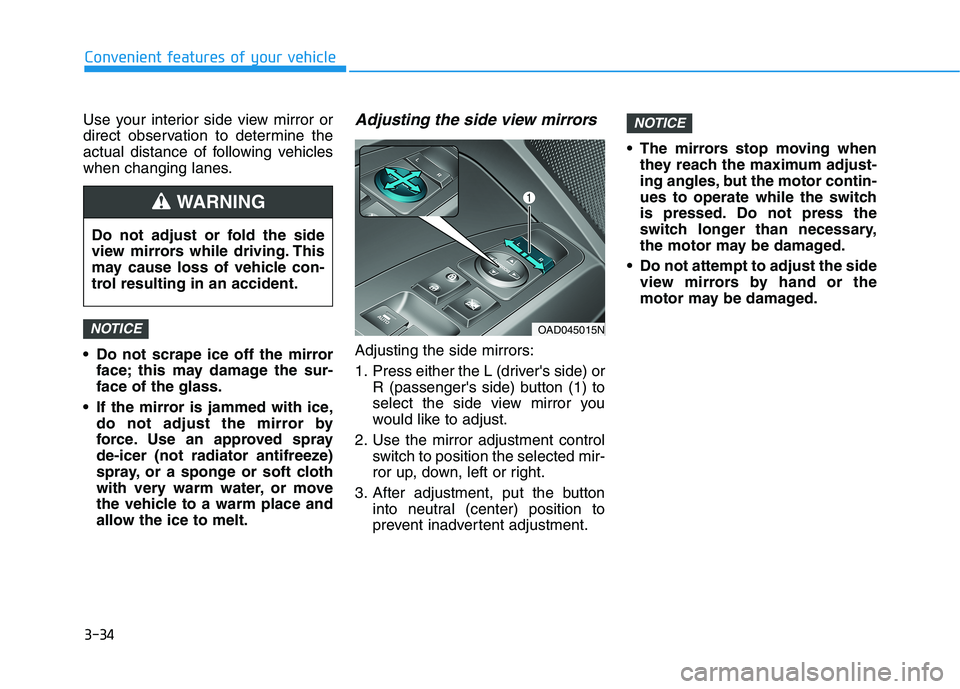
Adjusting the side mirrors:
1. Press either the L (driver's side) or R (passenger's side) button (1) to
select the side view mirror you
would like to adjust.
2. Use the mirror adjustment control switch to position the selected mir-
ror up, down, left or right.
3. After adjustment, put the button into neutral (center) position to
prevent inadvertent adjustment. The mirrors stop moving when
they reach the maximum adjust-
ing angles, but the motor contin-
ues to operate while the switch
is pressed. Do not press the
switch longer than necessary,
the motor may be damaged.
Do not attempt to adjust the side view mirrors by hand or the
motor may be damaged.
NOTICE
NOTICE
Do not adjust or fold the side
view mirrors while driving. This
may cause loss of vehicle con-
trol resulting in an accident.
WARNING
OAD045015N
Page 120 of 534
3-35
Convenient features of your vehicle
3
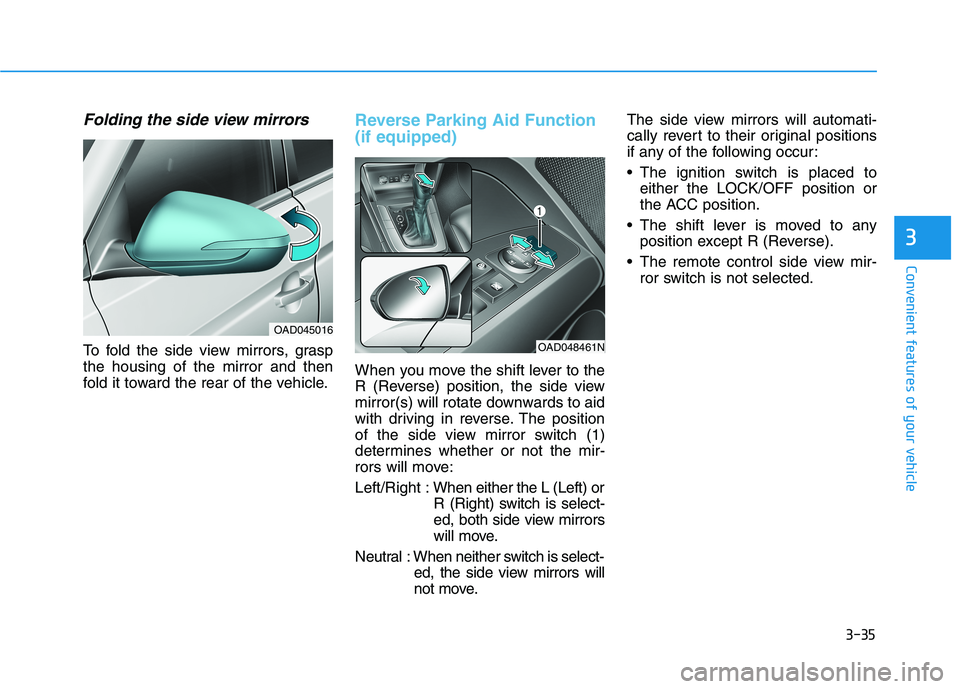
Folding the side view mirrors
To fold the side view mirrors, grasp the housing of the mirror and then
fold it toward the rear of the vehicle.
Reverse Parking Aid Function (if equipped)
When you move the shift lever to the
R (Reverse) position, the side view
mirror(s) will rotate downwards to aid
with driving in reverse. The position
of the side view mirror switch (1)
determines whether or not the mir-
rors will move: Left/Right :When either the L (Left) or
R (Right) switch is select-
ed, both side view mirrors
will move.
Neutral : When neither switch is select- ed, the side view mirrors will
not move. The side view mirrors will automati-
cally revert to their original positions
if any of the following occur:
The ignition switch is placed to
either the LOCK/OFF position or
the ACC position.
The shift lever is moved to any position except R (Reverse).
The remote control side view mir- ror switch is not selected.
OAD045016
OAD048461N
Page 190 of 534
3-105
Convenient features of your vehicle
3
The system may not operate nor-
mally if any of the following con-ditions should occur:
1) When the illumination froman on-coming vehicle or a
vehicle in front is dim. Such
examples may include:
When the headlamps of an on-
coming vehicle or the tail
lamps of a vehicle in front is
covered with dust, snow, or
water.
When the headlamps on an on-
coming vehicle are OFF, but the
fog lamps are ON.
2) When the High Beam Assist camera is adversely affected
by an external condition.
Such examples may include:
When the vehicle's head-
lamps have been damaged or
not repaired properly.
When the vehicle headlamps
are not aimed properly.
When the vehicle is driven on
a narrow curved road or rough
road
When the vehicle is driven on
an uphill road or downhill
road
When only part of the vehicle in
front is visible on a crossroad
or curved road.
When there is a traffic light,
reflecting sign, flashing sign or
mirror.
When the road conditions are
bad such as being wet or cov-
ered with snow.
When a vehicle suddenly
appears from a curve.
When the vehicle is tilted from
a flat tire or being towed.
When the Lane Keeping Assist (LKA) system warning lightilluminates.
When the light from the on-
coming or front vehicle is not
detected because of exhaust
fume, smoke, fog, snow, etc.
When the front window is cov-
ered with foreign matters such
as ice, dust, fog, or is damaged.
3) When the forward visibility is poor. Such examples may
include:
When the headlamps of an on-
coming vehicle or a vehicle in
front is not detected due topoor outside visibility (smog,
smoke, dust, fog, heavy rain,
snow, etc.).
When the lamp of the on-com-
ing or front vehicle is covered
with dust, snow or water.
When the windshield visibility
is poor.
WARNING
Page 191 of 534
3-106
Convenient features of your vehicle
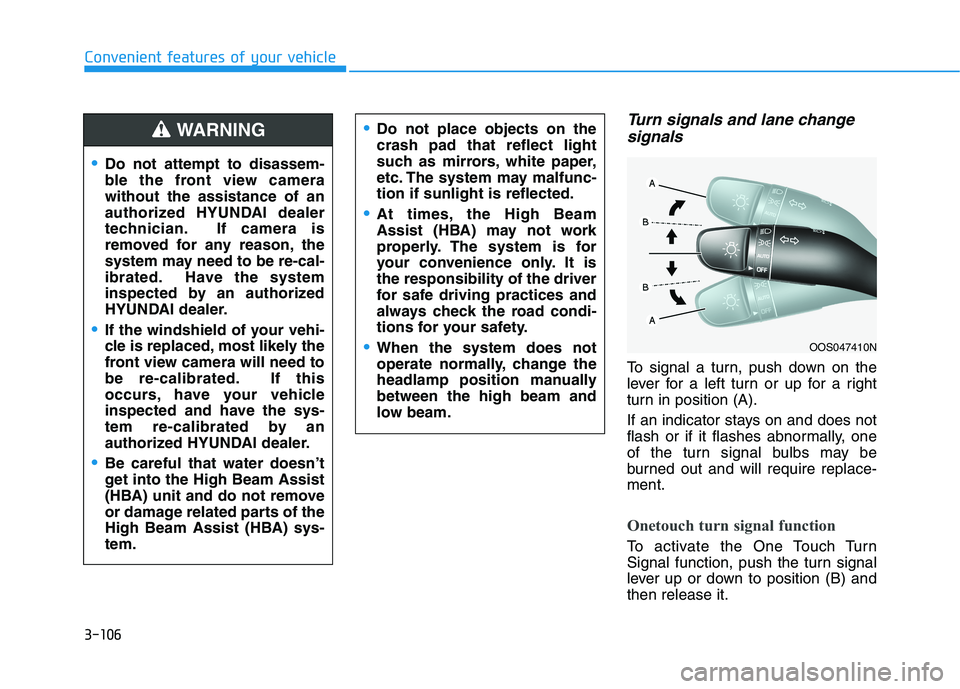
Turn signals and lane changesignals
To signal a turn, push down on the
lever for a left turn or up for a right
turn in position (A).
If an indicator stays on and does not
flash or if it flashes abnormally, one
of the turn signal bulbs may be
burned out and will require replace-ment.
Onetouch turn signal function
To activate the One Touch Turn
Signal function, push the turn signal
lever up or down to position (B) andthen release it.
OOS047410N
Do not attempt to disassem-
ble the front view camerawithout the assistance of an
authorized HYUNDAI dealer
technician. If camera is
removed for any reason, the
system may need to be re-cal-
ibrated. Have the system
inspected by an authorized
HYUNDAI dealer.
If the windshield of your vehi-
cle is replaced, most likely the
front view camera will need to
be re-calibrated. If this
occurs, have your vehicle
inspected and have the sys-
tem re-calibrated by an
authorized HYUNDAI dealer.
Be careful that water doesn’t
get into the High Beam Assist
(HBA) unit and do not remove
or damage related parts of the
High Beam Assist (HBA) sys-tem.
Do not place objects on the crash pad that reflect light
such as mirrors, white paper,
etc. The system may malfunc-tion if sunlight is reflected.
At times, the High Beam
Assist (HBA) may not work
properly. The system is for
your convenience only. It isthe responsibility of the driver
for safe driving practices and
always check the road condi-
tions for your safety.
When the system does not
operate normally, change the
headlamp position manuallybetween the high beam and
low beam.
WARNING