Page 293 of 526
5-10
Driving your vehicle
Engine Start/Stop button positions
- Vehicle with manual transmission
Button PositionAction Notice
OFFTo turn off the engine, stop the vehicle and then
press the Engine Start/Stop button.
Not illuminated
ACCPress the Engine Start/Stop button when the but-
ton is in the OFF position without depressing the
clutch pedal.
Electrical accessories are usable. If you leave the Engine Start/Stop button in the ACC
position for more than one hour, the battery power
will turn off automatically to prevent the battery from
discharging.
Orange indicator
Page 294 of 526
5-11
Driving your vehicle
5
Button PositionAction Notice
ON Press the Engine Start/Stop button while it is in
the ACC position without depressing the clutch
pedal.
The warning lights can be checked before the
engine is started. Do not leave the Engine Start/Stop button in the ON
position when the engine is not running to prevent
the battery from discharging.
Blue indicator
STARTTo start the engine, depress the clutch and brake
pedals and press the Engine Start/ Stop button
with the shift lever in neutral.
If you press the Engine Start/Stop button without
depressing the clutch pedal, the engine does not
start and the Engine Start/Stop button changes as
follows:
OFF
→ →
ACC →
→
ON →
→
OFF
Not illuminated
- Vehicle with manual transmission
Page 295 of 526
5-12
Driving your vehicle
Engine Start/Stop button positions
- Vehicle with automatic transmission/dual clutch transmission
Button PositionAction Notice
OFFTo turn off the engine, press the Engine Start/Stop
button with shift lever in P (Park).
When you press the Engine Start/Stop button
without the shift lever in P (Park), the Engine
Start/Stop button does not turn to the OFF posi-
tion, but turns to the ACC position.
ACCPress the Engine Start/Stop button when the but-
ton is in the OFF position without depressing the
brake pedal.
Electrical accessories are usable. If you leave the Engine Start/Stop button in the ACC
position for more than one hour, the battery power
will turn off automatically to prevent the battery from
discharging.
Page 296 of 526

5-13
Driving your vehicle
5
Button PositionAction Notice
ON Press the Engine Start/Stop button while it is in
the ACC position without depressing the brake
pedal.
The warning lights can be checked before the
engine is started. Do not leave the Engine Start/Stop button in the ON
position when the engine is not running to prevent
the battery from discharging.
STARTTo start the engine, depress the brake pedal and
press the Engine Start/Stop button with the shift
lever in the P (Park) or in the N (Neutral) position.
For your safety, start the engine with the shift lever
in the P (Park) position.If you press the Engine Start/Stop button without
depressing the brake pedal, the engine does not
start and the Engine Start/Stop button changes as
follows:
OFF
→ →
ACC →
→
ON →
→
OFF
However, the engine may start if you depress the
brake pedal within 0.5 second after pressing the
Engine Start/Stop button from the OFF position.
- Vehicle with automatic transmission/dual clutch transmission
Page 297 of 526

5-14
Driving your vehicle
Starting the engine Information
• The engine will start by pressing theEngine Start/Stop button, only when the
smart key is in the vehicle.
• Even if the smart key is in the vehicle, if it is far away from the driver, the engine
may not start.
• When the Engine Start/Stop button is in the ACC or ON position, if any door is
open, the system checks for the smart
key. If the smart key is not in the vehicle,
the " " indicator will blink and the
warning "Key not in vehicle" will come
on and if all doors are closed, the chime
will also sound for about 5 seconds.
Keep the smart key in the vehicle when
using the ACC position or if the vehicle
engine is ON. Vehicle with manual transmission:
1. Always carry the smart key with you.
2. Make sure the parking brake is
applied.
3. Make sure the shift lever is in neutral.
4. Depress the clutch and brake pedals.
5. Press the Engine Start/Stop button.
Information
Depress the brake pedal and clutch pedal
until the engine starts.
Vehicle with automatic transmission/dual
clutch transmission:
1. Always carry the smart key with you.
2. Make sure the parking brake is applied.
3. Make sure the shift lever is in P (Park).
4. Depress the brake pedal.
5. Press the Engine Start/Stop button.
i
i
Always wear appropriate shoes
when operating your vehicle.
Unsuitable shoes, such as high
heels, ski boots, sandals, flip-
flops, etc., may interfere with your
ability to use the brake and accel-
erator pedals.
Do not start the vehicle with the
accelerator pedal depressed. The
vehicle can move and lead to an
accident.
Wait until the engine rpm is nor-
mal. The vehicle may suddenly
move if the brake pedal is
released when the rpm is high.
WARNING
Page 298 of 526

5-15
Driving your vehicle
5
Information
• Do not wait for the engine to warm upwhile the vehicle remains stationary.
Start driving at moderate engine speeds.
(Aggressive accelerating and decelerat-
ing should be avoided.)
• Always start the vehicle with your foot on the brake pedal. Do not depress the
accelerator while starting the vehicle.
Do not race the engine while warming it
up.
To prevent damage to the vehicle:
If the engine stalls while you are in motion, do not attempt to move the
shift lever to the P (Park) position.
If traffic and road conditions permit,
you may put the shift lever in the N
(Neutral) position while the vehicle
is still moving and press the Engine
Start/Stop button in an attempt to
restart the engine.
Do not push or tow your vehicle to start the engine. To prevent damage to the vehicle:
When the stop lamp switch fuse is
blown, you can't start the engine nor-
mally. Replace the fuse with a new
one. If you are not able to replace the
fuse, you can start the engine by
pressing and holding the Engine
Start/Stop button for 10 seconds with
the Engine Start/Stop button in the
ACC position.
Do not press the Engine Start/Stop
button for more than 10 seconds
except when the stop lamp switch
fuse is blown.
For your safety always depress the
brake pedal before starting the
engine.
Information
If the smart key battery is weak or the
smart key does not work correctly, you can
start the engine by pressing the Engine
Start/Stop button with the smart key in the
direction of the picture above.
i
NOTICE
NOTICE
i
OAD055002
Page 299 of 526

5-16
Manual Transmission
Operation
The manual transmission has 6 forward
gears. The transmission is fully synchro-
nized in all forward gears so shifting to
either a higher or a lower gear is easily
accomplished.
To shift to R (Reverse), make sure the
vehicle has completely stopped, and
then move the shift lever to neutral before
moving into R (Reverse).When you've come to a complete stop
and it's hard to shift into 1st gear or R
(Reverse):
1. Put the shift lever in neutral and
release the clutch pedal.
2. Depress the clutch pedal, and then shift into 1 (first) or R (Reverse) gear.
During cold weather, shifting may be
difficult until the transmission lubri-
cant has warmed up.
Using the clutch
The clutch pedal should be depressed all
the way before:
- Starting the engine The engine will not start without
depressing the clutch pedal.
- Shifting into gear, up shifting to the next higher gear, or down shifting to
the next lower gear.
When releasing the clutch pedal, release
it slowly. The clutch pedal should always
be fully released while driving.
NOTICE
M M A
AN
N U
U A
AL
L
T
T R
R A
A N
N S
SM
M I
IS
S S
SI
IO
O N
N
Driving your vehicle
OAD055004
The shift lever can be moved without
pressing the button (1).
The button (1) must be pressed while
moving the shift lever to R (Reverse).
Before leaving the driver's seat,
always make sure the shift lever is
in 1
stgear when the vehicle is
parked on a uphill and in R
(Reverse) on a downhill, set the
parking brake, and place the igni-
tion switch in the LOCK/OFF posi-
tion. Unexpected vehicle movement
may occur if these precautions are
not followed.
WARNING
Page 383 of 526
6-2
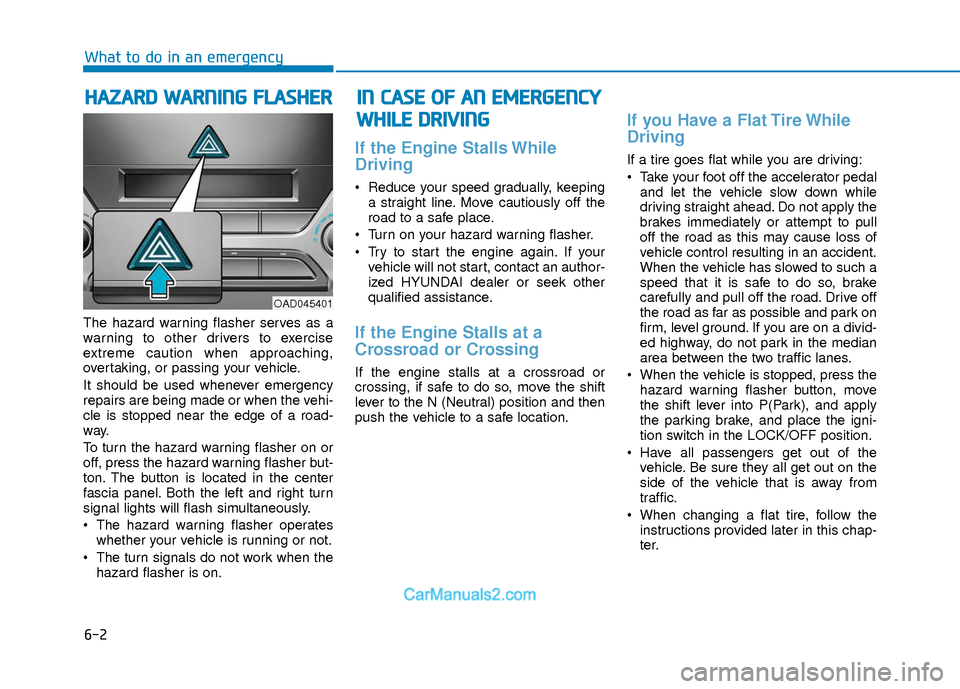
The hazard warning flasher serves as a
warning to other drivers to exercise
extreme caution when approaching,
overtaking, or passing your vehicle.
It should be used whenever emergency
repairs are being made or when the vehi-
cle is stopped near the edge of a road-
way.
To turn the hazard warning flasher on or
off, press the hazard warning flasher but-
ton. The button is located in the center
fascia panel. Both the left and right turn
signal lights will flash simultaneously.
• The hazard warning flasher operates
whether your vehicle is running or not.
The turn signals do not work when the hazard flasher is on.
If the Engine Stalls While
Driving
Reduce your speed gradually, keepinga straight line. Move cautiously off the
road to a safe place.
Turn on your hazard warning flasher.
Try to start the engine again. If your vehicle will not start, contact an author-
ized HYUNDAI dealer or seek other
qualified assistance.
If the Engine Stalls at a
Crossroad or Crossing
If the engine stalls at a crossroad or
crossing, if safe to do so, move the shift
lever to the N (Neutral) position and then
push the vehicle to a safe location.
If you Have a Flat Tire While
Driving
If a tire goes flat while you are driving:
Take your foot off the accelerator pedaland let the vehicle slow down while
driving straight ahead. Do not apply the
brakes immediately or attempt to pull
off the road as this may cause loss of
vehicle control resulting in an accident.
When the vehicle has slowed to such a
speed that it is safe to do so, brake
carefully and pull off the road. Drive off
the road as far as possible and park on
firm, level ground. If you are on a divid-
ed highway, do not park in the median
area between the two traffic lanes.
When the vehicle is stopped, press the hazard warning flasher button, move
the shift lever into P(Park), and apply
the parking brake, and place the igni-
tion switch in the LOCK/OFF position.
Have all passengers get out of the vehicle. Be sure they all get out on the
side of the vehicle that is away from
traffic.
When changing a flat tire, follow the instructions provided later in this chap-
ter.
H HA
AZ
ZA
A R
RD
D
W
W A
AR
RN
N I
IN
N G
G
F
F L
LA
A S
SH
H E
ER
R
What to do in an emergency
I
IN
N
C
C A
A S
SE
E
O
O F
F
A
A N
N
E
E M
M E
ER
R G
G E
EN
N C
CY
Y
W
W H
HI
IL
L E
E
D
D R
RI
IV
V I
IN
N G
G
OAD045401


