2018 Hyundai Elantra remove
[x] Cancel search: removePage 179 of 526

3-102
Convenient features of your vehicle
Turn signals and lane changesignals
To signal a turn, push down on the lever
for a left turn or up for a right turn in posi-
tion (A).
If an indicator stays on and does not
flash or if it flashes abnormally, one of the
turn signal bulbs may be burned out and
will require replacement.
Onetouch turn signal function
To activate the One Touch Turn Signal
function, push the turn signal lever up or
down to position (B) and then release it.
The lane change signals will blink 3, 5 or
7 times.
(Continued)
When driving on a narrow curved
road or rough road.
When driving downhill or uphill.
When only part of the vehicle in
front is visible on a crossroad or
curved road.
When there is a traffic light,
reflecting sign, flashing sign or
mirror.
When the road conditions are
bad such as being wet or covered
with snow.
When the front vehicle's head-
lamps are off but the fog lamps
on.
When a vehicle suddenly appears
from a curve.
When the vehicle is tilted from a
flat tire or being towed.
When the LDWS (Lane Departure
Warning System) warning light
illuminates. (if equipped)
OLF044091N
Do not place any accessories,
stickers or tint on the windshield.
Have the windshield glass
replaced from an authorized deal-
er.
Do not remove or impact related
parts of the Smart High Beam
system.
Be careful that water doesn't get
into the Smart High Beam unit.
Do not place objects on the dash-
board that reflects light such as
mirrors, white paper, etc. The sys-
tem may malfunction if sunlight
is reflected.
At times, the Smart High Beam
system may not work properly,
always check the road conditions
for your safety. When the system
does not operate normally, manu-
ally change between the high
beam and low beam.
WARNING
Page 180 of 526

3-103
Convenient features of your vehicle
3
You can activate or deactivate the One
Touch Turn Signal function or choose the
number of blinking (3, 5, or 7) from the
User Settings Mode (Light) on the LCD
display.
For more information, refer to the
"LCD Display" section in this chapter.
Battery saver function
The purpose of this feature is to prevent
the battery from being discharged. The
system automatically turns off the park-
ing lamp when the key is removed
(remote key) or when the driver turns the
engine off (smart key) and opens the
driver-side door.
With this feature, the parking lamps will
turn off automatically if the driver parks
on the side of road at night.
If necessary, to keep the lamps on when
the engine is turned off, perform the fol-
lowing:
1) Open the driver-side door.
2) Turn the parking lamps OFF and ONagain using the light switch on the
steering column.
Headlamp delay function (if equipped)
If the key is removed from the ignition
switch or placed in the ACC position or
the LOCK/OFF position with the head-
lamps ON, the headlamps (and/or park-
ing lamps) remain on for about 5 min-
utes. However, if the driver’s door is
opened and closed, the headlights are
turned off after 15 seconds. Also, with the
engine off if the driver's door is opened
and closed, the headlamps (and/or park-
ing lamps) are turned off after 15 sec-
onds.
The headlamps (and/or parking lamps)
can be turned off by pressing the lock
button on the remote key or smart key
twice or turning the light switch to the
OFF or AUTO position.
You can activate or deactivate the
Headlamp Delay function from the User
Settings Mode (Light) on the LCD dis-
play.
For more information, refer to the
"LCD Display" section in this chapter. If the driver gets out of the vehicle
through other doors (except driver’s
door), the battery saver function does
not operate and the headlamp delay
function does not turn off automati-
cally. Therefore, It causes the battery
to be discharged. In this case, make
sure to turn off the lamp before get-
ting out of the vehicle.
NOTICE
Page 185 of 526

3-108
Convenient features of your vehicle
A : Wiper speed control· MIST – Single wipe
· OFF – Off
· INT – Intermittent wipe
· LO – Low wiper speed
· HI – High wiper speed
B : Intermittent control wipe time adjustment
C : Wash with brief wipes
Windshield Wipers
Operates as follows when the ignition
switch is in the ON position.
MIST : For a single wiping cycle, push the lever upward and release. The
wipers will operate continuously if
the lever is held in this position.
OFF : Wiper is not in operation.
INT : Wiper operates intermittently at the same wiping intervals. To vary the
speed setting, move the speed con-
trol lever. The top most setting will
run the wipers most frequently (for
more rain). The bottom setting will
run the wipers the least frequently
(for less rain).
LO : The wiper runs at a lower speed.
HI : The wiper runs at a higher speed.
Information
If there is heavy accumulation of snow or
ice on the windshield, defrost the wind-
shield for about 10 minutes, or until the
snow and/or ice is removed before using
the windshield wipers to ensure proper
operation.
If you do not remove the snow and/or ice
before using the wiper and washer, it may
damage the wiper and washer system.
Windshield Washers
In the OFF position, pull the lever gently
toward you to spray washer fluid on the
windshield and to run the wipers 1-3
cycles. The spray and wiper operation
will continue until you release the lever. If
the washer does not work, you may need
to add washer fluid to the washer fluid
reservoir.
i
W W I
IP
P E
ER
R S
S
A
A N
N D
D
W
W A
AS
SH
H E
ER
R S
S
OLF044278
OLF044095N
Page 187 of 526
3-110
Convenient features of your vehicle
D
DE
EF
FR
R O
O S
ST
T E
ER
R
To prevent damage to the conductors
bonded to the inside surface of the
rear window, never use sharp instru-
ments or window cleaners containing
abrasives to clean the window.
If you want to defrost and defog the
front windshield, refer to the
"Windshield Defrosting and
Defogging" section in this chapter.
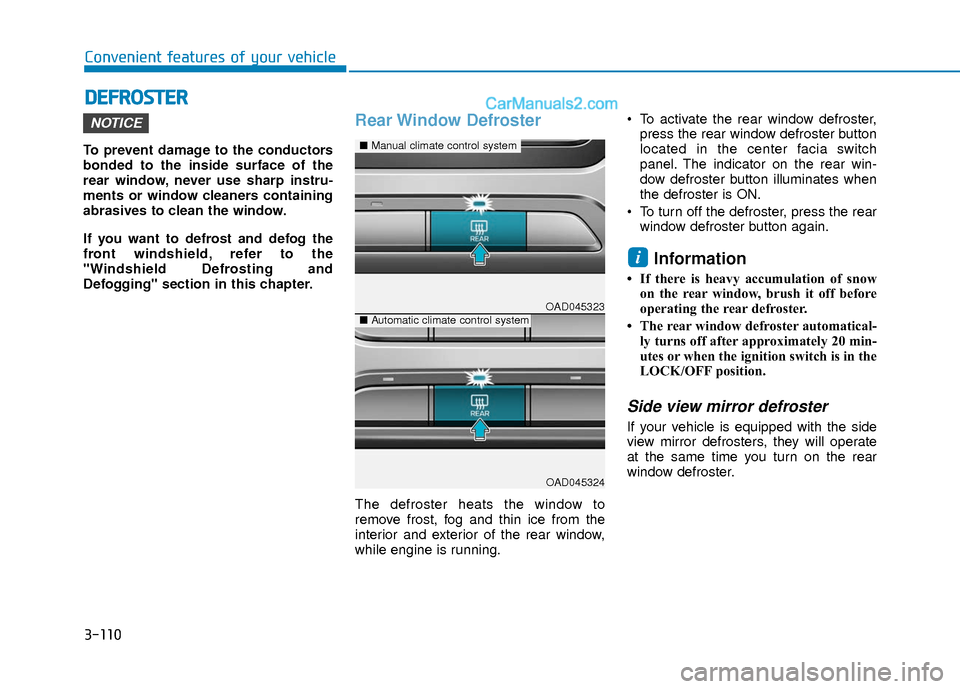
Rear Window Defroster
The defroster heats the window to
remove frost, fog and thin ice from the
interior and exterior of the rear window,
while engine is running. To activate the rear window defroster,
press the rear window defroster button
located in the center facia switch
panel. The indicator on the rear win-
dow defroster button illuminates when
the defroster is ON.
To turn off the defroster, press the rear window defroster button again.
Information
• If there is heavy accumulation of snowon the rear window, brush it off before
operating the rear defroster.
• The rear window defroster automatical- ly turns off after approximately 20 min-
utes or when the ignition switch is in the
LOCK/OFF position.
Side view mirror defroster
If your vehicle is equipped with the side
view mirror defrosters, they will operate
at the same time you turn on the rear
window defroster.
i
NOTICE
OAD045323
OAD045324
■ Manual climate control system
■Automatic climate control system
Page 211 of 526

3-134
Convenient features of your vehicle
Auto Defogging System (Only
for Automatic Climate Control
System, if equipped)
Auto defogging reduces the possibility of
fogging up the inside of the windshield by
automatically sensing the moisture of
inside the windshield.
The auto defogging system operates
when the heater or air conditioning is on.
Information
The auto defogging system may not oper-
ate normally, when the outside tempera-
ture is below 50 °F (-10 °C).When the Auto Defogging
System operates, the indica-
tor will illuminate.
If higher level of moisture are sensed in
the vehicle, the Auto Defogging System
will operate in the following order:
Step 1 : Outside air position
Step 2 : Operating the air conditioning
Step 3 : Blo wing air toward the wind-
shield
Step 4 : Increasing air flow toward the windshield
If the air conditioning is off or recirculated
air position is manually selected while
Auto Defogging System is ON, the Auto
Defogging System Indicator will blink 3
times to signal that the manual operation
has been canceled.
To cancel or reset the
Auto Defogging System
Press the front windshield defroster but-
ton for 3 seconds when the ignition
switch is in the ON position. When the
Auto Defogging System is canceled,
ADS OFF symbol will blink 3 times and
the ADS OFF will be displayed on the cli-
mate control information screen.
When the Auto Defogging System is
reset, ADS OFF symbol will blink 6 times
without a signal.
Information
• When the air conditioning is turned on by Auto defogging system, if you try to
turn off the air conditioning, the indica-
tor will blink 3 times and the air condi-
tioning will not be turned off.
• For efficiency, do not select recirculated air position while Auto defogging system
is operating.
• When Auto defogging mode is selected, fan speed, temperature and intake mode
which is adjusted manually are canceled
for better defogging result.
Do not remove the sensor cover locat-
ed on the upper end of the driver side
windshield glass.
Damage to system parts could occur
and may not be covered by your vehi-
cle warranty.
NOTICE
i
i
OAD045331
Page 215 of 526
3-138
Convenient features of your vehicle
I
IN
N T
TE
ER
R I
IO
O R
R
F
F E
E A
A T
TU
U R
RE
ES
S
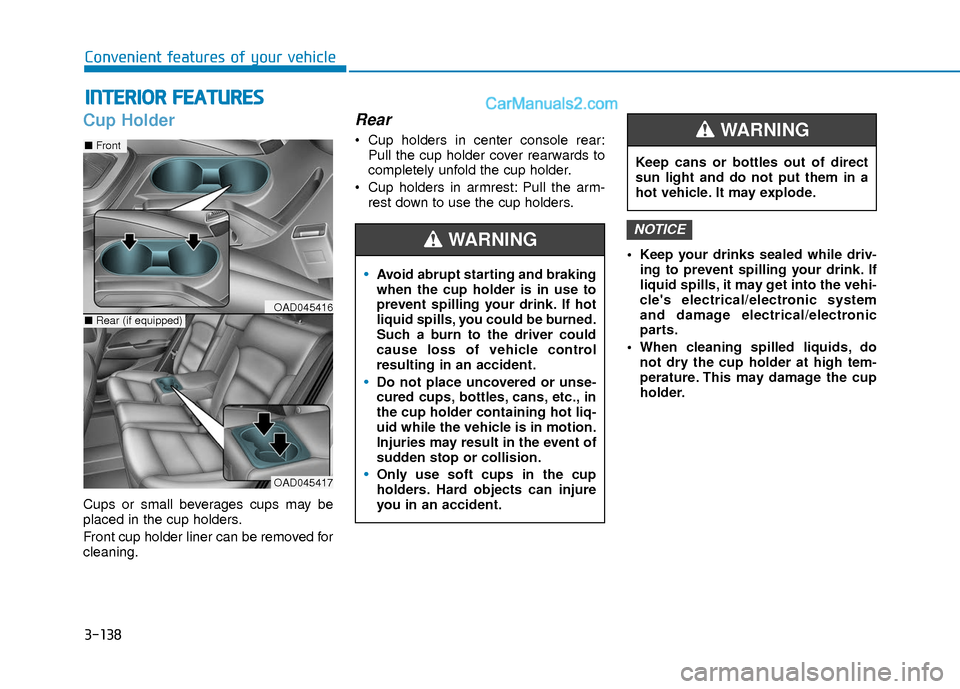
Cup Holder
Cups or small beverages cups may be
placed in the cup holders.
Front cup holder liner can be removed for
cleaning.
Rear
Cup holders in center console rear:
Pull the cup holder cover rearwards to
completely unfold the cup holder.
Cup holders in armrest: Pull the arm- rest down to use the cup holders.
Keep your drinks sealed while driv-ing to prevent spilling your drink. If
liquid spills, it may get into the vehi-
cle's electrical/electronic system
and damage electrical/electronic
parts.
When cleaning spilled liquids, do not dry the cup holder at high tem-
perature. This may damage the cup
holder.
NOTICE
Avoid abrupt starting and braking
when the cup holder is in use to
prevent spilling your drink. If hot
liquid spills, you could be burned.
Such a burn to the driver could
cause loss of vehicle control
resulting in an accident.
Do not place uncovered or unse-
cured cups, bottles, cans, etc., in
the cup holder containing hot liq-
uid while the vehicle is in motion.
Injuries may result in the event of
sudden stop or collision.
Only use soft cups in the cup
holders. Hard objects can injure
you in an accident.
WARNING
Keep cans or bottles out of direct
sun light and do not put them in a
hot vehicle. It may explode.
WARNING
OAD045417
■ Front
■Rear (if equipped)OAD045416
Page 217 of 526
3-140
Convenient features of your vehicle
To prevent damage to the Power
Outlets :
Use the power outlet only when theengine is running and remove the
accessory plug after use. Using the
accessory plug for prolonged peri-
ods of time with the engine off could
cause the battery to discharge.
Only use 12V electric accessories which are less than 180 W (Watts) in
electric capacity.
Adjust the air-conditioner or heater to the lowest operating level when
using the power outlet.
Close the cover when not in use. (Continued)(Continued)
Some electronic devices can cause
electronic interference when
plugged into a vehicle’s power out-
let. These devices may cause exces-
sive audio static and malfunctions
in other electronic systems or
devices used in your vehicle.
Push the plug in as far as it will go. If good contact is not made, the
plug may overheat and the fuse may
open.
Plug in battery equipped electri- cal/electronic devices with reverse
current protection. The current from
the battery may flow into the vehi-
cle's electrical/electronic system
and cause system malfunction.
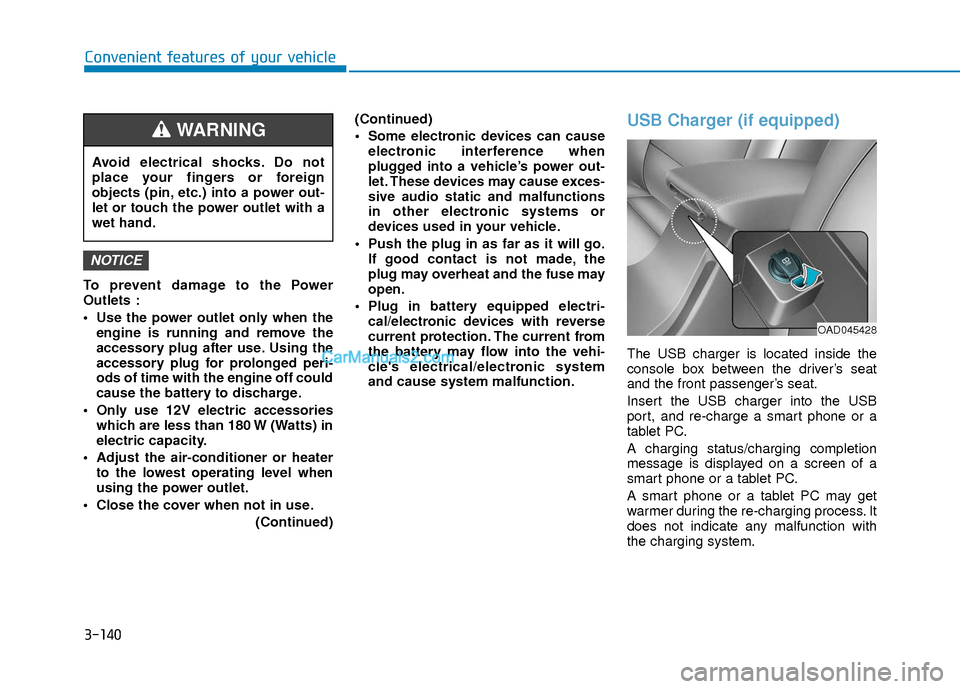
USB Charger (if equipped)
The USB charger is located inside the
console box between the driver’s seat
and the front passenger’s seat.
Insert the USB charger into the USB
port, and re-charge a smart phone or a
tablet PC.
A charging status/charging completion
message is displayed on a screen of a
smart phone or a tablet PC.
A smart phone or a tablet PC may get
warmer during the re-charging process. It
does not indicate any malfunction with
the charging system.
NOTICE
Avoid electrical shocks. Do not
place your fingers or foreign
objects (pin, etc.) into a power out-
let or touch the power outlet with a
wet hand.
WARNING
OAD045428
Page 222 of 526

4-3
Multimedia System
4
Do not clean the inside of the rearglass window with a cleaner or
scraper to remove foreign deposits
as this may cause damage to the
antenna elements.
Avoid adding metallic coatings to the rear glass window. These can
degrade AM and FM broadcast sig-
nals.
Steering Wheel Audio Control
Do not operate multiple audio remote
control buttons simultaneously.
VOLUME (VOL + / - ) (1)
Press the VOLUME switch up toincrease volume.
Press the VOLUME switch down to decrease volume.
SEEK/PRESET ( / ) (2)
If the SEEK/PRESET switch is pressed
up or down and held for 0.8 second or
more, it will function in the following
modes:
RADIO mode
It will function as the AUTO SEEK select
button. It will SEEK until you release the
button.
MEDIA mode
It will function as the FF/RW button.
If the SEEK/PRESET switch is pressed
up or down, it will function in the following
modes:
RADIO mode
It will function as the PRESET STATION
UP/DOWN button.
MEDIA mode
It will function as the TRACK UP/ DOWN
button.
NOTICE
NOTICE
OAD045446N