2018 Hyundai Elantra Head lamp
[x] Cancel search: Head lampPage 179 of 526

3-102
Convenient features of your vehicle
Turn signals and lane changesignals
To signal a turn, push down on the lever
for a left turn or up for a right turn in posi-
tion (A).
If an indicator stays on and does not
flash or if it flashes abnormally, one of the
turn signal bulbs may be burned out and
will require replacement.
Onetouch turn signal function
To activate the One Touch Turn Signal
function, push the turn signal lever up or
down to position (B) and then release it.
The lane change signals will blink 3, 5 or
7 times.
(Continued)
When driving on a narrow curved
road or rough road.
When driving downhill or uphill.
When only part of the vehicle in
front is visible on a crossroad or
curved road.
When there is a traffic light,
reflecting sign, flashing sign or
mirror.
When the road conditions are
bad such as being wet or covered
with snow.
When the front vehicle's head-
lamps are off but the fog lamps
on.
When a vehicle suddenly appears
from a curve.
When the vehicle is tilted from a
flat tire or being towed.
When the LDWS (Lane Departure
Warning System) warning light
illuminates. (if equipped)
OLF044091N
Do not place any accessories,
stickers or tint on the windshield.
Have the windshield glass
replaced from an authorized deal-
er.
Do not remove or impact related
parts of the Smart High Beam
system.
Be careful that water doesn't get
into the Smart High Beam unit.
Do not place objects on the dash-
board that reflects light such as
mirrors, white paper, etc. The sys-
tem may malfunction if sunlight
is reflected.
At times, the Smart High Beam
system may not work properly,
always check the road conditions
for your safety. When the system
does not operate normally, manu-
ally change between the high
beam and low beam.
WARNING
Page 180 of 526

3-103
Convenient features of your vehicle
3
You can activate or deactivate the One
Touch Turn Signal function or choose the
number of blinking (3, 5, or 7) from the
User Settings Mode (Light) on the LCD
display.
For more information, refer to the
"LCD Display" section in this chapter.
Battery saver function
The purpose of this feature is to prevent
the battery from being discharged. The
system automatically turns off the park-
ing lamp when the key is removed
(remote key) or when the driver turns the
engine off (smart key) and opens the
driver-side door.
With this feature, the parking lamps will
turn off automatically if the driver parks
on the side of road at night.
If necessary, to keep the lamps on when
the engine is turned off, perform the fol-
lowing:
1) Open the driver-side door.
2) Turn the parking lamps OFF and ONagain using the light switch on the
steering column.
Headlamp delay function (if equipped)
If the key is removed from the ignition
switch or placed in the ACC position or
the LOCK/OFF position with the head-
lamps ON, the headlamps (and/or park-
ing lamps) remain on for about 5 min-
utes. However, if the driver’s door is
opened and closed, the headlights are
turned off after 15 seconds. Also, with the
engine off if the driver's door is opened
and closed, the headlamps (and/or park-
ing lamps) are turned off after 15 sec-
onds.
The headlamps (and/or parking lamps)
can be turned off by pressing the lock
button on the remote key or smart key
twice or turning the light switch to the
OFF or AUTO position.
You can activate or deactivate the
Headlamp Delay function from the User
Settings Mode (Light) on the LCD dis-
play.
For more information, refer to the
"LCD Display" section in this chapter. If the driver gets out of the vehicle
through other doors (except driver’s
door), the battery saver function does
not operate and the headlamp delay
function does not turn off automati-
cally. Therefore, It causes the battery
to be discharged. In this case, make
sure to turn off the lamp before get-
ting out of the vehicle.
NOTICE
Page 181 of 526

3-104
Convenient features of your vehicle
AFLS (Adaptive Front LightingSystem) a.k.a. DBL (DynamicBending Light) (if equipped)
Adaptive front lighting system uses the
steering angle and vehicle speed, to
keep your field of vision wide by swiveling
and leveling the headlamp.
Change the switch to the AUTO position
when the engine is running. The adaptive
front lighting system will operate when
the headlamp is ON. To turn off the
AFLS, change the switch to other posi-
tions. After turning the AFLS off, head-
lamp swiveling no longer occurs, but lev-
eling operates continuously.
If the AFLS malfunction indicator comes
on, the AFLS is not working properly. Drive to the nearest safe location and
restart the engine. If the indicator contin-
uously remains on, we recommend that
the system be checked by an authorized
HYUNDAI dealer.
Interior Lights
Do not use the interior lights for
extended periods when the engine is
turned off or the battery will dis-
charge.
Interior lamp AUTO cut
The interior lamps will automatically go
off approximately 20 minutes after the
engine is turned off and the doors
closed. If a door is opened, the lamp will
go off 40 minutes after the engine is
turned off. If the doors are locked by the
remote key or smart key and the vehicle
enters the armed stage of the theft alarm
system, the lamps will go off five seconds
later.
NOTICE
OAD045436N
Do not use the interior lights when
driving in the dark. The interior
lights may obscure your view and
cause an accident.
WARNING
Page 184 of 526

3-107
Convenient features of your vehicle
3
Welcome System (if equipped)
Welcome light
Door handle lamp (if equipped)
When all the doors (and trunk) are
closed and locked, the door handle lamp
will come on for about 15 seconds if any
of the below is performed.
When the door unlock button ispressed on the remote key or smart
key.
When the button of the outside door handle is pressed.
When the vehicle is approached with the smart key in possession.
Headlamp and Parking lamp
When the headlamp (with the lamp
switch in the headlamp or AUTO posi-
tion) is on and all doors (and trunk) are
locked and closed, the parking lamp and
headlamp will come on for 15 seconds
if/or any of the below is performed.
When the door unlock button ispressed on the remote key or smart
key.
At this time, if you press the door lock or
unlock button on the remote key or smart
key the parking lamp and headlamp will
turn off immediately.
You can activate or deactivate the
Welcome Light from the User Settings
Mode (Light) on the LCD display.
For more information, refer to the
"LCD Display" section in this chapter.
Interior lamp
When the interior lamp switch is in the
DOOR position and all doors (and trunk)
are closed and locked, the room lamp will
come on for 30 seconds if any of the
below is performed.
When the door unlock button is pressed on the remote key or smart
key.
When the button of the outside door handle is pressed.
At this time, if you press the door lock or
unlock button on the remote key or smart
key the room lamp will turn off immedi-
ately.
OAD045434L
Page 221 of 526
4-2
Multimedia System
• If you install an aftermarket HIDhead lamp, your vehicle's audio and
electronic devices may not function
properly.
Prevent chemicals such as perfume, cosmetic oil, sun cream, hand
cleaner, and air freshener from con-
tacting the interior parts because
they may cause damage or discol-
oration.
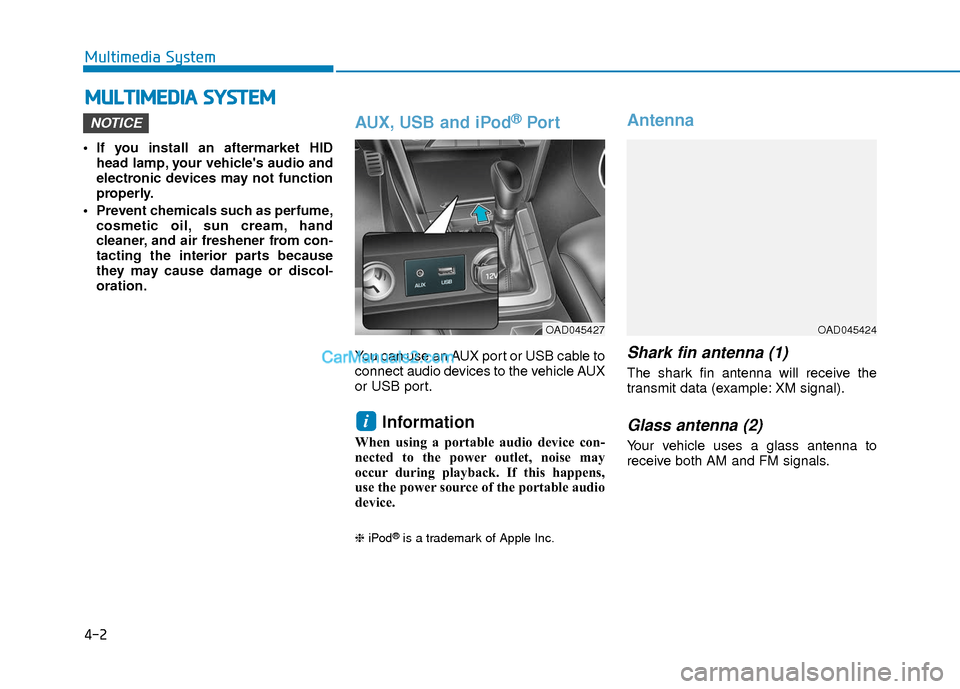
AUX, USB and iPod®Por t
You can use an AUX port or USB cable to
connect audio devices to the vehicle AUX
or USB port.
Information
When using a portable audio device con-
nected to the power outlet, noise may
occur during playback. If this happens,
use the power source of the portable audio
device.
❈ iPod®is a trademark of Apple Inc.
Antenna
Shark fin antenna (1)
The shark fin antenna will receive the
transmit data (example: XM signal).
Glass antenna (2)
Your vehicle uses a glass antenna to
receive both AM and FM signals.
i
NOTICE
M MU
UL
LT
T I
IM
M E
ED
D I
IA
A
S
S Y
Y S
ST
T E
EM
M
OAD045427OAD045424
Page 349 of 526

5-66
Driving your vehicle
The LKAS system will not be in the
ENABLED state and the steering
wheel will not be assisted when:
Vehicle speed is below 40 mph (60 km/h) and over 110 mph (180
km/h).
Only one lane line is detected.
The turn signal is turned on before changing a lane. If you change lanes
without the turn signal on, the steering
wheel might be controlled.
The hazard warning flasher is on.
The width of the lane is below 10 feet (3.1 m) and over 15 feet (4.5
m).
ESC (Electronic Stability Control) is activated.
The vehicle is driven on a sharp curve.
The vehicle brakes suddenly.
The vehicle makes sharp lane changes.
Information
When the system is turned on or right
after changing a lane, drive in the middle
of the lane. If not, the system will not pro-
vide steering assist function.
Limitations of the System
The LKAS may operate prematurely
even if the vehicle does not depart from
the intended lane, OR, the LKAS may not
warn you if the vehicle leaves the intend-
ed lane under the following circum-
stances:
The lanes ahead are not visible due torain, snow, water on the road, dam-
aged or stained road surface, or other
factors.
The brightness outside changes sud- denly such as when entering or exiting
a tunnel.
The brightness outside is too low such as when the headlamps are not on at
night or the vehicle is going through a
tunnel.
It is difficult to distinguish the lane marking from the road surface or the
lane marking is faded or not clearly
marked.
Driving on a steep grade, over a hill, or when driving on a curved road.
When light coming from a street light or an oncoming vehicle is reflected on a
wet road surface such as a puddle in
the road.
The windshield or the LKAS camera lens is blocked with dirt or debris. The field of view in front is obstructed
by sun glare.
The lanes are incomplete or the area is in a construction zone.
There are more than two lane lines on the road in front of you.
The lane markings are not clearly visi- ble from the road.
The lane width is too wide or too nar- row. See previous page.
The windshield glass is fogged up; a clear view of the road is obstructed.
There are markings on the road sur- face that look like a lane line that is
inadvertently being detected by the
camera.
There is a boundary structure in the roadway such as a concrete barrier,
guardrail and reflector post that is
inadvertently being detected by the
camera.
There is not enough distance between you and the vehicle in front to be able
to detect the lane line or the vehicle
ahead is driving on the lane line.
The adverse road conditions cause excessive vehicle vibrations while driv-
ing.
i
Page 371 of 526

5-88
Driving your vehicle
If you are still stuck after rocking the
vehicle a few times, have the vehicle
pulled out by a tow vehicle to avoid
engine overheating, possible damage
to the transmission, and tire damage.
See "Towing" in chapter 6.
Smooth Cornering
Avoid braking or gear changing in cor-
ners, especially when roads are wet.
Ideally, corners should always be taken
under gentle acceleration.
Driving at Night
Night driving presents more hazards
than driving in the daylight. Here are
some important tips to remember:
Slow down and keep more distancebetween you and other vehicles, as it
may be more difficult to see at night,
especially in areas where there may
not be any street lights.
Adjust your mirrors to reduce the glare from other driver's headlamps.
Keep your headlamps clean and prop- erly aimed. Dirty or improperly aimed
headlamps will make it much more dif-
ficult to see at night.
Avoid staring directly at the headlamps of oncoming vehicles. You could be
temporarily blinded, and it will take
several seconds for your eyes to read-
just to the darkness.
Driving in the Rain
Rain and wet roads can make driving
dangerous. Here are a few things to con-
sider when driving in the rain or on slick
pavement:
Slow down and allow extra followingdistance. A heavy rainfall makes it
harder to see and increases the dis-
tance needed to stop your vehicle.
Turn OFF your Cruise Control.
Replace your windshield wiper blades when they show signs of streaking or
missing areas on the windshield.
Tires should be properly maintained with at least 2/32nds of an inch of tread
depth. If your tires do not have enough
tread, making a quick stop on wet
pavement can cause a skid and possi-
bly lead to an accident. See "Tire
Tread" in chapter 7.
Turn on your headlamps to make it easier for others to see you.
Driving too fast through large puddles can affect your brakes. If you must go
through puddles, try to drive through
them slowly.
If you believe your brakes may be wet, apply them lightly while driving until
normal braking operation returns.
NOTICE
Page 420 of 526

7
Tires and Wheels .................................................7-33
Tire Care ........................................................................\
....7-33
Recommended Cold Tire Inflation Pressures ...........7-34
Check Tire Inflation Pressure ......................................7-35
Tire Rotation...................................................................\
..7-36
Wheel Alignment and Tire Balance ............................7-37
Tire Replacement ............................................................7-37
Wheel Replacement ........................................................7-38
Tire Traction .....................................................................7-3\
8
Tire Maintenance ............................................................7-39
Tire Sidewall Labeling ....................................................7-39
Tire Terminology and Definitions................................7-43
All Season Tires ...............................................................7-46
Summer Tires ...................................................................7-46
Snow Tires ........................................................................\
7-46
Radial-Ply Tires ...............................................................7-46
Low Aspect Ratio Tires..................................................7-47
Fuses ......................................................................7-\
48
Instrument Panel Fuse Replacement..........................7-49
Engine Compartment Panel Fuse Replacement.......7-50
Fuse/Relay Panel Description ......................................7-53
Light Bulbs ............................................................7-59
Headlamp, Parking Lamp,
Turn Signal Lamp and Side Marker ............................7-59
Side Repeater Lamp Replacement ..............................7-70
Rear Combination Light Bulb Replacement ..............7-70
High Mounted Stop Light Replacement ....................7-74
License Plate Light Bulb Replacement ......................7-74
Interior Light Bulb Replacement .................................7-75
Appearance Care..................................................7-76
Exterior Care ....................................................................7-76\
Interior Care .....................................................................7-8\
0
Emission Control System ....................................7-83
Crankcase Emission Control System ..........................7-83
Evaporative Emission Control System Including
Onboard Refueling Vapor Recovery (ORVR)............7-83
Exhaust Emission Control System ..............................7-84
California Perchlorate Notice.............................7-86