Page 4 of 623

Contents
This owner’s manual should be considered a permanent part of the
vehicle and should remain with the vehicle when it is sold.
This owner’s manual covers all models of your vehicle. You may find
descriptions of equipment and features that are not on your
particular model.
Images throughout this owner’s manual (including the front cover)
represent features and equipment that are available on some, but
not all, models. Your particular mo del may not have some of these
features.
This owner’s manual is for vehicles sold in the United States and
Canada.
The information and specifications in cluded in this publication were
in effect at the time of approval for printing. Honda Motor Co., Ltd.
reserves the right, however, to discontinue or change specifications
or design at any time without notice and without incurring any
obligation.2 Safe Driving P. 29
For Safe Driving P. 30 Seat Belts P. 35 Airbags P. 42
2Instrument Panel P. 73
Indicators P. 74 Gauges and Multi-Information Display P. 103
2Controls P. 109
Clock P. 110 Locking and Unlocking the Doors P. 111
Security System P. 133 Opening and Closing the Windows P. 136
Adjusting the Mirrors P. 161 Adjusting the Seats P. 163
Heating and Cooling System
* P. 195
2 Features P. 199
Audio System P. 200
General Information on the Audio System P. 298
HomeLink ® Universal Transceiver
* P. 348 Bluetooth ® HandsFreeLink ® P. 351, 376
2 Driving P. 409
Before Driving P. 410 Towing a Trailer P. 418
Parking Your Vehicle P. 501Multi-View Rear Camera P. 510
2Maintenance P. 517
Before Performing Maintenance P. 518 Maintenance MinderTM P. 521
Checking and Maintaining Wiper Blades P. 543
Heating and Cooling System
*/Climate Control System* Maintenance P. 556
2 Handling the Unexpected P. 565
Tools P. 566 If a Tire Goes Flat P. 567
Overheating P. 583 Indicator, Coming On/Blinking P. 585
When You Cannot Unlock the Fuel Fill Door P. 595
2 Information P. 599
Specifications P. 600 Identification Numbers P. 602
Emissions Testing P. 605 Warranty Coverages P. 607
Page 22 of 623
20
Quick Reference Guide
Driving (P409)
Release Button
Depress the brake pedal and press the
release button to move out of
( P.
Move the shift lever without pressing
the release button.
Press the release button to move the
shift lever.
Automatic Transmission (P440)
● Shift to
(P and depress the brake pedal when starting the engine.
● Shifting
Park
Turn off or start the engine.
Transmission is locked.
Reverse
Used when reversing.
Neutral
Transmission is not locked.
Drive
Normal driving.
Shift Lever
Intelligent Traction
Management ButtonLow●Strong engine power wh en climbing and strong
engine braking when going down steep hills.
Drive (D4)
Press the button while the shift lever is in
( D.
Used when:
●Going up or down hills.●Towing a trailer in hilly terrain.
D4
ButtonD4
Page 80 of 623
78
uuIndicators u
Instrument Panel
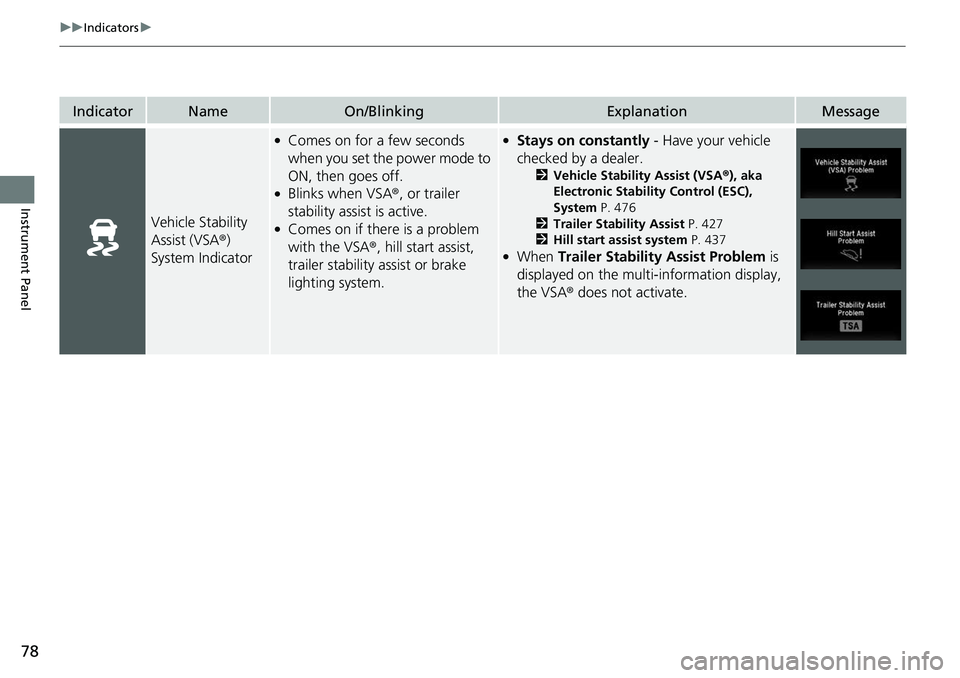
IndicatorNameOn/BlinkingExplanationMessage
Vehicle Stability
Assist (VSA ®)
System Indicator
●Comes on for a few seconds
when you set the power mode to
ON, then goes off.
●Blinks when VSA ®, or trailer
stability assist is active.
●Comes on if there is a problem
with the VSA ®, hill start assist,
trailer stability assist or brake
lighting system.
●Stays on constantly - Have your vehicle
checked by a dealer.
2 Vehicle Stability Assist (VSA ®), aka
Electronic Stability Control (ESC),
System P. 476
2 Trailer Stability Assist P. 427
2 Hill start assist system P. 437
●When Trailer Stability Assist Problem is
displayed on the multi-information display,
the VSA ® does not activate.
Page 411 of 623

409
Driving
This chapter discusses driving and refueling.
Before Driving................................... 410
Towing a Trailer ................................ 418
Off-Highway Driving Guidelines ..... 430
When Driving Starting the Engine .......................... 432
Precautions While Driving................. 438
Automatic Transmission ................... 439
Shifting ............................................ 440
ECON Button ................................... 442
Intelligent Traction Management...... 443
Cruise Control
*................................ 445
Front Sensor Camera*...................... 448Road Departure Mi tigation (RDM)
System*...................................... 450
Adaptive Cruise Control (ACC)*....... 455
Lane Keeping Assist System (LKAS)*.... 468Vehicle Stability Assist (VSA ®), aka Electronic
Stability Control (ESC), System ............. 476
Agile Handling Assist ....................... 478
i-VTM4 (Intelligent Variable Torque
Management)-4 ® System
*.............. 479
TPMS with Tire Fill Assist .................. 480
Tire Pressure Monitoring System (TPMS) -
Required Federal Explanation ......... 482
Blind spot inform ation (BSI) System
*.... 484
LaneWatchTM*.................................. 486 Braking
Brake System ................................... 488
Anti-lock Brake System (ABS) ........... 490
Brake Assist System ......................... 491
Collision Mitigation Braking System
TM
(CMBSTM)*..................................... 492
Parking Your Vehicle When Stopped ................................ 501
Parking Sensor System
*................... 502
Cross Traffic Monitor*..................... 506
Multi-View Rear Camera .................. 510
Refueling Fuel Information .............................. 512
How to Refuel ................................. 513
Fuel Economy and CO
2 Emissions .... 515
* Not available on all models
Page 413 of 623
Continued411
uuBefore Driving uDriving Preparation
Driving
• Store or secure all items on board properly.
u Carrying too much cargo, or improperly storing it, can affect your vehicle’s
handling, stability, sto pping distance, and tires, and make it unsafe.
2Maximum Load Limit P. 413
•Do not pile items higher than the seat height.
u They can block your view and may be thrown forward in the event of sudden
braking.
• Do not place anything in the front seat footwells. Make sure to secure the floor
mat.
u An object or unsecured floor mat can in terfere with your brake and accelerator
pedal operation while driving.
• If you have any animals on board, do no t let them move around in the vehicle.
u They may interfere with driv ing and a crash could occur.
• Securely close and lock all doors.
2Locking/Unlocking the Doors from the Inside P. 121
•Adjust your seating position properly.
u Adjust the head restraint, too.
2Adjusting the Seats P. 163
2 Adjusting the front head restraint positions P. 168
•Adjust the mirrors and steering wh eel properly for your driving.
u Adjust them while sitting in the proper driving position.
2 Adjusting the Steering Wheel P. 160
2 Adjusting the Mirrors P. 161
■Interior Checks1Interior Checks
The headlight aim is set by the factory, and does not
need to be adjusted. Howeve r, if you regularly carry
heavy items in the cargo area or tow a trailer, have
the aiming readjusted at a dealer or by a qualified
technician.
Page 415 of 623
413
uuBefore Driving uMaximum Load Limit
Continued
Driving
Maximum Load Limit
The maximum load for your ve hicle is 1,444 lbs (655 kg).
The maximum load for your ve hicle is 1,543 lbs (700 kg).
The maximum load for your ve hicle is 1,477 lbs (670 kg).
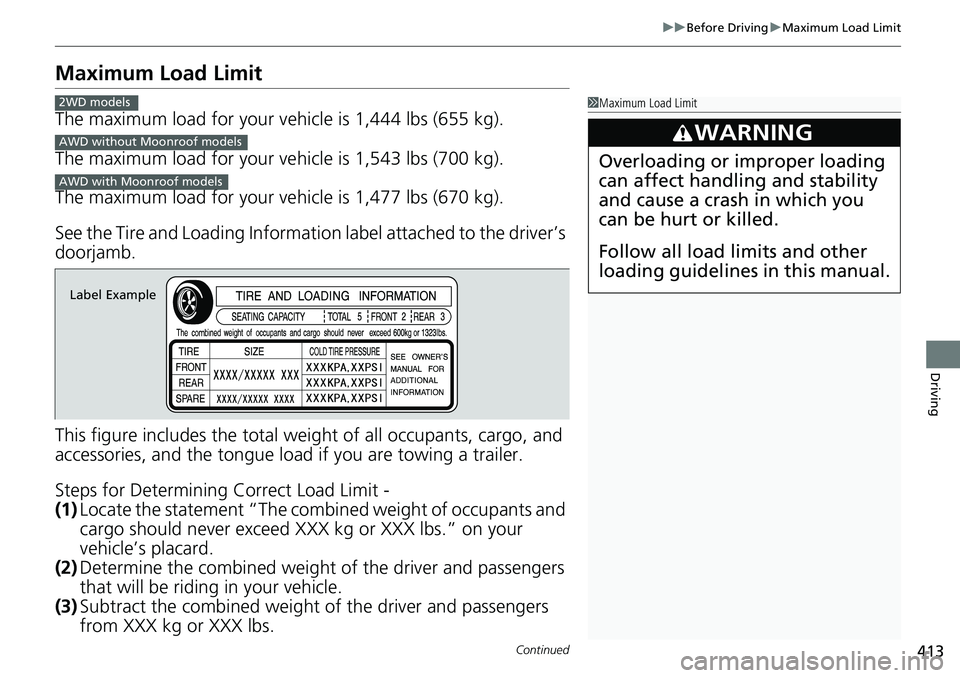
See the Tire and Loading Informatio n label attached to the driver’s
doorjamb.
This figure includes the total weig ht of all occupants, cargo, and
accessories, and the tongue load if you are towing a trailer.
Steps for Determining Correct Load Limit -
(1) Locate the statement “The comb ined weight of occupants and
cargo should never exceed XXX kg or XXX lbs.” on your
vehicle’s placard.
(2) Determine the combined weight of the driver and passengers
that will be riding in your vehicle.
(3) Subtract the combined weight of the driver and passengers
from XXX kg or XXX lbs.
1Maximum Load Limit
3WARNING
Overloading or improper loading
can affect handling and stability
and cause a crash in which you
can be hurt or killed.
Follow all load limits and other
loading guidelines in this manual.
2WD models
AWD without Moonroof models
AWD with Moonroof models
Label Example
Page 416 of 623
uuBefore Driving uMaximum Load Limit
414
Driving
(4) The resulting figure equals the available amount of cargo and
luggage load capacity. For example, if the “XXX” amount
equals 1,400 lbs. and there will be five 150 lb. passengers in
your vehicle, the amount of av ailable cargo and luggage load
capacity is 650 lbs. (1,400 - 750 (5 x 150) = 650 lbs.)
(5) Determine the combined weight of luggage and cargo being
loaded on the vehicle. That we ight may not safely exceed the
available cargo and luggage load capacity calculated in step 4.
(6) If your vehicle will be towing a tra iler, load from your trailer will
be transferred to your vehicl e. Consult this manual to
determine how this reduces th e available cargo and luggage
load capacity of your vehicle.1 Maximum Load Limit
Gross Vehicle Weight Rating (GVWR):
The maximum allowable weight of the vehicle, all
occupants, all a ccessories, all cargo, and the tongue
load. 2 Specifications P. 600
Gross Axle Weight Rating (GAWR):
The maximum allowable weight of the vehicle axle. 2 Specifications P. 600
3WARNING
Never let passengers ride in the
pickup bed, in the trunk space, or
on the bed rails. This could cause
very serious injuries or death. No
one should ride in any position on
your vehicle that is not equipped
with seats and seat belts.
Exceeding load limits or
improperly loading cargo on the
vehicle can cause a crash in which
you can be seriously injured or
killed.
Load the cargo carefully before
starting to drive.
Page 417 of 623
415
uuBefore Driving uMaximum Load Limit
Driving
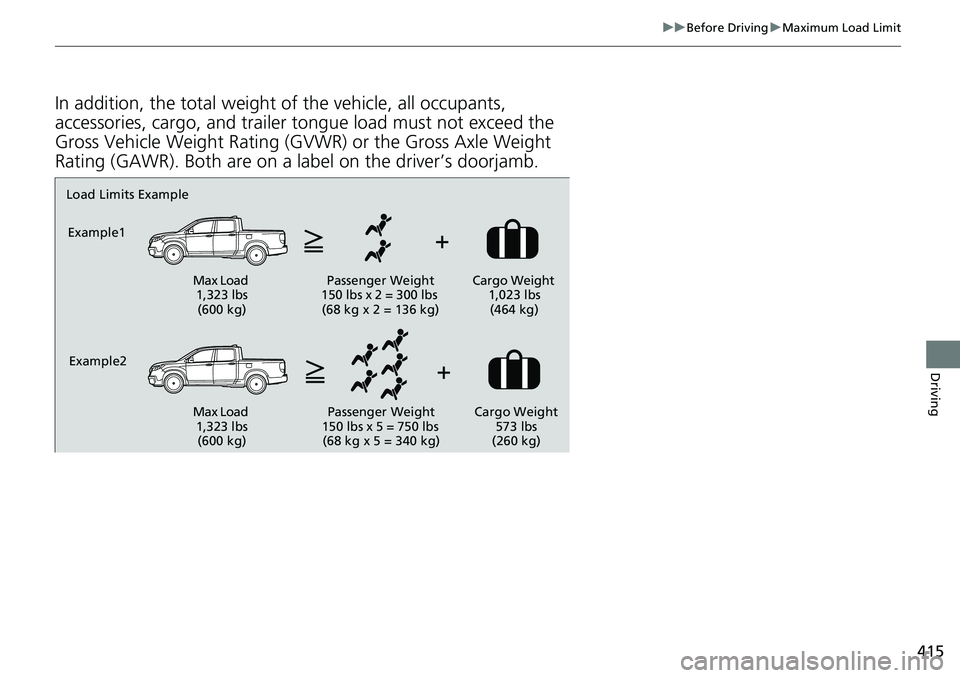
In addition, the total weight of the vehicle, all occupants,
accessories, cargo, and trailer tongue load must not exceed the
Gross Vehicle Weight Rating (GVWR) or the Gross Axle Weight
Rating (GAWR). Both are on a label on the driver’s doorjamb.
Load Limits Example
Example1
Max Load 1,323 lbs (600 kg) Passenger Weight
150 lbs x 2 = 300 lbs (68 kg x 2 = 136 kg) Cargo Weight
1,023 lbs (464 kg)
Example2 Max Load 1,323 lbs (600 kg) Passenger Weight
150 lbs x 5 = 750 lbs (68 kg x 5 = 340 kg) Cargo Weight
573 lbs
(260 kg)