Page 687 of 763
685Continued
Maintenance
Remote Control and Wireless Headphone Care*
Replacing the Battery
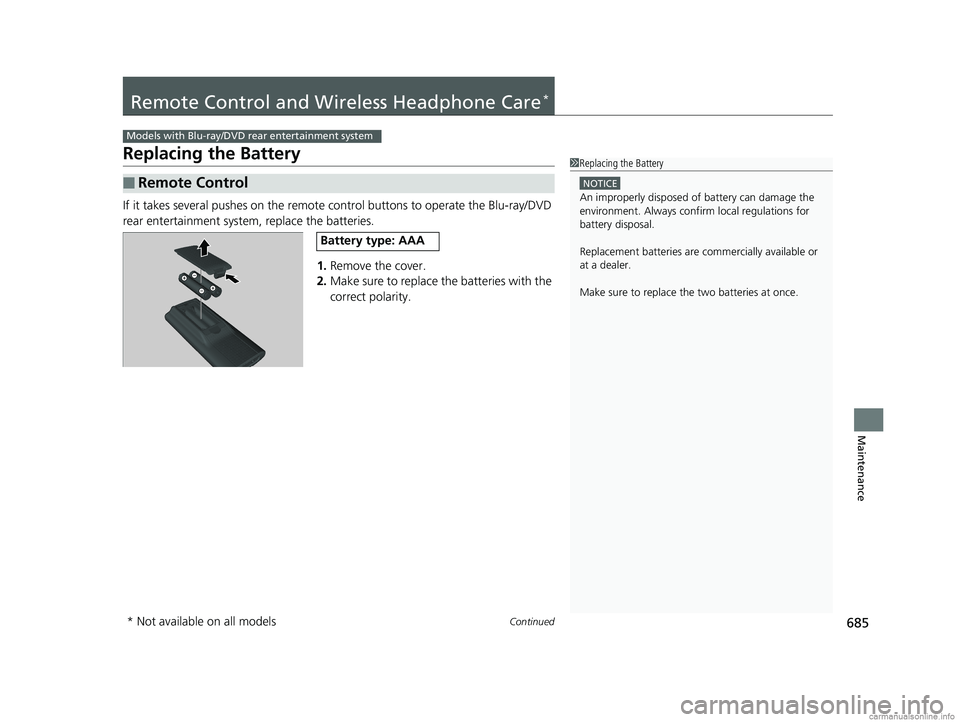
If it takes several pushes on the remote control buttons to operate the Blu-ray/DVD
rear entertainment system, replace the batteries.
1.Remove the cover.
2. Make sure to replace the batteries with the
correct polarity.
■Remote Control
Models with Blu-ray/DVD rear entertainment system
1Replacing the Battery
NOTICE
An improperly disposed of battery can damage the
environment. Always conf irm local regulations for
battery disposal.
Replacement batteries are commercially available or
at a dealer.
Make sure to replace the two batteries at once.
Battery type: AAA
* Not available on all models
18 US ODYSSEY-31THR6010.book 685 ページ 2018年12月6日 木曜日 午後4時18分
Page 688 of 763
686
uuRemote Control and Wireless Headphone Care*uReplacing the Battery
Maintenance
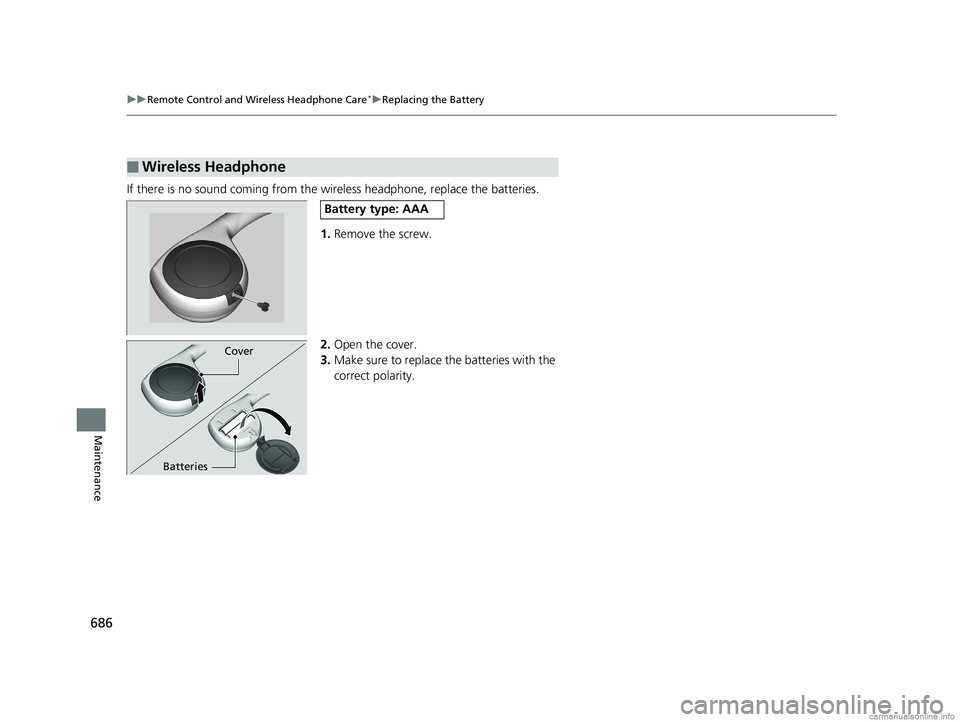
If there is no sound coming from the wireless headphone, replace the batteries.
1. Remove the screw.
2. Open the cover.
3. Make sure to replace the batteries with the
correct polarity.
■Wireless Headphone
Battery type: AAA
Cover
Batteries
18 US ODYSSEY-31THR6010.book 686 ページ 2018年12月6日 木曜日 午後4時18分
Page 694 of 763
uuCleaning uExterior Care
692
Maintenance
A good coat of automotive body wax helps protect your vehicle’s paint from the
elements. Wax will wear off over time and expose your vehicle’s paint to the
elements, so reapply as necessary.
If you get gasoline, oil, engine coolant, or battery fluid on resin coated parts, they
may be stained or the coating may peel. Prom ptly wipe it away using a soft cloth and
clean water.
Wipe using a glass cleaner.
Aluminum is susceptible to deterioration caused by salt and other road
contaminants. When necessary, as early as possible use a sponge and mild detergent
to wipe away these contaminants. Do no t use a stiff brush or harsh chemicals
(including some commercial wheel cleaners). These can damage the protective finish
on aluminum alloy wheels, resulting in corrosion. Depending on the type of finish,
the wheels also may lose their luster or appear burnished. To avoid water stains,
wipe the wheels dry with a cloth while they are still wet.
■Applying Wax
■Maintaining the Bumpers and Other Resin Coated Parts
■Cleaning the Window
■Maintaining Aluminum Wheels
1 Applying Wax
NOTICE
Chemical solvents and st rong cleaners can damage
the paint, metal, and plasti c on your vehicle. Wipe
away spills immediately.
1 Maintaining the Bumpers an d Other Resin Coated Parts
Ask a dealer about the corr ect coating material when
you want to repair the pa inted surface of the parts
made of resin.
18 US ODYSSEY-31THR6010.book 692 ページ 2018年12月6日 木曜日 午後4時18分
Page 697 of 763

695
uuAccessories and Modifications uModifications
Maintenance
Modifications
Do not modify your vehicle in a manner that may affect its handling, stability, or
reliability, or install non-genuine Honda pa rts or accessories that may have a similar
effect.
Even minor modifications to vehicle systems can affect overall vehicle performance.
Always make sure all equipment is properly installed and maintained, and do not
make any modification to your vehicle or its systems that might cause your vehicle
to no longer meet federal, state, pr ovince, territory, and local regulations.
The on-board diagnostic port (OBD-II/J2534 connector) installed on this vehicle is
intended to be used only with automobile system diagnostic devices. Use of any
other type of device may adversely affect the vehicle’s electronic systems or allow
them to be compromised, and could result in a system malfunction, drained battery,
or other unexpected problems.
Do not modify or attempt to repair any of the electrical components.
18 US ODYSSEY-31THR6010.book 695 ページ 2018年12月6日 木曜日 午後4時18分
Page 699 of 763

697
Handling the Unexpected
This chapter explains how to handle unexpected troubles.
ToolsTypes of Tools .................................. 698
If a Tire Goes Flat Changing a Flat Tire ......................... 699
Engine Does Not Start Checking the Engine ........................ 708
If the Remote Battery is Weak .......... 709
Emergency Engine Stop ................... 710
Jump Starting .................................... 711
Overheating How to Handle Overheating ............. 713
Indicator, Coming On/Blinking
If the Low Oil Pressure Symbol Appears... 716
If the Charging System Indicator Comes On ................................................. 716
If the Malfunction Indicator Lamp Comes
On or Blinks ................................... 717
If the Brake System Indicator (Red) Comes On or Blinks ................................... 718
If the Brake System Indicator (Red) Comes On or Blinks at the Same Time When the Brake
System Indicator (Amber) Comes On ..... 719
If the Electric Power Steering (EPS) System Indicator Comes On ....................... 720
If the Low Tire Pressure/TPMS Indicator
Comes On or Blinks........................ 720 If the Transmission System Indicator Blinks
along with the Warning Message... 721
Fuses
Fuse Locations ................................. 722
Inspecting and Changing Fuses ........ 728
Emergency Towing ........................... 729
When You Cannot Unlock the Fuel Fill Door ................................................. 730When You Cannot Open the Tailgate..... 731When You Cannot Close the Power
Sliding Doors*................................. 733
Refueling
Refueling From a Portable Fuel Container .... 734
* Not available on all models
18 US ODYSSEY-31THR6010.book 697 ページ 2018年12月6日 木曜日 午後4時18分
Page 710 of 763

708
Handling the Unexpected
Engine Does Not Start
Checking the Engine
If the engine does not start, check the starter.
Starter conditionChecklist
Starter doesn’t turn or turns
over slowly.
The battery may be dead. Check
each of the items on the right and
respond accordingly.Check for a message on the dr iver information interface.
• If the To Start, Hold Remote Near Start Button message appears
2If the Remote Battery is Weak P. 709
uMake sure the remote is in its operating range.
2 ENGINE START/STOP Button Operating Range P. 186
Check the brightness of the interior lights.
Turn on the interior lights and check the brightness.
• If the interior lights are dim or do not come on at all
2 Battery P. 682
•If the interior lights come on normally 2 Fuses P. 722
The starter turns over normally
but the engine doesn’t start.
There may be a problem with the
fuse. Check each of the items on
the right and resp ond accordingly. Review the engine start procedure.
Follow its instructions, and try to start the engine again.
2
Starting the Engine P. 536
Check the immobilizer system indicator.
When the immobilizer system indicator is blinking, the engine cannot be started.
2Immobilizer System P. 179
Check the fuel level.
There should be enough fuel in the tank.
2 Fuel Gauge P. 119
Check the fuses.
Check all fuses, or have the vehicle checked by a dealer.
2Inspecting and Changing Fuses P. 728
If the problem continues:
2Emergency Towing P. 729
1Checking the Engine
If you must start the vehi cle immediately, use an
assisting vehicle or booster battery to jump start it.
2 Jump Starting P. 711
18 US ODYSSEY-31THR6010.book 708 ページ 2018年12月6日 木曜日 午後4時18分
Page 711 of 763
709
uuEngine Does Not Start uIf the Remote Battery is Weak
Handling the Unexpected
If the Remote Battery is Weak
If the beeper sounds, the To Start, Hold Remote Near Start Button message
appears on the driver information interface, the ENGINE START/STOP button
flashes, and the engine won’t start. Start the engine as follows:
1.Touch the center of the ENGINE START/
STOP button with the H logo on the
remote while the ENGINE START/STOP
button is flashing. The buttons on the
remote should be facing you.
u The ENGINE START/STOP button
flashes for about 30 seconds.
2. Depress the brake pedal and press the
ENGINE START/STOP button within 10
seconds after the beeper sounds and the
ENGINE START/STOP button changes
from flashing to on.
u If you don’t depress the pedal, the mode
will change to ACCESSORY.
18 US ODYSSEY-31THR6010.book 709 ページ 2018年12月6日 木曜日 午後4時18分
Page 713 of 763

711Continued
Handling the Unexpected
Jump Starting
Turn off the power to electric devices, such as audio and lights. Turn off the engine,
then open the hood. 1.Connect the first jumper cable to your
vehicle’s battery + terminal.
2. Connect the other end of the first jumper
cable to the booster battery + terminal.
u Use a 12-volt booster battery only.
u When using an automotive battery
charger to boost your 12-volt battery,
select a lower charging voltage than 15-
volt. Check the charger manual for the
proper setting.
3. Connect the second jumper cable to the
booster battery - terminal.
4. Connect the other end of the second
jumper cable to the engine mounting bolt
as shown. Do not connect this jumper cable
to any other part.
5. If your vehicle is connected to another
vehicle, start the assisting vehicle’s engine
and increase its rpm slightly.
6. Attempt to start your ve hicle’s engine. If it
turns over slowly, check that the jumper
cables have good metal-to-metal contact.
■Jump Starting Procedure1 Jump Starting
Securely attach the jumper cables clips so that they
do not come off when the e ngine vibrates. Also be
careful not to tangle the ju mper cables or allow the
cable ends to touch each other while attaching or
detaching the jumper cables.
Battery performance degrades in cold conditions and
may prevent the engi ne from starting.
3WARNING
A battery can explode if you do not follow
the correct procedure, seriously injuring
anyone nearby.
Keep all sparks, open flames, and smoking
materials away from the battery.
Booster Battery
18 US ODYSSEY-31THR6010.book 711 ページ 2018年12月6日 木曜日 午後4時18分