2018 HONDA ODYSSEY ECU
[x] Cancel search: ECUPage 385 of 763
383
uuGeneral Information on the Audio System uHonda App License Agreement
Continued
Features
F. NO WARRANTY. You understand and agree that your use of the SOFTWARE and SERVICES are solely at your own risk and that you
will be solely responsible for any damage to your VEHICLE’s multimedia system or any other equipment or any loss of data that m ay result
from your use of the SOFTWARE or SERVICES. THE SOFTWARE AND SERVICES ARE PROVIDED ON AN “AS IS” AND “AS AVAILABLE” BASIS
WITHOUT ANY WARRANTY OF ANY KIND, EXPRESSED, IMPLIED OR STA TUTORY. WE SPECIFICALLY DISCLAIM ANY IMPLIED WARRANTIES
OF MERCHANTABILITY, FITNESS FOR A PARTICULAR PURPOSE, A ND NON-INFRINGEMENT. HONDA makes no warranties that the
SOFTWARE or SERVICES will meet your requirements, or that the SOFTWARE or SERVICES will be uninterrupted, timely, secure, non-
infringing or error free. You understand a nd agree that you are responsible for any an d all charges, costs or expenses associated with your
use of the SOFTWARE or SERVICES. Advice or information, whether oral or written, obtained by you from us or through the SOFTWAR E
or SERVICES are provided for informational purposes only and will not create any warranty not expressly made herein. You should not rely
on any such information or advice. We assume no liability or res ponsibility for any errors or omissions in the SOFTWARE or SERV ICES. We
do not make any warranty or representation that your use of the material displayed on, or obtained through, the SOFTWARE or SER VICES
is non-infringing of any rights of any third party. Any decision or action taken by you on the basis of information or content provided via
the application is at your sole discreti on and risk. HONDA and PROVIDERS are not res ponsible or liable for any such decision, or for the
accuracy, completeness, usefulness, or availability of any conten t or information displayed, transmitted, or otherwise made available via
the SOFTWARE or SERVICES. To the extent jurisdictions do not allow the exclusion of certain warranties, some of the above exclu sions may
not apply to you.
G. LIMITATIONS ON LIABILITY. You and HONDA are each waiving important rights.
1. Limitations on YOUR liability.
HONDA cannot recover from you any consequential, indirect, in cidental, or special damages, or attorney’s
fees in connection with your use of the SOFTWARE or HONDA SERVICES. HONDA WAIV ES TO THE FULLEST EXTENT ALLOWED BY LAW
ANY CLAIM FOR DAMAGES OTHER THAN DIRECT, COMPENSA TORY DAMAGES AS LIMITED IN THIS AGREEMENT.
18 US ODYSSEY-31THR6010.book 383 ページ 2018年12月6日 木曜日 午後4時18分
Page 391 of 763

389
uuGeneral Information on the Audio System uLegal Information on Apple CarPlay/Android Auto
Features
YOU EXPRESSLY ACKNOWLEDGE AND AGREE THAT USE OF APPLE CARPLAY OR ANDROID AUTO (“THE APPLICATIONS”) IS AT YOUR
SOLE RISK AND THAT THE ENTIRE RISK AS TO SATISFACTORY Q UALITY, PERFORMANCE, ACCURACY AND EFFORT IS WITH YOU TO THE
MAXIMUM EXTENT PERMITTED BY APPLICABLE LAW, AND THAT TH E APPLICATIONS AND INFORMATION ON THE APPLICATIONS IS
PROVIDED “AS IS” AND “AS AVAILABLE,” WITH ALL FAUL TS AND WITHOUT WARRANTY OF ANY KIND, AND HONDA HEREBY
DISCLAIMS ALL WARRANTIES AND CONDITIONS WITH RESPECT TO THE APPLICATIONS AND INFORMATION ON THE APPLICATIONS,
EITHER EXPRESS, IMPLIED OR STATUTORY, INCLUDING, BUT NOT LIMITED TO, THE IMPLIED WARRANTIES AND/OR CONDITIONS OF
MERCHANTABILITY, SATISFACTORY QUALITY, FITNESS FOR A PA RTICULAR PURPOSE, ACCURACY, QUIET ENJOYMENT, AND NON-
INFRINGEMENT OF THIRD PARTY RIGHTS. NO ORAL OR WRITTEN INFORMATION OR ADVICE GIVEN BY HONDA OR AN AUTHORIZED
REPRESENTATIVE SHALL CREATE A WARRANTY. AS EXAMPLES, AND WITHOUT LIMITATION, HONDA DISCLAIMS ANY WARRANTY
REGARDING THE ACCURACY OF DATA PROVIDED BY THE APPLI CATIONS, SUCH AS THE ACCURACY OF DIRECTIONS, ESTIMATED
TRAVEL TIME, SPEED LIMITS, ROAD CONDITIONS, NEWS, WEATHER, TRAF FIC, OR OTHER CONTENT PROVIDED BY APPLE, GOOGLE, THEIR
AFFILIATES, OR THIRD PARTY PROVIDERS; HONDA DOES NOT GUARANTEE AGAINST LO SS OF APPLICATION DATA, WHICH MAY BE LOST
AT ANY TIME; HONDA DOES NOT GUARANTEE THAT THE APPLICATIO NS OR ANY SERVICES PROVIDED THROUGH THEM WILL BE
PROVIDED AT ALL TIMES OR THAT ANY OR ALL SERVICES WILL BE AVAILABLE AT ANY PA RTICULAR TIME OR LOCATION. FOR EXAMPLE,
SERVICES MAY BE SUSPENDED OR INTERRUPTED WITHOUT NOTICE FOR REPAIR, MAINTENANCE, SECURITY FIXES, UPDATES, ETC.,
SERVICES MAY BE UNAVAILABLE IN YOUR AREA OR LOCATION, ETC. IN ADDITION, YOU UNDERSTAND THAT CHANGES IN THIRD PARTY
TECHNOLOGY OR GOVERNMENT REGULATION MAY RENDER THE SERVICES AND/OR APPLICATIONS OBSOLETE AND/OR UNUSABLE.
TO THE EXTENT NOT PROHIBITED BY LAW, IN NO EVENT SHALL HONDA OR ITS AFFILIATES BE LIABLE FOR PERSONAL INJURY, OR ANY
INCIDENTAL, SPECIAL, INDIRECT OR CO NSEQUENTIAL DAMAGES WHATSOEVER, INCLUDI NG, WITHOUT LIMITATION, DAMAGES FOR
LOSS OF PROFITS, CORRUPTION OR LOSS OF DATA, FAILURE TO TRANSMIT OR RECEIVE ANY DATA, BUSINESS INTERRUPTION OR ANY
OTHER COMMERCIAL DAMAGES OR LOSSES, ARISIN G OUT OF OR RELATED TO THE APPLICATIONS OR YOUR USE OF OR INABILITY TO
USE THE APPLICATIONS OR INFORMATION ON THE APPLICATIONS, HOWEVER CAUSED, REGARDLESS OF THE THEORY OF LIABILITY
(CONTRACT, TORT OR OTHERWISE) AND EVEN IF HONDA WERE ADVISED OF THE POSSIBILITY OF SUCH DAMAGES. SOME STATES AND
JURISDICTIONS DISALLOW THE EXCLUSION OR LIMITATION OF LI ABILITY FOR DAMAGES, SO THESE LIMITATIONS AND EXCLUSIONS MAY
NOT APPLY TO YOU. IN NO EVENT SHALL HONDA’S TOTAL LIABILITY TO YOU FOR ALL DAM AGES (OTHER THAN AS MAY BE REQUIRED
BY APPLICABLE LAW IN CASES INVOLVING PERSONAL INJURY) EXCE ED THE AMOUNT OF FIVE DOLLARS ($5.00). THE FOREGOING
LIMITATIONS WILL APPLY EVEN IF THE ABOVE STATED REMEDY FAILS OF ITS ESSENTIAL PURPOSE.
■DISCLAIMER OF WARRANTIES; LIMITATION ON LIABILITY
18 US ODYSSEY-31THR6010.book 389 ページ 2018年12月6日 木曜日 午後4時18分
Page 434 of 763
432
uuBlu-ray/DVD Rear Entertainment System*uPlayable Discs
Features
FreeType
Portions of this software ar e copyright (c) 1996-2002, 2006 The Fr eeType Project (www.freetype.org ). All rights reserved.
Legal Terms
0. Definitions
Throughout this license, the terms 'package ', 'FreeType Project', and 'FreeType archive' refer to the set of files originally d istributed by the
authors (David Turner, Robert Wilhelm, and We rner Lemberg) as the 'FreeType Project', be they named as alpha, beta or final release.
'You' refers to the licensee, or person using the project, wher e 'using' is a generic term including compiling the project's so urce code as
well as linking it to form a 'program' or 'executable'. This program is referred to as 'a program using the FreeType engine'.
This license applies to all files distributed in the original Fr eeType Project, including all source code, binaries and documen tation, unless
otherwise stated in the file in its original, unmodified form as distributedin the original archive. If you are unsure whether or not a particular
file is covered by this license, yo u must contact us to verify this.
The FreeType Project is copy right (C) 1996-2000 by David Turner , Robert Wilhelm, and Werner Lemberg. All rights reserved except as
specified below.
1. No Warranty
THE FREETYPE PROJECT IS PROVIDED 'AS IS' WITHOUT WARRANTY OF ANY KIND, EITHER EXPRESS OR IMPLIED, INCLUDING, BUT NOT
LIMITED TO, WARRANTIES OF MERCHANTABILITY AND FITNESS FOR A PART ICULAR PURPOSE. IN NO EVENT WILL ANY OF THE AUTHORS
OR COPYRIGHT HOLDERS BE LIABLE FOR ANY DAMAGES CAUSED BY THE USE OR THE INABILITY TO USE, OF THE FREETYPE PROJECT.
18 US ODYSSEY-31THR6010.book 432 ページ 2018年12月6日 木曜日 午後4時18分
Page 435 of 763
433
uuBlu-ray/DVD Rear Entertainment System*uPlayable Discs
Continued
Features
2. Redistribution
This license grants a worldwide, royalty-fr ee, perpetual and irrevocable right and license to use, execute, perform, compile, display, copy,
create derivative works of, distribute and sublicense the FreeType Project (in both source and object code forms) and derivativ e works
thereof for any purpose; and to authorize others to exercise some or all of the rights granted herein, subject to the following conditions:
• Redistribution of source code must retain this license file ('FTL.TXT') unaltered; any additions, de letions or changes to the original files
must be clearly indicated in acco mpanying documentation. The copy right notices of the unaltered, original files must be preserved in all
copies of source files.
• Redistribution in binary form mu st provide a disclaimer that states that the software is based in part of the work of the FreeType Team,
in the distribution documentation. We also encourage you to put an URL to the FreeType web page in your documentation, though this
isn't mandatory.
These conditions apply to any software derive d from or based on the FreeType Project, not just the unmodified files. If you use our work,
you must acknowledge us. However, no fee need be paid to us.
3. Advertising
Neither the FreeType authors and c ontributors nor you shall use the name of the other for commercial, advertising, or promotion al
purposes without specific prior written permission.
We suggest, but do not require, that you use one or more of the following phrases to refer to this software in your documentation or
advertising materials: 'FreeType Projec t', 'FreeType Engine', 'FreeType library', or 'FreeType Distribution'.
As you have not signed this license, you ar e not required to accept it. However, as the FreeType Project is copyrighted materia l, only this
license, or another one contracted with the authors, grants you the rightto use, distribute, and modi fy it. Therefore, by using, distributing,
ormodifying the FreeType Project, you indicate that you understand and accept all the terms of this license.
18 US ODYSSEY-31THR6010.book 433 ページ 2018年12月6日 木曜日 午後4時18分
Page 455 of 763
453
uuCustomized Features u
Continued
Features
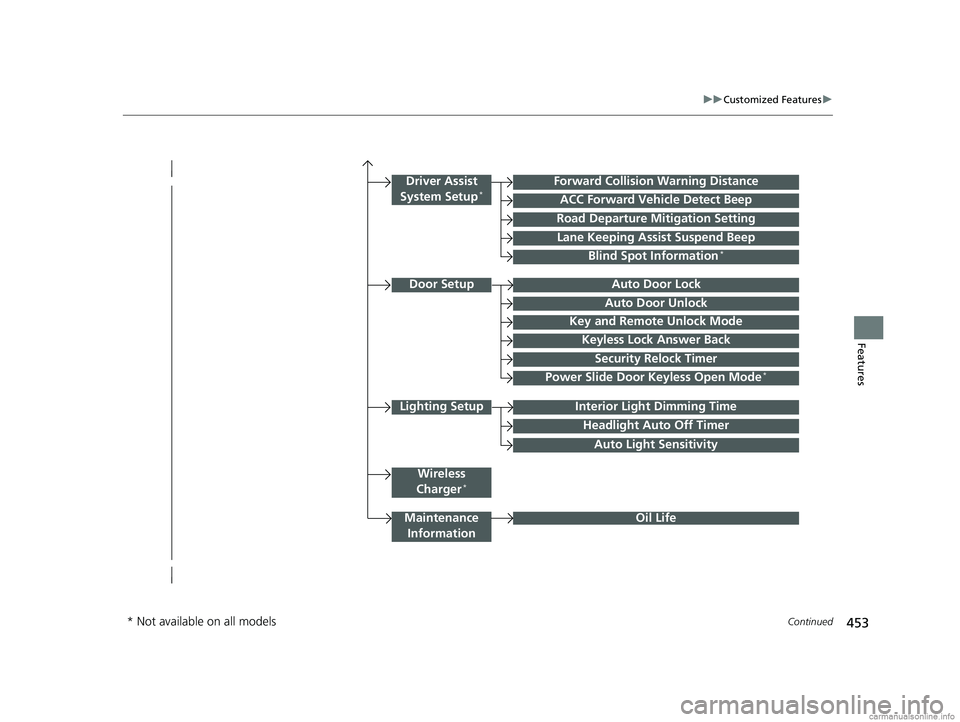
Lighting SetupInterior Light Dimming Time
Headlight Auto Off Timer
Forward Collision Warning Distance
ACC Forward Vehicle Detect Beep
Auto Light Sensitivity
Door SetupAuto Door Lock
Auto Door Unlock
Key and Remote Unlock Mode
Keyless Lock Answer Back
Security Relock Timer
Maintenance
Information
Driver Assist
System Setup*
Oil Life
Road Departure Mitigation Setting
Lane Keeping Assist Suspend Beep
Blind Spot Information*
Power Slide Door Keyless Open Mode*
Wireless
Charger*
* Not available on all models
18 US ODYSSEY-31THR6010.book 453 ページ 2018年12月6日 木曜日 午後4時18分
Page 464 of 763
462
uuCustomized Features u
Features
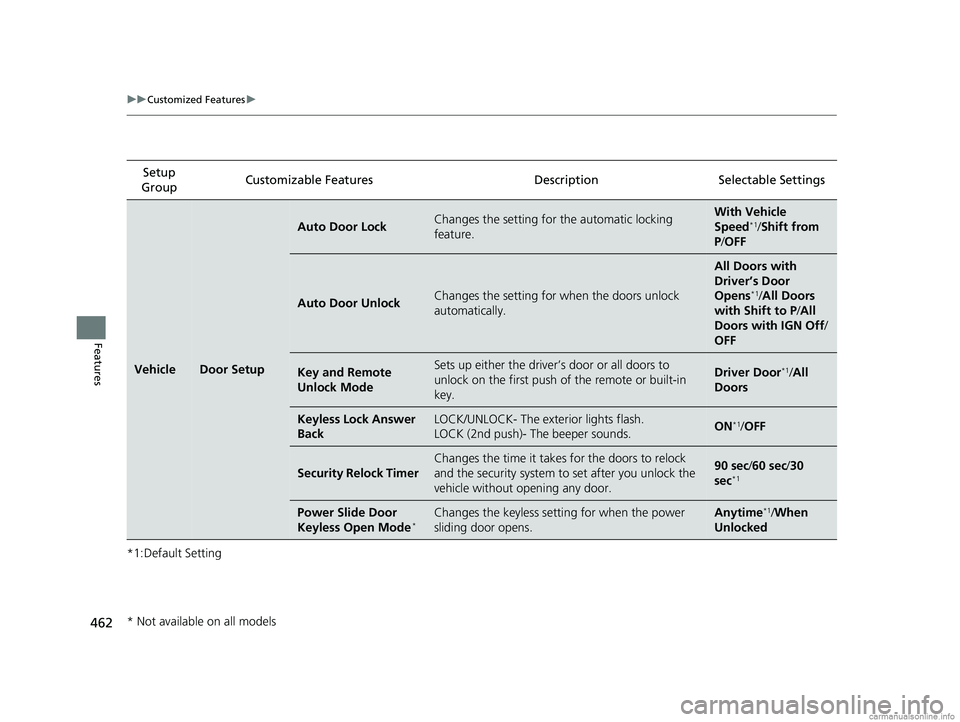
*1:Default SettingSetup
Group Customizable Features
DescriptionSelectable Settings
VehicleDoor Setup
Auto Door LockChanges the setting for the automatic locking
feature.With Vehicle
Speed*1/Shift from
P /OFF
Auto Door UnlockChanges the setting for when the doors unlock
automatically.
All Doors with
Driver’s Door
Opens
*1/All Doors
with Shift to P /All
Doors with IGN Off /
OFF
Key and Remote
Unlock ModeSets up either the driver’s door or all doors to
unlock on the first push of the remote or built-in
key.Driver Door*1/ All
Doors
Keyless Lock Answer
BackLOCK/UNLOCK- The exterior lights flash.
LOCK (2nd push)- The beeper sounds.ON*1/ OFF
Security Relock Timer
Changes the time it takes for the doors to relock
and the security system to set after you unlock the
vehicle without opening any door.90 sec/ 60 sec/30
sec*1
Power Slide Door
Keyless Open Mode*Changes the keyless setting for when the power
sliding door opens.Anytime*1/ When
Unlocked
* Not available on all models
18 US ODYSSEY-31THR6010.book 462 ページ 2018年12月6日 木曜日 午後4時18分
Page 469 of 763
467
Features
HomeLink® Universal Transceiver*
The HomeLink ® Universal Transceiver can be programmed to operate up to three
remote controlled devices around your home, such as garage doors, lighting, or
home security systems.
Refer to the safety information that came wi th your garage door opener to test that
the safety features are functioning prope rly. If you do not have the safety
information, contact the manufacturer.
Before programming HomeLink, make sure that people and objects are out of the
way of the garage or gate to prevent potential injury or damage.
When programming a garage door opener, pa rk just outside the garage door’s path.
■Important Safety Precautions
1HomeLink ® Universal Transceiver*
Before programming HomeLi nk to operate a garage
door opener, confirm that the opener has an external
entrapment protection system, such as an “electronic
eye,” or other safety and re verse stop features. If it
does not, HomeLink may not be able to operate it.
* Not available on all models
18 US ODYSSEY-31THR6010.book 467 ページ 2018年12月6日 木曜日 午後4時18分
Page 477 of 763
475
uuBluetooth ® HandsFreeLink ®u HFL Menus
Continued
Features
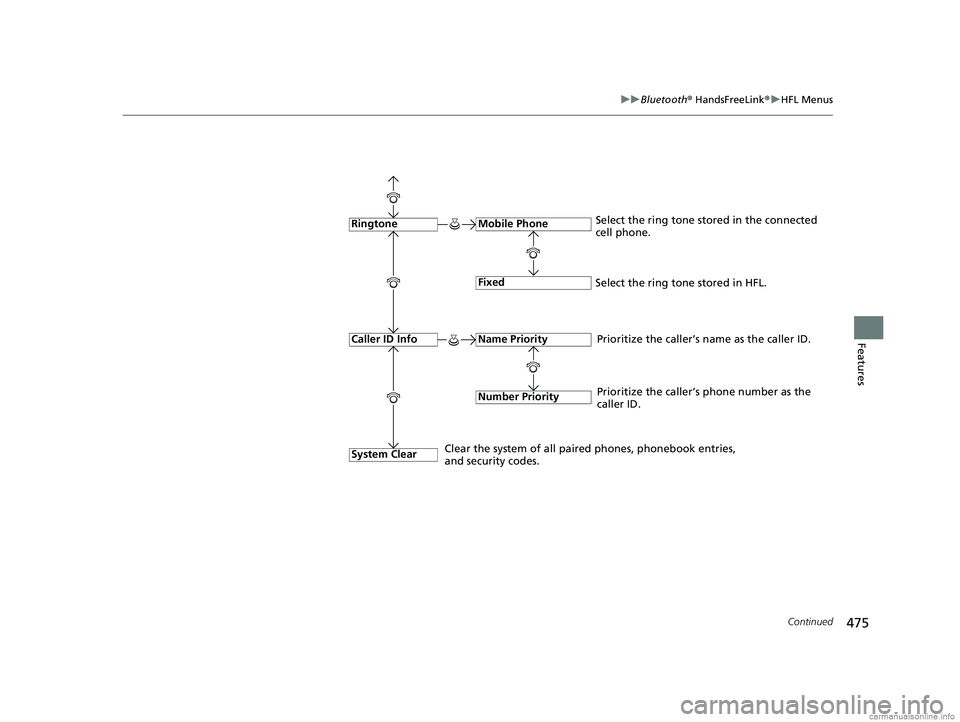
Fixed
Mobile Phone
System Clear
RingtoneSelect the ring tone stored in the connected
cell phone.
Name Priority
Number Priority
Caller ID InfoPrioritize the caller’s name as the caller ID.
Clear the system of all paired phones, phonebook entries,
and security codes. Prioritize the caller’s phone number as the
caller ID.
Select the ring tone stored in HFL.
18 US ODYSSEY-31THR6010.book 475 ページ 2018年12月6日 木曜日 午後4時18分