2018 HONDA CLARITY PLUG-IN Lights
[x] Cancel search: LightsPage 446 of 591

444
uuBraking uCollision Mitigation Braking SystemTM (CMBSTM)
Driving
■Vehicle conditions
• Headlight lenses are dirty or the headlights are not properly adjusted.
• The outside of the windshie ld is blocked by dirt, mud, leaves, wet snow, etc.
• The inside of the windshield is fogged.
• An abnormal tire or wheel condition (wrong sized, varied size or construction,
improperly inflated tire, etc.).
• When tire chains are installed.
• The vehicle is tilted due to a heav y load or suspension modifications.
• The camera temperature gets too high.
• Driving with the parking brake applied.
• When the radar sensor in the front grille gets dirty.
■Detection limitations
• A vehicle or pedestrian suddenly crosses in front of you.
• The distance between your vehicle and the vehicle or pedestrian ahead of you is
too short.
• A vehicle cuts in front of you at a slow speed, and it brakes suddenly.
• When you accelerate rapidly and approach the vehicle or pedestrian ahead of you
at high speed.
• The vehicle ahead of you is a motorcycle, bicycle, mobility scooter or other small
vehicle.
• When there are animals in front of your vehicle.
• When you drive on a curved, wi nding or undulating road that makes it difficult for
the sensor to properly detect a vehicle in front of you.
• The speed difference between your vehicle an d a vehicle or pedestrian in front of
you is significantly large.
• An oncoming vehicle suddenly comes in front of you.
• Another vehicle suddenly comes in front of you at an intersection, etc.
• Your vehicle abruptly crosses over in front of an oncoming vehicle.
• When driving through a narrow iron bridge.
• When the lead vehicle suddenly slows down.
18 CLARITY PHEV CSS-31TRW6000.book 444 ページ 2017年12月25日 月曜日 午後2時22分
Page 474 of 591

472
Maintenance
Before Performing Maintenance
Inspection and Maintenance
For your safety, perform all listed inspections and maintenance to keep your vehicle
in good condition. If you become aware of any abnormality (noise, smell, insufficient
brake fluid, oil residue on the ground, etc .), have your vehicle inspected by an
authorized Honda Clar ity Plug-In Hybrid dealer. (Note, however, that service at an
authorized Honda Clar ity Plug-In Hybrid dealer is not mandatory to keep your
warranties in effect.)
■Daily inspections
Perform inspections before long distance tri ps, when washing the vehicle, or when
refueling.
■Periodic inspections
• Check the brake fluid level monthly.
2 Brake Fluid P. 492
•Check the tire pressure monthly. Examin e the tread for wear and foreign objects.
2Checking and Maintaining Tires P. 499
•Check the operation of the exterior lights monthly.
2 Replacing Light Bulbs P. 494
•Check the condition of the wiper bl ades at least every six months.
2Checking and Maintaining Wiper Blades P. 496
■Types of Inspection and Maintenance
1Inspection and Maintenance
Maintenance, replacement, or repair of
emissions control devices and systems may be
done by any automotive repair establishment or
individuals using parts that are “certified” to
EPA standards.
According to state and fede ral regulations, failure to
perform maintenance on the maintenance main
items marked with # will not void your emissions
warranties. However, all ma intenance services should
be performed in accordan ce with the intervals
indicated by the driver information interface.
2 Maintenance Service Items P. 477
If you want to perform complex maintenance tasks
that require more skills a nd tools, you can purchase a
subscription to the Service Express website at
www.techinfo.honda.com .
2 Authorized Manuals P. 576
If you want to perform ma intenance yourself, make
sure that you have the necessary tools and skills first.
After performing ma intenance, update the records in
the separate maintenance booklet.
U.S. models
18 CLARITY PHEV CSS-31TRW6000.book 472 ページ 2017年12月25日 月曜日 午後2時22分
Page 496 of 591
494
Maintenance
Replacing Light Bulbs
Headlights
Headlights are LED type. Have an authorized Honda Clarity Plug-In Hybrid dealer
inspect and replace the light assembly.
Front Turn Signal and Front Side Marker Lights
Front turn signal and front side marker lights are LED type. Have an authorized
Honda Clarity Plug-In Hybrid dealer inspect and replace the light assembly.
Parking/Daytime Running Lights
Parking/daytime running lights are LED type. Have an authorized Honda Clarity Plug-
In Hybrid dealer inspect a nd replace the light assembly.
1Headlights
The headlight aim is set by the factory, and does not
need to be adjusted. Howeve r, if you regularly carry
heavy items in the trunk, have the aiming readjusted
at an authorized Honda Clar ity Plug-In Hybrid dealer
or by a qualif ied technician.
18 CLARITY PHEV CSS-31TRW6000.book 494 ページ 2017年12月25日 月曜日 午後2時22分
Page 497 of 591
495
uuReplacing Light Bulbs uTaillights/Rear Side Marker, Brake and Rear Turn Signal Lights
Maintenance
Taillights/Rear Side Marker , Brake and Rear Turn
Signal Lights
Taillights/rear side marker, brake and rear turn signal lights are LED type. Have an
authorized Honda Clarity Plug-In Hybrid dealer inspect and replace the light
assembly.
Taillights and Back-Up Lights
Taillights and back-up lights are LED type. Ha ve an authorized Honda Clarity Plug-In
Hybrid dealer inspect and replace the light assembly.
Rear License Plate Light
Rear license plate light is LED type. Have an authorized Honda Clarity Plug-In Hybrid
dealer inspect and replace the light assembly.
High-Mount Brake Light
High-mount brake light is LED type. Have an authorized Honda Clarity Plug-In Hybrid
dealer inspect and replace the light assembly.
18 CLARITY PHEV CSS-31TRW6000.book 495 ページ 2017年12月25日 月曜日 午後2時22分
Page 519 of 591
517
uuCleaning uExterior Care
Continued
Maintenance
Aluminum is susceptible to deterioration caused by salt and other road
contaminants. When necessary, as early as possible use a sponge and mild detergent
to wipe away these contaminants. Do no t use a stiff brush or harsh chemicals
(including some commercial wheel cleaners). These can damage the protective finish
on aluminum alloy wheels, resulting in corrosion. Depending on the type of finish,
the wheels also may lo se their luster or appear burn ished. To avoid water stains,
wipe the wheels dry with a cloth while they are still wet.
The inside lenses of exterior lights (headlights, brake light s, etc.) may fog temporarily
if you have driven in the rain, or after the vehicle has been run through a car wash.
Dew condensation also may build up inside the lenses when there is a significant
enough difference between the ambient and inside lens temperatures (similar to
vehicle windows fogging up in rainy conditions). These conditions are natural
processes, not structural design problems in the exterior lights.
Lens design characteristics ma y result in moisture developing on the light lens frame
surfaces. This also is not a malfunction.
However, if you see large amounts of wa ter accumulation, or large water drops
building up inside the lenses, have your vehicle inspected by an authorized Honda
Clarity Plug-In Hybrid dealer.
■Maintaining Aluminum Wheels
■Fogged Exterior Light Lenses
18 CLARITY PHEV CSS-31TRW6000.book 517 ページ 2017年12月25日 月曜日 午後2時22分
Page 524 of 591
522
Handling the Unexpected
If a Tire Goes Flat
Temporarily Repairing a Flat Tire
If the tire has a large cut or is otherwise severely damaged, you will need to have the
vehicle towed. If the tire only has a smal l puncture, from a nail for instance, you can
use the temporary tire repair kit so that you can drive to the nearest service station
for a more permanent repair.
If a tire goes flat while driving, grasp the steering wheel firmly, and brake gradually
to reduce speed. Then stop in a safe place.
1. Park the vehicle on a firm, level, and non-slippery surface and apply the parking
brake.
2. Change the gear position to
(P.
3. Turn on the hazard warning lights an d set the power mode to VEHICLE OFF
(LOCK).
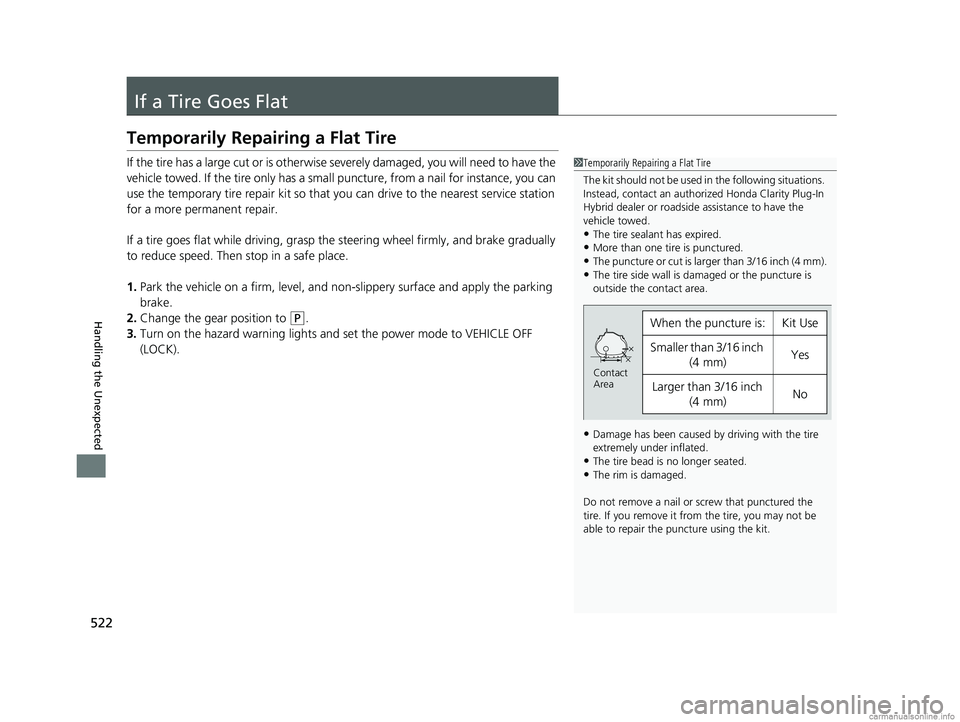
1 Temporarily Repairing a Flat Tire
The kit should not be used in the following situations.
Instead, contact an authorized Honda Clarity Plug-In
Hybrid dealer or roadside assistance to have the
vehicle towed.
•The tire sealant has expired.•More than one tire is punctured.
•The puncture or cut is larger than 3/16 inch (4 mm).
•The tire side wall is da maged or the puncture is
outside the contact area.
•Damage has been caused by driving with the tire
extremely under inflated.
•The tire bead is no longer seated.•The rim is damaged.
Do not remove a nail or screw that punctured the
tire. If you remove it from the tire, you may not be
able to repair the puncture using the kit.
When the puncture is:Kit Use
Smaller than 3/16 inch (4 mm)Yes
Larger than 3/16 inch
(4 mm)No
Contact
Area
18 CLARITY PHEV CSS-31TRW6000.book 522 ページ 2017年12月25日 月曜日 午後2時22分
Page 537 of 591
535Continued
Handling the Unexpected
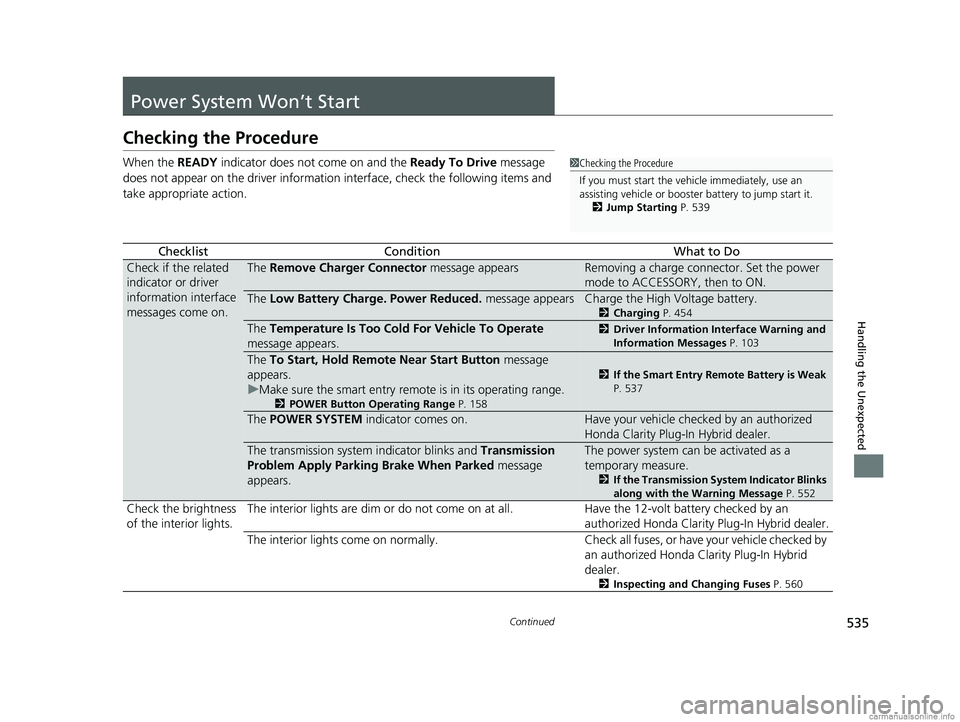
Power System Won’t Start
Checking the Procedure
When the READY indicator does not come on and the Ready To Drive message
does not appear on the driver informatio n interface, check the following items and
take appropriate action.
ChecklistConditionWhat to Do
Check if the related
indicator or driver
information interface
messages come on.The Remove Charger Connector message appearsRemoving a charge connector. Set the power
mode to ACCESSORY, then to ON.
The Low Battery Charge . Power Reduced. message appearsCharge the High Voltage battery.
2Charging P. 454
The Temperature Is Too Cold For Vehicle To Operate
message appears.2 Driver Information Interface Warning and
Information Messages P. 103
The To Start, Hold Remote Near Start Button message
appears.
u Make sure the smart entry remote is in its operating range.
2 POWER Button Operating Range P. 158
2If the Smart Entry Remote Battery is Weak
P. 537
The POWER SYSTEM indicator comes on.Have your vehicle checked by an authorized
Honda Clarity Plug-In Hybrid dealer.
The transmission system indicator blinks and Transmission
Problem Apply Parking Brake When Parked message
appears.The power system can be activated as a
temporary measure.
2 If the Transmission System Indicator Blinks
along with the Warning Message P. 552
Check the brightness
of the interior lights. The interior lights are dim or do not come on at
all. Have the 12-volt battery checked by an
authorized Honda Clarity Plug-In Hybrid dealer.
The interior lights come on normally. Check all fuses, or have your vehicle checked by
an authorized Honda Clarity Plug-In Hybrid
dealer.
2 Inspecting and Changing Fuses P. 560
1Checking the Procedure
If you must start the vehi cle immediately, use an
assisting vehicle or booster battery to jump start it.
2 Jump Starting P. 539
18 CLARITY PHEV CSS-31TRW6000.book 535 ページ 2017年12月25日 月曜日 午後2時22分
Page 541 of 591
539Continued
Handling the Unexpected
Jump Starting
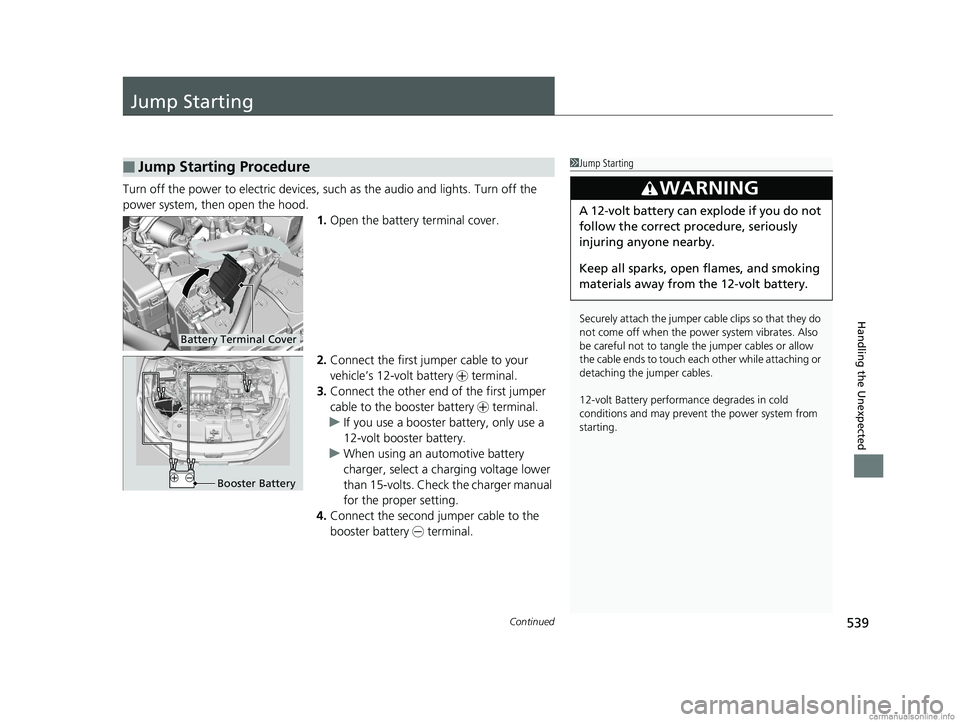
Turn off the power to electric devices, such as the audio and lights. Turn off the
power system, then open the hood. 1.Open the battery terminal cover.
2. Connect the first jumper cable to your
vehicle’s 12-volt battery + terminal.
3. Connect the other end of the first jumper
cable to the booster battery + terminal.
u If you use a booster battery, only use a
12-volt booster battery.
u When using an automotive battery
charger, select a charging voltage lower
than 15-volts. Check the charger manual
for the proper setting.
4. Connect the second jumper cable to the
booster battery - terminal.
■Jump Starting Procedure1Jump Starting
Securely attach the jumper cable clips so that they do
not come off when the power system vibrates. Also
be careful not to tangle the jumper cables or allow
the cable ends to touch eac h other while attaching or
detaching the jumper cables.
12-volt Battery performa nce degrades in cold
conditions and may prevent the power system from
starting.
3WARNING
A 12-volt battery can explode if you do not
follow the correct procedure, seriously
injuring anyone nearby.
Keep all sparks, open flames, and smoking
materials away from the 12-volt battery.
Battery Terminal Cover
Booster Battery
18 CLARITY PHEV CSS-31TRW6000.book 539 ページ 2017年12月25日 月曜日 午後2時22分