2018 GMC SIERRA brake
[x] Cancel search: brakePage 2 of 20

2
Audio Next/Previous Favorite Station Controls (behind steering wheel)
Cruise Control/ Collision AlertF/Heated Steering WheelF Buttons
Power Mirror Control/Door Lock Switch/Window Buttons
Audio Volume Controls (behind steering wheel)
Voice Recognition Buttons/ Customizable Driver Display Controls
Tilt Steering Wheel Lever
Telescoping Steering Wheel Control
Memory Seat Controls
Instrument Panel Illumination Control/Exterior Lamp Control4WD ControlFTow/Haul ButtonCustomizable Driver Display
Turn Signal/Windshield Wipers Lever
Integrated Trailer Brake ControlF
INSTRUMENT PANEL
Low Fuel
Traction Control Off
Engine Coolant Temperature
Brake System
Cruise Control Set
Forward Collision Alert
StabiliTrak Active
StabiliTrak Off
Security
Tow/Haul Mode
Hill Descent Control
Lights On Reminder
Airbag Readiness
Check Engine
Symbols
Page 3 of 20

3
Refer to your Owner’s Manual to learn about the information being relayed by the lights, gauges and indicators on the instrument cluster.
See In Brief in your Owner’s Manual.
Driver’s Heated/Vented Seat Buttons
GMC Infotainment System Touch ScreenPassenger’s Heated/Vented Seat ButtonsClimate Controls
Accessory Power Outlets
Adjustable Pedals Switch/Traction Control and StabiliTrak Button/Cargo Box Lamp Button
110V OutletUSB PortsWireless Charging PadF
Antilock Brake System
Diesel Exhaust Brake (diesel models only)
Low Tire Pressure (single rear wheel models only)
Door Ajar
Oil Pressure
Charging System
Safety Belt Reminder
Lane Keep Assist
F Optional equipment
Front and Rear Parking AssistF/ Lane Keep AssistF(LD models)/ Lane Departure WarningF(HD models)/Hill Descent ControlF/Diesel Exhaust Brake (if equipped) Buttons
Note: Diesel model shown.
Page 15 of 20
15
CRUISE CONTROL
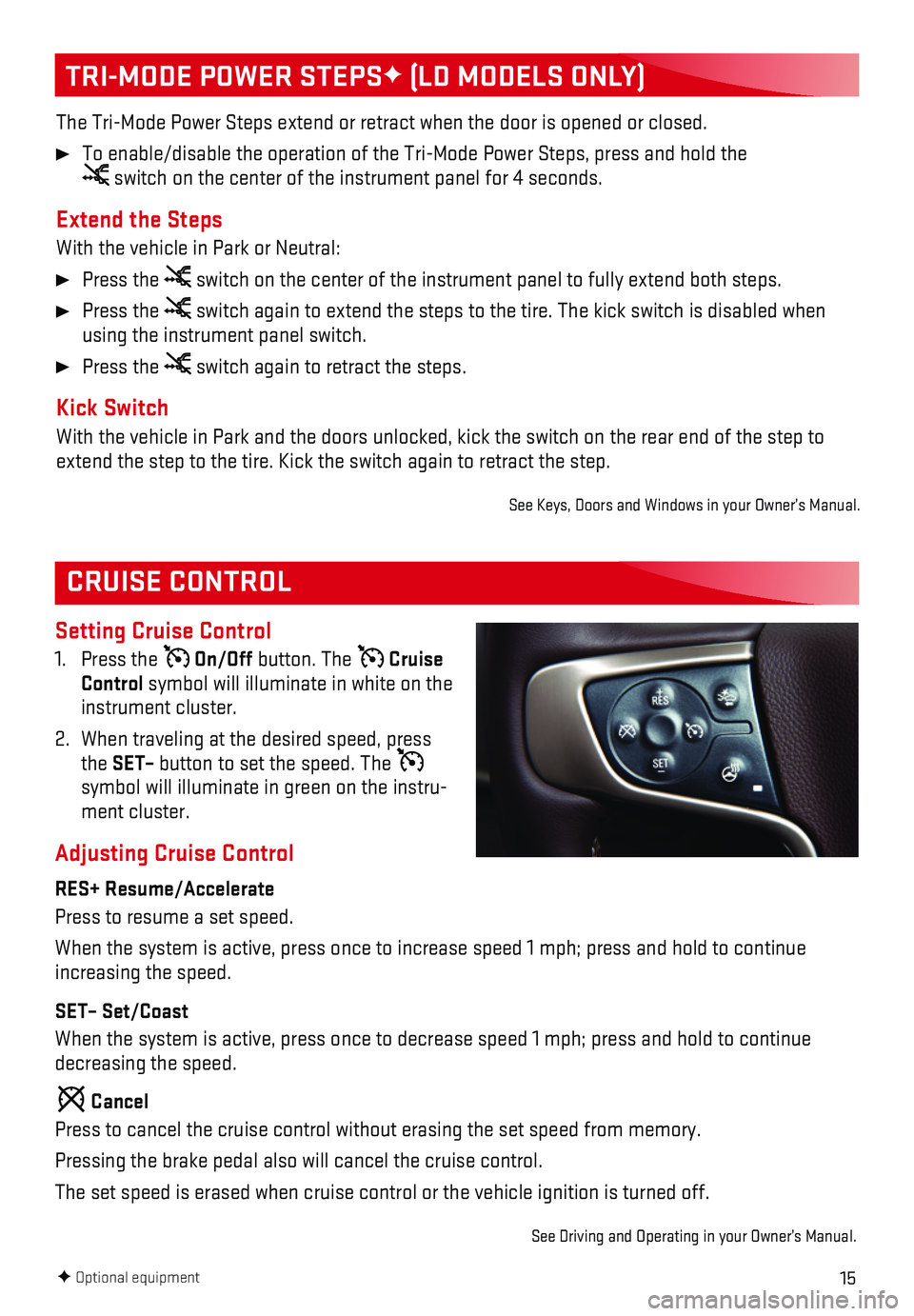
Setting Cruise Control
1. Press the On/Off button. The Cruise Control symbol will illuminate in white on the instrument cluster.
2. When traveling at the desired speed, press the SET– button to set the speed. The symbol will illuminate in green on the instru-ment cluster.
Adjusting Cruise Control
RES+ Resume/Accelerate
Press to resume a set speed.
When the system is active, press once to increase speed 1 mph; press and\
hold to continue increasing the speed.
SET– Set/Coast
When the system is active, press once to decrease speed 1 mph; press and\
hold to continue decreasing the speed.
Cancel
Press to cancel the cruise control without erasing the set speed from me\
mory.
Pressing the brake pedal also will cancel the cruise control.
The set speed is erased when cruise control or the vehicle ignition is t\
urned off.
See Driving and Operating in your Owner’s Manual.
TRI-MODE POWER STEPSF (LD MODELS ONLY)
The Tri-Mode Power Steps extend or retract when the door is opened or cl\
osed.
To enable/disable the operation of the Tri-Mode Power Steps, press and h\
old the switch on the center of the instrument panel for 4 seconds.
Extend the Steps
With the vehicle in Park or Neutral:
Press the switch on the center of the instrument panel to fully extend both steps\
.
Press the switch again to extend the steps to the tire. The kick switch is disabl\
ed when using the instrument panel switch.
Press the switch again to retract the steps.
Kick Switch
With the vehicle in Park and the doors unlocked, kick the switch on the \
rear end of the step to extend the step to the tire. Kick the switch again to retract the step.
See Keys, Doors and Windows in your Owner’s Manual.
F Optional equipment
Page 16 of 20

16
Safety Alert SeatF
The driver’s seat pulses — left side, right side, or simultaneousl\
y — to alert the driver of potential hazards.
Audible notification may be selected instead of Safety Alert Seat puls\
ing notification. To change the alert setting, go to Settings > Vehicle > Collision/Detection\
Systems > Alert Type.
Forward Collision AlertF
The Vehicle Ahead indicator is green when a vehicle is detected and is amber when following a vehicle ahead much too closely. When approach-ing a vehicle directly ahead too rapidly, a red alert flashes on the windshield and the Safety Alert Seat pulses or beeps sound (if selected).
Press the Collision Alert button on the left side of the steering wheel to set the alert timing to Far, Medium, Near, or Off.
Low-Speed Forward Automatic BrakingF (LD Models Only)
The brakes may be applied automatically in potential collision situation\
s to help reduce damage or help avoid collisions with vehicles directly ahead.
To turn the system on or off, go to Settings > Vehicle > Collision/Detec\
tion Systems > Auto Collision Preparation.
Lane Keep Assist with Lane Departure WarningF (LD Models Only)
The system may help avoid collisions due to unintentional lane departure\
s. The Lane Keep Assist indicator is green if the system is available to assist. If the v\
ehicle approaches a detected lane marking without using a turn signal in that direction, the system may assist by gently turning the steering wheel and displaying an amber .
If active driver steering is not detected, the amber may flash and the Safety Alert Seat may pulse or beeps may sound (if selected) on the side of the departure di\
rection as the lane marking is crossed. In order to use this system safely, the driver needs to stee\
r and be in complete control of the vehicle.
Press the Lane Keep Assist button on the center of the instrument panel to turn the
system on or off.
Lane Departure WarningF (HD Models Only)
When crossing a detected lane marking without using a turn signal in tha\
t direction, the system flashes an amber indicator on the instrument cluster and the Safety Alert Seat pulses or\
beeps sound (if selected) on the side of the lane departure direction.
Press the Lane Departure Warning button on the center of the instrument panel to turn the system on or off.
Rear Vision Camera
When the vehicle is in Reverse, a view of the area behind the vehicle di\
splays on the infotainment system. Vehicle speed must be below 5 mph.
To turn the Guidelines or Rear Park Assist Symbols on or off, go to Settings > Rear Camera.
DRIVER ASSISTANCE SYSTEMS
F Optional equipment
Page 17 of 20

17
DRIVER ASSISTANCE SYSTEMS
F Optional equipment
Hill Descent Control sets and maintains vehicle speed from 2–14 mph w\
hile descending a steep incline in a forward or reverse gear.
1. Press the Hill Descent Control button on the center of the instrument panel. Vehicle speed must be below 31 mph to enable the system. The Hill Descent Contro\
l symbol will
illuminate on the instrument cluster.
2. Increase or decrease speed by applying the accelerator or brake pedal or\
use the Cruise Control +/– buttons on the steering wheel. The adjusted speed becomes\
the new set speed. The symbol flashes when the system is actively applying the brakes to maintain vehicle speed.
See Driving and Operating in your Owner’s Manual.
HILL DESCENT CONTROL
The traction control system limits wheelspin and the StabiliTrak® stability control system assists with directional control of the vehicle in difficult driving conditions. Both systems turn on auto-matically every time the vehicle is started.
Turn off traction control if the vehicle is stuck and rocking the vehicl\
e is required.
Press the Traction Control/StabiliTrak Off button on the center of the instrument panel to turn traction control off or back on. The Traction Control Off light will illuminate on the instrument cluster when the system is off.
See Driving and Operating in your Owner’s Manual.
TRACTION CONTROL AND STABILITRAK SYSTEMS
DIESEL EXHAUST BRAKE (DIESEL MODELS ONLY)
The engine exhaust brake enhances the vehicle brake system by automatica\
lly downshifting the transmission, depending on the length of time the brakes are applied.
Press the Diesel Exhaust Brake button on the center of the instrument panel to turn the system on or off.
See your Duramax Diesel Owner’s Manual.
Front and/or Rear Parking Assist
During low-speed parking maneuvers, the system provides “distance to \
closest object”
information on the Driver Information Center and the Safety Alert Seat p\
ulses or a beep sounds (if selected). When an object is very close, the Safety Alert Seat pul\
ses 5 times or beeps sound (if selected).
To turn the system on or off, press the Parking Assist button on the center of the instrument panel.See Driving and Operating in your Owner’s Manual.
Page 18 of 20
F
Range Selection Mode
Range Selection Mode allows the driver to select the range of gears desi\
red for the cu")
18F Optional equipment
AUTOMATIC TRANSMISSION
INTEGRATED TRAILER BRAKE CONTROL (ITBC)F
Range Selection Mode
Range Selection Mode allows the driver to select the range of gears desi\
red for the current driving conditions.
1. Move the shift lever to the L (Manual) position.
2. Press the + (plus) or – (minus) button (A) on the shift lever to select a lower or higher gear. The current gear is displayed next to the L on the Driver Information Center.
The transmission will be limited to the gear selected and lower gears. If vehicle speed is too high or too low for the requested gear, the shift will not occur.
Tow/Haul Mode
The Tow/Haul Mode adjusts the transmission shifts to reduce shift cyclin\
g, such as when towing or hauling heavy loads or driving on steep grades.
Press the Tow/Haul Mode button (B) on the end of the shift lever to turn the system on or off.
GMC Trailering Guide App
The free trailering guide app includes maximum trailer weight ratings by\
model along with
trailering information on hitches and equipment, GMC trailering technolo\
gies, safe trailering techniques and more. Currently available for the iPad®, download the mobile app from the iPad’s app store.
See Driving and Operating in your Owner’s Manual.
The ITBC system can be used to adjust the amount of power output, or Trailer Gain, available to the trailer brakes. The control panel is located on the left side of the instrument panel. ITBC information is displayed on the Driver Information Center.
Adjust the Trailer Gain by pressing the +/– adjustment buttons on the control panel.
Squeeze the levers together on the control panel (left lever does not move) to manually apply the trailer brakes.
See Driving and Operating in your Owner’s Manual.
AB