2018 GMC SIERRA DENALI remote control
[x] Cancel search: remote controlPage 175 of 505
GMC Sierra/Sierra Denali Owner Manual (GMNA-Localizing-U.S./Canada/
Mexico-11349177) - 2018 - CRC - 10/17/17
174 Instruments and Controls The name and color of the
button may vary by
manufacturer.
5. Press and release the Learn or
Smart button. Step 6 must be
completed within 30 seconds of
pressing this button.
6. Inside the vehicle, press and
hold the newly programmed
Universal Remote system
button for two seconds and
then release it. If the garage
door does not move or the
lamp on the garage door
opener receiver does not flash,
press and hold the same
button a second time for
two seconds, then release it.
Again, if the door does not
move or the garage door lamp
does not flash, press and hold
the same button a third time for
two seconds, then release it.
The Universal Remote system
should now activate the
garage door. Repeat the process for
programming the two remaining
buttons.
Radio Signals for Canada and
Some Gate Operators For questions or programming help,
see www.homelink.com/gm or call
1-800-355-3515.
Canadian radio-frequency laws and
some U.S. gate operators require
transmitter signals to time out or quit
after several seconds of
transmission. This may not be long
enough for the Universal Remote
system to pick up the signal during
programming.
If the programming did not work,
replace Step 2 under “ Programming
the Universal Remote System ” with
the following:
Press and hold the Universal
Remote system button while
pressing and releasing the
hand-held transmitter button every
two seconds until the signal has
been successfully accepted by the
Universal Remote system. The
Universal Remote system indicator light will flash slowly at first and then
rapidly. Proceed with Step 3 under
“ Programming the Universal Remote
System ” to complete.
Universal Remote System
Operation Using the Universal Remote
System Press and hold the appropriate
Universal Remote system button for
at least one-half second. The
indicator light will come on while the
signal is being transmitted.
Erasing Universal Remote
System Buttons Erase all programmed buttons when
vehicle ownership is terminated.
To erase:
1. Press and hold the two outside
buttons until the indicator light
begins to flash. This should
take about 10 seconds.
2. Release both buttons.
Page 176 of 505
GMC Sierra/Sierra Denali Owner Manual (GMNA-Localizing-U.S./Canada/
Mexico-11349177) - 2018 - CRC - 10/17/17
Instruments and Controls 175Reprogramming a Single
Universal Remote System
Button To reprogram any of the system
buttons:
1. Press and hold any one of the
buttons. Do not release the
button.
2. The indicator light will begin to
flash after 20 seconds. Without
releasing the button, proceed
with Step 1 under
“ Programming the Universal
Remote System. ”
Page 185 of 505

GMC Sierra/Sierra Denali Owner Manual (GMNA-Localizing-U.S./Canada/
Mexico-11349177) - 2018 - CRC - 10/17/17
184 Lighting
Press
m or
n next to each reading
lamp to turn it on or off.
Lighting Features Entry Lighting Some exterior lamps and the interior
lamps turn on briefly at night, or in
areas with limited lighting, when
Kis pressed on the Remote Keyless
Entry (RKE) transmitter. When a
door is opened, the interior lamps
come on if the dome lamp control is
in the DOOR position. After about
30 seconds the exterior lamps turn
off. Entry lighting can be disabled
manually by changing the ignition
out of the OFF position, or by
pressing the RKE transmitter
Qbutton.
This feature can be changed. See
“ Vehicle Locator Lights ” under
Vehicle Personalization 0 165 .
Exit Lighting Some exterior lamps and the interior
lamps come on at night, or in areas
with limited lighting when the key is
removed from the ignition. The
exterior and interior lamps remain on for a set amount of time and then
automatically turn off. The interior
lamps do not come on if the dome
lamp control is in the Off position.
The exterior lamps turn off
immediately by turning the exterior
lamps control off.
This feature can be changed. See
Vehicle Personalization 0 165 .
Battery Load
Management The vehicle has Electric Power
Management (EPM), which
estimates the battery's temperature
and state of charge. It then adjusts
the voltage for best performance
and extended life of the battery.
When the battery's state of charge
is low, the voltage is raised slightly
to quickly bring the charge back up.
When the state of charge is high,
the voltage is lowered slightly to
prevent overcharging. The voltmeter
gauge or the voltage display on the
Driver Information Center (DIC),
if equipped, may show the voltage
Page 330 of 505
GMC Sierra/Sierra Denali Owner Manual (GMNA-Localizing-U.S./Canada/
Mexico-11349177) - 2018 - CRC - 10/17/17
Driving and Operating 329
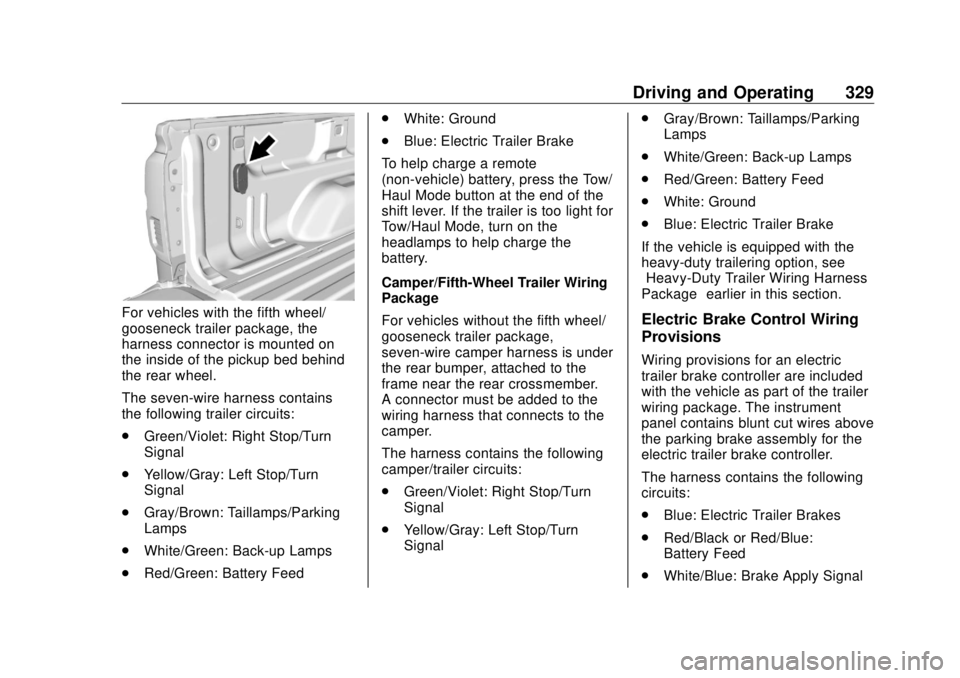
For vehicles with the fifth wheel/
gooseneck trailer package, the
harness connector is mounted on
the inside of the pickup bed behind
the rear wheel.
The seven-wire harness contains
the following trailer circuits:
.
Green/Violet: Right Stop/Turn
Signal
.
Yellow/Gray: Left Stop/Turn
Signal
.
Gray/Brown: Taillamps/Parking
Lamps
.
White/Green: Back-up Lamps
.
Red/Green: Battery Feed .
White: Ground
.
Blue: Electric Trailer Brake
To help charge a remote
(non-vehicle) battery, press the Tow/
Haul Mode button at the end of the
shift lever. If the trailer is too light for
Tow/Haul Mode, turn on the
headlamps to help charge the
battery.
Camper/Fifth-Wheel Trailer Wiring
Package
For vehicles without the fifth wheel/
gooseneck trailer package,
seven-wire camper harness is under
the rear bumper, attached to the
frame near the rear crossmember.
A connector must be added to the
wiring harness that connects to the
camper.
The harness contains the following
camper/trailer circuits:
.
Green/Violet: Right Stop/Turn
Signal
.
Yellow/Gray: Left Stop/Turn
Signal .
Gray/Brown: Taillamps/Parking
Lamps
.
White/Green: Back-up Lamps
.
Red/Green: Battery Feed
.
White: Ground
.
Blue: Electric Trailer Brake
If the vehicle is equipped with the
heavy-duty trailering option, see
“ Heavy-Duty Trailer Wiring Harness
Package ” earlier in this section.
Electric Brake Control Wiring
Provisions Wiring provisions for an electric
trailer brake controller are included
with the vehicle as part of the trailer
wiring package. The instrument
panel contains blunt cut wires above
the parking brake assembly for the
electric trailer brake controller.
The harness contains the following
circuits:
.
Blue: Electric Trailer Brakes
.
Red/Black or Red/Blue:
Battery Feed
.
White/Blue: Brake Apply Signal
Page 344 of 505

GMC Sierra/Sierra Denali Owner Manual (GMNA-Localizing-U.S./Canada/
Mexico-11349177) - 2018 - CRC - 10/17/17
Vehicle Care 343
California Proposition
65 Warning
{ WarningMost motor vehicles, including
this one, as well as many of its
service parts and fluids, contain
and/or emit chemicals known to
the State of California to cause
cancer and birth defects or other
reproductive harm. Engine
exhaust, many parts and
systems, many fluids, and some
component wear by-products
contain and/or emit these
chemicals. For more information
go to www.P65Warnings.ca.gov/
passenger-vehicle.
See Battery - North America 0 369
and Jump Starting - North America
0 426 and the back cover. California Perchlorate
Materials Requirements Certain types of automotive
applications, such as airbag
initiators, seat belt pretensioners,
and lithium batteries contained in
Remote Keyless Entry transmitters,
may contain perchlorate materials.
Special handling may be necessary.
For additional information, see
www.dtsc.ca.gov/hazardouswaste/
perchlorate.
Accessories and
Modifications Adding non-dealer accessories or
making modifications to the vehicle
can affect vehicle performance and
safety, including such things as
airbags, braking, stability, ride and
handling, emissions systems,
aerodynamics, durability, and
electronic systems like antilock
brakes, traction control, and stability
control. These accessories or
modifications could even cause
malfunction or damage not covered
by the vehicle warranty. Damage to suspension components
caused by modifying vehicle height
outside of factory settings will not be
covered by the vehicle warranty.
Damage to vehicle components
resulting from modifications or the
installation or use of non-GM
certified parts, including control
module or software modifications, is
not covered under the terms of the
vehicle warranty and may affect
remaining warranty coverage for
affected parts.
GM Accessories are designed to
complement and function with other
systems on the vehicle. See your
dealer to accessorize the vehicle
using genuine GM Accessories
installed by a dealer technician.
Also, see Adding Equipment to the
Airbag-Equipped Vehicle 0 90 .
Page 388 of 505

GMC Sierra/Sierra Denali Owner Manual (GMNA-Localizing-U.S./Canada/
Mexico-11349177) - 2018 - CRC - 10/17/17
Vehicle Care 387
The vehicle may not be equipped
with all of the fuses, relays, and
features shown. Fuses Usage
1 Accessory power
outlet 2 Fuses Usage
2 Special equipment
option/Retained
accessory power
3 Universal remote
system/Interior
rearview mirror
6 Body control module 3
7 Body control module 5
8 Driver window switch/
Mirror switch
9 –
10 Accessory power
outlet/Retained
accessory power
11 Accessory power
outlet battery
12 Accessory power
outlet 1/Cigarette
lighter
13 Discrete logic ignition
switch
14 Switch backlighting
17 Body control module 1
Page 487 of 505
GMC Sierra/Sierra Denali Owner Manual (GMNA-Localizing-U.S./Canada/
Mexico-11349177) - 2018 - CRC - 10/17/17
486 OnStar services. Service involving location
information about the vehicle cannot
work unless GPS signals are
available, unobstructed, and
compatible with the OnStar
hardware. OnStar services may not
work if the OnStar equipment is not
properly installed or it has not been
properly maintained. If equipment or
software is added, connected,
or modified, OnStar services may
not work. Other problems beyond
the control of OnStar — such as
hills, tall buildings, tunnels, weather,
electrical system design and
architecture of the vehicle, damage
to the vehicle in a crash, or wireless
phone network congestion or
jamming — may prevent service.
See Radio Frequency Statement
0 475 .
Services for People with
Disabilities
Advisors provide services to help
with physical disabilities and
medical conditions. Press
Q to help:
.
Locate a gas station with an
attendant to pump gas.
.
Find a hotel, restaurant, etc.,
that meets accessibility needs.
.
Provide directions to the closest
hospital or pharmacy in urgent
situations.
TTY Users OnStar has the ability to
communicate to deaf,
hard-of-hearing, or speech-impaired
customers while in the vehicle. The
available dealer-installed TTY
system can provide in-vehicle
access to all OnStar services,
except Virtual Advisor and OnStar
Turn-by-Turn Navigation.
OnStar Personal Identification
Number (PIN)
A PIN is needed to access some
OnStar services. The PIN will need
to be changed the first time when
speaking with an Advisor. To change the OnStar PIN, contact an
OnStar Advisor by pressing
Q or
calling 1-888-4ONSTAR.
Warranty OnStar equipment may be
warranted as part of the vehicle
warranty.
Languages The vehicle can be programmed to
respond in multiple languages.
Press
Q and ask for an Advisor.
Advisors are available in English,
Spanish, and French. Available
languages may vary by country.
Potential Issues OnStar cannot perform Remote
Door Unlock or Stolen Vehicle
Assistance after the vehicle has
been off continuously for 10 days
without an ignition cycle. If the
vehicle has not been started for
10 days, OnStar can contact
Roadside Assistance or a locksmith
to help gain access to the vehicle.
Page 497 of 505

GMC Sierra/Sierra Denali Owner Manual (GMNA-Localizing-U.S./Canada/
Mexico-11349177) - 2018 - CRC - 10/17/17
496 Index General Information (cont'd)
Vehicle Care . . . . . . . . . . . . . . . . . . 342
Glove Box . . . . . . . . . . . . . . . . . . . . . . 124
GM Mobility Reimbursement
Program . . . . . . . . . . . . . . . . . . . . . . . 469
H Halogen Bulbs . . . . . . . . . . . . . . . . . . 378
Hazard Warning Flashers . . . . . . . 180
Head Restraints . . . . . . . . . . . . . . . . . 58
Headlamps
Aiming . . . . . . . . . . . . . . . . . . . . . . . . 377
Automatic . . . . . . . . . . . . . . . . . . . . . 179
Bulb Replacement . . . . . . . . . . . . 378
Daytime Running
Lamps (DRL) . . . . . . . . . . . . . . . . 179
Flash-to-Pass . . . . . . . . . . . . . . . . . 179
High Intensity Discharge
(HID) Lighting . . . . . . . . . . . . . . . 378
High-Beam On Light . . . . . . . . . . 157
High/Low Beam Changer . . . . . 179
Lamps On Reminder . . . . . . . . . 157
Heated
Steering Wheel . . . . . . . . . . . . . . . 130
Heated and Ventilated Front
Seats . . . . . . . . . . . . . . . . . . . . . . . . . . 65
Heated Mirrors . . . . . . . . . . . . . . . . . . . 50 Heater
Engine Coolant . . . . . . . . . . . . . . . 260
Heating . . . . . . . . . . . . . . .224, 226, 228
High Voltage Devices and
Wiring . . . . . . . . . . . . . . . . . . . . . . . . . 380
High-Beam On Light . . . . . . . . . . . . 157
High-Speed Operation . . . . . . . . . . 399
Hill and Mountain Roads . . . . . . . . 245
Hill Descent Control (HDC) . . . . . 284
Hill Descent Control Light . . . . . . . 153
Hill Start Assist (HSA) . . . . . . . . . . 282
Home Page . . . . . . . . . . . . . . . . . . . . . 189
Hood . . . . . . . . . . . . . . . . . . . . . . . . . . . 344
Horn . . . . . . . . . . . . . . . . . . . . . . . . . . . . 130
How to Wear Seat Belts
Properly . . . . . . . . . . . . . . . . . . . . . . . . 70
HVAC . . . . . . . . . . . . . . . . .224, 226, 228
I Idle System
Fast . . . . . . . . . . . . . . . . . . . . . . . . . . 259
Ignition Positions . . . . . . . . . . . . . . . 256
Ignition Transmission Lock
Check . . . . . . . . . . . . . . . . . . . . . . . . . 374
Immobilizer . . . . . . . . . . . . . . . . . . . . . . 46
Indicator
Vehicle Ahead . . . . . . . . . . . . . . . . 154 Infants and Young Children,
Restraints . . . . . . . . . . . . . . . . . . . . . . 94
Infotainment . . . . . . . . . . . . . . . . . . . . 186
Infotainment System . . . . . . . . . . . . 478
Instrument Cluster . . . . . . . . . . . . . . 138
Instrument Panel
Storage Area . . . . . . . . . . . . . . . . . 124
Interior Rearview Mirrors . . . . . . . . . 51
Introduction . . . . . . . . . . . . . . . . . . . . . . . 2
J Jack
Auxiliary . . . . . . . . . . . . . . . . . . . . . . 203
Jump Starting - North
America . . . . . . . . . . . . . . . . . . . . . . . 426
K Keyless Entry
Remote (RKE) System . . . . . . . . . 37
Keys . . . . . . . . . . . . . . . . . . . . . . . . . . . . . 34
L Labeling, Tire Sidewall . . . . . . . . . . 391
Lamps
Auxiliary Roof
Mounted Lamp . . . . . . . . . . . . . . 182
Cargo . . . . . . . . . . . . . . . . . . . . . . . . . 183
Daytime Running (DRL) . . . . . . 179
Dome . . . . . . . . . . . . . . . . . . . . . . . . . 183