Page 358 of 505

GMC Sierra/Sierra Denali Owner Manual (GMNA-Localizing-U.S./Canada/
Mexico-11349177) - 2018 - CRC - 10/17/17
Vehicle Care 3571. Locate the transmission
dipstick at the rear of the
engine compartment, on the
passenger side of the vehicle.
See Engine Compartment
Overview 0 345 .
2. Flip the handle up, then pull out
the dipstick and wipe it with a
clean rag or paper towel.
3. Install the dipstick by pushing it
back in all the way; wait
three seconds, and then pull it
back out again.
4. Check both sides of the
dipstick and read the lower
level. Repeat the check
procedure to verify the reading. 5. Safe operating level is within
the HOT cross hatch band on
the dipstick. If the fluid level is
not within the HOT band, and
the transmission temperature is
between 71 °C and 93 °C
(160 °F and 200 °F), add or
drain fluid as necessary to
bring the level into the HOT
band. If the fluid level is low,
add only enough fluid to bring
the level into the HOT band.
It does not take much fluid,
generally less than 0.5 L (1 pt).
Do not overfill.
6. If the fluid level is in the
acceptable range, push the
dipstick back in all the way,
then flip the handle down to
lock the dipstick in place.
Consistency of Readings
Always check the fluid level at least
twice using the procedure described
previously. Consistency (repeatable
readings) is important to maintaining
proper fluid level. If readings are still
inconsistent, contact the dealer. Automatic Transmission
Fluid (8-Speed
Transmission) When to Check and Change
Automatic Transmission Fluid It is usually not necessary to check
the transmission fluid level. The only
reason for fluid loss is a
transmission leak or overheated
transmission. This vehicle is not
equipped with a transmission fluid
level dipstick. There is a special
procedure for checking and
changing the transmission fluid in
these vehicles. Because this
procedure is difficult, this should be
done at the dealer. Contact the
dealer for additional information or
the procedure can be found in the
service manual. See Service
Publications Ordering Information
0 474 .
Page 363 of 505

GMC Sierra/Sierra Denali Owner Manual (GMNA-Localizing-U.S./Canada/
Mexico-11349177) - 2018 - CRC - 10/17/17
362 Vehicle Care
{ WarningPlain water, or other liquids such
as alcohol, can boil before the
proper coolant mixture will. With
plain water or the wrong mixture,
the engine could get too hot but
there would not be an overheat
warning. The engine could catch
fire and you or others could be
burned.
{ WarningSteam and scalding liquids from a
hot cooling system are under
pressure. Turning the pressure
cap, even a little, can cause them
to come out at high speed and
you could be burned. Never turn
the cap when the cooling system,
including the pressure cap, is hot.
Wait for the cooling system and
pressure cap to cool. WarningFailure to follow the specific
coolant fill procedure could cause
the engine to overheat and could
cause system damage. If coolant
is not visible in the surge tank,
contact your dealer.
If no coolant is visible in the surge
tank, add coolant.
Light-Duty
Coolant Surge
Tank
Pressure Cap Heavy-Duty
Coolant Surge
Tank
Pressure Cap
1. Remove the coolant surge tank
pressure cap when the cooling
system, including the coolant
surge tank pressure cap and
upper radiator hose, is no
longer hot. Turn the pressure cap slowly
counterclockwise about one full
turn. If a hiss is heard, wait for
that to stop. A hiss means
there is still some pressure left.
2. Keep turning the pressure cap
slowly, and remove it.
3. Fill the coolant surge tank with
the proper mixture to the full
cold mark.
4. With the coolant surge tank
pressure cap off, start the
engine and let it run until the
engine coolant temperature
gauge indicates approximately
90 °C (195 °F).
By this time, the coolant level
inside the coolant surge tank
may be lower. If the level is
lower, add more of the proper
mixture to the coolant surge
tank until the level reaches the
full cold mark.
5. Replace the pressure cap
tightly.
Page 375 of 505

GMC Sierra/Sierra Denali Owner Manual (GMNA-Localizing-U.S./Canada/
Mexico-11349177) - 2018 - CRC - 10/17/17
374 Vehicle Care .
Removal of the fan shroud,
if equipped.
Air Intake:
.
Removal of the air cleaner
silencer.
.
Modification of the air cleaner.
Exhaust:
.
Removal of the muffler and/or
resonator.
.
Removal of the exhaust pipes
and exhaust pipe clamps.
Starter Switch Check
{ Warning
When you are doing this
inspection, the vehicle could
move suddenly. If the vehicle
moves, you or others could be
injured.
1. Before starting this check, be
sure there is enough room
around the vehicle. 2. Apply both the parking brake
and the regular brake.
Do not use the accelerator
pedal, and be ready to turn off
the engine immediately if it
starts.
3. Try to start the engine in each
gear. The vehicle should start
only in P (Park) or N (Neutral).
If the vehicle starts in any other
position, contact your dealer for
service.
Automatic Transmission
Shift Lock Control
Function Check
{ Warning
When you are doing this
inspection, the vehicle could
move suddenly. If the vehicle
moves, you or others could be
injured. 1. Before starting this check, be
sure there is enough room
around the vehicle. It should be
parked on a level surface.
2. Apply the parking brake. Be
ready to apply the regular
brake immediately if the vehicle
begins to move.
3. With the engine off, turn the
ignition on, but do not start the
engine. Without applying the
regular brake, try to move the
shift lever out of P (Park) with
normal effort. If the shift lever
moves out of P (Park), contact
your dealer for service.
Ignition Transmission
Lock Check While parked and with the parking
brake set, try to turn the ignition off
in each shift lever position.
.
The ignition should turn off only
when the shift lever is in
P (Park).
.
The ignition key should come
out only when the ignition is off.
Page 380 of 505
GMC Sierra/Sierra Denali Owner Manual (GMNA-Localizing-U.S./Canada/
Mexico-11349177) - 2018 - CRC - 10/17/17
Vehicle Care 379
2. Remove the two rear lamp
assembly screws.
3. Pull the rear lamp assembly
outboard away from the box
side until the retainers release.
There will be a noise when the
retainers release. 4. Pull the rear lamp assembly
straight back to remove it from
the vehicle.
5. Turn the bulb socket
counterclockwise.
6. Pull the bulb straight out from
the socket.
7. Replace the bulb, then insert
the bulb socket into the rear
lamp assembly and turn
clockwise. 8. Verify the retainer ring of
attachment stud is pulled away
from lamp. If the retainer ring is
out of position, it will not
engage. Reset the retainer by
pulling it forward with a tool.
9. Push the rear lamp assembly
straight in until it is seated
against the vehicle.
10. Make sure the rear lamp
assembly is flush with the
box side.
11. Reinstall the two rear lamp
assembly screws.
Page 381 of 505
GMC Sierra/Sierra Denali Owner Manual (GMNA-Localizing-U.S./Canada/
Mexico-11349177) - 2018 - CRC - 10/17/17
380 Vehicle Care
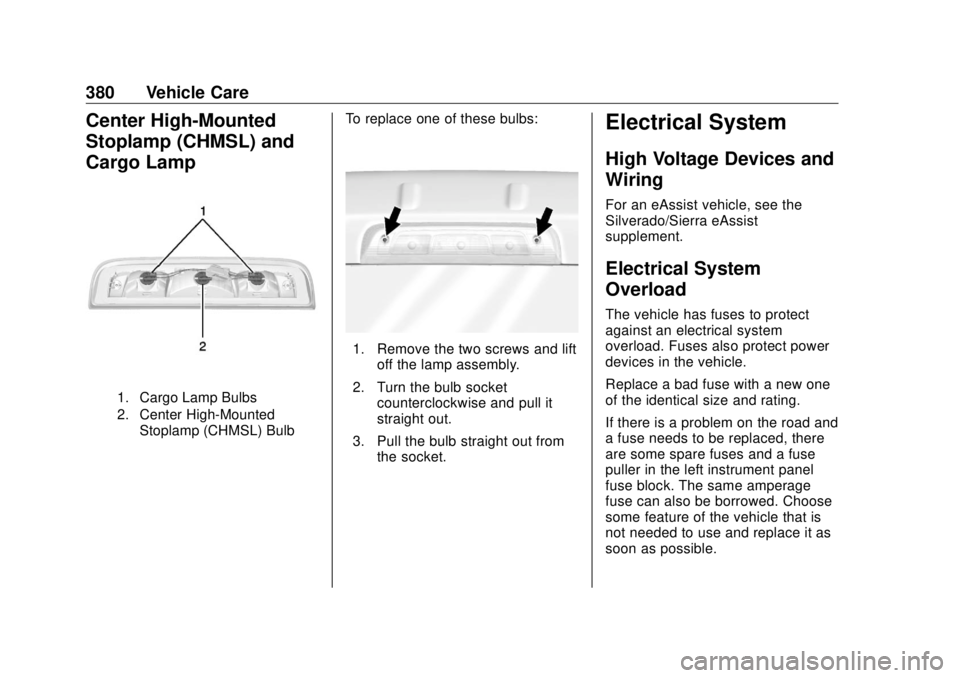
Center High-Mounted
Stoplamp (CHMSL) and
Cargo Lamp
1. Cargo Lamp Bulbs
2. Center High-Mounted
Stoplamp (CHMSL) Bulb To replace one of these bulbs:
1. Remove the two screws and lift
off the lamp assembly.
2. Turn the bulb socket
counterclockwise and pull it
straight out.
3. Pull the bulb straight out from
the socket. Electrical System High Voltage Devices and
Wiring For an eAssist vehicle, see the
Silverado/Sierra eAssist
supplement.
Electrical System
Overload The vehicle has fuses to protect
against an electrical system
overload. Fuses also protect power
devices in the vehicle.
Replace a bad fuse with a new one
of the identical size and rating.
If there is a problem on the road and
a fuse needs to be replaced, there
are some spare fuses and a fuse
puller in the left instrument panel
fuse block. The same amperage
fuse can also be borrowed. Choose
some feature of the vehicle that is
not needed to use and replace it as
soon as possible.
Page 382 of 505
GMC Sierra/Sierra Denali Owner Manual (GMNA-Localizing-U.S./Canada/
Mexico-11349177) - 2018 - CRC - 10/17/17
Vehicle Care 381Headlamp Wiring An electrical overload may cause
the lamps to go on and off, or in
some cases to remain off. Have the
headlamp wiring checked right away
if the lamps go on and off or
remain off.
Windshield Wipers If the wiper motor overheats due to
heavy snow or ice, the windshield
wipers will stop until the motor cools
and will then restart.
Although the circuit is protected
from electrical overload, overload
due to heavy snow or ice may
cause wiper linkage damage.
Always clear ice and heavy snow
from the windshield before using the
windshield wipers.
If the overload is caused by an
electrical problem and not snow or
ice, be sure to get it fixed. Fuses and Circuit
Breakers The wiring circuits in the vehicle are
protected from short circuits by a
combination of fuses and circuit
breakers. This greatly reduces the
chance of damage caused by
electrical problems.
{ DangerFuses and circuit breakers are
marked with their ampere rating.
Do not exceed the
specified amperage rating when
replacing fuses and circuit
breakers. Use of an oversized
fuse or circuit breaker can result
in a vehicle fire. You and others
could be seriously injured or
killed.
To check a fuse, look at the
silver-colored band inside the fuse.
If the band is broken or melted,
replace the fuse. Be sure to replace
a bad fuse with a new one of the
identical size and rating. Fuses of the same amperage can
be temporarily borrowed from
another fuse location, if a fuse goes
out. Replace the fuse as soon as
possible.
Engine Compartment
Fuse Block If the vehicle has a diesel engine,
see the Duramax diesel
supplement.
The engine compartment fuse block
is in the engine compartment, on
the driver side of the vehicle.
Page 383 of 505
GMC Sierra/Sierra Denali Owner Manual (GMNA-Localizing-U.S./Canada/
Mexico-11349177) - 2018 - CRC - 10/17/17
382 Vehicle Care Lift the cover to access the fuse
block.
CautionSpilling liquid on any electrical
component on the vehicle may
damage it. Always keep the
covers on any electrical
component.
A fuse puller is available in the left
instrument panel fuse block.
The vehicle may not be equipped
with all of the fuses, relays, and
features shown.
Fuses Usage
1 Trailer brake Fuses Usage
2 Trailer battery
Page 384 of 505
GMC Sierra/Sierra Denali Owner Manual (GMNA-Localizing-U.S./Canada/
Mexico-11349177) - 2018 - CRC - 10/17/17
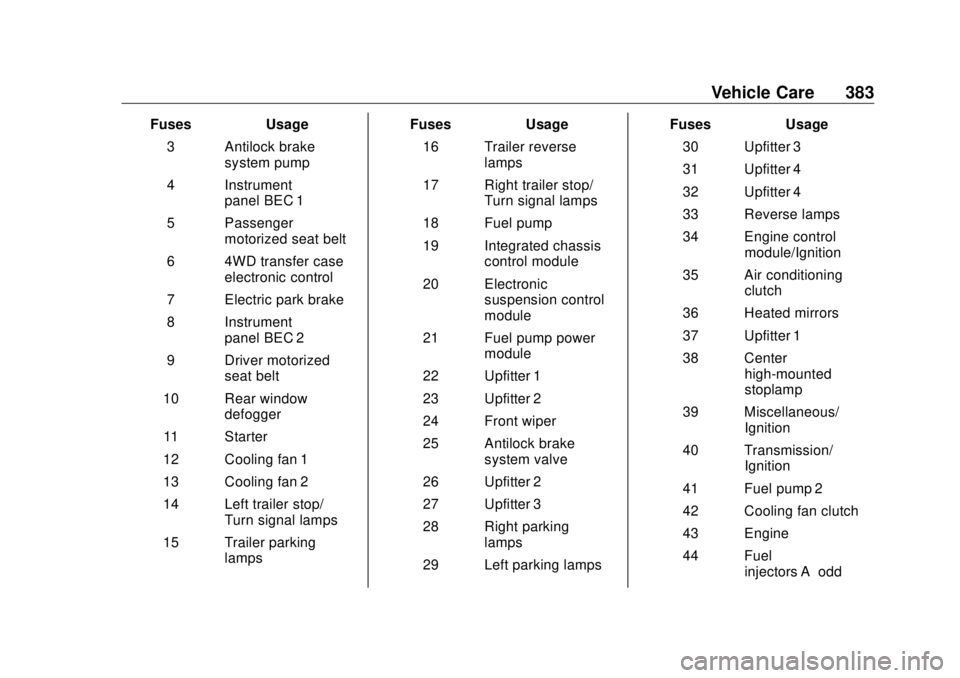
Vehicle Care 383Fuses Usage
3 Antilock brake
system pump
4 Instrument
panel BEC 1
5 Passenger
motorized seat belt
6 4WD transfer case
electronic control
7 Electric park brake
8 Instrument
panel BEC 2
9 Driver motorized
seat belt
10 Rear window
defogger
11 Starter
12 Cooling fan 1
13 Cooling fan 2
14 Left trailer stop/
Turn signal lamps
15 Trailer parking
lamps Fuses Usage
16 Trailer reverse
lamps
17 Right trailer stop/
Turn signal lamps
18 Fuel pump
19 Integrated chassis
control module
20 Electronic
suspension control
module
21 Fuel pump power
module
22 Upfitter 1
23 Upfitter 2
24 Front wiper
25 Antilock brake
system valve
26 Upfitter 2
27 Upfitter 3
28 Right parking
lamps
29 Left parking lamps Fuses Usage
30 Upfitter 3
31 Upfitter 4
32 Upfitter 4
33 Reverse lamps
34 Engine control
module/Ignition
35 Air conditioning
clutch
36 Heated mirrors
37 Upfitter 1
38 Center
high-mounted
stoplamp
39 Miscellaneous/
Ignition
40 Transmission/
Ignition
41 Fuel pump 2
42 Cooling fan clutch
43 Engine
44 Fuel
injectors A – odd

