2018 FORD TRANSIT ignition
[x] Cancel search: ignitionPage 173 of 521

System Warnings
Note:
The system does not warn you if the
vehicle speed falls below approximately
40 mph (65 km/h).
The warning system has two stages:
1. A temporary warning is issued to advise
you to take a rest. This message only
appears for a short time.
2. If you do not rest and the system continues to detect that your driving
deteriorates, it issues a further warning.
This remains in the information display
until you cancel it. See
Information
Messages (page 103).
Press
OK on the steering wheel control to
remove the warning.
System Display
When active the system runs automatically
in the background and only issue warnings
if required. You can view the status at any
time using the information display. See
General Information
(page 99).
The alertness level is shown by six steps
as a colored bar. Alertness level is fine, no rest required. Alertness level is critical, indicating that
you should take a rest as soon as it is safe
to do so.
The status bar travels from left to right as
the calculated alertness level decreases.
As the rest icon is approached, the color
turns from green to yellow and then finally
red when a rest break must be taken.
•
Green: No rest required.
• Yellow: First (temporary) warning.
• Red: Second warning.
Your alertness level will be shown in gray
if:
• The sensor cannot track the road lane
markings.
• The vehicle speed falls below
approximately
40 mph (65 km/h).
Resetting the System
You can reset the system by:
• Switching the ignition off and on.
• Stopping your vehicle and then opening
and closing the driver door.
LANE KEEPING SYSTEM
Lane Keeping Alert
Principle of Operation WARNING:
Always drive with due
care and attention when using and
operating the controls and features on your
vehicle. WARNING:
At all times, you are
responsible for controlling your vehicle,
supervising the system and intervening, if
required. Failure to take care may result in
the loss of control of your vehicle, serious
personal injury or death.
170
2018 Transit (TTH) Canada/United States of America, JK3J 19A321 AA enUSA, Edition date: 201705, Third-Printing- Driving AidsE131358 E131359
Page 189 of 521

The controller shows gain setting, output bar graph and the trailer connectivity
status in the information display as follows:
Action and Description
Message
Displays the current gain setting during a given ignition cycle
and when adjusting the gain setting. This also displays if you
use the manual control lever or make gain adjustments with
no trailer connected.
Trailer Brake
Gain:
No Trailer
Displays when you press your vehicle's brake pedal, or upon
use of the manual control lever. Bar indicators illuminate in
the information display to indicate the amount of power going
to the trailer brakes relative to the brake pedal or manual
control input. One bar indicates the least amount of output;
six bars indicate maximum output.
Trailer Brake
Gain:
Output:
Displays when the system senses a correct trailer wiring
connection during a given ignition cycle. For example a trailer
with electric trailer brakes.
Trailer Connected
Displays when the system senses a trailer connection and
then a disconnection, either intentional or unintentional,
during a given ignition cycle, this is accompanied by a single
audible tone. It also displays if a vehicle or trailer-wiring fault
occurs causing the trailer to appear disconnected. This
message can also display if you use the manual control lever
without a trailer connected.
Trailer Disconnected
Procedure for Adjusting the Gain Setting
The gain setting sets the trailer brake
controller for the specific towing condition.
You should change the setting as towing
conditions change. Changes to towing
conditions include trailer load, vehicle load,
road conditions and weather.
The gain should be set to provide the
maximum trailer braking assistance while
making sure the trailer wheels do not lock
when using the brakes. Locked trailer
wheels may lead to trailer instability.
Note: Only carry out this procedure in a
traffic-free environment at speeds of
approximately 20-25 mph (30-40 km/h). 1.
Make sure the trailer brakes are in good
working condition, functioning normally
and correctly adjusted. See a trailer
dealer if necessary.
2. Hook up the trailer and make the electrical connections according to the
trailer manufacturer's instructions.
3. Use the gain adjustment + and -
buttons to increase or decrease the
gain setting to the desired starting
point. A gain setting of six is a good
starting point for heavier loads.
4. In a traffic-free environment, tow the trailer on a dry, level surface at a speed
of 20-25 mph (30-40 km/h) and slide
the manual control lever completely.
186
2018 Transit (TTH) Canada/United States of America, JK3J 19A321 AA enUSA, Edition date: 201705, Third-Printing- Towing
Page 191 of 521

•
The trailer brake controller is fitted with
a feature that reduces output at vehicle
speeds below 11 mph (18 km/h) so
trailer and vehicle braking is not jerky
or harsh. This feature is only available
when applying the brakes using your
vehicle's brake pedal, not the
controller.
• The controller interacts with the brake
control system and powertrain control
system of your vehicle to provide the
best performance on different road
conditions.
• Your vehicle's brake system and the
trailer brake system work
independently of each other. Changing
the gain setting on the controller does
not affect the operation of your
vehicle's brake system whether you
attach a trailer or not.
• When you switch the engine off, the
controller output is disabled and the
display and module shut down. The
controller module and display turn on
when you switch the ignition on.
• The trailer brake controller is only a
factory-installed or dealer-installed
item. Ford is not responsible for
warranty or performance of the
controller due to misuse or customer
installation.
Trailer Lamps WARNING: Never connect any trailer
lamp wiring to the vehicle's tail lamp
wiring; this may damage the electrical
system resulting in fire. Contact your
authorized dealer as soon as possible for
assistance in proper trailer tow wiring
installation. Additional electrical
equipment may be required. Trailer lamps are required on most towed
vehicles. Make sure all running lamps,
brake lamps, turn signals and hazard
warning lamps are working.
Before Towing a Trailer
Practice turning, stopping and backing up
to get the feel of your vehicle-trailer
combination before starting on a trip.
When turning, make wider turns so the
trailer wheels clear curbs and other
obstacles.
When Towing a Trailer
•
Do not drive faster than
70 mph
(113 km/h) until you drive your vehicle
at least 495 mi (800 km). See
Breaking-In (page 191).
• Do not make full-throttle starts.
• Check the tow hitch, electrical
connections and trailer wheel lug nuts
thoroughly after you have traveled
50 mi (80 km)
.
• When stopped in congested or heavy
traffic during hot weather, place the
gearshift in position park (
P) to aid
engine and transmission cooling and
to help A/C performance.
• Turn off the speed control with heavy
loads or on hilly terrain. The speed
control may turn off automatically
when you are towing on long, steep
grades.
• Shift to a lower gear when driving down
a long or steep hill. Do not apply the
brakes continuously, as they may
overheat and become less effective.
• If the transmission is fitted with a
Grade Assist, Tow/Haul
feature, use
this feature when towing. This provides
engine braking and helps eliminate
excessive transmission shifting for
optimum fuel economy and
transmission cooling.
188
2018 Transit (TTH) Canada/United States of America, JK3J 19A321 AA enUSA, Edition date: 201705, Third-Printing- Towing
Page 192 of 521
•
If your vehicle is fitted with
AdvanceTrac with roll stability control
(RSC), this system may turn on during
typical cornering maneuvers with a
heavily loaded trailer. This is normal.
Turning the corner at a slower speed
while towing may reduce this tendency.
• If you are towing a trailer frequently in
hot weather, hilly conditions, at the
gross combined weight rating (or any
combination of these factors), consider
refilling your vehicle's rear axle with
synthetic gear lubricant (if the axle is
not already filled with it). See
Capacities and Specifications (page
305).
• Allow more distance for stopping with
a trailer attached. Anticipate stops and
brake gradually.
• Avoid parking on a grade. However, if
you must park on a grade:
•Turn the steering wheel to point
your vehicle tires away from traffic
flow.
• Set your vehicle parking brake.
• Place the automatic transmission
in position park (
P).
• Place wheel chocks in front of and
at the back of the trailer wheels.
(Trailer wheel chocks are not
included with your vehicle.)
Launching or Retrieving a Boat or
Personal Water Craft (PWC)
When backing down a ramp during boat
launching or retrieval:
• Do not allow the static water level to
rise above the bottom edge of the rear
bumper.
• Do not allow waves to break higher
than
6 in (15 cm) above the bottom
edge of the rear bumper.
Note: Disconnect the wiring to the trailer
before backing the trailer into the water. Note:
Reconnect the wiring to the trailer
after the trailer is removed from the water.
Exceeding these limits may allow water to
enter vehicle components:
• Causing internal damage to the
components.
• Affecting driveability, emissions, and
reliability.
Replace the rear axle lubricant anytime
the rear axle has been submerged in water.
Water may have contaminated the rear
axle lubricant, which is not normally
checked or changed unless a leak is
suspected or other axle repair is required.
TOWING THE VEHICLE ON
FOUR WHEELS
Emergency Towing WARNING:
If your vehicle has a
steering wheel lock make sure the ignition
is in the accessory or on position when
being towed.
You can flat-tow (all wheels on the
ground, regardless of the powertrain or
transmission configuration) your disabled
vehicle (without access to wheel dollies
or vehicle transport trailer) under the
following conditions:
• Your vehicle is facing forward so you
tow it in a forward direction.
• You shift into Neutral (N). If you cannot
shift into Neutral (N), you may need to
override the transmission. See
Transmission
(page 151).
• Maximum speed is 35 mph (56 km/h).
• Maximum distance is
50 mi (80 km).
189
2018 Transit (TTH) Canada/United States of America, JK3J 19A321 AA enUSA, Edition date: 201705, Third-Printing- Towing
Page 198 of 521

Vehicles Sold in Canada: Getting
Roadside Assistance
To fully assist you should you have a
vehicle concern, Ford Motor Company of
Canada, Limited offers a complimentary
roadside assistance program. This
program is eligible within Canada or the
continental United States.
This program is separate from the New
Vehicle Limited Warranty, but the coverage
is concurrent with the powertrain coverage
period of your vehicle.
Canadian customers who require roadside
assistance, call 1-800-665-2006.
Vehicles Sold in Canada: Using
Roadside Assistance
Complete the roadside assistance
identification card and place it in your
wallet for quick reference.
In Canada, this card is found in the
Warranty Guide in the glove compartment
of your vehicle.
Vehicles Sold in Canada: Roadside
Assistance Program Coverage
The service is available 24 hours a day,
seven days a week.
Canadian roadside coverage and benefits
may differ from the U.S. coverage.
If you require more information, please
refer to the coverage section of your
warranty guide, call us in Canada at
1-800-665-2006, or visit our website at
www.ford.ca.
HAZARD FLASHERS
The hazard warning button is
located on the instrument panel.
Switch the hazard warning
flashers on when your vehicle is creating a
safety hazard. Press the button to switch the hazard
warning flashers on. The front and rear
direction indicators will flash.
Press the button again to switch the
hazard warning flashers off.
Note:
Prolonged use of the hazard warning
flashers will cause the battery to run out of
charge. There may be insufficient power to
restart the engine.
EMERGENCY EXIT WARNING: Make sure that the roof
rack and its load do not obstruct the
emergency exit. Ask your dealer for advice
on roof racks suitable for your vehicle.
Break the glass with the hammer in an
emergency.
FUEL SHUTOFF WARNING:
If your vehicle has been
involved in a crash, have the fuel system
checked. Failure to follow this instruction
could result in fire, personal injury or death.
In the event of a moderate to severe crash,
your vehicle is fitted with a fuel pump
shut-off feature that stops the flow of fuel
to the engine. Not every impact will cause
a shut-off.
Should the engine turn off after a crash,
you may restart the engine by carrying out
the following.
Ignition Switch
1. Switch the ignition off.
2. Switch the ignition to position
III.
3. Switch the ignition off.
195
2018 Transit (TTH) Canada/United States of America, JK3J 19A321 AA enUSA, Edition date: 201705, Third-Printing- Roadside EmergenciesE71943
Page 199 of 521

4. Switch the ignition on again to
re-enable the fuel pump.
Note: Various system checks are
automatically carried out before the vehicle
will restart. if your vehicle fails to restart
after the third attempt, the system has
detected a fault that requires service. We
recommend you contact an authorized
dealer.
JUMP STARTING THE VEHICLE WARNING: The gases around the
battery can explode if exposed to flames,
sparks or lit cigarettes. An explosion could
result in personal injury or vehicle damage. WARNING: Batteries contain sulfuric
acid which can burn skin, eyes and clothing,
if contacted. WARNING:
Use only an
adequate-sized cable with insulated
clamps.
Preparing Your Vehicle
Note: Do not attempt to push-start your
automatic transmission vehicle. Automatic
transmissions do not have push-start
capability. Attempting to push-start a
vehicle with an automatic transmission may
cause transmission damage.
Note: Use only a 12-volt supply to start your
vehicle.
Note: Do not disconnect the battery of the
disabled vehicle as this could damage the
vehicle's electrical system.
Park the booster vehicle close to the hood
of the disabled vehicle, making sure the
two vehicles do not touch, and switch off
all accessories. Your vehicle has a positive (+) access
terminal and a negative (-) grounding
connection point that you can access
under the hood, even though the actual
battery is under the driver seat. You can
jump your vehicle using these points.
The positive (+) access terminal is next to
the fuse box, under a red cap. To access
the positive (+) terminal, lift the red cap
up.
The negative (-) terminal is a post, located
on the driver side, near the hood hinge. It
is a grounding connection point, so you will
need to remove the rubber covering first.
196
2018 Transit (TTH) Canada/United States of America, JK3J 19A321 AA enUSA, Edition date: 201705, Third-Printing- Roadside EmergenciesE145290 E183998
Page 202 of 521
If you need to have your vehicle towed,
contact a professional towing service or,
if you are a member of a roadside
assistance program, your roadside
assistance service provider.
We recommend the use of a wheel lift and
dollies or flatbed equipment to tow your
vehicle. Do not tow with a slingbelt. Ford
Motor Company has not approved a
slingbelt towing procedure. Vehicle
damage may occur if towed incorrectly, or
by any other means.
Ford Motor Company produces a towing
manual for all authorized tow truck
operators. Have your tow truck operator
refer to this manual for proper hook-up
and towing procedures for your vehicle.
It is acceptable to have your front-wheel
drive vehicle towed from the front if using
proper wheel lift equipment to raise the
front wheels off the ground. When towing
in this manner, the rear wheels can remain
on the ground.
Front-wheel drive vehicles must have the
front wheels placed on a tow dolly when
towing your vehicle from the rear using
wheel lift equipment. This prevents
damage to the transmission.
Towing an all-wheel or four-wheel drive
vehicle requires that all wheels be off the
ground, such as using a wheel lift and
dollies or flatbed equipment. This prevents
damage to the transmission, all-wheel or
four-wheel drive system and vehicle.
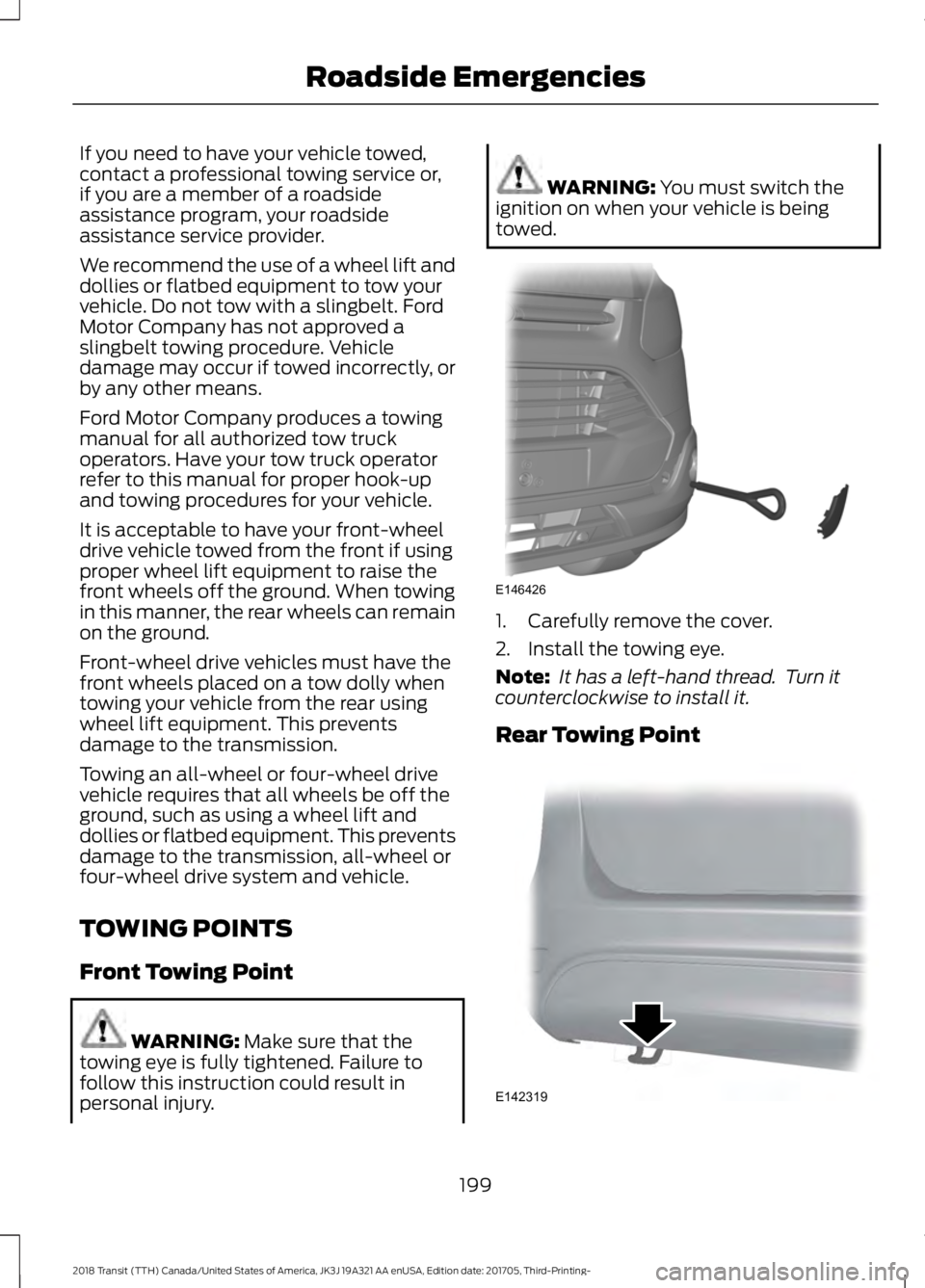
TOWING POINTS
Front Towing Point
WARNING: Make sure that the
towing eye is fully tightened. Failure to
follow this instruction could result in
personal injury. WARNING:
You must switch the
ignition on when your vehicle is being
towed. 1. Carefully remove the cover.
2. Install the towing eye.
Note:
It has a left-hand thread. Turn it
counterclockwise to install it.
Rear Towing Point 199
2018 Transit (TTH) Canada/United States of America, JK3J 19A321 AA enUSA, Edition date: 201705, Third-Printing- Roadside EmergenciesE146426 E142319
Page 213 of 521

Protected Component
Fuse Rating
Fuse Number
Diesel particulate filter vaporizer.
3 A
F5
Glow plug monitor.
Not used.
-
F6
Automatic transmission module.
7.5 A
F7
Not used.
-
F8
Not used.
-
F9
Power step.
30 A
F10
Heated seats.
Air conditioning clutch.
10 A
F11
Diesel particulate filter vaporizer glow plug.
20 A
F12
Not used.
-
F13
Selective catalytic reduction system.
3 A
F14
Not used.
-
F15
Fuel pump relay.
10 A
F16
Automatic transmission module.
15 A
F17
Fuel pump relay.
30 A
F18
Automatic transmission module.
Starter motor solenoid.
30 A
F19
Glow plugs.
60 A
F20
Ignition relay 3.
60 A
F21
Selective catalytic reduction system.
40 A
F22 Not used.
-
Spare.
10 A
F23
Not used.
-
F24
Spare.
10 A
F25
Spare.
20 A
F26
Not used.
-
F27
Crankcase pressure sensor.
7.5 A
F28
210
2018 Transit (TTH) Canada/United States of America, JK3J 19A321 AA enUSA, Edition date: 201705, Third-Printing- Fuses