2018 FORD TRANSIT manual transmission
[x] Cancel search: manual transmissionPage 202 of 521
If you need to have your vehicle towed,
contact a professional towing service or,
if you are a member of a roadside
assistance program, your roadside
assistance service provider.
We recommend the use of a wheel lift and
dollies or flatbed equipment to tow your
vehicle. Do not tow with a slingbelt. Ford
Motor Company has not approved a
slingbelt towing procedure. Vehicle
damage may occur if towed incorrectly, or
by any other means.
Ford Motor Company produces a towing
manual for all authorized tow truck
operators. Have your tow truck operator
refer to this manual for proper hook-up
and towing procedures for your vehicle.
It is acceptable to have your front-wheel
drive vehicle towed from the front if using
proper wheel lift equipment to raise the
front wheels off the ground. When towing
in this manner, the rear wheels can remain
on the ground.
Front-wheel drive vehicles must have the
front wheels placed on a tow dolly when
towing your vehicle from the rear using
wheel lift equipment. This prevents
damage to the transmission.
Towing an all-wheel or four-wheel drive
vehicle requires that all wheels be off the
ground, such as using a wheel lift and
dollies or flatbed equipment. This prevents
damage to the transmission, all-wheel or
four-wheel drive system and vehicle.
TOWING POINTS
Front Towing Point
WARNING: Make sure that the
towing eye is fully tightened. Failure to
follow this instruction could result in
personal injury. WARNING:
You must switch the
ignition on when your vehicle is being
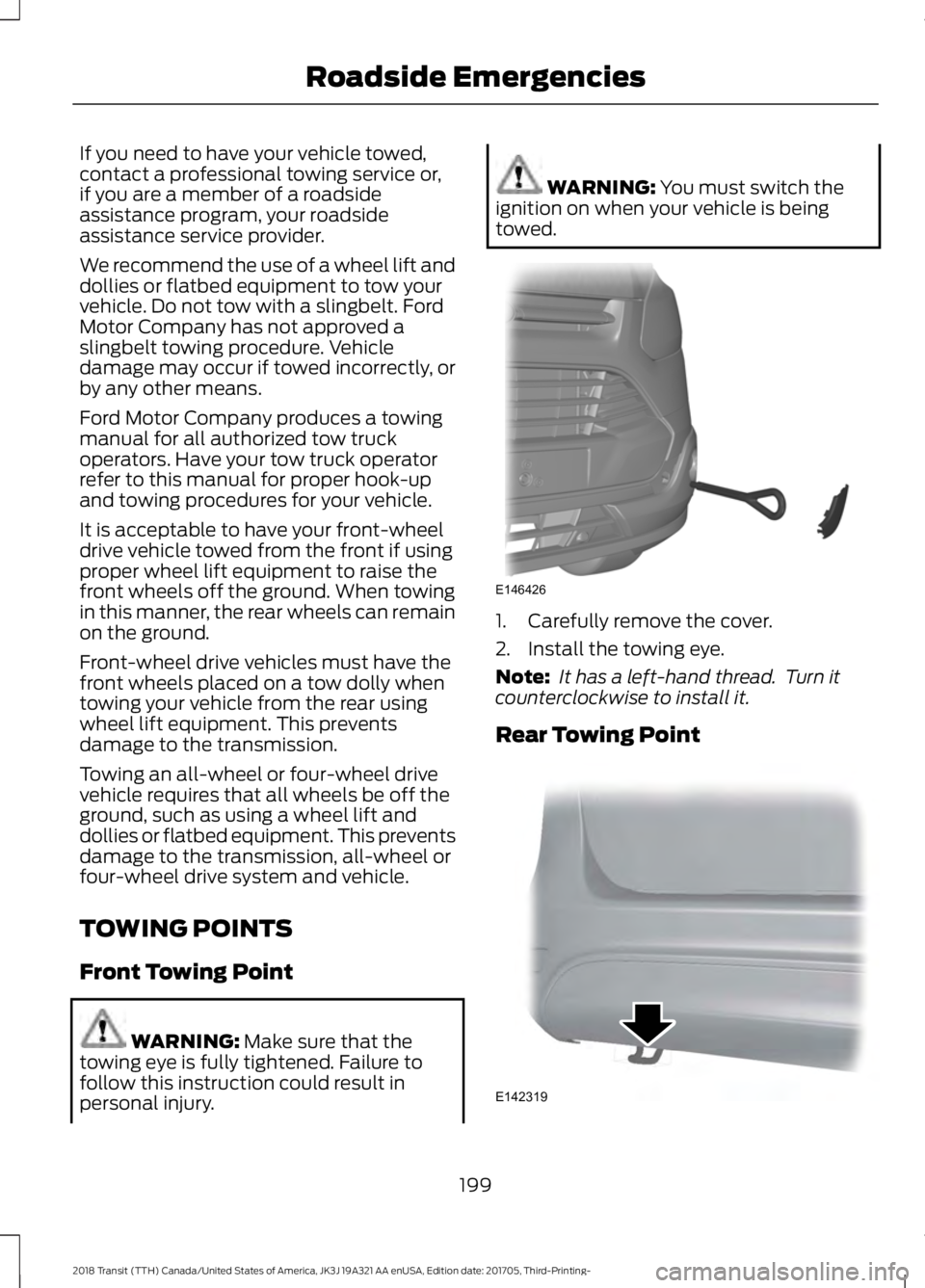
towed. 1. Carefully remove the cover.
2. Install the towing eye.
Note:
It has a left-hand thread. Turn it
counterclockwise to install it.
Rear Towing Point 199
2018 Transit (TTH) Canada/United States of America, JK3J 19A321 AA enUSA, Edition date: 201705, Third-Printing- Roadside EmergenciesE146426 E142319
Page 304 of 521
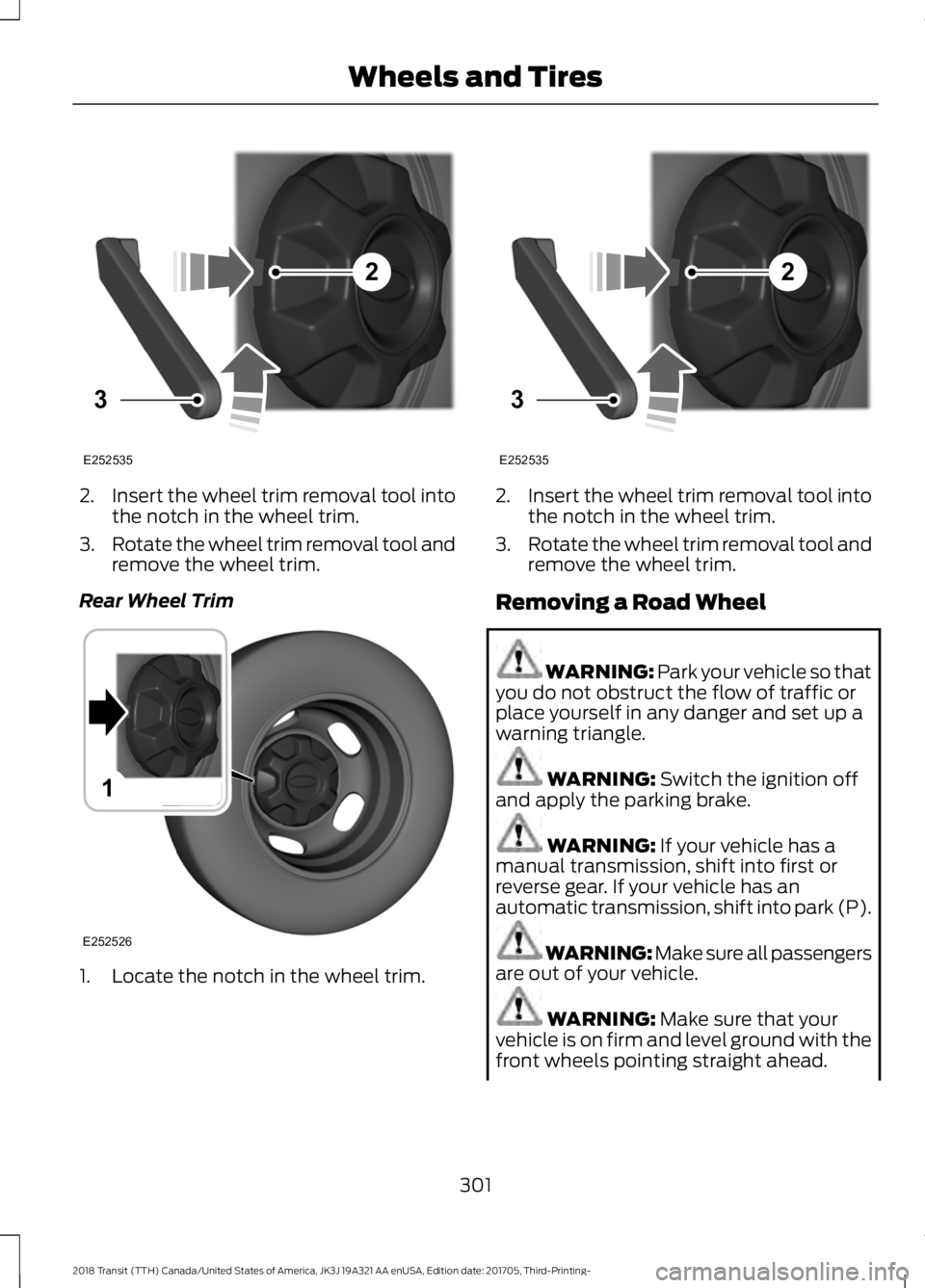
2.
Insert the wheel trim removal tool into
the notch in the wheel trim.
3. Rotate the wheel trim removal tool and
remove the wheel trim.
Rear Wheel Trim 1. Locate the notch in the wheel trim. 2.
Insert the wheel trim removal tool into
the notch in the wheel trim.
3. Rotate the wheel trim removal tool and
remove the wheel trim.
Removing a Road Wheel WARNING: Park your vehicle so that
you do not obstruct the flow of traffic or
place yourself in any danger and set up a
warning triangle. WARNING:
Switch the ignition off
and apply the parking brake. WARNING:
If your vehicle has a
manual transmission, shift into first or
reverse gear. If your vehicle has an
automatic transmission, shift into park (P). WARNING:
Make sure all passengers
are out of your vehicle. WARNING:
Make sure that your
vehicle is on firm and level ground with the
front wheels pointing straight ahead.
301
2018 Transit (TTH) Canada/United States of America, JK3J 19A321 AA enUSA, Edition date: 201705, Third-Printing- Wheels and Tires2
3
E252535 1
E252526 2
3
E252535
Page 357 of 521

Other features, such as text messaging
using Bluetooth and automatic phonebook
download, are phone-dependent features.
To check your phone's compatibility, see
your phone's manual and visit
www.SYNCMyRide.com,
www.SYNCMyRide.ca or
www.syncmaroute.ca.
Pairing a Phone for the First Time
Wirelessly pairing your phone with SYNC
allows you to make and receive hands-free
calls.
Note:
SYNC can support downloading up
to approximately 4000 entries per
Bluetooth-enabled cellular phone.
Note: Make sure to switch on the ignition
and the radio. Shift the transmission into
park (P) for automatic transmission or first
gear for manual transmission.
Using the Audio System
Note: To scroll through the menus, press
the up and down arrows on your audio
system.
1. Make sure to switch on your phone's Bluetooth feature before starting the
search. See your device's manual if
necessary.
2. Press the PHONE button. When the
audio display indicates there is no
paired phone, select the option to add.
3. When a message to begin pairing appears in the audio display, search for
SYNC on your phone to start the pairing
process. 4. When prompted on your cell phone
’s
display, confirm that the PIN provided
by SYNC matches the PIN displayed
on your cell phone. Your phone is now
paired and the display indicates that
the pairing was successful. If you are
prompted to enter a PIN on your device,
enter the PIN displayed on the screen.
The display indicates when the pairing
is successful.
Depending on your phone's capability and
your market, the system may prompt you
with questions, such as setting the current
phone as the primary phone (the phone
SYNC automatically tries to connect with
first upon vehicle start-up) and
downloading your phonebook.
Using Voice Commands Make sure to switch on your
phone's Bluetooth feature
before starting the search. See
your device's manual if necessary.
Press the voice and when prompted
say: Action and Descrip-
tion
Voice Command
Follow the instruc-
tions on the audio
display.
(pair ([Bluetooth]
device | phone |
Bluetooth audio) |
add phone)
You can say any of the voice commands
that appear within open and close brackets
that are separated by |. For example,
where; (what's | what is) appears you say;
what's or what is.
The commands that have [ ] around the
word means that the word is optional.
354
2018 Transit (TTH) Canada/United States of America, JK3J 19A321 AA enUSA, Edition date: 201705, Third-Printing- SYNC™E142599
Page 358 of 521

Depending on your phone's capability and
your market, the system may prompt you
with questions, such as setting the current
phone as the primary phone (the phone
SYNC automatically tries to connect with
first upon vehicle start-up) and
downloading your phonebook.
Pairing Subsequent Phones
Note:
Make sure to switch on the ignition
and the radio. Shift the transmission into
park (P) for automatic transmission or first
gear for manual transmission.
Note: To scroll through the menus, press
the up and down arrows on your audio
system.
1. Make sure to switch on your phone's Bluetooth feature before starting the
search. See your device's manual if
necessary.
2. Press the PHONE button.
3. Select the option for Bluetooth Devices.
4. Press the
OK button.
5. Select the option to add. This starts the pairing process.
6. When a message to begin pairing appears in the audio display, search for
SYNC on your device.
7. When prompted on your cell phone ’s
display, confirm that the PIN provided
by SYNC matches the PIN displayed
on your cell phone. Your phone is now
paired and the display indicates that
the pairing was successful. If you are
prompted to enter a PIN on your device,
enter the PIN displayed on the screen.
The display indicates when the pairing
is successful. SYNC may prompt you with more cell
phone options. Your cell phone may also
prompt you to give SYNC permission to
access information. For more information
on your cell phone
’s capability, see your
cell phone ’s manual and visit the website.
Phone Voice Commands Press the voice button. When
prompted, say any of the
following:
Voice Command
(phone | Blackberry | iPhone)
Then say any of the following:
call (___)
call ___ at home
call ___ ((in|at) [the] office | at work)
call ___ on (cell | mobile)
call ___ on other 1
dial [[a] number]
2
([go to] privacy | transfer to phone
| privacy on)
2
(hold call [on] | place call on hold)
2
join (calls | call)
2
mute call [on]
2
(mute call off | un-mute call)
(turn ringer on | silent mode off)
(turn ringer off | silent mode [on])
355
2018 Transit (TTH) Canada/United States of America, JK3J 19A321 AA enUSA, Edition date: 201705, Third-Printing- SYNC™E142599
Page 508 of 521

9
911 Assist............................................................57
911 Assist May Not Work If................................ 58
911 Assist Privacy Notice................................... 58
In the Event of a Crash....................................... 58
A
A/C See: Climate Control......................................... 109
About This Manual
...........................................7
ABS See: Brakes........................................................... 156
ABS driving hints See: Hints on Driving With Anti-Lock
Brakes................................................................ 156
Accessories....................................................454 Exterior Style....................................................... 454
Interior Style........................................................ 454
Lifestyle................................................................. 454
Peace of Mind..................................................... 454
Accessories See: Replacement Parts
Recommendation............................................ 12
Adjusting the Headlamps.........................247 Horizontal Aim Adjustment........................... 248
Vertical Aim Adjustment................................. 247
Adjusting the Steering Wheel...................80
Airbag Disposal
...............................................56
Air Conditioning See: Climate Control......................................... 109
Air Filter See: Changing the Engine Air Filter - 3.2L
Power Stroke Diesel..................................... 255
See: Changing the Engine Air Filter - 3.5L Ecoboost™..................................................... 256
See: Changing the Engine Air Filter - 3.7L...................................................................... 257
Alarm See: Anti-Theft Alarm........................................ 76
Anti-Theft Alarm
............................................76
Alarm System........................................................ 76
Arming the Alarm................................................. 76
Disarming the Alarm........................................... 76
Triggering the Alarm............................................ 76
Appendices.....................................................477 Apps
..................................................................425
........................................................................\
.......... 425
SiriusXM Traffic and Travel Link................... 427
Audible Warnings and Indicators
.............98
Airbag Secondary Warning.............................. 98
Door Ajar................................................................. 98
Exterior Lamps On............................................... 98
Key in Ignition........................................................ 98
Parking Brake On................................................. 98
Seatbelt Reminder.............................................. 98
Transmission Selector Lever Not in park (P)........................................................................\
98
Audio Control
..................................................80
Audio Input Jack...........................................347
Audio System................................................326 General Information......................................... 326
Audio Unit - Vehicles With: AM/FM/CD/ SYNC/Satellite Radio..............................327
Audio Unit - Vehicles With: AM/FM/CD/ SYNC..............................................................331
Audio Unit - Vehicles With: AM/FM/USB Port/Bluetooth
..........................................333
Bluetooth Audio Streaming........................... 338
iPod........................................................................\
. 338
Making and Receiving Calls............................ 337
Phone and Voice Pass-Through.................. 335
Phone Menu Options........................................ 337
Sound Button...................................................... 334
Station Preset Buttons.................................... 335
Station Tuning Control.................................... 334
USB........................................................................\
.. 337
Waveband Button............................................. 334
Audio Unit - Vehicles With: AM/ FM...................................................................339
AUX Button........................................................... 341
Clock Button....................................................... 340
Menu Button......................................................... 341
Sound Button....................................................... 341
Station Preset Buttons..................................... 341
Station Tuning Buttons.................................... 341
Audio Unit - Vehicles With: Premium AM/FM/CD..................................................329
Autolamps
........................................................86
Windshield Wiper Activated
Headlamps........................................................ 86
Automatic Crash Notification System.............................................................57
505
2018 Transit (TTH) Canada/United States of America, JK3J 19A321 AA enUSA, Edition date: 201705, Third-Printing- Index
Page 517 of 521

T
Technical Specifications
See: Capacities and Specifications............305
The Better Business Bureau (BBB) Auto Line Program (U.S. Only).......................203
Tire Care..........................................................269 Glossary of Tire Terminology.......................... 271
Inflating the Tires............................................... 278
Information About Uniform Tire Quality Grades.............................................................. 269
Information Contained on the Tire Sidewall............................................................ 272
Inspecting the Tires and Wheel Valve Stems................................................................. 281
Location of the Tire Label............................... 278
Tire Age.................................................................. 282
Tire and Wheel Alignment............................. 284
Tire Damage......................................................... 281
Tire Pressure Monitoring System.................283
Tire Replacement Requirements.................282
Tire Rotation........................................................ 285
Tire Safety Practices......................................... 283
Tire Wear................................................................ 281
United States Department of Transportation Tire Quality
Grades............................................................... 270
Tire Pressure Monitoring System...........287 Changing Tires With a Tire Pressure
Monitoring System....................................... 289
Tire Pressure Monitoring System Reset Procedure......................................................... 291
Understanding the Tire Pressure Monitoring System.............................................................. 289
Tires See: Wheels and Tires..................................... 268
Tow/Haul.........................................................154
Towing a Trailer.............................................180 Load Placement................................................. 180
Towing Points................................................199
Front Towing Point............................................. 199
Rear Towing Point.............................................. 199
Towing Eye Location........................................ 200
Towing the Vehicle on Four Wheels..........................................................189
Emergency Towing............................................ 189
Recreational Towing......................................... 190
Towing..............................................................180 Traction Control
............................................160
Principle of Operation...................................... 160
Trailer Sway Control.....................................181
Transmission Code Designation.............312
Transmission...................................................151
Transporting the Vehicle
...........................198
Trip Computer................................................102 All Values............................................................... 102
Average Fuel Consumption............................ 102
Digital Speedometer......................................... 102
Distance to Empty............................................. 102
Outside Air Temperature................................. 102
Resetting the Trip Computer.......................... 102
Trip Odometer..................................................... 102
Trip Timer.............................................................. 102
U
Under Hood Overview - 3.2L Power Stroke Diesel
..............................................230
Under Hood Overview - 3.5L Ecoboost™..................................................231
Under Hood Overview - 3.7L....................232
USB Port
..........................................................347
Using Cruise Control...................................168 Switching Cruise Control Off......................... 168
Switching Cruise Control On.......................... 168
Using MyKey With Remote Start Systems..........................................................68
Using Power Running Boards.....................77 Automatic Power Deploy................................... 77
Automatic Power Stow....................................... 77
Bounce-back.......................................................... 78
Enabling and Disabling...................................... 78
Manual Operation................................................ 78
Manual Power Deploy......................................... 77
Resetting the System.......................................... 79
Using Snow Chains
.....................................286
Using Stability Control................................162
Using SYNC™ With Your Media Player.............................................................370
Accessing Your USB Song Library................374
Bluetooth Devices and System Settings............................................................. 376
Connecting Your Digital Media Player to the USB Port........................................................... 370
Media Menu Features....................................... 373
Media Voice Commands.................................. 371
514
2018 Transit (TTH) Canada/United States of America, JK3J 19A321 AA enUSA, Edition date: 201705, Third-Printing- Index