2018 FORD TRANSIT audio
[x] Cancel search: audioPage 222 of 521

Protected Component
Fuse Rating
Fuse Number
Not used.
-
F5
Not used.
-
F6
Automatic transmission module.
7.5 A
F7
Cooling fan.
30 A
F8
Not used.
-
F9
Power step.
30 A
F10
Heated seats.
Air conditioning clutch.
10 A
F11
Not used.
-
F12
Not used.
-
F13
Not used.
-
F14
Not used.
-
F15
Fuel pump relay.
20 A
F16
Not used.
-
F17
Anti-lock brake system.
30 A
F18
Fuel pump relay.
Starter motor solenoid.
30 A
F19
Not used.
-
F20
Ignition relay 3.
60 A
F21
Selective catalytic reduction system catalyst.
40 A
F22
Brake vacuum pump relay.
Spare.
10 A
F23
Not used.
-
F24
Spare.
10 A
F25
Spare.
20 A
F26
Not used.
-
F27
Not used.
-
F28
Audio unit.
3 A
F29
219
2018 Transit (TTH) Canada/United States of America, JK3J 19A321 AA enUSA, Edition date: 201705, Third-Printing- Fuses
Page 229 of 521

Protected Component
Fuse
Rating
Fuse Number
Windshield washer pump.
15 A
F6
Exterior mirrors.
7.5 A
F7
Not used.
-
F8
Right-hand high beam.
10 A
F9
Left-hand high beam.
10 A
F10
Right-hand exterior lamps.
25 A
F11
Left-hand headlamp.
Not used.
-
F12
Secondary On-Board Diagnostic Control Module A.
15 A
F13
Battery saver.
Direction indicators.
25 A
F14 Power windows.
Heated windshield element.
Left-hand exterior lamps.
25 A
F15 Right-hand headlamp.
Central high mounted stoplamp.
Audio unit.
20 A
F16
Navigation unit.
Instrument panel cluster.
7.5 A
F17
Auxiliary heater control module.
Headlamp switch.
10 A
F18 Steering wheel module.
Stoplamp switch.
Front control/display interface module.
5 A
F19
Ignition passive anti-theft system.
5 A
F20
Spare.
3 A
F21
226
2018 Transit (TTH) Canada/United States of America, JK3J 19A321 AA enUSA, Edition date: 201705, Third-Printing- Fuses
Page 329 of 521

GENERAL INFORMATION
Radio Frequencies and Reception
Factors
AM and FM frequencies are established by
the Federal Communications Commission
(FCC) and the Canadian Radio and
Telecommunications Commission (CRTC).
Those frequencies are:
•
AM: 530, 540-1700, 1710 kHz
• FM: 87.9-107.7, 107.9 MHz Radio Reception Factors
The further you travel from an AM or FM station, the
weaker the signal and the weaker the reception.
Distance and strength
Hills, mountains, tall buildings, bridges, tunnels, freeway
overpasses, parking garages, dense tree foliage and
thunderstorms can interfere with the reception.
Terrain
When you pass a ground-based broadcast repeating
tower, a stronger signal may overtake a weaker one and
result in the audio system muting.
Station overload
CD and CD Player Information
Note: CD units play commercially pressed
5 in (12 cm) audio compact discs only. Due
to technical incompatibility, certain
recordable and re-recordable compact discs
may not function correctly when used in
Ford CD players.
Note: Do not insert CDs with homemade
paper (adhesive) labels into the CD player
as the label may peel and cause the CD to
become jammed. You should use a
permanent felt tip marker rather than
adhesive labels on your homemade CDs.
Ballpoint pens may damage CDs. Please
contact an authorized dealer for further
information.
Note: Do not use any irregularly shaped
discs or discs with a scratch protection film
attached.
Always handle discs by their edges only.
Clean the disc with an approved CD
cleaner only. Wipe it from the center of
the disc toward the edge. Do not clean in
a circular motion. Do not expose discs to direct sunlight or
heat sources for extended periods.
MP3 and WMA Track and Folder
Structure
Audio systems capable of recognizing and
playing MP3 and WMA individual tracks
and folder structures work as follows:
•
There are two different modes for MP3
and WMA disc playback: MP3 and
WMA track mode (system default) and
MP3 and WMA folder mode.
• MP3 and WMA track mode ignores any
folder structure on the MP3 and WMA
disc. The player numbers each MP3
and WMA track on the disc (noted by
the MP3 or WMA file extension) from
T001 to a maximum of T255. The
maximum number of playable MP3 and
WMA files may be less depending on
the structure of the CD and exact
model of radio present.
326
2018 Transit (TTH) Canada/United States of America, JK3J 19A321 AA enUSA, Edition date: 201705, Third-Printing- Audio System
Page 330 of 521

•
MP3 and WMA folder mode represents
a folder structure consisting of one
level of folders. The CD player numbers
all MP3 and WMA tracks on the disc
(noted by the MP3 or WMA file
extension) and all folders containing
MP3 and WMA files, from F001 (folder)
T001 (track) to F253 T255.
• Creating discs with only one level of
folders helps with navigation through
the disc files.
If you are burning your own MP3 and WMA
discs, it is important to understand how
the system reads the structures you create.
While various files may be present (files
with extensions other than MP3 and
WMA), only files with the MP3 and WMA
extension are played; other files are
ignored by the system. This enables you to
use the same MP3 and WMA disc for a
variety of tasks on your work computer,
home computer and your in-vehicle
system.
In track mode, the system displays and
plays the structure as if it were only one
level deep (all MP3 and WMA files play,
regardless of being in a specific folder). In
folder mode, the system only plays the
MP3 and WMA files in the current folder. AUDIO UNIT - VEHICLES WITH:
AM/FM/CD/SYNC/SATELLITE
RADIO WARNING: Driving while distracted
can result in loss of vehicle control, crash
and injury. We strongly recommend that
you use extreme caution when using any
device that may take your focus off the
road. Your primary responsibility is the safe
operation of your vehicle. We recommend
against the use of any hand-held device
while driving and encourage the use of
voice-operated systems when possible.
Make sure you are aware of all applicable
local laws that may affect the use of
electronic devices while driving.
Note: You can operate your audio system
for up to one hour after you switch the
ignition off. Press the on and off control to
operate the system with the ignition turned
off. The system automatically turns off after
one hour.
Note: Some features, such as SIRIUS
satellite radio, may not be available in your
location. Check with an authorized dealer.
327
2018 Transit (TTH) Canada/United States of America, JK3J 19A321 AA enUSA, Edition date: 201705, Third-Printing- Audio System
Page 331 of 521

Eject: Press to eject a CD.
A
OK and Arrow buttons:
Press
OK to confirm menu selections.
Press to scroll through the menu
choices.
B
Information:
Press to access
any available radio or CD
information.
C
TUNE: Press to manually search
through the radio frequency
band.
D Number block:
In radio mode,
you can store your favorite radio
stations. To store a radio station,
tune to the station, then press
and hold a preset button until
sound returns. In CD mode,
select a track. In phone mode,
enter a phone number.
E
CLOCK:
If not in phone mode,
press to display the clock.
F
Function buttons:
Select
different functions of the audio
system depending on which
mode you are in (such as Radio
mode or CD mode).
G
328
2018 Transit (TTH) Canada/United States of America, JK3J 19A321 AA enUSA, Edition date: 201705, Third-Printing- Audio SystemE216052
Page 332 of 521
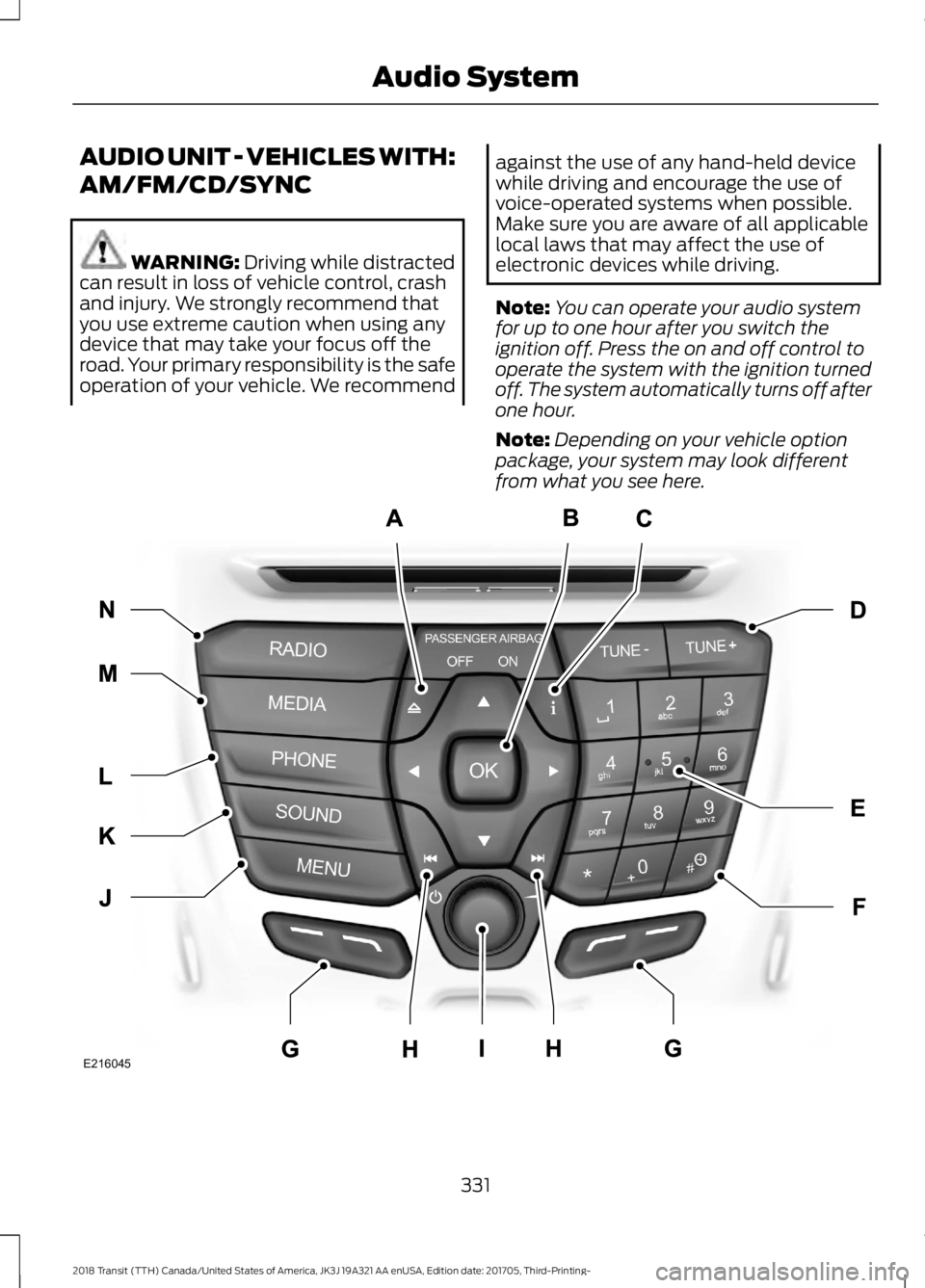
SOUND: Press to access
settings for Treble, Midrange,
Bass, Fade or Balance. Use the
up and down arrow buttons to
select the various settings. When
you make your selection, press
H
the left and right arrow buttons
to change the settings. Press OK
to set or press
MENU to exit.
Sound settings can be set for
each audio source
independently.
Seek, Fast Forward and
Reverse:
In radio mode, select
a frequency band and press
either button. The system stops
at the first station it finds in that
direction. In media mode, press
to select the previous or next
track. Press and hold either
button to move quickly forward
or backward through the current
track.
I
VOL and Power:
Press to
switch the system on and off.
Turn to adjust the volume.
J
MENU: Press to access different
audio system features. See
Menu Structure
later in this
chapter.
K
PHONE:
Press to access the
phone features of the SYNC
system. See your SYNC
information.
L MEDIA: Press to open the media
source menu. You can press this
multiple times to change to CD
or to a SYNC-Media device or
scroll through the media sources
using the arrow buttons. Press
OK
to select a source.
M
SIRIUS:
Press to listen to
SIRIUS satellite radio.
N
RADIO:
Press this multiple
times to select a radio band.
Press and hold to select the
autostore function. Press to
return to the main screen of the
active radio band.
O
AUDIO UNIT - VEHICLES WITH:
PREMIUM AM/FM/CD WARNING:
Driving while distracted
can result in loss of vehicle control, crash
and injury. We strongly recommend that
you use extreme caution when using any
device that may take your focus off the
road. Your primary responsibility is the safe
operation of your vehicle. We recommend
against the use of any hand-held device
while driving and encourage the use of
voice-operated systems when possible.
Make sure you are aware of all applicable
local laws that may affect the use of
electronic devices while driving.
Note: The touchscreen system controls
most of the audio features. See your SYNC
information.
329
2018 Transit (TTH) Canada/United States of America, JK3J 19A321 AA enUSA, Edition date: 201705, Third-Printing- Audio System
Page 333 of 521
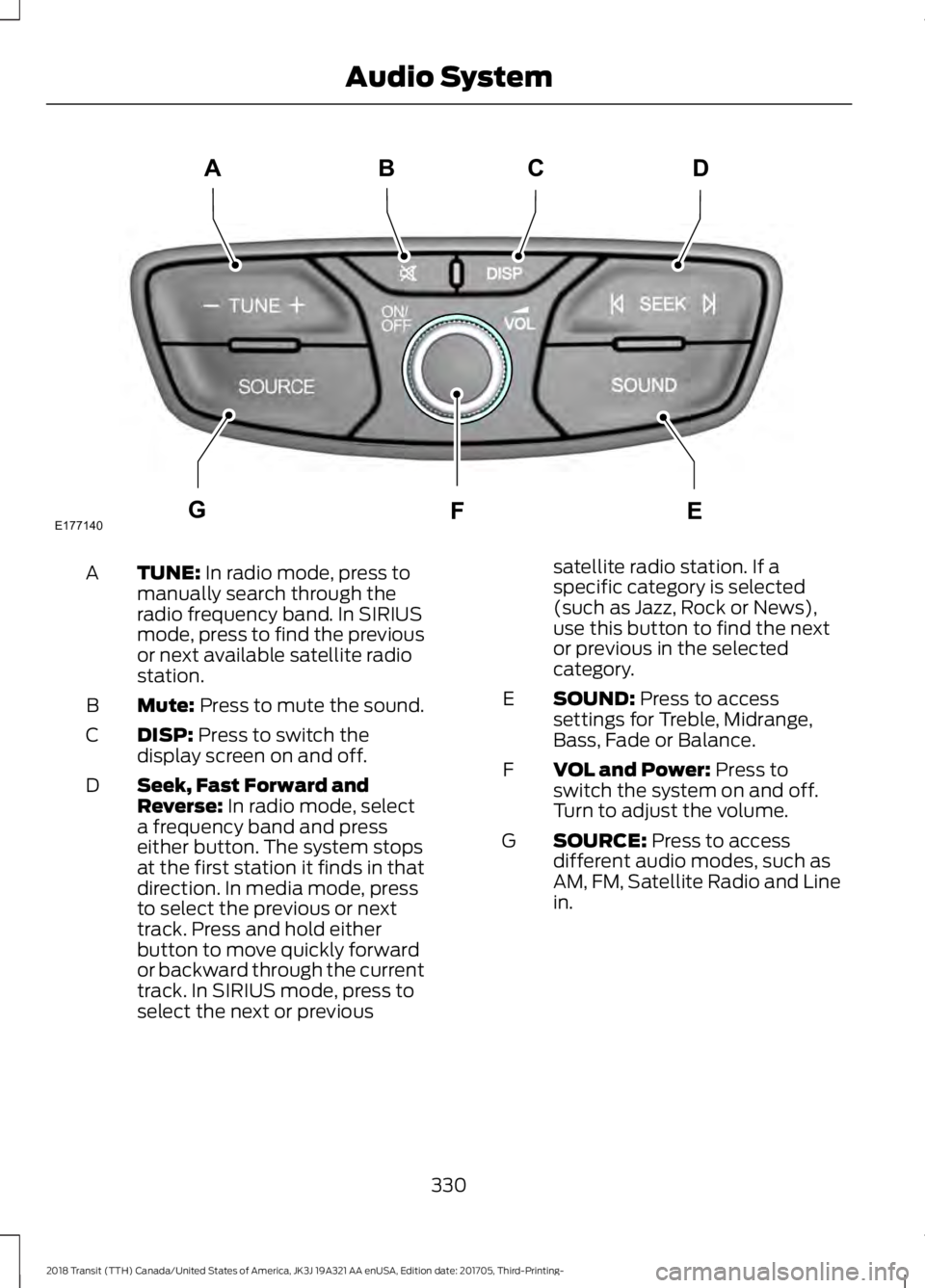
TUNE: In radio mode, press to
manually search through the
radio frequency band. In SIRIUS
mode, press to find the previous
or next available satellite radio
station.
A
Mute:
Press to mute the sound.
B
DISP:
Press to switch the
display screen on and off.
C
Seek, Fast Forward and
Reverse:
In radio mode, select
a frequency band and press
either button. The system stops
at the first station it finds in that
direction. In media mode, press
D
to select the previous or next
track. Press and hold either
button to move quickly forward
or backward through the current
track. In SIRIUS mode, press to
select the next or previous satellite radio station. If a
specific category is selected
(such as Jazz, Rock or News),
use this button to find the next
or previous in the selected
category.
SOUND:
Press to access
settings for Treble, Midrange,
Bass, Fade or Balance.
E
VOL and Power:
Press to
switch the system on and off.
Turn to adjust the volume.
F
SOURCE:
Press to access
different audio modes, such as
AM, FM, Satellite Radio and Line
in.
G
330
2018 Transit (TTH) Canada/United States of America, JK3J 19A321 AA enUSA, Edition date: 201705, Third-Printing- Audio SystemE177140
CD
GEF
B
A
Page 334 of 521
AUDIO UNIT - VEHICLES WITH:
AM/FM/CD/SYNC
WARNING: Driving while distracted
can result in loss of vehicle control, crash
and injury. We strongly recommend that
you use extreme caution when using any
device that may take your focus off the
road. Your primary responsibility is the safe
operation of your vehicle. We recommend against the use of any hand-held device
while driving and encourage the use of
voice-operated systems when possible.
Make sure you are aware of all applicable
local laws that may affect the use of
electronic devices while driving.
Note:
You can operate your audio system
for up to one hour after you switch the
ignition off. Press the on and off control to
operate the system with the ignition turned
off. The system automatically turns off after
one hour.
Note: Depending on your vehicle option
package, your system may look different
from what you see here. 331
2018 Transit (TTH) Canada/United States of America, JK3J 19A321 AA enUSA, Edition date: 201705, Third-Printing- Audio SystemE216045