2018 FORD POLICE INTERCEPTOR display
[x] Cancel search: displayPage 80 of 364

INFORMATION MESSAGES
Note:
Depending on the vehicle options
equipped with your vehicle, not all of the
messages will display or be available.
Certain messages may display abbreviated
or shortened depending upon which cluster
type you have. Press the OK button to acknowledge and
remove some messages from the
information display. Other messages
delete automatically after a short time.
You need to confirm certain messages
before you can access the menus.
AdvanceTrac ™ Action
Message
Displayed when the AdvanceTrac® system has detected a
condition that requires service. Contact your authorized dealer as soon as possible.
Service AdvanceTrac
The driver has disabled or enabled the traction control.
AdvanceTrac Off On
Alarm Action
Message
Displayed when the perimeter alarm system is armed and thevehicle is entered using the key on the driver ’s side door. In
order to prevent the perimeter alarm system from triggering,
the ignition must be turned to start or on before the 12 second chime expires.
Vehicle Alarm To Stop
Alarm, Start Vehicle.
77
Taurus (CPH) Police, Canada/United States of America, enUSA, Edition date: 201708, Second Printing Information DisplaysE213998
Page 81 of 364

AWD
Action
Message
Displays if the AWD system disables to protect itself. Thismay occur if you operate the vehicle after installing the
compact spare tire, if the system is overheating or if there is
an issue with another vehicle system that prevents the AWD system from operating. The AWD system resumes normal
operation and clears this message after you install the road
tire and you switch the ignition on and off, or after you allow
the system to cool. If this message remains on, have a quali- fied technician service your vehicle to repair other vehicle systems.
AWD OFF
Displayed in conjunction with the powertrain malfunction/
reduced power light when the system is not operating properly.
If the warning stays on or continues to come on, contact your authorized dealer as soon as possible.
Check AWD
Displayed when the system needs its power transfer unit
lubrication changed. This message may be set if the vehicle has experienced extended periods of extreme/severe duty cycle driving.
Change AWD Power
Transfer Unit Lube
Battery and Charging System Action
Message
Displayed when the charging system needs servicing. If thewarning stays on or continues to come on, contact your authorized dealer as soon as possible.
Check Charging System
The battery management system detects an extended lowvoltage condition. Your vehicle will disable various features
to help preserve the battery. Turn off as many of the electrical loads as soon as possible to improve the system voltage.
Once the system voltage recovers, the disabled features will operate as normal.
Low Battery Features
Temporarily Turned Off
The battery management system determines that the batteryis at a low state of charge. Switch the ignition off as soon as
possible to protect the battery. This message clears once you
start the vehicle and the battery state of charge has recovered.
Turning off unnecessary electrical loads allows faster battery state-of-charge recovery.
Turn Power Off To Save
Battery
78
Taurus (CPH) Police, Canada/United States of America, enUSA, Edition date: 201708, Second Printing Information Displays
Page 82 of 364

Blind Spot Information and Cross Traffic Alert System
Action
Message
Displayed when a fault with the blind spot information systemhas occurred. Contact your authorized dealer as soon as possible.
Blindspot System Fault
Displayed when the blind spot information system/cross
traffic alert system sensors are blocked. Driver can typically clean the sensor to resolve.
Blindspot Not Available
Sensor Blocked See Manual
Displayed when the blind spot information system with crosstraffic alert (CTA) system is operating and senses a vehicle.
Vehicle Coming From X
Displayed when the blind spot information system/cross
traffic alert system sensors are blocked. Driver can typically clean the sensor to resolve.
Cross Traffic Not Avail-
able Sensor Blocked See Manual
Displayed when a fault with the cross traffic alert system has
occurred. Contact your authorized dealer as soon as possible.
Cross Traffic System
Fault
Brake System Action
Message
Indicates the brake fluid level is low and the brake systemshould be inspected immediately.
Brake Fluid Level Low
Displayed when the brake system needs servicing. If thewarning stays on or continues to come on, contact your authorized dealer as soon as possible.
Check Brake System
Displayed when the parking brake is set, the engine is runningand the vehicle is driven more than 3 mph (5 km/h). If the
warning stays on after the parking brake is released, contact your authorized dealer as soon as possible.
Park Brake Engaged
Doors and Locks Action
Message
The liftgate is not completely closed.
Trunk Ajar
Displayed when a door is not completely closed.
X Door Ajar
79
Taurus (CPH) Police, Canada/United States of America, enUSA, Edition date: 201708, Second Printing Information Displays
Page 83 of 364

Fuel
Action
Message
An early reminder of a low fuel condition.
Fuel Level Low
The fuel fill inlet may not be properly closed.
Check Fuel Fill Inlet
Maintenance Action
Message
Stop your vehicle as soon as safely possible. Switch off the
engine. Check the oil level. If the warning stays on or continues to come on with your engine running, contact an authorized dealer as soon as possible.
Low Engine Oil Pressure
Displayed when the engine oil life remaining is 10% or less.
Change Engine Oil Soon
Displayed when the oil life left reaches 0%.
Oil Change Required
Displayed when the engine coolant temperature is excessively high.
Engine Coolant Over
Temperature
Indicates the washer fluid reservoir is less than one quarterfull. Check the washer fluid level.
Washer Fluid Level Low
Indicates that your vehicle is still in Transport mode. This maynot allow some features to operate properly. Contact an authorized dealer.
Transport Mode Contact
Dealer
Indicates that your vehicle is still in Factory mode. This maynot allow some features to operate properly. Contact an authorized dealer.
Factory Mode Contact
Dealer
Park Aid Action
Message
Displayed when the transmission is in R (Reverse) and thepark aid is disabled.
Check Park Aid
Displayed when the transmission is in R (Reverse) and thepark aid is disabled.
Check Rear Park Aid
Displays the park aid status.
Rear Park Aid On Off
80
Taurus (CPH) Police, Canada/United States of America, enUSA, Edition date: 201708, Second Printing Information Displays
Page 84 of 364

Police Engine Idle feature
Action
Message
Displayed when the Police Engine Idle feature conditions arenot correct for proper operation.
Police Engine Idle Not
Available
Displayed when there is a fault detected in the Police EngineIdle feature and the system is not active.
Police Engine Idle Fault
Displayed when there is a fault detected in the Police EngineIdle feature and the system is active.
Police Engine Idle Fault
Restart Engine
Displayed when the Police Engine Idle feature is active.
Police Engine Idle Active
Reinsert Key or Press Button
Power Steering Action
Message
The power steering system has detected a condition thatrequires service. Contact an authorized dealer.
Steering malfunction
Service now
The power steering system is not working. Stop your vehicleat a safe place. Contact an authorized dealer.
Service Power Steering
Now
The power steering system has detected a condition withinthe power steering system, or passive entry or passive start system requires service. Contact an authorized dealer.
Power Steering Assist
Fault
Reminder Messages Action
Message
Displays as a reminder to shift into park.
Shift to Park
Displayed when the engine is on, the vehicle is in park and thedriver’s door is opened.
Engine ON
Displayed at key on when the vehicle ’s top speed is limited.
Speed Limited to xx
MPH/km/h
81
Taurus (CPH) Police, Canada/United States of America, enUSA, Edition date: 201708, Second Printing Information Displays
Page 85 of 364
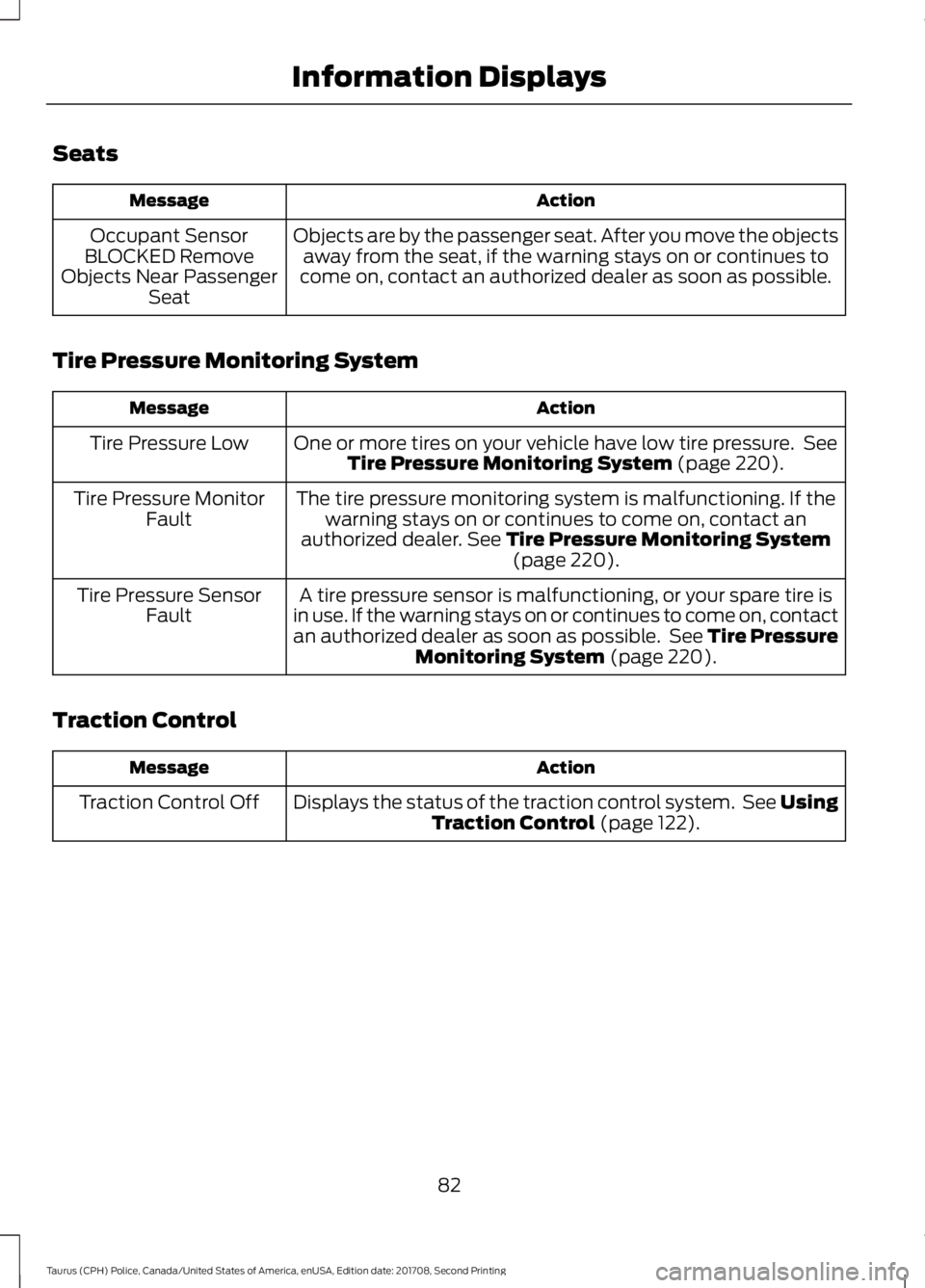
Seats
Action
Message
Objects are by the passenger seat. After you move the objectsaway from the seat, if the warning stays on or continues to
come on, contact an authorized dealer as soon as possible.
Occupant Sensor
BLOCKED Remove
Objects Near Passenger Seat
Tire Pressure Monitoring System Action
Message
One or more tires on your vehicle have low tire pressure. SeeTire Pressure Monitoring System (page 220).
Tire Pressure Low
The tire pressure monitoring system is malfunctioning. If thewarning stays on or continues to come on, contact an
authorized dealer.
See Tire Pressure Monitoring System (page 220).
Tire Pressure Monitor
Fault
A tire pressure sensor is malfunctioning, or your spare tire is
in use. If the warning stays on or continues to come on, contact
an authorized dealer as soon as possible. See Tire Pressure Monitoring System
(page 220).
Tire Pressure Sensor
Fault
Traction Control Action
Message
Displays the status of the traction control system. See UsingTraction Control
(page 122).
Traction Control Off
82
Taurus (CPH) Police, Canada/United States of America, enUSA, Edition date: 201708, Second Printing Information Displays
Page 96 of 364

Note:
You can crank the engine for a total
of 60 seconds without the engine starting
before the starting system temporarily
disables. The 60 seconds does not have to
be all at once. For example, if you crank the
engine three times for 20 seconds each
time, without the engine starting, you
reached the 60-second time limit. A
message appears in the information display
alerting you that you exceeded the cranking
time. You cannot attempt to start the
engine for at least 15 minutes. After 15
minutes, you are limited to a 15-second
engine cranking time. You need to wait 60
minutes before you can crank the engine for
60 seconds again.
Before starting your vehicle, check the
following:
• Make sure all occupants have fastened
their safety belts.
• Make sure the headlamps and
electrical accessories are off.
• Make sure the parking brake is on.
• Make sure the transmission is in park
(P).
To start the engine, do the following:
Note: Do not touch the accelerator pedal.
1. Fully depress the brake pedal.
2. Turn the key to the start position to start the engine.
Note: The engine may continue cranking
for up to 15 seconds or until it starts.
Note: If you cannot start the engine on the
first try, wait for a short period and try again.
Failure to Start
If you cannot start the engine after three
attempts, wait 10 seconds and follow this
procedure:
1. Fully depress the brake pedal.
2. Shift into park (P). 3. Fully press the accelerator pedal and
hold it there.
4. Start the engine.
Cold Weather Starting - Flex Fuel
Vehicles WARNING
Do not use starting fluid, for example
ether, in the air intake system. Such
fluid could cause immediate
explosive damage to the engine and
possible personal injury. The starting characteristics of all grades
of E85 ethanol make it unsuitable for use
when ambient temperatures fall below
0°F (-18°C). Consult your fuel distributor
for the availability of winter grade ethanol.
As the outside temperature approaches
freezing, ethanol fuel distributors should
supply winter grade ethanol, the same as
with unleaded gasoline. If summer grade
ethanol is used in cold weather conditions,
0°F to 32°F (-18°C to 0°C), you may
experience increased cranking times, rough
idle or hesitation until the engine has
warmed up.
You may experience a decrease in peak
performance when the engine is cold when
operating on E85 ethanol.
Do not crank the engine for more than 10
seconds at a time. This may cause
damage to the starter motor. If the engine
does not start, turn the key to the off
position and wait 30 seconds before trying
again.
If your vehicle does not start on E85
ethanol, and neither an alternative brand
of E85 ethanol nor an engine block heater
is available, the addition of unleaded
gasoline to the fuel tank improves cold
starting performance.
If the engine fails to start, do the following:
93
Taurus (CPH) Police, Canada/United States of America, enUSA, Edition date: 201708, Second Printing Starting and Stopping the Engine
Page 106 of 364

5. Operate the fuel pump nozzle within
the area shown. 6.
When you finish refueling slightly raise
the fuel pump nozzle and slowly
remove it.
7. Fully close the fuel filler door.
Do not attempt to start the engine if you
have filled the fuel tank with incorrect fuel.
Incorrect fuel use could cause damage not
covered by the vehicle Warranty. Have your
vehicle immediately checked.
Refueling System Warning (If Equipped)
If the fuel tank filler valve does not fully
close, a message may appear in the
information display. Message
Check Fuel Fill Inlet
If the message appears, do the following:
1. Stop your vehicle as soon as it is safe to do so and switch the engine off.
2. Shift into park (P) or neutral (N). 3. Apply the parking brake.
4. Fully open the fuel filler door.
5. Check the fuel tank filler valve for any
debris that may be restricting its
movement.
6. Remove any debris from the fuel tank filler valve.
7. Fully insert a fuel pump nozzle or the fuel filler funnel provided with your
vehicle into the fuel filler pipe. See
Fuel Filler Funnel Location (page
99). This action should dislodge any
debris that may be preventing the fuel
tank filler valve from fully closing.
8. Remove the fuel pump nozzle or fuel filler funnel from the fuel filler pipe.
9. Fully close the fuel filler door.
If this action corrects the problem the
message may not immediately reset. If the
message remains and a warning lamp
illuminates, have your vehicle checked as
soon as possible.
FUEL CONSUMPTION
The advertised capacity is the maximum
amount of fuel that you can add to the fuel
tank when the fuel gauge indicates empty.
In addition, the fuel tank contains an empty
reserve. The empty reserve is an
unspecified amount of fuel that remains
in the fuel tank when the fuel gauge
indicates empty.
Note: The amount of fuel in the empty
reserve varies and should not be relied upon
to increase driving range.
103
Taurus (CPH) Police, Canada/United States of America, enUSA, Edition date: 201708, Second Printing Fuel and RefuelingE206912
AB E119081