2018 FORD GT light
[x] Cancel search: lightPage 67 of 325

Normal and Wet Mode:
•
Gear.
Sport Mode:
• Speedometer.
Track Mode:
• Engine Coolant Temperature.
• Engine Oil Temperature.
• Transmission Temperature.
• Fuel Level.
V-Max Mode:
• Engine Coolant Temperature.
• Engine Oil Temperature.
• Engine Oil Pressure.
• Turbo Boost Pressure.
Trip Computer
The trip computer functions only operate
when the engine is running. See General
Information (page 70).
Fuel Gauge
Note: The fuel gauge may vary slightly
when your vehicle is moving or on a slope.
Switch the ignition on. The fuel gauge will
indicate approximately how much fuel is
left in the fuel tank. The arrow adjacent to
the fuel pump symbol indicates on which
side of your vehicle the fuel filler door is
located. The gauge is divided into four segments
and moves towards the right when you
refuel your vehicle. If the gauge remains in
the far left segment after adding fuel, this
indicates your vehicle needs service soon.
After refueling, some variability in gauge
position is normal:
•
It may take a short time for the gauge
to reach full after leaving the gas
station. This is normal and depends
upon the slope of pavement at the gas
station.
• The fuel amount dispensed into the
tank is a little less or more than the
gauge indicated. This is normal and
depends upon the slope of pavement
at the gas station.
• If the gas station nozzle shuts off
before the tank is full, try a different
gas pump nozzle.
Low Fuel Reminder
A low fuel reminder triggers when the
distance to empty value reaches
50 mi
(80 km) to empty, with additional
warnings at 25 mi (40 km), 10 mi (20 km)
and 0 mi (0 km) to empty if the message
is cleared each time.
In Track Mode, the distance to empty
warnings appear at 10 mi (20 km) and 0 mi
(0 km)
to empty if the message is cleared
each time.
After extended periods of performance
driving, your distance to empty value may
display low even after refueling. Drive your
vehicle under normal operating conditions
to recalibrate the distance to empty.
Variations
Note: The low fuel warning and distance-to-empty warning can appear at different fuel
gauge positions depending on fuel economy conditions. This variation is normal.
64
Ford GT (CGX), enUSA, Edition date: 201711, First Printing Instrument Cluster
Page 68 of 325

Fuel Gauge Position
Distance to Empty
Driving Type (Fuel Economy
Conditions)
1/8 tank.
50 mi (80 km)
Highway driving.
1/4 tank.
50 mi (80 km)
Performance driving or
extended idle.
Engine Coolant Temperature
Gauge WARNING
Do not remove the coolant reservoir
cap when the cooling system is hot.
Wait 10 minutes for the cooling
system to cool down. Cover the coolant
reservoir cap with a thick cloth to prevent
the possibility of scalding and slowly
remove the cap. Failure to follow this
instruction could result in personal injury. At normal operating temperature, the
engine coolant temperature will be in the
middle range of the gauge. If the engine
coolant temperature exceeds the normal
range, the gauge will be highlighted. Stop
your vehicle as soon as safely possible,
switch off the engine and let it cool.
Engine Oil Temperature Gauge
If the engine oil temperature exceeds the
normal range, the engine is overheating.
Reduce engine speed as soon as safely
possible to allow the engine to cool. If you
continue to operate the engine at high
engine speeds, the engine speed reduces
automatically to prevent engine damage.
Engine Oil Pressure Gauge
Oil pressure varies with engine speed. The
pressure rises as engine speed rises and
drops as engine speed drops. If the pressure drops below the normal
range of the gauge, a warning lamp
illuminates and a message appears in the
information display. Stop your vehicle as
soon as it is safe to do so and switch the
engine off. Check the engine oil level.
Gauge Mode
On the right side of the instrument cluster,
you can configure which gauges are
displayed.
WARNING LAMPS AND
INDICATORS
The following warning lamps and
indicators alert you to a vehicle condition
that may become serious. Some lamps
illuminate when you start your vehicle to
make sure they work. If any lamps remain
on after starting your vehicle, refer to the
respective system warning lamp for further
information.
Note:
Some warning indicators appear in
the information display and operate the
same as a warning lamp but do not
illuminate when you start your vehicle.
Anti-Lock Braking System If it illuminates when you are
driving, this indicates a
malfunction. You will continue
to have the normal braking system
(without ABS) unless the brake system
warning lamp is also illuminated. Have the
system checked by your authorized dealer.
65
Ford GT (CGX), enUSA, Edition date: 201711, First Printing Instrument Cluster
Page 73 of 325

GENERAL INFORMATION
WARNING
Driving while distracted can result in
loss of vehicle control, crash and
injury. We strongly recommend that
you use extreme caution when using any
device that may take your focus off the
road. Your primary responsibility is the safe
operation of your vehicle. We recommend
against the use of any hand-held device
while driving and encourage the use of
voice-operated systems when possible.
Make sure you are aware of all applicable
local laws that may affect the use of
electronic devices while driving. Various systems on your vehicle can be
controlled using the information display
controls on the steering wheel.
Corresponding information is displayed in
the information display.
Note:
Some options may appear slightly
different or not at all if the items are
optional.
Information Display Controls •
Press the return arrow button to enter
the menu.
• Use the center toggle control to scroll
through and highlight the options
within a menu.
• Press the OK button to enter a
sub-menu.
• Press the
OK button to choose and
confirm settings or messages.
• Press the return arrow button to exit a
menu.
You can switch some features on or off by
pressing the
OK button.
Main Menu Menu
Launch Control
Information
Navigation - Cancel Route
Rear Wing Deployment
Display Settings
Vehicle Settings
Note: You cannot switch on Launch Control
in Wet Mode.
70
Ford GT (CGX), enUSA, Edition date: 201711, First Printing Information DisplaysE227121
Page 75 of 325

Display Settings
Choose your applicable setting.
Distance
Choose your applicable setting.
Temperature
Choose your applicable setting.
Tire Pressure
Choose your applicable setting.
Language
Note: Changing the Distance setting also
affects other gauge values. Vehicle Settings
Choose your applicable setting.
Performance Shift Indic-
ator
Autolamp Delay
Lighting
Daytime Lights
Autolock
Locks
Autounlock
MislockChoose your applicable setting.
Remote
Unlock
Choose your applicable setting.
Duration
Remote Start
System
Hold OK to Reset
Tire Monitor
Remote Open
Windows
Courtesy Wipe
Wipers
72
Ford GT (CGX), enUSA, Edition date: 201711, First Printing Information Displays
Page 89 of 325
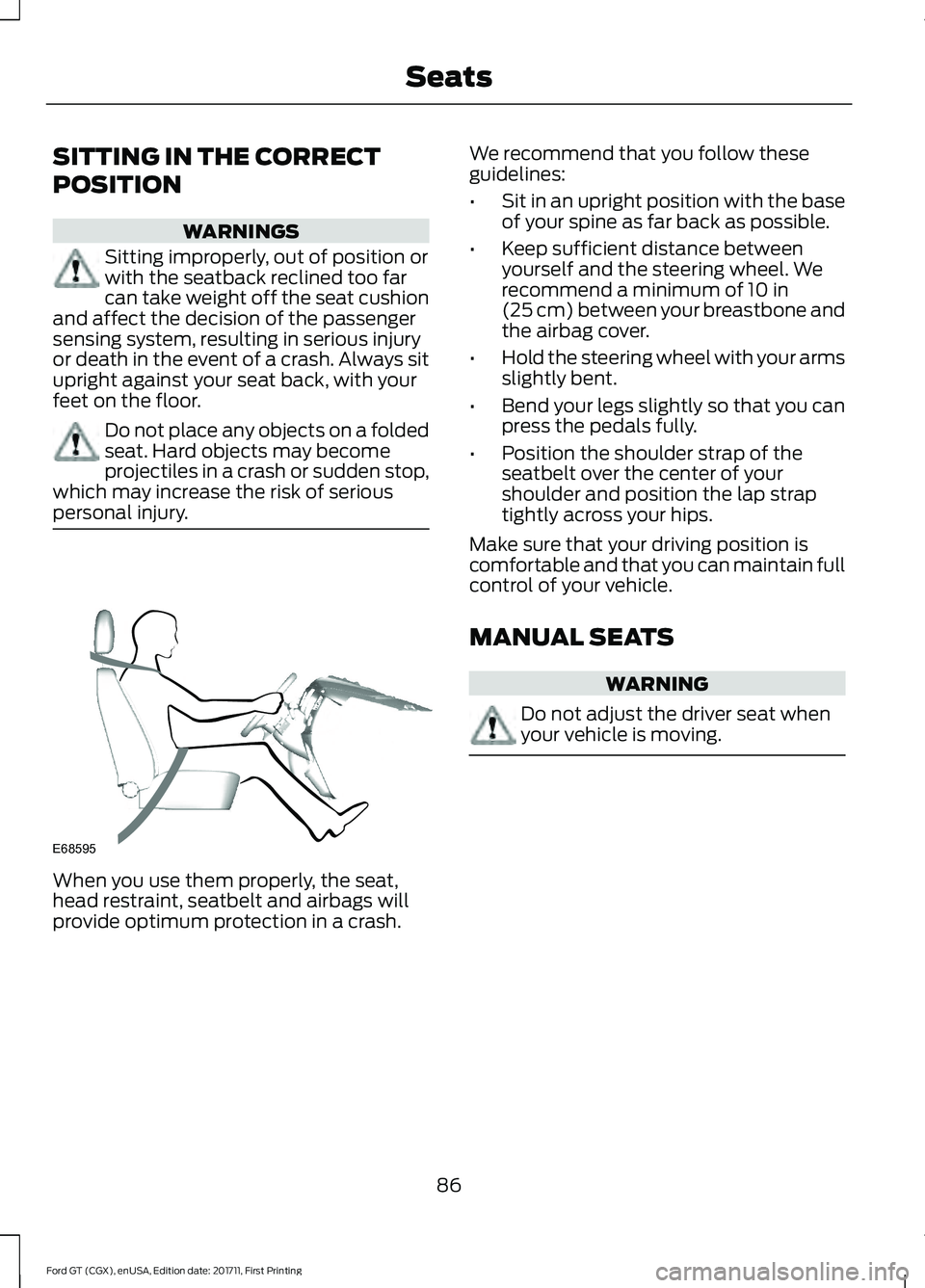
SITTING IN THE CORRECT
POSITION
WARNINGS
Sitting improperly, out of position or
with the seatback reclined too far
can take weight off the seat cushion
and affect the decision of the passenger
sensing system, resulting in serious injury
or death in the event of a crash. Always sit
upright against your seat back, with your
feet on the floor. Do not place any objects on a folded
seat. Hard objects may become
projectiles in a crash or sudden stop,
which may increase the risk of serious
personal injury. When you use them properly, the seat,
head restraint, seatbelt and airbags will
provide optimum protection in a crash. We recommend that you follow these
guidelines:
•
Sit in an upright position with the base
of your spine as far back as possible.
• Keep sufficient distance between
yourself and the steering wheel. We
recommend a minimum of 10 in
(25 cm) between your breastbone and
the airbag cover.
• Hold the steering wheel with your arms
slightly bent.
• Bend your legs slightly so that you can
press the pedals fully.
• Position the shoulder strap of the
seatbelt over the center of your
shoulder and position the lap strap
tightly across your hips.
Make sure that your driving position is
comfortable and that you can maintain full
control of your vehicle.
MANUAL SEATS WARNING
Do not adjust the driver seat when
your vehicle is moving.
86
Ford GT (CGX), enUSA, Edition date: 201711, First Printing SeatsE68595
Page 98 of 325

The use of the correct fuel is an important
part of the proper maintenance of your
vehicle, and a condition of the vehicle
Warranty. For this vehicle, the use of
gasoline with an octane level of 91 or
higher is required. The use of gasoline with
an octane rating lower than 91 will
invalidate the vehicle Warranty. It can
degrade vehicle performance and lead to
severe mechanical damage.
Note:
Use of any fuel other than those
recommended can impair the emission
control system and cause a loss of vehicle
performance.
Do not use:
• Diesel fuel.
• Fuels containing kerosene or paraffin.
• Fuel containing more than 15% ethanol
or E85 fuel.
• Fuels containing methanol.
• Fuels containing metallic-based
additives, including manganese-based
compounds.
• Fuels containing the octane booster
additive, methylcyclopentadienyl
manganese tricarbonyl (MMT).
• Leaded fuel (using leaded fuel is
prohibited by law).
The use of fuels with metallic compounds
such as methylcyclopentadienyl
manganese tricarbonyl (commonly known
as MMT), which is a manganese-based
fuel additive, will impair engine
performance and affect the emission
control system.
Do not be concerned if the engine
sometimes knocks lightly. However, if it
knocks heavily under most driving
conditions while you are using fuel with the
recommended octane rating, contact an
authorized dealer to prevent any engine
damage. FUEL FILLER FUNNEL
LOCATION
The fuel filler funnel is located in the
storage compartment under the rear hatch.
RUNNING OUT OF FUEL
Running out of fuel can cause damage not
covered by the vehicle Warranty.
If your vehicle runs out of fuel:
•
Add a minimum of 1.3 gal (5 L) of fuel
to restart the engine.
• You may need to switch the ignition
from off to on several times after
refueling to allow the fuel system to
pump the fuel from the tank to the
engine. When restarting, cranking time
takes a few seconds longer than
normal.
Note: If your vehicle is on a steep slope,
more fuel may be required.
Filling a Portable Fuel Container WARNING
Flow of fuel through a fuel pump
nozzle can produce static electricity.
This can cause a fire if you are filling
an ungrounded fuel container. Use the following guidelines to avoid
electrostatic charge build-up, which can
produce a spark, when filling an
ungrounded fuel container:
•
Only use an approved fuel container to
transfer fuel to your vehicle. Place the
container on the ground when filling it.
• Do not fill a fuel container when it is
inside your vehicle (including the cargo
area).
95
Ford GT (CGX), enUSA, Edition date: 201711, First Printing Fuel and Refueling
Page 101 of 325

5.
Slightly raise the fuel pump nozzle and
then slowly remove it.
6. Fully close the fuel tank filler door.
Note: Do not attempt to start the engine
if you have filled the fuel tank with incorrect
fuel. Incorrect fuel use can cause damage
not covered by the vehicle Warranty. Have
your vehicle checked immediately.
System Warnings (If Equipped)
If the fuel filler inlet does not fully close a
warning message appears in the
information display.
1. Stop your vehicle as soon as it is safe to do so and switch the engine off.
2. Shift into park (P) or neutral (N). Apply
the parking brake.
3. Fully open the fuel filler door.
4. Check the fuel filler inlet and the area around it for any items or debris that
may be obstructing its movement.
5. Fully insert a fuel pump nozzle or the fuel filler funnel provided with your
vehicle into the fuel filler inlet. This
action should dislodge any debris that
may be preventing the fuel filler inlet
from fully closing.
6. Fully close the fuel filler door.
Note: If this action corrects the problem
the message may not immediately reset. If
the message remains and a warning lamp
illuminates, have your vehicle checked as
soon as possible. FUEL CONSUMPTION
The advertised capacity is the indicated
capacity and the empty reserve combined.
Indicated capacity is the difference in the
amount of fuel in the fuel tank and when
the fuel gauge indicates empty.
See
Capacities and Specifications
(page 204).
Note: The amount of fuel in the empty
reserve varies and should not be relied upon
to increase driving range.
Note: When refueling your vehicle after the
fuel gauge indicates empty, you might not
be able to refuel the full amount of the
advertised capacity due to the empty
reserve still present in the fuel tank.
Filling the Fuel Tank
For consistent results when refueling:
• Always switch the ignition off before
refueling. If you leave the engine
running, you will get an inaccurate
reading.
• Use the same fill rate each time you fill
the tank.
Results are most accurate when the filling
method is consistent.
Calculating Fuel Economy
Do not measure fuel economy during the
first
1,000 mi (1,600 km) of driving (this is
your engine ’s break-in period). A more
accurate measurement is obtained after
2,000 mi (3,200 km)
to 3,000 mi
(4,800 km). Also, fuel expense, frequency
of fill ups or fuel gauge readings are not
accurate ways to measure fuel economy.
1. Fill the fuel tank completely and record
the initial odometer reading.
2. Each time you fill the fuel tank, record the amount of fuel added.
98
Ford GT (CGX), enUSA, Edition date: 201711, First Printing Fuel and RefuelingE119081
Page 102 of 325

3. After at least three fill ups, fill the fuel
tank and record the current odometer
reading.
4. Subtract your initial odometer reading from the current odometer reading.
5. To calculate L/100 km (liters per 100 kilometers) fuel consumption, multiply
the liters used by 100, then divide by
kilometers traveled. To calculate MPG
(miles per gallon) fuel consumption,
divide miles traveled by gallons used.
Keep a record for at least one month and
record the type of driving (city or highway).
This provides an accurate estimate of your
vehicle's fuel economy under current
driving conditions.
Conditions
• Heavily loading your vehicle reduces
fuel economy.
• Carrying unnecessary weight in your
vehicle may reduce fuel economy.
• Adding certain accessories to your
vehicle may reduce fuel economy.
• Using fuel blended with alcohol may
lower fuel economy.
• Fuel economy may decrease with lower
temperatures.
• Fuel economy may decrease when
driving short distances.
• You will get better fuel economy when
driving on flat terrain than when driving
on hilly terrain.
EMISSION CONTROL SYSTEM WARNINGS
Do not park, idle, or drive your vehicle
in dry grass or other dry ground cover.
The emission system heats up the
engine compartment and exhaust system,
which can start a fire. WARNINGS
Exhaust leaks may result in entry of
harmful and potentially lethal fumes
into the passenger compartment. If
you smell exhaust fumes inside your
vehicle, have your dealer inspect your
vehicle immediately. Do not drive if you
smell exhaust fumes. Your vehicle is equipped with various
emission control components and a
catalytic converter that will enable your
vehicle to comply with applicable exhaust
emission standards.
To make sure that the catalytic converter
and other emission control components
continue to work properly:
•
Use only the specified fuel listed.
• Avoid running out of fuel.
• Do not turn off the ignition while your
vehicle is moving, especially at high
speeds.
• Have the items listed in scheduled
maintenance information performed
according to the specified schedule.
The scheduled maintenance items listed
in scheduled maintenance information are
essential to the life and performance of
your vehicle and to its emissions system.
If you use anything other than Ford,
Motorcraft or Ford-authorized parts for
maintenance replacements or for service
of components affecting emission control,
such non-Ford parts should be equivalent
to genuine Ford Motor Company parts in
performance and durability.
Illumination of the service engine soon
indicator, charging system warning light or
the temperature warning light, fluid leaks,
strange odors, smoke or loss of engine
power could indicate that the emission
control system is not working properly.
99
Ford GT (CGX), enUSA, Edition date: 201711, First Printing Fuel and Refueling