2018 FORD FUSION ENERGI battery replacement
[x] Cancel search: battery replacementPage 234 of 538
ROADSIDE ASSISTANCE
Vehicles Sold in the United States:Getting Roadside Assistance
To fully assist you should you have avehicle concern, Ford Motor Companyoffers a complimentary roadsideassistance program. This program isseparate from the New Vehicle LimitedWarranty.
The service is available:
•24 hours a day, seven days a week.
•For the coverage period listed on theRoadside Assistance Card included inyour Owner's Manual portfolio.
Roadside Assistance covers:
•A flat tire change with a good spare(except vehicles supplied with a tireinflation kit).
•Battery jump start.
•Lock-out assistance (key replacementcost is the customer's responsibility).
•Fuel delivery — independent servicecontractors, if not prohibited by state,local or municipal law, shall deliver upto 2 gal (8 L) of gasoline or 5 gal (20 L)of diesel fuel to a disabled vehicle.Roadside Assistance limits fuel deliveryservice to two no-charge occurrenceswithin a 12-month period.
•Winch out — available within 100 ft(30 m) of a paved or countymaintained road, no recoveries.
•Towing — independent servicecontractors, if not prohibited by state,local or municipal law, shall tow Fordeligible vehicles to an authorized dealerwithin 35 mi (56 km) of thedisablement location or to the nearestauthorized dealer. If a memberrequests a tow to an authorized dealerthat is more than 35 mi (56 km) fromthe disablement location, the membershall be responsible for any mileagecosts in excess of 35 mi (56 km).
•Roadside Assistance includes up to$200 for a towed trailer if the disabledeligible vehicle requires service at thenearest authorized dealer. If the towingvehicle is operational but the trailer isnot, then the trailer does not qualify forany roadside services.
Vehicles Sold in the United States:Using Roadside Assistance
Complete the roadside assistanceidentification card and place it in yourwallet for quick reference. This card is inthe owner's information portfolio in theglove compartment.
United States vehicle customers whorequire Roadside Assistance, call1-800-241-3673.
If you need to arrange roadside assistancefor yourself, Ford Motor Companyreimburses a reasonable amount fortowing to the nearest dealership within35 mi (56 km). To obtain reimbursementinformation, United States vehiclecustomers call 1-800-241-3673.Customers need to submit their originalreceipts.
231
Fusion Energi / Fusion Hybrid (CC7) Hybrid Electric Vehicle (HEV)/Plug-In Hybrid Electric Vehicle (PHEV), Canada/United States of America, enUSA, Edition date: 201705, Second Printing
Roadside Emergencies
Page 270 of 538
State or local regulations on volatileorganic compounds may restrict the useof methanol, a common windshield washerantifreeze additive. Washer fluidscontaining non-methanol antifreezeagents should be used only if they providecold weather protection without damagingthe vehicle’s paint finish, wiper blades orwasher system.
FUEL FILTER
Your vehicle is equipped with a lifetimefuel filter that is integrated with the fueltank. Regular maintenance or replacementis not needed.
CHANGING THE 12V BATTERY
WARNINGS
Batteries normally produce explosivegases which can cause personalinjury. Therefore, do not allowflames, sparks or lighted substances tocome near the battery. When working nearthe battery, always shield your face andprotect your eyes. Always provide correctventilation.
When lifting a plastic-cased battery,excessive pressure on the end wallscould cause acid to flow through thevent caps, resulting in personal injury anddamage to the vehicle or battery. Lift thebattery with a battery carrier or with yourhands on opposite corners.
WARNINGS
Keep batteries out of reach ofchildren. Batteries contain sulfuricacid. Avoid contact with skin, eyes orclothing. Shield your eyes when workingnear the battery to protect against possiblesplashing of acid solution. In case of acidcontact with skin or eyes, flushimmediately with water for a minimum of15 minutes and get prompt medicalattention. If acid is swallowed, call aphysician immediately.
Battery posts, terminals and relatedaccessories contain lead and leadcompounds. Wash hands afterhandling.
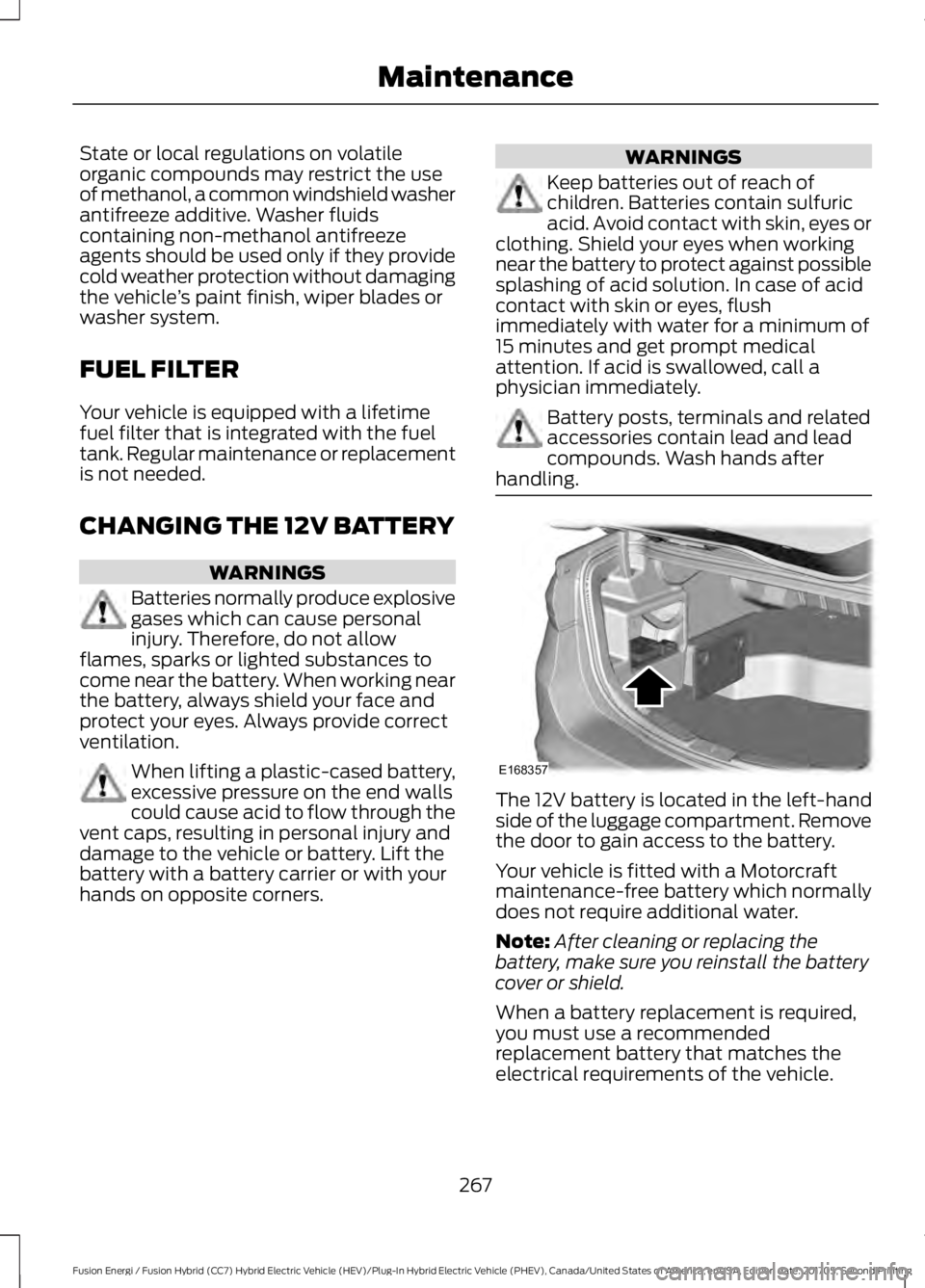
The 12V battery is located in the left-handside of the luggage compartment. Removethe door to gain access to the battery.
Your vehicle is fitted with a Motorcraftmaintenance-free battery which normallydoes not require additional water.
Note:After cleaning or replacing thebattery, make sure you reinstall the batterycover or shield.
When a battery replacement is required,you must use a recommendedreplacement battery that matches theelectrical requirements of the vehicle.
267
Fusion Energi / Fusion Hybrid (CC7) Hybrid Electric Vehicle (HEV)/Plug-In Hybrid Electric Vehicle (PHEV), Canada/United States of America, enUSA, Edition date: 201705, Second Printing
MaintenanceE168357
Page 271 of 538

Note:Contact an authorized dealer for lowvoltage battery access, testing orreplacement.
To make sure the battery managementsystem works correctly, do not connect anelectrical device ground connectiondirectly to the low voltage battery negativepost. This can cause inaccuratemeasurements of the battery conditionand potential incorrect system operation.
Note:If you add electrical accessories orcomponents to the vehicle, it may adverselyaffect the low voltage battery performanceand durability. This may also affect theperformance of other electrical systems inthe vehicle.
For longer, trouble-free operation, keep thetop of the battery clean and dry.
If you see any corrosion on the battery orterminals, remove the cables from theterminals and clean with a wire brush. Youcan neutralize the acid with a solution ofbaking soda and water.
Because your vehicle’s engine iselectronically-controlled by a computer,some engine control settings aremaintained by power from the low-voltagebattery. Some engine computer settings,like the idle trim and fuel trim strategy,optimize the driveability and performanceof the engine. The clock and radio stationpresets are also maintained in memory bypower from the low-voltage battery. Thesesettings are erased when a techniciandisconnects and connects the low-voltagebattery.
To restore the settings, do the following:
1. Apply the parking brake.
2. Shift into park (P) or neutral (N).
3. Switch off all accessories.
4. Press the brake pedal and start yourvehicle.
5. Run the engine until it reaches normaloperating temperature. While theengine is warming up, complete thefollowing: Reset the clock. See AudioSystem (page 317). Reset the powerwindows bounce-back feature. SeeWindows and Mirrors (page 83).Reset the radio station presets. SeeAudio System (page 317).
6.Allow the engine to idle for at least oneminute.
7.Drive the vehicle at least 10 mi (16 km)to completely relearn the idle trim andfuel trim strategy.
Note:If you do not allow the engine torelearn the idle and fuel trim strategy, theidle quality of your vehicle may be adverselyaffected until the engine computereventually relearns the idle trim and fueltrim strategy.
Make sure that you dispose of old batteriesin an environmentally friendly way. Seekadvice from your local authority aboutrecycling old batteries.
If storing your vehicle for more than 30days without recharging the battery, werecommend that you disconnect thebattery cables to maintain battery chargefor quick starting.
CHECKING THE WIPER
BLADES
Run the tip of your fingers over the edge ofthe blade to check for roughness.
268
Fusion Energi / Fusion Hybrid (CC7) Hybrid Electric Vehicle (HEV)/Plug-In Hybrid Electric Vehicle (PHEV), Canada/United States of America, enUSA, Edition date: 201705, Second Printing
MaintenanceE142463
Page 312 of 538

MOTORCRAFT PARTS
2.0L ATK iVCT EngineComponent
FA-1911Air filter element
FL-910-SOil filter
BXT-90T5-590Battery
SP-530Spark plugs
FP-71Cabin air filter
WW-2601(driver side)Windshield wiper bladeWW-2700 (passenger side)
We recommend Motorcraft replacement parts available at your Ford dealer or atfordparts.com for scheduled maintenance. These parts meet or exceed Ford MotorCompany’s specifications and are engineered for your vehicle. Use of other parts mayimpact vehicle performance, emissions and durability. Your warranty may be void for anydamage related to use of other parts.
If a Motorcraft oil filter is not available, use an oil filter that meets industry performancespecification SAE/USCAR-36.
For spark plug replacement, contact an authorized dealer. Replace the spark plugs at theappropriate intervals. See Scheduled Maintenance (page 473).
309
Fusion Energi / Fusion Hybrid (CC7) Hybrid Electric Vehicle (HEV)/Plug-In Hybrid Electric Vehicle (PHEV), Canada/United States of America, enUSA, Edition date: 201705, Second Printing
Capacities and Specifications
Page 477 of 538

Ford Motor Company has recommendedmaintenance intervals for various partsand component systems based uponengineering testing. Ford Motor Companyrelies upon this testing to determine themost appropriate mileage for replacementof oils and fluids to protect your vehicle atthe lowest overall cost to you andrecommends against maintenanceschedules that deviate from the scheduledmaintenance information.
We strongly recommend the use of onlygenuine Ford, Motorcraft orFord-authorized re-manufacturedreplacement parts engineered for yourvehicle.
Fusion Full Hybrid
Your vehicle is equipped with theIntelligent Oil-Life Monitor system, whichdisplays a message in the informationdisplay at the proper oil change interval.This interval may be up to one year or10,000 mi (16,000 km).
A message appears in the informationdisplay when it is time for an oil change.Make sure you perform the oil changewithin two weeks or 500 mi (800 km)ofthe message appearing. Make sure youreset the oil monitoring system after eachoil change. See Oil Change IndicatorReset (page 261).
If your information display resetsprematurely, becomes inoperative or thevehicle battery becomes discharged ordisconnected, the oil monitoring systemresets to 100% oil life. You should changeyour engine oil one year or 10,000 mi(16,000 km)from the previous oil change.Never exceed one year or 10,000 mi(16,000 km)between oil change intervals.
Fusion Energi Plug-in Hybrid
Your vehicle is equipped with theIntelligent Oil-Life Monitor system, whichdisplays a message in the informationdisplay at the proper oil change interval.This interval may be up to two years or20,000 mi (32,000 km).
A message appears in the informationdisplay when it is time for an oil change.Make sure you perform the oil changewithin two weeks or 500 mi (800 km)ofthe message appearing. Make sure youreset the Intelligent Oil-Life Monitor aftereach oil change. See Oil ChangeIndicator Reset (page 261).
If your information display resetsprematurely or becomes inoperative, youshould perform the oil change interval atsix months or 5,000 mi (8,000 km)fromyour last oil change. Never exceed twoyears or 20,000 mi (32,000 km)betweenoil change intervals.
Additives and Chemicals
This owner's manual and the FordWorkshop Manual list the recommendedadditives and chemicals for your vehicle.We do not recommend using chemicals oradditives not approved by us as part ofyour vehicle’s normal maintenance. Pleaseconsult your warranty information.
Oils, Fluids and Flushing
In many cases, fluid discoloration is anormal operating characteristic and, byitself, does not necessarily indicate aconcern or that the fluid needs to bechanged. However, a qualified expert, suchas the factory-trained technicians at yourdealership, should inspect discolored fluidsthat also show signs of overheating orforeign material contaminationimmediately.
474
Fusion Energi / Fusion Hybrid (CC7) Hybrid Electric Vehicle (HEV)/Plug-In Hybrid Electric Vehicle (PHEV), Canada/United States of America, enUSA, Edition date: 201705, Second Printing
Scheduled Maintenance
Page 535 of 538

Refueling.........................................................160Fuel Filler Door Manual OverrideLever...................................................................162System Warnings................................................162Remote Control..............................................50Car Finder................................................................53Intelligent Access Key........................................50Remote Start.........................................................54Replacing the Battery.........................................52Sounding the Panic Alarm................................53Using the Key Blade.............................................51Remote Start..................................................127Automatic Settings............................................127Repairing Minor Paint Damage...............278Replacement PartsRecommendation........................................12Collision Repairs....................................................12Scheduled Maintenance and MechanicalRepairs..................................................................12Warranty on Replacement Parts.....................12Replacing a Lost Key or RemoteControl.............................................................55Reporting Safety Defects (CanadaOnly)..............................................................244Reporting Safety Defects (U.S.Only)..............................................................244Roadside Assistance...................................231Vehicles Sold in Canada: Getting RoadsideAssistance........................................................232Vehicles Sold in Canada: RoadsideAssistance Program Coverage.................232Vehicles Sold in Canada: Using RoadsideAssistance........................................................232Vehicles Sold in the United States: GettingRoadside Assistance....................................231Vehicles Sold in the United States: UsingRoadside Assistance....................................231Roadside Emergencies...............................231Running-InSee: Breaking-In.................................................228Running Out of Fuel....................................159Adding Fuel From a Portable FuelContainer..........................................................159Filling a Portable Fuel Container..................159
S
Safety Canopy™.............................................47
Safety Precautions.......................................157Satellite Radio..............................................328Satellite Radio Electronic Serial Number(ESN)................................................................329Satellite Radio Reception Factors...............329SiriusXM Satellite Radio Service..................329Troubleshooting.................................................330Scheduled Maintenance Record...........482Scheduled Maintenance...........................473Seatbelt Extension........................................39Seatbelt Height Adjustment......................36Seatbelt Reminder.........................................37Belt-Minder™.........................................................37Seatbelts...........................................................32Principle of Operation.........................................32Seatbelt Warning Lamp and IndicatorChime..............................................................36Conditions of operation.....................................37Seats.................................................................128Security..............................................................68Settings...........................................................442911 Assist...............................................................447Ambient Lighting...............................................453Bluetooth.............................................................444Clock......................................................................444Display...................................................................455General...................................................................451Media Player........................................................443Mobile Apps........................................................450Navigation............................................................448Phone....................................................................444Radio.......................................................................447Sound.....................................................................442Valet Mode...........................................................455Vehicle...................................................................453Voice Control.......................................................455Wi-Fi and Hotspot.............................................452Side Airbags.....................................................45Side Sensing System..................................189Obstacle Distance Indicator..........................190Sitting in the Correct Position..................128Snow ChainsSee: Using Snow Chains.................................302Special Notices................................................12New Vehicle Limited Warranty.........................12On Board Diagnostics Data LinkConnector............................................................13Special Instructions..............................................12
532
Fusion Energi / Fusion Hybrid (CC7) Hybrid Electric Vehicle (HEV)/Plug-In Hybrid Electric Vehicle (PHEV), Canada/United States of America, enUSA, Edition date: 201705, Second Printing
Index